

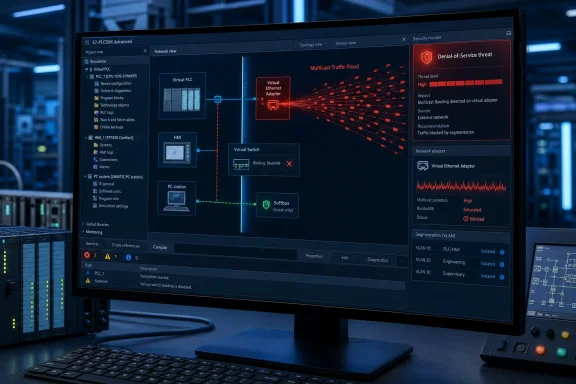
Overview: A Denial-of-Service Risk in a Simulation Platform
The vulnerability matters because S7-PLCSIM Advanced is not merely an offline engineering utility. Siemens positions it as a platform for simulating S7-1200, S7-1500, and certain related PLC derivatives, with network capabilities that can extend simulations into virtualized and distributed environments. That capability is valuable for realistic commissioning, HMI validation, automated tests, and integration work—but it also creates an exposure boundary that must be managed like any other industrial-network service. Siemens ProductCERT advisory
According to Siemens, affected instances do not properly handle high-volume multicast network traffic. Under the vulnerable conditions, multicast packets can exhaust memory available to the application, making the S7-PLCSIM Advanced instance inaccessible until an operator performs a manual restart. Siemens states that no project data is lost in the described failure mode. Siemens ProductCERT advisory
That distinction is important. This is not reported as a remote-code-execution issue, a PLC logic manipulation flaw, or a direct data-theft vulnerability. Its immediate effect is on availability: engineering, test, validation, or simulation workloads can abruptly stop. In industrial environments, availability interruptions can still be highly consequential, especially when a simulation host supports time-sensitive acceptance testing, a training cell, a digital-twin workflow, or a deployment window.
The advisory’s score also demands careful reading. A 7.4 High CVSS v3.1 rating reflects an adjacent-network attack vector, low attack complexity, no privileges, no user interaction, and high availability impact. In plain language, the attacker must be on the appropriate local network segment, but does not need an account in S7-PLCSIM Advanced or cooperation from the operator once the relevant environment and project conditions exist. Siemens ProductCERT advisory
What CVE-2026-54429 Actually Requires
The attacker is local to the relevant network segment
The vulnerability is classified with an adjacent-network attack vector rather than an internet-wide network vector. That does not mean it should be dismissed. It means exposure is determined largely by the design of the Windows host’s network attachments, the segmentation of lab and engineering VLANs, the use of virtualization bridges, and whether the PLCSIM simulation is allowed to communicate beyond its local machine. Siemens ProductCERT advisory
An attacker who can generate traffic on the same reachable segment may be an insider, a compromised workstation, an unmanaged device connected to a permissive lab network, or another system that has crossed an internal segmentation boundary. The practical security question is therefore not simply, “Is this PC on the internet?” It is, “Which packets can reach this Windows host and its S7-PLCSIM Advanced virtual networking path?”
A specific project configuration must already be active
Siemens notes a material precondition: successful exploitation requires a specific project configuration to already be active on the targeted instance. Siemens ProductCERT advisory That is a meaningful limitation and should inform risk prioritization, but it is not a substitute for mitigation.
The advisory does not publicly enumerate the project configuration in question. Organizations should avoid turning that absence into false reassurance. A sensible interpretation is that administrators need to identify which active simulations use external or distributed connectivity and determine whether they could satisfy the affected condition.
The expected outcome is an application crash or hang requiring intervention
The affected application becomes inaccessible and needs a manual restart, Siemens says. Siemens ProductCERT advisory That places the operational burden on the engineering or test team: someone must recognize the event, restore the application, confirm the active instance state, and determine whether the interruption affected a test result, HMI session, automated workflow, or connected development tool.
In a production-control context, a simulated controller is not the same as a physical controller. Yet simulation systems increasingly serve as essential engineering infrastructure. A stalled PLCSIM environment may delay commissioning, invalidate a test run, disrupt factory acceptance work, or create confusion if staff mistake a simulation outage for a defect in the project being tested.
Why Windows Networking Is Central to the Risk
S7-PLCSIM Advanced has multiple communication modes, and the distinction between them is central to the mitigation strategy. Siemens documentation describes Softbus as a virtual software communication path restricted to a local PC or virtual machine. It is the default communication setting and is intended to prevent accidental downloads to hardware CPUs and communication with real hardware. Siemens S7-PLCSIM Advanced Function Manual
By contrast, TCP/IP-based workflows use the PLCSIM Virtual Ethernet Adapter, which behaves like a network interface. Distributed communication allows PLCSIM Advanced instances to communicate with other devices via the S7-PLCSIM Advanced Virtual Switch, including real or simulated CPUs and HMIs. Siemens S7-PLCSIM Advanced Function Manual
This functionality is precisely what makes the platform compelling for serious engineering use. It lets teams validate interactions that are not possible in a fully isolated local simulation:
- A TIA Portal project running on a separate Windows PC or VM can interact with a simulated controller.
- HMI behavior can be tested in a distributed topology.
- Virtual machines can participate in broader test arrangements.
- Network-facing controller services, where supported by the project and version, can be incorporated into test scenarios.
- Engineering teams can more closely model real deployment paths before touching production hardware.
But each capability comes with a security trade-off. When a virtual PLC simulation is connected to a real adapter or reachable network, the host is no longer simply running an isolated test environment. It is participating in a networked industrial workflow, and Windows network configuration becomes part of the operational technology security posture.
The Virtual Switch binding is the critical control point
Siemens’ documentation explains that the S7-PLCSIM Advanced Virtual Switch is activated through the properties of a selected Windows network adapter. When enabled, it is used to make instances visible on the network for distributed communication. Siemens S7-PLCSIM Advanced Function Manual
The security advisory directly uses this architecture as a mitigation opportunity: disable the S7-PLCSIM Virtual Switch binding on the network adapter used by the affected instance. Siemens says this prevents the adapter from entering external communication mode and removes the attack vector entirely. Siemens ProductCERT advisory
That recommendation has a powerful implication. For teams that do not genuinely require their simulated PLC instances to be externally reachable, the best response is not elaborate filtering alone. It is to remove unnecessary connectivity and return the workload to a local-only design.
The Recommended Mitigations
Siemens provides three principal measures for organizations operating S7-PLCSIM Advanced before a fix becomes available. These should be treated as complementary controls rather than interchangeable checkboxes.
1. Use Softbus / PLCSIM mode wherever external networking is unnecessary
The most straightforward mitigation is to use the Softbus or PLCSIM network mode. Siemens states that this is the default mode and that it does not accept packets from the network. Siemens ProductCERT advisory
This is an example of a strong security pattern: reduce exposure by design. A workstation used only for local project development, local controller simulation, or testing within a single PC or VM typically does not need a virtual PLC reachable by other systems on the LAN.
The decision should be deliberate:
- Identify the S7-PLCSIM Advanced instances active on the host.
- Determine whether each one truly needs communication beyond its local PC or VM.
- Move local-only work back to
PLCSIM/ Softbus mode. - Confirm that testing workflows still operate as expected.
- Document the required network mode for each approved use case.
The benefits are immediate. Softbus limits communication to the local computer or virtual machine, and Siemens documentation emphasizes that it helps prevent both communication with real hardware and accidental downloads to a physical CPU. Siemens S7-PLCSIM Advanced Function Manual
2. Disable the S7-PLCSIM Advanced Virtual Switch binding when it is not required
For cases in which administrators want to retain local TCP/IP behavior but do not require the host to expose simulation traffic to the external network, disabling the Virtual Switch binding is a highly targeted option. Siemens identifies this action as a way to remove the attack vector by preventing the selected adapter from operating in external communication mode. Siemens ProductCERT advisory
The operational caution is clear: this setting may affect legitimate distributed simulations. Before making changes, teams should map the dependencies that connect to the simulated controller:
- Engineering stations running TIA Portal
- Separate HMI or SCADA test machines
- Virtual machines used for automated validation
- Test harnesses that use industrial communications
- Other simulated controllers
- Any real devices included in an authorized hybrid test bed
The Windows administrator should also verify the change in the same context in which the instance runs. A host may have multiple physical NICs, VPN adapters, Wi-Fi, Hyper-V or VMware virtual adapters, and separate routing paths. Removing the binding from the wrong adapter may not address the actual exposure; removing it from a required adapter may disrupt a test environment unnecessarily.
3. Restrict multicast traffic on the hosting network segment
Siemens’ other primary mitigation is to restrict multicast traffic on the network segment hosting the S7-PLCSIM Advanced machine. Siemens ProductCERT advisory This is the correct compensating control where distributed communication is a real business requirement and the Virtual Switch cannot simply be disabled.
For network teams, “restrict multicast” should become a specific engineering task rather than a generic recommendation. The environment should be assessed for:
- Multicast sources that have no legitimate role in the simulation VLAN.
- Switch configurations that broadly flood multicast frames.
- Shared test networks where unrelated devices can generate unwanted traffic.
- Bridged virtual-network configurations that expand the traffic domain.
- Temporary commissioning connections that inadvertently join lab systems to broader networks.
- Network monitoring systems that can validate the traffic profile before and after changes.
The exact switch and firewall implementation will vary by vendor and topology. The objective is consistent: the PLCSIM host should receive only multicast traffic that is explicitly required for the approved test scenario. Where no multicast dependency exists, the default should be to block or contain it at the segment boundary.
A Practical Risk-Triage Model for Engineering Teams
Not every S7-PLCSIM Advanced deployment carries equal exposure. The following grouping can help Windows and OT teams prioritize remediation while preserving critical testing activities.
Lower-exposure environments
Lower-exposure cases generally include standalone engineering laptops or VMs where:
- S7-PLCSIM Advanced uses Softbus only.
- The Virtual Switch is not bound to a live network adapter.
- The simulated environment has no external TCP/IP reachability.
- The host is not bridged to lab, business, or plant networks.
These systems should still be inventoried and monitored for Siemens updates, because the advisory lists all versions as affected. But they are aligned with Siemens’ recommended configuration to remove the disclosed attack path. Siemens ProductCERT advisory
Moderate-exposure environments
Moderate exposure often applies to local TCP/IP simulation setups that use the PLCSIM Virtual Ethernet Adapter but remain tightly restricted to a dedicated workstation, isolated VM network, or non-routed test segment. Siemens notes that the virtual Ethernet adapter behaves like a real network interface, so network design and subnet overlap remain important even in “local” workflows. Siemens S7-PLCSIM Advanced Function Manual
The key task is confirming whether any route, bridge, or adapter binding turns that apparently local scenario into a reachable one. Inventory should include both Windows adapter properties and hypervisor networking settings.
Higher-exposure environments
Higher-risk use cases include distributed simulations that depend on the Virtual Switch and connect across real Ethernet, virtualization platforms, or shared industrial test networks. Siemens documentation describes distributed scenarios involving separate PCs and VMs, as well as communication with real or simulated HMI and CPU components. Siemens S7-PLCSIM Advanced Function Manual
These environments should receive priority attention because they are closest to the advisory’s adjacent-network threat model. Segmentation, multicast filtering, access control, and dedicated test VLANs are especially important here.
The Strength of Siemens’ Guidance—and the Remaining Gap
Siemens’ advisory has several strengths. It clearly identifies the scope as all versions, provides a defined CVE, explains the practical failure condition, states the expected availability impact, and acknowledges that customers must use mitigations while fixes are being prepared. Siemens ProductCERT advisory
The mitigation advice is also unusually actionable. It does not merely advise customers to “protect the network.” It points to concrete configuration choices:
- Restrict multicast on the relevant segment.
- Disable the Virtual Switch binding if external communication is unnecessary.
- Prefer Softbus / PLCSIM mode for local-only simulation.
That specificity is valuable because it maps the vulnerability directly to the product’s network architecture. It gives Windows administrators and automation engineers a clear path to reducing exposure without waiting for a future release.
However, the absence of an available fix remains the central risk. Affected organizations cannot patch their way out of the issue today. They must rely on architecture, configuration, segmentation, and operational discipline until Siemens releases corrected versions. Siemens ProductCERT advisory
There is also a practical trade-off: the same distributed connectivity that enables sophisticated HMI testing, cross-VM simulation, and external communication may be necessary for high-value projects. Disabling it can reduce risk dramatically, but it can also reduce fidelity in a test environment. The correct response is not to abandon distributed simulation wholesale; it is to make its network exposure intentional, limited, observable, and documented.
A Windows-Focused Hardening Checklist
For organizations using Siemens engineering software on Windows workstations, a concise response plan should include the following actions.
- Inventory installations and active instances. Identify every Windows PC, engineering VM, test server, and shared lab host running S7-PLCSIM Advanced. Treat all product versions as in scope until Siemens publishes a fixed release. Siemens ProductCERT advisory
- Classify network mode. Determine whether each environment uses local Softbus, local TCP/IP, or distributed TCP/IP communication. Siemens documents Softbus as local-only and the default setting, while distributed TCP/IP relies on the Virtual Ethernet Adapter and Virtual Switch. Siemens S7-PLCSIM Advanced Function Manual
- Disable unnecessary Virtual Switch bindings. If an instance does not need network-external communication, remove the S7-PLCSIM Advanced Virtual Switch binding from the associated Windows adapter. This is Siemens’ most direct recommendation for eliminating the disclosed attack vector. Siemens ProductCERT advisory
- Move eligible workflows to Softbus. Use
PLCSIM/ Softbus for local testing wherever practical. This minimizes network attack surface and avoids communication with real hardware by design. Siemens S7-PLCSIM Advanced Function Manual - Constrain multicast at the network layer. For required distributed setups, implement multicast restrictions appropriate to the VLAN, firewall, switch, and virtualization design. Siemens explicitly identifies multicast restriction as a mitigation for this CVE. Siemens ProductCERT advisory
- Separate simulation networks from business and production networks. Dedicated, access-controlled test segments reduce the population of systems capable of generating traffic toward the simulation host and make anomalous traffic easier to investigate.
- Review hypervisor bridges and Windows adapters. Ensure that virtual-machine networking, VPN clients, USB Ethernet adapters, Wi-Fi interfaces, and secondary NICs are not creating unexpected paths into the test environment.
- Prepare a recovery procedure. Because the described outcome requires a manual restart, teams should document instance restoration, test-state validation, and escalation steps. The procedure should distinguish a PLCSIM availability event from a defect in the simulated PLC program.
- Track Siemens’ forthcoming fix versions. The vendor states that fixes are in preparation. When releases become available, organizations should validate compatibility in a non-production test environment and schedule controlled deployment. Siemens ProductCERT advisory
The Bigger Lesson for Industrial Simulation Security
CVE-2026-54429 is a reminder that a simulation environment deserves the same network discipline as a physical automation asset when it is connected beyond the local machine. Virtual PLCs, virtual Ethernet adapters, engineering workstations, HMI test clients, and hypervisor bridges may look like development tooling, but together they can form an operationally important system with real availability requirements.
The strongest mitigation is therefore architectural: keep simulations local when they can be local. Siemens’ Softbus default is not merely a convenience setting; it is a security boundary that limits communication to the local PC or VM and avoids contact with real hardware. Siemens S7-PLCSIM Advanced Function Manual
Where realistic distributed simulation is necessary, organizations should treat S7-PLCSIM Advanced hosts as managed OT engineering assets. That means tightly scoped connectivity, multicast controls, least-privilege administrative practices, monitored network segments, validated recovery procedures, and a disciplined process for adopting Siemens’ forthcoming fixes.
Until those fixes arrive, the immediate message is clear: do not leave the S7-PLCSIM Advanced Virtual Switch exposed by default simply because it is available. Use it only when the test case requires it, restrict the traffic it can receive, and keep the Windows host’s simulation network as isolated as the engineering objective permits.
References
- Siemens SIMATIC S7-PLCSIM Advanced CISA · 2026-07-28T12:00:00+00:00