

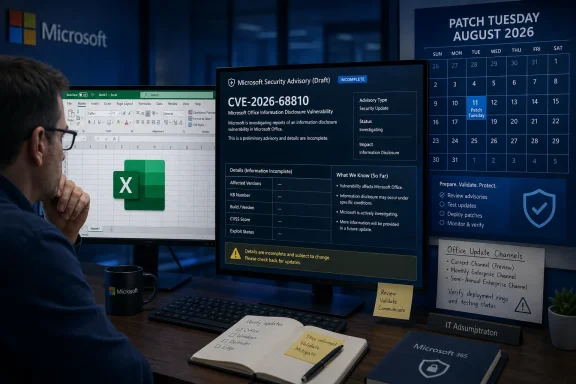
That gap is the immediate story. A vulnerability title establishes that Microsoft has assigned a case and an impact category; it does not establish the attack vector, affected product generations, CVSS score, exploitability assessment, or remediation path. As of early August 12 UTC, Microsoft’s advisory page is public but its details are not independently surfaced in Microsoft Support update articles, Microsoft 365 Apps security release notes, the NVD’s searchable public record, or the CVE Program’s public database.
For IT teams, CVE-2026-68810 should therefore be treated as an item requiring verification in their August Office patch review, rather than as a vulnerability with a confirmed emergency workaround. The identifier is real. The deployment guidance is not yet sufficiently public.
Microsoft’s advisory confirms the issue exists, but little else
The MSRC entry labels CVE-2026-68810 an Excel remote code execution vulnerability and gives it a publication date of August 11, 2026. Microsoft’s use of the “remote code execution” impact category means the security boundary at issue could permit code execution, generally in the context of the user running the affected Excel process.
What Microsoft has not made readily available in the public record is equally important. There is no visible description of the vulnerable component, no stated file format or input path, no identified Office editions, no named KB article, and no listed Microsoft 365 Apps build. There is also no public statement attached to the advisory confirming whether exploitation has been detected.
The supplied advisory material includes explanatory text for a confidence metric: the metric describes how certain a vulnerability’s existence and technical details are, and how much information may be available to attackers. But that text is the definition of the metric, not the metric’s selected value for CVE-2026-68810. It should not be read as Microsoft saying the flaw is confirmed, publicly known, weaponized, or under active attack.
This is a subtle but material distinction. Security dashboards often display definitions alongside values, and copied advisory text can make a generic explanation look like incident-specific intelligence. For this CVE, the public information currently supports only one firm conclusion: Microsoft has disclosed an Excel RCE case under that identifier.
The missing KB and build numbers block normal patch verification
In a routine Office security release, administrators should be able to answer three questions quickly: which products are affected, which update fixes the issue, and how to verify successful deployment. CVE-2026-68810 currently has no clearly published answer to any of them.
That means a security team cannot safely declare an endpoint protected simply because it received the August 11 Windows cumulative update. Excel is updated through Office servicing, and the appropriate remediation can differ between Microsoft 365 Apps Click-to-Run installations and perpetual MSI-based Office editions. Microsoft’s own Office update documentation has long drawn that distinction: an MSI package from the Microsoft Update Catalog does not apply to Click-to-Run editions, while Click-to-Run servicing is controlled through Office update channels and their associated build numbers.
That servicing split is where many “patched” Office estates become only partially patched. An organization may have current Windows 11 servicing, current Microsoft 365 Apps in Current Channel, and a separate set of older Office LTSC, Office 2021, or Office 2016 systems maintained through MSI updates. Until Microsoft maps CVE-2026-68810 to supported editions and packages, the affected population cannot be measured from the identifier alone.
The absence of a public patch map also creates a change-management problem. A patch team can deploy its normal August Office baseline, but it cannot produce defensible evidence that the baseline contains the CVE-2026-68810 fix. “Latest available” is operationally useful; it is not the same as an auditable remediation statement tied to a CVE.
“Remote code execution” does not reveal the delivery mechanism
Excel vulnerabilities often become practical through a malicious workbook, embedded content, external data connection, add-in, preview path, or another crafted input that causes Excel to process data incorrectly. But none of those mechanisms has been confirmed for CVE-2026-68810.
Administrators should resist filling in that blank with assumptions. The advisory title does not say whether an attacker needs a user to open a file, whether a document preview is enough, whether a macro is involved, whether Protected View blocks the attack, or whether the issue can be reached through a network-delivered data source. It also does not say whether the attacker must already have local access.
Those differences determine both urgency and compensating controls. An exploit requiring a user to open an attachment sent from outside the organization calls for one set of controls; a flaw reachable through normal document previewing, shared workbooks, or external data sources calls for another. Microsoft has not publicly attached a workaround to this CVE, so disabling macros, blocking a particular file extension, or changing Protected View policy cannot be described as a CVE-2026-68810 mitigation.
The practical consequence is that existing hardening should remain in place, but no team should claim that its existing policies neutralize this vulnerability. Attachment filtering, Mark of the Web enforcement, macro restrictions, least privilege, and application control reduce Excel’s general attack surface. They are sensible controls, not a substitute for a documented vendor fix.
What Office administrators should do now
The prudent response is to make the environment ready for a fast, verified deployment when Microsoft publishes the missing remediation details. This is a patch-management task, not a reason to push unknown registry changes or broadly disable Excel.
- Inventory every installed Office servicing model, separating Microsoft 365 Apps Click-to-Run deployments from Office LTSC, Office 2021, Office 2019, Office 2016, and any remaining MSI-based installations.
- Record the installed Excel version and build on representative machines in every update channel, including Current Channel, Monthly Enterprise Channel, and Semi-Annual Enterprise Channel.
- Confirm that Office automatic updates are functioning where policy permits, and identify devices whose Office update source is controlled by Configuration Manager, Intune, an enterprise update location, or a disconnected servicing process.
- Deploy the organization’s standard August Office security baseline through its normal pilot ring if that baseline is already approved, but retain the before-and-after build inventory needed to prove whether it later maps to CVE-2026-68810.
- Preserve existing email and web controls for untrusted spreadsheets, particularly policies that prevent or warn on externally sourced files and restrict executable content launched through Office.
- Watch Microsoft’s Security Update Guide entry for a revision, then reconcile its listed products and update packages against the actual Office inventory rather than assuming all Excel installations receive the same fix.
The last point is the one most likely to be missed. Microsoft may update the advisory without issuing a new CVE, and a modified date, revised product list, or newly attached KB can materially change which group needs attention. The advisory currently has no published modified date in the material available here, so teams should treat August 11 as the initial disclosure date rather than proof that the record is complete.
This is an incomplete advisory, not evidence of a zero-day
No public Microsoft statement currently says CVE-2026-68810 is exploited in the wild, publicly disclosed before patching, or associated with a proof of concept. The lack of external technical reporting is not proof that the flaw is low-risk, but it does mean there is no verified basis for describing it as an active zero-day.
The appropriate priority is therefore conditional. Organizations with broad exposure to externally supplied spreadsheets, high-value financial models, or legacy Office installations should put the CVE on their immediate August remediation tracker. They should not, however, disrupt business workflows with claimed mitigations that Microsoft has not endorsed or deploy a Windows-only patch under the mistaken belief that it necessarily updates Excel.
Microsoft needs to publish the ordinary details that turn a CVE listing into an actionable security advisory: affected Office versions, CVSS metrics, exploitability status, update identifiers or Microsoft 365 build numbers, and any temporary workaround. Until then, the concrete task is to know exactly which Excel builds are deployed and be prepared to prove which ones receive the eventual fix.