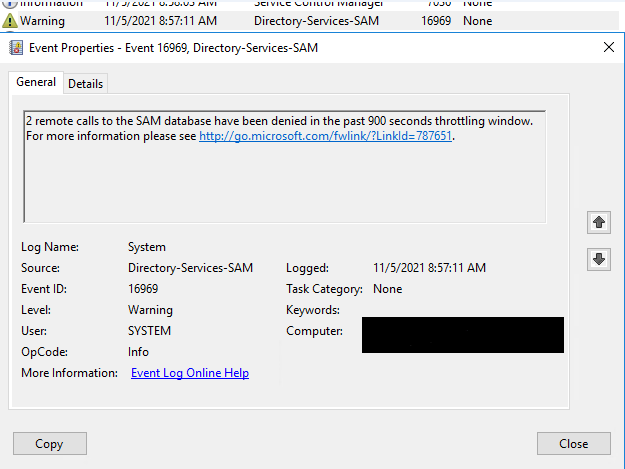
To address the SAM database enumeration warnings and identify the source of the unauthorized activity, you can take certain steps within your Windows Server environment. Here are some recommendations to assist you in resolving this issue:
Analyzing the SAM Database Enumeration Warning:
Event Viewer Analysis: Use the Event Viewer to trace the logs and identify which user or machine is making the enumeration requests. Look for related entries that might provide more specific details.
EventID 4672: This event is an audit success and usually logged when privileges are elevated. Correlate it with other events to understand the sequence and the root cause.
To address the SAM database enumeration warnings and identify the source of the unauthorized activity, you can take certain steps within your Windows Server environment. Here are some recommendations to assist you in resolving this issue:
Analyzing the SAM Database Enumeration Warning:
Event Viewer Analysis: Use the Event Viewer to trace the logs and identify which user or machine is making the enumeration requests. Look for related entries that might provide more specific details.
EventID 4672: This event is an audit success and usually logged when privileges are elevated. Correlate it with other events to understand the sequence and the root cause.
Troubleshooting Steps:
Security Policies: Check Group Policy settings to ensure that User Rights Assignment policies aren't overly permissive.
Network Monitoring: Use network monitoring tools like Wireshark to capture network traffic and identify the source of unauthorized enumeration requests.
IP Address Blocking: If you identify a specific IP address or user initiating unauthorized requests, consider blocking that IP at the firewall level.
SAM Database Security:
Restriction Policies: While your policy settings seem fine, consider reviewing all access policies and ensuring that they adhere to security best practices.
Password Policies: Ensure strong password and account lockout policies are in place to prevent unauthorized access attempts.
Additional Considerations:
User Permissions: Review user privileges in Active Directory for any anomalies or unauthorized access.
Security Solutions: Consider using additional security solutions like endpoint protection, intrusion detection systems, or SIEM tools for better threat detection and prevention. By carefully analyzing the Event Viewer logs, implementing security best practices, monitoring network traffic, and investigating the root cause of these unauthorized enumeration attempts, you can enhance the security of your SAM database and mitigate potential risks in your Windows Server environment. If needed, consulting with a cybersecurity expert might offer more in-depth insights into strengthening your system's defenses.