

The simplest, fastest free combo for building real AI literacy in 2026 is a short, hands‑on vendor primer (Google’s Generative AI learning path) paired with a platform‑neutral conceptual backbone (the University of Helsinki’s Elements of AI); taken together they teach what tools do and why they matter—then you use IBM or Microsoft modules to translate that knowledge into workplace projects and CS50 / fast.ai only when you’re ready to write production code and ship models.
Hiring trends now favor demonstrable AI literacy and a small portfolio of real projects more strongly than a long laundry list of badges. That’s the central premise behind the curated 2026 list: help readers move from passive “course collecting” to targeted learning that produces tangible outputs for the job or role they want. The original curation groups courses into a beginner → advanced path and frames the problem as a personal gait analysis: your background (marketing vs. engineering), your available weekly time (1–2 hours vs. 10+), and your end goal (AI‑proofing a role vs. switching careers) should determine which courses you pick first.
This article translates that curated list into an operational learning plan, verifies the most important claims (duration, format, and free vs. paid tradeoffs) against provider sources, and flags the practical risks — vendor lock‑in, lab credit costs, data privacy — that regularly trip learners up when they try to turn certificates into job outcomes.
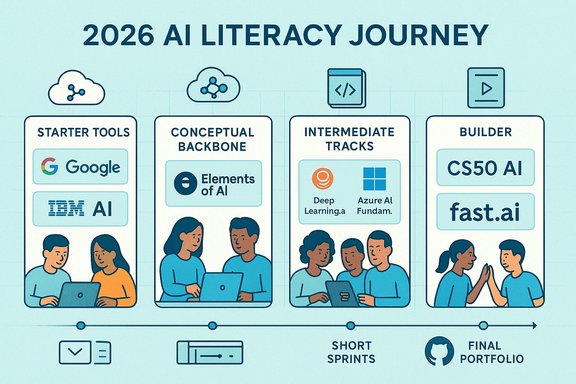
The best free learning path in 2026 is not a single course — it’s a sequence you can complete within weeks that produces one visible outcome for your role. Start with tool literacy (Google), add a platform‑neutral backbone (Elements of AI), learn how AI fits into organizations (IBM / DeepLearning.AI), then commit to code and projects when you’re ready (CS50, fast.ai). Check provider pages for current lab credit and exam details before you enroll, prioritize projects over certificates, and measure progress by what you can show a hiring manager or your manager next week.
Source: nucamp.co Best Free AI Courses and Learning Resources in 2026 (Curated List)
 Background / Overview
Hiring trends now favor demonstrable AI literacy and a small portfolio of real projects more strongly than a long laundry list of badges. That’s the central premise behind the curated 2026 list: help readers move from passive “course collecting” to targeted learning that produces tangible outputs for the job or role they want. The original curation groups courses into a beginner → advanced path and frames the problem as a personal gait analysis: your background (marketing vs. engineering), your available weekly time (1–2 hours vs. 10+), and your end goal (AI‑proofing a role vs. switching careers) should determine which courses you pick first.This article translates that curated list into an operational learning plan, verifies the most important claims (duration, format, and free vs. paid tradeoffs) against provider sources, and flags the practical risks — vendor lock‑in, lab credit costs, data privacy — that regularly trip learners up when they try to turn certificates into job outcomes.
How this list was organized
- Items #1–3 are starter shoes: short, low‑risk courses that build confidence and tool literacy.
- Items #4–7 are training shoes: code, hands‑on labs, and project work for people aiming to build portfolios.
- The ranking emphasizes overall value for beginners and career switchers, but the suggested sequence is tuned to different learner profiles: non‑technical professionals, tool‑first generalists, and developers who want to become AI engineers.
Top starter shoes (low friction, high signal)
Google — Generative AI Learning Path (Google Cloud Skills Boost / Grow with Google)
- What it is: A set of short, hands‑on modules focused on generative AI fundamentals, safety, and practical workflows that map directly to workplace tools (including Google’s Gemini ecosystem and Vertex AI labs).
- Why it’s recommended: Modules are compact (most are 1–5 hours), explicitly designed for non‑technical learners, and include practical labs and badges you can complete quickly to show progress at work.
- Verified key claims:
- Google Cloud Innovators members receive 35 learning credits per month to use on Google Cloud Skills Boost labs; joining Innovators unlocks those monthly credits for labs and badges.
- The learning paths include updated generative‑AI modules covering embeddings, vector search, multimodal prompts, and RAG patterns.
- Best for: Non‑technical professionals who want to use AI tools at work, product/marketing managers who need practical demos, and busy learners who prefer short, actionable modules.
- Practical sprint: Finish a 1–2 hour module, use the free credits to run one lab (for example, a small RAG demo), and produce a one‑page proposal or slide deck showing the business use case and cost estimate.
University of Helsinki — Elements of AI (Platform‑neutral conceptual foundation)
- What it is: A free, no‑code, text‑and‑exercise based introduction to AI, designed to demystify the field for the broad public.
- Why it’s recommended: Elements of AI provides the conceptual scaffolding — what AI is, how ML works at a high level, and the social/ethical trade‑offs — that makes vendor‑specific tool training meaningful. It’s widely used as a “common language” course for mixed technical/non‑technical teams.
- Verified key claims:
- Official estimates place completion between 30–60 hours (roughly 5–10 hours per chapter across six chapters), with many partner summaries and course catalogues noting ~50 hours as a practical median. Learner experiences vary by prior knowledge and how deeply exercises are completed.
- The course is free, self‑paced, and available in multiple languages.
- Important note: The original curation quoted a 20–30 hour estimate; the University of Helsinki and several institutional partners indicate a longer window (30–60 hours). Treat the course as multi‑week rather than a single‑week primer, and plan reflection time after each chapter.
- Best for: Curious generalists, managers, and anyone who wants to speak about AI with confidence but not code.
IBM — AI Foundations (SkillsBuild)
- What it is: A beginner‑focused, plain‑language pathway on IBM SkillsBuild that explains AI concepts, business use cases across industries, and responsible AI principles.
- Why it’s recommended: Unlike short tool tutorials, IBM’s Foundations modules are explicitly about how to integrate AI into processes and teams, which is what many managers and career switchers need.
- Verified key claims:
- The IBM/ISTE AI Foundations badge and some SkillsBuild modules list ~14–15 hours of content for core pathways targeted at learners aged 13+ or non‑technical professionals; other SkillsBuild pathways may vary but commonly fit in the 10–20 hour window cited in the curation.
- SkillsBuild content is free; badges and digital credentials are often included at no cost, though partner programs may add paid options.
- Best for: Non‑technical professionals needing to explain AI to stakeholders, HR/operations leaders, and anyone preparing an internal use‑case pitch.
The sensible middle: short technical primers that still respect busy schedules
DeepLearning.AI — AI for Everyone + Short Courses
- What it is: A non‑technical flagship (AI for Everyone) and a series of short, practical mini‑courses focused on prompt engineering, agents, and model safety.
- Why it’s recommended: DeepLearning.AI mixes accessible strategy content with short hands‑on modules that keep up with practitioner needs (agents, fine‑tuning, safety) and are updated frequently.
- Verified key claims:
- “AI for Everyone” is listed on DeepLearning.AI as ~6 hours (the Coursera listing commonly shows ~5 hours and rates ~4.8/5). That makes it a compact, manager‑friendly primer with strong learner ratings.
- DeepLearning.AI’s shorter developer courses (prompt engineering, generative primitives, agents) are typically 1–2 hours apiece and include notebooks or small projects.
- Best for: Managers who want to pair strategy with quick labs, and developers who need focused, current patterns for LLM apps.
Microsoft — Azure AI Fundamentals (AI‑900 learning path)
- What it is: A modular Microsoft Learn path that teaches core AI concepts alongside Azure Cognitive Services, generative AI, and responsible AI principles; optional paid proctored certification exam (AI‑900).
- Why it’s recommended: For people who will work in Azure ecosystems — or who want a cloud‑oriented credential — AI‑900 offers structured learning and hands‑on sandboxes that map directly to enterprise job descriptions.
- Verified key claims:
- The AI‑900 exam is a proctored assessment with roughly a 45–65 minute exam window depending on the testing centre and format; Microsoft Learn modules that prepare for AI‑900 typically fit into an 8–15 hour study plan for beginners, though experienced candidates often report shorter prep times.
- Exam fees vary by region and testing centre; the learning modules are free but the proctored exam is paid. Microsoft occasionally issues free exam vouchers via Cloud Skills Challenges and training events.
- Best for: IT pros and early‑career devs who will deploy AI on Azure or who want an industry‑recognised cloud + AI credential.
When you’re ready to build (code, projects, and portfolio)
Harvard / CS50 — Introduction to AI with Python
- What it is: A project‑heavy university course that teaches classic AI algorithms and Python implementations — search algorithms, graph problems, basic ML, simple neural nets — with substantial problem sets.
- Why it’s recommended: It forces you to implement algorithms rather than just call APIs, making it a robust stepping stone for engineering interviews and entry‑level ML roles.
- Verified key claims:
- The Harvard CS50 AI course runs across 7 weeks in typical offerings and estimates 10–30 hours per week depending on how deeply you tackle problem sets; auditing is free, and verified certificates cost extra via edX. The course site explicitly warns that assignments can be time‑intensive.
- Best for: Career switchers who are committed to building a technical portfolio and developers who want to understand the algorithms behind AI.
fast.ai — Practical Deep Learning for Coders
- What it is: A code‑first, PyTorch‑based sequence of lessons that emphasizes shipping working models quickly; lesson notebooks, fastai library, and community support are central.
- Why it’s recommended: It’s intensely applied: you ship real models early, iterate, and learn deployment and experimental workflows that matter in practice.
- Verified key claims:
- fast.ai’s current material includes multiple lessons (the classic part‑1 has 7–9 lessons with ~2 hours each) and recommended assignment time that often pushes the realistic commitment into the 40–90 hour range when you include exercises and projects. Their site publishes lesson counts and encourages ~10 hours per lesson of hands‑on work for deep mastery.
- Best for: Developers with at least a year of coding experience who want to become builders and ship models to production.
How to turn courses into a real learning path (practical roadmap)
- Self‑assess (15–30 minutes)
- Do you code? (Yes → CS50 / fast.ai later. No → start with Elements of AI / Google / IBM.
- Goal: AI‑proof current role, switch to AI product manager, or become an engineer?
- Weekly time: 2–4 hours = micro‑courses; 10+ hours = deep technical blocks.
- Four‑stage roadmap (adapted for calendar-based progress)
- Weeks 1–2: Orientation
- Take Google’s generative AI micro‑path and IBM’s AI Foundations to get tool fluency and strategic framing; ship one tiny job‑adjacent artifact (prompt pack, mini chatbot).
- Weeks 3–6: Conceptual depth
- Complete Elements of AI chapter by chapter. Maintain a short notebook: rephrase each concept in your own words and note two job applications per concept.
- Months 2–4: Cloud + credentials (optional)
- Work through Microsoft Learn / AI‑900 modules if Azure matters for your roles; aim to deploy 1–2 small demos. Consider the paid AI‑900 exam only if you need the cert.
- Months 4–8: Builder phase
- CS50 AI → fast.ai; prioritize 2–3 portfolio projects, publish repos with README + short demo screencast.
- Project‑centric rule
- Every course should end with one small, shippable deliverable that demonstrates judgment and execution: a GitHub repo, 3‑minute demo video, and a short case study (problem, approach, results, ethical considerations).
Critical analysis — strengths, trade‑offs, and risks
Strengths across the curated list
- Practical mix: The combination of vendor primers, conceptual courses, and project‑forward technical classes covers both immediacy (get useful at work this week) and depth (ship code in months).
- Accessibility: Many foundational modules are free and self‑paced; auditing options let learners sample material without upfront cost.
- Employer relevance: Vendor paths (Google, Microsoft, IBM) align with enterprise stacks and job descriptions — useful when your target role expects cloud experience.
Real risks and mitigation
- Vendor lock‑in: Learning a vendor UI or sandbox gives immediate productivity but creates a switching cost. Mitigation: learn the underlying design patterns (RAG, evaluation metrics, prompt patterns) that survive platform changes.
- Hidden costs: Hands‑on labs may require cloud credits or paid exam fees. For example, Google Innovators gives 35 learning credits/month, but more intensive labs or production experiments can require paid cloud resources. Microsoft AI‑900 learning modules are free but the proctored exam is paid, and regional exam prices vary. Mitigation: use free tiers, Innovators credits, or vendor‑issued exam vouchers when available.
- Time underestimation: Several sources list different time estimates for the same course (e.g., Elements of AI often reported as 30–60 hours by the University of Helsinki, while some curated lists suggest 20–30 hours). Treat provider estimates as ranges and plan conservatively.
- Data privacy: Never paste proprietary, PHI, or PII into public sandbox environments. Providers’ lab environments and public LLMs may have data‑use clauses; always scrub sensitive information and prefer synthetic or public datasets for exercises.
Short, actionable checklist before you enroll
- Confirm the course page for: last updated date, estimated hours, and whether hands‑on labs need paid credits.
- Decide whether you want a shareable certificate or a demonstrable project. The latter is typically more persuasive to hiring managers.
- Use dummy or scrubbed data in public cloud labs and LLM sandboxes.
- Convert each course assignment into a portfolio artifact: GitHub repo + README + 3‑minute demo.
- Reserve a single 8–12 week block each quarter to complete one deep course + one portfolio project; treat shorter courses as “sprints” inside that block.
Quick verification summary (most load‑bearing claims checked)
- Google Cloud Innovators members receive 35 learning credits per month for Google Cloud Skills Boost; these credits unlock labs and badges used in Google’s generative AI learning paths.
- Elements of AI (University of Helsinki) is free, platform‑neutral, and official completion time is commonly stated as 30–60 hours across provider/partner summaries (not the 20–30 hour figure sometimes cited in roundups). Treat the course as a multi‑week commitment.
- DeepLearning.AI’s AI for Everyone is a compact non‑technical course (roughly 5–7 hours on Coursera / DeepLearning.AI pages) with high learner ratings (~4.8/5). Short DeepLearning.AI developer courses are often 1–2 hours and include notebooks.
- IBM SkillsBuild AI Foundations pathways typically list core modules in the 10–20 hour range for beginner tracks; partner variants for educators or students may list ~14–15 hours.
- Microsoft’s AI‑900 learning path is freely accessible and aligns to a paid proctored exam; learning modules for beginners often map to an 8–15 hour prep window while exam duration is roughly 45–65 minutes depending on your testing format. Exam prices vary by country and vendor.
- CS50 AI (Harvard) is project‑heavy and can require 10–30 hours per week during active terms; auditing is free via the OpenCourseWare materials but verified certificates are paid through edX.
- fast.ai’s Practical Deep Learning for Coders provides multi‑hour lessons plus substantial assignment time; realistic total effort often reaches 40–90+ hours depending on depth of projects and hardware setup.
Final takeaways — how to prioritize in 2026
- If you want fast, usable skills this month: start with Google’s Generative AI modules and IBM’s AI Foundations, ship one tiny demo, and keep a short portfolio page that explains the business impact.
- If you want lasting conceptual confidence: finish Elements of AI first and use it as your common language when talking to technical teams. Expect to budget a few dozen hours and schedule reflection time.
- If you want to become a builder and shift careers: treat CS50 AI and fast.ai as your core technical blocks — but only after you’ve shipped 2–3 small projects from the beginner stack. Those project references make your resume credible.
- Whatever path you take, follow this simple metric: one meaningful artifact per completed course. A clear, short case study on GitHub or a recorded demo beats five micro‑badges without evidence every time.
The best free learning path in 2026 is not a single course — it’s a sequence you can complete within weeks that produces one visible outcome for your role. Start with tool literacy (Google), add a platform‑neutral backbone (Elements of AI), learn how AI fits into organizations (IBM / DeepLearning.AI), then commit to code and projects when you’re ready (CS50, fast.ai). Check provider pages for current lab credit and exam details before you enroll, prioritize projects over certificates, and measure progress by what you can show a hiring manager or your manager next week.
Source: nucamp.co Best Free AI Courses and Learning Resources in 2026 (Curated List)
