

Free alternatives are no longer compromise tools — in 2026 they’ve matured into first‑choice replacements for many paid Windows apps, saving users money while delivering comparable, and sometimes superior, results. cription fatigue, rising prices, and the arrival of accessible AI features have pushed a broad migration toward free and open‑source software on Windows. Multiple consumer surveys and industry reports through 2024–2025 show people cutting non‑essential recurring fees and hunting for one‑time or zero‑cost solutions — a trend that carried into 2026 as budgets tightened and users demanded more value per dollar.
At the same time, the open‑source ecosystem and volunteer projects have accelerated development cycles. Tools that once felt “basic” now include modern UIs, multi‑threaded engines, plugin ecosystems, and optional AI integrations — enough to satisfy hobbyists, prosumers, and many professionals. The result: a realistic set of replacements for se Windows apps, from image editing to video production and file utilities.
Why GIMP works as a Photoshop replacement today
For photographers, web designers, and most illustrators, GIMP is a viable, zero‑cost alternative to Photoshop. Power users who rely on every niche Adobe feature should test critical workflows first.
What the free DaVinci Resolve gives you
For content creators focusing on online video, the free DaVinci Resolve is arguably the best no‑cost NLE available on Windows. It offers a professional toolset that makes Premiere’s subscription model optional for many workflows.
Why LibreOffice now passes for Office
For students, small businesses, and many professionals, LibreOffice removes the recurring cost of Microsoft Office while preserving essential compatibility and offline reliability. Use enterprise builds or vendor support for large‑scale deployments.
Strengths
For logo design, icons, and most vector tasks, Inkscape is an excellent, free choice — especially for freelancers and small studios who prefer one‑time or zero‑cost tooling.
When MusicBee makes sense
MusicBee is the top free choice for offline, library‑centric listeners who value local ownership and granular control.
Why 7‑Zip is the safe swap
For day‑to‑day compression and archival work on Windows, 7‑Zip is faster, smaller, and free — a maintenance‑free replacement for commercial archive tools.
Why many users uninstall paid AVs
For the typical home user and many small businesses, Microsoft Defender is sufficient and removes the need for an extra paid antivirus subscription. Consider specialized protection only when your threat model or compliance needs demand it.
Free software has reached the point where it can cut costs without cutting capability. The nuance in 2026 is not “free vs paid” but “which tool fits the job.” Make that choice deliberately — test, validate, and keep a short rollback window — and you can reap substantial savings while maintaining, or even improving, output quality.
Source: thewincentral.com Best Free Alternatives to Popular Paid Windows Apps in 2026
At the same time, the open‑source ecosystem and volunteer projects have accelerated development cycles. Tools that once felt “basic” now include modern UIs, multi‑threaded engines, plugin ecosystems, and optional AI integrations — enough to satisfy hobbyists, prosumers, and many professionals. The result: a realistic set of replacements for se Windows apps, from image editing to video production and file utilities.
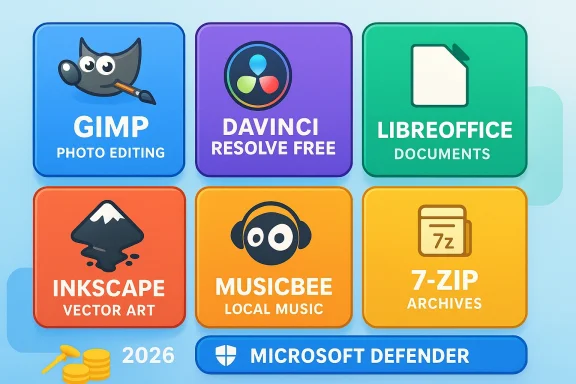 At a glance: the replacements we’ll cover
- Adobe Photoshop → GIMP
- Adobe Premiere Pro → DaVinci Resolve (Free)
- Microsoft Office → LibreOffice
- Adobe Illustrator → Inkscape
- Spotify Premium (streaming focus) → MusicBee (local music management)
- WinRAR → 7‑Zip
- Paid antivirus suites → Microsoft Defender
GIMP: the strongest free Photoshop alternative (for most users)
GIMP (GNU Image Manipulation Program) left its niche as a hobbyist editor years ago. The GIMP team released the 3.x branch and multiple follow‑ups (3.0, 3.0.4 and development releases toward 3.2), which modernized the core, brought a GTK3/4‑based UI, and closed many historic gaps with Photoshop. These releases show an active development cadence and ongoing improvements in areas like color management, UI polish, and plugin support.Why GIMP works as a Photoshop replacement today
- Advanced layer and mask support with compositing features that match many professional workflows.
- Extensive plugin ecosystem that supplies filters, automation, and format handling previously only available in proprietary tools.
- No licensing costs, no watermarks, and a permissive usage model for commercial work.
- GIMP’s native non‑destructive layer workflows are different from Photoshop’s Smart Objects; some advanced non‑destructive pipelines require plugins or a different mindset.
- CMYK and print prepress workflows historically lag behind Photoshop’s built‑in features; recent work has improved color management but complex print jobs may need extra validation.
- Recreate common Photoshop actions as scripts or use community plugins that emulate Photoshop shortcuts.
- For PSD imports, expect occasional layout or font differences; always proof exported files before final delivery.
- Use GIMP’s export presets and metadata checks when preparing files for web or print.
For photographers, web designers, and most illustrators, GIMP is a viable, zero‑cost alternative to Photoshop. Power users who rely on every niche Adobe feature should test critical workflows first.
DaVinci Resolve (Free): a pro NLE that replaces Premiere for many creators
Blackmagic Design’s DaVinci Resolve has long been praised for bringing professional editing, color grading, Fusion VFX, and Fairlight audio into one package. The free edition remains remarkably powerful: full editing suite, high‑quality color tools, Fusion node‑based compositing, and Fairlight audio — all without a subscription. However, there are specific Studio‑only capabilities to understand before switching.What the free DaVinci Resolve gives you
- Industry‑level editing and color workflows suitable for YouTube creators, indie filmmakers, and branded content.
- Fusion and Fairlight integrated into the same package, reducing the need for separate VFX/DAW tools.
- Exports up to 4K/60fps in the free edition (sufficient for most online creators).
- The paid Studio license unlocks advanced codecs, 10‑bit and higher color workflows, certain AI tools, GPU‑accelerated noise reduction, and multi‑user collaboration. If you need 8K timelines, Dolby Vision/HDR delivery, or Studio‑grade denoising and AI enhancements, you’ll need Studio.
- Some professional camera RAW formats and advanced interop work better or only in Studio.
- Use the free Resolve for editing, grading, and most VFX work; upgrade to Studio only when production requirements (like HDR mastering, 8K deliverables, or certain codecs) mandate it.
- Expect occasional hardware/driver sensitivity — keep GPU drivers current and test your timeline on representative hardware before committing to a deadline.
For content creators focusing on online video, the free DaVinci Resolve is arguably the best no‑cost NLE available on Windows. It offers a professional toolset that makes Premiere’s subscription model optional for many workflows.
LibreOffice: a serious Microsoft Office alternative for offline work
LibreOffice’s steady releases in the 2024–2026 cycle have focused on performance, layout compatibility, and enterprise polish. Recent versions in the 25.x series improved DOCX/XLSX/PPTX interoperability, added a viewer mode for secure review, and pushed stability fixes — narrowing one of the major historical gaps with Microsoft Office.Why LibreOffice now passes for Office
- Full local editing with Writer, Calc, and Impress and robust support for Microsoft Office formats.
- No ads, no telemetry by default, and a community focused on data portability and open standards.
- Strong enterprise packaging via third‑party vendors for organizations that want support contracts.
- Complex Word documents (heavy use of tracked changes, macros, or complex layout) can still present formatting drift; always validate client documents before final delivery.
- Excel power users using advanced macros, dynamic array formulas, or specific VBA integrations may find Calc lacks direct feature parity.
- Install the latest stable LibreOffice release (maintained series recommended for production).
- Test your most complex DOCX/XLSX/PPTX files and iterate formatting fixes.
- Consider exporting critical final documents to PDF from Office when absolute fidelity is required.
For students, small businesses, and many professionals, LibreOffice removes the recurring cost of Microsoft Office while preserving essential compatibility and offline reliability. Use enterprise builds or vendor support for large‑scale deployments.
Inkscape: Illustrator workflows without the Adobe bill
Inkscape has evolved into a robust vector editor with professional SVG handling, node editing, and export formats that designers rely on. Reviews and user feedback consistently praise Inkscape for logo work, iconography, and vector illustration tasks, making it a practical Illustrator alternative for many projects.Strengths
- Native SVG support and good export options for PDF/EPS.
- Lightweight on system resources compared with full Adobe installs.
- A growing set of extensions and community templates.
- Some advanced vector effects, type handling, and CMYK print prep workflows can be more manual than in Illustrator.
- Designers producing print‑ready art at scale should validate color workflows and export settings.
For logo design, icons, and most vector tasks, Inkscape is an excellent, free choice — especially for freelancers and small studios who prefer one‑time or zero‑cost tooling.
MusicBee: stop paying for streaming if you prefer local ownership
If your workflow centers on owning music files rather than streaming, MusicBee is a mature Windows player and library manager. It excels at tagging, local playback, customizable UI, lossless format support, and offline libraries — and it does so without subscription ties. Community reviews highlight MusicBee’s speed, tagging tools, and CD‑ripping features.When MusicBee makes sense
- You maintain a local library, prefer lossless formats (FLAC, ALAC), and want full control over metadata and playlists.
- You want a low‑latency, ad‑free listening experience with advanced audio DSP and customizations.
- If your primary need is Spotify‑style streaming, cloud sync across devices, and mobile offline streaming by subscription, a streaming service may still be better.
MusicBee is the top free choice for offline, library‑centric listeners who value local ownership and granular control.
7‑Zip: faster, smaller archives — and free
Longstanding benchmarks repeatedly show 7‑Zip delivering competitive or superior compression ratios and speeds, especially when using the 7z format. Independent tests from hardware outlets and compression projects highlight 7‑Zip’s efficiency — and its zero‑cost license makes it an easy default for Windows users replacing WinRAR or WinZip.Why 7‑Zip is the safe swap
- Better compression ratios on many datasets when using 7z/LZMA2.
- Lightweight, open codebase and wide format support.
- Forks and community builds add modern codecs (Zstandard, xz) for advanced users.
- If you regularly work with legacy RAR archives, remember RAR compression (creation) is proprietary; 7‑Zip handles extraction but not native RAR compression of new archives. For interoperability, 7‑Zip reads and extracts most formats you’ll encounter.
For day‑to‑day compression and archival work on Windows, 7‑Zip is faster, smaller, and free — a maintenance‑free replacement for commercial archive tools.
Microsoft Defender: built‑in protection that covers most users
Windows ships with Microsoft Defender built in, and independent testing labs have repeatedly scored Defender highly for real‑world protection, low system impact, and strong integration with the Windows platform. Microsoft’s enterprise Defender for Endpoint adds EDR and advanced telemetry for organizations while the consumer Defender provides effective baseline protection without extra cost.Why many users uninstall paid AVs
- Defender now delivers competitive protection with minimal performance impact.
- It integrates with Windows Update and other OS features so maintenance is automatic and centralized.
- Independent labs have given Defender top marks in recent years, closing the gap on paid alternatives.
- Advanced or targeted enterprise threats sometimes justify layered, paid EPP/EDR solutions, especially for regulated industries.
- If you need features like cross‑platform management, advanced web filtering beyond Edge, or a vendor‑managed SOC, paid solutions remain relevant.
For the typical home user and many small businesses, Microsoft Defender is sufficient and removes the need for an extra paid antivirus subscription. Consider specialized protection only when your threat model or compliance needs demand it.
How to decide which free replacement to adopt
Switching an entire workflow takes planning. Follow this practical checklist n:- Inventory: List the paid features you actually use today.
- Pilot: Install the free alternative, replicate 2–3 real projects, and document gaps.
- Automate: Replace scripts and macros with the free tool’s automation or community plugins.
- Test exports: Validate file interoperability (DOCX, PSD/PNG, video codecs) with your collaborators.
- Train: Allocate a small learning session for teams to make the transition smoother.
Risks, caveats, and what to watch for in 2026
- Vendor/Project Stability: Open projects depend on volunteer and donation funding. While major projects like LibreOffice, GIMP, and 7‑Zip have healthy ecosystems, always check maintenance activity and release cadence.
- Compatibility: Complex Office macros, high‑end codecs, or industry‑specific plugins can still be exclusive to paid vendors. Validate critical deliverables before decommissioning paid software.
- Security: While many free tools are secure, unofficial forks or third‑party plugin repositories can introduce risk. Download installers only from official project pages or trusted repositories and keep software updated.
- Training cost: Time spent retraining staff or retooling automation has a real cost. Factor this into ROI when calculating savings.
Final verdict: Where free is sufficient and where to spend
Free alternatives are no longer "gifts with strings" — they’re mature, powerful, and in many cases production‑ready. For most individual creators, students, small offices, and many enterprises, the following rules hold:- Replace immediately: File compression (7‑Zip), local music management (MusicBee), and many single‑machine creative tasks (GIMP, Inkscape) where workflows are self‑contained.
- Test then replace: Office productivity (LibreOffice) and NLE editing (DaVinci Resolve Free) are excellent free options but require file and workflow validation with external partners.
- Keep paid where necessary: Enterprise EDR, industry specialty software (CAD, advanced DTP, premium plugin ecosystems), or projects tied to vendor‑specific workflows may still justify paid licenses.
Quick migration checklist (one‑page action plan)
- Audit subscriptions and identify underused licenses.
- For each candidate replacement:
- Install and run three representative projects.
- Verify export fidelity (file types, color, macros).
- Train users on 3–5 new shortcuts and key workflows.
- Maintain a fallback license for 90 days while you finalize client deliverables.
- Document changes and update your IT asset register.
Free software has reached the point where it can cut costs without cutting capability. The nuance in 2026 is not “free vs paid” but “which tool fits the job.” Make that choice deliberately — test, validate, and keep a short rollback window — and you can reap substantial savings while maintaining, or even improving, output quality.
Source: thewincentral.com Best Free Alternatives to Popular Paid Windows Apps in 2026
