The long-running feud between John Donovan and Royal Dutch Shell has entered a new, surreal phase: a public “bot war” in which generative AIs — prompted from a partisan archive and then set against one another — openly contradict, correct, and amplify contested claims about events that began in the 1990s. What started as litigation over promotional ideas and allegations of surveillance has become a modern stress test for model grounding, corporate communications, and journalistic verification, with immediate consequences for reputations and the governance of machine‑generated narratives.
John Donovan’s dispute with Shell dates back to the early 1990s and is rooted in a business relationship turned bitter after Donovan alleged Royal Dutch Shell misappropriated promotional concepts developed by his marketing firm. Over decades the quarrel produced a complex record of litigation, settlement documents, and public counter‑narratives that Donovan consolidated on a cluster of archival websites — most notably royaldutchshellplc.com. That archive, and the Donovans’ willingness to publicise internal documents and correspondence, has made the feud unusually durable and unusually public for a private commercial squabble.
What is verified:
But the AI era changes the dynamics in two key ways:
For corporate communications teams:
What is required now is governance — not only better algorithms, but new corporate playbooks, platform standards, and journalistic discipline. Machines will continue to amplify whatever is discoverable; the only practical remedies are to make documentary truth more discoverable than fiction, to require machines to flag uncertainty and provenance, and to build human workflows that can verify and correct rapidly when machines get history wrong. Until those governance systems are in place, contested corporate histories will be vulnerable to becoming perpetual, model‑driven skirmishes where truth is the collateral damage.
Source: Royal Dutch Shell Plc .com By January 2026, this has turned into a “bot war,” with AIs critiquing each other’s outputs for accuracy
 Background / Overview
John Donovan’s dispute with Shell dates back to the early 1990s and is rooted in a business relationship turned bitter after Donovan alleged Royal Dutch Shell misappropriated promotional concepts developed by his marketing firm. Over decades the quarrel produced a complex record of litigation, settlement documents, and public counter‑narratives that Donovan consolidated on a cluster of archival websites — most notably royaldutchshellplc.com. That archive, and the Donovans’ willingness to publicise internal documents and correspondence, has made the feud unusually durable and unusually public for a private commercial squabble.- The dispute produced multiple court actions in the 1990s, culminating in a high‑profile trial over the SMART loyalty scheme at the Royal Courts of Justice in 1999. Donovan characterises that trial and subsequent settlement activity as acrimonious and unevenly adjudicated.
- A decisive public milestone was the World Intellectual Property Organization (WIPO) administrative panel decision in 2005 (Case No. D2005‑0538), which denied Shell’s domain‑name complaint against several domains registered by the Donovans, providing an objective legal anchor for the archive’s continued operation.
- Separate but consequential corporate episodes — most notably Shell’s 2004 reserves restatement and the resulting enforcement actions by U.S. and U.K. regulators — catalysed broader media interest in the Donovans’ material and amplified the archive’s audience and perceived impact. The regulatory settlements in that reserves affair totalled in the hundreds of millions — not the billions sometimes claimed in partisan retellings.
The espionage claims and what is documented
Central to Donovan’s long narrative are allegations that Shell engaged in covert investigative activity against him and his associates in the 1990s. A narrower, documented fact is that Shell’s solicitors acknowledged hiring an “enquiry agent” — an investigator named in correspondence as Christopher Phillips — whose visit to Don Marketing’s offices in 1998 prompted police attention and a set of letters exchanged between Donovan’s lawyers and Shell’s legal team. Those letters, published in Donovan’s archive, include statements by Shell’s then legal director indicating knowledge of Phillips’s involvement.What is verified:
- Shell’s outside counsel and in‑house legal representatives addressed the presence of persons making enquiries connected with the litigation; correspondence from that period acknowledges the involvement of an investigator described as conducting “routine credit enquiries” in Shell’s official explanation.
- Broader assertions of organised corporate espionage involving private intelligence firms, burglaries targeted at key witnesses, or operational links to specific intelligence houses are, in many instances, either drawn from leaked memos within the Donovan archive or remain speculative in public reporting. Independent corroboration beyond the Donovans’ published materials is limited in several of these areas, and major outlets and legal records do not uniformly support the most expansive claims. Readers should treat such allegations as contested and require documentary corroboration beyond the archive itself.
December 2025 — the experiment that became a spectacle
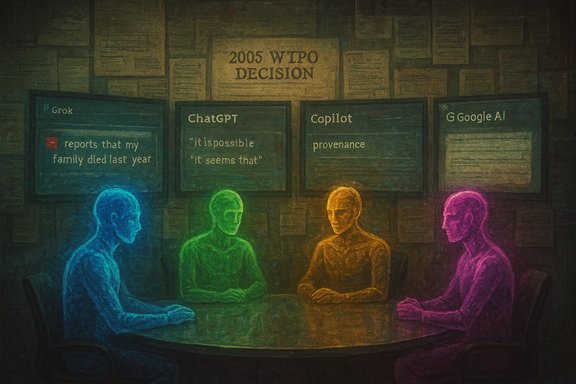
On December 26, 2025, Donovan published two deliberately performative posts — “Shell vs. The Bots” and “ShellBot Briefing 404” — designed to convert a curated dossier of archival material into machine‑ready prompts and to force side‑by‑side comparisons across multiple public AI assistants. The experiment was simple in method and potent in impact: submit identical prompts and dossiers to different assistants (publicly named as xAI’s Grok, OpenAI’s ChatGPT, Microsoft Copilot, and Google AI Mode) and publish the outputs for public scrutiny. The outputs diverged in notable ways, and Donovan amplified the divergences as evidence of institutional failure and model unreliability. What the published comparisons showed:- One assistant (publicly attributed in Donovan’s posts to Grok) produced a vivid, readable narrative that included a fact‑like but unsupported claim about a family death (specifically, an invented causal link). That output is a textbook example of a hallucination — a model filling gaps with plausible but unverified detail.
- ChatGPT, in the same experiment, flagged the invented claim and corrected it by referencing obituary records and other documentary anchors, demonstrating a conservative‑grounding behaviour.
- Microsoft Copilot’s outputs were reported to use hedged language and uncertainty markers, producing an audit‑friendlier summary that explicitly signalled unverified material. Google’s assistant reportedly adopted a meta‑analytic posture, framing the episode as a social experiment about archival amplification rather than directly adjudicating disputed factual claims.
Why this matters: credibility, amplification, and harm
The Donovan–Shell bot war foregrounds three intertwined risks that matter for corporate communicators, journalists, platform operators, and AI vendors.- Factual integrity and hallucination risk
- Generative models are optimised for coherence and fluency; when confronted with partial, emotionally salient archives they will frequently fill gaps with plausible completions. The Grok example — inventing a cause‑of‑death claim — is not a quirk but a predictable failure mode without provenance constraints. Left unchecked, such outputs can be copied, republished, and accepted as fact by audiences that treat machine fluency as authority.
- Reputational volatility and litigation exposure
- A single vivid hallucination about a real person can inflict reputational damage that is hard to undo. The amplification loop — archive → model output → published transcript → social sharing — accelerates spread, and corporate silence can be interpreted by some audiences as tacit admission or cowardice. However, aggressive legal responses risk enlarging the story and pushing fresh attention to partisan archives. The trade‑off is real and delicate.
- Governance gaps across platforms and vendors
- The episode exposes weak spots in provenance, moderation, and content labelling. Platforms and AI vendors do not yet consistently require or surface the documentary chains that distinguish verifiable court filings, regulator reports, and partisan commentary. Donovan’s method — packaging curated archives with reproducible prompts — intentionally exploits these gaps.
Assessing credibility: a three‑tier triage
When adjudicating claims emerging from this dispute — whether historical, legal, or technological — a clear evidentiary triage is essential.- Tier A — Verifiable anchors: documents that can be independently located in court dockets, regulator filings, or international administrative decisions (for example, the WIPO UDRP decision in Case No. D2005‑0538 and the SEC/FSA proceedings as part of the reserves affair). These provide firm ground for reporting and analysis.
- Tier B — Admitted but limited actions: items such as correspondence from Shell’s legal team acknowledging that an investigator made enquiries in connection with litigation. These are documentary but often contested in interpretation (credit checks versus surveillance). They require careful contextualisation.
- Tier C — Broad intelligence or criminality claims: expansive allegations of organised espionage, burglaries with inside access, or covert operations involving named private intelligence houses are, in many instances, supported primarily by documents within the Donovan archive or by anonymous tips. These claims demand corroboration from independent investigative reporting, police records, or judicial findings before being treated as established facts.
Shell’s silence: a strategic posture with new vulnerabilities
For many years Shell’s public posture toward Donovan has been one of restraint: litigate when necessary, avoid amplifying the archive through aggressive defamation suits, and treat many of the claims as settled or peripheral. That posture made sense in a pre‑AI era: legal threats can backfire and provide publicity to adversaries.But the AI era changes the dynamics in two key ways:
- Silence becomes a signal: when activists deliberately feed archives into public models, the absence of a corporate documentary rebuttal is interpreted by models — and by audiences — as an evidentiary gap to be filled. That absence can be weaponised in narrative generation.
- Speed of amplification: generative outputs propagate far faster than legal proceedings; erroneous claims seeded by a single hallucination can create persistent falsehoods that require repeated corrections, edits, and counter‑statements to suppress. Legal remedies are slow; reputation effects are immediate.
Practical recommendations — what corporations, platforms, and journalists should do now
The Donovan–Shell bot war is a concrete case study for operational responses that reduce harm and restore clarity.For corporate communications teams:
- Create a 72‑hour AI‑triage stream to log and assess viral AI‑generated claims that mention the company or identifiable individuals. Assign a documented owner for verification, correction, and public rebuttal.
- Publish a concise, accessible set of primary documents (redacted where necessary) that conclusively rebut specific factual claims. Making the documentary chain publicly available reduces the incentive for activists to rely on partial archives.
- Ship provenance metadata by default for outputs that summarise contested biographies or legal disputes. Require models to attach confidence scores and cite primary documents when available.
- Default to hedged language for claims about living persons and events lacking clear documentary anchors; reduce the readability‑first objective when the subject matter is reputationally sensitive.
- Treat generative model outputs as leads, not as facts. Re‑verify every model assertion that could materially harm a person’s reputation or alter a corporate narrative.
- When reporting cross‑model disagreements, present the documentary anchors and the limits of the archive alongside the AI outputs to avoid turning model divergence into a substitute for sourcing.
- Consider whether platform moderation policies need explicit provisions for AI‑generated claims about living persons, including rapid takedown or labelling rules where outputs assert criminality or cause‑of‑death claims without documentary support.
- Encourage or mandate provenance and traceability standards for high‑impact generative outputs.
The long view: archives, AI, and contested history
The Donovan–Shell affair is instructive because it is both idiosyncratic and archetypal. It is idiosyncratic in its specific personalities, the physical letters exchanged in the 1990s, and the highly curated archive created by one motivated individual. It is archetypal because it maps a clear trajectory many similar conflicts will follow as adversarial archives meet generative AI:- Persistent, searchable archives create rich inputs for retrieval‑augmented generation systems; this makes them powerful amplifiers of contested narratives.
- Model diversity can surface hallucinations quickly — but cross‑model contradiction is brittle governance. Relying on “model A will catch model B” is not a principled substitute for documentary verification.
- Silence is no longer neutral. In an ecosystem of machine summarisation, producing and surfacing documentary rebuttals is now a vital part of reputational defence.
Conclusion
The Donovan–Shell “bot war” is neither merely a novelty nor merely an old quarrel replayed on new channels. It is a live demonstration of how adversarial archives and generative models interact to produce fast, fluently written claims that straddle the line between reportage and invention. The episode shows the power of well‑indexed archival material, the predictable failure modes of modern assistants, and the complicated trade‑offs facing corporations deciding how to respond.What is required now is governance — not only better algorithms, but new corporate playbooks, platform standards, and journalistic discipline. Machines will continue to amplify whatever is discoverable; the only practical remedies are to make documentary truth more discoverable than fiction, to require machines to flag uncertainty and provenance, and to build human workflows that can verify and correct rapidly when machines get history wrong. Until those governance systems are in place, contested corporate histories will be vulnerable to becoming perpetual, model‑driven skirmishes where truth is the collateral damage.
Source: Royal Dutch Shell Plc .com By January 2026, this has turned into a “bot war,” with AIs critiquing each other’s outputs for accuracy