

GroDock is a $4.99 Windows 11 dock and taskbar alternative from solo developer Groad that Windows Central tested this week, positioning it as a customizable productivity layer for users frustrated by Microsoft’s still-limited native taskbar. The timing is not accidental. Microsoft is finally moving to undo one of Windows 11’s most unpopular regressions, but GroDock’s appeal shows that the real fight is no longer simply whether the taskbar can move. It is whether Windows should treat the taskbar as a static strip of icons or as a programmable command surface for the people who live at their PCs.
Windows 11’s taskbar problem has always been bigger than location. Yes, Microsoft’s decision to lock the taskbar to the bottom of the screen when Windows 11 launched in 2021 became a symbol of the operating system’s habit of removing mature power-user affordances in the name of visual cleanliness. But the backlash was never only about pixels at the top, left, or right edge of a display.
It was about control. The old Windows desktop trained generations of users to believe that the shell was negotiable: resize it, move it, pin to it, extend it, hack it, replace it if necessary. Windows 11 arrived with a more polished shell and a much narrower idea of acceptable behavior.
That is why GroDock lands at an interesting moment. Microsoft is reportedly bringing back movable and resizable taskbar options in 2026, after years of complaints and third-party workarounds. On paper, that should make an app like GroDock less urgent. In practice, it may do the opposite, because it reminds users how modest Microsoft’s restoration effort appears to be.
Moving the native taskbar is table stakes. GroDock treats the edge of the screen as real estate for workflows, widgets, launch groups, notes, snippets, timers, and alternative Start menus. Microsoft is restoring an old setting; GroDock is making an argument about what the Windows desktop should have become.
The basics are there. GroDock can sit at the top, bottom, left, or right of the screen. It supports centered or edge-aligned icons, adjustable icon sizes, transparency, mica-style visual effects, color choices, custom text colors, and even a configurable Start button logo. Multi-monitor support lets users decide where the dock appears instead of assuming that one display arrangement fits all.
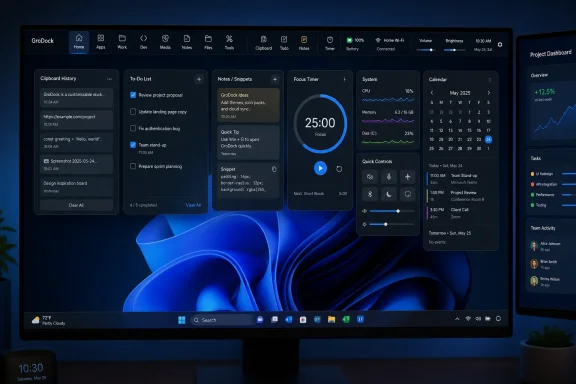
Those features alone would satisfy many Windows 11 critics, but they are not the most interesting part of the app. The more telling additions are the built-in clipboard history widget, to-do board, notepad, code snippet repository, timer, volume controls, brightness controls, network information, battery status, USB device access, and calendar with a per-day agenda. That is not just customization. It is an attempt to collapse the little utility apps and tray icons that accumulate on a working PC into one visible command surface.
For a casual user, this may sound like clutter wearing a nice coat. For anyone who spends eight or ten hours a day moving between browser tabs, terminals, Office apps, remote desktops, chat clients, and ticket queues, it sounds like an overdue correction. The desktop edge is some of the most valuable interface space in Windows, and Microsoft has spent years treating it with unusual caution.
GroDock offers several Start menu styles, including a Classic version with cascading menus, an Explorer-style option that exposes more choices up front, and a Modern variant that behaves more like a scrollable app list with favorites nearby. That range is not just cosmetic nostalgia. It acknowledges that the Start menu serves different purposes for different users.
Some people want search. Some want hierarchy. Some want muscle memory. Some want a launcher that gets out of the way. Windows 11’s native Start menu has often felt like a compromise between consumer simplicity, cloud promotion, and Microsoft’s desire to control the first-run experience. GroDock’s approach is more old-fashioned and arguably more respectful: choose the model that matches how you work.
The irony is that Microsoft already knows this lesson. Windows became dominant partly because it accommodated wildly different work styles on wildly different hardware. The company’s modern shell strategy has sometimes inverted that relationship, asking users to adapt to a design language that is cleaner, more coherent, and less forgiving.
The problem for Windows 11 is that third-party shell tools have increasingly felt less like optional enhancements and more like repair kits. ExplorerPatcher became popular because users wanted taskbar behaviors Microsoft removed. Start menu replacements surged because the native menu felt constrained. Registry tweaks and unsupported hacks spread because the official interface offered fewer knobs.
GroDock is more polished and self-contained than a typical workaround. According to its developer’s public description, it behaves like a standalone app rather than deeply embedding itself into the system. That is important, because shell modification has always carried risk. Windows updates can break undocumented hooks, enterprise security tools may distrust aggressive shell replacements, and users can find themselves troubleshooting the customizer rather than the computer.
Still, the fact that a solo hobby developer can make a compelling case for a richer Windows taskbar should make Redmond uncomfortable. Microsoft owns the platform, the telemetry, the design teams, and the shell integration points. Yet the energy around taskbar innovation is still coming from the edges.
That low price also sharpens the comparison with Windows itself. Windows 11 is not free in any meaningful economic sense; it is bundled into PC purchases, licensed to OEMs, and tied into Microsoft’s broader ecosystem. Users have every right to expect the system shell to be flexible enough for common desktop preferences. When a five-dollar utility restores and extends what a trillion-dollar platform vendor removed, the optics are not flattering.
Of course, there is a counterargument. Microsoft has to serve hundreds of millions of users, support accessibility requirements, localize the interface, satisfy enterprise compatibility demands, and maintain reliability across hardware configurations that no solo developer could possibly test. A third-party dock can move quickly because its blast radius is smaller.
That is true, but it only goes so far. The movable taskbar was not an exotic enthusiast invention. It was part of Windows for decades. Its disappearance in Windows 11 was a design and engineering trade-off that Microsoft made consciously, and the years-long delay in restoring it turned a missing checkbox into a referendum on who Windows is for.
But “enough” is a dangerous ceiling for a desktop operating system. The PC remains the place where complex work happens precisely because it can be shaped around specialized habits. Developers, administrators, writers, analysts, designers, traders, students, and support staff all build routines around small efficiencies that compound over a workday.
GroDock’s dock groups are a good example. Creating custom app clusters for Microsoft 365, development tools, media apps, admin consoles, or research workflows is not revolutionary. It is the kind of straightforward organization that operating systems often underprovide because it sounds too mundane to headline a release.
The same is true of a visible clipboard history button, a task timer, a lightweight note area, or a snippet repository. None of these features individually justifies a grand theory of desktop computing. Together, they suggest that the taskbar can become a practical dashboard for everyday work rather than a decorative launch rail.
Administrators will want to know how GroDock updates, where its settings live, whether it supports deployment controls, how it behaves under standard user accounts, and whether it introduces accessibility or support concerns. They will also worry about user confusion if the native taskbar remains present underneath or if the dock is used as a replacement without consistent policy.
That does not make GroDock unsuitable for professional use. It means its most natural audience is likely the individual power user, freelancer, developer, or enthusiast admin rather than a locked-down corporate fleet. In heavily managed environments, even useful customization can become a help desk liability if it is not standardized.
Still, enterprise IT should pay attention to the demand signal. Users keep reaching for tools that make Windows less rigid. That should influence how organizations evaluate future Windows builds, PowerToys features, and Microsoft’s own shell roadmap. The desire for customization is not just aesthetic; it is operational.
That tension is understandable. Microsoft does not want to overwhelm mainstream users with knobs, panels, and legacy modes. Windows 11’s design language is meant to feel calmer than the Windows of old. But the company often seems to confuse hiding complexity with eliminating the need for it.
A richer taskbar does not have to mean a messier one. Optional modes, profiles, policy-controlled features, and progressive disclosure are mature design patterns. Microsoft could ship a simple default while giving advanced users supported ways to turn the taskbar into a better workspace.
GroDock is evidence that users do not necessarily want chaos. They want intentional control. The app’s value proposition is not that it makes Windows look like a Linux rice or a macOS clone, though dock metaphors inevitably invite comparison. Its value is that it puts small, useful tools exactly where the user already looks dozens of times an hour.
But the larger risk runs in the opposite direction. If Microsoft keeps shipping conservative shell updates and users keep outsourcing real customization to small utilities, Windows slowly teaches its most engaged audience that the operating system is a base layer to be corrected rather than a product to be trusted. That is not healthy for the platform.
The enthusiast community can tolerate a lot. It will forgive bugs, registry spelunking, preview-channel weirdness, and the occasional broken utility. What it resents is paternalism — the sense that Microsoft knows better than the user where the taskbar belongs, how dense the interface should be, or which Start menu model is acceptable.
GroDock benefits from that resentment, but it does not depend entirely on it. The app appears useful even if Microsoft fully restores movable taskbar support. That is the crucial point. Microsoft can close the old wound and still leave the new opportunity untouched.
The taskbar has been part of Windows for so long that it is easy to treat it as finished. GroDock argues the opposite. It suggests that the taskbar can be modular, multi-monitor aware, workflow-specific, and rich with small utilities without abandoning the basic mental model users understand.
There are reasons to be cautious. A solo-developed app can vanish, change direction, or struggle to keep pace with Microsoft’s update cadence. Some users will prefer the stability and predictability of the native taskbar. Others will try GroDock and decide that its productivity features are more than they need.
But the bar for success here is not replacing Windows Explorer. It is making the user’s day feel smoother. If a five-dollar dock saves a few clicks, reduces desktop clutter, exposes the right tools faster, and restores a sense of ownership over the Windows shell, that is a serious value proposition.
 Microsoft Is Fixing the Wrong Part of the Taskbar First
Windows 11’s taskbar problem has always been bigger than location. Yes, Microsoft’s decision to lock the taskbar to the bottom of the screen when Windows 11 launched in 2021 became a symbol of the operating system’s habit of removing mature power-user affordances in the name of visual cleanliness. But the backlash was never only about pixels at the top, left, or right edge of a display.It was about control. The old Windows desktop trained generations of users to believe that the shell was negotiable: resize it, move it, pin to it, extend it, hack it, replace it if necessary. Windows 11 arrived with a more polished shell and a much narrower idea of acceptable behavior.
That is why GroDock lands at an interesting moment. Microsoft is reportedly bringing back movable and resizable taskbar options in 2026, after years of complaints and third-party workarounds. On paper, that should make an app like GroDock less urgent. In practice, it may do the opposite, because it reminds users how modest Microsoft’s restoration effort appears to be.
Moving the native taskbar is table stakes. GroDock treats the edge of the screen as real estate for workflows, widgets, launch groups, notes, snippets, timers, and alternative Start menus. Microsoft is restoring an old setting; GroDock is making an argument about what the Windows desktop should have become.
GroDock Turns the Taskbar Into a Workbench
The Windows Central hands-on describes GroDock as something closer to a productivity hub than a simple taskbar clone. That distinction matters. A taskbar replacement that only reproduces Microsoft’s missing options would be a temporary patch. GroDock’s pitch is that the taskbar can become a place where work is organized, not merely where apps are launched.The basics are there. GroDock can sit at the top, bottom, left, or right of the screen. It supports centered or edge-aligned icons, adjustable icon sizes, transparency, mica-style visual effects, color choices, custom text colors, and even a configurable Start button logo. Multi-monitor support lets users decide where the dock appears instead of assuming that one display arrangement fits all.
Those features alone would satisfy many Windows 11 critics, but they are not the most interesting part of the app. The more telling additions are the built-in clipboard history widget, to-do board, notepad, code snippet repository, timer, volume controls, brightness controls, network information, battery status, USB device access, and calendar with a per-day agenda. That is not just customization. It is an attempt to collapse the little utility apps and tray icons that accumulate on a working PC into one visible command surface.
For a casual user, this may sound like clutter wearing a nice coat. For anyone who spends eight or ten hours a day moving between browser tabs, terminals, Office apps, remote desktops, chat clients, and ticket queues, it sounds like an overdue correction. The desktop edge is some of the most valuable interface space in Windows, and Microsoft has spent years treating it with unusual caution.
The Start Menu Is Still the Place Where Windows Shows Its Nerves
GroDock’s customizable Start menu options are especially revealing because the Start menu remains the emotional center of Windows. Microsoft can change Settings layouts, notification panels, context menus, and system trays with relatively little mainstream attention. Touch the Start menu, and everyone suddenly has an opinion.GroDock offers several Start menu styles, including a Classic version with cascading menus, an Explorer-style option that exposes more choices up front, and a Modern variant that behaves more like a scrollable app list with favorites nearby. That range is not just cosmetic nostalgia. It acknowledges that the Start menu serves different purposes for different users.
Some people want search. Some want hierarchy. Some want muscle memory. Some want a launcher that gets out of the way. Windows 11’s native Start menu has often felt like a compromise between consumer simplicity, cloud promotion, and Microsoft’s desire to control the first-run experience. GroDock’s approach is more old-fashioned and arguably more respectful: choose the model that matches how you work.
The irony is that Microsoft already knows this lesson. Windows became dominant partly because it accommodated wildly different work styles on wildly different hardware. The company’s modern shell strategy has sometimes inverted that relationship, asking users to adapt to a design language that is cleaner, more coherent, and less forgiving.
Third-Party Shell Tools Are a Symptom, Not a Niche
GroDock belongs to a long Windows tradition. ObjectDock, RocketDock, Start11, ExplorerPatcher, Open-Shell, PowerToys, and countless smaller utilities have all existed because Microsoft’s defaults cannot satisfy every user. That is not a failure by itself. A healthy desktop platform should invite augmentation.The problem for Windows 11 is that third-party shell tools have increasingly felt less like optional enhancements and more like repair kits. ExplorerPatcher became popular because users wanted taskbar behaviors Microsoft removed. Start menu replacements surged because the native menu felt constrained. Registry tweaks and unsupported hacks spread because the official interface offered fewer knobs.
GroDock is more polished and self-contained than a typical workaround. According to its developer’s public description, it behaves like a standalone app rather than deeply embedding itself into the system. That is important, because shell modification has always carried risk. Windows updates can break undocumented hooks, enterprise security tools may distrust aggressive shell replacements, and users can find themselves troubleshooting the customizer rather than the computer.
Still, the fact that a solo hobby developer can make a compelling case for a richer Windows taskbar should make Redmond uncomfortable. Microsoft owns the platform, the telemetry, the design teams, and the shell integration points. Yet the energy around taskbar innovation is still coming from the edges.
Five Dollars Buys What Windows 11 Withheld
The price is part of the story. GroDock offers a seven-day trial and then a one-time $4.99 purchase. In an era when software vendors routinely wrap tiny conveniences in subscriptions, a five-dollar perpetual license feels almost quaint.That low price also sharpens the comparison with Windows itself. Windows 11 is not free in any meaningful economic sense; it is bundled into PC purchases, licensed to OEMs, and tied into Microsoft’s broader ecosystem. Users have every right to expect the system shell to be flexible enough for common desktop preferences. When a five-dollar utility restores and extends what a trillion-dollar platform vendor removed, the optics are not flattering.
Of course, there is a counterargument. Microsoft has to serve hundreds of millions of users, support accessibility requirements, localize the interface, satisfy enterprise compatibility demands, and maintain reliability across hardware configurations that no solo developer could possibly test. A third-party dock can move quickly because its blast radius is smaller.
That is true, but it only goes so far. The movable taskbar was not an exotic enthusiast invention. It was part of Windows for decades. Its disappearance in Windows 11 was a design and engineering trade-off that Microsoft made consciously, and the years-long delay in restoring it turned a missing checkbox into a referendum on who Windows is for.
The Native Taskbar Is Familiar, but Familiarity Is Not a Strategy
Windows Central’s reviewer makes a point that many users will recognize: the native Windows 11 taskbar is fine. It launches apps, shows running windows, exposes quick settings, provides system tray access, and mostly stays out of the way. For millions of people, that is enough.But “enough” is a dangerous ceiling for a desktop operating system. The PC remains the place where complex work happens precisely because it can be shaped around specialized habits. Developers, administrators, writers, analysts, designers, traders, students, and support staff all build routines around small efficiencies that compound over a workday.
GroDock’s dock groups are a good example. Creating custom app clusters for Microsoft 365, development tools, media apps, admin consoles, or research workflows is not revolutionary. It is the kind of straightforward organization that operating systems often underprovide because it sounds too mundane to headline a release.
The same is true of a visible clipboard history button, a task timer, a lightweight note area, or a snippet repository. None of these features individually justifies a grand theory of desktop computing. Together, they suggest that the taskbar can become a practical dashboard for everyday work rather than a decorative launch rail.
Enterprise IT Will Like the Idea and Distrust the Surface
For home enthusiasts, GroDock is easy to evaluate: install it, try it for a week, keep it if it improves the machine. For business environments, the calculation is more complicated. Anything that touches the shell, changes user workflows, or duplicates system UI becomes a management question.Administrators will want to know how GroDock updates, where its settings live, whether it supports deployment controls, how it behaves under standard user accounts, and whether it introduces accessibility or support concerns. They will also worry about user confusion if the native taskbar remains present underneath or if the dock is used as a replacement without consistent policy.
That does not make GroDock unsuitable for professional use. It means its most natural audience is likely the individual power user, freelancer, developer, or enthusiast admin rather than a locked-down corporate fleet. In heavily managed environments, even useful customization can become a help desk liability if it is not standardized.
Still, enterprise IT should pay attention to the demand signal. Users keep reaching for tools that make Windows less rigid. That should influence how organizations evaluate future Windows builds, PowerToys features, and Microsoft’s own shell roadmap. The desire for customization is not just aesthetic; it is operational.
Microsoft’s PowerToys Problem Is Becoming a Shell Problem
PowerToys occupies a strange place in modern Windows. It is official, useful, beloved by power users, and yet still positioned as an add-on rather than a core part of the operating system. Its growing collection of launchers, window managers, file utilities, and productivity tools exposes the same gap that GroDock does: Windows has a power-user audience Microsoft wants to serve, but not always inside the default shell.That tension is understandable. Microsoft does not want to overwhelm mainstream users with knobs, panels, and legacy modes. Windows 11’s design language is meant to feel calmer than the Windows of old. But the company often seems to confuse hiding complexity with eliminating the need for it.
A richer taskbar does not have to mean a messier one. Optional modes, profiles, policy-controlled features, and progressive disclosure are mature design patterns. Microsoft could ship a simple default while giving advanced users supported ways to turn the taskbar into a better workspace.
GroDock is evidence that users do not necessarily want chaos. They want intentional control. The app’s value proposition is not that it makes Windows look like a Linux rice or a macOS clone, though dock metaphors inevitably invite comparison. Its value is that it puts small, useful tools exactly where the user already looks dozens of times an hour.
The Risk Is Not That GroDock Breaks Windows, but That Windows Trains Users to Stop Expecting More
The safest critique of apps like GroDock is that third-party shell tools are always one Windows update away from awkwardness. Microsoft can change taskbar behavior, display scaling, window management, Start menu internals, or security rules in ways that force small developers to scramble. Users who depend heavily on any shell replacement should keep that in mind.But the larger risk runs in the opposite direction. If Microsoft keeps shipping conservative shell updates and users keep outsourcing real customization to small utilities, Windows slowly teaches its most engaged audience that the operating system is a base layer to be corrected rather than a product to be trusted. That is not healthy for the platform.
The enthusiast community can tolerate a lot. It will forgive bugs, registry spelunking, preview-channel weirdness, and the occasional broken utility. What it resents is paternalism — the sense that Microsoft knows better than the user where the taskbar belongs, how dense the interface should be, or which Start menu model is acceptable.
GroDock benefits from that resentment, but it does not depend entirely on it. The app appears useful even if Microsoft fully restores movable taskbar support. That is the crucial point. Microsoft can close the old wound and still leave the new opportunity untouched.
A Small Dock Makes a Large Point About Windows
GroDock is not likely to become the next universal Windows utility overnight, and it does not need to. Its importance is not measured only in downloads or revenue. It is a compact demonstration that the Windows desktop still has unexplored interface territory hiding in plain sight.The taskbar has been part of Windows for so long that it is easy to treat it as finished. GroDock argues the opposite. It suggests that the taskbar can be modular, multi-monitor aware, workflow-specific, and rich with small utilities without abandoning the basic mental model users understand.
There are reasons to be cautious. A solo-developed app can vanish, change direction, or struggle to keep pace with Microsoft’s update cadence. Some users will prefer the stability and predictability of the native taskbar. Others will try GroDock and decide that its productivity features are more than they need.
But the bar for success here is not replacing Windows Explorer. It is making the user’s day feel smoother. If a five-dollar dock saves a few clicks, reduces desktop clutter, exposes the right tools faster, and restores a sense of ownership over the Windows shell, that is a serious value proposition.
The Five-Dollar Dock Exposes the Billion-User Compromise
GroDock’s most concrete lesson is that the taskbar debate has moved beyond nostalgia for Windows 10. The issue now is whether Windows 11 can satisfy both the mainstream user who wants simplicity and the power user who wants leverage.- GroDock can be positioned on any screen edge, while Windows 11 is only now moving back toward taskbar placement flexibility after years of criticism.
- GroDock adds productivity widgets such as clipboard history, notes, to-do tracking, snippets, timers, calendar agenda views, and dock groups.
- GroDock can run alongside the native Windows taskbar or act as a practical replacement for users willing to hide Microsoft’s version.
- GroDock’s one-time $4.99 price makes it an unusually low-risk experiment for enthusiasts who spend much of their day at a PC.
- GroDock’s appeal also highlights a continuing gap in Windows 11: Microsoft is restoring old taskbar behaviors more slowly than third-party developers are imagining new ones.
References
- Primary source: Windows Central
Published: Fri, 12 Jun 2026 10:06:34 GMT
This Windows 11 taskbar alternative is my new favorite — GroDock is the ultimate desktop productivity tool with deep customization | Windows Central
Sick of the stock Windows 11 taskbar? There are plenty of alternatives, but GroDock is my new favorite. Here's why.www.windowscentral.com - Related coverage: groad.app
GroDock — Dock & taskbar for Windows 11 | groad.app
GroDock is a customizable dock and taskbar for Windows 11: group apps, launch faster, use any screen edge, and optionally replace the built-in Windows taskbar.groad.app - Related coverage: alternativeto.net
More than 5 years after launch, Windows 11 is finally bringing back the movable Taskbar | AlternativeTo
Windows 11 is finally bringing back the movable Taskbar years after launch, allowing users to move it to any screen edge. There are also new updates to the Start menu design and Search improvementsalternativeto.net
- Related coverage: windowslatest.com
Microsoft rolls out Windows 11's movable and smaller taskbar 5 years after killing it (hands on experience)
Microsoft is finally rolling out two of the most requested features in Windows 11: the ability to move the taskbar and make it smaller. www.windowslatest.com
- Related coverage: thefpsreview.com
Microsoft Finally Lets You Move the Windows 11 Taskbar After Nearly Five Years
It only took about five years, but Microsoft has finally relented. Windows Insiders in the Experimental channel can now move the Windows 11 taskbar to the top, bottom, left, or right of the screen, restoring a feature that Windows users had for decades before Windows 11 launched in October 2021...www.thefpsreview.com - Related coverage: arstechnica.com
Five years later, Windows 11 brings back much-missed taskbar options (and more) - Ars Technica
Microsoft is also testing a smaller taskbar and more customizable Start menu.arstechnica.com
- Related coverage: pureinfotech.com
Windows 11 is finally getting movable Taskbar support as part of Windows K2 - Pureinfotech
Windows 11 finally brings back movable Taskbar support with top, left, and right positions now testing in Experimental builds. pureinfotech.com
- Related coverage: windowsreport.com
Windows 11 finally gets movable taskbar, Microsoft says "The Choice is Yours"
Microsoft finally brings movable taskbar to Windows 11, alongside smaller taskbar support and Start menu resizing options. windowsreport.com
- Related coverage: techradar.com
Miss Windows 10's movable taskbar? You still can't relocate it in Windows 11, but a new PowerToys feature could be the next best thing | TechRadar
Possible PowerToys feature is proving somewhat divisivewww.techradar.com - Related coverage: archive.stardock.com
