

If your Windows Server 2025 machine installed the October 14, 2025 security update KB5066835, update it to KB5070773 from October 20, 2025 or any later cumulative update before a BitLocker recovery event forces you into Windows Recovery Environment with no working USB input. The immediate admin move is to inventory Server 2025 hosts, identify systems sitting on OS build 26100.6899, and patch forward before recovery becomes the first time you discover the keyboard is dead.
That is the story Microsoft’s terse known-issue entry does not quite shout loudly enough. This is not merely another BitLocker nuisance where the recovery key is inconveniently required. It is a recovery-path failure: the place you go when the boot path is broken may itself be unable to accept the keystrokes and mouse clicks needed to recover.
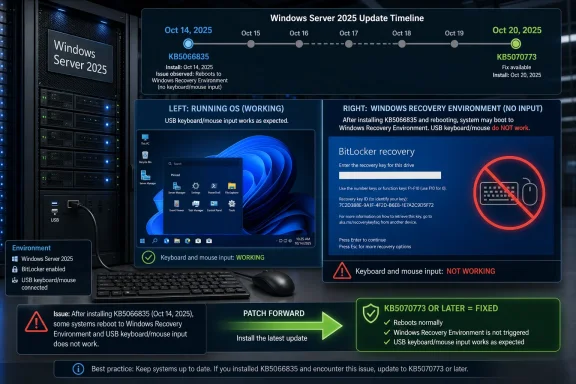
Microsoft says the regression arrived with Windows Server 2025’s October 14, 2025 security update, KB5066835, which moved Server 2025 to OS build 26100.6899. After that update, USB keyboards and mice could stop functioning inside Windows Recovery Environment, even though those same devices continued to work normally inside the running operating system.
That distinction matters. A server can look perfectly healthy during routine administration, remote management, patch validation, and ordinary workload checks. The failure only becomes visible when the machine enters WinRE, which is exactly the moment when the administrator has the least room for improvisation.
Microsoft resolved the issue in the out-of-band KB5070773 update released on October 20, 2025, and in later updates. In practical terms, the remediation target is simple: do not leave Windows Server 2025 systems stranded on KB5066835 if those systems may need BitLocker recovery, Startup Repair, reset workflows, or other WinRE tools.
For administrators, the clean check is straightforward. Confirm whether the server is Windows Server 2025, then check whether KB5070773 or a later cumulative update is installed. If the server is still on KB5066835, schedule and apply the newer update through your normal Windows Update, WSUS, Microsoft Configuration Manager, or offline servicing process, then reboot and verify the installed update history.
For a single server, an administrator can check installed hotfixes from PowerShell with
The remediation should be treated as a recovery-readiness fix, not just a monthly patch compliance item. If a server has no reason to enter WinRE today, that is good luck, not mitigation. The bug lives in the emergency path, and emergency paths are rarely tested as often as production boot.
After installing KB5070773 or a later update, confirm that the system reports the newer update level and that any maintenance window includes a successful reboot. Where possible, validate recovery media and out-of-band access plans separately. The point is not to turn every patch cycle into a disaster-recovery drill, but to avoid discovering a broken recovery interface during an actual incident.
That is why this bug is sharper than the familiar “BitLocker asked for a key after an update” story. A BitLocker prompt is irritating but manageable when the keyboard works and the recovery key is available. A BitLocker prompt inside an environment that cannot see the USB keyboard is a different class of failure.
Microsoft’s own BitLocker recovery guidance makes clear that Windows RE can be involved in recovering access to BitLocker-protected drives, and that recovery keys may need to be entered there depending on how the system reached recovery. The broken component, then, sits directly in the workflow administrators rely on when the boot chain has already gone wrong.
The result is an ugly dependency inversion. The encrypted server needs WinRE to help it recover; WinRE needs USB input to let the admin act; and KB5066835 can break that input path. The encryption layer is not the bug, but BitLocker makes the consequences far more visible.
Server recovery is rarely a one-person, one-keyboard problem. It may involve remote hands in a data center, a crash cart in a branch office, a lights-out management console, a storage controller change, a TPM event, or an after-hours escalation where the person with the BitLocker key is not the person standing near the machine.
In that world, “USB devices do not function in WinRE” is not a cosmetic defect. It can extend downtime, complicate change windows, and force administrators to choose between waiting for better access and attempting more invasive recovery steps. A broken mouse is not the issue; a blocked recovery decision tree is.
This is also why WindowsForum readers have been circling similar BitLocker recovery stories for more than a year. Prior Windows update incidents trained administrators to ask whether they have the key. This one adds a harsher question: even if you have the key, can you enter it where Windows is asking for it?
That does not mean every Server 2025 deployment hit the problem, and Microsoft’s public note does not provide a root-cause narrative. The company’s documented symptom is narrower: after KB5066835, USB keyboards and mice do not function in WinRE, preventing navigation of recovery options, while continuing to work in the normal operating system.
The absence of a detailed root cause should shape admin behavior. There is no published tweak to safely make KB5066835 “good enough” for recovery. The fix path Microsoft names is KB5070773 or later, which makes patch-forward the cleanest and most supportable answer.
This is where generic BitLocker troubleshooting articles tend to under-serve server administrators. Back up the recovery key, know where it is stored, and document the unlock process — all of that remains necessary. But for this specific Server 2025 regression, the key management story is only half the incident. Input availability inside WinRE is the other half.
The reason is simple: this is a recovery bug tied to a specific October update state. Moving forward to KB5070773 or later gets the server onto Microsoft’s corrected path without trying to preserve an older vulnerable or partially serviced state. In production infrastructure, that is usually the more defensible choice.
There is also a practical timing issue. If the server is still bootable and manageable, the administrator has the luxury of patching in the running operating system. Waiting until the server is already in WinRE means the update path may no longer be available, and the USB input problem may already be blocking the obvious recovery controls.
That is the nasty asymmetry at the center of this bug. It is easy to fix while Windows is running. It may be painfully hard to work around once Windows is not.
For more mature shops, this is a good moment to review how Server 2025 recovery is actually performed. Check where BitLocker recovery passwords are stored, who can retrieve them, how remote console access works, and whether the person executing the recovery can enter data into pre-boot and WinRE interfaces. None of that requires inventing a new policy; it requires proving the old one still matches the platform.
The validation should also include a sober look at “headless” assumptions. Many servers are administered remotely for months or years, and USB keyboard functionality may be treated as a last-resort detail. This incident shows why last-resort details are production dependencies.
There is no need to dramatize every cumulative update into a crisis. But there is a need to distinguish normal patch risk from recovery-path risk. KB5066835 crossed that line because it could break the very interface used to recover from other failures.
A desktop user who loses input in recovery has a bad day. A server admin who loses input in recovery during an outage may have a service-impacting incident, an escalation bridge, and an executive asking why a recovery key was not enough. The answer, in this case, is that the recovery workflow is only as reliable as the environment that hosts it.
Microsoft’s documentation is clear enough on the fix but thin on causality. That leaves administrators with an unglamorous but useful conclusion: do not wait for a perfect explanation before applying the corrected update. The published chronology is sufficient for action.
The competitive coverage around BitLocker bugs often collapses into the same advice: find the key, back up the key, enter the key. For Windows Server 2025 on KB5066835, that advice is incomplete. The better question is whether the server can accept input at the point where the key becomes useful.
There are always edge cases. A tightly isolated lab system, a disposable test VM, or a server with a carefully staged rebuild path may not carry the same urgency. But those are exceptions that prove the rule: the more a machine matters, the less acceptable it is to leave its recovery interface in a known-bad state.
Administrators should also resist treating this as a BitLocker indictment. BitLocker is doing the job it is designed to do: protect data when the boot environment cannot be trusted or accessed normally. The failure here is that an operating-system update impaired a recovery environment component that BitLocker workflows may depend on.
That distinction matters for policy. Turning off encryption to avoid recovery friction is the wrong lesson. Keeping encrypted systems patched beyond the broken recovery build is the right one.
That is the story Microsoft’s terse known-issue entry does not quite shout loudly enough. This is not merely another BitLocker nuisance where the recovery key is inconveniently required. It is a recovery-path failure: the place you go when the boot path is broken may itself be unable to accept the keystrokes and mouse clicks needed to recover.
 Microsoft Fixed the Bug, but the Trap Is Still in the Timeline
Microsoft says the regression arrived with Windows Server 2025’s October 14, 2025 security update, KB5066835, which moved Server 2025 to OS build 26100.6899. After that update, USB keyboards and mice could stop functioning inside Windows Recovery Environment, even though those same devices continued to work normally inside the running operating system.That distinction matters. A server can look perfectly healthy during routine administration, remote management, patch validation, and ordinary workload checks. The failure only becomes visible when the machine enters WinRE, which is exactly the moment when the administrator has the least room for improvisation.
Microsoft resolved the issue in the out-of-band KB5070773 update released on October 20, 2025, and in later updates. In practical terms, the remediation target is simple: do not leave Windows Server 2025 systems stranded on KB5066835 if those systems may need BitLocker recovery, Startup Repair, reset workflows, or other WinRE tools.
For administrators, the clean check is straightforward. Confirm whether the server is Windows Server 2025, then check whether KB5070773 or a later cumulative update is installed. If the server is still on KB5066835, schedule and apply the newer update through your normal Windows Update, WSUS, Microsoft Configuration Manager, or offline servicing process, then reboot and verify the installed update history.
The First Job Is to Patch Before Recovery Becomes the Test
The recommended operational sequence is not exotic. Inventory the Server 2025 estate, flag systems that installed the October 14 update, and patch them forward to KB5070773 or later. Do this before firmware changes, boot troubleshooting, storage work, TPM-related maintenance, or any activity likely to trigger BitLocker recovery.For a single server, an administrator can check installed hotfixes from PowerShell with
Get-HotFix and look for KB5066835, KB5070773, or a later cumulative update. In larger environments, the same question belongs in the patch-management console: which Server 2025 machines show OS build 26100.6899, and which have advanced beyond it?The remediation should be treated as a recovery-readiness fix, not just a monthly patch compliance item. If a server has no reason to enter WinRE today, that is good luck, not mitigation. The bug lives in the emergency path, and emergency paths are rarely tested as often as production boot.
After installing KB5070773 or a later update, confirm that the system reports the newer update level and that any maintenance window includes a successful reboot. Where possible, validate recovery media and out-of-band access plans separately. The point is not to turn every patch cycle into a disaster-recovery drill, but to avoid discovering a broken recovery interface during an actual incident.
BitLocker Turns a USB Regression Into a Recovery Dead End
BitLocker recovery is not just a Windows dialog with a long number. In many real-world cases it is a pre-boot or WinRE workflow where the administrator must supply credentials, a recovery password, or other input before the protected volume can be unlocked and recovery can continue.That is why this bug is sharper than the familiar “BitLocker asked for a key after an update” story. A BitLocker prompt is irritating but manageable when the keyboard works and the recovery key is available. A BitLocker prompt inside an environment that cannot see the USB keyboard is a different class of failure.
Microsoft’s own BitLocker recovery guidance makes clear that Windows RE can be involved in recovering access to BitLocker-protected drives, and that recovery keys may need to be entered there depending on how the system reached recovery. The broken component, then, sits directly in the workflow administrators rely on when the boot chain has already gone wrong.
The result is an ugly dependency inversion. The encrypted server needs WinRE to help it recover; WinRE needs USB input to let the admin act; and KB5066835 can break that input path. The encryption layer is not the bug, but BitLocker makes the consequences far more visible.
Server 2025 Makes This More Than a Desktop Annoyance
Windows Server 2025 is Microsoft’s current long-term servicing release for Windows Server, which means it is the platform organizations are supposed to trust for durable infrastructure deployments. That is precisely why a recovery-environment regression deserves more attention on servers than it might receive on a lightly managed client PC.Server recovery is rarely a one-person, one-keyboard problem. It may involve remote hands in a data center, a crash cart in a branch office, a lights-out management console, a storage controller change, a TPM event, or an after-hours escalation where the person with the BitLocker key is not the person standing near the machine.
In that world, “USB devices do not function in WinRE” is not a cosmetic defect. It can extend downtime, complicate change windows, and force administrators to choose between waiting for better access and attempting more invasive recovery steps. A broken mouse is not the issue; a blocked recovery decision tree is.
This is also why WindowsForum readers have been circling similar BitLocker recovery stories for more than a year. Prior Windows update incidents trained administrators to ask whether they have the key. This one adds a harsher question: even if you have the key, can you enter it where Windows is asking for it?
The Out-of-Band Fix Is a Signal, Not Just a Patch Number
Microsoft’s decision to ship KB5070773 out of band six days after the October security update is the tell. Out-of-band updates are not issued for every rough edge in Windows servicing. They are used when the vendor decides the normal cadence is too slow for the risk or operational pain involved.That does not mean every Server 2025 deployment hit the problem, and Microsoft’s public note does not provide a root-cause narrative. The company’s documented symptom is narrower: after KB5066835, USB keyboards and mice do not function in WinRE, preventing navigation of recovery options, while continuing to work in the normal operating system.
The absence of a detailed root cause should shape admin behavior. There is no published tweak to safely make KB5066835 “good enough” for recovery. The fix path Microsoft names is KB5070773 or later, which makes patch-forward the cleanest and most supportable answer.
This is where generic BitLocker troubleshooting articles tend to under-serve server administrators. Back up the recovery key, know where it is stored, and document the unlock process — all of that remains necessary. But for this specific Server 2025 regression, the key management story is only half the incident. Input availability inside WinRE is the other half.
Rollback Is the Wrong Center of Gravity
Admins often ask whether they can roll back a bad update, and in some Windows servicing incidents that becomes the natural first move. Here, rollback should not be the center of gravity unless an organization’s change-control process leaves no other workable option. Microsoft has already provided a forward fix, and later cumulative updates include the resolution.The reason is simple: this is a recovery bug tied to a specific October update state. Moving forward to KB5070773 or later gets the server onto Microsoft’s corrected path without trying to preserve an older vulnerable or partially serviced state. In production infrastructure, that is usually the more defensible choice.
There is also a practical timing issue. If the server is still bootable and manageable, the administrator has the luxury of patching in the running operating system. Waiting until the server is already in WinRE means the update path may no longer be available, and the USB input problem may already be blocking the obvious recovery controls.
That is the nasty asymmetry at the center of this bug. It is easy to fix while Windows is running. It may be painfully hard to work around once Windows is not.
The Validation Work Belongs in the Maintenance Window
The minimum validation is to confirm the installed update level after reboot. If the system still reports KB5066835 as the relevant October state and does not show KB5070773 or a later cumulative update, the risk remains. If the system has moved to KB5070773 or a later update, Microsoft says the issue is addressed.For more mature shops, this is a good moment to review how Server 2025 recovery is actually performed. Check where BitLocker recovery passwords are stored, who can retrieve them, how remote console access works, and whether the person executing the recovery can enter data into pre-boot and WinRE interfaces. None of that requires inventing a new policy; it requires proving the old one still matches the platform.
The validation should also include a sober look at “headless” assumptions. Many servers are administered remotely for months or years, and USB keyboard functionality may be treated as a last-resort detail. This incident shows why last-resort details are production dependencies.
There is no need to dramatize every cumulative update into a crisis. But there is a need to distinguish normal patch risk from recovery-path risk. KB5066835 crossed that line because it could break the very interface used to recover from other failures.
The Server Room Lesson Hidden in One Bad Build
This incident is small in the way many Windows servicing incidents are small: a specific operating system, a specific update, a specific environment, a specific symptom. It is also large in the way infrastructure failures are large: the blast radius is determined less by how many machines are affected than by when the failure appears.A desktop user who loses input in recovery has a bad day. A server admin who loses input in recovery during an outage may have a service-impacting incident, an escalation bridge, and an executive asking why a recovery key was not enough. The answer, in this case, is that the recovery workflow is only as reliable as the environment that hosts it.
Microsoft’s documentation is clear enough on the fix but thin on causality. That leaves administrators with an unglamorous but useful conclusion: do not wait for a perfect explanation before applying the corrected update. The published chronology is sufficient for action.
The competitive coverage around BitLocker bugs often collapses into the same advice: find the key, back up the key, enter the key. For Windows Server 2025 on KB5066835, that advice is incomplete. The better question is whether the server can accept input at the point where the key becomes useful.
The Patch Decision Is Already Made for Most Server 2025 Shops
For most Windows Server 2025 environments, the decision is not whether to install KB5070773 or later. The decision is how quickly to remove KB5066835-only systems from the estate. If the server is production, encrypted, and potentially dependent on WinRE, the update belongs in the next controlled maintenance window rather than the next leisurely compliance cycle.There are always edge cases. A tightly isolated lab system, a disposable test VM, or a server with a carefully staged rebuild path may not carry the same urgency. But those are exceptions that prove the rule: the more a machine matters, the less acceptable it is to leave its recovery interface in a known-bad state.
Administrators should also resist treating this as a BitLocker indictment. BitLocker is doing the job it is designed to do: protect data when the boot environment cannot be trusted or accessed normally. The failure here is that an operating-system update impaired a recovery environment component that BitLocker workflows may depend on.
That distinction matters for policy. Turning off encryption to avoid recovery friction is the wrong lesson. Keeping encrypted systems patched beyond the broken recovery build is the right one.
The KB5070773 Checklist for Server 2025 Admins
The operational lesson is compact enough to put on a change-review slide. KB5066835 introduced the WinRE USB input regression; KB5070773 and later updates fix it; BitLocker recovery can depend on WinRE input; therefore Server 2025 machines should not be left on the October 14 build if they may need recovery.- Windows Server 2025 systems that installed KB5066835 should be treated as exposed to a WinRE USB keyboard and mouse regression until patched forward.
- KB5070773, released on October 20, 2025, is the first Microsoft-named out-of-band fix for this Server 2025 issue.
- Any later cumulative update should also carry the fix, so the practical target is KB5070773 or newer rather than that exact package forever.
- BitLocker recovery planning should verify not only that recovery keys exist, but that administrators can actually provide input in the recovery environment.
- The safest time to fix this is while the server still boots normally, because the bug becomes most painful after the system has already entered recovery.
References
- Primary source: learn.microsoft.com

BitLocker recovery: known issues - Windows Client | Microsoft Learn
Describes common issues that can occur that prevent BitLocker from behaving as expected when recovering a drive, or may cause BitLocker to start recovery unexpectedly. The article provides guidance for addressing those issues.learn.microsoft.com - Primary source: WindowsForum

Microsoft Fixes BitLocker Recovery Bug: Essential Updates for Windows Users | Windows Forum
In August 2024, Microsoft addressed a significant issue related to the BitLocker recovery feature that impacted users of Windows 10, Windows 11, and various...windowsforum.com
