

DavMail 6.8 has been released as the newest version of the open-source Exchange and Microsoft 365 gateway, adding active Microsoft Graph support in its graphical interface while improving calendar behavior, authentication handling, Linux packaging, macOS compatibility, and the project’s redesigned configuration model. The release matters because it arrives just as Microsoft’s long goodbye to Exchange Web Services is becoming an operational deadline rather than a distant architectural preference. For users who prefer Thunderbird, Evolution-adjacent workflows, CalDAV calendars, CardDAV address books, or scriptable Unix mail stacks, DavMail is less a convenience than a pressure valve. Version 6.8 is therefore not just a maintenance release; it is a small but telling sign of how third-party Microsoft 365 access is being dragged into the Graph era.
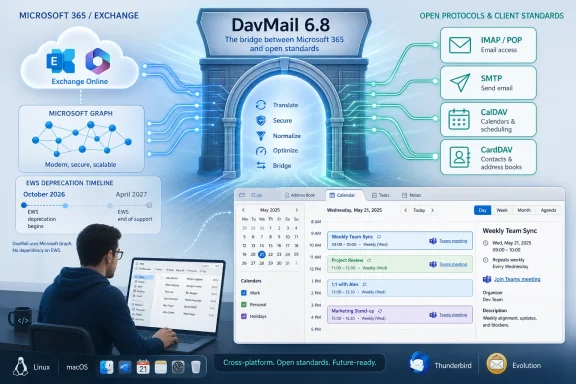
DavMail has always lived in the uncomfortable space between user preference and enterprise gravity. Microsoft Exchange and Microsoft 365 are dominant groupware platforms, but many technically minded users do not want Outlook to be the only sanctioned interface to their inbox, calendar, and contacts. DavMail answers that mismatch by translating Exchange access into older, standardized protocols: IMAP and POP for mail retrieval, SMTP for sending, CalDAV for calendars, CardDAV for contacts, and LDAP for address lookups.
That design has made it especially valuable on Linux, where Outlook has never been a native desktop citizen in the way it is on Windows and macOS. Thunderbird users, Emacs die-hards, lightweight mail-client loyalists, and administrators with automated workflows have all leaned on DavMail because it lets Microsoft’s server-side world appear as something more open and modular on the client side.
But DavMail’s old bargain depended heavily on Exchange Web Services, or EWS. EWS was never exactly elegant, but it was documented, powerful, and good enough to sustain a large ecosystem of third-party Exchange integrations. Microsoft’s decision to retire EWS in Exchange Online changes the ground under every tool in that ecosystem.
That is why Graph support in DavMail 6.8 deserves more attention than a normal checkbox in a changelog. The project is not merely adding another backend. It is trying to preserve the same user-facing promise — bring your own client, keep your own workflow — while Microsoft changes the protocol layer underneath.
The practical problem is that EWS is not always visible as a neat line item in an inventory spreadsheet. It hides inside backup tools, CRM integrations, public-folder workflows, calendar sync utilities, legacy line-of-business applications, and desktop clients that users have quietly depended on for years. The closer the cutoff gets, the more those quiet dependencies become change-management problems.
DavMail sits in the middle of that story. For a single user, it may be the difference between using Thunderbird and being forced back into Outlook or Outlook on the web. For an administrator, it may represent an unofficial but important accommodation for Linux desktops, shared calendar workflows, or users who need standards-based access for accessibility, automation, or preference reasons.
Version 6.8’s active Graph support is therefore less about novelty than survival. Microsoft Graph is the strategic API for Microsoft 365, and whatever one thinks of its breadth, permission model, or parity with EWS, it is where Microsoft is putting the future. DavMail has to follow that current or risk becoming a bridge to a road Microsoft is closing.
In the older Exchange world, users often thought in terms of a server URL, a username, a password, and maybe a domain. Today’s Microsoft 365 tenant may involve OAuth, OpenID Connect, device-code flows, interactive browser sign-in, conditional access rules, multifactor authentication, tenant-specific app registrations, and policies that distinguish between personal Microsoft accounts and organizational identities. The “mail server settings” dialog has become a front end for an identity platform.
By separating connection mode from authentication method, DavMail is admitting that reality rather than burying it in a single confusing selection. Administrators need to know whether they are connecting through Graph or EWS, and they separately need to understand how tokens are acquired, refreshed, and constrained. Users need fewer magic incantations and more visible cause and effect.
This is also where open-source infrastructure can outperform vendor polish in a subtle way. Microsoft’s official clients tend to hide the machinery until policy blocks something, at which point the user is left with a generic sign-in failure. DavMail’s audience often wants the opposite: enough exposure of the moving parts to troubleshoot them.
DavMail’s job is especially tricky because it is not simply exposing Graph to developers. It is translating Graph-backed Exchange data into traditional protocols and client expectations. A CalDAV client expects calendar behavior to look like CalDAV. An IMAP client expects folders and message state to behave like IMAP. Graph may expose the underlying mailbox and calendar data, but DavMail still has to make that data feel coherent through old protocols that were never designed around Microsoft 365’s modern identity and collaboration model.
That translation layer is where many of the 6.8 fixes become meaningful. The release includes Graph-related fixes for folder handling, expired sessions, attendee status, mailbox behavior, and invalid_grant errors affecting live.com accounts. Those are not glamorous features. They are the gritty edge cases that determine whether a user trusts a bridge application or abandons it after the third mysterious sync failure.
The introduction of default OIDC enablement when using Graph for token retrieval points in the same direction. Graph support is not useful if token handling remains brittle. The modern Microsoft 365 stack is as much about identity choreography as mailbox access, and DavMail has to become competent at both.
The release adds automatic Teams meeting creation through the
For users living outside Outlook, Teams meeting creation has often been one of the points where the Microsoft ecosystem reasserts itself. You can read mail in Thunderbird and sync a calendar through CalDAV, but the moment you need to create a meeting that behaves like a native Teams invite, the limits of the bridge become visible. DavMail’s new option does not erase every gap, but it narrows one that users are likely to encounter every week.
The EWS side also gets recurrence improvements, while CalDAV gains timezone fixes and new mappings, including Central Standard Time and Asia/Singapore. Mixed-timezone events are exactly the sort of mundane enterprise reality that punishes weak calendar software. International teams, daylight-saving transitions, travel, and recurring meetings can turn a minor mapping bug into missed calls and duplicate entries.
In that sense, DavMail 6.8 looks like a release shaped by lived use rather than roadmap theater. The project is working on the APIs that Microsoft’s schedule demands, but it is also patching the calendar weirdness that determines whether people can actually rely on it.
The release resolves missing
Wayland, in particular, has become a long-running transition tax for desktop applications. The Linux desktop is still split across toolkits, distributions, display-server assumptions, sandboxing models, and packaging ecosystems. An app like DavMail, written in Java and using SWT, has to navigate that matrix while also embedding browser-based authentication flows that modern Microsoft sign-in often requires.
That is an awkward stack, but it is also the reality of enterprise Linux desktops in 2026. The web has become the sign-in surface for almost everything, even for local desktop utilities. If the embedded browser looks broken, shows the wrong icon, or fails under a display-server transition, users do not experience that as a subtle toolkit issue. They experience it as “Microsoft 365 login does not work.”
DavMail 6.8’s Linux fixes are therefore part of the Graph story, not an unrelated footnote. Modern authentication has made desktop integration more important, not less.
Version 6.8 disables the URL field in O365 mode, improves paste support in O365 Interactive and Manual authentication modes, switches to 128×128 icons, and enables tray icon auto-sizing. None of this changes the architecture. All of it reduces friction at the exact point where users are most likely to misconfigure something.
The disabled URL field is a good example. If a mode does not require or should not allow a particular server URL, leaving that field editable invites confusion. A user will assume every blank field is a problem and every editable field is a responsibility. Removing unnecessary choices is not dumbing down; it is respecting the complexity that remains.
Improved paste support in authentication modes is similarly mundane and important. OAuth flows and manual authentication steps often involve copying codes, tokens, or generated values between windows. A tiny clipboard bug can turn a secure authentication flow into a user-hostile ritual. DavMail’s audience may be technical, but technical users still benefit from software that does not make them fight the UI.
The refreshed icons and tray behavior also signal a project that understands how much of its use happens as a background service. A gateway should become invisible once configured. If the tray icon is broken, ugly, oversized, or unreliable, the application keeps reminding users that the bridge is there.
macOS has native Exchange account support, but not every organization’s policy, workflow, or user preference fits neatly into Apple’s account stack. Some users want Thunderbird on macOS. Others want a consistent client setup across Linux, Windows, and Mac. Some administrators prefer to standardize around protocol bridges because they can reason about local ports and standard clients more easily than about every proprietary mail client’s Exchange implementation.
DavMail’s cross-platform nature is therefore part of its value. It can present a similar standards-based surface across operating systems even as the underlying Microsoft access path shifts. That does not make it a universal solution, and it certainly does not remove tenant policy constraints, but it gives users and admins another option in a narrowing field.
The macOS fixes also show that Graph migration is not simply a server-side or API-level problem. Every client environment has its own desktop integration quirks, and authentication flows increasingly depend on browser components, tray behavior, and operating-system conventions. The gateway has to be boring everywhere, which is harder than it sounds.
Graph support changes the risk profile. Permissions, consent, token refresh behavior, conditional access, tenant restrictions, and account type differences can all affect whether a DavMail deployment works. A configuration that worked under EWS may not map cleanly to Graph, especially in tightly managed Microsoft 365 tenants.
Administrators should also remember that DavMail is often used at the edge of official support. It may be tolerated, undocumented, or invisible to central IT. That makes it more important to identify where it exists, not less. Shadow dependencies become visible at the worst possible time: after a platform provider flips a switch.
The saner approach is to treat DavMail 6.8 as an opportunity to run controlled tests. Verify Graph mode with representative users. Check Teams meeting creation. Test recurring meetings, shared mailboxes, folders, attendee status, and long-lived sessions. Confirm how the application behaves after token expiration, password changes, MFA prompts, and conditional-access policy updates.
The question is not whether DavMail 6.8 is “ready” in some abstract sense. The question is whether it is ready for your tenant, your clients, and your policies.
That shift cuts both ways. Graph can be more controllable and more aligned with modern identity security than legacy protocol access. Administrators can define app permissions, enforce conditional access, and monitor usage in ways that were not always clean under older approaches. From a security standpoint, the move away from older Exchange access patterns is not irrational.
At the same time, centralization has costs. When Microsoft changes an API, an authentication behavior, or a consent requirement, third-party tools must adapt on Microsoft’s timetable. Users who prefer open clients may find their choices constrained not by the client’s capabilities but by tenant policy and API availability. DavMail can bridge protocols, but it cannot repeal the governance model of Microsoft 365.
That is the uncomfortable middle ground version 6.8 inhabits. It is a win for user choice, but it is also a reminder that user choice now depends on successful integration with Microsoft’s preferred identity and API stack. The old dream of “just use IMAP” has been replaced by a more conditional promise: use IMAP locally, as long as the gateway can satisfy Graph, OAuth, and tenant policy upstream.
That is exactly what the moment requires. Microsoft’s EWS retirement does not leave third-party tools with the luxury of perfect sequencing. Projects have to ship Graph support, gather feedback, fix the strange cases, and iterate while users still have EWS as a fallback. Waiting until October 2026 would turn every bug into an outage.
For WindowsForum readers, the broader lesson extends beyond DavMail. Any organization with non-Outlook Exchange Online access should be auditing now. That includes mail clients, backup products, room-booking systems, CRM integrations, public-folder tools, scripts, monitoring systems, and anything else that may be speaking EWS quietly in the background.
DavMail’s release is useful because it makes one migration path more tangible. It does not eliminate the need to test, document, and communicate. The bridge is being rebuilt while traffic is still moving across it.
 DavMail Moves From Escape Hatch to Migration Tool
DavMail has always lived in the uncomfortable space between user preference and enterprise gravity. Microsoft Exchange and Microsoft 365 are dominant groupware platforms, but many technically minded users do not want Outlook to be the only sanctioned interface to their inbox, calendar, and contacts. DavMail answers that mismatch by translating Exchange access into older, standardized protocols: IMAP and POP for mail retrieval, SMTP for sending, CalDAV for calendars, CardDAV for contacts, and LDAP for address lookups.That design has made it especially valuable on Linux, where Outlook has never been a native desktop citizen in the way it is on Windows and macOS. Thunderbird users, Emacs die-hards, lightweight mail-client loyalists, and administrators with automated workflows have all leaned on DavMail because it lets Microsoft’s server-side world appear as something more open and modular on the client side.
But DavMail’s old bargain depended heavily on Exchange Web Services, or EWS. EWS was never exactly elegant, but it was documented, powerful, and good enough to sustain a large ecosystem of third-party Exchange integrations. Microsoft’s decision to retire EWS in Exchange Online changes the ground under every tool in that ecosystem.
That is why Graph support in DavMail 6.8 deserves more attention than a normal checkbox in a changelog. The project is not merely adding another backend. It is trying to preserve the same user-facing promise — bring your own client, keep your own workflow — while Microsoft changes the protocol layer underneath.
Microsoft’s Graph Deadline Turns a Niche Release Into a Timely One
Microsoft announced years ago that EWS would stop receiving feature updates, and the company has since moved from soft deprecation to a concrete Exchange Online retirement path. EWS disablement is scheduled to begin in October 2026, with full disablement following in April 2027. That timeline gives administrators some runway, but not much comfort.The practical problem is that EWS is not always visible as a neat line item in an inventory spreadsheet. It hides inside backup tools, CRM integrations, public-folder workflows, calendar sync utilities, legacy line-of-business applications, and desktop clients that users have quietly depended on for years. The closer the cutoff gets, the more those quiet dependencies become change-management problems.
DavMail sits in the middle of that story. For a single user, it may be the difference between using Thunderbird and being forced back into Outlook or Outlook on the web. For an administrator, it may represent an unofficial but important accommodation for Linux desktops, shared calendar workflows, or users who need standards-based access for accessibility, automation, or preference reasons.
Version 6.8’s active Graph support is therefore less about novelty than survival. Microsoft Graph is the strategic API for Microsoft 365, and whatever one thinks of its breadth, permission model, or parity with EWS, it is where Microsoft is putting the future. DavMail has to follow that current or risk becoming a bridge to a road Microsoft is closing.
The New Configuration Model Acknowledges the Real Problem
One of the more important changes in DavMail 6.8 is not Graph itself but the way the application now presents configuration. The release separates connection modes, such as Graph and EWS, from authentication methods. That sounds like a small user-interface improvement, but it reflects a deeper truth about modern Microsoft 365 access: the protocol and the sign-in path are no longer the same conversation.In the older Exchange world, users often thought in terms of a server URL, a username, a password, and maybe a domain. Today’s Microsoft 365 tenant may involve OAuth, OpenID Connect, device-code flows, interactive browser sign-in, conditional access rules, multifactor authentication, tenant-specific app registrations, and policies that distinguish between personal Microsoft accounts and organizational identities. The “mail server settings” dialog has become a front end for an identity platform.
By separating connection mode from authentication method, DavMail is admitting that reality rather than burying it in a single confusing selection. Administrators need to know whether they are connecting through Graph or EWS, and they separately need to understand how tokens are acquired, refreshed, and constrained. Users need fewer magic incantations and more visible cause and effect.
This is also where open-source infrastructure can outperform vendor polish in a subtle way. Microsoft’s official clients tend to hide the machinery until policy blocks something, at which point the user is left with a generic sign-in failure. DavMail’s audience often wants the opposite: enough exposure of the moving parts to troubleshoot them.
Active Graph Support Is a Bet on Imperfect Parity
Microsoft Graph is broad, modern, and central to Microsoft’s developer strategy, but it is not a drop-in replacement for every EWS behavior. Microsoft itself has acknowledged parity gaps in some areas, and administrators dealing with migration projects already know that “move to Graph” can mean anything from a clean SDK swap to a full redesign of assumptions.DavMail’s job is especially tricky because it is not simply exposing Graph to developers. It is translating Graph-backed Exchange data into traditional protocols and client expectations. A CalDAV client expects calendar behavior to look like CalDAV. An IMAP client expects folders and message state to behave like IMAP. Graph may expose the underlying mailbox and calendar data, but DavMail still has to make that data feel coherent through old protocols that were never designed around Microsoft 365’s modern identity and collaboration model.
That translation layer is where many of the 6.8 fixes become meaningful. The release includes Graph-related fixes for folder handling, expired sessions, attendee status, mailbox behavior, and invalid_grant errors affecting live.com accounts. Those are not glamorous features. They are the gritty edge cases that determine whether a user trusts a bridge application or abandons it after the third mysterious sync failure.
The introduction of default OIDC enablement when using Graph for token retrieval points in the same direction. Graph support is not useful if token handling remains brittle. The modern Microsoft 365 stack is as much about identity choreography as mailbox access, and DavMail has to become competent at both.
Calendar Features Reveal Where Users Feel the Pain First
Mail gets the attention, but calendars often expose compatibility problems faster. A delayed email is annoying; a mangled recurring meeting can be professionally disastrous. DavMail 6.8’s calendar improvements therefore deserve more weight than their position in the changelog might suggest.The release adds automatic Teams meeting creation through the
davmail.caldav.enableOnlineMeeting setting. That is a notable concession to the reality that Microsoft 365 calendars are no longer just date-and-time stores. They are collaboration objects, often expected to generate online meeting links, track attendees, reflect status changes, and interoperate with Teams by default.For users living outside Outlook, Teams meeting creation has often been one of the points where the Microsoft ecosystem reasserts itself. You can read mail in Thunderbird and sync a calendar through CalDAV, but the moment you need to create a meeting that behaves like a native Teams invite, the limits of the bridge become visible. DavMail’s new option does not erase every gap, but it narrows one that users are likely to encounter every week.
The EWS side also gets recurrence improvements, while CalDAV gains timezone fixes and new mappings, including Central Standard Time and Asia/Singapore. Mixed-timezone events are exactly the sort of mundane enterprise reality that punishes weak calendar software. International teams, daylight-saving transitions, travel, and recurring meetings can turn a minor mapping bug into missed calls and duplicate entries.
In that sense, DavMail 6.8 looks like a release shaped by lived use rather than roadmap theater. The project is working on the APIs that Microsoft’s schedule demands, but it is also patching the calendar weirdness that determines whether people can actually rely on it.
Linux Packaging Fixes Are Not Cosmetic for This Audience
The Linux-specific fixes in DavMail 6.8 may look pedestrian next to Graph support, but they matter because DavMail’s core constituency includes Linux desktop users and administrators who package, deploy, and support Java applications in real environments. A missing dependency is not an aesthetic flaw. It is the difference between a tool being viable and a helpdesk ticket being inevitable.The release resolves missing
libswt-webkit-4-jni dependencies and corrects a regression affecting SUSE builds. It also includes SWT-related Wayland work that sets the application name to prevent a default icon when using the embedded browser window. These are the sorts of fixes that rarely make headlines but often determine whether a release feels professional on a modern Linux desktop.Wayland, in particular, has become a long-running transition tax for desktop applications. The Linux desktop is still split across toolkits, distributions, display-server assumptions, sandboxing models, and packaging ecosystems. An app like DavMail, written in Java and using SWT, has to navigate that matrix while also embedding browser-based authentication flows that modern Microsoft sign-in often requires.
That is an awkward stack, but it is also the reality of enterprise Linux desktops in 2026. The web has become the sign-in surface for almost everything, even for local desktop utilities. If the embedded browser looks broken, shows the wrong icon, or fails under a display-server transition, users do not experience that as a subtle toolkit issue. They experience it as “Microsoft 365 login does not work.”
DavMail 6.8’s Linux fixes are therefore part of the Graph story, not an unrelated footnote. Modern authentication has made desktop integration more important, not less.
The GUI Is Catching Up With the Complexity It Has to Hide
DavMail’s graphical interface has never been the main reason power users adopted it. Many administrators and Linux users are perfectly comfortable editing a properties file, running a daemon, or launching a tray utility with specific flags. But the GUI still matters because Microsoft 365 access has become too complicated to leave entirely to tribal knowledge.Version 6.8 disables the URL field in O365 mode, improves paste support in O365 Interactive and Manual authentication modes, switches to 128×128 icons, and enables tray icon auto-sizing. None of this changes the architecture. All of it reduces friction at the exact point where users are most likely to misconfigure something.
The disabled URL field is a good example. If a mode does not require or should not allow a particular server URL, leaving that field editable invites confusion. A user will assume every blank field is a problem and every editable field is a responsibility. Removing unnecessary choices is not dumbing down; it is respecting the complexity that remains.
Improved paste support in authentication modes is similarly mundane and important. OAuth flows and manual authentication steps often involve copying codes, tokens, or generated values between windows. A tiny clipboard bug can turn a secure authentication flow into a user-hostile ritual. DavMail’s audience may be technical, but technical users still benefit from software that does not make them fight the UI.
The refreshed icons and tray behavior also signal a project that understands how much of its use happens as a background service. A gateway should become invisible once configured. If the tray icon is broken, ugly, oversized, or unreliable, the application keeps reminding users that the bridge is there.
macOS Fixes Underscore That This Is Not Only a Linux Story
Although Linux users are the obvious beneficiaries of DavMail, version 6.8 also improves macOS Tahoe support and fixes regressions involving the tray icon and dock hiding. That matters because the pressure created by EWS retirement is not confined to one operating system. It affects anyone using non-Microsoft clients or workflows against Exchange Online.macOS has native Exchange account support, but not every organization’s policy, workflow, or user preference fits neatly into Apple’s account stack. Some users want Thunderbird on macOS. Others want a consistent client setup across Linux, Windows, and Mac. Some administrators prefer to standardize around protocol bridges because they can reason about local ports and standard clients more easily than about every proprietary mail client’s Exchange implementation.
DavMail’s cross-platform nature is therefore part of its value. It can present a similar standards-based surface across operating systems even as the underlying Microsoft access path shifts. That does not make it a universal solution, and it certainly does not remove tenant policy constraints, but it gives users and admins another option in a narrowing field.
The macOS fixes also show that Graph migration is not simply a server-side or API-level problem. Every client environment has its own desktop integration quirks, and authentication flows increasingly depend on browser components, tray behavior, and operating-system conventions. The gateway has to be boring everywhere, which is harder than it sounds.
Administrators Should Treat 6.8 as a Test Signal, Not a Free Pass
For IT departments, the temptation with a release like DavMail 6.8 is to treat Graph support as a solved problem: upgrade the gateway, switch the mode, move on. That would be a mistake. The release is important precisely because it creates something administrators can test before Microsoft’s EWS deadline becomes a production outage.Graph support changes the risk profile. Permissions, consent, token refresh behavior, conditional access, tenant restrictions, and account type differences can all affect whether a DavMail deployment works. A configuration that worked under EWS may not map cleanly to Graph, especially in tightly managed Microsoft 365 tenants.
Administrators should also remember that DavMail is often used at the edge of official support. It may be tolerated, undocumented, or invisible to central IT. That makes it more important to identify where it exists, not less. Shadow dependencies become visible at the worst possible time: after a platform provider flips a switch.
The saner approach is to treat DavMail 6.8 as an opportunity to run controlled tests. Verify Graph mode with representative users. Check Teams meeting creation. Test recurring meetings, shared mailboxes, folders, attendee status, and long-lived sessions. Confirm how the application behaves after token expiration, password changes, MFA prompts, and conditional-access policy updates.
The question is not whether DavMail 6.8 is “ready” in some abstract sense. The question is whether it is ready for your tenant, your clients, and your policies.
The Open-Source Bridge Now Carries More Policy Weight Than Before
DavMail’s appeal has always been partly philosophical. It lets users keep standards-based mail and calendar clients in a world where Microsoft would prefer the gravitational pull of Outlook, Teams, and the Microsoft 365 web experience. But as Microsoft tightens the Exchange Online access path around Graph and modern authentication, the bridge becomes more policy-sensitive.That shift cuts both ways. Graph can be more controllable and more aligned with modern identity security than legacy protocol access. Administrators can define app permissions, enforce conditional access, and monitor usage in ways that were not always clean under older approaches. From a security standpoint, the move away from older Exchange access patterns is not irrational.
At the same time, centralization has costs. When Microsoft changes an API, an authentication behavior, or a consent requirement, third-party tools must adapt on Microsoft’s timetable. Users who prefer open clients may find their choices constrained not by the client’s capabilities but by tenant policy and API availability. DavMail can bridge protocols, but it cannot repeal the governance model of Microsoft 365.
That is the uncomfortable middle ground version 6.8 inhabits. It is a win for user choice, but it is also a reminder that user choice now depends on successful integration with Microsoft’s preferred identity and API stack. The old dream of “just use IMAP” has been replaced by a more conditional promise: use IMAP locally, as long as the gateway can satisfy Graph, OAuth, and tenant policy upstream.
The Real Upgrade Is Time Bought Before the Cutoff
DavMail 6.8 should not be read as the final form of Graph-based Exchange access for open clients. It is better understood as a necessary acceleration. The project is moving Graph from roadmap item to active user-facing capability while continuing to sand down the rough edges in calendar sync, authentication, packaging, and desktop integration.That is exactly what the moment requires. Microsoft’s EWS retirement does not leave third-party tools with the luxury of perfect sequencing. Projects have to ship Graph support, gather feedback, fix the strange cases, and iterate while users still have EWS as a fallback. Waiting until October 2026 would turn every bug into an outage.
For WindowsForum readers, the broader lesson extends beyond DavMail. Any organization with non-Outlook Exchange Online access should be auditing now. That includes mail clients, backup products, room-booking systems, CRM integrations, public-folder tools, scripts, monitoring systems, and anything else that may be speaking EWS quietly in the background.
DavMail’s release is useful because it makes one migration path more tangible. It does not eliminate the need to test, document, and communicate. The bridge is being rebuilt while traffic is still moving across it.
The Practical Reading of DavMail 6.8 Is Narrow but Urgent
DavMail 6.8 is not a flashy release, and that is part of its significance. It is the kind of update that matters to people who have already learned that mail infrastructure breaks in unglamorous ways: a token stops refreshing, a calendar invite loses its timezone, a package dependency disappears, or a tray app fails to launch after a desktop upgrade.- DavMail 6.8 brings active Microsoft Graph support into the GUI, making Graph mode more accessible before Exchange Online’s EWS retirement begins in October 2026.
- The redesigned configuration model separates connection modes from authentication methods, which should make Microsoft 365 setup easier to reason about and troubleshoot.
- Automatic Teams meeting creation through the CalDAV online-meeting setting closes a practical gap for users who create meetings outside Outlook.
- Calendar handling remains a major focus, with recurrence, timezone, attendee-status, and mixed-timezone fixes all pointing to real-world interoperability pain.
- Linux users get important packaging and Wayland-related fixes, while macOS users benefit from Tahoe, tray, and dock-behavior improvements.
- Administrators should test Graph mode now rather than assuming that an EWS-era DavMail configuration will survive Microsoft’s 2026–2027 cutoff unchanged.
References
- Primary source: Linuxiac
Published: Fri, 12 Jun 2026 19:56:08 GMT

DavMail 6.8 Exchange Gateway Adds Active Graph Support
DavMail 6.8 improves Microsoft 365 access with active Graph support, better calendar handling, and several Linux packaging fixes.linuxiac.com - Related coverage: davmail.sourceforge.net

Change Log Report
davmail.sourceforge.net
- Related coverage: sourceforge.net
- Related coverage: pingvinus.ru

DavMail - Gateway для Exchange. Программы для Linux
Gateway для Microsoft Exchange. Подключение произвольных программ к серверам Exchange. pingvinus.ru
- Related coverage: linux.org

News - [Linuxiac] DavMail 6.6 Exchange Gateway Released with Office 365 Fixes | Linux.org
News - [Linuxiac] DavMail 6.6 Exchange Gateway Released with Office 365 Fixes - Linux.org - Friendly Linux Forum
www.linux.org
- Related coverage: freshports.org

FreshPorts -- mail/davmail: POP/IMAP/SMTP/Caldav/Carddav/LDAP Exchange Gateway
DavMail POP/IMAP/SMTP/Caldav/Carddav/LDAP Exchange Gateway DavMail is a POP/IMAP/SMTP/Caldav/Carddav/LDAP exchange gateway allowing users to use any mail/calendar client (e.g. Thunderbird with Lightning or Apple iCal) with an Exchange server, even from the internet or behind a firewall through...www.freshports.org

- Related coverage: pcurtis.com
- Official source: learn.microsoft.com

Deprecation of Exchange Web Services in Exchange Online | Microsoft Learn
Learn about deprecation of Exchange Web Services (EWS) in Exchange Onlinelearn.microsoft.com - Related coverage: support.workspace365.net

Microsoft EWS API deprecation | Workspace 365 Support Portal
Microsoft will disable the Exchange Web Services (EWS) API for Exchange Online in October 2026.support.workspace365.net - Related coverage: techradar.com

Microsoft starts the countdown for the end of Exchange Web Services | TechRadar
Exchange Web Services will be shut down from April 2027www.techradar.com - Related coverage: windowscentral.com

Microsoft to retire Exchange Web Services (EWS) in October 2026 | Windows Central
Microsoft is set to start blocking EWS requests from non-Microsoft apps to Exchange Online from October 2026. However, it's worth noting that this change will only apply to Microsoft 365 and Exchange Online (all environments).www.windowscentral.com - Official source: techcommunity.microsoft.com

Exchange Online EWS, Your Time is Almost Up | Microsoft Community Hub
We wanted to provide an update on Exchange Online EWS deprecation. techcommunity.microsoft.com
- Related coverage: support.cloudally.com
Transition to Microsoft Graph API – CLOUDALLY
OverviewMicrosoft has announced the retirement of Exchange Web Services (EWS) in favor of the Microsoft Graph API, with blocking of EWS...support.cloudally.com - Related coverage: fosdem.org
