

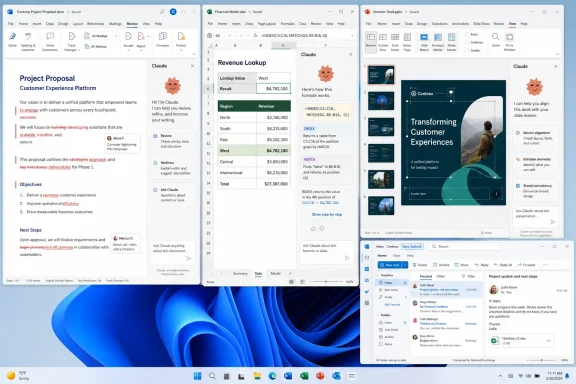
Anthropic’s Claude for Microsoft 365 is now available as official add-ins for Word, Excel, PowerPoint, and a beta Outlook experience, giving paid Claude users a serious alternative to Microsoft Copilot inside Office apps as of mid-2026. That matters because the Office AI fight is no longer about which chatbot can summarize a paragraph in a browser tab. It is about which assistant users trust with the documents, spreadsheets, decks, and workflows that still define daily knowledge work.
The switch from Copilot to Claude is easy to dismiss as personal preference. Copilot is Microsoft’s home-field player, wired into Microsoft 365, Windows, Edge, Teams, Outlook, and the administrative machinery enterprises already understand. But Claude’s arrival inside Office exposes a more uncomfortable truth for Microsoft: integration is not the same thing as judgment, and the best assistant for Office work may not be the one built by Office’s owner.
For the last two years, Microsoft has treated Copilot as the natural destination for workplace AI. That assumption made sense. Word, Excel, PowerPoint, Outlook, Teams, SharePoint, OneDrive, Windows, and Microsoft Graph give Redmond an extraordinary distribution advantage.
If AI is supposed to live where work happens, Microsoft controls an enormous amount of that real estate. Copilot can appear in the ribbon, in chat, in Windows search, in Outlook summaries, and in meeting recaps without asking the user to reimagine their workflow. That is the power of incumbency, and Microsoft has used it aggressively.
But incumbency also creates a trap. When a product is everywhere, users start judging it everywhere. A weak summary in Word, a timid rewrite in Outlook, a spreadsheet suggestion that feels generic, or a slide deck that looks like it came from a template graveyard all become part of the same impression.
Claude’s Office add-ins attack Microsoft from a different angle. Anthropic does not need to replace Microsoft 365. It only needs to convince users that the thinking layer inside those apps can come from somewhere else.
That is why the MakeUseOf account of cancelling Copilot and switching to Claude lands harder than an ordinary “I tried an app” post. The writer did not abandon Word, Excel, or PowerPoint. They abandoned Microsoft’s AI layer while keeping Microsoft’s productivity stack intact.
A separate chatbot requires the user to copy text out of a document, paste it into a chat window, explain the context, copy the result back, and then clean up the formatting. That friction is small once. Across dozens of edits, formula fixes, and slide revisions, it becomes the reason people stop using the tool.
Claude inside Word, Excel, and PowerPoint gets much closer to the ideal version of AI assistance: the model sees the working file, responds in context, and applies changes where the user is already working. The add-in does not make Claude part of Windows in the way Copilot is, but it makes Claude present at the point where many people actually need help.
The setup is not magic. Users need a paid Claude plan, a Microsoft 365 subscription with access to the relevant apps, and the add-ins installed from Microsoft’s marketplace or deployed by an administrator. That creates a cost stack rather than a one-click replacement.
Still, the fact that this works at all is strategically important. Microsoft 365 is not a sealed AI appliance. Office’s add-in architecture gives rivals a path into the suite, and Anthropic has now walked through it with a polished enough product to make power users reconsider the default.
A spelling checker notices a typo. A grammar checker flags a possible agreement error. A useful AI editor sees the lede, the rhythm of the paragraph, the overworked phrase, the sentence that is technically correct but dead on arrival, and the inconsistency that will irritate a careful reader.
That is where Anthropic’s model family has built much of its reputation. Claude has long appealed to writers, editors, analysts, and developers because it tends to handle long context, nuance, and prose structure with unusual care. It is not infallible, and it can still over-polish text into corporate oatmeal if left unchecked. But at its best, it edits with a sense of intent rather than merely applying rules.
The source account highlights Claude’s
That last detail matters. Tracked changes are the difference between assistance and vandalism. Writers and editors do not want an AI silently rewriting their work. They want a tool that can move quickly while leaving a paper trail.
Claude’s advantage here is not just model quality. It is workflow design. Skills turn repeated work into reusable editorial procedures, and Office integration turns those procedures into document operations. The result is not a chatbot commenting on a file from the outside. It is closer to a junior editor sitting inside the document, fast enough to be useful and constrained enough to be reviewable.
Word’s built-in tools were never designed to tell a writer whether a product claim is outdated, a release date has changed, or a vendor feature has moved from preview to general availability. Traditional Office intelligence is about the document as an object: spelling, grammar, layout, accessibility, comments, version history.
AI shifts the boundary. A model with browsing or retrieval can evaluate the relationship between the document and the outside world. That is a very different job.
In the MakeUseOf example, Claude reportedly checked an article for factual inaccuracies, performed web searches, confirmed most claims, and flagged the one that needed attention. That is exactly the kind of assistance modern writers need and exactly the kind of task that makes AI feel less like a novelty.
It also introduces risk. A confident model can miss a source, misunderstand a product page, or treat stale information as current. The answer is not blind trust. The answer is a workflow where the model accelerates the first pass and the human verifies the claims that matter.
For WindowsForum readers, this is the broader lesson: AI inside Office becomes valuable when it connects document mechanics to real-world knowledge. The assistant that merely rewrites a paragraph is useful. The assistant that knows the paragraph may now be wrong is much more disruptive.
The better pattern is for the model to avoid doing the math itself. It should understand the workbook, write the formula, explain the logic, and let Excel calculate the result. That is the right division of labor.
Claude’s Excel add-in is interesting because it appears to lean into that division. The model can inspect sheets, identify formulas, describe relationships between tabs, and explain constructs such as INDEX/MATCH in ordinary language. For anyone inheriting a workbook from a former employee, a consultant, or a finance team with a taste for nested formulas, that alone is valuable.
The more consequential feature is self-auditing. If Claude parses a vendor PDF into a sheet and then checks line items against subtotals and tax values, it is doing something more useful than “AI spreadsheet magic.” It is creating a review loop.
That loop is essential because spreadsheet errors are not edge cases. They are a normal feature of business life. Bad references, broken imports, pasted values, circular dependencies, and invisible assumptions routinely survive because the workbook looks authoritative enough to discourage inspection.
An assistant that can explain what a spreadsheet is doing may be more valuable than one that can generate a spreadsheet from scratch. Creation is flashy. Comprehension is what keeps teams from making expensive decisions on broken files.
The real test is whether an assistant can improve a deck that already exists. Existing decks contain brand rules, layout habits, half-finished arguments, overstuffed slides, missing transitions, and charts that need to remain editable. They are messy in ways that prompt-to-deck demos politely avoid.
Claude’s claimed template awareness is therefore more important than it sounds. Reading the slide master, matching layouts, respecting fonts, and using the existing color scheme are not cosmetic niceties. They determine whether the output can survive contact with a real workplace.
A deck that ignores the template is not a draft. It is extra work. Someone has to restyle it, align it, rebuild the chart, and explain why the AI’s idea of “modern design” looks nothing like the company’s actual presentation language.
The source account describes Claude cutting a six-bullet slide to three takeaways, merging overlapping slides, and converting bullets into editable charts. Those are revision tasks, not novelty tasks. They are also the tasks that most people actually perform the night before a meeting.
This is where Claude’s appeal becomes clear. It is not trying to be a universal design oracle. It is trying to help a user make an existing artifact cleaner, sharper, and more coherent while preserving the structure that Office users need to keep editing later.
For organizations deeply invested in Microsoft, Copilot’s appeal is not just feature quality. It is identity, compliance, licensing, procurement, governance, and support. CIOs do not buy AI tools the same way individual writers do.
A sysadmin evaluating Claude add-ins will ask different questions from a freelancer evaluating prose quality. Where does the data go? What permissions does the add-in request? How does deployment work? How are logs handled? What happens to prompts, outputs, file content, and telemetry? Can access be managed centrally? Does it comply with internal policy?
Microsoft has a built-in advantage on those questions because it already owns the tenant relationship. Many enterprises would rather buy a slightly weaker assistant from a vendor already inside their trust boundary than add another AI provider to the risk register.
That is especially true in regulated industries. The better model does not always win. The model that legal, security, procurement, and IT can approve before the next budget cycle often does.
But that does not erase Claude’s threat. It reframes it. Anthropic does not need to take the whole enterprise. It can win influential users inside the enterprise first: writers, analysts, consultants, product managers, finance operators, and executives who care more about output quality than bundle purity.
That makes Claude for Office a premium overlay rather than a cheap escape hatch. Users are not leaving Microsoft 365. They are paying Microsoft for the suite and Anthropic for the intelligence layer.
For heavy users, that can still make sense. If Claude saves hours of editing, formula debugging, deck cleanup, and document review, the subscription math becomes trivial. The same is true for professionals whose work quality directly affects revenue.
For casual users, it is harder to justify. If AI assistance means the occasional email rewrite or birthday slideshow, Copilot’s proximity may be enough. The best tool is not always the strongest model; it is the tool that fits the user’s frequency and tolerance for friction.
There is also the subscription fatigue problem. Every AI vendor wants to become a monthly utility bill. Users are increasingly forced to decide whether they want one general-purpose assistant, several specialized assistants, or the vendor-approved assistant bundled into the platform they already use.
That pressure may help Microsoft in the short term. It may also help Anthropic among users who have already decided they want the best possible assistant and are willing to pay separately for it.
When an AI assistant reads a Word document, inspects a workbook, or analyzes a deck, it is not merely autocomplete. It is processing potentially sensitive business content. Permission prompts are annoying because they interrupt flow, but they also force the user to acknowledge that a boundary is being crossed.
Copilot benefits from feeling native. But native can also make data movement feel invisible. That is convenient until a user wants to understand exactly what the assistant can see and where the data is processed.
Anthropic’s add-in approach may always carry more visible friction because it is a third-party service living inside Microsoft’s apps. That friction can be a disadvantage for casual users and a reassurance for cautious ones.
Administrators will want more than vibes. They will need formal documentation, deployment controls, retention policies, auditability, and clarity about which content is sent to which service. The Office AI wars will increasingly be fought as much in admin centers and security reviews as in product demos.
Those questions matter, but the deeper contest is over workflow defaults. The winning assistant is the one a user reaches for without thinking.
Microsoft’s strategy is to make Copilot the ambient default. It appears because Microsoft put it there. Anthropic’s strategy is to become the trusted specialist that users deliberately choose for higher-stakes work.
That division may persist. Copilot could become the assistant for quick summaries, meeting recaps, Windows actions, inbox triage, and Microsoft-native automation. Claude could become the assistant for writing, reasoning, editing, analysis, and document transformation.
But product categories rarely stay neatly separated. If Claude keeps improving its Office presence, users will ask why they need Copilot for document work. If Microsoft improves Copilot’s editorial judgment and spreadsheet reliability, users will ask why they should pay for Claude on top.
The most likely near-term outcome is fragmentation. Users will keep multiple assistants and develop instincts about which one to use for which job. That is inefficient, but it reflects where AI tools are today: powerful, uneven, and still highly dependent on task fit.
That is healthier for users. It prevents Microsoft from defining Office AI solely around its own model behavior, licensing strategy, and product cadence. It also pressures Microsoft to make Copilot better where users are most dissatisfied: quality, transparency, controllability, and consistency.
For Windows enthusiasts, this is an old story in a new wrapper. Microsoft has often won by owning the platform and integrating the feature. Rivals have often survived by being better at a narrower job. Browsers, media players, compression tools, editors, terminals, password managers, and backup utilities have all lived through versions of this dynamic.
The AI version is faster and more consequential because the assistant is not just another app. It is becoming an interface to the work itself.
If users trust Claude to revise the contract draft, fix the workbook, and reshape the board deck, Claude is no longer a chatbot off to the side. It is part of the productivity stack, even if Microsoft still owns the file format, the desktop app, and the subscription account.
The switch from Copilot to Claude is easy to dismiss as personal preference. Copilot is Microsoft’s home-field player, wired into Microsoft 365, Windows, Edge, Teams, Outlook, and the administrative machinery enterprises already understand. But Claude’s arrival inside Office exposes a more uncomfortable truth for Microsoft: integration is not the same thing as judgment, and the best assistant for Office work may not be the one built by Office’s owner.
 Microsoft Owns the Suite, but Not the User’s Loyalty
For the last two years, Microsoft has treated Copilot as the natural destination for workplace AI. That assumption made sense. Word, Excel, PowerPoint, Outlook, Teams, SharePoint, OneDrive, Windows, and Microsoft Graph give Redmond an extraordinary distribution advantage.If AI is supposed to live where work happens, Microsoft controls an enormous amount of that real estate. Copilot can appear in the ribbon, in chat, in Windows search, in Outlook summaries, and in meeting recaps without asking the user to reimagine their workflow. That is the power of incumbency, and Microsoft has used it aggressively.
But incumbency also creates a trap. When a product is everywhere, users start judging it everywhere. A weak summary in Word, a timid rewrite in Outlook, a spreadsheet suggestion that feels generic, or a slide deck that looks like it came from a template graveyard all become part of the same impression.
Claude’s Office add-ins attack Microsoft from a different angle. Anthropic does not need to replace Microsoft 365. It only needs to convince users that the thinking layer inside those apps can come from somewhere else.
That is why the MakeUseOf account of cancelling Copilot and switching to Claude lands harder than an ordinary “I tried an app” post. The writer did not abandon Word, Excel, or PowerPoint. They abandoned Microsoft’s AI layer while keeping Microsoft’s productivity stack intact.
The Add-In Model Turns Office Into Neutral Territory
The most important thing about Claude for Microsoft 365 is not that it exists. It is that it exists as an Office-native add-in rather than a separate browser companion. That distinction changes the economics of attention.A separate chatbot requires the user to copy text out of a document, paste it into a chat window, explain the context, copy the result back, and then clean up the formatting. That friction is small once. Across dozens of edits, formula fixes, and slide revisions, it becomes the reason people stop using the tool.
Claude inside Word, Excel, and PowerPoint gets much closer to the ideal version of AI assistance: the model sees the working file, responds in context, and applies changes where the user is already working. The add-in does not make Claude part of Windows in the way Copilot is, but it makes Claude present at the point where many people actually need help.
The setup is not magic. Users need a paid Claude plan, a Microsoft 365 subscription with access to the relevant apps, and the add-ins installed from Microsoft’s marketplace or deployed by an administrator. That creates a cost stack rather than a one-click replacement.
Still, the fact that this works at all is strategically important. Microsoft 365 is not a sealed AI appliance. Office’s add-in architecture gives rivals a path into the suite, and Anthropic has now walked through it with a polished enough product to make power users reconsider the default.
Claude Wins Where Tone, Structure, and Taste Matter
The argument for Claude in Word is not that it checks spelling better than Microsoft Editor. That is table stakes. The more interesting claim is that Claude behaves more like a copy editor than a grammar plug-in.A spelling checker notices a typo. A grammar checker flags a possible agreement error. A useful AI editor sees the lede, the rhythm of the paragraph, the overworked phrase, the sentence that is technically correct but dead on arrival, and the inconsistency that will irritate a careful reader.
That is where Anthropic’s model family has built much of its reputation. Claude has long appealed to writers, editors, analysts, and developers because it tends to handle long context, nuance, and prose structure with unusual care. It is not infallible, and it can still over-polish text into corporate oatmeal if left unchecked. But at its best, it edits with a sense of intent rather than merely applying rules.
The source account highlights Claude’s
/copy-edit skill as the moment Word starts to feel different. Instead of writing a long prompt, the user invokes a reusable editing workflow. Claude scans the document, proposes corrections, flags style issues, and applies changes as tracked edits.That last detail matters. Tracked changes are the difference between assistance and vandalism. Writers and editors do not want an AI silently rewriting their work. They want a tool that can move quickly while leaving a paper trail.
Claude’s advantage here is not just model quality. It is workflow design. Skills turn repeated work into reusable editorial procedures, and Office integration turns those procedures into document operations. The result is not a chatbot commenting on a file from the outside. It is closer to a junior editor sitting inside the document, fast enough to be useful and constrained enough to be reviewable.
Fact-Checking Is Where the Office Assistant Stops Being a Toy
The most revealing part of the switch is not proofreading. It is fact-checking.Word’s built-in tools were never designed to tell a writer whether a product claim is outdated, a release date has changed, or a vendor feature has moved from preview to general availability. Traditional Office intelligence is about the document as an object: spelling, grammar, layout, accessibility, comments, version history.
AI shifts the boundary. A model with browsing or retrieval can evaluate the relationship between the document and the outside world. That is a very different job.
In the MakeUseOf example, Claude reportedly checked an article for factual inaccuracies, performed web searches, confirmed most claims, and flagged the one that needed attention. That is exactly the kind of assistance modern writers need and exactly the kind of task that makes AI feel less like a novelty.
It also introduces risk. A confident model can miss a source, misunderstand a product page, or treat stale information as current. The answer is not blind trust. The answer is a workflow where the model accelerates the first pass and the human verifies the claims that matter.
For WindowsForum readers, this is the broader lesson: AI inside Office becomes valuable when it connects document mechanics to real-world knowledge. The assistant that merely rewrites a paragraph is useful. The assistant that knows the paragraph may now be wrong is much more disruptive.
Excel Is the Place Where AI Has to Show Its Work
Excel is where language models should be weakest and where Claude’s Office story becomes surprisingly practical. Large language models are notoriously unreliable calculators. They can produce plausible arithmetic that is simply false, and spreadsheet users do not need a poetic explanation of why the quarterly rollup is wrong.The better pattern is for the model to avoid doing the math itself. It should understand the workbook, write the formula, explain the logic, and let Excel calculate the result. That is the right division of labor.
Claude’s Excel add-in is interesting because it appears to lean into that division. The model can inspect sheets, identify formulas, describe relationships between tabs, and explain constructs such as INDEX/MATCH in ordinary language. For anyone inheriting a workbook from a former employee, a consultant, or a finance team with a taste for nested formulas, that alone is valuable.
The more consequential feature is self-auditing. If Claude parses a vendor PDF into a sheet and then checks line items against subtotals and tax values, it is doing something more useful than “AI spreadsheet magic.” It is creating a review loop.
That loop is essential because spreadsheet errors are not edge cases. They are a normal feature of business life. Bad references, broken imports, pasted values, circular dependencies, and invisible assumptions routinely survive because the workbook looks authoritative enough to discourage inspection.
An assistant that can explain what a spreadsheet is doing may be more valuable than one that can generate a spreadsheet from scratch. Creation is flashy. Comprehension is what keeps teams from making expensive decisions on broken files.
PowerPoint Reveals the Difference Between Generation and Revision
PowerPoint has become the graveyard of AI demos. Every vendor can now generate a deck from a prompt. Most of those decks look like the same five templates wearing different fonts.The real test is whether an assistant can improve a deck that already exists. Existing decks contain brand rules, layout habits, half-finished arguments, overstuffed slides, missing transitions, and charts that need to remain editable. They are messy in ways that prompt-to-deck demos politely avoid.
Claude’s claimed template awareness is therefore more important than it sounds. Reading the slide master, matching layouts, respecting fonts, and using the existing color scheme are not cosmetic niceties. They determine whether the output can survive contact with a real workplace.
A deck that ignores the template is not a draft. It is extra work. Someone has to restyle it, align it, rebuild the chart, and explain why the AI’s idea of “modern design” looks nothing like the company’s actual presentation language.
The source account describes Claude cutting a six-bullet slide to three takeaways, merging overlapping slides, and converting bullets into editable charts. Those are revision tasks, not novelty tasks. They are also the tasks that most people actually perform the night before a meeting.
This is where Claude’s appeal becomes clear. It is not trying to be a universal design oracle. It is trying to help a user make an existing artifact cleaner, sharper, and more coherent while preserving the structure that Office users need to keep editing later.
Copilot’s Advantage Is Distribution, and Distribution Still Matters
None of this means Copilot is doomed. Microsoft’s position remains formidable because Office is only one layer of the company’s AI strategy. Copilot lives across Microsoft 365, Windows, Edge, Teams, Outlook, GitHub, security tools, and enterprise administration.For organizations deeply invested in Microsoft, Copilot’s appeal is not just feature quality. It is identity, compliance, licensing, procurement, governance, and support. CIOs do not buy AI tools the same way individual writers do.
A sysadmin evaluating Claude add-ins will ask different questions from a freelancer evaluating prose quality. Where does the data go? What permissions does the add-in request? How does deployment work? How are logs handled? What happens to prompts, outputs, file content, and telemetry? Can access be managed centrally? Does it comply with internal policy?
Microsoft has a built-in advantage on those questions because it already owns the tenant relationship. Many enterprises would rather buy a slightly weaker assistant from a vendor already inside their trust boundary than add another AI provider to the risk register.
That is especially true in regulated industries. The better model does not always win. The model that legal, security, procurement, and IT can approve before the next budget cycle often does.
But that does not erase Claude’s threat. It reframes it. Anthropic does not need to take the whole enterprise. It can win influential users inside the enterprise first: writers, analysts, consultants, product managers, finance operators, and executives who care more about output quality than bundle purity.
The Cost Equation Is Messier Than the Feature Comparison
The economics of switching from Copilot to Claude are not clean. A Microsoft 365 Personal or Family subscription gives users the Office apps, storage, and core productivity suite. Copilot adds another subscription layer or appears through specific consumer and business plans. Claude Pro, Max, Team, or Enterprise adds its own cost again.That makes Claude for Office a premium overlay rather than a cheap escape hatch. Users are not leaving Microsoft 365. They are paying Microsoft for the suite and Anthropic for the intelligence layer.
For heavy users, that can still make sense. If Claude saves hours of editing, formula debugging, deck cleanup, and document review, the subscription math becomes trivial. The same is true for professionals whose work quality directly affects revenue.
For casual users, it is harder to justify. If AI assistance means the occasional email rewrite or birthday slideshow, Copilot’s proximity may be enough. The best tool is not always the strongest model; it is the tool that fits the user’s frequency and tolerance for friction.
There is also the subscription fatigue problem. Every AI vendor wants to become a monthly utility bill. Users are increasingly forced to decide whether they want one general-purpose assistant, several specialized assistants, or the vendor-approved assistant bundled into the platform they already use.
That pressure may help Microsoft in the short term. It may also help Anthropic among users who have already decided they want the best possible assistant and are willing to pay separately for it.
The Privacy Prompt Is Friction With a Purpose
One of the complaints in the source account is that Claude’s permission prompts make it slower than Copilot’s instant suggestions. That is a fair usability criticism. It is also a reminder of what is happening under the surface.When an AI assistant reads a Word document, inspects a workbook, or analyzes a deck, it is not merely autocomplete. It is processing potentially sensitive business content. Permission prompts are annoying because they interrupt flow, but they also force the user to acknowledge that a boundary is being crossed.
Copilot benefits from feeling native. But native can also make data movement feel invisible. That is convenient until a user wants to understand exactly what the assistant can see and where the data is processed.
Anthropic’s add-in approach may always carry more visible friction because it is a third-party service living inside Microsoft’s apps. That friction can be a disadvantage for casual users and a reassurance for cautious ones.
Administrators will want more than vibes. They will need formal documentation, deployment controls, retention policies, auditability, and clarity about which content is sent to which service. The Office AI wars will increasingly be fought as much in admin centers and security reviews as in product demos.
The Real Contest Is Over the Default Workflow
The Copilot-versus-Claude debate is often framed as a model comparison. Which one writes better? Which one reasons better? Which one hallucinates less? Which one understands spreadsheets?Those questions matter, but the deeper contest is over workflow defaults. The winning assistant is the one a user reaches for without thinking.
Microsoft’s strategy is to make Copilot the ambient default. It appears because Microsoft put it there. Anthropic’s strategy is to become the trusted specialist that users deliberately choose for higher-stakes work.
That division may persist. Copilot could become the assistant for quick summaries, meeting recaps, Windows actions, inbox triage, and Microsoft-native automation. Claude could become the assistant for writing, reasoning, editing, analysis, and document transformation.
But product categories rarely stay neatly separated. If Claude keeps improving its Office presence, users will ask why they need Copilot for document work. If Microsoft improves Copilot’s editorial judgment and spreadsheet reliability, users will ask why they should pay for Claude on top.
The most likely near-term outcome is fragmentation. Users will keep multiple assistants and develop instincts about which one to use for which job. That is inefficient, but it reflects where AI tools are today: powerful, uneven, and still highly dependent on task fit.
Anthropic’s Office Push Makes Microsoft Look Less Inevitable
The symbolic damage to Microsoft may matter more than the immediate subscription churn. Copilot was supposed to make Microsoft 365 feel like the natural home of workplace AI. Claude inside Office makes the suite feel more like a platform where different AI vendors can compete.That is healthier for users. It prevents Microsoft from defining Office AI solely around its own model behavior, licensing strategy, and product cadence. It also pressures Microsoft to make Copilot better where users are most dissatisfied: quality, transparency, controllability, and consistency.
For Windows enthusiasts, this is an old story in a new wrapper. Microsoft has often won by owning the platform and integrating the feature. Rivals have often survived by being better at a narrower job. Browsers, media players, compression tools, editors, terminals, password managers, and backup utilities have all lived through versions of this dynamic.
The AI version is faster and more consequential because the assistant is not just another app. It is becoming an interface to the work itself.
If users trust Claude to revise the contract draft, fix the workbook, and reshape the board deck, Claude is no longer a chatbot off to the side. It is part of the productivity stack, even if Microsoft still owns the file format, the desktop app, and the subscription account.
The Practical Lesson Hidden Inside One User’s Switch
This switch is not a universal prescription, but it is a useful field report for anyone deciding where AI belongs in their Microsoft 365 setup. The strongest case for Claude is not that it replaces every Copilot feature. It is that it may outperform Copilot on the kinds of Office work where judgment matters most.- Claude for Microsoft 365 is best understood as an intelligence layer inside Office, not as a replacement for Microsoft 365 itself.
- Paid Claude users get the most value when they regularly write, edit, analyze spreadsheets, or revise presentations rather than merely asking for occasional summaries.
- Copilot remains stronger as a native Microsoft ecosystem feature, especially where Windows, Teams, Outlook, tenant management, and enterprise procurement matter.
- Claude’s strengths are most visible in revision-heavy workflows where tracked changes, formula explanation, template awareness, and self-auditing reduce manual cleanup.
- The cost and governance trade-offs are real because users or organizations may end up paying both Microsoft and Anthropic while also managing third-party data access.
- The safest workflow still keeps a human in charge because AI-generated edits, formulas, fact checks, and slide revisions need review before they become final work.
References
- Primary source: MakeUseOf
Published: 2026-06-14T11:01:07.496103

I cancelled my Copilot subscription and switched to Claude for Office tasks
Claude beat Copilot at every Office task I threw at it. www.makeuseof.com
- Related coverage: itpro.com

Anthropic just launched Claude Fable 5, its first Mythos-class AI model – but it has new safeguards to prevent misuse and will ‘fall back’ to Opus 4.8 for queries in ‘high risk’ topics | IT Pro
The launch of Claude Fable 5 marks the first public release of a Mythos-class AI modelwww.itpro.com - Related coverage: tomshardware.com

Claude Fable 5 brings Mythos to the masses — Anthropic's new frontier model is 'state-of-the-art on nearly all tested benchmarks' | Tom's Hardware
Queries regarding cybersecurity, biology and chemistry, and distillation will be redirected to the prior-gen Opus 4.8, howeverwww.tomshardware.com - Related coverage: techradar.com

Anthropic spent months saying Mythos was too dangerous to release — then it launched a public version called Fable 5 that it warns ‘comes with risks’ | TechRadar
Anthropic says Fable 5 brings Mythos-class AI to ordinary Claude users — but only after the addition of extensive safety controls.www.techradar.com - Official source: anthropic.com

Introducing Claude Opus 4.8 \ Anthropic
Our latest model, Claude Opus 4.8, is an upgrade to our Opus class of models, with stronger performance across coding, agentic tasks, and professional work, and the consistency to handle long-running work.www.anthropic.com - Official source: support.claude.com

Use Claude for Microsoft 365 with third-party platforms | Claude Help Center
support.claude.com
- Official source: marketplace.microsoft.com

Claude for Microsoft 365
Claude for Excel, PowerPoint, and Word. Edit your files with one conversation across apps.marketplace.microsoft.com
- Official source: claude.com

Claude for Microsoft 365 | Claude by Anthropic
Claude works inside Excel, PowerPoint, Word, and Outlook. Edit your files, carry context across all four apps, and stay in control of every change.claude.com - Official source: learn.microsoft.com

Application Information for Claude by Anthropic for Excel by Claude by Anthropic for Office - Microsoft 365 App Certification | Microsoft Learn
All available security and compliance information information for Claude by Anthropic for Excel, its data handling policies, its Microsoft Cloud App Security app catalog information, and security/compliance information in the CSA STAR registry.learn.microsoft.com - Related coverage: venturebeat.com

Anthropic's Claude Opus 4.8 is here with 3X cheaper fast mode and near-Mythos level alignment | VentureBeat
Opus 4.8 shows a growing tendency to reason explicitly about how its outputs will be graded, including in environments where it wasn't told it was being evaluated.venturebeat.com - Related coverage: tomsguide.com

Claude Opus 4.8 just launched — and Anthropic says it's far less likely to ‘fake’ answers | Tom's Guide
Anthropic just launched Claude Opus 4.8 with new reasoning controls, dynamic AI workflows and a major focus on reducing fake or overconfident AI answers.www.tomsguide.com - Related coverage: issuewire.com
- Related coverage: zeronoise.ai
