

Microsoft Has Decided the Problem Is Not Copilot, but Your Failure to Notice It
The most revealing phrase in Microsoft’s latest Office change is not “Copilot,” “AI,” or even “streamlining.” It is the company’s claim that users are unsure how to start engaging with Copilot. That diagnosis tells us where Redmond believes the friction lies: not in user skepticism, licensing complexity, administrative uncertainty, or the usefulness of the assistant, but in discoverability.
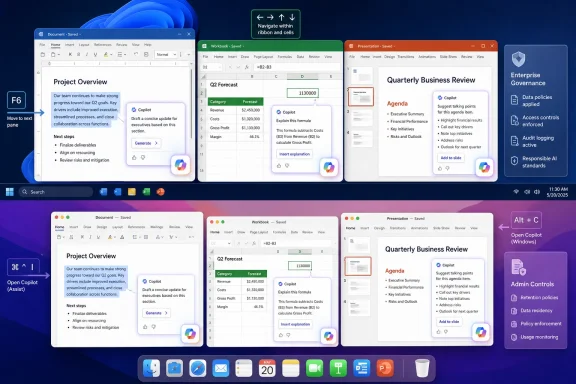
So the assistant gets a new, consolidated presence. Instead of scattering Copilot affordances across multiple entry points, Microsoft is reducing the interface down to a bottom-right icon, contextual prompts when users interact with content, and keyboard shortcuts that can move focus directly to Copilot or its chat pane. In ordinary software design terms, that sounds tidy. In Office, where users spend hours inside dense documents, spreadsheets, and decks, it is also an assertion of ownership over the canvas.
The Register’s framing is sharp because it captures the tension Microsoft would rather soften: Copilot is being made easier to summon and harder to ignore at the same time. That is not necessarily a contradiction. It is the business model.
Microsoft’s AI strategy depends on habituation. Copilot must become not merely a feature but a reflex, something invoked when a user selects a paragraph, hesitates over a formula, or stares at a blank slide. The interface is being tuned to make that reflex more likely.
The Floating Button Is a Small UI Object Carrying a Large Corporate Strategy
A bottom-right button sounds trivial until it lives inside Word, Excel, and PowerPoint all day. Office is not a social feed or a search page; it is where people write contracts, reconcile budgets, build pitch decks, prepare board materials, and maintain the fragile rituals of workplace productivity. A persistent AI button in that space is not just a shortcut. It is a standing invitation from Microsoft to route more cognitive work through Microsoft’s cloud.
This is why the backlash matters. Users asking how to hide the icon are not merely complaining about pixels. They are objecting to the way Microsoft is redefining the default posture of Office from tools waiting for instruction to assistant waiting for engagement.
There is a long history here. Microsoft has repeatedly tried to add proactive help to Office, from Clippy to Smart Tags to the modern editor and design suggestions. Some of those ideas became useful infrastructure. Others became punchlines. The difference is usually not whether the feature is clever, but whether users feel it respects their attention.
Copilot raises the stakes because it is not a spell-checker or formatting hint. It is a branded AI layer with licensing implications, data governance questions, and a strategic role in Microsoft’s growth story. When that layer floats above the document, users reasonably read it as more than help.
Keyboard Shortcuts Reveal the Target Audience Microsoft Cannot Afford to Lose
The revised shortcuts are worth taking seriously. On Windows, F6 shifts focus to the Copilot button in the canvas, the Up Arrow key moves between prompts, and Alt+C can move focus to the Copilot Chat pane if it is already open. On Mac, users will use Cmd + Control + I to set focus on the Copilot button.
That sounds like accessibility and efficiency work, and in part it is. Keyboard access matters. If Microsoft is going to put Copilot inside Office, it has an obligation to make it reachable without mouse gymnastics, especially for users who rely on keyboard navigation or screen readers.
But keyboard shortcuts also signal that Microsoft wants Copilot embedded in the muscle memory of power users. The casual user clicks a button. The committed user learns the chord. Once a shortcut enters daily workflow, a feature becomes harder to dislodge.
That is the subtle genius, and the irritation, of the change. Microsoft is not simply advertising Copilot inside Office; it is giving it the ergonomics of a native command. The more Copilot behaves like Save, Find, or Format Painter, the more the assistant becomes part of Office’s operating grammar.
The Enterprise Problem Is Control, Not Curiosity
Microsoft’s public explanation leans on users who supposedly do not know how to begin. Enterprise IT departments have a different problem: they know exactly where this is going, and they want knobs, scopes, auditability, and silence where silence is required.
The top-voted requests on Microsoft’s own feedback channels reportedly include demands for more granular controls over agent availability. That tracks with what administrators have been saying since Microsoft began pushing Copilot deeper into Microsoft 365. The issue is not whether AI can summarize a document or draft an email. The issue is whether organizations can decide who gets which AI affordance, in which app, against which data, under which policy, and with what user-visible surface area.
For regulated industries, Copilot is not a toy. It is a new path through corporate data. Even when Microsoft’s security and compliance story is stronger than the average consumer AI product, administrators still need to reason about permissions, retention, prompts, outputs, sensitivity labels, and the very human habit of pasting the wrong thing into the wrong box.
A floating icon can therefore become a governance irritant. It invites questions from users before IT has finished policy design. It makes an unlicensed or partially licensed feature feel present. It can also create the perception that AI use is encouraged simply because the button is there.
Microsoft’s “Streamlining” Is Also a Licensing Funnel
The timing matters because Microsoft has been steadily tightening and rearranging Copilot’s presence across Microsoft 365. The company has rebranded the old Microsoft 365 app experience around Copilot, promoted the Copilot app as a central hub, and continued to separate full Microsoft 365 Copilot capabilities from more limited Copilot Chat experiences.
That creates a strange product landscape. Some users see Copilot branding everywhere but cannot use the most advanced features. Others have licensed access but encounter uneven rollout behavior across apps and platforms. Administrators must explain why a button exists, why a pane is unavailable, why a feature works in one application but not another, or why “Copilot” means different things depending on the context.
This is not just messy branding. It is a funnel. The more visible Copilot becomes inside Word, Excel, and PowerPoint, the more organizations feel pressure to resolve the mismatch between user expectation and license entitlement.
Microsoft would likely argue that this is normal product evolution. If AI is central to the next generation of productivity software, then Office should expose it prominently. That argument has merit. But it does not erase the commercial reality: persistent UI real estate is valuable, and Microsoft is allocating it to a paid strategic layer.
Office Is Becoming a Conversation Surface, Whether Users Asked for One or Not
The most consequential line in Microsoft’s positioning is the suggestion that Copilot will soon edit content directly from conversation. That is the actual destination. The button is the handle; conversational editing is the door.
For decades, Office has been built around direct manipulation. You select text and format it. You click a cell and enter a formula. You drag objects on a slide. Even when Office added automation, the user remained close to the artifact. Macros, styles, templates, and formulas all required some understanding of the machinery.
Copilot shifts that interaction model toward delegation. You describe the change, and the system acts. That can be powerful, especially for repetitive formatting, first drafts, data summaries, and slide generation. It can also be disorienting, because the user must now evaluate not only the output but the assistant’s interpretation of intent.
This is where Microsoft’s optimism and user frustration collide. The company sees reduced friction. Many users see another agent in the room, one that constantly suggests it could do the work differently.
The Backlash Is Not Anti-AI So Much as Anti-Default
It would be easy to write off complaints about the Copilot button as reflexive anti-AI grumbling. That would be a mistake. A large share of the pushback is about defaults, removability, and respect for attention.
Users are not all asking Microsoft to delete Copilot. Many are asking for the ability to hide the button, disable the floating element, or make the assistant less visually intrusive. That distinction matters. A feature can be available without being ambient. A tool can be powerful without occupying persistent screen territory.
Microsoft knows this from Windows. The company has spent years learning, forgetting, and relearning that users react badly when search, widgets, ads, account nudges, Edge prompts, and cloud services feel imposed rather than offered. Copilot in Office risks entering the same psychological category if Microsoft treats presence as adoption.
The irony is that Copilot’s best case does not require coercion. If the assistant reliably saves time in Excel, produces credible first drafts in Word, and turns rough outlines into useful decks in PowerPoint, users will discover it. The hard sell becomes necessary only when Microsoft wants adoption faster than trust develops naturally.
The Old Office Contract Is Being Rewritten in Real Time
The traditional Office contract was simple: users bought or subscribed to mature applications that mostly stayed out of the way. The ribbon was sometimes controversial, cloud autosave changed habits, and collaboration features shifted workflows, but the basic relationship remained stable. Office was a set of instruments.
Copilot changes that contract because it places a Microsoft-mediated intelligence layer between user intent and document output. The company is no longer just selling tools for producing work; it is selling a system that participates in the production of work. That makes the interface political in the small-p sense. It determines who or what gets a say in the document.
For enthusiasts and IT pros, the question is not whether AI belongs in Office. It probably does, at least for some users and some tasks. The question is whether Microsoft will offer enough control for different organizations, roles, and temperaments.
A lawyer drafting a sensitive clause, a finance analyst auditing a workbook, a student preparing slides, and a sales manager summarizing meeting notes do not all need the same AI posture. Yet a persistent bottom-right Copilot icon implies a universal answer: start here.
The Real Test Is Whether Microsoft Can Make Copilot Feel Earned
Microsoft’s strongest argument is that Office has become too complex for many users to exploit fully. Excel alone contains decades of power features that most subscribers never touch. Word can produce structured, accessible, beautifully formatted documents, but many users still wrestle with spacing and styles. PowerPoint can support serious visual storytelling, but it often becomes a graveyard of bullet slides.
An assistant that helps users navigate that complexity could be genuinely valuable. If Copilot can explain a formula, transform a messy outline into a coherent deck, rewrite a dense paragraph without flattening its meaning, or pull relevant context from permitted business data, then the assistant earns its place.
But earning a place is different from occupying one by default. Microsoft’s current approach risks confusing exposure with affection. The company can make Copilot visible, reachable, and keyboard-friendly, but it cannot shortcut the user’s judgment about whether the assistant is worth the interruption.
That judgment will be made millions of times a day in tiny moments. Did Copilot help, or did it produce corporate fog? Did it save time, or did it create review work? Did it understand the spreadsheet, or did it confidently misunderstand the business logic? Did it respect the user’s flow, or did it nag from the corner?
Windows Users Should Read This as Part of the Same Copilot Campaign
Although this particular change lands in Word, Excel, and PowerPoint, Windows users should not treat it as an Office-only story. Microsoft’s broader Copilot strategy runs across Windows, Edge, Microsoft 365, Teams, and the web. The goal is not a chatbot in one app. The goal is a cross-product assistant layer that follows the user through work.
That is why UI placement matters. The Copilot key on new PCs, the Copilot app, the Microsoft 365 Copilot branding shift, and Office canvas buttons are all pieces of the same argument: AI should be close at hand, ideally one click or shortcut away.
For some users, that will be welcome. For others, it will feel like another example of Microsoft deciding that strategic priorities deserve privileged placement on personal and enterprise desktops. WindowsForum readers have seen this movie before with browser defaults, account prompts, Start menu recommendations, and cloud backup nudges.
The difference this time is that AI features can alter the work itself. That makes the tolerance threshold lower. A promotional tile is annoying. An assistant that can touch documents, suggest edits, and eventually act from conversation occupies a more sensitive layer of trust.
The June Rollout Will Be a Usability Test Disguised as an Adoption Push
Microsoft says the new Copilot button and shortcuts are due for general availability in Word, Excel, and PowerPoint on Windows and Mac by early June. That gives administrators little time to prepare messaging if users begin asking why the icon appeared, what it can access, whether it can be removed, and whether using it is approved.
For smaller organizations, this may be another minor change in the endless churn of Microsoft 365 updates. For larger tenants, it is a reminder that AI adoption is now part of endpoint experience management. The user interface is not neutral; it shapes behavior before policy documents can catch up.
The practical advice is not to panic. It is to inventory what Copilot experiences are enabled, which licenses are assigned, what admin controls exist, and how the organization wants employees to use AI in Office. If the answer is “we have not decided yet,” the floating button may decide part of it for you.
Microsoft’s mistake would be to treat complaints as resistance to the future. Many administrators and power users are not resisting AI. They are resisting surprise, ambiguity, and the slow erosion of the ability to say no.
The Copilot Button Is Small Enough to Miss and Strategic Enough to Matter
This rollout is not the most dramatic Copilot announcement Microsoft will make in 2026, but it is one of the more revealing ones. It shows how the company plans to normalize AI: not through a single grand launch, but through repeated adjustments to the surfaces where work already happens.
- Microsoft is consolidating Copilot access in Office around a persistent canvas button, contextual entry points, and revised keyboard navigation.
- The rollout is expected to reach Word, Excel, and PowerPoint for Windows and Mac by early June 2026.
- The user backlash is centered less on the existence of Copilot than on whether Microsoft allows the interface to be hidden, scoped, or controlled.
- Enterprise IT teams should treat visible Copilot entry points as part of governance, licensing, training, and data-protection planning.
- The long-term significance is conversational editing, where Copilot moves from suggesting actions to directly changing Office content from chat.
- Microsoft’s challenge is to prove that Copilot deserves persistent attention instead of merely claiming screen space for it.
The bottom-right corner of Office now carries a bigger burden than its size suggests. If Copilot becomes the assistant Microsoft imagines, users may eventually wonder how they worked without it. If it remains an ever-present sales pitch wrapped in productivity language, the button will become another symbol of software that no longer waits to be invited. Microsoft’s next task is not to make Copilot easier to summon; it is to make the summon feel worth it.