

The best AI tools for small business in 2026 are the ones embedded in daily workflows — email, spreadsheets, CRMs, accounting systems, meeting notes, support queues, and design tools — rather than standalone chatbots that demand a new operating habit. That is the quiet but important shift now happening across the small-business software market. AI is becoming less of a destination and more of a layer inside the places where owners already lose time. For founders, freelancers, agencies, shops, clinics, contractors, and consultants, the winning question is no longer “Which AI is smartest?” but “Which recurring task can this remove from my week?”
That distinction matters because small businesses do not have the luxury of experimentation for its own sake. A large enterprise can run pilots, appoint AI leads, and tolerate overlapping subscriptions while teams figure out what sticks. A five-person business usually cannot. Every new tool adds not only a monthly fee but another login, another workflow, another place where work can disappear.
The AI market still sells itself through spectacle: chatbots that write essays, image generators that conjure ads, agents that promise to run whole departments. But the useful reality is more modest and more powerful. The best small-business AI tools are not magic employees. They are disciplined helpers attached to invoices, leads, messages, notes, forms, tickets, and proposals.
The first wave of AI adoption trained business owners to think in prompts. Open a blank box, ask a question, get an answer. That experience was impressive, and it remains useful, but it also put the burden on the user to know what to ask, what context to provide, what format to request, and what to do with the output afterward.
That is not how most small-business work happens. A founder does not wake up needing “content.” She wakes up needing to reply to three leads, chase two invoices, turn yesterday’s sales call into a proposal, prepare for a vendor meeting, and figure out why last month’s margin slipped. The work already has context. The problem is that the context is scattered.
This is why workflow-tied AI is more valuable than a general-purpose chatbot alone. An assistant sitting inside Outlook, Gmail, HubSpot, QuickBooks, Notion, Canva, or Zapier starts closer to the work. It can see the thread, the record, the document, the spreadsheet, the ticket, or the task. That proximity reduces the amount of explaining the owner must do before anything useful happens.
The blank chatbot is still the Swiss Army knife of the stack. It is good for brainstorming, rewriting, summarizing, comparing options, analyzing uploaded files, and turning messy thoughts into a first draft. But in a small business, the real return comes when AI does not merely produce words. It should move work one step closer to done.
That is the difference between “write a follow-up email” and “draft a follow-up email based on this CRM record, yesterday’s meeting notes, the customer’s objections, and the proposal template we normally use.” The first is a parlor trick. The second is operational leverage.
That stack may look modern, but it can easily become a tax on attention. Each product captures a sliver of work while creating its own inbox, dashboard, notification system, permission model, and billing line. Small businesses rarely fail to adopt AI because they lacked options. They fail because the tools never become part of Tuesday afternoon.
A better starting point is brutally practical: list the jobs that happen every week and take longer than they should. Customer replies. Lead follow-up. Meeting notes. Quote preparation. Invoice reminders. Support answers. Blog drafts. Social graphics. Job descriptions. Expense categorization. Monthly reporting. Once those recurring jobs are visible, the tool choice becomes less ideological.
There is a hierarchy worth following. Use a general assistant for thinking, drafting, and analysis. Use embedded AI inside the core apps where private business context already lives. Use automation tools only once the process is stable enough to repeat with clear rules.
That last clause is important. AI does not fix a broken process; it accelerates it. If the company cannot explain when a lead should be routed, who approves a refund, how a quote is priced, or which support questions require escalation, an agent or automation will simply make the confusion faster.
Microsoft’s pitch is strongest for companies standardized on Outlook, Teams, SharePoint, Word, Excel, and PowerPoint. Copilot’s advantage is not merely that it can summarize a document. It can operate across the Microsoft 365 environment, using organizational context to prepare meeting briefs, summarize Teams calls, draft responses, find relevant files, and help turn scattered collaboration into decisions. For a business already paying for Microsoft 365, that lowers the adoption barrier considerably.
Google’s argument is similar but aimed at the Gmail-and-Drive world. Gemini in Workspace is most useful when the team already lives in Gmail, Docs, Sheets, Drive, and Meet. The promise is not that Google has invented a better blank page. It is that the assistant can help find, summarize, draft, translate, polish, and organize work where the team already stores it.
This is also where small businesses should be careful about seat counts. Giving every employee a paid AI add-on may sound democratic, but the usage will not be evenly distributed. The owner, operations lead, sales rep, customer support person, or office manager may get far more value than a part-time field worker or seasonal employee.
The smart deployment is role-based. Start with the people whose work is document-heavy, communication-heavy, or decision-heavy. Measure whether meetings get summarized, follow-ups go out faster, spreadsheets are easier to interpret, and customers receive better responses. Expand only after the tool proves it has become part of the daily rhythm.
A useful meeting assistant should produce a short summary, identify decisions, assign owners, extract deadlines, and create follow-up tasks where the team already works. If a sales call produces a transcript but no CRM update, no proposal draft, and no reminder to follow up, the tool has archived the conversation rather than advanced the deal.
This distinction matters for founders because meetings are often where valuable business context is created. Customer objections, pricing concerns, delivery promises, hiring decisions, vendor commitments, and product feedback all surface in conversation. Losing that information creates rework. Capturing it without acting on it creates clutter.
The right test is simple: after the call, does the AI reduce the next 20 minutes of administrative work? If it can turn a client conversation into a summary, a task list, and the bones of a proposal, it is useful. If it creates another document nobody reads, it is not.
Small teams should also define what should never be automated from a meeting. Sensitive HR topics, legal commitments, financial approvals, medical details, and customer disputes need human judgment. AI notes are a memory aid, not a governance system.
The dividing line is business context. A generic assistant can write an outreach email. A CRM-native assistant can see the contact, company, prior conversations, deal stage, support history, and last objection. That makes a meaningful difference.
HubSpot’s Breeze is a useful example of where the market is heading. Its value is not simply that HubSpot added AI writing features. The more interesting development is AI tied to customer records, prospecting, support, ticket handling, CRM updates, and follow-up workflows. In small-business terms, that means the assistant is closer to revenue and retention than a standalone writing tool would be.
That does not make vendor claims automatic proof. HubSpot, like every software company in the AI race, has an incentive to present productivity gains in the best possible light. But the underlying architecture is right: AI that knows the customer file is more useful than AI that guesses from a prompt.
The practical starting point is narrow. Do not ask the CRM assistant to “do marketing.” Ask it to summarize stale deals, draft follow-ups after real calls, identify missing fields, prepare account briefs, flag support-heavy customers before renewal, and help one salesperson follow up with 20 prospects more consistently. Revenue usually improves through better execution of boring steps, not through one miraculous campaign.
Canva’s AI strength is practical rather than mystical. It can resize assets, remove backgrounds, generate first-pass layouts, create social graphics, help with presentation drafts, and keep brand kits within reach of non-designers. That is exactly the level at which many small businesses need help.
The risk is brand drift. AI design tools are very good at producing something polished and very bad at knowing whether the result still feels like the business. If every flyer, post, and slide deck is reinvented from scratch by a generative model, the company can start to look like a template carousel.
The better use is controlled acceleration. Lock down colors, fonts, logos, templates, and image style. Let AI help produce variations inside those boundaries. The goal is not to discover a new brand identity every week. The goal is to make the ordinary campaign assets look less improvised.
For many small businesses, that is enough. AI does not need to replace a designer to be worth paying for. It only needs to prevent the owner from spending Sunday night nudging text boxes around a social graphic that should have taken ten minutes.
Zapier is especially illustrative because its appeal is ordinary. A website form arrives, a lead record is created, the owner gets a Slack alert, an email draft is prepared, and a task appears in the CRM. A low review comes in, a support ticket opens, the complaint is summarized, and a manager is asked to approve a response. An invoice is paid, a thank-you email goes out, and a review request is scheduled for later.
None of that sounds futuristic. That is the point. The value of AI in automation is not the theatrics of an “agent” pretending to be a person. It is the removal of handoffs that used to depend on the owner noticing, copying, pasting, remembering, and following up.
But automation has a trap door. If the underlying process is vague, the automation will be brittle. Before connecting five apps and an AI model, a small business should run the workflow manually and write down the trigger, required fields, exceptions, approval points, and owner. If nobody can describe the process, nobody should automate it.
AI can help build the automation, draft the messages, classify the incoming request, summarize a record, or map fields between systems. It should not be given silent authority over refunds, legal commitments, pricing exceptions, safety issues, or anything else that requires judgment. The best automations keep humans in the loop at the points where business risk appears.
QuickBooks and Intuit’s AI features point to the practical direction of the category. Expense categorization, invoice reminders, cash-flow summaries, anomaly detection, reconciliation help, and business insights are exactly the kinds of work where pattern recognition can save time. A bookkeeper or owner does not need AI to be creative. They need it to notice, prepare, and explain.
The human review step is non-negotiable. Let AI suggest categories, flag unusual expenses, summarize receivables, and draft polite payment reminders. Do not let it silently decide tax treatment, payroll classifications, write-offs, refunds, or sales tax obligations. A wrong social post is embarrassing. A wrong filing assumption can become a financial problem.
Small businesses should also separate accounting automation from accounting advice. A tool can help organize transactions. It cannot replace the accountant who understands the owner’s business structure, state rules, industry norms, and risk tolerance. AI is very useful as a preparer of work. It is dangerous as an unreviewed authority.
The best finance workflow is therefore modest: AI does the first pass, a human reviews exceptions, and the accountant handles judgment. That is not a failure of automation. That is automation being used where it belongs.
The word “if” is doing a lot of work. A support bot is only as good as the knowledge base behind it. If the company’s policies are outdated, scattered across old documents, or mostly held in the owner’s head, AI will improvise. That is when a time-saving tool becomes a liability.
A good small-business support setup is narrow and explicit. Train the assistant on approved policies. Require escalation for refunds, complaints, legal threats, safety issues, medical matters, unusual warranties, and angry customers. Review failed answers weekly. Turn the best human responses into approved knowledge-base entries.
This is also where tone can be overrated. Many support AI products emphasize warmth, friendliness, and brand personality. Those things matter, but customers usually want a correct answer faster than they want a delightful paragraph. Accuracy, escalation, and accountability beat charm.
The businesses that benefit most from support AI will treat it like a junior support rep with strict permissions. It can answer common questions. It can summarize tickets. It can suggest replies. It should not be allowed to invent policy.
That does not make the result authoritative. AI research should be treated like a smart assistant’s first pass: helpful, directional, and in need of verification. The more money, reputation, compliance, or customer trust is at stake, the more important it is to check the underlying sources.
This is especially true in regulated or fast-changing areas. Employment law, taxes, privacy rules, advertising claims, industry licensing, healthcare guidance, and financial advice are not places to rely on a confident paragraph. A small business can use AI to identify what to ask, where to look, and how to summarize options. It should not use AI as the final decision-maker.
The same applies to competitive research. AI can summarize public positioning and extract patterns, but it may miss local nuance, outdated pages, paid placements, or quiet market shifts. Owners still need to talk to customers, review primary sources, and apply judgment.
Used properly, AI research saves time at the beginning of a decision. It should not remove diligence at the end.
For many businesses, that means something like ChatGPT Business as the general layer, Microsoft 365 Copilot or Google Gemini as the office layer, and Zapier or Power Automate as the connective tissue. A CRM-centered business may add HubSpot Breeze. A design-heavy business may lean on Canva. A finance-heavy business may get more value from QuickBooks AI features than from another writing assistant. A knowledge-heavy team may use Notion as the internal operating manual.
The exact vendor mix matters less than the division of labor. One tool should help think. One should work inside the company’s primary context. One should automate handoffs. Everything else should have to prove it saves enough time or reduces enough friction to justify its place.
This is where subscription drift becomes the enemy. AI tools often start cheap, promotional, or bundled. Then usage limits, paid seats, premium models, agent credits, and add-ons turn experimentation into a recurring expense. Small businesses should review AI spending like any other operational line item.
The test should be concrete. Did response time improve? Did follow-ups go out faster? Were proposals completed sooner? Did invoices get chased more consistently? Did support tickets close with fewer owner interruptions? Did the team save hours, or did it simply move work into another interface?
If the tool cannot point to a recurring workflow it improves, cancel it. The AI market will keep producing impressive demos. Small businesses need durable habits.
A founder should not ask whether AI can transform the business in the abstract. The better question is whether it can remove the work that piles up after dinner: the unanswered lead, the unfiled expense, the unmade follow-up, the half-written proposal, the support reply waiting for approval, the meeting notes that never became tasks.
The most useful takeaways are practical ones:
That distinction matters because small businesses do not have the luxury of experimentation for its own sake. A large enterprise can run pilots, appoint AI leads, and tolerate overlapping subscriptions while teams figure out what sticks. A five-person business usually cannot. Every new tool adds not only a monthly fee but another login, another workflow, another place where work can disappear.
The AI market still sells itself through spectacle: chatbots that write essays, image generators that conjure ads, agents that promise to run whole departments. But the useful reality is more modest and more powerful. The best small-business AI tools are not magic employees. They are disciplined helpers attached to invoices, leads, messages, notes, forms, tickets, and proposals.
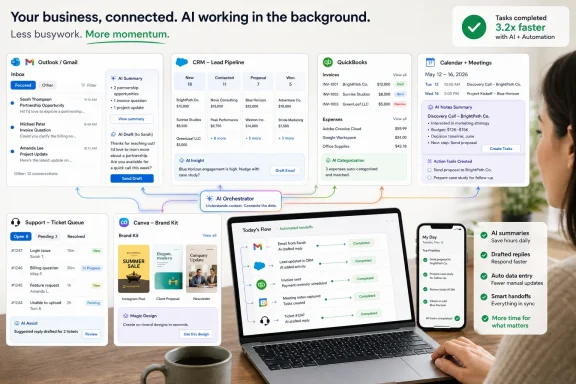 The Chatbot Was the Demo, Not the Business Model
The first wave of AI adoption trained business owners to think in prompts. Open a blank box, ask a question, get an answer. That experience was impressive, and it remains useful, but it also put the burden on the user to know what to ask, what context to provide, what format to request, and what to do with the output afterward.That is not how most small-business work happens. A founder does not wake up needing “content.” She wakes up needing to reply to three leads, chase two invoices, turn yesterday’s sales call into a proposal, prepare for a vendor meeting, and figure out why last month’s margin slipped. The work already has context. The problem is that the context is scattered.
This is why workflow-tied AI is more valuable than a general-purpose chatbot alone. An assistant sitting inside Outlook, Gmail, HubSpot, QuickBooks, Notion, Canva, or Zapier starts closer to the work. It can see the thread, the record, the document, the spreadsheet, the ticket, or the task. That proximity reduces the amount of explaining the owner must do before anything useful happens.
The blank chatbot is still the Swiss Army knife of the stack. It is good for brainstorming, rewriting, summarizing, comparing options, analyzing uploaded files, and turning messy thoughts into a first draft. But in a small business, the real return comes when AI does not merely produce words. It should move work one step closer to done.
That is the difference between “write a follow-up email” and “draft a follow-up email based on this CRM record, yesterday’s meeting notes, the customer’s objections, and the proposal template we normally use.” The first is a parlor trick. The second is operational leverage.
Small Businesses Need Fewer Tools With Better Context
The temptation in 2026 is to build a museum of AI subscriptions. ChatGPT for writing. Claude for analysis. Gemini for email. Copilot for Office. Perplexity for research. Notion for notes. Canva for design. Zapier for automation. HubSpot for sales. QuickBooks for finance. Then a transcription tool, a social media tool, a support bot, and three products that promised “agents” during a webinar.That stack may look modern, but it can easily become a tax on attention. Each product captures a sliver of work while creating its own inbox, dashboard, notification system, permission model, and billing line. Small businesses rarely fail to adopt AI because they lacked options. They fail because the tools never become part of Tuesday afternoon.
A better starting point is brutally practical: list the jobs that happen every week and take longer than they should. Customer replies. Lead follow-up. Meeting notes. Quote preparation. Invoice reminders. Support answers. Blog drafts. Social graphics. Job descriptions. Expense categorization. Monthly reporting. Once those recurring jobs are visible, the tool choice becomes less ideological.
There is a hierarchy worth following. Use a general assistant for thinking, drafting, and analysis. Use embedded AI inside the core apps where private business context already lives. Use automation tools only once the process is stable enough to repeat with clear rules.
That last clause is important. AI does not fix a broken process; it accelerates it. If the company cannot explain when a lead should be routed, who approves a refund, how a quote is priced, or which support questions require escalation, an agent or automation will simply make the confusion faster.
Microsoft and Google Are Selling Familiarity as the Feature
For businesses that live in email, calendars, documents, spreadsheets, and meetings, the first AI purchase should usually be inside the productivity suite already in use. Microsoft 365 Copilot and Google Gemini for Workspace are not compelling because they can draft generic paragraphs. They are compelling because they sit beside the messages, files, meetings, and spreadsheets where work already happens.Microsoft’s pitch is strongest for companies standardized on Outlook, Teams, SharePoint, Word, Excel, and PowerPoint. Copilot’s advantage is not merely that it can summarize a document. It can operate across the Microsoft 365 environment, using organizational context to prepare meeting briefs, summarize Teams calls, draft responses, find relevant files, and help turn scattered collaboration into decisions. For a business already paying for Microsoft 365, that lowers the adoption barrier considerably.
Google’s argument is similar but aimed at the Gmail-and-Drive world. Gemini in Workspace is most useful when the team already lives in Gmail, Docs, Sheets, Drive, and Meet. The promise is not that Google has invented a better blank page. It is that the assistant can help find, summarize, draft, translate, polish, and organize work where the team already stores it.
This is also where small businesses should be careful about seat counts. Giving every employee a paid AI add-on may sound democratic, but the usage will not be evenly distributed. The owner, operations lead, sales rep, customer support person, or office manager may get far more value than a part-time field worker or seasonal employee.
The smart deployment is role-based. Start with the people whose work is document-heavy, communication-heavy, or decision-heavy. Measure whether meetings get summarized, follow-ups go out faster, spreadsheets are easier to interpret, and customers receive better responses. Expand only after the tool proves it has become part of the daily rhythm.
Meeting Notes Are Only Useful When They Change the Next Action
AI meeting tools are one of the easiest products to buy and one of the easiest to waste. Transcription feels productive because it captures everything. But “everything” is usually the opposite of what a small business needs.A useful meeting assistant should produce a short summary, identify decisions, assign owners, extract deadlines, and create follow-up tasks where the team already works. If a sales call produces a transcript but no CRM update, no proposal draft, and no reminder to follow up, the tool has archived the conversation rather than advanced the deal.
This distinction matters for founders because meetings are often where valuable business context is created. Customer objections, pricing concerns, delivery promises, hiring decisions, vendor commitments, and product feedback all surface in conversation. Losing that information creates rework. Capturing it without acting on it creates clutter.
The right test is simple: after the call, does the AI reduce the next 20 minutes of administrative work? If it can turn a client conversation into a summary, a task list, and the bones of a proposal, it is useful. If it creates another document nobody reads, it is not.
Small teams should also define what should never be automated from a meeting. Sensitive HR topics, legal commitments, financial approvals, medical details, and customer disputes need human judgment. AI notes are a memory aid, not a governance system.
CRM-Native AI Beats Generic Sales Copy
Sales and marketing are where AI can save real time and create real damage. Used well, it can turn one customer interview into a landing page draft, three follow-up emails, a sales enablement note, and a social post. Used badly, it can flood a small market with beige copy that sounds like every other beige company.The dividing line is business context. A generic assistant can write an outreach email. A CRM-native assistant can see the contact, company, prior conversations, deal stage, support history, and last objection. That makes a meaningful difference.
HubSpot’s Breeze is a useful example of where the market is heading. Its value is not simply that HubSpot added AI writing features. The more interesting development is AI tied to customer records, prospecting, support, ticket handling, CRM updates, and follow-up workflows. In small-business terms, that means the assistant is closer to revenue and retention than a standalone writing tool would be.
That does not make vendor claims automatic proof. HubSpot, like every software company in the AI race, has an incentive to present productivity gains in the best possible light. But the underlying architecture is right: AI that knows the customer file is more useful than AI that guesses from a prompt.
The practical starting point is narrow. Do not ask the CRM assistant to “do marketing.” Ask it to summarize stale deals, draft follow-ups after real calls, identify missing fields, prepare account briefs, flag support-heavy customers before renewal, and help one salesperson follow up with 20 prospects more consistently. Revenue usually improves through better execution of boring steps, not through one miraculous campaign.
Canva Shows Why AI Design Wins When It Respects the Brand
Design is another area where small businesses benefit from AI not because the machines become artists, but because they remove production friction. A restaurant needs updated menus. A gym needs class announcements. A contractor needs before-and-after graphics. A consultant needs cleaner slides. A retailer needs product posts in five formats before the weekend.Canva’s AI strength is practical rather than mystical. It can resize assets, remove backgrounds, generate first-pass layouts, create social graphics, help with presentation drafts, and keep brand kits within reach of non-designers. That is exactly the level at which many small businesses need help.
The risk is brand drift. AI design tools are very good at producing something polished and very bad at knowing whether the result still feels like the business. If every flyer, post, and slide deck is reinvented from scratch by a generative model, the company can start to look like a template carousel.
The better use is controlled acceleration. Lock down colors, fonts, logos, templates, and image style. Let AI help produce variations inside those boundaries. The goal is not to discover a new brand identity every week. The goal is to make the ordinary campaign assets look less improvised.
For many small businesses, that is enough. AI does not need to replace a designer to be worth paying for. It only needs to prevent the owner from spending Sunday night nudging text boxes around a social graphic that should have taken ten minutes.
Automation Is Where the Time Savings Finally Compound
The most important AI tool in a small business may not look like a chatbot at all. Zapier, Make, Power Automate, and similar workflow platforms turn AI from a writing aid into plumbing. They connect forms, CRMs, spreadsheets, email, Slack, accounting systems, support tools, and databases so that work moves without manual copying.Zapier is especially illustrative because its appeal is ordinary. A website form arrives, a lead record is created, the owner gets a Slack alert, an email draft is prepared, and a task appears in the CRM. A low review comes in, a support ticket opens, the complaint is summarized, and a manager is asked to approve a response. An invoice is paid, a thank-you email goes out, and a review request is scheduled for later.
None of that sounds futuristic. That is the point. The value of AI in automation is not the theatrics of an “agent” pretending to be a person. It is the removal of handoffs that used to depend on the owner noticing, copying, pasting, remembering, and following up.
But automation has a trap door. If the underlying process is vague, the automation will be brittle. Before connecting five apps and an AI model, a small business should run the workflow manually and write down the trigger, required fields, exceptions, approval points, and owner. If nobody can describe the process, nobody should automate it.
AI can help build the automation, draft the messages, classify the incoming request, summarize a record, or map fields between systems. It should not be given silent authority over refunds, legal commitments, pricing exceptions, safety issues, or anything else that requires judgment. The best automations keep humans in the loop at the points where business risk appears.
Accounting AI Should Prepare the Books, Not Own Them
Finance is where small businesses should be both excited and conservative. Accounting software already contains high-value context: income, expenses, invoices, bills, payroll, taxes, customers, vendors, and cash flow. That makes embedded AI potentially useful. It also makes mistakes expensive.QuickBooks and Intuit’s AI features point to the practical direction of the category. Expense categorization, invoice reminders, cash-flow summaries, anomaly detection, reconciliation help, and business insights are exactly the kinds of work where pattern recognition can save time. A bookkeeper or owner does not need AI to be creative. They need it to notice, prepare, and explain.
The human review step is non-negotiable. Let AI suggest categories, flag unusual expenses, summarize receivables, and draft polite payment reminders. Do not let it silently decide tax treatment, payroll classifications, write-offs, refunds, or sales tax obligations. A wrong social post is embarrassing. A wrong filing assumption can become a financial problem.
Small businesses should also separate accounting automation from accounting advice. A tool can help organize transactions. It cannot replace the accountant who understands the owner’s business structure, state rules, industry norms, and risk tolerance. AI is very useful as a preparer of work. It is dangerous as an unreviewed authority.
The best finance workflow is therefore modest: AI does the first pass, a human reviews exceptions, and the accountant handles judgment. That is not a failure of automation. That is automation being used where it belongs.
Support Bots Need Boundaries More Than Personality
Customer support is one of the clearest use cases for AI, especially for businesses that answer the same questions every day. Hours, pricing, refund policies, appointment rules, shipping status, warranty terms, onboarding steps, and troubleshooting instructions are all ripe for automation if the answers are stable.The word “if” is doing a lot of work. A support bot is only as good as the knowledge base behind it. If the company’s policies are outdated, scattered across old documents, or mostly held in the owner’s head, AI will improvise. That is when a time-saving tool becomes a liability.
A good small-business support setup is narrow and explicit. Train the assistant on approved policies. Require escalation for refunds, complaints, legal threats, safety issues, medical matters, unusual warranties, and angry customers. Review failed answers weekly. Turn the best human responses into approved knowledge-base entries.
This is also where tone can be overrated. Many support AI products emphasize warmth, friendliness, and brand personality. Those things matter, but customers usually want a correct answer faster than they want a delightful paragraph. Accuracy, escalation, and accountability beat charm.
The businesses that benefit most from support AI will treat it like a junior support rep with strict permissions. It can answer common questions. It can summarize tickets. It can suggest replies. It should not be allowed to invent policy.
Research Assistants Are Fast, but Fast Is Not the Same as True
AI research tools are useful for small businesses because owners constantly make decisions with incomplete information. They compare vendors, scan competitors, prepare sales calls, read regulations, evaluate software, write grant applications, and summarize unfamiliar markets. A good AI assistant can compress the first hour of research into ten minutes.That does not make the result authoritative. AI research should be treated like a smart assistant’s first pass: helpful, directional, and in need of verification. The more money, reputation, compliance, or customer trust is at stake, the more important it is to check the underlying sources.
This is especially true in regulated or fast-changing areas. Employment law, taxes, privacy rules, advertising claims, industry licensing, healthcare guidance, and financial advice are not places to rely on a confident paragraph. A small business can use AI to identify what to ask, where to look, and how to summarize options. It should not use AI as the final decision-maker.
The same applies to competitive research. AI can summarize public positioning and extract patterns, but it may miss local nuance, outdated pages, paid placements, or quiet market shifts. Owners still need to talk to customers, review primary sources, and apply judgment.
Used properly, AI research saves time at the beginning of a decision. It should not remove diligence at the end.
The Three-Layer Stack Is Enough for Most Firms
A practical small-business AI stack usually has three layers. The first is a general assistant for thinking, drafting, summarizing, and analyzing. The second is embedded AI inside the work suite, CRM, accounting tool, design platform, or project system where the business already operates. The third is an automation layer that moves repeatable work between systems.For many businesses, that means something like ChatGPT Business as the general layer, Microsoft 365 Copilot or Google Gemini as the office layer, and Zapier or Power Automate as the connective tissue. A CRM-centered business may add HubSpot Breeze. A design-heavy business may lean on Canva. A finance-heavy business may get more value from QuickBooks AI features than from another writing assistant. A knowledge-heavy team may use Notion as the internal operating manual.
The exact vendor mix matters less than the division of labor. One tool should help think. One should work inside the company’s primary context. One should automate handoffs. Everything else should have to prove it saves enough time or reduces enough friction to justify its place.
This is where subscription drift becomes the enemy. AI tools often start cheap, promotional, or bundled. Then usage limits, paid seats, premium models, agent credits, and add-ons turn experimentation into a recurring expense. Small businesses should review AI spending like any other operational line item.
The test should be concrete. Did response time improve? Did follow-ups go out faster? Were proposals completed sooner? Did invoices get chased more consistently? Did support tickets close with fewer owner interruptions? Did the team save hours, or did it simply move work into another interface?
If the tool cannot point to a recurring workflow it improves, cancel it. The AI market will keep producing impressive demos. Small businesses need durable habits.
The Boring Jobs Are Where AI Finally Pays Rent
The clearest winners in 2026 will not be the businesses with the longest AI tool list. They will be the ones that assign AI to repetitive work with clear inputs, clear rules, and clear review points. That sounds less glamorous than the agentic future promised from conference stages, but it is much closer to how small companies actually operate.A founder should not ask whether AI can transform the business in the abstract. The better question is whether it can remove the work that piles up after dinner: the unanswered lead, the unfiled expense, the unmade follow-up, the half-written proposal, the support reply waiting for approval, the meeting notes that never became tasks.
The most useful takeaways are practical ones:
- A general AI assistant is still worth having, but it should not become the dumping ground for work that belongs inside email, CRM, accounting, or project systems.
- Microsoft 365 Copilot and Google Gemini make the most sense when the business already lives deeply inside their respective productivity suites.
- CRM-native AI is usually more valuable for sales and support than generic copywriting because it can work from customer history rather than guesswork.
- Automation tools should be introduced only after the workflow has been tested manually and the exceptions are understood.
- Finance and support AI should keep humans in the loop wherever policy, compliance, money, or customer trust is at risk.
- The right metric is not how impressive the AI output looks, but whether a recurring task gets completed faster with fewer owner interventions.