

The latest flare-up over Windows 11’s Microsoft account requirement began in June 2026 after Ubergizmo highlighted a Reddit discussion about users being forced online during setup, reviving anger over a policy Microsoft has tightened repeatedly since Windows 11’s launch. The fight is not really about whether cloud accounts are useful; they are. It is about whether the first boot of a privately owned PC should feel like device setup or enrollment into Microsoft’s services stack. That distinction matters because Windows is still both a consumer product and the default workplace operating system, and Microsoft keeps treating those worlds as if they have the same consent model.
For years, the local Windows account was the boring option that told you something important about the PC: it was yours before it was anyone else’s. Windows 11 changed that mood. Depending on edition, region, network state, and build, setup increasingly steers users toward signing in with a Microsoft account before the desktop ever appears.
Microsoft’s public justification is not frivolous. A Microsoft account can synchronize settings, restore apps, connect OneDrive, enable Find My Device, simplify Store licensing, and, crucially, store BitLocker recovery keys where ordinary users might actually find them later. If a firmware update, TPM event, motherboard replacement, or mistaken boot configuration change sends a machine into BitLocker recovery, a cloud-stored key can be the difference between a bad morning and total data loss.
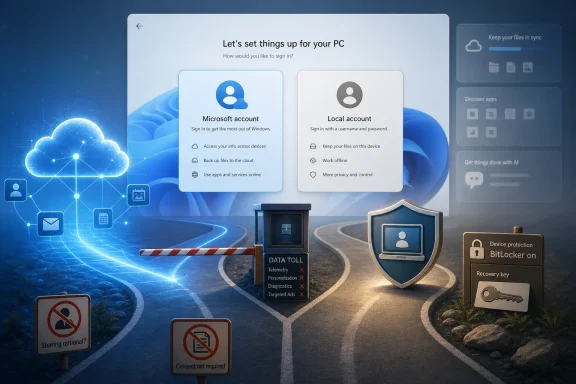
But that security argument has a consent problem attached to it. Many users do not experience the setup flow as a clear choice among security models. They experience it as a toll booth: create or use an account, connect the device, and move along.
The Ubergizmo piece captured why the issue keeps resurfacing. The Microsoft account mandate is framed as convenience and safety, while users describe it as opacity and coercion. Both sides are describing real things, but only one side controls the interface.
A Microsoft account gives the company a tidy answer. Sign in, save the recovery key, and give the average home user a realistic path back into encrypted storage. From a security engineering standpoint, that is defensible. From a support perspective, it is almost irresistible.
The trouble is that the account requirement turns a good default into a hard dependency. There is a large difference between saying “we strongly recommend this because otherwise you may lose encrypted data” and saying “you cannot finish setup the normal way unless you participate.” Microsoft has spent the Windows 11 era blurring that line.
Worse, the same mechanism that protects users can confuse them later. A person who creates a Microsoft account only because setup demanded it may not remember the address, password, recovery email, or MFA path two years later. When a BitLocker screen appears, the key may be “safely” stored in an account the owner no longer recognizes as part of their PC ownership story.
That is not a fringe scenario. It is the kind of problem that appears whenever a security design depends on users understanding an account relationship they were rushed into accepting.
Microsoft has, in turn, kept closing doors. The once-popular
That explanation is plausible, but incomplete. If the real concern is that users are skipping critical screens, Microsoft could design a local-account path that includes those screens. Instead, the company’s practical posture has often looked like this: the official road leads to a Microsoft account, and the unofficial roads will be made progressively rougher.
This is how a product decision becomes a legitimacy problem. Every workaround that works today but might fail tomorrow teaches advanced users that Windows setup is an adversarial environment. Every workaround guide teaches less technical users that the path to owning their machine requires tricks.
A healthy operating system ecosystem does not need its most loyal users to behave like jailbreakers during installation.
That mixture weakens trust. If the requirement were only about BitLocker, Microsoft could say so with ruthless clarity and offer a local path that forces users to acknowledge encryption trade-offs. Instead, the first-run experience arrives surrounded by years of other nudges: Edge prompts, OneDrive backup pitches, Microsoft 365 trials, advertising surfaces, Copilot integration, and periodic attempts to pull users back toward recommended defaults.
Users are not paranoid for noticing the pattern. Windows is no longer merely an operating system license; it is a services gateway. The Microsoft account is the key that unlocks much of that gateway, and setup is the most powerful moment to demand the key.
That does not make the account useless or sinister. For many people, it is genuinely convenient. A family PC, a laptop used across devices, or a machine whose owner already lives inside Outlook, OneDrive, Xbox, and Microsoft 365 will benefit from signing in. But the useful option becomes politically toxic when it is made mandatory for everyone else.
Microsoft’s mistake is treating resistance as a usability problem rather than a sovereignty problem. The user is not always asking, “How do I avoid a helpful feature?” Often, the user is asking, “Why does this company get to decide the identity model for hardware I bought?”
But Windows users do not experience these decisions in isolation. The account mandate lands alongside hardware requirements that left many capable Windows 10 machines outside the Windows 11 upgrade path. It lands alongside Copilot branding, Recall controversy, Start menu recommendations, cloud backup prompts, and the long-running suspicion that Windows changes are increasingly made for Microsoft’s strategic metrics rather than for users’ preferences.
That is why the local account has become symbolic. It is the small, concrete switch that represents a larger feeling: Windows is becoming less configurable at the exact moments when users care most about control. Setup is one of those moments because it establishes the relationship between person, machine, and vendor.
A local account says the computer can begin as a standalone tool. A Microsoft account says the computer begins as an endpoint in an ecosystem. Many users are happy with the second model. The backlash comes from being denied the first.
The irony is that Microsoft built its empire on compatibility, flexibility, and grudging tolerance for weird customer environments. Windows succeeded because it ran everywhere, talked to everything, and let people do things Microsoft would never have designed as a polished path. The more Windows 11 setup resembles a managed funnel, the less it feels like that Windows.
Scott Hanselman, a longtime Microsoft developer figure and vice president, has publicly acknowledged frustration with the requirement and has suggested that people inside the company are working on the issue. That does not mean a policy reversal is guaranteed. Microsoft is a large company, and a public comment from a respected executive is not the same thing as a shipping commitment from the Windows team.
Still, the signal matters. It implies that even within Microsoft, the debate is not simply “security professionals versus noisy users.” There are people who understand that the company’s credibility depends on more than technically defensible defaults. It depends on whether Windows feels honest.
This is where Microsoft’s Windows K2-style community outreach efforts run into a hard limit. Feedback programs can collect sentiment, but they cannot substitute for changing the product. If the setup experience continues to remove local paths while asking users to believe the process is designed solely for their benefit, the trust deficit will grow.
Microsoft does not need to abandon Microsoft accounts to fix this. It needs to stop pretending that the absence of a visible local choice is a neutral design decision.
In business environments, forced consumer-style flows are noise. Administrators want predictable enrollment, auditability, recovery, and policy enforcement. They also want Microsoft not to break established deployment scripts because a consumer OOBE loophole became politically inconvenient.
That tension is familiar to IT pros. Microsoft frequently designs Windows as a consumer cloud platform and an enterprise-managed endpoint at the same time. The overlap can be productive, but it can also produce strange compromises: setup screens that make sense for a Best Buy laptop but are absurd in a lab, repair bench, classroom, kiosk, or offline environment.
Small shops and independent technicians live in the awkward middle. They may not have the tooling of a large enterprise, but they still need to set up machines for clients, recover systems, test hardware, or install Windows in places where the final user identity is not yet known. For them, the Microsoft account mandate adds operational friction without necessarily adding security.
This is why bypass culture persists even among responsible professionals. It is not always about rejecting Microsoft’s cloud. Sometimes it is about needing Windows to install cleanly before the administrator decides how that specific machine should be governed.
Windows setup should explain, plainly and early, what account choice means. If the user signs in with a Microsoft account, setup should say which features will be enabled, where recovery keys may be stored, what data sync options are being activated, and how to change those choices later. If the user chooses a local account, setup should explain the consequences for BitLocker recovery, device finding, Store purchases, and settings sync.
That is not impossible. It is ordinary product design. Microsoft already knows how to build warning screens when users attempt something it dislikes; Windows has never lacked for friction when the company wants friction. The missing ingredient is willingness to apply that same clarity to a choice Microsoft would rather users not make.
A better setup flow would still recommend a Microsoft account for most consumers. It could even make that recommendation strongly. But it would preserve a clear local path, ensure device encryption decisions are understood, and stop hiding autonomy behind command prompt folklore.
The industry has a bad habit of calling user choice “confusing” when what it really means is “less aligned with our business strategy.” Microsoft should be careful not to fall into that trap with Windows. A transparent choice is not a security failure. In many cases, it is the beginning of trust.
Microsoft still has time to defuse this fight before it hardens into another permanent Windows grievance. A Windows 11 setup screen that says, in effect, “Use a Microsoft account for the safest and easiest recovery path, or choose a local account and accept these trade-offs,” would not satisfy everyone, but it would treat users like adults. If Windows is to remain the operating system for enthusiasts, admins, repair shops, families, schools, and businesses at once, Microsoft cannot make ownership feel like a workaround.
 Microsoft Turned First Boot Into a Trust Test
For years, the local Windows account was the boring option that told you something important about the PC: it was yours before it was anyone else’s. Windows 11 changed that mood. Depending on edition, region, network state, and build, setup increasingly steers users toward signing in with a Microsoft account before the desktop ever appears.Microsoft’s public justification is not frivolous. A Microsoft account can synchronize settings, restore apps, connect OneDrive, enable Find My Device, simplify Store licensing, and, crucially, store BitLocker recovery keys where ordinary users might actually find them later. If a firmware update, TPM event, motherboard replacement, or mistaken boot configuration change sends a machine into BitLocker recovery, a cloud-stored key can be the difference between a bad morning and total data loss.
But that security argument has a consent problem attached to it. Many users do not experience the setup flow as a clear choice among security models. They experience it as a toll booth: create or use an account, connect the device, and move along.
The Ubergizmo piece captured why the issue keeps resurfacing. The Microsoft account mandate is framed as convenience and safety, while users describe it as opacity and coercion. Both sides are describing real things, but only one side controls the interface.
BitLocker Is the Best Argument Microsoft Has, and It Still Isn’t Enough
The strongest version of Microsoft’s case begins with encryption. Modern Windows hardware increasingly ships with device encryption enabled or readily activated, and BitLocker recovery keys are a recurring support headache. If the key is stored only on paper, in a forgotten file, or not saved at all, Microsoft knows the user will blame Windows when recovery becomes impossible.A Microsoft account gives the company a tidy answer. Sign in, save the recovery key, and give the average home user a realistic path back into encrypted storage. From a security engineering standpoint, that is defensible. From a support perspective, it is almost irresistible.
The trouble is that the account requirement turns a good default into a hard dependency. There is a large difference between saying “we strongly recommend this because otherwise you may lose encrypted data” and saying “you cannot finish setup the normal way unless you participate.” Microsoft has spent the Windows 11 era blurring that line.
Worse, the same mechanism that protects users can confuse them later. A person who creates a Microsoft account only because setup demanded it may not remember the address, password, recovery email, or MFA path two years later. When a BitLocker screen appears, the key may be “safely” stored in an account the owner no longer recognizes as part of their PC ownership story.
That is not a fringe scenario. It is the kind of problem that appears whenever a security design depends on users understanding an account relationship they were rushed into accepting.
The Workaround Culture Is a Symptom, Not a Solution
The Windows community has responded in the way Windows communities always respond: with commands, USB tools, registry edits, and rituals passed around like field notes. Rufus has become the best-known consumer-friendly escape hatch, letting users create installation media that can remove the Microsoft account and internet requirements during setup. Other methods have leaned on command prompt access during OOBE, registry changes, domain-join paths, or quirks in the setup experience.Microsoft has, in turn, kept closing doors. The once-popular
OOBE\BYPASSNRO path became a flashpoint when Microsoft moved to remove the easy script from Insider builds in 2025. Later reporting and testing showed the company targeting additional local-account creation mechanisms, with Microsoft arguing that these bypasses could skip important setup screens and leave devices incompletely configured.That explanation is plausible, but incomplete. If the real concern is that users are skipping critical screens, Microsoft could design a local-account path that includes those screens. Instead, the company’s practical posture has often looked like this: the official road leads to a Microsoft account, and the unofficial roads will be made progressively rougher.
This is how a product decision becomes a legitimacy problem. Every workaround that works today but might fail tomorrow teaches advanced users that Windows setup is an adversarial environment. Every workaround guide teaches less technical users that the path to owning their machine requires tricks.
A healthy operating system ecosystem does not need its most loyal users to behave like jailbreakers during installation.
Microsoft’s Security Story Collides With Its Services Business
The problem for Microsoft is that the account requirement does too many jobs at once. It is a security measure, a support simplification, a cloud onboarding funnel, a OneDrive growth mechanism, a Store identity layer, a settings sync feature, and a way to tie Windows more tightly to Microsoft 365, Copilot, Edge, and the broader consumer services universe.That mixture weakens trust. If the requirement were only about BitLocker, Microsoft could say so with ruthless clarity and offer a local path that forces users to acknowledge encryption trade-offs. Instead, the first-run experience arrives surrounded by years of other nudges: Edge prompts, OneDrive backup pitches, Microsoft 365 trials, advertising surfaces, Copilot integration, and periodic attempts to pull users back toward recommended defaults.
Users are not paranoid for noticing the pattern. Windows is no longer merely an operating system license; it is a services gateway. The Microsoft account is the key that unlocks much of that gateway, and setup is the most powerful moment to demand the key.
That does not make the account useless or sinister. For many people, it is genuinely convenient. A family PC, a laptop used across devices, or a machine whose owner already lives inside Outlook, OneDrive, Xbox, and Microsoft 365 will benefit from signing in. But the useful option becomes politically toxic when it is made mandatory for everyone else.
Microsoft’s mistake is treating resistance as a usability problem rather than a sovereignty problem. The user is not always asking, “How do I avoid a helpful feature?” Often, the user is asking, “Why does this company get to decide the identity model for hardware I bought?”
The Local Account Has Become a Proxy War for Everything Else
The intensity of the argument can seem disproportionate if viewed narrowly. After all, a user can often sign in, create a local account later, move files, delete the original profile, or disconnect pieces of the Microsoft ecosystem after setup. In isolation, that sounds like a nuisance rather than a crisis.But Windows users do not experience these decisions in isolation. The account mandate lands alongside hardware requirements that left many capable Windows 10 machines outside the Windows 11 upgrade path. It lands alongside Copilot branding, Recall controversy, Start menu recommendations, cloud backup prompts, and the long-running suspicion that Windows changes are increasingly made for Microsoft’s strategic metrics rather than for users’ preferences.
That is why the local account has become symbolic. It is the small, concrete switch that represents a larger feeling: Windows is becoming less configurable at the exact moments when users care most about control. Setup is one of those moments because it establishes the relationship between person, machine, and vendor.
A local account says the computer can begin as a standalone tool. A Microsoft account says the computer begins as an endpoint in an ecosystem. Many users are happy with the second model. The backlash comes from being denied the first.
The irony is that Microsoft built its empire on compatibility, flexibility, and grudging tolerance for weird customer environments. Windows succeeded because it ran everywhere, talked to everything, and let people do things Microsoft would never have designed as a polished path. The more Windows 11 setup resembles a managed funnel, the less it feels like that Windows.
Internal Dissent Shows Microsoft Knows the Mandate Has a Cost
The most interesting detail in the recent wave of criticism is not that Reddit is angry. Reddit is often angry. The more telling point is that the dissatisfaction reportedly exists inside Microsoft as well.Scott Hanselman, a longtime Microsoft developer figure and vice president, has publicly acknowledged frustration with the requirement and has suggested that people inside the company are working on the issue. That does not mean a policy reversal is guaranteed. Microsoft is a large company, and a public comment from a respected executive is not the same thing as a shipping commitment from the Windows team.
Still, the signal matters. It implies that even within Microsoft, the debate is not simply “security professionals versus noisy users.” There are people who understand that the company’s credibility depends on more than technically defensible defaults. It depends on whether Windows feels honest.
This is where Microsoft’s Windows K2-style community outreach efforts run into a hard limit. Feedback programs can collect sentiment, but they cannot substitute for changing the product. If the setup experience continues to remove local paths while asking users to believe the process is designed solely for their benefit, the trust deficit will grow.
Microsoft does not need to abandon Microsoft accounts to fix this. It needs to stop pretending that the absence of a visible local choice is a neutral design decision.
Enterprise IT Sees a Different Problem Than Home Users Do
For managed organizations, the account debate plays differently. Enterprises have their own identity systems, provisioning pipelines, Autopilot workflows, Entra ID joins, imaging practices, compliance rules, and help desks. Their issue is less about whether a consumer Microsoft account is convenient and more about whether Microsoft’s setup assumptions interfere with standardized deployment.In business environments, forced consumer-style flows are noise. Administrators want predictable enrollment, auditability, recovery, and policy enforcement. They also want Microsoft not to break established deployment scripts because a consumer OOBE loophole became politically inconvenient.
That tension is familiar to IT pros. Microsoft frequently designs Windows as a consumer cloud platform and an enterprise-managed endpoint at the same time. The overlap can be productive, but it can also produce strange compromises: setup screens that make sense for a Best Buy laptop but are absurd in a lab, repair bench, classroom, kiosk, or offline environment.
Small shops and independent technicians live in the awkward middle. They may not have the tooling of a large enterprise, but they still need to set up machines for clients, recover systems, test hardware, or install Windows in places where the final user identity is not yet known. For them, the Microsoft account mandate adds operational friction without necessarily adding security.
This is why bypass culture persists even among responsible professionals. It is not always about rejecting Microsoft’s cloud. Sometimes it is about needing Windows to install cleanly before the administrator decides how that specific machine should be governed.
Transparency Would Solve More Than Another Hidden Button
The debate often gets reduced to a binary demand: bring back the local account option. That would help. But the deeper fix is transparency.Windows setup should explain, plainly and early, what account choice means. If the user signs in with a Microsoft account, setup should say which features will be enabled, where recovery keys may be stored, what data sync options are being activated, and how to change those choices later. If the user chooses a local account, setup should explain the consequences for BitLocker recovery, device finding, Store purchases, and settings sync.
That is not impossible. It is ordinary product design. Microsoft already knows how to build warning screens when users attempt something it dislikes; Windows has never lacked for friction when the company wants friction. The missing ingredient is willingness to apply that same clarity to a choice Microsoft would rather users not make.
A better setup flow would still recommend a Microsoft account for most consumers. It could even make that recommendation strongly. But it would preserve a clear local path, ensure device encryption decisions are understood, and stop hiding autonomy behind command prompt folklore.
The industry has a bad habit of calling user choice “confusing” when what it really means is “less aligned with our business strategy.” Microsoft should be careful not to fall into that trap with Windows. A transparent choice is not a security failure. In many cases, it is the beginning of trust.
The Real Windows 11 Setup Lesson Is Written in the Bypass Guides
The practical facts are less dramatic than the rhetoric but more damning than Microsoft would like. The company has a defensible security rationale, users have a defensible autonomy complaint, and the current setup experience satisfies neither side as cleanly as it should.- Microsoft accounts make recovery, encryption, synchronization, and service integration easier for many ordinary Windows users.
- The setup mandate undermines that benefit by making consent feel coerced rather than informed.
- BitLocker recovery is Microsoft’s strongest argument, but it requires clearer explanation during setup, not a hidden local-account path.
- Workarounds such as Rufus, registry edits, and OOBE commands show sustained demand for offline setup rather than a temporary wave of complaints.
- IT professionals need predictable deployment paths that do not depend on consumer account assumptions or fragile bypass behavior.
- Microsoft can preserve the security advantages of cloud identity while restoring trust by making local setup visible, supported, and explicit.
Microsoft still has time to defuse this fight before it hardens into another permanent Windows grievance. A Windows 11 setup screen that says, in effect, “Use a Microsoft account for the safest and easiest recovery path, or choose a local account and accept these trade-offs,” would not satisfy everyone, but it would treat users like adults. If Windows is to remain the operating system for enthusiasts, admins, repair shops, families, schools, and businesses at once, Microsoft cannot make ownership feel like a workaround.
References
- Primary source: Ubergizmo
Published: Mon, 15 Jun 2026 09:58:25 GMT
Loading…
www.ubergizmo.com - Official source: support.microsoft.com
Loading…
support.microsoft.com - Related coverage: windowscentral.com
Microsoft wants Windows 11 installs to use a Microsoft Account — confirms removal of popular setup bypass | Windows Central
The popular "bypassnro" command, which let users to skip connecting to the Internet and signing into a Microsoft Account, is being removed.www.windowscentral.com - Related coverage: pureinfotech.com

Microsoft blocks bypass to skip Microsoft Account during setup on Windows 11 - Pureinfotech
Microsoft removes workarounds to bypass the Microsoft account when setting up Windows 11, including "bypassnro" and ms-cxh:localonly." pureinfotech.com
- Related coverage: windowsforum.com

Windows 11 Setup May Get Local Account Option Back After Hanselman ‘Working On It’ | Windows Forum
A long-running irritation in Windows 11 setup may finally be headed for a fix. Microsoft’s Scott Hanselman has publicly acknowledged frustration with the...windowsforum.com - Related coverage: techspot.com
Microsoft is removing the ability to easily install Windows 11 with a local account | TechSpot
Microsoft has released a new Windows 11 preview build for beta testers in the Insider program. Build 26220.6772 (KB5065797) introduces several changes that will gradually roll out...www.techspot.com
- Related coverage: winbuzzer.com

Microsoft VP Wants to End Windows 11 Microsoft Account Mandate
Microsoft VP Scott Hanselman has revealed he is working to end Windows 11's mandatory Microsoft account requirement, amid a growing internal campaign. winbuzzer.com
- Related coverage: tomshardware.com
Loading…
www.tomshardware.com - Related coverage: beebom.com
Loading…
beebom.com - Related coverage: techenclave.com
Loading…
techenclave.com - Related coverage: tomsguide.com
Microsoft might be cracking down on Windows 11 local account setups — here's what we know so far | Tom's Guide
Microsoft is attempting to restrict account access for local accounts.www.tomsguide.com - Related coverage: laswitchtech.com
- Related coverage: app-direct-www-cloudfront.s3.amazonaws.com
Introducing Windows 10 for IT Professionals Technical Overview
PDF documentapp-direct-www-cloudfront.s3.amazonaws.com