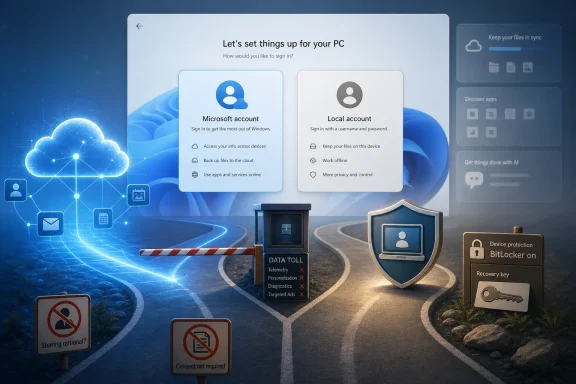
Windows 11 users are again criticizing Microsoft’s account requirement after a late-May Reddit discussion revived demands for a visible local-account option during setup, arguing that Microsoft’s out-of-box experience now forces online identity, cloud recovery, and device encryption decisions before many buyers understand the tradeoffs. The complaint is not new, but its timing matters. Microsoft is trying to sell 2026 as the year it listens to Windows users, while one of Windows 11’s most visible trust problems remains parked at the front door of every new PC.
The local-account fight has become a proxy war for something larger than login preference. It is about who gets to decide what a personal computer is connected to, what data is recoverable through the cloud, and whether security defaults should be explained before they are imposed. Microsoft has good reasons to prefer online accounts, but the company keeps weakening its own case by making the escape hatch feel like contraband.
The Windows out-of-box experience used to be a short negotiation. You named the PC, created a user, made a few privacy choices, and eventually landed on the desktop. Today, Windows 11 setup increasingly feels like a funnel: connect to the internet, sign in, accept that this machine now participates in a broader Microsoft account ecosystem, and only then start using the hardware you bought.
That is why the Reddit thread struck a nerve. The original poster was not asking how to bypass the Microsoft account requirement with Rufus, hidden commands, or installation tricks. They were asking why the workaround economy exists at all. A normal consumer setup flow should not require folk knowledge passed around by technicians.
The tone of the responses matters because Windows users are not merely saying, “I prefer a local account.” They are saying the choice should be visible, official, and supported. That distinction is where Microsoft keeps losing the argument.
A workaround is not the same thing as consent. A hidden command prompt sequence may satisfy enthusiasts, but it does not help a parent setting up a laptop for a child, a small-business owner rebuilding a machine after a drive failure, or a privacy-conscious user who simply does not want another online identity tied to a device. If Microsoft believes the online path is better, it should be able to win that argument in the setup screen itself.
Local accounts are useful when a machine is offline, when it is being staged, when it is used in a lab, when it is being repaired, when it is shared in a household, or when the user simply wants separation between identity and hardware. They are also a cleaner mental model. A local password unlocks this device; an online account unlocks a web of services.
That distinction is not pedantic. Windows 11 increasingly merges setup, identity, recovery, OneDrive, Microsoft Store access, device tracking, password reset, and encryption recovery into a single account relationship. Some users welcome that convenience. Others see a single point of dependency.
The old Windows answer was inelegant but honest: you could use a Microsoft account if you wanted cloud conveniences, or you could use a local account if you preferred the machine to stand more on its own. Windows 11 still technically supports local accounts in various contexts, editions, and post-setup paths, but the consumer setup experience has shifted the balance from choice to pressure.
That is why the complaint persists. Users are not confused about the benefits of a Microsoft account. They are objecting to the disappearance of the ordinary “no thanks” button.
This is where Microsoft’s account strategy becomes more understandable. If Windows encrypts a drive automatically, the recovery key has to live somewhere. For consumers, saving it to the Microsoft account is the most supportable answer. A user who forgets a password, changes firmware settings, replaces hardware, or triggers recovery after an update has some chance of getting data back.
That is the humane version of the policy. It assumes the alternative is a world full of people locked out of their own files because they never printed, exported, or backed up a 48-digit recovery key. Anyone who has done family tech support knows that scenario is not hypothetical.
But the optics are brutal because the user often does not experience this as security. They experience it as surprise. They set up a PC, sign in because Windows says they should, use a PIN because Windows says that is easier, and months later are confronted by a BitLocker recovery screen asking for a key they may not remember ever being told about.
At that moment, Microsoft’s tidy security architecture becomes a customer-support trap. The key may be in the Microsoft account. The user may have several Microsoft accounts. The account may use an old email address. The device may have been set up by a retailer, a relative, an employer, or a school. The account might be inaccessible because the user lost a phone number or recovery method. None of that feels like protection when the machine will not boot.
A good Windows 11 setup screen would say something like this: signing in with a Microsoft account can back up your recovery key, sync settings, connect Store purchases, enable recovery options, and link this device to your account dashboard. A local account keeps sign-in limited to this PC, but you must manage recovery keys and backups yourself. Then the user chooses.
That would be more honest than the current posture, which presents the Microsoft account as the expected route and leaves local-account setup to edition quirks, post-install conversion, or community-discovered detours. It would also make the security argument stronger. Users are more likely to accept encryption when they understand where the key goes and why.
The irony is that Microsoft knows how to write these flows when it wants to. Windows is full of consent screens, permission prompts, and recovery notices. The company can explain passkeys, Windows Hello, OneDrive backup, and account recovery when those features advance its product strategy. Local accounts receive a different treatment: they are technically possible but rhetorically discouraged.
That asymmetry is what annoys power users and confuses everyone else. The problem is not that Microsoft prefers the account. The problem is that Microsoft has turned preference into choreography.
But trust is not rebuilt by moving the taskbar while ignoring the first-run experience. Setup is where Microsoft tells users what kind of relationship they are entering. If that relationship begins with a mandatory online account prompt, a disappearing local path, and an implicit cloud recovery arrangement, K2 has already inherited a trust deficit before the desktop appears.
This is why the account requirement has outsize symbolic value. It is not the most technically severe issue in Windows 11. It may not even affect most users day to day. But it is visible, memorable, and easy to understand: “I bought this PC, and Windows will not let me set it up the old way.”
For enthusiasts, that becomes another example of Microsoft tightening control. For administrators, it complicates staging and support workflows outside managed enterprise deployment. For ordinary users, it creates account sprawl and recovery confusion. For privacy-minded users, it ties local computing to a cloud identity at the earliest possible moment.
K2 can fix many things, but it cannot talk its way around that. A customer-listening initiative that does not address one of the loudest customer complaints will look selective by design.
This matters because workaround culture favors the technically confident. The people most able to avoid the Microsoft account requirement are the people least likely to be trapped by it in the first place. Technicians know how to retrieve BitLocker keys, reinstall Windows, stage devices, and document recovery information. Casual users do not.
That inversion makes Microsoft’s policy feel paternalistic in the wrong direction. The company says the online account protects less technical users, but the lack of transparency is precisely what leaves those users vulnerable when something goes wrong. Meanwhile, the technical users Microsoft is trying to corral simply find another exit.
The result is an odd two-tier system. Experts still get local accounts because experts know the rituals. Everyone else gets the default because the default is presented as the only supported path. That is not a clean security model; it is a usability tax.
A visible local-account option would not eliminate Microsoft accounts. It would eliminate the resentment around them. Most consumers would still sign in if the benefits were clear, especially on laptops where cloud recovery, Store access, OneDrive, and device finding have obvious value. The difference is that the yes would mean more.
But the consumer OOBE still matters to IT pros because the boundary between personal and work devices keeps blurring. Small businesses buy retail laptops. Contractors bring their own machines. Employees enroll personal devices. A PC that begins life with an unmanaged Microsoft account can later become a support headache when ownership, encryption, and recovery paths are unclear.
This is especially true for small organizations without a mature endpoint-management stack. They may not have Entra join, Intune policies, documented BitLocker recovery procedures, or a clean procurement pipeline. They just have a pile of Windows 11 laptops and someone in the office who is “good with computers.”
For that audience, setup clarity is not a philosophical luxury. It is operational hygiene. Who owns the recovery key? Which account controls the device? What happens when the employee leaves? Can the machine be recovered without calling a former staffer? Windows should make those consequences legible before the first login, not after the first disaster.
Microsoft’s cloud-first assumptions make more sense in a managed tenant than in a household or a five-person business. The problem is that Windows setup increasingly behaves as if every PC belongs to an identity strategy. Many still belong to people who just need a computer.
That does not make every Microsoft account prompt sinister. Modern operating systems are service platforms, and Apple and Google have their own account-driven ecosystems. A Mac without an Apple Account is possible but diminished. An Android phone without a Google account is technically usable but outside the mainstream path. Microsoft is not alone in wanting identity at the center.
But Windows occupies a different historical role. It is the general-purpose PC operating system, the platform that ran everything from offline CNC controllers to gaming rigs to family desktops to school laptops. Its cultural promise was not elegance or ecosystem purity. It was breadth.
That breadth is why users react so strongly when Windows behaves like a locked-in consumer service. A Windows PC is not a phone, and many users do not want the first-run experience to pretend it is. Microsoft can argue that the world has changed, but it cannot erase decades of user expectation with a setup prompt.
The company’s incentives also make users skeptical of the security explanation. If Microsoft accounts only backed up BitLocker keys, the argument would land differently. But because the same account also drives upsell, sync, telemetry, and service adoption, users suspect security is doing double duty as leverage.
Microsoft could attach sensible warnings to that choice. It could require the user to save or print a recovery key before enabling encryption. It could recommend creating a password reset disk or adding recovery questions. It could remind users that some cloud features will not work until they sign in. That is not anti-security; it is informed setup.
The company could also design a hybrid path. Let a user create a local account first, then opt into cloud recovery for BitLocker without converting the entire Windows sign-in identity. Let the recovery-key decision be explicit rather than bundled into account sign-in. Let local identity and cloud backup be separable choices.
That kind of design would respect both realities. Microsoft is right that many users benefit from cloud recovery. Critics are right that users should not be forced into an online account to operate a personal computer. The current setup flow collapses those ideas into one demand, and that is why it keeps producing backlash.
The best defaults are not the ones users cannot escape. They are the ones users keep because they understand them.
Microsoft may see the account requirement as a small piece of a larger modernization strategy. Users see it every time they install Windows. That makes it emotionally bigger than its technical footprint.
The company also risks training its most loyal users to distrust every change. When a setup requirement is framed as security but also benefits Microsoft’s ecosystem, every future security improvement becomes suspect. That is bad for Microsoft and bad for users, because Windows genuinely needs stronger defaults in an era of stolen laptops, commodity malware, phishing, and ransomware.
The fix is not to retreat to 2009. It is to treat users like adults in 2026. Explain the tradeoff. Recommend the safer path. Preserve the local path. Make recovery responsibilities explicit. Stop forcing enthusiasts to behave like jailbreakers for wanting a PC account that stays on the PC.
The next version of Windows trust will be won or lost in moments like this, not in keynote language about listening or internal codenames about quality. If Microsoft wants users to believe Windows is becoming more respectful, the setup screen is the place to prove it: make the online account useful, make the local account visible, and let the person who bought the PC decide how connected that PC should be.
The local-account fight has become a proxy war for something larger than login preference. It is about who gets to decide what a personal computer is connected to, what data is recoverable through the cloud, and whether security defaults should be explained before they are imposed. Microsoft has good reasons to prefer online accounts, but the company keeps weakening its own case by making the escape hatch feel like contraband.
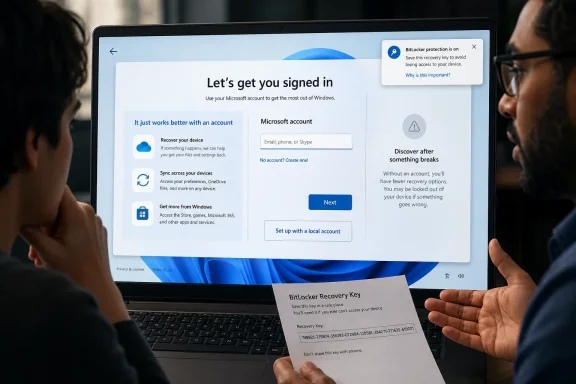 Microsoft’s Setup Screen Has Become a Trust Test
The Windows out-of-box experience used to be a short negotiation. You named the PC, created a user, made a few privacy choices, and eventually landed on the desktop. Today, Windows 11 setup increasingly feels like a funnel: connect to the internet, sign in, accept that this machine now participates in a broader Microsoft account ecosystem, and only then start using the hardware you bought.That is why the Reddit thread struck a nerve. The original poster was not asking how to bypass the Microsoft account requirement with Rufus, hidden commands, or installation tricks. They were asking why the workaround economy exists at all. A normal consumer setup flow should not require folk knowledge passed around by technicians.
The tone of the responses matters because Windows users are not merely saying, “I prefer a local account.” They are saying the choice should be visible, official, and supported. That distinction is where Microsoft keeps losing the argument.
A workaround is not the same thing as consent. A hidden command prompt sequence may satisfy enthusiasts, but it does not help a parent setting up a laptop for a child, a small-business owner rebuilding a machine after a drive failure, or a privacy-conscious user who simply does not want another online identity tied to a device. If Microsoft believes the online path is better, it should be able to win that argument in the setup screen itself.
The Local Account Was Never Just Nostalgia
Microsoft sometimes treats local-account defenders as if they are clinging to an older model of computing. That is only partly true. Yes, the local account belongs to a pre-cloud PC era, when the operating system was primarily a piece of software running on a box under your desk. But the practical case for local accounts has not disappeared.Local accounts are useful when a machine is offline, when it is being staged, when it is used in a lab, when it is being repaired, when it is shared in a household, or when the user simply wants separation between identity and hardware. They are also a cleaner mental model. A local password unlocks this device; an online account unlocks a web of services.
That distinction is not pedantic. Windows 11 increasingly merges setup, identity, recovery, OneDrive, Microsoft Store access, device tracking, password reset, and encryption recovery into a single account relationship. Some users welcome that convenience. Others see a single point of dependency.
The old Windows answer was inelegant but honest: you could use a Microsoft account if you wanted cloud conveniences, or you could use a local account if you preferred the machine to stand more on its own. Windows 11 still technically supports local accounts in various contexts, editions, and post-setup paths, but the consumer setup experience has shifted the balance from choice to pressure.
That is why the complaint persists. Users are not confused about the benefits of a Microsoft account. They are objecting to the disappearance of the ordinary “no thanks” button.
BitLocker Gives Microsoft Its Best Argument — And Its Worst Optics
The strongest defense of Microsoft’s approach is security. Modern laptops should be encrypted by default. A stolen PC should not become a free data buffet for whoever removes the SSD. Device encryption and BitLocker recovery are real user protections, not marketing fluff.This is where Microsoft’s account strategy becomes more understandable. If Windows encrypts a drive automatically, the recovery key has to live somewhere. For consumers, saving it to the Microsoft account is the most supportable answer. A user who forgets a password, changes firmware settings, replaces hardware, or triggers recovery after an update has some chance of getting data back.
That is the humane version of the policy. It assumes the alternative is a world full of people locked out of their own files because they never printed, exported, or backed up a 48-digit recovery key. Anyone who has done family tech support knows that scenario is not hypothetical.
But the optics are brutal because the user often does not experience this as security. They experience it as surprise. They set up a PC, sign in because Windows says they should, use a PIN because Windows says that is easier, and months later are confronted by a BitLocker recovery screen asking for a key they may not remember ever being told about.
At that moment, Microsoft’s tidy security architecture becomes a customer-support trap. The key may be in the Microsoft account. The user may have several Microsoft accounts. The account may use an old email address. The device may have been set up by a retailer, a relative, an employer, or a school. The account might be inaccessible because the user lost a phone number or recovery method. None of that feels like protection when the machine will not boot.
The Real Failure Is Disclosure, Not Encryption
Microsoft does not need to abandon secure defaults to fix this. It needs to stop burying the significance of those defaults under a generic sign-in demand. The setup experience should explain, in plain English, what an online account changes.A good Windows 11 setup screen would say something like this: signing in with a Microsoft account can back up your recovery key, sync settings, connect Store purchases, enable recovery options, and link this device to your account dashboard. A local account keeps sign-in limited to this PC, but you must manage recovery keys and backups yourself. Then the user chooses.
That would be more honest than the current posture, which presents the Microsoft account as the expected route and leaves local-account setup to edition quirks, post-install conversion, or community-discovered detours. It would also make the security argument stronger. Users are more likely to accept encryption when they understand where the key goes and why.
The irony is that Microsoft knows how to write these flows when it wants to. Windows is full of consent screens, permission prompts, and recovery notices. The company can explain passkeys, Windows Hello, OneDrive backup, and account recovery when those features advance its product strategy. Local accounts receive a different treatment: they are technically possible but rhetorically discouraged.
That asymmetry is what annoys power users and confuses everyone else. The problem is not that Microsoft prefers the account. The problem is that Microsoft has turned preference into choreography.
K2 Cannot Rebuild Windows Trust While Setup Feels Like a Sales Funnel
Microsoft’s reported Windows K2 initiative is supposed to be a credibility reset. The company has been trying to respond to complaints about performance, reliability, interface inconsistency, update friction, AI clutter, and a general sense that Windows 11 was built more around Microsoft’s priorities than the user’s. That is a serious effort if it results in real engineering changes.But trust is not rebuilt by moving the taskbar while ignoring the first-run experience. Setup is where Microsoft tells users what kind of relationship they are entering. If that relationship begins with a mandatory online account prompt, a disappearing local path, and an implicit cloud recovery arrangement, K2 has already inherited a trust deficit before the desktop appears.
This is why the account requirement has outsize symbolic value. It is not the most technically severe issue in Windows 11. It may not even affect most users day to day. But it is visible, memorable, and easy to understand: “I bought this PC, and Windows will not let me set it up the old way.”
For enthusiasts, that becomes another example of Microsoft tightening control. For administrators, it complicates staging and support workflows outside managed enterprise deployment. For ordinary users, it creates account sprawl and recovery confusion. For privacy-minded users, it ties local computing to a cloud identity at the earliest possible moment.
K2 can fix many things, but it cannot talk its way around that. A customer-listening initiative that does not address one of the loudest customer complaints will look selective by design.
The Workaround Culture Is a Symptom of Product Design Failure
The local-account workaround ecosystem is now its own Windows subculture. Rufus options, command-line incantations, fake email tricks, domain-join paths, registry edits, unattended installs, and shifting bypass methods circulate every time Microsoft tightens the setup flow. The fact that these methods exist is not proof that Microsoft has preserved choice. It is proof that users are routing around the product.This matters because workaround culture favors the technically confident. The people most able to avoid the Microsoft account requirement are the people least likely to be trapped by it in the first place. Technicians know how to retrieve BitLocker keys, reinstall Windows, stage devices, and document recovery information. Casual users do not.
That inversion makes Microsoft’s policy feel paternalistic in the wrong direction. The company says the online account protects less technical users, but the lack of transparency is precisely what leaves those users vulnerable when something goes wrong. Meanwhile, the technical users Microsoft is trying to corral simply find another exit.
The result is an odd two-tier system. Experts still get local accounts because experts know the rituals. Everyone else gets the default because the default is presented as the only supported path. That is not a clean security model; it is a usability tax.
A visible local-account option would not eliminate Microsoft accounts. It would eliminate the resentment around them. Most consumers would still sign in if the benefits were clear, especially on laptops where cloud recovery, Store access, OneDrive, and device finding have obvious value. The difference is that the yes would mean more.
Enterprise IT Sees the Same Pattern From a Different Angle
Large organizations have tools that consumers do not. Autopilot, Microsoft Entra ID, Intune, provisioning packages, group policy, and deployment images give enterprise administrators ways to define identity and recovery workflows at scale. In a managed environment, the Microsoft account debate is usually not about a personal Outlook login; it is about directory identity, compliance, and key escrow.But the consumer OOBE still matters to IT pros because the boundary between personal and work devices keeps blurring. Small businesses buy retail laptops. Contractors bring their own machines. Employees enroll personal devices. A PC that begins life with an unmanaged Microsoft account can later become a support headache when ownership, encryption, and recovery paths are unclear.
This is especially true for small organizations without a mature endpoint-management stack. They may not have Entra join, Intune policies, documented BitLocker recovery procedures, or a clean procurement pipeline. They just have a pile of Windows 11 laptops and someone in the office who is “good with computers.”
For that audience, setup clarity is not a philosophical luxury. It is operational hygiene. Who owns the recovery key? Which account controls the device? What happens when the employee leaves? Can the machine be recovered without calling a former staffer? Windows should make those consequences legible before the first login, not after the first disaster.
Microsoft’s cloud-first assumptions make more sense in a managed tenant than in a household or a five-person business. The problem is that Windows setup increasingly behaves as if every PC belongs to an identity strategy. Many still belong to people who just need a computer.
Microsoft’s Business Incentives Are Too Obvious to Ignore
The uncomfortable truth is that the Microsoft account is not only a security mechanism. It is also a distribution channel. It connects the user to OneDrive, Microsoft 365, the Store, Edge, rewards, device tracking, backup, sync, advertising identifiers, subscription prompts, and the broader Microsoft consumer graph.That does not make every Microsoft account prompt sinister. Modern operating systems are service platforms, and Apple and Google have their own account-driven ecosystems. A Mac without an Apple Account is possible but diminished. An Android phone without a Google account is technically usable but outside the mainstream path. Microsoft is not alone in wanting identity at the center.
But Windows occupies a different historical role. It is the general-purpose PC operating system, the platform that ran everything from offline CNC controllers to gaming rigs to family desktops to school laptops. Its cultural promise was not elegance or ecosystem purity. It was breadth.
That breadth is why users react so strongly when Windows behaves like a locked-in consumer service. A Windows PC is not a phone, and many users do not want the first-run experience to pretend it is. Microsoft can argue that the world has changed, but it cannot erase decades of user expectation with a setup prompt.
The company’s incentives also make users skeptical of the security explanation. If Microsoft accounts only backed up BitLocker keys, the argument would land differently. But because the same account also drives upsell, sync, telemetry, and service adoption, users suspect security is doing double duty as leverage.
A Better Default Would Still Be Microsoft’s Default
There is an obvious compromise: make the Microsoft account the recommended path, not the mandatory-feeling path. Present it first. Explain the benefits. Make clear that it is the easiest way to store a recovery key, recover a password, sync settings, and use Microsoft services. Then offer “Set up with a local account” as a visible alternative.Microsoft could attach sensible warnings to that choice. It could require the user to save or print a recovery key before enabling encryption. It could recommend creating a password reset disk or adding recovery questions. It could remind users that some cloud features will not work until they sign in. That is not anti-security; it is informed setup.
The company could also design a hybrid path. Let a user create a local account first, then opt into cloud recovery for BitLocker without converting the entire Windows sign-in identity. Let the recovery-key decision be explicit rather than bundled into account sign-in. Let local identity and cloud backup be separable choices.
That kind of design would respect both realities. Microsoft is right that many users benefit from cloud recovery. Critics are right that users should not be forced into an online account to operate a personal computer. The current setup flow collapses those ideas into one demand, and that is why it keeps producing backlash.
The best defaults are not the ones users cannot escape. They are the ones users keep because they understand them.
The Setup Screen Is Where Windows Decides Who It Serves
The Reddit complaint lands because it captures a broader exhaustion with Windows 11’s posture. Users are tired of discovering that something they once controlled has become a managed preference. They are tired of needing tricks to avoid prompts. They are tired of being told that the workaround proves the choice still exists.Microsoft may see the account requirement as a small piece of a larger modernization strategy. Users see it every time they install Windows. That makes it emotionally bigger than its technical footprint.
The company also risks training its most loyal users to distrust every change. When a setup requirement is framed as security but also benefits Microsoft’s ecosystem, every future security improvement becomes suspect. That is bad for Microsoft and bad for users, because Windows genuinely needs stronger defaults in an era of stolen laptops, commodity malware, phishing, and ransomware.
The fix is not to retreat to 2009. It is to treat users like adults in 2026. Explain the tradeoff. Recommend the safer path. Preserve the local path. Make recovery responsibilities explicit. Stop forcing enthusiasts to behave like jailbreakers for wanting a PC account that stays on the PC.
The Choice Microsoft Keeps Trying Not to Say Out Loud
The practical lessons from this latest flare-up are not complicated, which is precisely why the issue keeps returning. Microsoft has engineered a sophisticated account-and-recovery ecosystem, but it has not earned the right to make that ecosystem feel compulsory.- Windows 11 users are not only objecting to Microsoft accounts; they are objecting to the disappearance of a clear local-account choice during setup.
- Microsoft has a legitimate security argument because device encryption and BitLocker recovery keys need a reliable recovery path.
- The company undermines that argument when users discover encryption and recovery-key storage only after a boot problem or hardware change.
- Workarounds help technicians and enthusiasts, but they are not a substitute for an official setup option ordinary users can understand.
- A better Windows 11 OOBE would recommend Microsoft accounts while visibly offering local accounts and explaining the consequences of each path.
- Windows K2 will struggle to rebuild trust if Microsoft improves polish and performance while leaving the first-run identity funnel untouched.
The next version of Windows trust will be won or lost in moments like this, not in keynote language about listening or internal codenames about quality. If Microsoft wants users to believe Windows is becoming more respectful, the setup screen is the place to prove it: make the online account useful, make the local account visible, and let the person who bought the PC decide how connected that PC should be.
References
- Primary source: Windows Central
Published: None

Windows 11 users say Microsoft account requirements are creeping into everything and they are tired of it | Windows Central
A Reddit discussion about local accounts turns into a bigger debate over privacy, transparency, and user control on Windows 11.www.windowscentral.com - Related coverage: pcworld.com

Microsoft VP hints at ending Windows 11's Microsoft Account requirement | PCWorld
A Microsoft VP says he's "working on" removing the mandatory Microsoft account requirement in Windows 11, a truly controversial "feature."www.pcworld.com - Related coverage: techrepublic.com

‘Windows K2’ Could Be Microsoft’s Answer to Years of Windows 11 Frustration
Microsoft’s Windows K2 effort aims to improve Windows 11 performance, reliability, updates, taskbar flexibility, and user feedback loops.www.techrepublic.com
- Related coverage: lowyat.net
Microsoft Reportedly Working On “K2” Initiative To Extensively Address Windows 11 Issues - Lowyat.NET
Microsoft is reportedly working on a major effort to address longstanding issues surrounding its Windows 11 platform.www.lowyat.net - Related coverage: pureinfotech.com

Microsoft blocks bypass to skip Microsoft Account during setup on Windows 11 - Pureinfotech
Microsoft removes workarounds to bypass the Microsoft account when setting up Windows 11, including "bypassnro" and ms-cxh:localonly." pureinfotech.com
- Related coverage: tomshardware.com

Microsoft clamping down on Windows 11 local account setup — latest Insider build removes 'local-only commands,' skipping Microsoft account sign-in will crash setup process | Tom's Hardware
Microsoft is clamping down on the practicewww.tomshardware.com
- Official source: support.microsoft.com

Change From a Local Account to a Microsoft Account in Windows | Microsoft Support
Learn how to change your Windows sign in from a local account to a Microsoft account to sync your settings across all your devices.support.microsoft.com - Related coverage: techradar.com

You might soon be able to sign into Windows 11 without a Microsoft account, with software engineers 'working on it' | TechRadar
We're hopefulwww.techradar.com - Related coverage: notebookcheck.net

Microsoft doubles down on local account restrictions in Windows 11 setup - Notebookcheck News
In the latest preview builds of Windows 11, Microsoft has made it harder to create a local account than before. The company has blocked most of the known workarounds, and the initial setup now requires an internet connection. www.notebookcheck.net
- Related coverage: windowsforum.com

Windows 11 Setup May Get Local Account Option Back After Hanselman ‘Working On It’ | Windows Forum
A long-running irritation in Windows 11 setup may finally be headed for a fix. Microsoft’s Scott Hanselman has publicly acknowledged frustration with the...windowsforum.com - Related coverage: tech.slashdot.org

Some Microsoft Insiders Fight to Drop Windows 11's Microsoft Account Requirements - Slashdot
Yes, Microsoft announced it's fixing common Windows 11 complaints. But what about getting rid of that requirement to have a Microsoft account before installing Windows 11? While Microsoft didn't mention that at all, the senior editor at the blog Windows Central reports there's "a number of...tech.slashdot.org - Related coverage: unanswered.io
Set Up Windows 11 Without Microsoft Account in 2026
Learn how to bypass Microsoft account requirement during Windows 11 setup. Use Command Prompt tricks or Rufus for local account install on 24H2 and newer builds.unanswered.io - Related coverage: howtogeek.com

Windows 11 Just Killed a Local Account Setup Workaround
There are still other ways to skip a Microsoft account during PC setup, though. www.howtogeek.com
- Related coverage: pcgamer.com

A YouTuber claims they've had two Windows 11 local account and hardware bypass videos taken down because of supposedly 'harmful or dangerous content' | PC Gamer
Maybe it's time to try Linux.www.pcgamer.com - Official source: microsoft.com
- Related coverage: laswitchtech.com
- Official source: learn.microsoft.com

WIndows 11 Bitlocker recovery key - Microsoft Q&A
I experienced a bug in windows 11 with a black screen and just a cursor. I have tried every different method but i need my Bit locker recovery key. Which I do not have access to, because I forgot my Microsoft's Gmail account password. (I can't reset it)…learn.microsoft.com - Official source: answers.microsoft.com
BitLocker recovery key - Microsoft Q&A
hi my pc telling me to enter BitLocker recovery key but i dont have it when i enter to my account in Clés de récupération BitLocker i didnt found any BitLocker recovery key whats the solution plsanswers.microsoft.com - Related coverage: archive.ph
- Official source: download.microsoft.com