

On June 9, 2026, Microsoft’s Patch Tuesday fixed two BitLocker security-feature bypass flaws, including the publicly disclosed “YellowKey” vulnerability, after weeks of mitigation-only guidance for Windows systems that relied on TPM-only disk encryption. The headline number was enormous, but the more important story is narrower and more uncomfortable. BitLocker did not fail because AES suddenly became weak; it failed because the trusted boot and recovery machinery around encrypted Windows installations offered attackers a way to arrive after the drive had effectively been unlocked. That is the kind of flaw administrators should treat less like a one-off bug and more like a design warning.
Patch Tuesday coverage has developed a predictable rhythm: count the CVEs, count the criticals, count the zero-days, then move on. June 2026 made that habit easy to indulge because the numbers were unusually large, with reports putting the release at roughly 200 vulnerabilities and more than 30 rated critical. For vulnerability managers, that is a miserable spreadsheet. For everyone else, it risks becoming noise.
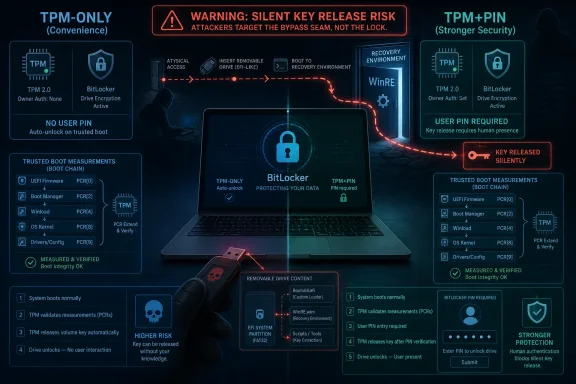
YellowKey cuts through that noise because it attacks an assumption rather than merely another component. Many Windows laptops ship or are provisioned with BitLocker enabled in a configuration that asks the user for nothing at boot. The Trusted Platform Module measures the boot path, releases the key if the measurements look right, and Windows starts as if encryption were invisible. That convenience is precisely why TPM-only BitLocker became the default comfort blanket for fleets of mobile PCs.
The June update matters because it closes known bypasses in that trust chain. But it also exposes how thin the line can be between “transparent security” and “security the user never participates in.” When the user is never asked for a secret, the system must decide on its own whether the environment is trustworthy. YellowKey is a reminder that the decision-making environment is itself software, and software has edges.
According to public reporting and Microsoft’s own mitigation posture before the June patch, YellowKey involved WinRE behavior and a boot-time execution path tied to a component named
That sequence matters. If a vendor has to tell administrators to mount WinRE offline, edit an offline registry hive, remove a BootExecute entry, reseal the recovery image, and rebuild trust relationships, the underlying issue is not merely a bad line of code. It is a reminder that recovery environments are privileged operating systems in miniature. They are allowed to touch the disk when the normal OS cannot, and that makes them an attractive place for both repair tooling and abuse.
The uncomfortable phrase here is trusted recovery path. Organizations spend years hardening Windows logon, endpoint detection, credential storage, and identity policy, only to discover that the pre-OS and recovery layers may deserve the same scrutiny. BitLocker protects data at rest, but Windows must still have a way to recover, repair, update, and boot. Those pathways are not decorative; they are part of the security boundary whether Microsoft wants to market them that way or not.
CVSS treats physical access as a limiting factor, and usually that is sensible. A remotely exploitable Exchange or HTTP.sys vulnerability can scale across the Internet in a way a laptop-theft attack cannot. But scale is not the only measure of harm. Some attacks are low-scale and high-value, especially when the target is a device that already contains the data an adversary wants.
This is where enterprise risk diverges from vulnerability-score theater. A BitLocker bypass that requires hands-on access may not create a wormable emergency. It can still be catastrophic for organizations that rely on full-disk encryption as the control that turns lost hardware into a paperwork exercise instead of a breach notification. The whole promise of laptop encryption is that the hardware can vanish without the data vanishing with it.
That promise becomes weaker when the configuration is TPM-only. The TPM can attest to measurements and protect keys, but it cannot know whether the person holding the machine is its owner. If the boot and recovery environment can be steered into releasing access without a user-supplied factor, the attacker has found the gap between platform integrity and user authentication.
The pattern is the point. Two BitLocker bypasses in the same month, with similar practical preconditions and similar consequences, create a different signal than one isolated oddity. The signal is not that BitLocker is broken in the cryptographic sense. The signal is that the surrounding machinery — WinRE, boot policy, TPM release conditions, EFI state, and recovery handling — is now the battlefield.
Microsoft’s public advisory language tends to compress these issues into impact categories: security feature bypass, missing authentication, important severity. That taxonomy is useful for patch management, but it can hide architectural meaning. A security feature bypass in disk encryption is not just another local bug. It is an exception path through a control many organizations treat as foundational.
The most prudent reading is that CVE-2026-50507 and YellowKey should be managed together even if they are technically distinct. Both challenge the same operational habit: enabling BitLocker, seeing “protection on,” storing the recovery key in Entra ID or Active Directory, and assuming the fleet has crossed the encryption finish line. It has not.
But convenience is not neutral. In TPM-only mode, BitLocker is primarily asking whether the machine appears to be in the expected boot state. It is not asking whether the right person is present. If that expected state can be preserved, spoofed, or detoured through a trusted recovery mechanism, the protection can degrade in precisely the scenario where administrators expected it to matter most.
TPM+PIN changes that bargain. It adds a user-known secret before the TPM releases the material needed to unlock the system volume. That extra step is annoying, especially for users accustomed to modern standby, biometric sign-in, and seamless reboot cycles. It also forces an attacker with a stolen laptop to defeat something more than firmware measurements and recovery logic.
This is why Microsoft’s mitigation advice before the June patch was revealing. The company did not merely tell customers to wait. It pointed them toward TPM+PIN as a stronger configuration. That recommendation remains sensible after the patch because the patch closes known bypasses while TPM+PIN reduces dependence on the same class of silent, machine-only trust decision.
The mitigation path for YellowKey made that plain. Administrators were told to modify the recovery image and remove a problematic execution entry from an offline registry value. That is not the sort of action most endpoint teams have well-rehearsed. Many organizations have mature processes for deploying cumulative updates, rotating BitLocker recovery keys, and enforcing Secure Boot; far fewer routinely inventory the exact contents and behavior of WinRE across hardware models and Windows versions.
This gap is partly historical. Recovery tooling lived below the line of everyday endpoint management, invoked only when something went wrong. But modern Windows security places more weight on early boot, measured boot, virtualization-based security, credential isolation, and recovery servicing. The pre-OS environment is no longer a backwater. It is an extension of the security architecture.
That means administrators should stop thinking of WinRE as merely a support feature. It needs version tracking, servicing validation, and policy review. If a mitigation modifies WinRE, the change must survive imaging workflows, feature updates, OEM recovery customizations, and later cumulative updates. Otherwise, the fleet may appear patched while recovery partitions quietly drift.
For home users, the answer depends on the threat model. A desktop that never leaves the house is not the same as a laptop carried through airports. A gaming notebook with no sensitive local data is not the same as a work machine with cached mail, browser sessions, VPN profiles, SSH keys, tax documents, and synced cloud folders. “Physical access required” means different things depending on how often the device is physically exposed to strangers.
For businesses, the answer should be more formal. Security teams should identify which devices use TPM-only BitLocker, which devices have startup PINs, which devices have Secure Boot and PCR binding states that match policy, and which devices have recovery partitions that can actually be serviced. They should also revisit lost-device procedures. If the organization’s breach assessment assumes BitLocker makes every lost laptop a non-event, TPM-only deserves a fresh exception analysis.
The June patch also raises a practical testing issue. Some Windows updates that touch boot or BitLocker-adjacent components can trigger recovery-key prompts under certain configurations. Administrators should stage updates, confirm recovery-key escrow, and watch for devices whose firmware or PCR state causes surprises. A security patch that strands a remote user at a BitLocker recovery screen is still better than an unpatched bypass, but it is not something a help desk wants to discover at scale on Monday morning.
Still, the disclosure dynamics matter because timing affects defenders. When a proof of concept is public before a patch exists, administrators must choose between interim mitigations, compensating controls, and waiting for a vendor fix. That is an ugly position, especially when the mitigation involves offline changes to recovery images rather than a normal update package.
Vendors often argue, reasonably, that coordinated disclosure protects users by giving engineers time to produce a robust fix. Researchers often argue, also reasonably, that vendors can be slow, dismissive, or opaque when a finding is inconvenient. The YellowKey episode appears to have landed in the worst middle ground: enough public detail to create urgency, but not enough initial patch coverage to make remediation routine.
The healthier outcome would be less theater and more transparency. If a BitLocker bypass affects a specific mode, say so plainly. If the workaround modifies WinRE in ways administrators must later verify, document that lifecycle. If a related vulnerability is separate from YellowKey, explain at a high level where the boundary lies without handing attackers a recipe. Security teams can handle nuance; what they cannot handle is silence dressed up as simplicity.
The danger is that ubiquity becomes complacency. A device can show as encrypted, compliant, and healthy while still using a configuration that is weaker than the organization assumes. TPM-only may be acceptable for some fleets, but it should be accepted explicitly, with awareness of physical-access bypass history and data sensitivity. It should not persist simply because it is the least disruptive default.
Different groups will reasonably land in different places. A school district managing shared classroom laptops may prioritize supportability and theft deterrence. A law firm, defense contractor, health system, or executive fleet should probably treat TPM+PIN as the cost of doing business on machines that travel. Developers with local secrets and administrators with privileged tooling should be in the stricter camp as well.
The policy should also account for modern work habits. Laptops now carry more than local files. They carry browser tokens, cached cloud access, synchronization clients, password managers, VPN certificates, and development credentials. Full-disk encryption remains essential, but it is only one layer in a device-loss scenario. If an attacker can boot far enough to access a decrypted volume, the blast radius may extend beyond the files on disk.
The first operational question is whether the June 2026 security updates are installed on every supported Windows client and server that uses BitLocker. The second is whether any interim YellowKey mitigation was applied in May and, if so, whether the later patch changed or superseded that state. The third is whether the organization’s BitLocker policy still matches the value of the data on the devices.
There is also a communication problem. Users experience TPM+PIN as a regression because it adds friction before Windows Hello, biometrics, and single sign-on can do their magic. IT should not pretend otherwise. The better argument is honest: mobile machines with sensitive data face a different risk than office-bound desktops, and a startup PIN protects against a class of attacks that pure TPM unlock cannot fully answer.
For administrators, the review should include recovery readiness. If TPM+PIN is expanded, recovery-key escrow must be reliable, help-desk procedures must be rehearsed, and device rebuild paths must be clear. Security that collapses under normal support pressure will be rolled back quietly. The goal is a stronger configuration that can survive the week after deployment, not just the policy meeting.
There are a few concrete lessons Windows administrators should take from this month’s BitLocker fixes:
 Microsoft’s Biggest Patch Tuesday Was Not Really About the Count
Patch Tuesday coverage has developed a predictable rhythm: count the CVEs, count the criticals, count the zero-days, then move on. June 2026 made that habit easy to indulge because the numbers were unusually large, with reports putting the release at roughly 200 vulnerabilities and more than 30 rated critical. For vulnerability managers, that is a miserable spreadsheet. For everyone else, it risks becoming noise.YellowKey cuts through that noise because it attacks an assumption rather than merely another component. Many Windows laptops ship or are provisioned with BitLocker enabled in a configuration that asks the user for nothing at boot. The Trusted Platform Module measures the boot path, releases the key if the measurements look right, and Windows starts as if encryption were invisible. That convenience is precisely why TPM-only BitLocker became the default comfort blanket for fleets of mobile PCs.
The June update matters because it closes known bypasses in that trust chain. But it also exposes how thin the line can be between “transparent security” and “security the user never participates in.” When the user is never asked for a secret, the system must decide on its own whether the environment is trustworthy. YellowKey is a reminder that the decision-making environment is itself software, and software has edges.
YellowKey Turned Recovery Into the Wrong Kind of Convenience
The most alarming part of YellowKey was not that it required physical access. Physical access is the oldest caveat in computer security, and it is often used to drain urgency from otherwise serious bugs. The alarming part was where the attack lived: the Windows Recovery Environment, the place users and administrators expect to rescue damaged systems, not to undermine encrypted ones.According to public reporting and Microsoft’s own mitigation posture before the June patch, YellowKey involved WinRE behavior and a boot-time execution path tied to a component named
autofstx.exe. The attack as described placed crafted files on removable media or the EFI system partition, then used a recovery boot sequence to reach a command shell with access to a BitLocker-protected volume. The proof-of-concept details became public before a full security update was available, pushing Microsoft into the awkward position of publishing mitigations first and patching later.That sequence matters. If a vendor has to tell administrators to mount WinRE offline, edit an offline registry hive, remove a BootExecute entry, reseal the recovery image, and rebuild trust relationships, the underlying issue is not merely a bad line of code. It is a reminder that recovery environments are privileged operating systems in miniature. They are allowed to touch the disk when the normal OS cannot, and that makes them an attractive place for both repair tooling and abuse.
The uncomfortable phrase here is trusted recovery path. Organizations spend years hardening Windows logon, endpoint detection, credential storage, and identity policy, only to discover that the pre-OS and recovery layers may deserve the same scrutiny. BitLocker protects data at rest, but Windows must still have a way to recover, repair, update, and boot. Those pathways are not decorative; they are part of the security boundary whether Microsoft wants to market them that way or not.
CVSS Understates the Fear of a Stolen Laptop
Both YellowKey and the related June BitLocker bypass coverage landed around the same severity neighborhood, with CVSS scores reported at 6.8. On paper, “Important” sounds manageable. In a real incident involving a stolen executive laptop, a field-service tablet, or a developer workstation with source code and cached credentials, the adjective feels bloodless.CVSS treats physical access as a limiting factor, and usually that is sensible. A remotely exploitable Exchange or HTTP.sys vulnerability can scale across the Internet in a way a laptop-theft attack cannot. But scale is not the only measure of harm. Some attacks are low-scale and high-value, especially when the target is a device that already contains the data an adversary wants.
This is where enterprise risk diverges from vulnerability-score theater. A BitLocker bypass that requires hands-on access may not create a wormable emergency. It can still be catastrophic for organizations that rely on full-disk encryption as the control that turns lost hardware into a paperwork exercise instead of a breach notification. The whole promise of laptop encryption is that the hardware can vanish without the data vanishing with it.
That promise becomes weaker when the configuration is TPM-only. The TPM can attest to measurements and protect keys, but it cannot know whether the person holding the machine is its owner. If the boot and recovery environment can be steered into releasing access without a user-supplied factor, the attacker has found the gap between platform integrity and user authentication.
The Second BitLocker Flaw Makes This Bigger Than One Research Drama
CVE-2026-50507 complicated the story because it appeared in the same Patch Tuesday cycle as a second BitLocker security-feature bypass, also described as requiring physical access and no prior authentication. Public reports describe it as separate from YellowKey, while the available technical descriptions leave some ambiguity about how closely the two issues sit in the same neighborhood of code and trust assumptions. That distinction matters to vulnerability researchers, but it matters less to administrators trying to decide whether TPM-only is still good enough.The pattern is the point. Two BitLocker bypasses in the same month, with similar practical preconditions and similar consequences, create a different signal than one isolated oddity. The signal is not that BitLocker is broken in the cryptographic sense. The signal is that the surrounding machinery — WinRE, boot policy, TPM release conditions, EFI state, and recovery handling — is now the battlefield.
Microsoft’s public advisory language tends to compress these issues into impact categories: security feature bypass, missing authentication, important severity. That taxonomy is useful for patch management, but it can hide architectural meaning. A security feature bypass in disk encryption is not just another local bug. It is an exception path through a control many organizations treat as foundational.
The most prudent reading is that CVE-2026-50507 and YellowKey should be managed together even if they are technically distinct. Both challenge the same operational habit: enabling BitLocker, seeing “protection on,” storing the recovery key in Entra ID or Active Directory, and assuming the fleet has crossed the encryption finish line. It has not.
TPM-Only BitLocker Was Always a Trade, Not a Guarantee
The popularity of TPM-only BitLocker is easy to understand. It is nearly frictionless. Users do not forget startup PINs, help desks do not drown in boot-time lockouts, and laptops can reboot overnight for updates without human intervention. In a large Windows fleet, those advantages are not cosmetic; they affect patch compliance, support cost, and user acceptance.But convenience is not neutral. In TPM-only mode, BitLocker is primarily asking whether the machine appears to be in the expected boot state. It is not asking whether the right person is present. If that expected state can be preserved, spoofed, or detoured through a trusted recovery mechanism, the protection can degrade in precisely the scenario where administrators expected it to matter most.
TPM+PIN changes that bargain. It adds a user-known secret before the TPM releases the material needed to unlock the system volume. That extra step is annoying, especially for users accustomed to modern standby, biometric sign-in, and seamless reboot cycles. It also forces an attacker with a stolen laptop to defeat something more than firmware measurements and recovery logic.
This is why Microsoft’s mitigation advice before the June patch was revealing. The company did not merely tell customers to wait. It pointed them toward TPM+PIN as a stronger configuration. That recommendation remains sensible after the patch because the patch closes known bypasses while TPM+PIN reduces dependence on the same class of silent, machine-only trust decision.
WinRE Has Become Part of the Attack Surface Administrators Cannot Ignore
Windows Recovery Environment is often treated like plumbing. It exists so Windows can repair itself, uninstall bad updates, reset the machine, or provide recovery options when boot fails. In practice, it is a privileged environment with enough access to be dangerous when its trust assumptions are wrong.The mitigation path for YellowKey made that plain. Administrators were told to modify the recovery image and remove a problematic execution entry from an offline registry value. That is not the sort of action most endpoint teams have well-rehearsed. Many organizations have mature processes for deploying cumulative updates, rotating BitLocker recovery keys, and enforcing Secure Boot; far fewer routinely inventory the exact contents and behavior of WinRE across hardware models and Windows versions.
This gap is partly historical. Recovery tooling lived below the line of everyday endpoint management, invoked only when something went wrong. But modern Windows security places more weight on early boot, measured boot, virtualization-based security, credential isolation, and recovery servicing. The pre-OS environment is no longer a backwater. It is an extension of the security architecture.
That means administrators should stop thinking of WinRE as merely a support feature. It needs version tracking, servicing validation, and policy review. If a mitigation modifies WinRE, the change must survive imaging workflows, feature updates, OEM recovery customizations, and later cumulative updates. Otherwise, the fleet may appear patched while recovery partitions quietly drift.
The Patch Fixes the Known Door, Not the Building Plan
Installing the June 2026 updates is the obvious first step. There is no serious argument for leaving known BitLocker bypasses unpatched, particularly now that YellowKey details have circulated publicly. The more interesting question is what should change after the update reports success.For home users, the answer depends on the threat model. A desktop that never leaves the house is not the same as a laptop carried through airports. A gaming notebook with no sensitive local data is not the same as a work machine with cached mail, browser sessions, VPN profiles, SSH keys, tax documents, and synced cloud folders. “Physical access required” means different things depending on how often the device is physically exposed to strangers.
For businesses, the answer should be more formal. Security teams should identify which devices use TPM-only BitLocker, which devices have startup PINs, which devices have Secure Boot and PCR binding states that match policy, and which devices have recovery partitions that can actually be serviced. They should also revisit lost-device procedures. If the organization’s breach assessment assumes BitLocker makes every lost laptop a non-event, TPM-only deserves a fresh exception analysis.
The June patch also raises a practical testing issue. Some Windows updates that touch boot or BitLocker-adjacent components can trigger recovery-key prompts under certain configurations. Administrators should stage updates, confirm recovery-key escrow, and watch for devices whose firmware or PCR state causes surprises. A security patch that strands a remote user at a BitLocker recovery screen is still better than an unpatched bypass, but it is not something a help desk wants to discover at scale on Monday morning.
Microsoft’s Researcher Problem Is a Side Plot With Real Consequences
YellowKey also arrived wrapped in researcher-vendor tension. Public reporting described a messy dispute around disclosure, proof-of-concept publication, account removals, and Microsoft’s response. It is tempting to make that the main drama because personalities are easier to narrate than boot-chain trust. But for Windows users, the disclosure fight is secondary to the technical lesson.Still, the disclosure dynamics matter because timing affects defenders. When a proof of concept is public before a patch exists, administrators must choose between interim mitigations, compensating controls, and waiting for a vendor fix. That is an ugly position, especially when the mitigation involves offline changes to recovery images rather than a normal update package.
Vendors often argue, reasonably, that coordinated disclosure protects users by giving engineers time to produce a robust fix. Researchers often argue, also reasonably, that vendors can be slow, dismissive, or opaque when a finding is inconvenient. The YellowKey episode appears to have landed in the worst middle ground: enough public detail to create urgency, but not enough initial patch coverage to make remediation routine.
The healthier outcome would be less theater and more transparency. If a BitLocker bypass affects a specific mode, say so plainly. If the workaround modifies WinRE in ways administrators must later verify, document that lifecycle. If a related vulnerability is separate from YellowKey, explain at a high level where the boundary lies without handing attackers a recipe. Security teams can handle nuance; what they cannot handle is silence dressed up as simplicity.
Endpoint Encryption Needs a Threat Model, Not a Checkbox
BitLocker’s strength has always been that it turns encryption into a deployable Windows feature rather than a boutique security project. That is why it is everywhere. It integrates with TPMs, Group Policy, Intune, Entra ID, Active Directory, recovery-key escrow, and hardware attestation. For many organizations, it is the only realistic way to encrypt thousands of endpoints without making users revolt.The danger is that ubiquity becomes complacency. A device can show as encrypted, compliant, and healthy while still using a configuration that is weaker than the organization assumes. TPM-only may be acceptable for some fleets, but it should be accepted explicitly, with awareness of physical-access bypass history and data sensitivity. It should not persist simply because it is the least disruptive default.
Different groups will reasonably land in different places. A school district managing shared classroom laptops may prioritize supportability and theft deterrence. A law firm, defense contractor, health system, or executive fleet should probably treat TPM+PIN as the cost of doing business on machines that travel. Developers with local secrets and administrators with privileged tooling should be in the stricter camp as well.
The policy should also account for modern work habits. Laptops now carry more than local files. They carry browser tokens, cached cloud access, synchronization clients, password managers, VPN certificates, and development credentials. Full-disk encryption remains essential, but it is only one layer in a device-loss scenario. If an attacker can boot far enough to access a decrypted volume, the blast radius may extend beyond the files on disk.
The June Fix Should Start a Fleet Conversation
The practical response to YellowKey and CVE-2026-50507 is not panic. It is inventory, patching, and configuration review. Panic produces one-off scripts and forgotten exceptions. A serious response produces a clear map of which machines rely on silent TPM unlock and which machines justify a startup factor.The first operational question is whether the June 2026 security updates are installed on every supported Windows client and server that uses BitLocker. The second is whether any interim YellowKey mitigation was applied in May and, if so, whether the later patch changed or superseded that state. The third is whether the organization’s BitLocker policy still matches the value of the data on the devices.
There is also a communication problem. Users experience TPM+PIN as a regression because it adds friction before Windows Hello, biometrics, and single sign-on can do their magic. IT should not pretend otherwise. The better argument is honest: mobile machines with sensitive data face a different risk than office-bound desktops, and a startup PIN protects against a class of attacks that pure TPM unlock cannot fully answer.
For administrators, the review should include recovery readiness. If TPM+PIN is expanded, recovery-key escrow must be reliable, help-desk procedures must be rehearsed, and device rebuild paths must be clear. Security that collapses under normal support pressure will be rolled back quietly. The goal is a stronger configuration that can survive the week after deployment, not just the policy meeting.
The Lesson Hidden Inside the YellowKey Patch
The June Patch Tuesday story is best understood as a warning about where Windows trust actually lives. Encryption algorithms are only one part of the system. The boot chain, recovery environment, firmware state, TPM policy, update servicing, and user authentication model all decide whether encrypted data stays encrypted when a machine is in hostile hands.There are a few concrete lessons Windows administrators should take from this month’s BitLocker fixes:
- Organizations should install the June 2026 security updates promptly on BitLocker-protected systems, especially mobile devices that may be lost or stolen.
- TPM-only BitLocker should be treated as a convenience configuration, not as the strongest available protection for sensitive laptops.
- TPM+PIN remains the clearest mitigation against attacks that depend on silent key release during boot or recovery flows.
- WinRE should be inventoried and serviced like a security-sensitive component rather than ignored as a break-glass support tool.
- Lost-device procedures should distinguish between “BitLocker enabled” and “BitLocker configured with a user-supplied startup factor.”
- Administrators who applied Microsoft’s earlier YellowKey workaround should verify after patching that recovery functionality and BitLocker trust state still behave as expected.
References
- Primary source: igor´sLAB
Published: 2026-06-15T04:40:07.517411

Patch Tuesday June 2026: Microsoft patches "YellowKey" vulnerability …
Sometimes it is worth taking a closer look at security updates instead of simply nodding along to the headline “another record Patch Tuesday.” Microsoft’s June…www.igorslab.de - Related coverage: techradar.com

Microsoft breaks Patch Tuesday record with fixes for over 200 security flaws | TechRadar
AI use is really starting to showwww.techradar.com - Related coverage: windowscentral.com

Windows 11’s June update shuts down an intentional BitLocker backdoor with full file access — here’s what changed | Windows Central
Microsoft’s June 2026 Patch Tuesday update fixes a controversial BitLocker flaw.www.windowscentral.com - Related coverage: threat-modeling.com

Windows BitLocker Security Feature Bypass — YellowKey (CVE-2026-45585): PoC Publicly Released, Mitigation Available - Threat-Modeling.com
Microsoft has acknowledged a security feature bypass vulnerability in Windows BitLocker, publicly known as “YellowKey” and tracked as CVE-2026-45585. The vulnerability affects Windows 11 (24H2, ... <a title="Windows BitLocker Security Feature Bypass — YellowKey... threat-modeling.com
- Related coverage: helpnetsecurity.com

Microsoft provides mitigation for "YellowKey" BitLocker bypass flaw (CVE-2026-45585) - Help Net Security
Microsoft is working on a fix for CVE-2026-45585 (aka "Yellowkey"), a vulnerability that can be used to bypass Windows' BitLocker protection.www.helpnetsecurity.com - Related coverage: dbugs.ptsecurity.com
CVE-2026-45585 — Windows | dbugs
Details on CVE-2026-45585: Windows. Exploited in the wild. Includes CVSS score, affected versions, and references.dbugs.ptsecurity.com
- Related coverage: techrepublic.com

Microsoft Warns: Windows Zero-Day ‘YellowKey’ Can Bypass BitLocker
Microsoft has released a temporary mitigation for YellowKey, a Windows zero-day that can reportedly bypass BitLocker protections.www.techrepublic.com
- Related coverage: sentinelone.com

CVE-2026-45585: Windows 11 24H2 Auth Bypass Vulnerability
CVE-2026-45585 is an authentication bypass vulnerability in Windows 11 24H2. Learn about its impact, affected versions, and mitigation methods.www.sentinelone.com
- Related coverage: thecybersignal.com

YellowKey: BitLocker Bypass CVE-2026-45585 — TPM+PIN Mitigation
YellowKey (CVE-2026-45585) bypasses BitLocker via a WinRE flaw. Microsoft's only fix is switching TPM-only devices to TPM+PIN — a config change, not a patch. www.thecybersignal.com
- Related coverage: techspot.com

Microsoft's June Patch Tuesday fixes a record 200 vulnerabilities, including five being actively exploited | TechSpot
Microsoft recently released its latest batch of monthly security fixes for vulnerabilities found in Windows, Office, and other products sold by the company. This month's Patch Tuesday...www.techspot.com - Related coverage: s-edv.com

BitLocker YellowKey CVE-2026-45585: Patch KB5039142 | Schönfelder EDV
CVE-2026-45585 (YellowKey) umgeht BitLocker via WinRE. Notfall-Patch KB5039142 vom 28. Mai verfügbar – CCB warnt vor aktiver Ausnutzung. s-edv.com
- Related coverage: atworkstudio.it

June 2026 Patch Tuesday: 200 vulnerabilities, six zero-days and the KB5087424 printing bug | AtWorkStudio
The June 2026 Patch Tuesday fixes around 200 vulnerabilities (33 critical) and closes six zero-days, including GreenPlasma, YellowKey (BitLocker bypass) and HTTP/2 Bomb. And if printing stopped working on Windows Server 2022, the culprit is hotpatch KB5087424. What to do this week.www.atworkstudio.it - Related coverage: computerworld.com

For June, Patch Tuesday means an IT scramble – Computerworld
Microsoft’s monthly update included 206 fixes for flaws in everything from Windows to Office to Exchange Server, not to mention three zero-days. www.computerworld.com
- Related coverage: pcgamer.com

Security researcher describes freshly uncovered Windows 11 vulnerability as 'one of the most insane discoveries I ever found.' | PC Gamer
The king in yellow.www.pcgamer.com - Related coverage: tomshardware.com

Microsoft BitLocker-protected drives can now be opened with just some files on a USB stick — YellowKey zero-day exploit demonstrates an apparent backdoor | Tom's Hardware
Also, it's a twofer with the GreenPlasma zero-day local privilege escalation.www.tomshardware.com - Security advisory: msrc.microsoft.com

Security Update Guide - Microsoft Security Response Center
 msrc.microsoft.com