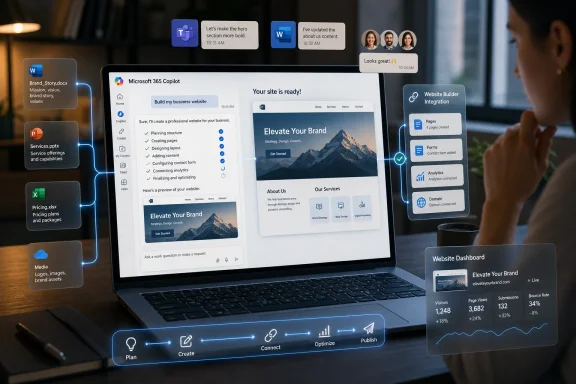
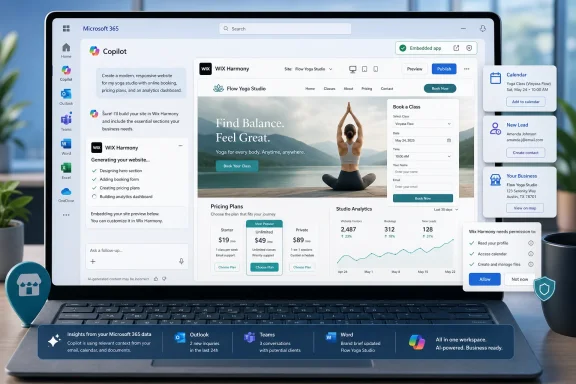
Wix said on June 15, 2026, that Wix Harmony, its AI-assisted website creation system, is now available inside Microsoft 365 Copilot through Copilot’s generally available support for the OpenAI Apps SDK. The move turns Copilot from a productivity assistant into a storefront for business software that can act inside the Microsoft 365 workspace. For Microsoft, it is another bet that the future of Office is not merely documents plus chat, but a controlled workbench where third-party apps compete for the user’s next instruction. For Wix, it is a defensive and offensive play at once: meet small businesses where they already work, and make website creation feel less like a separate project than an extension of daily operations.
The old Windows desktop was a place where applications lived side by side and users decided when to jump between them. The new Microsoft pitch is different. Copilot is being positioned as the place where work begins, where the user describes an outcome, and where the relevant app shows up only when needed.
That shift matters more than the Wix logo in the announcement. Microsoft has spent the last few years trying to make Copilot feel less like a chatbot bolted onto Office and more like an operating layer for business work. Partner apps are a key part of that strategy because Microsoft cannot plausibly build every workflow itself, but it can try to make every workflow pass through Copilot.
Wix Harmony fits neatly into that vision. A small business owner could ask Copilot to create a site, adjust copy, prepare a booking page, or surface performance information without leaving Microsoft 365. The work still belongs to Wix, but the entry point belongs to Microsoft.
That is the strategic bargain behind the integration. Wix gets distribution inside the productivity suite used by many of the customers it wants. Microsoft gets another proof point that Copilot can be more than an answer engine.
That distinction is important because the first wave of AI website builders often looked magical in a product video and brittle in production. They could generate a landing page, but they struggled with the messy middle of actual business: payments, bookings, SEO, responsiveness, analytics, content updates, integrations, and the peculiar way every small company thinks its workflow is unique.
Wix’s pitch is that Harmony is not just generating code in a vacuum. It sits on top of Wix’s existing platform, which already includes hosting, commerce, marketing, bookings, customer management, and analytics. The Microsoft integration therefore does not merely promise “make me a website.” It promises a way to operate the site through the same conversational surface where an employee may already be handling email, documents, meetings, and spreadsheets.
That is a more credible version of AI website creation than the fantasy that a single prompt replaces the entire lifecycle of building and running a digital presence. The real question is whether Copilot can become a practical control surface for that lifecycle, or whether it becomes another layer of indirection between users and the tools they still need to understand.
The Apps SDK model lets third-party services expose interactive experiences inside an AI conversation rather than forcing users to click out to a separate app every time the work becomes visual or transactional. For a website builder, that is crucial. A pure text chat can draft copy, suggest layouts, or produce instructions, but a site is a visual product with state, settings, pages, assets, forms, and business rules.
Microsoft’s decision to support that kind of embedded app experience shows how quickly the AI assistant market is converging on a familiar platform pattern. First comes the assistant. Then come plugins, agents, widgets, stores, SDKs, permissions, review processes, and eventually the uncomfortable questions about control, fees, telemetry, and lock-in.
For WindowsForum readers, this should feel familiar. The platform wars have always been about where software is discovered, how it is launched, what permissions it receives, and whose interface becomes the default habit. Copilot is not Windows, but Microsoft clearly wants it to become a comparable place of gravity inside business computing.
For that user, the promise is not that Copilot understands design better than a professional web agency. The promise is that the cost of starting is lower. If a business can ask for a site in the same place it drafts a proposal or reviews a spreadsheet, the website stops feeling like a separate technology project and starts feeling like another office task.
That is both powerful and risky. Powerful, because small businesses often delay basic digital work precisely because every tool feels like another account, another dashboard, another learning curve. Risky, because reducing friction at the start can hide complexity later, when the business needs to understand domain settings, search visibility, payment flows, customer data, accessibility, compliance, and ownership.
Wix has long made its money by abstracting those problems away. Microsoft’s involvement adds another abstraction layer. The user may feel like they are “in Copilot,” while the actual work is distributed across Microsoft identity, Wix infrastructure, OpenAI-compatible app interfaces, and whatever business systems the site eventually touches.
That is not necessarily bad. Modern software is mostly abstraction. But it means the product’s success should be judged less by how impressive the first generated page looks and more by how gracefully it handles the second month of changes.
That is where Microsoft has an advantage over consumer AI chat platforms. Microsoft can tell IT departments that Copilot is part of a managed environment, tied to enterprise identity and familiar admin controls. Whether every third-party integration satisfies every organization’s risk posture is another matter, but Microsoft at least knows how to speak the language.
For Wix, that could open doors beyond the traditional small-business website-builder market. Departments inside larger organizations routinely create microsites, campaign pages, internal portals, event pages, partner landing pages, and proof-of-concept experiences. Many of those projects never justify a full engineering queue, but they still need enough polish and governance to avoid becoming a security or branding headache.
The problem is that Copilot’s convenience can blur the line between sanctioned creation and accidental sprawl. If nontechnical users can spin up more web properties from inside the productivity suite, someone has to decide what counts as official, who owns the resulting assets, how data is retained, and what happens when the employee who prompted the thing leaves the company.
That is the administrator’s recurring nightmare in a new costume. The AI era does not eliminate unmanaged software; it makes unmanaged software easier to create.
A Wix integration helps because website creation has visible output. Unlike a generic productivity summary, a generated and managed site is something a user can point to. It is also something with ongoing value, which gives Copilot a role beyond the first prompt.
That is exactly what Microsoft needs. If Copilot is only a smarter search box for Office files, its value is bounded by the user’s existing Microsoft content. If Copilot can summon business applications that create, update, analyze, and transact, it becomes a broader operating surface.
The catch is that every partner integration must be good enough to avoid making Copilot feel like a cramped browser tab. Users will not tolerate a parade of half-functional widgets simply because they appear in a chat window. The embedded experience must be faster than opening the original app, clearer than navigating the original dashboard, and trustworthy enough for business-critical actions.
That is a high bar. It is also the only bar that matters.
But distribution is never free in platform economics. If users begin to think of Wix Harmony as something they access through Copilot, Microsoft owns more of the user habit. Wix may still own the site, the billing relationship, and the platform features, but Microsoft owns the place where the request begins.
That dynamic has played out before with browsers, app stores, search engines, social platforms, and cloud marketplaces. The application provider gains reach. The platform provider gains leverage.
The question for Wix is whether the trade is worth it. Given the pace at which AI-native creation tools are crowding the market, the answer may be yes. A website builder that waits for users to visit its own homepage may lose to one that appears inside the workstream at the exact moment the user says, “We need a site for this.”
For Microsoft, the calculus is even simpler. Every useful partner app makes Copilot stickier. Every completed task inside Copilot gives Microsoft another argument that its AI layer is not optional decoration but the new center of work.
For power users, that shift can feel both liberating and irritating. It is liberating when the assistant reduces busywork and connects systems that used to require manual copying. It is irritating when the assistant becomes a mandatory vestibule for features that used to be direct, predictable, and locally understandable.
Website creation inside Copilot is a clean example of the trade-off. A user may save time by asking for a site and refining it conversationally. But the more capable the assistant becomes, the more the user has to trust that the assistant understands intent, permission, context, and consequences.
That trust is not automatic. Microsoft has to earn it through reliability, transparency, and admin controls. Wix has to earn it by making Harmony’s generated output editable, portable enough for real business confidence, and robust enough that users do not discover too late that the AI took them down a dead-end design path.
The future Microsoft is building assumes people will increasingly describe outcomes instead of operating software directly. The future many Windows veterans still prefer is one where tools are explicit, files are visible, settings are findable, and automation does not obscure control. The best version of Copilot has to reconcile those instincts rather than bulldoze one with the other.
That phase is already commoditizing. Large models are good enough at producing plausible text and design suggestions that the demo itself no longer proves much. The harder and more durable competition is workflow: who can connect creation to operations, analytics, customer management, marketing, commerce, and collaboration?
Wix’s Copilot integration is an answer to that second race. It says the website is not an isolated artifact. It is part of the business system, and the business system increasingly lives inside a conversation that can reach multiple apps.
That sounds grand, but the day-to-day test will be mundane. Can a user update holiday hours without breaking layout? Can Copilot summarize site performance in language that leads to a useful action? Can the integration help create a booking page that actually respects availability and service rules? Can it distinguish between a draft change and a published change with enough clarity that nobody accidentally pushes a half-baked campaign live?
The companies that solve those dull problems will win more trust than the companies that merely generate prettier first drafts.
This is a subtle but important change in the role of Microsoft 365. The suite used to be where documents were made and communications were handled. Now Microsoft wants it to be where external business systems are invoked, manipulated, and analyzed through a common AI interface.
That could reduce fragmentation for users who are exhausted by tab sprawl. It could also concentrate more power in Microsoft’s hands, especially if Copilot becomes the preferred path to apps that once stood independently. The same interface that simplifies work can also mediate competition.
For IT leaders, the practical response is not panic. It is inventory. Which Copilot apps are allowed? Which users can install or invoke them? What data can they access? What logging exists? What happens when an AI-assisted action changes a public-facing asset?
Those questions are not anti-AI. They are the difference between adopting a platform and being absorbed by one.
That is where Harmony’s hybrid model matters. Users need AI help, but they also need deterministic control. They need to be able to inspect, adjust, override, and understand what the system has done.
Copilot adds another layer to that requirement. If a user asks for a change in Microsoft 365, the system should make clear what will happen in Wix, what will remain a draft, what will be published, and what business data is being used to make the recommendation. Ambiguity is tolerable when drafting a paragraph. It is less tolerable when changing a live checkout flow or a lead-generation form.
The most successful AI integrations will be the ones that know when not to be conversational. Sometimes the right interface is a prompt. Sometimes it is a preview pane. Sometimes it is a confirmation dialog. Sometimes it is the full app.
Microsoft’s challenge is to make Copilot feel like the right front door without pretending every room in the building should look like chat.
 Microsoft Is Turning Copilot Into the New Desktop
The old Windows desktop was a place where applications lived side by side and users decided when to jump between them. The new Microsoft pitch is different. Copilot is being positioned as the place where work begins, where the user describes an outcome, and where the relevant app shows up only when needed.That shift matters more than the Wix logo in the announcement. Microsoft has spent the last few years trying to make Copilot feel less like a chatbot bolted onto Office and more like an operating layer for business work. Partner apps are a key part of that strategy because Microsoft cannot plausibly build every workflow itself, but it can try to make every workflow pass through Copilot.
Wix Harmony fits neatly into that vision. A small business owner could ask Copilot to create a site, adjust copy, prepare a booking page, or surface performance information without leaving Microsoft 365. The work still belongs to Wix, but the entry point belongs to Microsoft.
That is the strategic bargain behind the integration. Wix gets distribution inside the productivity suite used by many of the customers it wants. Microsoft gets another proof point that Copilot can be more than an answer engine.
Wix Harmony Arrives as the Website Builder Becomes an Agent
Wix Harmony is not simply a prettier template editor with a chatbot attached. Wix has framed Harmony as a hybrid of visual design, AI guidance, and platform-managed business functionality. In plain English, it is meant to let a user describe what they want, see the site take shape, and still retain enough manual control to make the result feel like a real business asset rather than a disposable demo.That distinction is important because the first wave of AI website builders often looked magical in a product video and brittle in production. They could generate a landing page, but they struggled with the messy middle of actual business: payments, bookings, SEO, responsiveness, analytics, content updates, integrations, and the peculiar way every small company thinks its workflow is unique.
Wix’s pitch is that Harmony is not just generating code in a vacuum. It sits on top of Wix’s existing platform, which already includes hosting, commerce, marketing, bookings, customer management, and analytics. The Microsoft integration therefore does not merely promise “make me a website.” It promises a way to operate the site through the same conversational surface where an employee may already be handling email, documents, meetings, and spreadsheets.
That is a more credible version of AI website creation than the fantasy that a single prompt replaces the entire lifecycle of building and running a digital presence. The real question is whether Copilot can become a practical control surface for that lifecycle, or whether it becomes another layer of indirection between users and the tools they still need to understand.
The OpenAI Apps SDK Gives Microsoft a Shortcut to an App Ecosystem
The technical hinge in this announcement is Copilot’s generally available support for the OpenAI Apps SDK. That phrase sounds like developer plumbing, but it is the kind of plumbing that decides who gets to own the interface.The Apps SDK model lets third-party services expose interactive experiences inside an AI conversation rather than forcing users to click out to a separate app every time the work becomes visual or transactional. For a website builder, that is crucial. A pure text chat can draft copy, suggest layouts, or produce instructions, but a site is a visual product with state, settings, pages, assets, forms, and business rules.
Microsoft’s decision to support that kind of embedded app experience shows how quickly the AI assistant market is converging on a familiar platform pattern. First comes the assistant. Then come plugins, agents, widgets, stores, SDKs, permissions, review processes, and eventually the uncomfortable questions about control, fees, telemetry, and lock-in.
For WindowsForum readers, this should feel familiar. The platform wars have always been about where software is discovered, how it is launched, what permissions it receives, and whose interface becomes the default habit. Copilot is not Windows, but Microsoft clearly wants it to become a comparable place of gravity inside business computing.
The Small Business Pitch Is Convenience, Not Magic
The most obvious customer for this integration is not a Fortune 500 IT department. It is the founder, consultant, local service provider, or small team that already lives in Outlook, Teams, Word, Excel, and SharePoint, but still needs a website that can book appointments, capture leads, sell products, and tell them whether anyone is paying attention.For that user, the promise is not that Copilot understands design better than a professional web agency. The promise is that the cost of starting is lower. If a business can ask for a site in the same place it drafts a proposal or reviews a spreadsheet, the website stops feeling like a separate technology project and starts feeling like another office task.
That is both powerful and risky. Powerful, because small businesses often delay basic digital work precisely because every tool feels like another account, another dashboard, another learning curve. Risky, because reducing friction at the start can hide complexity later, when the business needs to understand domain settings, search visibility, payment flows, customer data, accessibility, compliance, and ownership.
Wix has long made its money by abstracting those problems away. Microsoft’s involvement adds another abstraction layer. The user may feel like they are “in Copilot,” while the actual work is distributed across Microsoft identity, Wix infrastructure, OpenAI-compatible app interfaces, and whatever business systems the site eventually touches.
That is not necessarily bad. Modern software is mostly abstraction. But it means the product’s success should be judged less by how impressive the first generated page looks and more by how gracefully it handles the second month of changes.
The Enterprise Angle Is Governance Wearing a Friendly Face
Microsoft will talk about productivity, but every Copilot integration has a governance story underneath it. When business apps move into Copilot, administrators have to think about access, data boundaries, app approval, user consent, auditability, and the spread of shadow workflows.That is where Microsoft has an advantage over consumer AI chat platforms. Microsoft can tell IT departments that Copilot is part of a managed environment, tied to enterprise identity and familiar admin controls. Whether every third-party integration satisfies every organization’s risk posture is another matter, but Microsoft at least knows how to speak the language.
For Wix, that could open doors beyond the traditional small-business website-builder market. Departments inside larger organizations routinely create microsites, campaign pages, internal portals, event pages, partner landing pages, and proof-of-concept experiences. Many of those projects never justify a full engineering queue, but they still need enough polish and governance to avoid becoming a security or branding headache.
The problem is that Copilot’s convenience can blur the line between sanctioned creation and accidental sprawl. If nontechnical users can spin up more web properties from inside the productivity suite, someone has to decide what counts as official, who owns the resulting assets, how data is retained, and what happens when the employee who prompted the thing leaves the company.
That is the administrator’s recurring nightmare in a new costume. The AI era does not eliminate unmanaged software; it makes unmanaged software easier to create.
Microsoft’s Platform Bet Depends on Third Parties Doing Real Work
The Copilot story has sometimes suffered from overbroad demos. Summarize a meeting, draft an email, make a slide deck: useful, yes, but not always enough to justify the strategic weight Microsoft has placed on the brand. Third-party apps that do tangible work are how Copilot becomes harder to dismiss.A Wix integration helps because website creation has visible output. Unlike a generic productivity summary, a generated and managed site is something a user can point to. It is also something with ongoing value, which gives Copilot a role beyond the first prompt.
That is exactly what Microsoft needs. If Copilot is only a smarter search box for Office files, its value is bounded by the user’s existing Microsoft content. If Copilot can summon business applications that create, update, analyze, and transact, it becomes a broader operating surface.
The catch is that every partner integration must be good enough to avoid making Copilot feel like a cramped browser tab. Users will not tolerate a parade of half-functional widgets simply because they appear in a chat window. The embedded experience must be faster than opening the original app, clearer than navigating the original dashboard, and trustworthy enough for business-critical actions.
That is a high bar. It is also the only bar that matters.
Wix Gets Distribution, but Microsoft Gets the Habit
For Wix, Microsoft 365 Copilot is an attractive front door. The company competes in a market where AI has lowered the apparent cost of website creation and where rivals can promise instant sites with increasingly plausible demos. Being present inside Copilot gives Wix access to users at the moment of intent: when they are planning a business, drafting a campaign, reviewing a customer list, or preparing a launch.But distribution is never free in platform economics. If users begin to think of Wix Harmony as something they access through Copilot, Microsoft owns more of the user habit. Wix may still own the site, the billing relationship, and the platform features, but Microsoft owns the place where the request begins.
That dynamic has played out before with browsers, app stores, search engines, social platforms, and cloud marketplaces. The application provider gains reach. The platform provider gains leverage.
The question for Wix is whether the trade is worth it. Given the pace at which AI-native creation tools are crowding the market, the answer may be yes. A website builder that waits for users to visit its own homepage may lose to one that appears inside the workstream at the exact moment the user says, “We need a site for this.”
For Microsoft, the calculus is even simpler. Every useful partner app makes Copilot stickier. Every completed task inside Copilot gives Microsoft another argument that its AI layer is not optional decoration but the new center of work.
The Windows User Should Watch the Boundary Between App and Assistant
This announcement is not directly about Windows, but it belongs in the same story as Microsoft’s broader reshaping of the PC experience. The company has been pushing Copilot into Windows, Microsoft 365, Edge, developer tools, and business workflows. The common thread is a shift from launching applications to delegating tasks.For power users, that shift can feel both liberating and irritating. It is liberating when the assistant reduces busywork and connects systems that used to require manual copying. It is irritating when the assistant becomes a mandatory vestibule for features that used to be direct, predictable, and locally understandable.
Website creation inside Copilot is a clean example of the trade-off. A user may save time by asking for a site and refining it conversationally. But the more capable the assistant becomes, the more the user has to trust that the assistant understands intent, permission, context, and consequences.
That trust is not automatic. Microsoft has to earn it through reliability, transparency, and admin controls. Wix has to earn it by making Harmony’s generated output editable, portable enough for real business confidence, and robust enough that users do not discover too late that the AI took them down a dead-end design path.
The future Microsoft is building assumes people will increasingly describe outcomes instead of operating software directly. The future many Windows veterans still prefer is one where tools are explicit, files are visible, settings are findable, and automation does not obscure control. The best version of Copilot has to reconcile those instincts rather than bulldoze one with the other.
The AI Website Race Is Becoming a Workflow Race
The first AI website-builder battles were about generation. Who could produce the most impressive homepage from the shortest prompt? Who could turn a vague business description into a polished hero section, contact form, and color palette?That phase is already commoditizing. Large models are good enough at producing plausible text and design suggestions that the demo itself no longer proves much. The harder and more durable competition is workflow: who can connect creation to operations, analytics, customer management, marketing, commerce, and collaboration?
Wix’s Copilot integration is an answer to that second race. It says the website is not an isolated artifact. It is part of the business system, and the business system increasingly lives inside a conversation that can reach multiple apps.
That sounds grand, but the day-to-day test will be mundane. Can a user update holiday hours without breaking layout? Can Copilot summarize site performance in language that leads to a useful action? Can the integration help create a booking page that actually respects availability and service rules? Can it distinguish between a draft change and a published change with enough clarity that nobody accidentally pushes a half-baked campaign live?
The companies that solve those dull problems will win more trust than the companies that merely generate prettier first drafts.
The Announcement Says More About Copilot Than About Websites
The tempting read is that Wix is now inside Microsoft 365 Copilot, therefore website creation has become easier. That is true, but too small. The larger story is that Microsoft is accelerating the transformation of Copilot into a host environment for third-party business applications.This is a subtle but important change in the role of Microsoft 365. The suite used to be where documents were made and communications were handled. Now Microsoft wants it to be where external business systems are invoked, manipulated, and analyzed through a common AI interface.
That could reduce fragmentation for users who are exhausted by tab sprawl. It could also concentrate more power in Microsoft’s hands, especially if Copilot becomes the preferred path to apps that once stood independently. The same interface that simplifies work can also mediate competition.
For IT leaders, the practical response is not panic. It is inventory. Which Copilot apps are allowed? Which users can install or invoke them? What data can they access? What logging exists? What happens when an AI-assisted action changes a public-facing asset?
Those questions are not anti-AI. They are the difference between adopting a platform and being absorbed by one.
The Real Test Comes After the First Prompt
The Wix-Microsoft partnership will live or die after the initial novelty fades. A generated website is exciting for an afternoon. A managed website becomes valuable over months and years, as it survives edits, campaigns, staff turnover, business changes, analytics reviews, and customer complaints.That is where Harmony’s hybrid model matters. Users need AI help, but they also need deterministic control. They need to be able to inspect, adjust, override, and understand what the system has done.
Copilot adds another layer to that requirement. If a user asks for a change in Microsoft 365, the system should make clear what will happen in Wix, what will remain a draft, what will be published, and what business data is being used to make the recommendation. Ambiguity is tolerable when drafting a paragraph. It is less tolerable when changing a live checkout flow or a lead-generation form.
The most successful AI integrations will be the ones that know when not to be conversational. Sometimes the right interface is a prompt. Sometimes it is a preview pane. Sometimes it is a confirmation dialog. Sometimes it is the full app.
Microsoft’s challenge is to make Copilot feel like the right front door without pretending every room in the building should look like chat.
The Copilot Storefront Now Has a Website Builder in the Window
This partnership is concrete enough to matter, but early enough that users and administrators should treat it as a signal of direction rather than a finished verdict. Wix Harmony inside Copilot is less a one-off convenience feature than a preview of how Microsoft wants third-party software to appear inside work.- Wix Harmony is now available through Microsoft 365 Copilot via Copilot’s support for the OpenAI Apps SDK.
- The integration is aimed at letting users create, manage, and analyze a Wix-powered web presence from within the Microsoft 365 interface.
- Microsoft benefits by making Copilot a more credible host for real business applications, not just summaries and drafts.
- Wix benefits by reaching users inside the productivity environment where business planning and execution already happen.
- IT teams should evaluate the integration through the lens of app governance, data access, publishing control, and lifecycle ownership.
- The long-term value will depend less on first-prompt website generation and more on whether ongoing site management is reliable, transparent, and controllable.
References
- Primary source: TipRanks
Published: Mon, 15 Jun 2026 13:52:05 GMT
- Official source: microsoft.com

Bring your everyday business apps into the flow of work with agents in Microsoft 365 Copilot | Microsoft 365 Blog
Discover how apps integrate with AI agents to power Copilot experiences, streamline workflows, and turn business context into action.www.microsoft.com - Official source: support.microsoft.com

Build apps with Microsoft 365 Copilot (Frontier) | Microsoft Support
Learn how to use App Builder in Microsoft 365. you can build apps, play them, share them, and delete them.support.microsoft.com - Related coverage: support.wix.com
Introducing the Wix Harmony Editor | Help Center | Wix.com
Wix Harmony Editor is a hybrid editor that blends familiar drag-and-drop controls with built-in AI support. Whether this is your very first site or your next bisupport.wix.com
- Official source: developer.microsoft.com
Microsoft 365 Copilot | Extend and Customize Copilot
Extend, enrich, and customize Microsoft Microsoft 365 Copilot. Explore Copilot extensibility options such as agents, API plugins, and Copilot connectors to expand AI-powered productivity, skills, and creativity.developer.microsoft.com - Related coverage: wix.com
How to make a website with Microsoft Copilot
Learn how to make a website with Microsoft Copilot step by step, from planning your site to publishing it. No coding skills required.
- Official source: learn.microsoft.com

Microsoft 365 Copilot APIs Overview | Microsoft Learn
Use the Copilot APIs to securely access Microsoft 365 Copilot capabilities in your own applications and custom engine agents, while aligning with the compliance standards built in to Microsoft 365.learn.microsoft.com - Related coverage: createwith.com
Wix and Base44 Are Coming to Microsoft Copilot | Wix | Create With
Wix announced a Microsoft partnership to bring Wix Harmony websites and Base44 apps into Microsoft Copilot via conversation-driven building.www.createwith.com - Official source: devblogs.microsoft.com

MCP Apps now available in Copilot chat - Microsoft 365 Developer Blog
Learn how MCP Apps transform agent capabilities in Microsoft 365 Copilot, enabling seamless app interactions.devblogs.microsoft.com - Official source: techcommunity.microsoft.com

Microsoft 365 Copilot is generally available now! | FAQ | Microsoft Community Hub
    In March, we introduced Microsoft 365 Copilot to the world. Now, it's generally available for our enterprise customers.    Microsoft... techcommunity.microsoft.com
- Related coverage: tomsguide.com

Biggest Microsoft Build 2026 announcements — agentic AI, RTX Spark Dev Box, GitHub Copilot app, new MAI models, and more | Tom's Guide
All the big news from Microsoft's AI-focused eventwww.tomsguide.com - Related coverage: techradar.com

Wix launches 'Harmony' - a hybrid approach to vibe coding and visual design | TechRadar
Wix Harmony doesn't live in a 'bubble'www.techradar.com - Official source: cdn-dynmedia-1.microsoft.com
- Related coverage: newsroom.ibm.com
IBM Introduces New Microsoft Copilot Capabilities to Fuel AI-Powered Business Transformation
PDF documentnewsroom.ibm.com
- Related coverage: hcltech.com
FD-4440_SNow_Microsoft 365 Copilot Transformation Brochure
HCLTech delivered a consumption based public cloud solution for omnichannel contact center with out-of-the-box integration with ServiceNow. Read the case study to know the approach and benefits of the solution.www.hcltech.com