

Google Chrome before 149.0.7827.103 contains CVE-2026-11667, a high-severity WebRTC out-of-bounds read flaw disclosed June 8, 2026, that could let a remote attacker who already compromised Chrome’s GPU process trigger heap corruption through a crafted HTML page. The important word in that sentence is not merely “WebRTC,” or even “heap corruption.” It is “already.” This is not the clean, one-click browser apocalypse that makes for easy patch slogans, but it is exactly the kind of bug that matters in modern exploit chains, where attackers do not need one perfect flaw if they can stitch together several imperfect ones.
CVE-2026-11667 sits in the uncomfortable middle of browser security: too conditional to panic over, too serious to ignore, and too close to the media and real-time communications stack to dismiss as theoretical. For Windows users and administrators, the practical answer is simple enough — update Chrome and Chromium-derived browsers as soon as their vendors ship fixes — but the strategic lesson is larger. The browser has become an operating system inside the operating system, and its security boundary is now a layered argument among renderers, GPU brokers, codecs, device permissions, and sandbox assumptions.
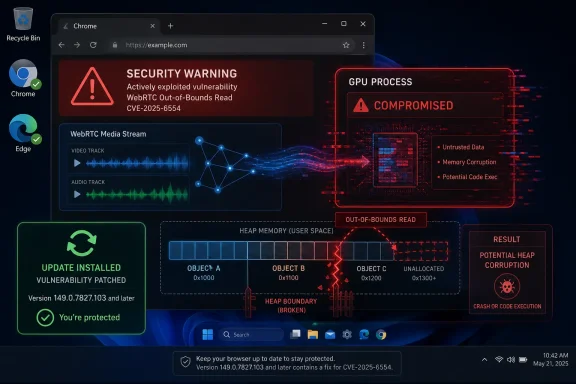
The description of CVE-2026-11667 is unusually revealing because it does not describe a garden-variety drive-by flaw. The attacker is described as remote, the trigger is a crafted HTML page, and the vulnerable component is WebRTC, but exploitation also requires that the attacker has compromised the GPU process. That makes the bug less useful as a standalone entry point and more useful as a second or third step in a chain.
That distinction matters. A vulnerability that requires a prior GPU-process compromise is not the same as a JavaScript engine bug that immediately hands an attacker code execution in the renderer. But it also does not make the flaw harmless. In Chrome’s architecture, process boundaries are the whole point; when an attacker gets a foothold in one process, the next question is what adjacent surfaces can be abused to move, corrupt memory, or weaken the assumptions of the sandbox.
WebRTC is a particularly sensitive place for such a flaw to appear. It exists to make browsers speak real-time audio, video, and data streams with low latency, often under messy network conditions and across a variety of codecs, device paths, and transport states. That complexity is useful to users and developers, but it is also useful to attackers because it creates a dense parsing and state-management surface reachable from web content.
The “out-of-bounds read” label can sound milder than “write” or “use-after-free,” but memory safety bugs rarely respect marketing categories. Reading past an intended boundary can disclose memory contents, destabilize assumptions, or become part of a heap-corruption path depending on surrounding code and allocator behavior. In this CVE, the public description explicitly says the consequence could be heap corruption, which is why the “read” label should not lull administrators into waiting for the next maintenance window.
But that success has changed the way serious browser exploitation looks. Instead of one monolithic exploit that breaks everything in one move, attackers increasingly need a chain: a renderer foothold, a sandbox escape, a broker or GPU process weakness, and then perhaps a platform-specific privilege escalation. CVE-2026-11667 appears to live in that chain-oriented world.
The GPU process has long been a strange character in browser security. It exists because modern websites lean heavily on graphics acceleration, video decode, WebGL, compositing, and increasingly complex media pipelines. It is sandboxed, but it also brokers access to hardware-adjacent functionality that was never designed with hostile web pages as its original threat model.
That is why a vulnerability conditioned on a compromised GPU process deserves attention. If attackers already have a way into that process, a WebRTC heap-corruption primitive may help them turn a constrained beachhead into a more useful one. Browser security is less about whether one bug is “the exploit” and more about whether it makes the exploit chain shorter, more reliable, or less noisy.
That ubiquity is why WebRTC vulnerabilities age differently from bugs in obscure browser features. A crafted HTML page does not need to look like a malicious binary download. It can be an invitation link, a fake meeting page, a compromised collaboration portal, or a watering-hole site tuned for a particular organization. The distance between “ordinary business activity” and “attacker-controlled WebRTC path” is uncomfortably short.
The security challenge is not merely that WebRTC handles media. It is that it handles media while negotiating capabilities, network paths, codecs, timing, buffering, device access, encryption states, and peer connections. Each of those stages involves transitions, parsing, permissions, and cleanup logic. Memory safety bugs thrive in precisely those places where state machines get complicated and rare edge cases are hard to test.
For home users, the most visible mitigation is still the least glamorous one: let Chrome update and restart it. For enterprises, the calculus is more involved because WebRTC may be business-critical, extensions may interfere with browser behavior, and update rings may lag behind stable releases. But the conclusion is the same. A WebRTC bug in a major Chrome release is not a curiosity; it is part of the attack surface that supports everyday work.
Chrome’s own updater usually does the right thing quickly for unmanaged desktops, but fleets are rarely that clean. Some systems are pinned, some browsers are installed per-user, some are packaged through third-party patching tools, and some are Chromium-derived browsers with their own release cadence. Microsoft Edge, Brave, Vivaldi, Opera, and other Chromium-based products do not automatically become safe simply because Google has published a Chrome fix.
This is where Windows administrators should resist the temptation to build a vulnerability response around only the Chrome executable. Inventory should answer which Chromium engines are present, which are default browsers, which are embedded inside applications, and which are updated outside the normal Windows Update rhythm. The browser monoculture problem is not that every browser has the same brand; it is that many browsers inherit the same low-level code paths while patching on different clocks.
The NVD CPE entry also illustrates an old vulnerability-management headache. The listed affected configuration combines the Chrome application with operating systems such as Windows, Linux, and macOS, which is technically useful for describing supported platforms but easy to misread in dashboards. The vulnerable product is Chrome; the operating system CPEs are part of the applicability logic, not evidence that Windows itself contains the WebRTC bug.
The problem is that patch decisions cannot wait for every database to converge. A high-severity Chrome memory-safety issue in WebRTC, fixed in a stable-channel update and described as exploitable through crafted HTML after a GPU-process compromise, is already actionable. Defenders do not need the NVD to bless every field before pushing browser updates.
This is especially true because CVSS can compress important nuance into a number. CVE-2026-11667’s attack complexity is high in the CISA vector, and user interaction is required. That correctly signals that exploitation is not effortless. But the same vector also rates confidentiality, integrity, and availability impacts as high, which reflects the possible consequences if the necessary preconditions are met.
The right reading is not “only 7.5, wait.” Nor is it “high impact, panic.” The right reading is that this is a serious chainable browser bug that should be removed from exposed fleets quickly, especially on systems used for conferencing, customer interaction, privileged administration, development, or access to sensitive web applications.
Attackers do not care about the neat boundaries between CVE entries. A V8 bug may provide one stage, a GPU issue another, a WebRTC flaw another, and a platform vulnerability yet another. The public record does not show that CVE-2026-11667 itself is being exploited in the wild, and it would be irresponsible to claim otherwise. Still, it was fixed in the same general window as a known exploited Chrome flaw, which makes slow patching harder to defend.
This is one reason security teams often treat browser stable-channel security releases as a bundle rather than as a menu. The most famous CVE in the advisory may not be the only one that matters to a capable attacker. Once a patch ships, the diff becomes a map for researchers and adversaries alike, even if bug details remain restricted for a time.
Chrome’s practice of restricting issue details until users have updated is sensible, but it is not magic. Attackers can still compare code, watch commits, test crash cases, and reason about changed behavior. The longer a fleet remains on a vulnerable build, the more time the offensive side has to convert a sparse advisory into a working exploit component.
For administrators, CVE-2026-11667 is a reminder that the browser is not merely installed on endpoints; it is often the most exposed application on them. It processes hostile content by design. It brokers access to cameras, microphones, files, GPUs, USB devices, local network hints, authentication flows, and enterprise web apps. When the browser is behind, the endpoint is behind.
Patch cadence should reflect that. A monthly workstation update cycle may be acceptable for some applications, but browsers deserve faster rings, clear restart enforcement, and reporting that distinguishes “downloaded update” from “running updated build.” Chrome can stage an update silently, but the vulnerable process may persist until the user relaunches.
The awkward part is user experience. No one wants to kill a browser full of unsaved work, live calls, or half-completed forms. But this is a management problem, not an excuse. Enterprises can communicate restart windows, use policy to notify and enforce relaunches, and prioritize high-risk groups first. The point is not to be draconian; it is to stop pretending that a pending browser restart is a completed patch.
CPE is useful for matching named products and versions, but Chromium is a codebase, not a single product. A vulnerability in Chrome may be inherited by Chromium-based browsers, Electron applications, embedded webviews, kiosk shells, enterprise wrappers, and vendor-specific builds. Some of those products will have their own CVEs or advisories; others will quietly rev dependencies without making much noise.
That means vulnerability scanners can understate or overstate exposure. They may correctly flag Google Chrome but miss a Chromium runtime bundled inside a line-of-business application. They may also flag operating-system CPEs in a way that makes asset owners think Windows or macOS is the vulnerable component. Both errors lead to bad prioritization.
For WindowsForum readers, the practical lesson is to use CPE data as a starting point, not as a complete asset model. If a system runs Chrome, update Chrome. If it runs Edge, verify Edge’s corresponding Chromium fix. If it runs an Electron-heavy application stack, check vendor advisories. If it runs kiosk or VDI images, rebuild and redeploy the image rather than assuming auto-update will clean up persistent templates.
That ecosystem includes Microsoft Edge, which matters enormously in Windows environments because it is present by default and deeply integrated into enterprise management patterns. Edge is not Chrome, but it is Chromium-based, and administrators should track Edge advisories whenever Chrome ships a security update touching shared components. The same logic applies to other Chromium derivatives used in developer, privacy, gaming, and specialized workflows.
The hard cases are applications that embed browser engines invisibly. Users may not know they are running Chromium when they open a chat client, a note-taking app, a trading terminal, or an internal desktop portal. Those applications may not expose a familiar chrome://version page, and they may update on vendor-specific schedules. In those cases, asset inventory and software composition awareness matter more than end-user instructions.
This is why “update Chrome” is necessary but insufficient advice for IT. The better instruction is “remove vulnerable Chromium code from the environment.” That includes the obvious browser, the default browser, the alternate browser someone installed for testing, and the embedded runtime that quietly renders login pages inside a desktop app.
That simplicity is one of Chrome’s great advantages. Most users do not need to download installers, compare hashes, or read CVSS vectors. The browser’s update mechanism is built to make security maintenance boring, and boring is good. The weak link is the human tendency to defer relaunches indefinitely.
Users who rely on video meetings should be especially alert because WebRTC is not an obscure lab feature for them. It is the plumbing behind the calls they join every day. A malicious page does not need to ask politely before probing browser-exposed code paths, and a user does not need to download anything for a crafted page to matter.
There is no need for ordinary users to disable WebRTC wholesale in response to this CVE. That would break too much and likely create more confusion than security. The sensible path is to update, restart, keep the operating system patched, and be cautious with unexpected meeting links or web pages that demand unusual permissions.
Those stragglers are not random noise. They are frequently the same machines that create disproportionate risk because they sit outside normal management, run unusual software, or belong to users with elevated access. A developer workstation with old Chromium builds, test browsers, local services, and production credentials is a far more interesting target than a fully managed kiosk.
Telemetry should therefore focus on running versions, not only installed versions. A machine may have received the update but still be running old browser processes. On Windows, that distinction can persist for days if users never close the browser, if startup boost features keep processes warm, or if remote sessions remain active.
Security teams should also look for signs of exploit-chain activity rather than waiting for a CVE-specific indicator. GPU-process crashes, unusual renderer crashes, suspicious WebRTC activity, unexpected browser child-process behavior, and visits to newly registered or lookalike conferencing pages can all be useful signals. None of those proves exploitation of CVE-2026-11667, but they help defenders reason about the class of attack this bug belongs to.
That dual-browser reality creates duplicated risk. A company may patch Chrome quickly but forget Edge, or manage Edge tightly while leaving Chrome to auto-update. Users may switch between them without understanding that a shared upstream codebase can make both relevant to the same class of vulnerability. The brand icon on the taskbar is less important than the engine version underneath.
Microsoft’s update process for Edge is separate from Windows cumulative updates, even though Edge is a Microsoft product and ships with Windows. That separation is usually an advantage because Edge can move quickly. But it also means Windows Update compliance alone does not prove browser compliance. An endpoint can be fully patched at the OS level and still run an outdated browser engine.
For administrators, this is where policy alignment matters. Chrome, Edge, and other Chromium browsers should have comparable update enforcement, restart expectations, and reporting. Otherwise, attackers will not need to defeat the best-managed browser; they will simply wait for the neglected one.
The browser industry has made real progress with sandboxing, fuzzing, site isolation, exploit mitigations, safer allocators, control-flow protections, and increasingly aggressive testing. Those defenses are why many browser bugs today require chains rather than delivering immediate full compromise. But the underlying pattern remains stubborn.
There is a slow transition underway toward memory-safe languages and safer component boundaries, but browsers cannot be rewritten overnight. WebRTC, graphics, codecs, and platform integration layers have deep performance constraints and long histories. Security improvements arrive incrementally, often one dangerous class of bug at a time.
That is why users experience browser security as an endless stream of updates. It is not because vendors are uniquely careless; it is because the browser is one of the most complex hostile-input processing systems ever deployed to ordinary desktops. The update treadmill is annoying, but it is also the visible sign of a defensive system that is still moving.
This CVE does not currently appear to be the headline zero-day in the Chrome update, and public descriptions do not say it has been exploited in the wild. That should shape the tone. The right response is urgency without theatrics: patch promptly, verify thoroughly, and avoid implying that every vulnerable machine has already been compromised.
The “crafted HTML page” element keeps the attack path broadly reachable. The “compromised GPU process” prerequisite narrows it. Together, they tell us that the bug is probably most valuable to an attacker who already has a foothold in Chrome’s process model and wants to improve the chain. That is exactly the sort of vulnerability professional defenders should care about, because real intrusions are built from such increments.
There is also a lesson for security communications. Advisories that mention a prior compromised process can be misread by non-specialists as saying the attacker already owns the machine. That is not necessarily the case. In a sandboxed browser, compromising one process may still leave important barriers in place. A bug that helps cross or abuse those barriers is still consequential.
Google’s practice of withholding detailed bug information until users are updated is meant to reduce that risk. It buys time, but it does not eliminate the race. Skilled researchers can infer a great deal from patches, tests, and behavioral changes, especially in an open-source-adjacent project like Chromium.
Enterprises should therefore avoid stretching browser patch windows out of habit. A seven-day delay may seem reasonable for ordinary software. For a browser security update containing memory-safety fixes and a separately known exploited vulnerability, seven days can be a long time. The more exposed the user population, the shorter the acceptable lag.
This does not mean every organization can or should blast patches instantly to every machine without testing. It means the testing path for browsers should already exist, already be fast, and already account for rollback. If a company is improvising its Chrome update process after a high-severity CVE lands, the process is the vulnerability.
For Windows users, the action is concrete: update Chrome, restart it, and verify any Chromium-based browser you actually use. For administrators, the action is broader: measure browser versions across the fleet, enforce relaunches, track Edge and Chrome separately, and remember that embedded Chromium runtimes may not follow either browser’s update schedule. For security teams, the action is to treat GPU and WebRTC surfaces as meaningful parts of the exploit chain, not as implementation trivia.
The awkward beauty of modern browser security is that it often works by making attackers do more work. Sandboxes, process isolation, and mitigations do not make bugs vanish; they make bugs less decisive. CVE-2026-11667 matters because it lives in the space between those defenses, where an attacker with one compromised process looks for the next mistake.
CVE-2026-11667 sits in the uncomfortable middle of browser security: too conditional to panic over, too serious to ignore, and too close to the media and real-time communications stack to dismiss as theoretical. For Windows users and administrators, the practical answer is simple enough — update Chrome and Chromium-derived browsers as soon as their vendors ship fixes — but the strategic lesson is larger. The browser has become an operating system inside the operating system, and its security boundary is now a layered argument among renderers, GPU brokers, codecs, device permissions, and sandbox assumptions.
 The Bug Is Conditional, but the Condition Is the Story
The description of CVE-2026-11667 is unusually revealing because it does not describe a garden-variety drive-by flaw. The attacker is described as remote, the trigger is a crafted HTML page, and the vulnerable component is WebRTC, but exploitation also requires that the attacker has compromised the GPU process. That makes the bug less useful as a standalone entry point and more useful as a second or third step in a chain.That distinction matters. A vulnerability that requires a prior GPU-process compromise is not the same as a JavaScript engine bug that immediately hands an attacker code execution in the renderer. But it also does not make the flaw harmless. In Chrome’s architecture, process boundaries are the whole point; when an attacker gets a foothold in one process, the next question is what adjacent surfaces can be abused to move, corrupt memory, or weaken the assumptions of the sandbox.
WebRTC is a particularly sensitive place for such a flaw to appear. It exists to make browsers speak real-time audio, video, and data streams with low latency, often under messy network conditions and across a variety of codecs, device paths, and transport states. That complexity is useful to users and developers, but it is also useful to attackers because it creates a dense parsing and state-management surface reachable from web content.
The “out-of-bounds read” label can sound milder than “write” or “use-after-free,” but memory safety bugs rarely respect marketing categories. Reading past an intended boundary can disclose memory contents, destabilize assumptions, or become part of a heap-corruption path depending on surrounding code and allocator behavior. In this CVE, the public description explicitly says the consequence could be heap corruption, which is why the “read” label should not lull administrators into waiting for the next maintenance window.
Chrome’s Sandbox Has Changed the Shape of Browser Risk
The modern browser security model is designed around the assumption that bugs will happen. Chrome’s multiprocess architecture separates tabs, renderers, the GPU process, network services, and other privileged or semi-privileged components so that a single memory bug is less likely to become full system compromise. This is one of the great defensive successes of the last two decades of browser engineering.But that success has changed the way serious browser exploitation looks. Instead of one monolithic exploit that breaks everything in one move, attackers increasingly need a chain: a renderer foothold, a sandbox escape, a broker or GPU process weakness, and then perhaps a platform-specific privilege escalation. CVE-2026-11667 appears to live in that chain-oriented world.
The GPU process has long been a strange character in browser security. It exists because modern websites lean heavily on graphics acceleration, video decode, WebGL, compositing, and increasingly complex media pipelines. It is sandboxed, but it also brokers access to hardware-adjacent functionality that was never designed with hostile web pages as its original threat model.
That is why a vulnerability conditioned on a compromised GPU process deserves attention. If attackers already have a way into that process, a WebRTC heap-corruption primitive may help them turn a constrained beachhead into a more useful one. Browser security is less about whether one bug is “the exploit” and more about whether it makes the exploit chain shorter, more reliable, or less noisy.
WebRTC Remains a Necessary Attack Surface
WebRTC is one of those technologies that became infrastructure before many users learned its name. Video calls, browser-based conferencing, remote support portals, collaboration tools, telehealth sessions, education platforms, customer service widgets, and peer-to-peer data channels all depend on it in one form or another. It is not a niche feature that can be safely removed from the modern web without breaking real workflows.That ubiquity is why WebRTC vulnerabilities age differently from bugs in obscure browser features. A crafted HTML page does not need to look like a malicious binary download. It can be an invitation link, a fake meeting page, a compromised collaboration portal, or a watering-hole site tuned for a particular organization. The distance between “ordinary business activity” and “attacker-controlled WebRTC path” is uncomfortably short.
The security challenge is not merely that WebRTC handles media. It is that it handles media while negotiating capabilities, network paths, codecs, timing, buffering, device access, encryption states, and peer connections. Each of those stages involves transitions, parsing, permissions, and cleanup logic. Memory safety bugs thrive in precisely those places where state machines get complicated and rare edge cases are hard to test.
For home users, the most visible mitigation is still the least glamorous one: let Chrome update and restart it. For enterprises, the calculus is more involved because WebRTC may be business-critical, extensions may interfere with browser behavior, and update rings may lag behind stable releases. But the conclusion is the same. A WebRTC bug in a major Chrome release is not a curiosity; it is part of the attack surface that supports everyday work.
The Version Number Is More Than Housekeeping
The fixed version line matters because Chromium patching is a distributed ecosystem problem, not just a Google Chrome problem. The NVD entry names Google Chrome prior to 149.0.7827.103, while reporting around the same stable-channel update also points to platform-specific stable builds around 149.0.7827.102 and 149.0.7827.103 depending on operating system. In practice, administrators should not treat the third or fourth segment of the version string as trivia.Chrome’s own updater usually does the right thing quickly for unmanaged desktops, but fleets are rarely that clean. Some systems are pinned, some browsers are installed per-user, some are packaged through third-party patching tools, and some are Chromium-derived browsers with their own release cadence. Microsoft Edge, Brave, Vivaldi, Opera, and other Chromium-based products do not automatically become safe simply because Google has published a Chrome fix.
This is where Windows administrators should resist the temptation to build a vulnerability response around only the Chrome executable. Inventory should answer which Chromium engines are present, which are default browsers, which are embedded inside applications, and which are updated outside the normal Windows Update rhythm. The browser monoculture problem is not that every browser has the same brand; it is that many browsers inherit the same low-level code paths while patching on different clocks.
The NVD CPE entry also illustrates an old vulnerability-management headache. The listed affected configuration combines the Chrome application with operating systems such as Windows, Linux, and macOS, which is technically useful for describing supported platforms but easy to misread in dashboards. The vulnerable product is Chrome; the operating system CPEs are part of the applicability logic, not evidence that Windows itself contains the WebRTC bug.
NVD Is Still Catching Up While Defenders Need to Move
At publication time, the NVD record for CVE-2026-11667 had not yet supplied its own CVSS score, while CISA’s ADP enrichment listed a CVSS 3.1 base score of 7.5, high severity. That gap is not unusual. Vulnerability records often arrive first with vendor text, then gain scoring, CPEs, weakness mappings, and enrichment over the following hours or days.The problem is that patch decisions cannot wait for every database to converge. A high-severity Chrome memory-safety issue in WebRTC, fixed in a stable-channel update and described as exploitable through crafted HTML after a GPU-process compromise, is already actionable. Defenders do not need the NVD to bless every field before pushing browser updates.
This is especially true because CVSS can compress important nuance into a number. CVE-2026-11667’s attack complexity is high in the CISA vector, and user interaction is required. That correctly signals that exploitation is not effortless. But the same vector also rates confidentiality, integrity, and availability impacts as high, which reflects the possible consequences if the necessary preconditions are met.
The right reading is not “only 7.5, wait.” Nor is it “high impact, panic.” The right reading is that this is a serious chainable browser bug that should be removed from exposed fleets quickly, especially on systems used for conferencing, customer interaction, privileged administration, development, or access to sensitive web applications.
The Other Chrome Bug Casts a Long Shadow
CVE-2026-11667 arrived alongside a Chrome stable-channel security update that also included a separate zero-day, CVE-2026-11645, reportedly exploited in the wild. That neighboring vulnerability was in V8 rather than WebRTC, and it attracted the louder headlines because active exploitation changes the urgency of any advisory. But focusing only on the zero-day risks missing the shape of the whole update.Attackers do not care about the neat boundaries between CVE entries. A V8 bug may provide one stage, a GPU issue another, a WebRTC flaw another, and a platform vulnerability yet another. The public record does not show that CVE-2026-11667 itself is being exploited in the wild, and it would be irresponsible to claim otherwise. Still, it was fixed in the same general window as a known exploited Chrome flaw, which makes slow patching harder to defend.
This is one reason security teams often treat browser stable-channel security releases as a bundle rather than as a menu. The most famous CVE in the advisory may not be the only one that matters to a capable attacker. Once a patch ships, the diff becomes a map for researchers and adversaries alike, even if bug details remain restricted for a time.
Chrome’s practice of restricting issue details until users have updated is sensible, but it is not magic. Attackers can still compare code, watch commits, test crash cases, and reason about changed behavior. The longer a fleet remains on a vulnerable build, the more time the offensive side has to convert a sparse advisory into a working exploit component.
Windows Admins Should Treat Browser Updates as Tier-Zero Hygiene
There is still a cultural lag in some Windows environments where browser updates are treated as end-user software maintenance rather than core security operations. That made more sense when the browser was mainly a document viewer for the public web. It makes little sense now that browser sessions carry identity tokens, password managers, SSO workflows, admin consoles, SaaS data, and remote collaboration.For administrators, CVE-2026-11667 is a reminder that the browser is not merely installed on endpoints; it is often the most exposed application on them. It processes hostile content by design. It brokers access to cameras, microphones, files, GPUs, USB devices, local network hints, authentication flows, and enterprise web apps. When the browser is behind, the endpoint is behind.
Patch cadence should reflect that. A monthly workstation update cycle may be acceptable for some applications, but browsers deserve faster rings, clear restart enforcement, and reporting that distinguishes “downloaded update” from “running updated build.” Chrome can stage an update silently, but the vulnerable process may persist until the user relaunches.
The awkward part is user experience. No one wants to kill a browser full of unsaved work, live calls, or half-completed forms. But this is a management problem, not an excuse. Enterprises can communicate restart windows, use policy to notify and enforce relaunches, and prioritize high-risk groups first. The point is not to be draconian; it is to stop pretending that a pending browser restart is a completed patch.
The CPE Footnote Is a Vulnerability-Management Trap
The user-submitted NVD change history asks, in effect, whether a CPE is missing. The short answer is that the visible configuration is not obviously missing the core vulnerable application CPE: it includes Google Chrome versions before 149.0.7827.103. The more interesting answer is that CPEs often fail to capture how Chromium risk actually propagates.CPE is useful for matching named products and versions, but Chromium is a codebase, not a single product. A vulnerability in Chrome may be inherited by Chromium-based browsers, Electron applications, embedded webviews, kiosk shells, enterprise wrappers, and vendor-specific builds. Some of those products will have their own CVEs or advisories; others will quietly rev dependencies without making much noise.
That means vulnerability scanners can understate or overstate exposure. They may correctly flag Google Chrome but miss a Chromium runtime bundled inside a line-of-business application. They may also flag operating-system CPEs in a way that makes asset owners think Windows or macOS is the vulnerable component. Both errors lead to bad prioritization.
For WindowsForum readers, the practical lesson is to use CPE data as a starting point, not as a complete asset model. If a system runs Chrome, update Chrome. If it runs Edge, verify Edge’s corresponding Chromium fix. If it runs an Electron-heavy application stack, check vendor advisories. If it runs kiosk or VDI images, rebuild and redeploy the image rather than assuming auto-update will clean up persistent templates.
The Browser Supply Chain Is Now a Patch Race
Chromium’s scale is both its defensive strength and its supply-chain weakness. Google can find and fix a tremendous number of bugs, and Chrome’s update machinery can move faster than traditional desktop software. But when a Chromium flaw lands, a large ecosystem has to absorb it, rebuild it, test it, sign it, and ship it.That ecosystem includes Microsoft Edge, which matters enormously in Windows environments because it is present by default and deeply integrated into enterprise management patterns. Edge is not Chrome, but it is Chromium-based, and administrators should track Edge advisories whenever Chrome ships a security update touching shared components. The same logic applies to other Chromium derivatives used in developer, privacy, gaming, and specialized workflows.
The hard cases are applications that embed browser engines invisibly. Users may not know they are running Chromium when they open a chat client, a note-taking app, a trading terminal, or an internal desktop portal. Those applications may not expose a familiar chrome://version page, and they may update on vendor-specific schedules. In those cases, asset inventory and software composition awareness matter more than end-user instructions.
This is why “update Chrome” is necessary but insufficient advice for IT. The better instruction is “remove vulnerable Chromium code from the environment.” That includes the obvious browser, the default browser, the alternate browser someone installed for testing, and the embedded runtime that quietly renders login pages inside a desktop app.
Home Users Get the Easy Button, but Not a Free Pass
For individual Windows users, the immediate action is straightforward. Open Chrome’s About page, let it check for updates, and restart when prompted. If the browser reports a build at or beyond the fixed release line for the user’s platform, the main Chrome exposure is addressed.That simplicity is one of Chrome’s great advantages. Most users do not need to download installers, compare hashes, or read CVSS vectors. The browser’s update mechanism is built to make security maintenance boring, and boring is good. The weak link is the human tendency to defer relaunches indefinitely.
Users who rely on video meetings should be especially alert because WebRTC is not an obscure lab feature for them. It is the plumbing behind the calls they join every day. A malicious page does not need to ask politely before probing browser-exposed code paths, and a user does not need to download anything for a crafted page to matter.
There is no need for ordinary users to disable WebRTC wholesale in response to this CVE. That would break too much and likely create more confusion than security. The sensible path is to update, restart, keep the operating system patched, and be cautious with unexpected meeting links or web pages that demand unusual permissions.
Security Teams Should Hunt for Lag, Not Just Vulnerability
Once a Chrome fix ships, the first job is deployment. The second job is finding the machines that did not follow the plan. Browser patching failures often cluster around offline laptops, stale VDI pools, nonpersistent images, lab machines, unmanaged developer workstations, and systems where users lack permissions or have disabled update services.Those stragglers are not random noise. They are frequently the same machines that create disproportionate risk because they sit outside normal management, run unusual software, or belong to users with elevated access. A developer workstation with old Chromium builds, test browsers, local services, and production credentials is a far more interesting target than a fully managed kiosk.
Telemetry should therefore focus on running versions, not only installed versions. A machine may have received the update but still be running old browser processes. On Windows, that distinction can persist for days if users never close the browser, if startup boost features keep processes warm, or if remote sessions remain active.
Security teams should also look for signs of exploit-chain activity rather than waiting for a CVE-specific indicator. GPU-process crashes, unusual renderer crashes, suspicious WebRTC activity, unexpected browser child-process behavior, and visits to newly registered or lookalike conferencing pages can all be useful signals. None of those proves exploitation of CVE-2026-11667, but they help defenders reason about the class of attack this bug belongs to.
Microsoft’s Edge Stake Makes This a Windows Story
It is tempting to file CVE-2026-11667 under “Google Chrome” and move on. For Windows users, that is too narrow. The Chromium engine is now part of the default Windows browsing experience through Microsoft Edge, and many organizations standardize on Edge while still allowing Chrome for compatibility or user preference.That dual-browser reality creates duplicated risk. A company may patch Chrome quickly but forget Edge, or manage Edge tightly while leaving Chrome to auto-update. Users may switch between them without understanding that a shared upstream codebase can make both relevant to the same class of vulnerability. The brand icon on the taskbar is less important than the engine version underneath.
Microsoft’s update process for Edge is separate from Windows cumulative updates, even though Edge is a Microsoft product and ships with Windows. That separation is usually an advantage because Edge can move quickly. But it also means Windows Update compliance alone does not prove browser compliance. An endpoint can be fully patched at the OS level and still run an outdated browser engine.
For administrators, this is where policy alignment matters. Chrome, Edge, and other Chromium browsers should have comparable update enforcement, restart expectations, and reporting. Otherwise, attackers will not need to defeat the best-managed browser; they will simply wait for the neglected one.
Memory Safety Remains the Browser Industry’s Unpaid Debt
CVE-2026-11667 is another entry in the long ledger of memory-safety issues that continue to shape browser security. Out-of-bounds reads, writes, use-after-free bugs, type confusions, and heap corruptions are not exotic categories. They are the recurring tax paid by large C and C++ codebases that must parse hostile input at enormous speed.The browser industry has made real progress with sandboxing, fuzzing, site isolation, exploit mitigations, safer allocators, control-flow protections, and increasingly aggressive testing. Those defenses are why many browser bugs today require chains rather than delivering immediate full compromise. But the underlying pattern remains stubborn.
There is a slow transition underway toward memory-safe languages and safer component boundaries, but browsers cannot be rewritten overnight. WebRTC, graphics, codecs, and platform integration layers have deep performance constraints and long histories. Security improvements arrive incrementally, often one dangerous class of bug at a time.
That is why users experience browser security as an endless stream of updates. It is not because vendors are uniquely careless; it is because the browser is one of the most complex hostile-input processing systems ever deployed to ordinary desktops. The update treadmill is annoying, but it is also the visible sign of a defensive system that is still moving.
The Practical Meaning of This Particular Chrome Fix
The concrete risk from CVE-2026-11667 depends on the environment. A fully updated home PC with Chrome restarted is no longer the main concern. A managed enterprise fleet with mixed browser versions, delayed restart enforcement, and heavy use of WebRTC-based collaboration tools deserves a closer look.This CVE does not currently appear to be the headline zero-day in the Chrome update, and public descriptions do not say it has been exploited in the wild. That should shape the tone. The right response is urgency without theatrics: patch promptly, verify thoroughly, and avoid implying that every vulnerable machine has already been compromised.
The “crafted HTML page” element keeps the attack path broadly reachable. The “compromised GPU process” prerequisite narrows it. Together, they tell us that the bug is probably most valuable to an attacker who already has a foothold in Chrome’s process model and wants to improve the chain. That is exactly the sort of vulnerability professional defenders should care about, because real intrusions are built from such increments.
There is also a lesson for security communications. Advisories that mention a prior compromised process can be misread by non-specialists as saying the attacker already owns the machine. That is not necessarily the case. In a sandboxed browser, compromising one process may still leave important barriers in place. A bug that helps cross or abuse those barriers is still consequential.
The Patch Window Is Where the Risk Concentrates
The most dangerous period for a vulnerability like this is often after disclosure and before broad patch saturation. Before disclosure, only the discoverer and perhaps a small set of actors know the details. After disclosure, defenders know to patch, but attackers also know where to look. The race begins.Google’s practice of withholding detailed bug information until users are updated is meant to reduce that risk. It buys time, but it does not eliminate the race. Skilled researchers can infer a great deal from patches, tests, and behavioral changes, especially in an open-source-adjacent project like Chromium.
Enterprises should therefore avoid stretching browser patch windows out of habit. A seven-day delay may seem reasonable for ordinary software. For a browser security update containing memory-safety fixes and a separately known exploited vulnerability, seven days can be a long time. The more exposed the user population, the shorter the acceptable lag.
This does not mean every organization can or should blast patches instantly to every machine without testing. It means the testing path for browsers should already exist, already be fast, and already account for rollback. If a company is improvising its Chrome update process after a high-severity CVE lands, the process is the vulnerability.
The Lesson Hidden in the Version String
CVE-2026-11667 is not the loudest browser bug of the year, and it may not become the one that appears in incident reports. But it is a useful marker of where browser defense has arrived. The single-bug era is fading; the chainable-component era is here.For Windows users, the action is concrete: update Chrome, restart it, and verify any Chromium-based browser you actually use. For administrators, the action is broader: measure browser versions across the fleet, enforce relaunches, track Edge and Chrome separately, and remember that embedded Chromium runtimes may not follow either browser’s update schedule. For security teams, the action is to treat GPU and WebRTC surfaces as meaningful parts of the exploit chain, not as implementation trivia.
The awkward beauty of modern browser security is that it often works by making attackers do more work. Sandboxes, process isolation, and mitigations do not make bugs vanish; they make bugs less decisive. CVE-2026-11667 matters because it lives in the space between those defenses, where an attacker with one compromised process looks for the next mistake.
The Build Number Is the Boundary Between Theory and Exposure
The immediate story is not complicated, but it is easy to operationalize badly. A high-severity WebRTC memory-safety flaw exists in Chrome before the fixed 149.0.7827.103 line, the public description requires a prior GPU-process compromise, and the realistic enterprise risk is concentrated in delayed updates, unrestarted browsers, and Chromium-based software outside normal patch visibility.- Chrome users should verify that their browser has updated to a fixed 149.0.7827.103-era build or later and should restart the browser to replace old running processes.
- Windows administrators should track Chrome and Edge as separate managed applications rather than assuming operating-system patch compliance covers browser exposure.
- Security teams should treat CVE-2026-11667 as a chainable browser flaw, not as an isolated one-click compromise.
- Vulnerability managers should read the CPE data carefully because the vulnerable product is Chrome, while the listed operating systems describe affected platform configurations.
- Organizations using WebRTC-heavy workflows should prioritize browser patch completion because conferencing and collaboration sites routinely exercise the affected class of functionality.
- Teams with Electron apps, kiosk shells, or embedded Chromium runtimes should check vendor update status instead of assuming the Chrome desktop patch resolves every Chromium-derived exposure.
References
- Primary source: NVD / Chromium
Published: 2026-06-15T19:14:24-07:00

NVD - CVE-2026-11667
 nvd.nist.gov
- Security advisory: MSRC
Published: 2026-06-15T19:14:24-07:00
Original feed URL

Security Update Guide - Microsoft Security Response Center
 msrc.microsoft.com