

Microsoft released Windows 11 Insider builds and inbox app updates on June 12, 2026, including Media Player version 11.2605.14.0 for Experimental channels, adding caption styling, playback fixes, playlist polish, and clearer codec messaging while leaving persistent performance complaints unresolved. That is the practical story behind a rollout that otherwise looks like routine Insider housekeeping. Microsoft is still improving the modern Windows app stack, but the comparison users actually feel is not against last month’s build. It is against the apps Windows already had, and against VLC, which continues to make Microsoft’s default player look heavier than it should.
The latest Media Player update is not empty. It brings useful quality-of-life changes, especially for users who rely on captions, maintain local libraries, or bump into the sort of file-recognition failures that make a media app feel unfinished. Caption styling now follows Windows caption settings, the play queue can explain when indexing is still underway, and Microsoft says the app should do a better job recognizing supported file types.
Those are sensible fixes. They also reveal the nature of the problem. Microsoft is polishing the experience around playback, but the complaint from many users is more basic: the app can feel slow before it even starts doing the job it was opened to do.
That distinction matters because media players are judged brutally. A user double-clicks a video file and expects motion and sound almost immediately. If the app takes several seconds to launch while alternatives open the same file almost instantly, the user does not experience that delay as an implementation detail. They experience it as the operating system getting in their way.
The modern Media Player is supposed to be the unified successor to an awkward Windows past: Groove Music on one side, Movies & TV on another, and the legacy Windows Media Player still lurking for users who remember when desktop apps were plain, fast, and unapologetically utilitarian. But in 2026, the old app’s continued existence has become an indictment as much as a compatibility feature. If the legacy player still feels faster for ordinary files, the new app has not yet earned its default status.
That context is important because Microsoft is clearly trying to make Windows 11 feel less noisy and less brittle. Widgets are being adjusted to reduce badges, alerts, and unwanted attention. File Explorer is getting fixes for awkward path handling, ISO mounting responsiveness, and rename behavior. Windows Update is seeing repairs for installation failures that affect Insider confidence.
This is the kind of work Windows 11 needs. It is not glamorous, but it addresses a theme that has followed the OS since launch: too many surfaces competing for attention, too many modernized components that feel heavier than the things they replaced, and too many small frictions that accumulate into a sense that Windows is asking users to accommodate it rather than the other way around.
Media Player fits that pattern neatly. Microsoft can add better caption integration and clearer missing-codec dialogs, and those improvements matter. But if the app still launches slowly and sits idle with a large memory footprint, users will file it in the same mental drawer as other modern Windows experiences that appear more designed than engineered.
That usefulness is exactly the problem for Microsoft. The legacy app often opens local files quickly, consumes comparatively little memory, and behaves like a tool rather than a portal. For many Windows users, especially enthusiasts and IT pros, that is the whole point.
The modern app is better aligned with Windows 11 visually. It supports the current design language, integrates more naturally with the Microsoft Store app servicing model, and gives Microsoft a cleaner path for incremental updates outside major Windows releases. In theory, this should be a win: a maintained app, distributed through modern channels, refined independently from the operating system.
In practice, users compare outcomes. If one app takes several seconds to launch and another starts playing immediately, the prettier app loses. If one idles at hundreds of megabytes while the other sits closer to a third of that, the newer architecture starts to look like a tax.
This is why the performance debate is not nostalgia. Windows users are not asking Microsoft to freeze the platform in 2009. They are asking why the replacement for a simple desktop utility cannot consistently beat the utility it replaced at the simple things.
That matters because Media Player’s codec limitations are not a niche annoyance. HEVC, or H.265, is widely used by modern phones and cameras because it compresses high-quality video efficiently. A Windows user who receives a video from an iPhone, an Android device, a drone, or a mirrorless camera may reasonably expect the default media app to play it.
Instead, the Windows experience can still route users toward the HEVC Video Extensions package in the Microsoft Store. Depending on the device, licensing path, and installed components, some users get playback and others get a codec prompt. From Microsoft’s perspective, this is partly a licensing and distribution issue. From the user’s perspective, it is a default app failing at a default job.
VLC avoids the perception problem by bundling broad codec support and simply getting on with playback. That has always been its advantage, but it looks sharper in a Windows 11 world where Microsoft is trying to make its inbox apps feel complete. A clean interface cannot compensate for a file that does not play.
The latest Media Player update’s clearer missing-codec message is therefore a double-edged improvement. It may reduce confusion, but it also formalizes the gap. Microsoft is not saying, “Your file now works.” It is saying, “Here is a better explanation of why your file does not work yet.”
But for Windows, the codec issue is bigger than format coverage. It cuts directly into the out-of-box experience, which is the emotional contract between an operating system and its users. A default app does not need to satisfy every professional workflow, but it does need to handle common consumer files without making the user feel like they bought an incomplete machine.
HEVC is the obvious flashpoint because it sits at the intersection of technical reality and licensing complexity. Microsoft cannot simply wish away patent pools and commercial licensing arrangements. Windows ships at enormous scale across devices, regions, OEM agreements, and enterprise environments, so every bundled capability has cost and legal implications.
Still, the user does not experience licensing complexity. They experience a prompt. They experience a file that opens in VLC but not in Microsoft’s own app. They experience the oddity of a modern operating system that can advertise AI-powered features and cloud-connected services while asking for an extra codec package to play a video from a phone.
That contrast is damaging because it makes Windows feel strategically advanced but tactically unfinished. Microsoft can build Copilot experiences, refine Widgets, and modernize accessibility, but if a basic media file stalls at the gate, the sophistication elsewhere starts to look misplaced.
But perception has hardened. When users see a modern Windows app using far more memory than its legacy counterpart, they do not perform a forensic analysis. They say “WinUI” the way older Windows users once said “.NET” or “Electron” — as shorthand for something that looks contemporary but feels heavy.
Microsoft has been pushing toward more native modern Windows development, and that shift should eventually pay dividends. A well-optimized WinUI app can look current, respect accessibility and system theming, and integrate cleanly with Windows without behaving like a web app in disguise. The problem is that the promise is still competing with lived experience.
Media Player is a useful test case because its job is legible. Users understand what success looks like. Open quickly. Play reliably. Use reasonable resources. Support common formats. Do not make the user think about the app more than the file.
If Microsoft cannot make that experience feel fast and effortless, it will struggle to convince skeptics that the broader modern app platform is ready to replace Win32 utilities that have spent decades being optimized for exactly this sort of immediacy.
For many users, the Outlook transition has become shorthand for Microsoft’s willingness to trade native speed and familiar workflow for a service-backed, web-adjacent experience. Complaints about notification handling, startup behavior, account switching, offline capability, and general responsiveness have made “new Outlook” less a product name than a warning label.
Media Player is not Outlook. It is not trying to merge consumer mail, enterprise mail, advertising surfaces, cloud services, and web technologies into a single client. But the emotional association is already there. When another modern Microsoft app feels heavier than the older one, users see a pattern.
That pattern is especially frustrating because Microsoft has the engineering capacity to do better. Windows remains one of the most important software platforms in the world, and Microsoft knows more than anyone about the performance characteristics of Windows PCs across cheap laptops, corporate desktops, gaming rigs, and workstation-class hardware. If its own inbox apps feel sluggish, the company cannot blame the ecosystem.
For IT pros, the concern is not merely aesthetic. Modern apps that consume more memory, depend more heavily on Store servicing, and change behavior outside the cadence of traditional OS deployments complicate support. They may be easier for Microsoft to update, but they are not automatically easier for administrators to trust.
That is good product engineering, but it changes the administrative bargain. In older Windows environments, default apps were relatively static unless an administrator chose to update them or deploy a new OS image. In modern Windows 11, inbox apps can evolve faster and sometimes more quietly, depending on Store policies, channel membership, and device management configuration.
For home users, that means a media app can improve without fanfare. For enterprise users, it means another moving part. A change that fixes playback for one department might alter file association behavior, codec prompts, accessibility settings, or memory patterns for another.
Media Player is unlikely to be the highest-risk app in a managed environment. Many organizations standardize on VLC, dedicated line-of-business viewers, browser playback, or content-management platforms. But default app behavior still matters because it shapes helpdesk tickets. Users double-click files. They expect the default handler to work. When it does not, the ticket does not say “codec licensing ambiguity.” It says “video won’t open.”
This is where Microsoft’s modern app strategy needs a sharper enterprise story. Faster updates are useful only if the result is more predictable, not merely more current.
That may sound procedural, but it matters. For years, one of the frustrations around modern Windows apps has been the sense that they change in the background without the same level of scrutiny applied to Windows builds. When an inbox app gains or loses behavior, users often discover it by accident.
Publishing app-level notes does not solve performance issues, but it creates a record. It gives Insiders something concrete to test. It lets administrators track whether a problem appeared after a specific app update rather than after a Windows build. It also gives Microsoft less room to hide behind the fog of continuous delivery.
The Media Player notes are a good example. They do not overpromise. They describe caption styling, indexing messaging, selected-item layout fixes, playback recognition improvements, playlist naming validation, empty playlist polish, play queue crash fixes, and clearer missing-codec guidance. That is a real changelog, not marketing copy.
Now Microsoft needs the same clarity around performance. If startup time and memory footprint are priorities, say so. If the team is measuring them, say what improved. If the app’s framework imposes unavoidable costs, explain the trade-off. Windows users can tolerate complexity better than they tolerate silence.
Memory usage alone does not tell the whole story. Modern Windows aggressively caches, shares components, compresses memory, and reclaims resources under pressure. A higher idle footprint on a machine with 32 GB of RAM may have little practical impact. On a low-end laptop, a shared family PC, or a managed fleet with background security agents and collaboration tools, the same footprint can matter.
Startup time is harder to rationalize away. A media player’s first obligation is responsiveness. If a user opens a file and waits for the app shell to assemble itself, the app has already lost the comparison against simpler tools.
Microsoft has spent years telling developers that performance is part of user experience. Windows itself has gained features intended to improve perceived responsiveness, power behavior, and background resource management. But inbox apps are the place where those principles become visible to ordinary users.
A slow default media player is not catastrophic. It will not bring down a business. It will not stop enthusiasts from installing VLC. But it does chip away at confidence in Microsoft’s app modernization project. Every sluggish launch whispers the same thing: the old thing was faster.
That is exactly where Microsoft’s default apps can be better than third-party alternatives. They can respect system-wide accessibility choices. They can expose settings in predictable places. They can align with Windows’ broader vision and input models.
But accessibility features should arrive inside an app that feels quick and dependable. Otherwise, Microsoft risks pairing genuinely thoughtful inclusion work with an experience that frustrates everyone, including the users those features are meant to help.
This is the central tension of modern Windows design. Microsoft wants apps that are accessible, consistent, theme-aware, touch-friendly, Store-serviced, and visually aligned with Windows 11. Users want apps that open instantly and stay out of the way. The hard work is not choosing one side; it is delivering both.
Legacy Win32 apps often won on speed because they did less, assumed more, and carried fewer layers of abstraction. Modern apps have broader obligations. That does not excuse poor performance, but it explains why fixing it requires engineering discipline rather than nostalgia.
Historically, Insider attention tends to cluster around visible features: new Settings pages, File Explorer changes, Start menu experiments, taskbar behavior, AI integrations, and update mechanics. App performance can be less dramatic, partly because it varies across hardware and file types, and partly because users have easy workarounds.
That workaround culture is dangerous for Microsoft. If enthusiasts simply install VLC and move on, the feedback loop weakens. The default app remains good enough for casual use, bad enough to annoy power users, and insulated from the pressure that would force a deeper rewrite.
Microsoft should treat Media Player as more than a bundled convenience. It is one of the first apps a user encounters when opening common local content. It is a daily referendum on whether Windows 11’s modern design system can produce tools that feel as immediate as the classic desktop software it is replacing.
The June 12 update suggests the team is still engaged. That is good. But engagement is not the same as resolution. Performance needs to become a release-note item, not a forum complaint that lingers in the background.
Microsoft has spent the Windows 11 era arguing, implicitly and explicitly, that modern Windows can be cleaner, calmer, more accessible, and more adaptive without losing the utility that made Windows indispensable. Media Player is a small app carrying a large version of that argument. If future builds make it faster, leaner, and less codec-fragile, the June 12 release will look like one step in a necessary rebuild; if not, it will be remembered as another round of polish on an app users continue to replace.
 Microsoft Fixes the App Around the Edges While the Center Still Feels Heavy
The latest Media Player update is not empty. It brings useful quality-of-life changes, especially for users who rely on captions, maintain local libraries, or bump into the sort of file-recognition failures that make a media app feel unfinished. Caption styling now follows Windows caption settings, the play queue can explain when indexing is still underway, and Microsoft says the app should do a better job recognizing supported file types.Those are sensible fixes. They also reveal the nature of the problem. Microsoft is polishing the experience around playback, but the complaint from many users is more basic: the app can feel slow before it even starts doing the job it was opened to do.
That distinction matters because media players are judged brutally. A user double-clicks a video file and expects motion and sound almost immediately. If the app takes several seconds to launch while alternatives open the same file almost instantly, the user does not experience that delay as an implementation detail. They experience it as the operating system getting in their way.
The modern Media Player is supposed to be the unified successor to an awkward Windows past: Groove Music on one side, Movies & TV on another, and the legacy Windows Media Player still lurking for users who remember when desktop apps were plain, fast, and unapologetically utilitarian. But in 2026, the old app’s continued existence has become an indictment as much as a compatibility feature. If the legacy player still feels faster for ordinary files, the new app has not yet earned its default status.
The Insider Rollout Shows Microsoft’s Real Priority: Quieting Windows Down
The Media Player update landed alongside a broader June 12 Insider push that included Beta Build 26220.8680, Experimental Build 26300.8687, and new Release Preview builds. The system-level changes were not all about media. Microsoft is also testing quieter Widgets defaults, accessibility additions such as screen tint, Magnifier refinements, File Explorer fixes, and Windows Update reliability work.That context is important because Microsoft is clearly trying to make Windows 11 feel less noisy and less brittle. Widgets are being adjusted to reduce badges, alerts, and unwanted attention. File Explorer is getting fixes for awkward path handling, ISO mounting responsiveness, and rename behavior. Windows Update is seeing repairs for installation failures that affect Insider confidence.
This is the kind of work Windows 11 needs. It is not glamorous, but it addresses a theme that has followed the OS since launch: too many surfaces competing for attention, too many modernized components that feel heavier than the things they replaced, and too many small frictions that accumulate into a sense that Windows is asking users to accommodate it rather than the other way around.
Media Player fits that pattern neatly. Microsoft can add better caption integration and clearer missing-codec dialogs, and those improvements matter. But if the app still launches slowly and sits idle with a large memory footprint, users will file it in the same mental drawer as other modern Windows experiences that appear more designed than engineered.
The Legacy Player Is Not Winning on Features, It Is Winning on Trust
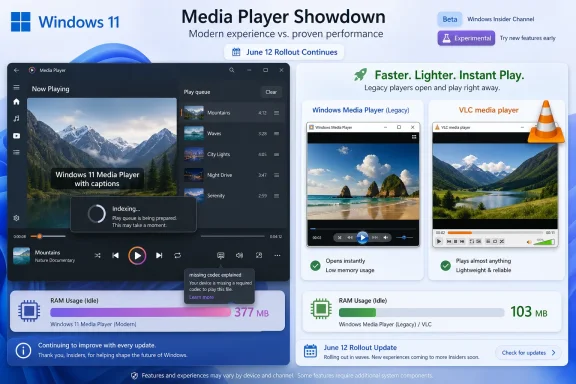
Nobody should pretend the old Windows Media Player is a model for modern media software. Its interface belongs to another era, its library model is dated, and its design language sits awkwardly inside Windows 11. It survives because it remains useful, not because it is elegant.That usefulness is exactly the problem for Microsoft. The legacy app often opens local files quickly, consumes comparatively little memory, and behaves like a tool rather than a portal. For many Windows users, especially enthusiasts and IT pros, that is the whole point.
The modern app is better aligned with Windows 11 visually. It supports the current design language, integrates more naturally with the Microsoft Store app servicing model, and gives Microsoft a cleaner path for incremental updates outside major Windows releases. In theory, this should be a win: a maintained app, distributed through modern channels, refined independently from the operating system.
In practice, users compare outcomes. If one app takes several seconds to launch and another starts playing immediately, the prettier app loses. If one idles at hundreds of megabytes while the other sits closer to a third of that, the newer architecture starts to look like a tax.
This is why the performance debate is not nostalgia. Windows users are not asking Microsoft to freeze the platform in 2009. They are asking why the replacement for a simple desktop utility cannot consistently beat the utility it replaced at the simple things.
VLC Remains the Embarrassing Control Group
VLC occupies an unusual place in the Windows ecosystem. It is not just a media player; it is the app people install when they want the codec conversation to end. It has trained users to expect that a video file should open without a hunt through the Microsoft Store, a codec upsell, or a troubleshooting detour.That matters because Media Player’s codec limitations are not a niche annoyance. HEVC, or H.265, is widely used by modern phones and cameras because it compresses high-quality video efficiently. A Windows user who receives a video from an iPhone, an Android device, a drone, or a mirrorless camera may reasonably expect the default media app to play it.
Instead, the Windows experience can still route users toward the HEVC Video Extensions package in the Microsoft Store. Depending on the device, licensing path, and installed components, some users get playback and others get a codec prompt. From Microsoft’s perspective, this is partly a licensing and distribution issue. From the user’s perspective, it is a default app failing at a default job.
VLC avoids the perception problem by bundling broad codec support and simply getting on with playback. That has always been its advantage, but it looks sharper in a Windows 11 world where Microsoft is trying to make its inbox apps feel complete. A clean interface cannot compensate for a file that does not play.
The latest Media Player update’s clearer missing-codec message is therefore a double-edged improvement. It may reduce confusion, but it also formalizes the gap. Microsoft is not saying, “Your file now works.” It is saying, “Here is a better explanation of why your file does not work yet.”
The Codec Problem Is Really an Out-of-Box Problem
It is tempting to treat codec support as a checklist. VLC supports more. Media Player supports less. End of story.But for Windows, the codec issue is bigger than format coverage. It cuts directly into the out-of-box experience, which is the emotional contract between an operating system and its users. A default app does not need to satisfy every professional workflow, but it does need to handle common consumer files without making the user feel like they bought an incomplete machine.
HEVC is the obvious flashpoint because it sits at the intersection of technical reality and licensing complexity. Microsoft cannot simply wish away patent pools and commercial licensing arrangements. Windows ships at enormous scale across devices, regions, OEM agreements, and enterprise environments, so every bundled capability has cost and legal implications.
Still, the user does not experience licensing complexity. They experience a prompt. They experience a file that opens in VLC but not in Microsoft’s own app. They experience the oddity of a modern operating system that can advertise AI-powered features and cloud-connected services while asking for an extra codec package to play a video from a phone.
That contrast is damaging because it makes Windows feel strategically advanced but tactically unfinished. Microsoft can build Copilot experiences, refine Widgets, and modernize accessibility, but if a basic media file stalls at the gate, the sophistication elsewhere starts to look misplaced.
WinUI Has Become the Scapegoat and the Test
The modern Windows app ecosystem has a performance reputation problem, and WinUI often takes the blame. That is not always fair. Slow startup and high memory use can come from app architecture, dependencies, background services, media libraries, framework choices, telemetry hooks, graphics initialization, and plain old inefficient code.But perception has hardened. When users see a modern Windows app using far more memory than its legacy counterpart, they do not perform a forensic analysis. They say “WinUI” the way older Windows users once said “.NET” or “Electron” — as shorthand for something that looks contemporary but feels heavy.
Microsoft has been pushing toward more native modern Windows development, and that shift should eventually pay dividends. A well-optimized WinUI app can look current, respect accessibility and system theming, and integrate cleanly with Windows without behaving like a web app in disguise. The problem is that the promise is still competing with lived experience.
Media Player is a useful test case because its job is legible. Users understand what success looks like. Open quickly. Play reliably. Use reasonable resources. Support common formats. Do not make the user think about the app more than the file.
If Microsoft cannot make that experience feel fast and effortless, it will struggle to convince skeptics that the broader modern app platform is ready to replace Win32 utilities that have spent decades being optimized for exactly this sort of immediacy.
The New Outlook Shadow Hangs Over Every Modern App
The Media Player discussion does not exist in isolation. Windows users have already seen several modern Microsoft app transitions where the replacement looked like part of a unified strategy but felt like a regression in daily use. The new Outlook is the most obvious example.For many users, the Outlook transition has become shorthand for Microsoft’s willingness to trade native speed and familiar workflow for a service-backed, web-adjacent experience. Complaints about notification handling, startup behavior, account switching, offline capability, and general responsiveness have made “new Outlook” less a product name than a warning label.
Media Player is not Outlook. It is not trying to merge consumer mail, enterprise mail, advertising surfaces, cloud services, and web technologies into a single client. But the emotional association is already there. When another modern Microsoft app feels heavier than the older one, users see a pattern.
That pattern is especially frustrating because Microsoft has the engineering capacity to do better. Windows remains one of the most important software platforms in the world, and Microsoft knows more than anyone about the performance characteristics of Windows PCs across cheap laptops, corporate desktops, gaming rigs, and workstation-class hardware. If its own inbox apps feel sluggish, the company cannot blame the ecosystem.
For IT pros, the concern is not merely aesthetic. Modern apps that consume more memory, depend more heavily on Store servicing, and change behavior outside the cadence of traditional OS deployments complicate support. They may be easier for Microsoft to update, but they are not automatically easier for administrators to trust.
Store-Serviced Apps Move Faster Than Enterprise Comfort
Inbox app updates through the Microsoft Store give Microsoft a valuable lever. Bugs can be fixed without waiting for a major Windows feature update. Accessibility improvements can reach Insiders quickly. App teams can iterate independently from the Windows core.That is good product engineering, but it changes the administrative bargain. In older Windows environments, default apps were relatively static unless an administrator chose to update them or deploy a new OS image. In modern Windows 11, inbox apps can evolve faster and sometimes more quietly, depending on Store policies, channel membership, and device management configuration.
For home users, that means a media app can improve without fanfare. For enterprise users, it means another moving part. A change that fixes playback for one department might alter file association behavior, codec prompts, accessibility settings, or memory patterns for another.
Media Player is unlikely to be the highest-risk app in a managed environment. Many organizations standardize on VLC, dedicated line-of-business viewers, browser playback, or content-management platforms. But default app behavior still matters because it shapes helpdesk tickets. Users double-click files. They expect the default handler to work. When it does not, the ticket does not say “codec licensing ambiguity.” It says “video won’t open.”
This is where Microsoft’s modern app strategy needs a sharper enterprise story. Faster updates are useful only if the result is more predictable, not merely more current.
Microsoft’s App Notes Are a Quiet Step Toward Accountability
One positive development in the June 12 rollout is Microsoft’s move to document inbox app updates more visibly for Insiders. Release notes for apps such as Media Player, Calculator, Camera, Clock, Paint, Photos, and Sound Recorder give users and administrators a clearer view into what is changing.That may sound procedural, but it matters. For years, one of the frustrations around modern Windows apps has been the sense that they change in the background without the same level of scrutiny applied to Windows builds. When an inbox app gains or loses behavior, users often discover it by accident.
Publishing app-level notes does not solve performance issues, but it creates a record. It gives Insiders something concrete to test. It lets administrators track whether a problem appeared after a specific app update rather than after a Windows build. It also gives Microsoft less room to hide behind the fog of continuous delivery.
The Media Player notes are a good example. They do not overpromise. They describe caption styling, indexing messaging, selected-item layout fixes, playback recognition improvements, playlist naming validation, empty playlist polish, play queue crash fixes, and clearer missing-codec guidance. That is a real changelog, not marketing copy.
Now Microsoft needs the same clarity around performance. If startup time and memory footprint are priorities, say so. If the team is measuring them, say what improved. If the app’s framework imposes unavoidable costs, explain the trade-off. Windows users can tolerate complexity better than they tolerate silence.
Performance Is a Feature, Not a Benchmark Footnote
The numbers circulating around Media Player are striking because they describe an experience users can feel. A modern Media Player instance reportedly idling around 377 MB of RAM beside a legacy Windows Media Player closer to 103 MB is not just a benchmark curiosity. It is the kind of contrast that confirms a suspicion many users already had.Memory usage alone does not tell the whole story. Modern Windows aggressively caches, shares components, compresses memory, and reclaims resources under pressure. A higher idle footprint on a machine with 32 GB of RAM may have little practical impact. On a low-end laptop, a shared family PC, or a managed fleet with background security agents and collaboration tools, the same footprint can matter.
Startup time is harder to rationalize away. A media player’s first obligation is responsiveness. If a user opens a file and waits for the app shell to assemble itself, the app has already lost the comparison against simpler tools.
Microsoft has spent years telling developers that performance is part of user experience. Windows itself has gained features intended to improve perceived responsiveness, power behavior, and background resource management. But inbox apps are the place where those principles become visible to ordinary users.
A slow default media player is not catastrophic. It will not bring down a business. It will not stop enthusiasts from installing VLC. But it does chip away at confidence in Microsoft’s app modernization project. Every sluggish launch whispers the same thing: the old thing was faster.
Accessibility Improvements Deserve Better Than a Slow Shell
One reason the Media Player update should not be dismissed is that its caption improvements matter. Tying caption styling to Windows settings is the sort of integration a first-party app should provide. Users who need larger text, different colors, or higher-contrast caption backgrounds should not have to configure every app separately.That is exactly where Microsoft’s default apps can be better than third-party alternatives. They can respect system-wide accessibility choices. They can expose settings in predictable places. They can align with Windows’ broader vision and input models.
But accessibility features should arrive inside an app that feels quick and dependable. Otherwise, Microsoft risks pairing genuinely thoughtful inclusion work with an experience that frustrates everyone, including the users those features are meant to help.
This is the central tension of modern Windows design. Microsoft wants apps that are accessible, consistent, theme-aware, touch-friendly, Store-serviced, and visually aligned with Windows 11. Users want apps that open instantly and stay out of the way. The hard work is not choosing one side; it is delivering both.
Legacy Win32 apps often won on speed because they did less, assumed more, and carried fewer layers of abstraction. Modern apps have broader obligations. That does not excuse poor performance, but it explains why fixing it requires engineering discipline rather than nostalgia.
The Insider Channel Is the Right Place for This Fight
Because this Media Player update is rolling through Insider channels, Microsoft still has room to tune. Insider builds are supposed to expose rough edges before they harden into mainstream releases. The question is whether performance feedback on inbox apps carries the same weight as feature feedback on the OS shell.Historically, Insider attention tends to cluster around visible features: new Settings pages, File Explorer changes, Start menu experiments, taskbar behavior, AI integrations, and update mechanics. App performance can be less dramatic, partly because it varies across hardware and file types, and partly because users have easy workarounds.
That workaround culture is dangerous for Microsoft. If enthusiasts simply install VLC and move on, the feedback loop weakens. The default app remains good enough for casual use, bad enough to annoy power users, and insulated from the pressure that would force a deeper rewrite.
Microsoft should treat Media Player as more than a bundled convenience. It is one of the first apps a user encounters when opening common local content. It is a daily referendum on whether Windows 11’s modern design system can produce tools that feel as immediate as the classic desktop software it is replacing.
The June 12 update suggests the team is still engaged. That is good. But engagement is not the same as resolution. Performance needs to become a release-note item, not a forum complaint that lingers in the background.
The June 12 Builds Make the Media Player Gap Harder to Ignore
The practical reading of the June 12 rollout is that Microsoft is improving Windows 11 in many small, sensible ways while leaving one of its more symbolic app problems unresolved.- Microsoft shipped Media Player version 11.2605.14.0 to Experimental Insider channels with caption, playlist, indexing, playback recognition, and missing-codec message improvements.
- The same Insider wave included broader Windows 11 work on quieter Widgets defaults, accessibility, Magnifier controls, File Explorer reliability, and Windows Update fixes.
- The modern Media Player still reportedly trails VLC and legacy Windows Media Player in launch speed, which is the metric users notice first.
- Reported idle memory comparisons continue to make the modern app look heavy, especially on lower-spec systems and managed PCs already burdened by background software.
- HEVC playback remains a sore spot because users increasingly receive videos from phones and cameras that may not play cleanly without extra codec support.
- Microsoft’s clearer app release notes are welcome, but the company now needs to document and prioritize performance improvements with the same specificity.
Microsoft has spent the Windows 11 era arguing, implicitly and explicitly, that modern Windows can be cleaner, calmer, more accessible, and more adaptive without losing the utility that made Windows indispensable. Media Player is a small app carrying a large version of that argument. If future builds make it faster, leaner, and less codec-fragile, the June 12 release will look like one step in a necessary rebuild; if not, it will be remembered as another round of polish on an app users continue to replace.
References
- Primary source: Windows Report
Published: 2026-06-16T14:10:21.439829
Loading…
windowsreport.com - Related coverage: windowscentral.com

Windows Insiders get first crack at a less annoying Windows 11 update process | Windows Central
Microsoft is laying the groundwork to bundle driver, .NET, and firmware updates together so you only have to reboot your PC once a month.www.windowscentral.com - Official source: learn.microsoft.com

Windows 11 Insider Beta Preview Build 26220.8680 - Windows Insider Program | Microsoft Learn
Release notes for Windows 11 Insider Beta Preview Build 26220.8680learn.microsoft.com - Related coverage: berrall.com
Loading…
www.berrall.com - Related coverage: computerworld.com

Windows 11 Insider Previews: What’s in the latest build? – Computerworld
Get the latest info on new preview builds of Windows 11 as they roll out to Windows Insiders. Now updated for the June 12, 2026 releases for all seven Windows Insider Channels. www.computerworld.com
- Related coverage: ntcompatible.com

Windows 11 Insider Beta Preview Build 26220.8680 Update Fixes File Explorer Glitches and Quiets Widgets
The Windows 11 Insider Beta Preview Build update finally tames the notification system by disabling hover prompts and switching alert badges to match the system accent color.www.ntcompatible.com
- Related coverage: windowsforum.com

Windows 11 Insider Build 26300.8687: Explorer Tabs, Unified Updates, Better Search | Windows Forum
Microsoft released Windows 11 Insider Experimental Preview Build 26300.8687 on June 12, 2026, bringing a batch of gradual-rollout changes that include File...windowsforum.com - Related coverage: htnovo.net
Loading…
www.htnovo.net - Official source: download.microsoft.com