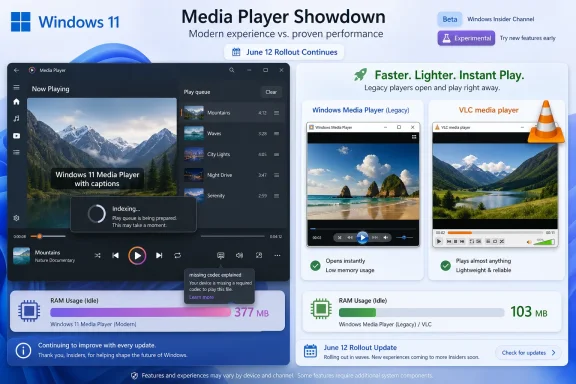
Microsoft’s June 12, 2026 Windows 11 Insider releases put Media Player version 11.2605.14.0 back in the spotlight, with new app-specific release notes and fixes now rolling out to Experimental Insider builds. The headline is not that Microsoft has reinvented its modern media app. The headline is that Redmond is finally documenting its care and feeding while users keep reaching for older, faster tools that do the same job with less fuss.
That contrast is awkward because Media Player is supposed to be one of the polished, default experiences of Windows 11. It is the app a normal user meets when they double-click a local video, not an obscure utility buried in Administrative Tools. If Microsoft wants Windows 11 to feel coherent, modern, and native, Media Player cannot merely be alive; it has to feel worth using.
The most important change in this Insider drop may not be inside Media Player at all. Microsoft has created dedicated release-note pages for several Windows 11 inbox apps, including Calculator, Camera, Clock, Media Player, Paint, Photos, and Sound Recorder. That sounds bureaucratic, but it matters.
For years, Windows’ built-in apps have lived in a strange middle ground. They are part of the operating system experience, but they update through Store-era plumbing, Insider flights, staged rollouts, and occasionally opaque version bumps that make it hard to know what actually changed. A formal release-note hub gives these apps something closer to the accountability Windows itself already has.
That does not mean every inbox app is about to receive a renaissance. But it does suggest Microsoft knows these apps are no longer decorative extras. They are the first-party answer to basic user expectations: view photos, record audio, open a video, edit an image, check the time, do a calculation.
Media Player benefits from that shift because it has looked, from the outside, like a neglected app. Windows Latest says Microsoft told it that Media Player never stopped being developed and that bug fixes have continued even when visible feature additions slowed. The new documentation makes that claim easier to believe, but it also raises the bar. Once Microsoft starts publishing the work, users can measure whether that work fixes the problems they actually feel.
There is also a new indexing banner in the play queue. That is not glamorous, but it fixes a real annoyance: a fresh library can appear incomplete while the app is still scanning, leaving users to wonder whether their files are missing, unsupported, or simply invisible. Explaining background work is a basic courtesy, and Media Player needed it.
Microsoft has also improved how the app recognizes supported file types, which should reduce cases where valid files fail at the first hurdle. The update blocks blank playlist names, fixes a crash that could occur when editing the play queue during session transitions, cleans up empty playlist presentation, corrects a list-selection layout glitch, and improves the missing-codec dialog.
None of this is trivial. These are the sorts of paper cuts that make a default app feel unfinished. The problem is that they also read like a maintenance backlog, not a strategic advance.
A better missing-codec message is useful. But it is not the same as playing the file. A clearer indexing banner is useful. But it is not the same as a library model that feels immediate and predictable. A crash fix is welcome. But it does not answer the bigger question: why does the modern player still feel heavier than the legacy one?
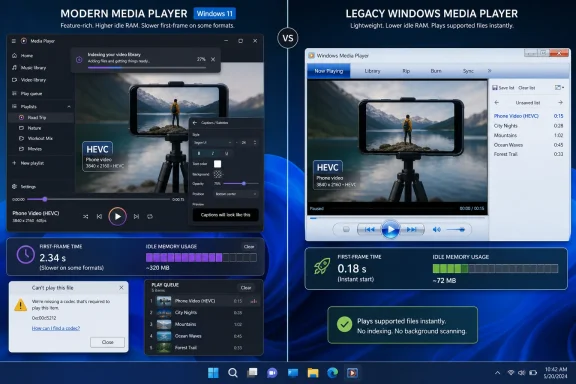
The legacy Windows Media Player associated with the Windows 7 era remains a more convincing local-video launcher for many users because it does the thing people ask of it: it opens the file quickly. Windows Latest’s testing found that the modern Windows 11 Media Player took noticeably longer to open a video, while VLC and legacy Windows Media Player opened the same video essentially instantly. The site also reported a large idle-memory gap, with the modern app using roughly 377 MB of RAM compared with about 103 MB for legacy Windows Media Player in the same state.
That is not a lab-grade benchmark, and it should not be treated as the final word on every system, file type, codec, and storage configuration. But it tracks with a complaint that has followed many modern Windows apps: they can look more current while feeling less direct. For the user, the distinction between framework overhead, app initialization, library scanning, Store packaging, codec probing, and UI composition does not matter. The file either opens now or it does not.
This is where nostalgia becomes dangerous for Microsoft. Users are often told they are simply attached to old interfaces. Sometimes they are. But in this case the older app is not merely familiar; it is operationally better at a core task.
The legacy player also has a visual identity that many modern Windows apps lack. Its chrome, library view, playback controls, and compact density belong to another design era, but they communicate purpose. The modern Media Player is cleaner, but cleanliness without responsiveness can read as emptiness.
But native is not a label Microsoft can simply apply to an app. It is a behavior users can feel. A native Windows media player should launch quickly, respond instantly to common commands, respect system accessibility and theme settings, integrate with file associations, and avoid turning a double-click into a miniature loading sequence.
That is why Media Player matters beyond media playback. It is a small referendum on Microsoft’s Windows client strategy. If the default apps built by Microsoft cannot outperform or at least match old Microsoft software at ordinary local tasks, the pitch to third-party developers becomes less convincing.
This is not just an enthusiast complaint. Sysadmins and IT departments care about defaults because defaults shape tickets. If the built-in app cannot open files reliably, users install alternatives. If users install alternatives, IT inherits patching, policy, file association, procurement, training, and support questions. A weak inbox app creates downstream complexity.
Microsoft does not need Media Player to beat every specialist tool. VLC, MPV, PotPlayer, foobar2000, and other media applications exist because power users have always wanted more. But Microsoft does need Media Player to be the safe, fast, boringly competent default. Right now, the June update makes it safer and less confusing, but not yet fast enough to end the argument.
From a licensing perspective, this is not simple. HEVC is patent-encumbered, and vendors have to account for royalties. Microsoft cannot pretend those costs do not exist. But from the user’s perspective, the explanation sounds absurd: they bought a Windows PC, recorded a video on a mainstream phone, transferred it locally, and the default player may tell them they need another component to watch it.
That gap becomes harder to defend because VLC plays so much without complaint. VLC is not magic; it is the product of a different distribution model, different licensing posture, and years of community-driven codec support. But users do not evaluate licensing structures when they are trying to watch a clip. They evaluate the app in front of them.
Microsoft’s challenge is that a clearer error can still feel like an accusation. It tells the user what they lack instead of making the platform feel complete. For a company trying to sell Windows 11 as refined and consumer-ready, that is a bad moment.
There is also a branding problem. “Media Player” is a broad promise. It does not say “Media Player for a subset of formats included by default under current licensing arrangements.” The name implies that ordinary media should work. When ordinary media does not, the product loses trust.
MPV occupies a similar place for a more technical audience. It is not warm, friendly, or especially discoverable for casual users, but it is fast, flexible, and trusted by people who care about playback behavior. Both VLC and MPV benefit from expectations that are narrower and clearer than those placed on Microsoft’s inbox player.
Still, that does not let Microsoft off the hook. The default app has a different mission, but not a lower one. It must serve beginners without insulting advanced users. It must fit Windows 11 visually without becoming sluggish. It must handle mainstream formats without turning codec support into a scavenger hunt.
The comparison with the new Outlook is painful because it points to a wider pattern. Microsoft has repeatedly replaced older, dense, fast-enough desktop software with modern apps that offer cleaner interfaces but worse perceived latency. Outlook is a larger and more complicated case, but the user reaction rhymes: the new thing may align with Microsoft’s strategy, yet the old thing still gets the task done faster.
That is the risk with Media Player. If the modern app’s best defense is that it is still being maintained, the argument has already shifted away from user experience and toward institutional reassurance.
That separation is overdue. Windows 11 is no longer just a kernel, shell, and servicing model. The practical Windows experience is a bundle of first-party apps, cloud hooks, local utilities, account prompts, file associations, widgets, search, Copilot surfaces, and Store-managed components. If Microsoft documents the OS but leaves the inbox apps hazy, it documents only part of the product people use.
There is also a feedback advantage. “Media Player is bad” is not actionable. “Media Player version 11.2605.14.0 still takes several seconds to open a local HEVC clip on this hardware” is much closer to useful. Versioned app notes encourage better bug reports and more disciplined comparisons.
But transparency can cut both ways. Once Microsoft makes app updates legible, the absence of progress becomes legible too. If Media Player keeps receiving polish fixes while launch latency, memory use, and codec friction remain, the release notes will start to read like a record of avoidance.
That is why this moment feels more important than the individual fixes suggest. Microsoft has put the app on the map. Now it has to make the route worth following.
That is not a healthy default posture for an operating system at Windows’ scale. The built-in experience should be good enough that replacing it feels like preference, not triage. Media Player is a perfect test case because the task is so basic: play a local file.
The modern app’s accessibility integration is a real positive. Caption styling tied to Windows settings is exactly the kind of platform consistency Microsoft should deliver. Users who need captions to be readable should not have to configure the same preference app by app.
The indexing banner also reflects a more honest UI philosophy. If the app is doing work, say so. Silent background operations breed distrust, especially when the visible result is missing content. A banner is a small fix, but small fixes can change the emotional temperature of an app.
Yet none of that resolves the first-click experience. Users judge a media player harshly because the expected delay is nearly zero. A video player that opens slowly feels broken even when it is technically functioning.
There is also a harsher reading. In 2026, Microsoft is still fixing blank playlist names, crashy queue edits, misaligned selected items, and vague codec errors in the default media app for Windows 11. Meanwhile, a legacy Microsoft player and open-source alternatives still make the modern app look slow at the moment that matters most.
Both readings can be true. Software maintenance is never glamorous, and many good products improve through unglamorous bug fixes. But a default Windows app does not get to live on maintenance alone. It must justify being the default.
The path forward is not mysterious. Media Player needs a performance pass that treats launch time as a feature, not an implementation detail. It needs lower idle overhead. It needs codec behavior that makes sense for modern phone and camera workflows. It needs library management that explains itself without feeling delayed. It needs to become the app users keep, not the one they immediately replace.
The most encouraging thing about the June 12 update is that Microsoft now appears willing to discuss Media Player as a living app. The least encouraging thing is that the living app is still being judged against its ancestors, and the ancestors keep winning the race to first frame.
That contrast is awkward because Media Player is supposed to be one of the polished, default experiences of Windows 11. It is the app a normal user meets when they double-click a local video, not an obscure utility buried in Administrative Tools. If Microsoft wants Windows 11 to feel coherent, modern, and native, Media Player cannot merely be alive; it has to feel worth using.
 Microsoft Puts the Inbox Apps on the Record
The most important change in this Insider drop may not be inside Media Player at all. Microsoft has created dedicated release-note pages for several Windows 11 inbox apps, including Calculator, Camera, Clock, Media Player, Paint, Photos, and Sound Recorder. That sounds bureaucratic, but it matters.For years, Windows’ built-in apps have lived in a strange middle ground. They are part of the operating system experience, but they update through Store-era plumbing, Insider flights, staged rollouts, and occasionally opaque version bumps that make it hard to know what actually changed. A formal release-note hub gives these apps something closer to the accountability Windows itself already has.
That does not mean every inbox app is about to receive a renaissance. But it does suggest Microsoft knows these apps are no longer decorative extras. They are the first-party answer to basic user expectations: view photos, record audio, open a video, edit an image, check the time, do a calculation.
Media Player benefits from that shift because it has looked, from the outside, like a neglected app. Windows Latest says Microsoft told it that Media Player never stopped being developed and that bug fixes have continued even when visible feature additions slowed. The new documentation makes that claim easier to believe, but it also raises the bar. Once Microsoft starts publishing the work, users can measure whether that work fixes the problems they actually feel.
The New Media Player Fixes Are Sensible, Not Transformative
The Media Player 11.2605.14.0 update is a tidy collection of improvements. Closed captions now follow Windows caption settings, so font size, color, and background choices can carry across from the system accessibility configuration. The app also adds a direct route into those settings, which is the kind of small integration Windows apps should have had all along.There is also a new indexing banner in the play queue. That is not glamorous, but it fixes a real annoyance: a fresh library can appear incomplete while the app is still scanning, leaving users to wonder whether their files are missing, unsupported, or simply invisible. Explaining background work is a basic courtesy, and Media Player needed it.
Microsoft has also improved how the app recognizes supported file types, which should reduce cases where valid files fail at the first hurdle. The update blocks blank playlist names, fixes a crash that could occur when editing the play queue during session transitions, cleans up empty playlist presentation, corrects a list-selection layout glitch, and improves the missing-codec dialog.
None of this is trivial. These are the sorts of paper cuts that make a default app feel unfinished. The problem is that they also read like a maintenance backlog, not a strategic advance.
A better missing-codec message is useful. But it is not the same as playing the file. A clearer indexing banner is useful. But it is not the same as a library model that feels immediate and predictable. A crash fix is welcome. But it does not answer the bigger question: why does the modern player still feel heavier than the legacy one?
The Ghost of Windows 7 Still Opens the File Faster
The uncomfortable comparison is not between Microsoft and some imaginary ideal. It is between Microsoft and Microsoft.The legacy Windows Media Player associated with the Windows 7 era remains a more convincing local-video launcher for many users because it does the thing people ask of it: it opens the file quickly. Windows Latest’s testing found that the modern Windows 11 Media Player took noticeably longer to open a video, while VLC and legacy Windows Media Player opened the same video essentially instantly. The site also reported a large idle-memory gap, with the modern app using roughly 377 MB of RAM compared with about 103 MB for legacy Windows Media Player in the same state.
That is not a lab-grade benchmark, and it should not be treated as the final word on every system, file type, codec, and storage configuration. But it tracks with a complaint that has followed many modern Windows apps: they can look more current while feeling less direct. For the user, the distinction between framework overhead, app initialization, library scanning, Store packaging, codec probing, and UI composition does not matter. The file either opens now or it does not.
This is where nostalgia becomes dangerous for Microsoft. Users are often told they are simply attached to old interfaces. Sometimes they are. But in this case the older app is not merely familiar; it is operationally better at a core task.
The legacy player also has a visual identity that many modern Windows apps lack. Its chrome, library view, playback controls, and compact density belong to another design era, but they communicate purpose. The modern Media Player is cleaner, but cleanliness without responsiveness can read as emptiness.
Native Windows Apps Have to Earn the Word Native
Microsoft has been trying to steer Windows app development back toward native-feeling software, with WinUI occupying the role of the modern interface framework meant to carry Windows 11 forward. That strategy is sensible in theory. Windows has spent too many years asking users to accept a patchwork of Win32 utilities, UWP-era shells, WebView-heavy replacements, Control Panel leftovers, Settings pages, Store apps, and half-migrated experiences.But native is not a label Microsoft can simply apply to an app. It is a behavior users can feel. A native Windows media player should launch quickly, respond instantly to common commands, respect system accessibility and theme settings, integrate with file associations, and avoid turning a double-click into a miniature loading sequence.
That is why Media Player matters beyond media playback. It is a small referendum on Microsoft’s Windows client strategy. If the default apps built by Microsoft cannot outperform or at least match old Microsoft software at ordinary local tasks, the pitch to third-party developers becomes less convincing.
This is not just an enthusiast complaint. Sysadmins and IT departments care about defaults because defaults shape tickets. If the built-in app cannot open files reliably, users install alternatives. If users install alternatives, IT inherits patching, policy, file association, procurement, training, and support questions. A weak inbox app creates downstream complexity.
Microsoft does not need Media Player to beat every specialist tool. VLC, MPV, PotPlayer, foobar2000, and other media applications exist because power users have always wanted more. But Microsoft does need Media Player to be the safe, fast, boringly competent default. Right now, the June update makes it safer and less confusing, but not yet fast enough to end the argument.
The Codec Problem Is Bigger Than the Error Dialog
The missing-codec message may be clearer now, but the codec situation remains one of the most user-hostile parts of the Windows media story. HEVC is the obvious example. It is common in modern phone video workflows, particularly from iPhones and many Android flagships, yet Windows users can still run into a paid extension path when trying to play those files in Microsoft’s own modern player.From a licensing perspective, this is not simple. HEVC is patent-encumbered, and vendors have to account for royalties. Microsoft cannot pretend those costs do not exist. But from the user’s perspective, the explanation sounds absurd: they bought a Windows PC, recorded a video on a mainstream phone, transferred it locally, and the default player may tell them they need another component to watch it.
That gap becomes harder to defend because VLC plays so much without complaint. VLC is not magic; it is the product of a different distribution model, different licensing posture, and years of community-driven codec support. But users do not evaluate licensing structures when they are trying to watch a clip. They evaluate the app in front of them.
Microsoft’s challenge is that a clearer error can still feel like an accusation. It tells the user what they lack instead of making the platform feel complete. For a company trying to sell Windows 11 as refined and consumer-ready, that is a bad moment.
There is also a branding problem. “Media Player” is a broad promise. It does not say “Media Player for a subset of formats included by default under current licensing arrangements.” The name implies that ordinary media should work. When ordinary media does not, the product loses trust.
VLC Wins Because It Treats Local Playback as the Product
It is tempting to frame VLC’s continued popularity as a triumph of open-source goodwill, and that is partly true. But VLC wins on Windows because it has remained ruthlessly focused on the job. Open file, decode file, play file. It is not trying to be a Store showcase, a design-system ambassador, or a content-discovery surface.MPV occupies a similar place for a more technical audience. It is not warm, friendly, or especially discoverable for casual users, but it is fast, flexible, and trusted by people who care about playback behavior. Both VLC and MPV benefit from expectations that are narrower and clearer than those placed on Microsoft’s inbox player.
Still, that does not let Microsoft off the hook. The default app has a different mission, but not a lower one. It must serve beginners without insulting advanced users. It must fit Windows 11 visually without becoming sluggish. It must handle mainstream formats without turning codec support into a scavenger hunt.
The comparison with the new Outlook is painful because it points to a wider pattern. Microsoft has repeatedly replaced older, dense, fast-enough desktop software with modern apps that offer cleaner interfaces but worse perceived latency. Outlook is a larger and more complicated case, but the user reaction rhymes: the new thing may align with Microsoft’s strategy, yet the old thing still gets the task done faster.
That is the risk with Media Player. If the modern app’s best defense is that it is still being maintained, the argument has already shifted away from user experience and toward institutional reassurance.
Insider Notes Turn Maintenance Into a Public Scorecard
The dedicated app release notes could become a turning point if Microsoft treats them as a public scorecard rather than a filing cabinet. Media Player’s June update is exactly the kind of work that benefits from visibility. It tells users that the app has not been abandoned, gives Insiders specific behaviors to test, and lets Microsoft separate app changes from operating-system changes.That separation is overdue. Windows 11 is no longer just a kernel, shell, and servicing model. The practical Windows experience is a bundle of first-party apps, cloud hooks, local utilities, account prompts, file associations, widgets, search, Copilot surfaces, and Store-managed components. If Microsoft documents the OS but leaves the inbox apps hazy, it documents only part of the product people use.
There is also a feedback advantage. “Media Player is bad” is not actionable. “Media Player version 11.2605.14.0 still takes several seconds to open a local HEVC clip on this hardware” is much closer to useful. Versioned app notes encourage better bug reports and more disciplined comparisons.
But transparency can cut both ways. Once Microsoft makes app updates legible, the absence of progress becomes legible too. If Media Player keeps receiving polish fixes while launch latency, memory use, and codec friction remain, the release notes will start to read like a record of avoidance.
That is why this moment feels more important than the individual fixes suggest. Microsoft has put the app on the map. Now it has to make the route worth following.
The Windows 11 Default Experience Is Still Too Often a Negotiation
Windows users have grown used to negotiating with their defaults. Change the browser. Replace the mail app. Install VLC. Install 7-Zip or NanaZip. Swap in PowerToys. Disable this, pin that, unpin the other thing. Enthusiasts enjoy some of this tinkering, but ordinary users do it because the out-of-box answer is not always the best answer.That is not a healthy default posture for an operating system at Windows’ scale. The built-in experience should be good enough that replacing it feels like preference, not triage. Media Player is a perfect test case because the task is so basic: play a local file.
The modern app’s accessibility integration is a real positive. Caption styling tied to Windows settings is exactly the kind of platform consistency Microsoft should deliver. Users who need captions to be readable should not have to configure the same preference app by app.
The indexing banner also reflects a more honest UI philosophy. If the app is doing work, say so. Silent background operations breed distrust, especially when the visible result is missing content. A banner is a small fix, but small fixes can change the emotional temperature of an app.
Yet none of that resolves the first-click experience. Users judge a media player harshly because the expected delay is nearly zero. A video player that opens slowly feels broken even when it is technically functioning.
The June Build Is a Signal, Not a Salvation
There is a generous reading of this update. Microsoft is formalizing inbox-app release notes, continuing to fix Media Player, improving accessibility behavior, reducing playback failures, and communicating more clearly when files need codecs. That is real engineering work, and it deserves acknowledgment.There is also a harsher reading. In 2026, Microsoft is still fixing blank playlist names, crashy queue edits, misaligned selected items, and vague codec errors in the default media app for Windows 11. Meanwhile, a legacy Microsoft player and open-source alternatives still make the modern app look slow at the moment that matters most.
Both readings can be true. Software maintenance is never glamorous, and many good products improve through unglamorous bug fixes. But a default Windows app does not get to live on maintenance alone. It must justify being the default.
The path forward is not mysterious. Media Player needs a performance pass that treats launch time as a feature, not an implementation detail. It needs lower idle overhead. It needs codec behavior that makes sense for modern phone and camera workflows. It needs library management that explains itself without feeling delayed. It needs to become the app users keep, not the one they immediately replace.
The most encouraging thing about the June 12 update is that Microsoft now appears willing to discuss Media Player as a living app. The least encouraging thing is that the living app is still being judged against its ancestors, and the ancestors keep winning the race to first frame.
Redmond’s Media Player Homework Is Now Visible
The practical picture for Windows users and administrators is clearer than the changelog makes it sound. Media Player is being maintained, but the default experience still trails the alternatives in the places users notice first.- Microsoft released Windows 11 Insider builds on June 12, 2026, including Beta Build 26220.8680 and Experimental Build 26300.8687, alongside new documentation for inbox app updates.
- Media Player version 11.2605.14.0 adds caption customization through Windows settings, an indexing banner, fewer file-recognition failures, playlist-name enforcement, queue crash fixes, and clearer missing-codec guidance.
- The update improves reliability and communication, but it does not directly solve complaints about slow launch behavior or higher idle memory use compared with legacy Windows Media Player.
- HEVC remains the symbolic codec problem because many users encounter it through ordinary phone videos, not exotic media workflows.
- VLC and MPV remain the easy recommendations for users who want broad codec support, fast local playback, and fewer surprises.
- Microsoft’s new app-specific release notes are useful only if they become the start of measurable improvement rather than a polished record of incremental maintenance.
References
- Primary source: Windows Latest
Published: Mon, 15 Jun 2026 23:35:06 GMT

Microsoft reveals Windows 11's Media Player isn't dead, but Legacy still opens videos instantly
Windows Media Player gets new features in Insider builds, but it still to open a video, uses 3x more RAM idle, and can't play HEVC for free. www.windowslatest.com
- Official source: learn.microsoft.com

Media Player release notes - Windows Insider Program | Microsoft Learn
Release notes for Media Player updates in Windows Insider builds.learn.microsoft.com - Official source: blogs.windows.com

Announcing new builds for 12 June 2026
Hello Windows Insiders, We have a number of releases today with new builds across Beta, Experimental and Release Preview. Release notes for inbox Windows 11 apps Windows 11 inbox apps are now getting their own release notes sectioblogs.windows.com - Related coverage: computerworld.com

Windows 11 Insider Previews: What’s in the latest build? – Computerworld
Get the latest info on new preview builds of Windows 11 as they roll out to Windows Insiders. Now updated for the June 12, 2026 releases for all seven Windows Insider Channels. www.computerworld.com
- Related coverage: windowsforum.com

Windows 11 Insider Build 26300.8687: Explorer Tabs, Unified Updates, Better Search | Windows Forum
Microsoft released Windows 11 Insider Experimental Preview Build 26300.8687 on June 12, 2026, bringing a batch of gradual-rollout changes that include File...windowsforum.com - Related coverage: windowscentral.com

I dug through the Windows 11 Insider builds for June 2026 and found 7 features worth paying attention to | Windows Central
Microsoft's June Insider preview builds show a growing focus on polishing the OS experience across accessibility, updates, and performance.www.windowscentral.com
- Related coverage: ntcompatible.com

Windows 11 Insider Beta Preview Build 26220.8680 Update Fixes File Explorer Glitches and Quiets Widgets
The Windows 11 Insider Beta Preview Build update finally tames the notification system by disabling hover prompts and switching alert badges to match the system accent color.www.ntcompatible.com - Related coverage: nsaneforums.com

Microsoft releases major feature updates for stock Windows 11 apps - Software News - Nsane Forums
Paint, Clock, Calculator, Camera, Media Player, Photos, and Sound Recorder are getting a lot of new improvements and features. In addition to releasing new Windows 11 preview builds, Microsoft announced that inbox Windows apps now have dedicated release notes in the official documentation. At lon... nsaneforums.com
- Related coverage: content-static.olybet.dev
- Official source: download.microsoft.com