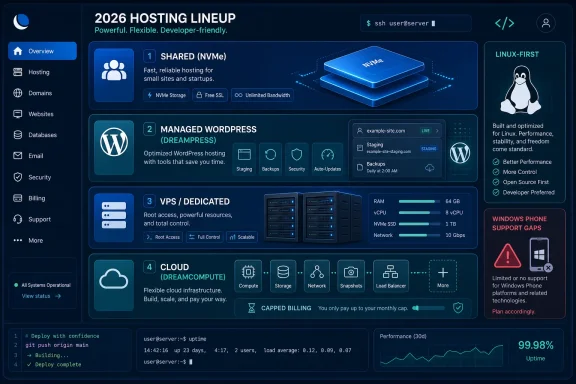
DreamHost is a Los Angeles-based web hosting provider that, as of June 2026, sells Linux-first shared, VPS, dedicated, managed WordPress, object storage, and OpenStack-based cloud hosting plans for individuals, developers, small businesses, and site owners who want broad hosting choice without hyperscaler complexity. The company’s pitch is not that it beats AWS, Azure, or Google Cloud on raw scale. It is that most people building websites do not need a hyperscaler; they need a practical runway from cheap shared hosting to something more serious. That makes DreamHost interesting less as a bargain-bin host and more as a reminder that the web’s middle class still exists.
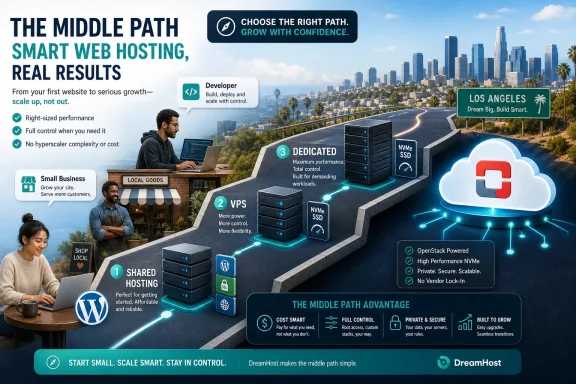
The modern hosting market has been pulled in two directions. At one end are website builders that hide infrastructure almost completely; at the other are public clouds that expose every knob and bill for every mistake. DreamHost sits in the old but still useful middle, where a customer can buy shared hosting today, grow into WordPress or VPS tomorrow, and eventually rent dedicated or cloud capacity without changing providers.
That breadth matters. A personal blog, a small law firm, a WooCommerce shop, and a developer’s side project are not the same workload, but they often begin in the same emotional place: someone wants a site online without having to become a systems engineer first. DreamHost’s strongest argument is that it provides multiple exits from that starting point.
The PCMag review makes the case most forcefully around cloud hosting, where DreamHost earns an Editors’ Choice nod alongside Ionos. That is a revealing distinction. DreamHost is not being framed as the enterprise cloud champion; it is being praised for affordable, flexible cloud hosting that ordinary site owners and smaller businesses can understand.
This is the key to reading DreamHost correctly. It is not the best answer for every technical requirement. It is a host whose portfolio makes sense if your web ambitions are real but not yet hyperscale.
DreamHost’s revamped shared hosting lineup — Launch, Growth, and Scale — is designed to make that compromise look less antique. The plans add NVMe SSD storage, support for multiple websites, included email allowances, and access to AI-assisted site-building tools. In a market that once marketed “unlimited” everything until the word lost meaning, explicit website and storage limits are almost refreshing.
Launch starts as the entry point, with enough capacity for many personal or small-business sites. Growth and Scale widen the envelope with more websites, more NVMe storage, and stronger security features. The point is not that these plans turn shared hosting into cloud infrastructure; they make the low end of the market feel less neglected.
Still, the usual caveat remains. If your business depends on predictable performance, shared hosting is a starting line, not a destination. The danger is not that shared hosting is bad. The danger is pretending that cheap hosting can repeal physics.
But WindowsForum readers will spot the limitation immediately. If a business needs Windows Server, ASP.NET Framework legacy applications, Microsoft SQL Server in a traditional hosting arrangement, or other Microsoft-dependent software, DreamHost’s standard shared, VPS, and dedicated catalog is the wrong tool. That does not make DreamHost weak; it makes its audience clear.
This is where competitors like HostGator or AccuWeb enter the conversation. They offer Windows-based hosting options that DreamHost generally does not across those conventional categories. For some customers, that single fact will decide the purchase before price, storage, or support ever enters the room.
DreamHost’s cloud hosting is the more flexible exception, with Linux, BSD, and Windows varieties referenced in the review. But the broader posture remains: DreamHost is built around the open-source web, not around Microsoft’s server ecosystem. For a Linux-powered website, that is a virtue. For a Windows-dependent business application, it is a stop sign.
DreamHost’s VPS plans include unlimited monthly data transfers and domains, with configurations that scale upward in RAM and SSD storage. The entry-level VPS tier described in the review starts with 2GB of RAM and 60GB of SSD storage, while the high-end VPS Premier plan reaches 12GB of RAM and 360GB of SSD storage. Those figures are respectable for small and midsize workloads.
The weakness is not that DreamHost lacks VPS hosting. It is that the VPS market is brutally competitive. Providers like Hostwinds compete aggressively on price, flexibility, and higher ceiling configurations, especially for customers who know exactly how much RAM, storage, and transfer they need.
DreamHost’s VPS pitch is therefore strongest for existing DreamHost customers and site owners who value a familiar control panel over bargain hunting. If you are comparing specs line by line, DreamHost may not always win. If you want an upgrade path that does not require a migration weekend and a stiff drink, it has a better case.
DreamHost’s dedicated plans begin with relatively modest configurations and scale to much larger systems with up to 128GB of RAM and nearly 2TB of SSD storage in the Enhanced 128 tier described by PCMag. Every dedicated plan includes unlimited data transfers. For a mission-critical website, large database-backed application, or high-traffic property, that can be more reassuring than trying to tune a shared or VPS plan beyond its natural limits.
But here again, DreamHost’s Linux-first identity narrows the audience. There are no Windows-based dedicated servers in the reviewed lineup. For many web-native businesses, that will be irrelevant; for Microsoft-stack shops, it is disqualifying.
The dedicated hosting market also includes providers with more extreme configurations. AccuWeb, for example, is cited as offering Linux and Windows dedicated options with far larger RAM and storage ceilings. DreamHost is credible here, but it is not trying to be the most exotic dedicated-server vendor on the shelf.
The plans described in the review are refreshingly legible: 512MB, 2GB, and 8GB RAM server tiers, with pricing that begins at $4.50 per month and rises to $48 per month for the 8GB configuration. The storage figure cited is 80GB, and the plans include unlimited monthly data transfers. In a cloud market famous for surprise bills, that kind of ceiling has obvious appeal.
This is why DreamHost’s cloud hosting earns special praise. It is not trying to be AWS. It is trying to be cloud hosting for people who want flexible servers without first attending a three-week seminar on identity policies, virtual private clouds, reserved instances, and egress fees.
That simplicity has limits. Large enterprises may prefer Ionos, hyperscalers, or specialized cloud providers with deeper regional footprints, compliance options, managed services, and procurement support. But for developers, small agencies, and technically curious site owners, DreamCompute occupies a valuable niche: cloud without the ritual humiliation.
DreamHost splits its WordPress pitch into consumer WordPress plans and DreamPress managed WordPress plans. The consumer plans largely mirror the shared hosting tiers. DreamPress is the premium path, adding automatic updates, daily backups, WordPress-specific security, staging, a CDN, and visitor-tier guidance.
That distinction matters because WordPress is both easy and fragile. Installing it is trivial; maintaining it responsibly is not. Themes, plugins, updates, databases, caching, and security patches can turn a simple site into a maintenance burden, especially for businesses that do not have in-house web staff.
DreamPress is DreamHost’s answer to that problem. It does not eliminate the need for judgment, but it moves more of the operational load onto the provider. That is worth paying for if the alternative is a neglected plugin stack and a site owner who only discovers maintenance exists after a breach.
The PCMag review describes Remixer generating themes and fonts after a few descriptors, followed by easy editing of photos, text, and video. That is exactly where these tools are strongest. They create momentum.
But AI builders should not be mistaken for brand strategy, accessibility review, conversion optimization, or editorial judgment. A human still needs to decide whether the site says anything distinctive, whether the copy is accurate, whether the images make sense, and whether the result builds trust. The faster AI gets you to a draft, the more important it becomes to recognize that it is still a draft.
For small businesses, this is not a dismissal. A mediocre live site is often better than a perfect site that never launches. But the winning workflow is not “let AI build my business identity.” It is “let AI remove the first hour of friction, then let a person make the site credible.”
DreamHost supports e-commerce through integrations and hosting plans that can accommodate tools such as Ecwid and WooCommerce. Ecwid’s tiers range from small starter stores to larger paid plans with unlimited products and staff accounts. WooCommerce begins as a free WordPress plugin, but the real cost often arrives later through themes, extensions, payment features, shipping integrations, and maintenance.
This is where customers should be brutally honest about their tolerance for complexity. WooCommerce is powerful because it lives inside WordPress and inherits that ecosystem’s flexibility. It is also demanding because it lives inside WordPress and inherits that ecosystem’s maintenance burden.
DreamHost can host an online store, but the hosting account is only one component. Store owners also need backups, payment security, update discipline, performance monitoring, and a plan for seasonal traffic spikes. The more revenue a store generates, the less defensible it becomes to treat hosting as an afterthought.
The inclusion of Subversion is a charmingly old-school developer feature. Most modern teams have moved to Git, but version-control support signals that DreamHost still thinks about users who build and maintain software rather than merely drag blocks around a page builder. That matters culturally, even if Subversion is no longer the center of gravity.
The more concerning note is malware protection. The review states that DreamHost offers antispam on email but no antimalware services in the tested context, while newer plan materials point to DreamShield scans on some tiers or as an add-on. The practical reading is that customers should not assume robust malware defense is universally bundled into every plan.
Security-minded buyers should treat hosting security as layered. SSL is not malware scanning. Spam filtering is not intrusion detection. Backups are not incident response. DreamHost provides several important pieces, but customers still need to understand what is included, what costs extra, and what remains their responsibility.
The rub is phone support. DreamHost does not offer traditional always-available phone support as a default experience. Some higher-tier plans include a limited number of callbacks, and other customers can pay for callbacks separately.
This is a defensible business model, but it divides customers by temperament. Many developers and experienced admins prefer tickets and chat because they create a written trail and avoid hold music. Many small-business owners want a human voice when email is down, DNS looks broken, or the site is offline.
Neither preference is irrational. The problem comes when buyers do not notice the support model until an outage. DreamHost’s support may be capable, but customers who equate “premium hosting” with “I can call someone now” should read the terms before committing.
But guarantees are not the same as immunity from failure. They usually translate into account credits under specific conditions, not reimbursement for lost sales, reputational damage, or a ruined product launch. That is normal across the hosting industry, but customers should understand the difference.
The better question is not whether a provider promises perfection. The better question is how quickly it communicates, how clearly it identifies failures, how reliably backups work, and how much architectural control customers have to reduce single points of failure.
For a hobby site, the guarantee may be enough reassurance. For a revenue-generating site, it should be only one line in a broader resilience plan. Hosting uptime is important; recovery planning is what keeps downtime from becoming a business crisis.
It makes less sense for organizations with strict Windows Server requirements, deep compliance needs, complex multi-region architecture, or a procurement department that expects enterprise account management. Those customers may be better served by Ionos, Azure, AWS, specialized managed WordPress providers, or dedicated hosts with more configurable hardware.
That does not diminish DreamHost’s value. In fact, it clarifies it. The company’s competitive advantage is not being the largest, deepest, or most enterprise-oriented host. It is being broad enough to prevent common migrations and approachable enough that customers can actually use what they buy.
The web hosting market needs that middle tier. Too many providers either oversimplify until customers hit a wall or overcomplicate until customers never start. DreamHost’s appeal is that it gives users a ladder, even if the top rungs are not meant for skyscrapers.
Shared hosting is the right answer when cost matters more than isolation. VPS hosting is the right answer when consistency and control begin to matter. Dedicated hosting is the right answer when predictable resources justify the price. Cloud hosting is the right answer when flexibility matters and the customer is comfortable managing a more infrastructure-like environment.
WordPress adds another dimension. A casual WordPress site can live comfortably on shared hosting. A business-critical WordPress site probably deserves managed hosting, staging, backups, and more deliberate security. An e-commerce WordPress site deserves even more caution.
This is also where renewal pricing, callback policies, malware scanning, email limits, storage limits, and migration paths matter. Introductory prices attract attention, but operational fit determines satisfaction. DreamHost’s catalog is strong enough to deserve consideration; it is not magic enough to exempt buyers from reading the plan details.
 DreamHost Wins by Refusing to Become Just One Thing
The modern hosting market has been pulled in two directions. At one end are website builders that hide infrastructure almost completely; at the other are public clouds that expose every knob and bill for every mistake. DreamHost sits in the old but still useful middle, where a customer can buy shared hosting today, grow into WordPress or VPS tomorrow, and eventually rent dedicated or cloud capacity without changing providers.That breadth matters. A personal blog, a small law firm, a WooCommerce shop, and a developer’s side project are not the same workload, but they often begin in the same emotional place: someone wants a site online without having to become a systems engineer first. DreamHost’s strongest argument is that it provides multiple exits from that starting point.
The PCMag review makes the case most forcefully around cloud hosting, where DreamHost earns an Editors’ Choice nod alongside Ionos. That is a revealing distinction. DreamHost is not being framed as the enterprise cloud champion; it is being praised for affordable, flexible cloud hosting that ordinary site owners and smaller businesses can understand.
This is the key to reading DreamHost correctly. It is not the best answer for every technical requirement. It is a host whose portfolio makes sense if your web ambitions are real but not yet hyperscale.
Shared Hosting Is Cheap Because Someone Else Is Sharing the Pain
Shared hosting remains the web’s great compromise. It is cheap because many customers live on the same server, drawing from the same CPU, RAM, storage, and network capacity. That arrangement is perfectly rational for low-traffic sites, but it also means your site’s performance can be affected by neighbors you will never meet.DreamHost’s revamped shared hosting lineup — Launch, Growth, and Scale — is designed to make that compromise look less antique. The plans add NVMe SSD storage, support for multiple websites, included email allowances, and access to AI-assisted site-building tools. In a market that once marketed “unlimited” everything until the word lost meaning, explicit website and storage limits are almost refreshing.
Launch starts as the entry point, with enough capacity for many personal or small-business sites. Growth and Scale widen the envelope with more websites, more NVMe storage, and stronger security features. The point is not that these plans turn shared hosting into cloud infrastructure; they make the low end of the market feel less neglected.
Still, the usual caveat remains. If your business depends on predictable performance, shared hosting is a starting line, not a destination. The danger is not that shared hosting is bad. The danger is pretending that cheap hosting can repeal physics.
The Linux-First Strategy Is a Strength Until It Isn’t
DreamHost’s shared, VPS, and dedicated hosting story is overwhelmingly Linux-centric. For the majority of web workloads, that is not a problem. WordPress, PHP, MySQL, Node-based tools, static sites, and most open-source web stacks are at home on Linux.But WindowsForum readers will spot the limitation immediately. If a business needs Windows Server, ASP.NET Framework legacy applications, Microsoft SQL Server in a traditional hosting arrangement, or other Microsoft-dependent software, DreamHost’s standard shared, VPS, and dedicated catalog is the wrong tool. That does not make DreamHost weak; it makes its audience clear.
This is where competitors like HostGator or AccuWeb enter the conversation. They offer Windows-based hosting options that DreamHost generally does not across those conventional categories. For some customers, that single fact will decide the purchase before price, storage, or support ever enters the room.
DreamHost’s cloud hosting is the more flexible exception, with Linux, BSD, and Windows varieties referenced in the review. But the broader posture remains: DreamHost is built around the open-source web, not around Microsoft’s server ecosystem. For a Linux-powered website, that is a virtue. For a Windows-dependent business application, it is a stop sign.
VPS Hosting Gives DreamHost Room to Grow, but Not Infinite Room
VPS hosting is where DreamHost starts sounding like a more serious infrastructure provider. A virtual private server gives each customer a more isolated slice of compute resources than shared hosting, which generally means better consistency and more control. For a growing WordPress site, a business portal, or a developer-managed application, VPS can be the sensible middle path.DreamHost’s VPS plans include unlimited monthly data transfers and domains, with configurations that scale upward in RAM and SSD storage. The entry-level VPS tier described in the review starts with 2GB of RAM and 60GB of SSD storage, while the high-end VPS Premier plan reaches 12GB of RAM and 360GB of SSD storage. Those figures are respectable for small and midsize workloads.
The weakness is not that DreamHost lacks VPS hosting. It is that the VPS market is brutally competitive. Providers like Hostwinds compete aggressively on price, flexibility, and higher ceiling configurations, especially for customers who know exactly how much RAM, storage, and transfer they need.
DreamHost’s VPS pitch is therefore strongest for existing DreamHost customers and site owners who value a familiar control panel over bargain hunting. If you are comparing specs line by line, DreamHost may not always win. If you want an upgrade path that does not require a migration weekend and a stiff drink, it has a better case.
Dedicated Servers Still Matter When Predictability Beats Elasticity
Dedicated hosting can sound old-fashioned in a cloud-saturated world, but it continues to solve a real problem. Some workloads benefit from having the whole machine. Some businesses want predictable capacity, stable pricing, and no noisy neighbors.DreamHost’s dedicated plans begin with relatively modest configurations and scale to much larger systems with up to 128GB of RAM and nearly 2TB of SSD storage in the Enhanced 128 tier described by PCMag. Every dedicated plan includes unlimited data transfers. For a mission-critical website, large database-backed application, or high-traffic property, that can be more reassuring than trying to tune a shared or VPS plan beyond its natural limits.
But here again, DreamHost’s Linux-first identity narrows the audience. There are no Windows-based dedicated servers in the reviewed lineup. For many web-native businesses, that will be irrelevant; for Microsoft-stack shops, it is disqualifying.
The dedicated hosting market also includes providers with more extreme configurations. AccuWeb, for example, is cited as offering Linux and Windows dedicated options with far larger RAM and storage ceilings. DreamHost is credible here, but it is not trying to be the most exotic dedicated-server vendor on the shelf.
DreamCompute Is the Product That Changes the Conversation
Cloud hosting is where DreamHost becomes more than a conventional web host with a long menu. DreamCompute, its OpenStack-based cloud service, gives customers a way to spin up cloud servers with hourly billing and capped monthly pricing. That model is simple enough for smaller operators while still giving developers something closer to real infrastructure control.The plans described in the review are refreshingly legible: 512MB, 2GB, and 8GB RAM server tiers, with pricing that begins at $4.50 per month and rises to $48 per month for the 8GB configuration. The storage figure cited is 80GB, and the plans include unlimited monthly data transfers. In a cloud market famous for surprise bills, that kind of ceiling has obvious appeal.
This is why DreamHost’s cloud hosting earns special praise. It is not trying to be AWS. It is trying to be cloud hosting for people who want flexible servers without first attending a three-week seminar on identity policies, virtual private clouds, reserved instances, and egress fees.
That simplicity has limits. Large enterprises may prefer Ionos, hyperscalers, or specialized cloud providers with deeper regional footprints, compliance options, managed services, and procurement support. But for developers, small agencies, and technically curious site owners, DreamCompute occupies a valuable niche: cloud without the ritual humiliation.
WordPress Is the Center of Gravity, Whether Hosts Admit It or Not
No mainstream web host can ignore WordPress. It remains the default content management system for a huge portion of the web, and hosting companies have learned that “WordPress hosting” can mean anything from ordinary shared hosting with a one-click installer to heavily managed infrastructure with staging, backups, caching, and security controls.DreamHost splits its WordPress pitch into consumer WordPress plans and DreamPress managed WordPress plans. The consumer plans largely mirror the shared hosting tiers. DreamPress is the premium path, adding automatic updates, daily backups, WordPress-specific security, staging, a CDN, and visitor-tier guidance.
That distinction matters because WordPress is both easy and fragile. Installing it is trivial; maintaining it responsibly is not. Themes, plugins, updates, databases, caching, and security patches can turn a simple site into a maintenance burden, especially for businesses that do not have in-house web staff.
DreamPress is DreamHost’s answer to that problem. It does not eliminate the need for judgment, but it moves more of the operational load onto the provider. That is worth paying for if the alternative is a neglected plugin stack and a site owner who only discovers maintenance exists after a breach.
AI Site Builders Are Helpful, but They Are Not a Design Department
DreamHost’s Remixer AI tool, and the broader wave of AI-assisted website builders, address a real pain point: blank-page paralysis. Many users do not know how to begin a site, what layout to choose, or how to translate a business description into a page structure. A prompt-driven builder can get them from nothing to something quickly.The PCMag review describes Remixer generating themes and fonts after a few descriptors, followed by easy editing of photos, text, and video. That is exactly where these tools are strongest. They create momentum.
But AI builders should not be mistaken for brand strategy, accessibility review, conversion optimization, or editorial judgment. A human still needs to decide whether the site says anything distinctive, whether the copy is accurate, whether the images make sense, and whether the result builds trust. The faster AI gets you to a draft, the more important it becomes to recognize that it is still a draft.
For small businesses, this is not a dismissal. A mediocre live site is often better than a perfect site that never launches. But the winning workflow is not “let AI build my business identity.” It is “let AI remove the first hour of friction, then let a person make the site credible.”
E-Commerce Turns Hosting From Convenience Into Liability
Hosting an online store raises the stakes. A brochure site can be slow or awkward and merely look bad. A store that fails at checkout, leaks customer data, or goes offline during a promotion costs money immediately.DreamHost supports e-commerce through integrations and hosting plans that can accommodate tools such as Ecwid and WooCommerce. Ecwid’s tiers range from small starter stores to larger paid plans with unlimited products and staff accounts. WooCommerce begins as a free WordPress plugin, but the real cost often arrives later through themes, extensions, payment features, shipping integrations, and maintenance.
This is where customers should be brutally honest about their tolerance for complexity. WooCommerce is powerful because it lives inside WordPress and inherits that ecosystem’s flexibility. It is also demanding because it lives inside WordPress and inherits that ecosystem’s maintenance burden.
DreamHost can host an online store, but the hosting account is only one component. Store owners also need backups, payment security, update discipline, performance monitoring, and a plan for seasonal traffic spikes. The more revenue a store generates, the less defensible it becomes to treat hosting as an afterthought.
Security Is Solid in Places and Oddly Thin in Others
DreamHost’s security story is a mixture of sensible defaults and noticeable gaps. Free SSL certificates are table stakes now, but they remain essential, especially for sites that accept payments, forms, logins, or any sensitive user interaction. The ability to block search indexing for private sections, schedule cron jobs, and manage operational tasks adds practical value.The inclusion of Subversion is a charmingly old-school developer feature. Most modern teams have moved to Git, but version-control support signals that DreamHost still thinks about users who build and maintain software rather than merely drag blocks around a page builder. That matters culturally, even if Subversion is no longer the center of gravity.
The more concerning note is malware protection. The review states that DreamHost offers antispam on email but no antimalware services in the tested context, while newer plan materials point to DreamShield scans on some tiers or as an add-on. The practical reading is that customers should not assume robust malware defense is universally bundled into every plan.
Security-minded buyers should treat hosting security as layered. SSL is not malware scanning. Spam filtering is not intrusion detection. Backups are not incident response. DreamHost provides several important pieces, but customers still need to understand what is included, what costs extra, and what remains their responsibility.
Support Is Good Until You Need a Phone Call
DreamHost offers email, ticket-based support, live chat, and a knowledge base. In PCMag’s testing, support representatives provided useful answers about VPS versus dedicated hosting and WordPress.com migration. That matters because hosting support often reveals its quality only when something has already gone wrong.The rub is phone support. DreamHost does not offer traditional always-available phone support as a default experience. Some higher-tier plans include a limited number of callbacks, and other customers can pay for callbacks separately.
This is a defensible business model, but it divides customers by temperament. Many developers and experienced admins prefer tickets and chat because they create a written trail and avoid hold music. Many small-business owners want a human voice when email is down, DNS looks broken, or the site is offline.
Neither preference is irrational. The problem comes when buyers do not notice the support model until an outage. DreamHost’s support may be capable, but customers who equate “premium hosting” with “I can call someone now” should read the terms before committing.
The 100 Percent Uptime Promise Is a Marketing Claim With Operational Consequences
DreamHost’s 100 percent uptime guarantee sounds bold, and it is useful as a statement of intent. Uptime is the hosting industry’s most emotionally charged metric because downtime is visible, embarrassing, and often expensive. A guarantee at least tells customers that the provider recognizes the seriousness of the issue.But guarantees are not the same as immunity from failure. They usually translate into account credits under specific conditions, not reimbursement for lost sales, reputational damage, or a ruined product launch. That is normal across the hosting industry, but customers should understand the difference.
The better question is not whether a provider promises perfection. The better question is how quickly it communicates, how clearly it identifies failures, how reliably backups work, and how much architectural control customers have to reduce single points of failure.
For a hobby site, the guarantee may be enough reassurance. For a revenue-generating site, it should be only one line in a broader resilience plan. Hosting uptime is important; recovery planning is what keeps downtime from becoming a business crisis.
DreamHost’s Best Customer Is Ambitious, Not Enterprise
DreamHost makes the most sense for users who want room to grow without committing to enterprise complexity on day one. A freelancer hosting multiple client sites, a small business building a WordPress presence, a developer experimenting with cloud servers, or a publication that has outgrown bare shared hosting could all find a plausible path here.It makes less sense for organizations with strict Windows Server requirements, deep compliance needs, complex multi-region architecture, or a procurement department that expects enterprise account management. Those customers may be better served by Ionos, Azure, AWS, specialized managed WordPress providers, or dedicated hosts with more configurable hardware.
That does not diminish DreamHost’s value. In fact, it clarifies it. The company’s competitive advantage is not being the largest, deepest, or most enterprise-oriented host. It is being broad enough to prevent common migrations and approachable enough that customers can actually use what they buy.
The web hosting market needs that middle tier. Too many providers either oversimplify until customers hit a wall or overcomplicate until customers never start. DreamHost’s appeal is that it gives users a ladder, even if the top rungs are not meant for skyscrapers.
The Fine Print Is Where the Real Buying Decision Lives
The most important DreamHost decision is not “Is DreamHost good?” It is “Which DreamHost product matches the risk profile of this site?” Those are different questions, and confusing them is how customers end up unhappy.Shared hosting is the right answer when cost matters more than isolation. VPS hosting is the right answer when consistency and control begin to matter. Dedicated hosting is the right answer when predictable resources justify the price. Cloud hosting is the right answer when flexibility matters and the customer is comfortable managing a more infrastructure-like environment.
WordPress adds another dimension. A casual WordPress site can live comfortably on shared hosting. A business-critical WordPress site probably deserves managed hosting, staging, backups, and more deliberate security. An e-commerce WordPress site deserves even more caution.
This is also where renewal pricing, callback policies, malware scanning, email limits, storage limits, and migration paths matter. Introductory prices attract attention, but operational fit determines satisfaction. DreamHost’s catalog is strong enough to deserve consideration; it is not magic enough to exempt buyers from reading the plan details.
The DreamHost Buyer’s Map Is Shorter Than the Product Page
DreamHost’s catalog can look sprawling, but the practical lessons are fairly compact. The provider is strongest when judged as a flexible Linux-first host for users who want website infrastructure without hyperscaler overhead.- DreamHost is best understood as a growth path from shared hosting to VPS, managed WordPress, dedicated servers, or cloud infrastructure.
- Its Linux-first approach is a strength for open-source web stacks and a limitation for businesses that require traditional Windows hosting.
- DreamCompute is the standout product because it offers cloud flexibility with unusually approachable pricing and packaging.
- DreamPress is the safer WordPress option for businesses that value managed updates, backups, staging, and WordPress-specific support.
- Buyers should check support terms carefully because traditional phone support is not the default experience across all plans.
- Security features vary by plan and add-on, so customers should verify malware scanning, backups, and monitoring before hosting a serious business site.
References
- Primary source: PCMag UK
Published: 2026-06-16T19:50:07.902045

DreamHost Web Hosting - Review 2026 - PCMag UK
DreamHost offers outstanding small business-friendly cloud hosting at excellent prices and many powerful tools that make building websites a breeze.uk.pcmag.com - Related coverage: dreamhost.com

Cloud Computing Powered by OpenStack - DreamHost
DreamCompute is Cloud Computing at Its Best. On Demand, Virtual Cloud Servers For Entrepreneurs and Developers are Unlimited, Scalable and Affordable.www.dreamhost.com - Related coverage: tomsguide.com

DreamHost web hosting review | Tom's Guide
In our comprehensive DreamHost review, we take a close look at this popular web hosting provider to determine whether it’s as good as it appearswww.tomsguide.com - Related coverage: ai-cmo.net

DreamHost Review 2026: Independent Hosting With AI-Powered
DreamHost: employee-owned, 100% uptime SLA, Liftoff AI + DreamPress, 97-day shared refund—no 24/7 phone; watch renewal promos vs Hostinger speed.ai-cmo.net - Related coverage: techradar.com

DreamHost review | TechRadar
A great hosting service for beginners recommended by WordPress themselveswww.techradar.com - Related coverage: checkthat.ai

DreamHost Pricing 2026: Real Plans & Renewal Costs - DreamHost | CheckThat.ai
See DreamHost's actual pricing across all plans. Compare intro vs. renewal rates, hidden costs, and what you'll really pay over time.checkthat.ai
- Related coverage: tech.yahoo.com
DreamHost Web Hosting Review: Top-Notch Cloud Servers for SMBs
Excellent cloud hosting plans that won't break the banktech.yahoo.com - Related coverage: digmodo.com
- Related coverage: eddamoun.com

DreamHost Pros and Cons 2026: Honest Review Before You Buy
DreamHost pros and cons for 2026. Honest review of pricing, renewal hikes, speed, support, and features. Plans from $2.89/mo, 97-day money-back guarantee.eddamoun.com