

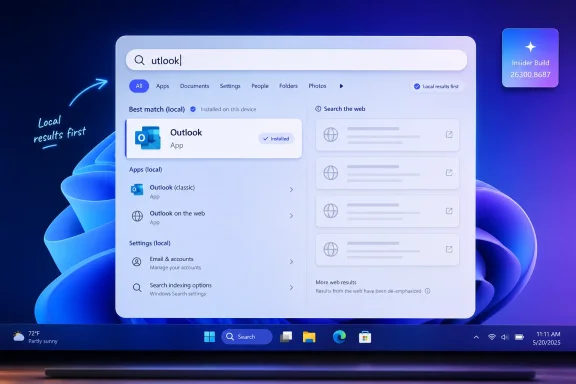
Microsoft confirmed in Windows 11 Insider Experimental Preview Build 26300.8687, released June 12, 2026, that Windows Search is being changed so mistyped, shortened, or partially entered app names can still surface the correct installed application instead of defaulting to Bing web results. That sounds like a small fix until you remember how often Search is used as Windows’ launcher, file finder, settings shortcut, and accidental web portal. The real story is not that “utlook” can now find Outlook. It is that Microsoft is finally admitting, through product behavior rather than forum replies, that local intent must outrank web monetization when a user is clearly trying to operate their own PC.
For years, Windows 11 Search had a credibility problem hiding inside a spelling problem. Type a near miss for an app name, and the system could be astonishingly poor at recognizing what you meant, even when the answer was installed locally and sitting in the Start menu. Yet the same box could confidently produce a corrected Bing result, as if Windows had become fluent in the internet while forgetting the contents of the machine beneath it.
Build 26300.8687 changes that logic for apps. Microsoft says Search is now better at handling typos, dropped letters, extra letters, and partial words when looking for installed applications. In practical terms, the app launcher side of Windows Search is becoming more tolerant in the same way users already expect web search to be tolerant.
That matters because Search is no longer a side feature in Windows. For many users, it is the front door to the operating system. Press the Windows key, type a few letters, hit Enter: that muscle memory has replaced hunting through menus, pinning every app to the taskbar, or remembering where Microsoft moved a setting this year.
When that flow breaks, the whole OS feels less reliable. A launcher that cannot survive a missing letter does not merely inconvenience the user; it trains the user not to trust the interface. Microsoft’s fix is overdue because the failure was never obscure. It lived in the most repeated interaction many people have with Windows.
The insult was in the contrast. Windows could not find the app you installed, the document you named, or the setting you were trying to open, but it could still sell you a trip to the web. The result felt less like assistance and more like a product manager had cut in line ahead of the user.
This is why typo tolerance is more important than its feature-note wording suggests. If a mistyped app name now produces the intended local app as the best match, the search box regains its role as an operating-system control surface. If it instead produces a web card, the search box feels like an ad slot with keyboard focus.
Microsoft’s recent work appears to attack both sides of that perception. The Insider build improves app matching. Separate testing points to a coming ability to disable web suggestions entirely. Stable Windows 11 builds have already received some file-search improvements through the June 2026 cumulative update. Individually, each item is modest. Together, they suggest Microsoft has finally recognized that Search’s reputation problem is structural.
That principle sounds obvious, but Windows 11 has often behaved as if it were controversial. The operating system has spent years blending apps, files, settings, Microsoft Store suggestions, web links, and promotional surfaces into a single panel. The result was a search experience that could be rich in theory and chaotic in practice.
The new app typo handling narrows that chaos. A user looking for PowerPoint should not need to type the name perfectly. A user looking for Task Manager should not be punished for typing a compressed fragment. A user looking for Outlook should not be sent to a web result because the first character fell off.
The reported file-search improvements follow the same theme. If a file exists locally and the query strongly resembles its name, it should appear before videos, shopping results, or generic Bing suggestions. That is not anti-web. It is pro-context. The OS knows more about what is installed and indexed on a user’s PC than a remote search engine does, and it should act like it.
Search is supposed to paper over that sprawl. Instead, it has often exposed it. A user types the name of a setting and gets something adjacent, something vaguely related, or something that uses the same word in a different context. That kind of failure is especially damaging in enterprise and support environments, where instructions often depend on quickly locating the same panel across many machines.
Better ranking does not solve Windows’ broader settings fragmentation. It does, however, reduce the cost of living with it. If Microsoft insists on continuing the long migration from Control Panel to Settings while adding more cloud-connected toggles and AI-era features, Search must become the stable layer above that churn.
There is also a security and administration angle here. Users who cannot find legitimate settings often go looking for registry edits, third-party tweakers, or old forum instructions that may no longer apply. A more reliable Settings search keeps people inside supported UI paths. That is not glamorous, but it is exactly the kind of operating-system polish that prevents avoidable mistakes.
That matters for admins who read every Search improvement through the lens of change management. A more forgiving app search is unlikely to break workflows, but a redesigned search-ranking system can still produce surprises. Help desk scripts, user training, kiosk configurations, and locked-down environments all depend on predictable shell behavior.
The coming local-only toggle, if it ships as described, will deserve particular attention. For consumers, it is a long-requested escape hatch from Bing clutter. For managed environments, it could become a policy question: should Windows Search be local-only by default, should web suggestions remain available, or should the choice depend on device role?
Microsoft should not bury that decision in a consumer-grade settings page and call the job done. If the company is serious about making Search more respectful of local intent, it needs clean administrative controls as well. Group Policy, MDM exposure, and clear documentation will matter as much as the toggle itself.
Search is not judged only by whether it eventually finds the right answer. It is judged by how quickly it begins to look useful. A blank or irrelevant panel during the first few keystrokes makes the feature feel inert. Early local results tell the user the index is alive and the system is paying attention.
The still-Insider substring work points in the same direction. If Windows can find a file from a meaningful segment in the middle of a compound filename, users no longer have to remember how a name begins. That better reflects how people actually recall documents: by project, date, client, episode, topic, or fragment, not necessarily by the first character in a carefully structured filename.
Taken together, two-character triggering, substring matching, app typo tolerance, and better Settings ranking suggest a broader effort to make Search less literal. That is exactly where it needed to go. The modern PC has too much stuff on it for a search system that behaves like a brittle prefix matcher.
Most of what users are asking for is basic competence. Find the installed app. Find the local file. Put the relevant setting first. Do not treat every typo as an invitation to open the web. Do not make people edit the registry to disable behavior they never asked for.
That distinction matters because Microsoft has sometimes confused feature ambition with product trust. Windows users are not hostile to smarter software. They are hostile to software that gets the fundamentals wrong while asking for more attention, more cloud integration, and more telemetry-fed personalization.
A humble Search fix may do more for Windows 11’s reputation than another AI button. It tells users Microsoft is willing to sand down the daily irritations that make an otherwise capable OS feel pushy. In 2026, that may be the more radical product decision.
A proper local-search toggle changes the politics of the feature. It acknowledges that web suggestions are not universally desired and that local search is a legitimate mode, not a hack. It also gives Microsoft a cleaner answer to critics: if users want the integrated web experience, it remains available; if they want the PC-only experience, they can choose it.
The independent Store toggle is just as important. Microsoft Store suggestions may be useful when someone searches for an app they do not have, but they are noise when the user is looking for something already installed. Separating web suggestions from Store suggestions would let users and administrators tune Search around actual intent instead of accepting one bundled experience.
The test for Microsoft will be whether these controls are obvious, durable, and respected across updates. Windows has a bad habit of reintroducing promotional surfaces after feature updates, account changes, or “recommended” setup flows. A local-only Search setting should mean local-only Search, not local-mostly-until-the-next-engagement-campaign Search.
That nostalgia can be technically unfair. Modern Windows indexes more locations, integrates cloud accounts, searches settings, exposes Store entries, and tries to bridge local and web content. The job is harder than it used to be.
But users do not experience architecture diagrams. They experience whether typing a few letters opens the thing they meant. If Windows 11 asks users to tolerate a more complex search surface, it must deliver a better outcome than the simpler versions it replaced.
This is why the current changes are strategically important. Microsoft does not need Search to become dazzling. It needs Search to stop being a punchline. If the box becomes boringly reliable again, the company wins back something more valuable than engagement: muscle memory.
The asterisk is governance. Enterprises will want to know whether the new behavior can be configured, audited, and kept consistent across Windows 11 24H2, 25H2, and future releases. They will also want clarity on whether Search changes roll out through cumulative updates, controlled feature rollouts, enablement packages, or Insider-to-stable waves that arrive on Microsoft’s schedule rather than theirs.
There is also a privacy dimension. Even when web suggestions are benign, many organizations prefer to minimize accidental query leakage from OS-level search boxes. A local-only setting that is both user-visible and admin-enforceable would reduce that concern. It would also bring Windows more in line with the principle that the desktop should not assume every search term belongs on the internet.
The biggest practical risk is inconsistency during rollout. If one machine finds apps with typos, another prioritizes files, a third still throws Bing to the top, and a fourth has a hidden toggle unavailable to stable users, IT teams will have to explain why identical instructions produce different results. Microsoft’s job now is not just to build better Search. It is to ship it coherently.
 Microsoft Finally Teaches Search the Difference Between a Typo and a Web Query
For years, Windows 11 Search had a credibility problem hiding inside a spelling problem. Type a near miss for an app name, and the system could be astonishingly poor at recognizing what you meant, even when the answer was installed locally and sitting in the Start menu. Yet the same box could confidently produce a corrected Bing result, as if Windows had become fluent in the internet while forgetting the contents of the machine beneath it.Build 26300.8687 changes that logic for apps. Microsoft says Search is now better at handling typos, dropped letters, extra letters, and partial words when looking for installed applications. In practical terms, the app launcher side of Windows Search is becoming more tolerant in the same way users already expect web search to be tolerant.
That matters because Search is no longer a side feature in Windows. For many users, it is the front door to the operating system. Press the Windows key, type a few letters, hit Enter: that muscle memory has replaced hunting through menus, pinning every app to the taskbar, or remembering where Microsoft moved a setting this year.
When that flow breaks, the whole OS feels less reliable. A launcher that cannot survive a missing letter does not merely inconvenience the user; it trains the user not to trust the interface. Microsoft’s fix is overdue because the failure was never obscure. It lived in the most repeated interaction many people have with Windows.
Bing Was Not the Only Problem, but It Made Every Failure Look Worse
The long-running anger around Windows Search has often been framed as a Bing problem. That is fair, but incomplete. Users did not hate web results merely because they existed; they hated them because they appeared at the exact moment Windows had failed at a more basic local task.The insult was in the contrast. Windows could not find the app you installed, the document you named, or the setting you were trying to open, but it could still sell you a trip to the web. The result felt less like assistance and more like a product manager had cut in line ahead of the user.
This is why typo tolerance is more important than its feature-note wording suggests. If a mistyped app name now produces the intended local app as the best match, the search box regains its role as an operating-system control surface. If it instead produces a web card, the search box feels like an ad slot with keyboard focus.
Microsoft’s recent work appears to attack both sides of that perception. The Insider build improves app matching. Separate testing points to a coming ability to disable web suggestions entirely. Stable Windows 11 builds have already received some file-search improvements through the June 2026 cumulative update. Individually, each item is modest. Together, they suggest Microsoft has finally recognized that Search’s reputation problem is structural.
The Local PC Is Becoming the First-Class Search Target Again
The most encouraging part of the current Search work is not that Microsoft is adding another switch or another algorithmic tweak. It is that the ranking philosophy appears to be moving in the right direction: local results should win when local intent is strong.That principle sounds obvious, but Windows 11 has often behaved as if it were controversial. The operating system has spent years blending apps, files, settings, Microsoft Store suggestions, web links, and promotional surfaces into a single panel. The result was a search experience that could be rich in theory and chaotic in practice.
The new app typo handling narrows that chaos. A user looking for PowerPoint should not need to type the name perfectly. A user looking for Task Manager should not be punished for typing a compressed fragment. A user looking for Outlook should not be sent to a web result because the first character fell off.
The reported file-search improvements follow the same theme. If a file exists locally and the query strongly resembles its name, it should appear before videos, shopping results, or generic Bing suggestions. That is not anti-web. It is pro-context. The OS knows more about what is installed and indexed on a user’s PC than a remote search engine does, and it should act like it.
The Settings Fix Is About Confidence, Not Convenience
Microsoft also says it has improved Search ranking for Settings results, so more relevant settings should appear higher. This is another small release-note sentence carrying years of accumulated irritation. Windows Settings has become the place where old Control Panel logic, modern design language, account integration, privacy controls, accessibility options, and device management all collide.Search is supposed to paper over that sprawl. Instead, it has often exposed it. A user types the name of a setting and gets something adjacent, something vaguely related, or something that uses the same word in a different context. That kind of failure is especially damaging in enterprise and support environments, where instructions often depend on quickly locating the same panel across many machines.
Better ranking does not solve Windows’ broader settings fragmentation. It does, however, reduce the cost of living with it. If Microsoft insists on continuing the long migration from Control Panel to Settings while adding more cloud-connected toggles and AI-era features, Search must become the stable layer above that churn.
There is also a security and administration angle here. Users who cannot find legitimate settings often go looking for registry edits, third-party tweakers, or old forum instructions that may no longer apply. A more reliable Settings search keeps people inside supported UI paths. That is not glamorous, but it is exactly the kind of operating-system polish that prevents avoidable mistakes.
Insider Builds Are Promises Written in Pencil
The usual caveat applies: this is still Insider territory. Build 26300.8687 is not the same thing as a stable monthly update landing on every production PC. Features in experimental channels can change, arrive gradually, be pulled, or ship in a slightly different form months later.That matters for admins who read every Search improvement through the lens of change management. A more forgiving app search is unlikely to break workflows, but a redesigned search-ranking system can still produce surprises. Help desk scripts, user training, kiosk configurations, and locked-down environments all depend on predictable shell behavior.
The coming local-only toggle, if it ships as described, will deserve particular attention. For consumers, it is a long-requested escape hatch from Bing clutter. For managed environments, it could become a policy question: should Windows Search be local-only by default, should web suggestions remain available, or should the choice depend on device role?
Microsoft should not bury that decision in a consumer-grade settings page and call the job done. If the company is serious about making Search more respectful of local intent, it needs clean administrative controls as well. Group Policy, MDM exposure, and clear documentation will matter as much as the toggle itself.
The Two-Character Change Shows Microsoft Is Fixing the Plumbing Too
The June 2026 Patch Tuesday update, KB5094126, already brings one important Search improvement to stable Windows 11 systems: file results can begin appearing after as few as two typed characters instead of three. That may sound minor, but it changes the feel of Search in the same way a shorter animation or faster menu can change the perceived speed of an OS.Search is not judged only by whether it eventually finds the right answer. It is judged by how quickly it begins to look useful. A blank or irrelevant panel during the first few keystrokes makes the feature feel inert. Early local results tell the user the index is alive and the system is paying attention.
The still-Insider substring work points in the same direction. If Windows can find a file from a meaningful segment in the middle of a compound filename, users no longer have to remember how a name begins. That better reflects how people actually recall documents: by project, date, client, episode, topic, or fragment, not necessarily by the first character in a carefully structured filename.
Taken together, two-character triggering, substring matching, app typo tolerance, and better Settings ranking suggest a broader effort to make Search less literal. That is exactly where it needed to go. The modern PC has too much stuff on it for a search system that behaves like a brittle prefix matcher.
Microsoft Is Learning the Wrong Lesson if It Treats This as an AI Story
It would be easy for Microsoft to fold all of this into the company’s larger AI narrative. Search that understands messy input, ranks intent, and bridges files, apps, and settings sounds like the sort of thing that could be marketed as intelligent, contextual, or Copilot-adjacent. But Windows Search does not need a grand AI rebrand to justify these improvements.Most of what users are asking for is basic competence. Find the installed app. Find the local file. Put the relevant setting first. Do not treat every typo as an invitation to open the web. Do not make people edit the registry to disable behavior they never asked for.
That distinction matters because Microsoft has sometimes confused feature ambition with product trust. Windows users are not hostile to smarter software. They are hostile to software that gets the fundamentals wrong while asking for more attention, more cloud integration, and more telemetry-fed personalization.
A humble Search fix may do more for Windows 11’s reputation than another AI button. It tells users Microsoft is willing to sand down the daily irritations that make an otherwise capable OS feel pushy. In 2026, that may be the more radical product decision.
The Registry Hack Era Should End Here
For years, users who wanted to remove Bing from Windows Search had to rely on registry edits or third-party tools. That was always a bad compromise. Registry workarounds are fragile, unfriendly to normal users, and awkward for IT departments that prefer supported configuration paths.A proper local-search toggle changes the politics of the feature. It acknowledges that web suggestions are not universally desired and that local search is a legitimate mode, not a hack. It also gives Microsoft a cleaner answer to critics: if users want the integrated web experience, it remains available; if they want the PC-only experience, they can choose it.
The independent Store toggle is just as important. Microsoft Store suggestions may be useful when someone searches for an app they do not have, but they are noise when the user is looking for something already installed. Separating web suggestions from Store suggestions would let users and administrators tune Search around actual intent instead of accepting one bundled experience.
The test for Microsoft will be whether these controls are obvious, durable, and respected across updates. Windows has a bad habit of reintroducing promotional surfaces after feature updates, account changes, or “recommended” setup flows. A local-only Search setting should mean local-only Search, not local-mostly-until-the-next-engagement-campaign Search.
The Real Competition Is the Windows 7 Memory
The emotional benchmark for Windows Search is not macOS Spotlight or third-party launchers, though those comparisons are inevitable. For many Windows users, the benchmark is older Windows itself: the fast, predictable Start-menu search that launched apps with minimal drama. Windows 11’s problem is that it made a familiar action feel less deterministic.That nostalgia can be technically unfair. Modern Windows indexes more locations, integrates cloud accounts, searches settings, exposes Store entries, and tries to bridge local and web content. The job is harder than it used to be.
But users do not experience architecture diagrams. They experience whether typing a few letters opens the thing they meant. If Windows 11 asks users to tolerate a more complex search surface, it must deliver a better outcome than the simpler versions it replaced.
This is why the current changes are strategically important. Microsoft does not need Search to become dazzling. It needs Search to stop being a punchline. If the box becomes boringly reliable again, the company wins back something more valuable than engagement: muscle memory.
Enterprise IT Will Welcome the Direction and Watch the Defaults
For sysadmins, the Search fixes are mostly good news with a familiar asterisk. Better local matching means fewer support tickets, fewer confused users, and fewer instructions that begin with “open Settings, then search for...” only to fail because the ranking did something unexpected. A cleaner local-first model also aligns with environments where web search from the taskbar is unwanted or distracting.The asterisk is governance. Enterprises will want to know whether the new behavior can be configured, audited, and kept consistent across Windows 11 24H2, 25H2, and future releases. They will also want clarity on whether Search changes roll out through cumulative updates, controlled feature rollouts, enablement packages, or Insider-to-stable waves that arrive on Microsoft’s schedule rather than theirs.
There is also a privacy dimension. Even when web suggestions are benign, many organizations prefer to minimize accidental query leakage from OS-level search boxes. A local-only setting that is both user-visible and admin-enforceable would reduce that concern. It would also bring Windows more in line with the principle that the desktop should not assume every search term belongs on the internet.
The biggest practical risk is inconsistency during rollout. If one machine finds apps with typos, another prioritizes files, a third still throws Bing to the top, and a fourth has a hidden toggle unavailable to stable users, IT teams will have to explain why identical instructions produce different results. Microsoft’s job now is not just to build better Search. It is to ship it coherently.
The Search Box Starts Acting Like It Belongs to the User Again
The concrete lesson from this round of changes is simple: Windows Search is improving because Microsoft is bringing the user’s local intent back to the top of the stack. The remaining question is how quickly the Insider-only pieces make it to stable builds and how much control Microsoft gives users and administrators when they do.- Windows 11 Insider Build 26300.8687 improves app search so typos, missing letters, extra characters, and partial names can still return the intended installed app.
- Microsoft is also improving Settings search ranking so the most relevant system controls should appear higher in the results.
- The June 2026 cumulative update KB5094126 already lets stable Windows 11 builds begin returning file results after two typed characters.
- Substring file matching remains in Insider testing, but it could make Windows Search much better at finding files from remembered fragments rather than exact beginnings.
- A local-only Search toggle is reportedly in development, and it could finally give users a supported way to remove Bing web suggestions from Windows Search.
- The feature will matter most if Microsoft exposes durable controls for consumers and administrators instead of treating local-first Search as a temporary experiment.
References
- Primary source: Windows Latest
Published: Wed, 17 Jun 2026 04:07:33 GMT
Microsoft confirms Windows 11 Search will find your apps, not Bing results, even if you make typos
Windows 11 Insider build fixes Search to find apps with typos, shows local files first instead of web results, and improves Settings ranking. www.windowslatest.com
- Related coverage: windowscentral.com
Windows Insiders get first crack at a less annoying Windows 11 update process | Windows Central
Microsoft is laying the groundwork to bundle driver, .NET, and firmware updates together so you only have to reboot your PC once a month.www.windowscentral.com - Related coverage: techradar.com
Windows 11's June update is here — these are the 3 most important features, including a huge move to make apps and menus load much faster | TechRadar
Low Latency Profile, shared audio, and a boost for searchwww.techradar.com - Official source: learn.microsoft.com
Windows 11 Insider Experimental Preview Build 26300.8687 - Windows Insider Program | Microsoft Learn
Release notes for Windows 11 Insider Experimental Preview Build 26300.8687learn.microsoft.com - Related coverage: allthings.how
KB5094126 for Windows 11 (June 2026): Builds 26200.8655 and 26100.8655
The June Patch Tuesday update brings the Low Latency Profile, Shared Audio, multi-app camera streaming, and the Secure Boot certificate push.allthings.how - Related coverage: windowsblogitalia.com
Download e novità di Windows 11 Insider Preview Build 26300.8687
Microsoft ha rilasciato Windows 11 Insider Preview Build 26300.8687 ai Windows Insider che hanno scelto il canale Canary. www.windowsblogitalia.com
- Related coverage: windows-faq.de
Windows 11 KB5094126 Update für 24H2 und 25H2 für Secure Boot & Sicherheit - Windows FAQ
Windows 11 KB5094126 bringt Sicherheitsfixes, Secure Boot Änderungen und Fehlerbehebungen für 24H2 und 25H2.www.windows-faq.de - Official source: catalog.update.microsoft.com
- Related coverage: pcworld.com
Microsoft acknowledges Windows 11's search problems, working on a fix | PCWorld
Windows 11's Start menu search is slow and inconsistent. Microsoft confirms fixes are coming, including a unified search update.www.pcworld.com - Official source: microsofters.com
Windows 11 (actualización KB5094126): novedades, errores conocidos y cómo instalarla | Microsofters
La actualización KB5094126 de Windows 11 trae numerosas mejoras de estabilidad y rendimiento. ¡Las apps abrirán más rápido que nunca! microsofters.com
- Related coverage: techtimes.com
Windows 11 June 2026 Update Kills Folder Icons: 23-Year-Old Shell Bug Finally Closed
Windows 11 desktop.ini update June 2026 breaks custom folder icons on network drives — but it is intentional. KB5094126 closes an unchecked-buffer code execution risk in Windows Shell folder parsingwww.techtimes.com - Related coverage: windowsforum.com
Windows 11 KB5094126 Update Lets Search Find Files With 2 Characters | Windows Forum
Microsoft’s June 9, 2026 cumulative update KB5094126 for Windows 11 versions 24H2 and 25H2 changes Windows Search so files can be found with as few as two...windowsforum.com - Related coverage: tomshardware.com
Microsoft confirms Windows 11 26H1 will be for Arm devices only at launch — Snapdragon X2-powered devices officially shipping with 26H1 | Tom's Hardware
It's 24H2 all over again, but with the caveat that 26H1 will only support specific hardware for its entire lifecycle. Devices running 26H1 will not be able to upgrade to 26H2.www.tomshardware.com
