Microsoft began rolling out Windows 11 Search improvements in late May 2026, with optional update KB5089573 letting regular PCs find and prioritize files from as few as two characters, while Insider builds 26300.8553 and 26220.8544 add substring matching for compound file names. The short version is that Windows Search is finally being taught to behave less like a brittle database query and more like a tool for humans. The longer version is more interesting: Microsoft appears to be correcting one of Windows 11’s most visible daily irritations without hiding the fix behind an AI pitch. That makes this a small feature with unusually large symbolic weight.
For years, Windows Search has occupied an odd place in the operating system. It is one of the first things users touch when they want to get work done, but it has often felt like one of the last things Microsoft optimized for that purpose. The interface could find web results, promote Bing content, surface trending distractions, and point users toward Microsoft services, but it could still stumble over the local file sitting somewhere on the same machine.
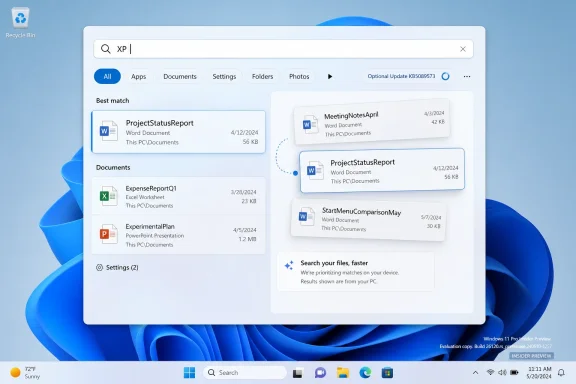
The new two-character matching improvement matters because it attacks that mismatch directly. If typing “XP” can surface a folder of Windows XP wallpapers instead of only pushing an app or unrelated system result, the search box starts to feel like part of the desktop again. That is the promise Windows Search was always supposed to keep: type a fragment of what you remember, get the thing you meant.
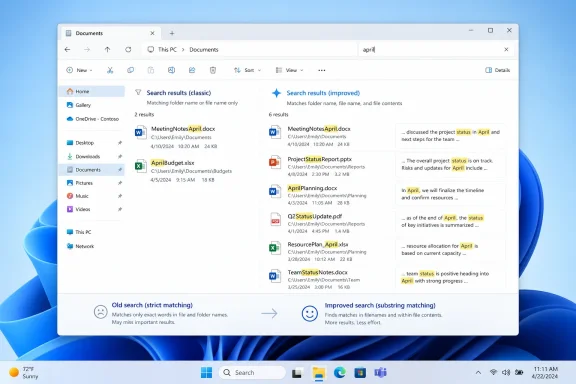
The substring change in Insider builds is arguably more important. Real users do not name files as if they were building a library catalog. They create names like “StartMenuComparisonMay,” “ProjectStatusReport,” “MeetingNotesApril,” and “invoiceFinalFINAL2,” then hope the operating system is smart enough to meet them halfway later.
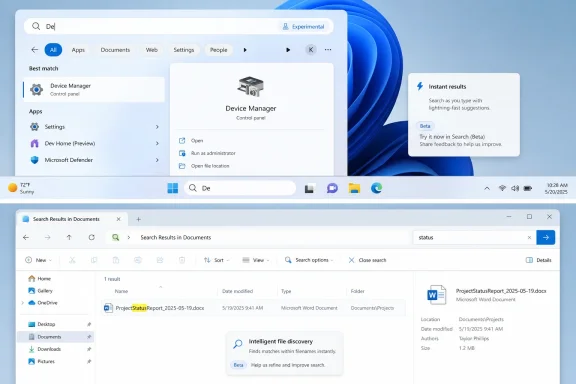
Until now, Windows has too often demanded that users remember the beginning of the name, not just a meaningful part of it. Searching for “status” should find “ProjectStatusReport.” Searching for “April” should find “MeetingNotesApril.” That sounds obvious only because every modern search experience outside parts of Windows trained users to expect it.
That is a tax on attention. Every time a user pauses to think, “Will Windows Search understand this filename?” the operating system has failed a small but real test. The best shell features fade into muscle memory; the worst ones force people to build rituals around them.
Compound file names are a perfect example. They are common because they are readable at a glance and easy to create quickly. A human sees “StartMenuComparisonMay” and understands three pieces of information instantly. A weak search implementation sees one long token and forces the human to remember where that token begins.
Substring search flips that relationship. The user no longer has to shape the filename around the indexer’s preferences. The indexer has to accommodate the user’s memory, which is exactly where responsibility belongs.
That is especially true for enthusiasts and IT pros. A sysadmin may search for “DC,” “GPO,” “PX,” “VM,” “AD,” or “KB.” A developer may remember “UI,” “API,” “RC,” or “v2.” A home user may remember “XP,” “CV,” “ID,” or “tax.” Two-character search is not a gimmick when the things people remember are often short by nature.
There is a risk, of course. Shorter queries can produce noisier results, and bad ranking could turn this improvement into a different kind of clutter. Microsoft’s wording matters because it says Search will find and prioritize files with as few as two characters, not merely include them somewhere in an avalanche of results.
That ranking layer is where the feature will either succeed or fail. If Windows understands that a local file whose name matches “XP” is more relevant than a promotional web card or an obscure app result, users will notice immediately. If it buries that file below web content, the technical improvement will be squandered by product design.
That joke endured because it captured something true. Windows Search too often seemed confused about its job. Was it a launcher? A file finder? A settings shortcut? A Bing entry point? A content feed? A Copilot runway? The answer, too often, was “yes.”
The trouble with that strategy is that Search is not a destination in the way a browser home page might be. It is a transitional interface. People pass through it on the way to something else, and every additional tile, quiz, prompt, or web wrapper becomes friction disguised as engagement.
Microsoft has spent years trying to make Windows feel more cloud-connected, but the search box is one place where that instinct has repeatedly collided with user intent. A desktop search panel should privilege the desktop first. The web can be available, but it should not behave as if every local query is an opportunity to open Bing.
The Search changes are visible. They are also refreshingly practical. They do not require users to learn a new assistant, sign into a new service, adopt a new workflow, or believe that every local task should be mediated through generative AI. They simply make an existing box better at finding existing things.
That distinction matters because Windows 11’s reputation problem has not been a shortage of ambition. It has been a shortage of trust. Users have watched Microsoft chase new surfaces while unfinished edges remained in the shell. They have seen AI buttons arrive faster than long-requested fixes. They have seen performance promises coexist with slow context menus, laggy panels, and inconsistent design.
A search box that finds files from two characters and understands substrings will not repair all of that. But it is the kind of change users recognize as being for them, not for a quarterly slide deck.
There are good engineering reasons for staged rollouts. Microsoft can catch regressions, measure performance, and avoid pushing a bad search-indexing change to hundreds of millions of machines at once. Search touches local files, shell responsiveness, indexing behavior, and user trust; a bug there can be more disruptive than a broken widget.
But the user-facing experience remains maddening. Two people can install the same update, read the same changelog, and see different behavior. One gets the fix; the other gets the old frustration and a vague promise that it may arrive later.
For IT administrators, this complicates communication. A help desk cannot simply say, “Install the May optional update and your two-character file searches will work.” The accurate answer is more conditional: the update contains the improvement, but the feature may arrive when Microsoft’s rollout system decides the device is eligible.
It also fits the broader pattern of Windows 11 shell work now moving through 2026 builds. Start menu customization, taskbar changes, interface resizing, and shell performance improvements all point toward a Microsoft that is trying to sand down Windows 11’s most obvious irritants after years of defending them by omission.
Search belongs in that same category. It sits beside Start and the taskbar as part of the daily control surface of Windows. If those neighboring components become more flexible while Search remains cluttered and unreliable, the whole desktop still feels unfinished.
The interesting part is that Microsoft seems to be improving Search at two levels at once. The index is getting better at matching what users type. The product direction, at least in these examples, is drifting back toward local utility. Those two changes reinforce each other.
There is a hierarchy of trust in operating systems. Users need the file picker, Start menu, taskbar, Search, update system, and settings app to feel predictable before they will welcome more abstract layers on top. If the foundation feels noisy, every new assistant looks like another thing standing between the user and the machine.
That is why the substring feature is more exciting than it sounds. It is not glamorous. It will not headline a keynote. It does not require a neural processing unit or a subscription. It just solves a real problem.
The same is true of two-character matching. It is the kind of improvement that disappears into daily use when done well. Nobody wants to think about search indexing. They want to type “May” and open the May comparison file.
That principle should guide ranking, interface design, and resource usage. A search panel filled with remote content may look lively in a demo, but it can feel wasteful on a real machine. Users notice when a supposedly simple shell surface consumes memory, opens web-backed components, or hesitates while loading content they never requested.
A cleaner Windows Search would not be anti-cloud. It would be disciplined. It would understand that the operating system’s job is to reduce distance between intent and action. If the user intends to open a file, the fastest route is the best route.
This is also where Microsoft’s native UI work matters. The more Search feels like a web portal embedded in the shell, the less confidence users have in it. The more it feels like a fast, native, predictable Windows component, the easier it becomes to trust.
The practical questions are not philosophical. Does the feature respect existing indexing scopes? Does it behave consistently with enterprise search restrictions? Does it increase indexing overhead on older hardware? Does it produce better results in File Explorer as well as the taskbar search box? Those are the details that determine whether a quality-of-life feature becomes an operational win.
Administrators should also be cautious about optional previews. KB5089573 is a non-security preview update, which means it is useful for testing but not something every organization will rush into production. Many shops will wait for the next cumulative update cadence before broad deployment, especially if the feature itself is still staged.
Still, this is exactly the kind of change IT departments should validate early. Search behavior affects training material, user support, and everyday productivity. A better search box can quietly save time across an organization, but only if it arrives without regressions.
That is the heart of the issue. Search is not merely a feature; it is an expression of what the operating system thinks the user is trying to do. For too long, Windows 11 too often guessed that the user might want the web, a promotion, an AI tool, or a content card. These changes suggest Microsoft is relearning that the user may simply want their document.
The fix also arrives at a moment when Windows 11 needs wins that are not controversial. AI features can divide users. Hardware requirements still irritate holdouts. Ads and recommendations trigger backlash. But better local search is the rare Windows improvement almost everyone can understand.
That universality is why this matters beyond the changelog. A user who feels the search box has improved may not know which build delivered the change, but they will feel the operating system getting out of the way. That feeling is the currency Microsoft has been spending too freely.
 Microsoft Finally Fixes the Search Box People Actually Use
For years, Windows Search has occupied an odd place in the operating system. It is one of the first things users touch when they want to get work done, but it has often felt like one of the last things Microsoft optimized for that purpose. The interface could find web results, promote Bing content, surface trending distractions, and point users toward Microsoft services, but it could still stumble over the local file sitting somewhere on the same machine.The new two-character matching improvement matters because it attacks that mismatch directly. If typing “XP” can surface a folder of Windows XP wallpapers instead of only pushing an app or unrelated system result, the search box starts to feel like part of the desktop again. That is the promise Windows Search was always supposed to keep: type a fragment of what you remember, get the thing you meant.
The substring change in Insider builds is arguably more important. Real users do not name files as if they were building a library catalog. They create names like “StartMenuComparisonMay,” “ProjectStatusReport,” “MeetingNotesApril,” and “invoiceFinalFINAL2,” then hope the operating system is smart enough to meet them halfway later.
Until now, Windows has too often demanded that users remember the beginning of the name, not just a meaningful part of it. Searching for “status” should find “ProjectStatusReport.” Searching for “April” should find “MeetingNotesApril.” That sounds obvious only because every modern search experience outside parts of Windows trained users to expect it.
The Old Search Model Made Users Work for the Machine
The annoyance here was never just that Windows Search sometimes missed files. It was that users learned defensive habits around its limitations. They renamed files with extra spaces, prefixes, dates, and redundant descriptors not because those names were cleaner, but because Windows was more likely to find them later.That is a tax on attention. Every time a user pauses to think, “Will Windows Search understand this filename?” the operating system has failed a small but real test. The best shell features fade into muscle memory; the worst ones force people to build rituals around them.
Compound file names are a perfect example. They are common because they are readable at a glance and easy to create quickly. A human sees “StartMenuComparisonMay” and understands three pieces of information instantly. A weak search implementation sees one long token and forces the human to remember where that token begins.
Substring search flips that relationship. The user no longer has to shape the filename around the indexer’s preferences. The indexer has to accommodate the user’s memory, which is exactly where responsibility belongs.
Two Characters Are Not Just a Convenience
On paper, “as few as two characters” sounds like a minor tuning change. In practice, it changes the rhythm of desktop use. Many real searches begin with abbreviations, initials, short project codes, month fragments, device names, or file-type hints.That is especially true for enthusiasts and IT pros. A sysadmin may search for “DC,” “GPO,” “PX,” “VM,” “AD,” or “KB.” A developer may remember “UI,” “API,” “RC,” or “v2.” A home user may remember “XP,” “CV,” “ID,” or “tax.” Two-character search is not a gimmick when the things people remember are often short by nature.
There is a risk, of course. Shorter queries can produce noisier results, and bad ranking could turn this improvement into a different kind of clutter. Microsoft’s wording matters because it says Search will find and prioritize files with as few as two characters, not merely include them somewhere in an avalanche of results.
That ranking layer is where the feature will either succeed or fail. If Windows understands that a local file whose name matches “XP” is more relevant than a promotional web card or an obscure app result, users will notice immediately. If it buries that file below web content, the technical improvement will be squandered by product design.
Windows Search’s Real Enemy Was Clutter
Search quality has not been Windows 11’s only problem. The larger complaint has been that Microsoft treated the search pane as a surface for web content, rewards nudges, Bing integrations, image-of-the-day panels, AI tools, and other promotional furniture. Users opened Search to launch Terminal and were rewarded with the internet’s idea of “terminal.”That joke endured because it captured something true. Windows Search too often seemed confused about its job. Was it a launcher? A file finder? A settings shortcut? A Bing entry point? A content feed? A Copilot runway? The answer, too often, was “yes.”
The trouble with that strategy is that Search is not a destination in the way a browser home page might be. It is a transitional interface. People pass through it on the way to something else, and every additional tile, quiz, prompt, or web wrapper becomes friction disguised as engagement.
Microsoft has spent years trying to make Windows feel more cloud-connected, but the search box is one place where that instinct has repeatedly collided with user intent. A desktop search panel should privilege the desktop first. The web can be available, but it should not behave as if every local query is an opportunity to open Bing.
The Quality Push Is Starting to Look Less Theoretical
Microsoft’s March 2026 Windows quality pledge was broad enough to invite skepticism. The company promised a more responsive and consistent Windows 11, better performance, clearer search results, and improvements across core areas such as File Explorer and the shell. That sort of corporate language is easy to publish and harder to make visible on a user’s screen.The Search changes are visible. They are also refreshingly practical. They do not require users to learn a new assistant, sign into a new service, adopt a new workflow, or believe that every local task should be mediated through generative AI. They simply make an existing box better at finding existing things.
That distinction matters because Windows 11’s reputation problem has not been a shortage of ambition. It has been a shortage of trust. Users have watched Microsoft chase new surfaces while unfinished edges remained in the shell. They have seen AI buttons arrive faster than long-requested fixes. They have seen performance promises coexist with slow context menus, laggy panels, and inconsistent design.
A search box that finds files from two characters and understands substrings will not repair all of that. But it is the kind of change users recognize as being for them, not for a quarterly slide deck.
Controlled Rollout Still Means Controlled Frustration
The catch is Microsoft’s familiar Controlled Feature Rollout system. Installing KB5089573 does not necessarily mean every user immediately gets the improved Search behavior. The same gradual-release logic applies to Insider features, where availability can vary even among people running the right build.There are good engineering reasons for staged rollouts. Microsoft can catch regressions, measure performance, and avoid pushing a bad search-indexing change to hundreds of millions of machines at once. Search touches local files, shell responsiveness, indexing behavior, and user trust; a bug there can be more disruptive than a broken widget.
But the user-facing experience remains maddening. Two people can install the same update, read the same changelog, and see different behavior. One gets the fix; the other gets the old frustration and a vague promise that it may arrive later.
For IT administrators, this complicates communication. A help desk cannot simply say, “Install the May optional update and your two-character file searches will work.” The accurate answer is more conditional: the update contains the improvement, but the feature may arrive when Microsoft’s rollout system decides the device is eligible.
Insider Builds Show the Direction of Travel
The substring feature is currently in preview, which means it should be treated as a signal rather than a guarantee. Microsoft tests many Windows features that change, pause, or disappear before general release. Still, the fact that substring matching appears in both Experimental and Beta Insider builds suggests this is not just a throwaway experiment.It also fits the broader pattern of Windows 11 shell work now moving through 2026 builds. Start menu customization, taskbar changes, interface resizing, and shell performance improvements all point toward a Microsoft that is trying to sand down Windows 11’s most obvious irritants after years of defending them by omission.
Search belongs in that same category. It sits beside Start and the taskbar as part of the daily control surface of Windows. If those neighboring components become more flexible while Search remains cluttered and unreliable, the whole desktop still feels unfinished.
The interesting part is that Microsoft seems to be improving Search at two levels at once. The index is getting better at matching what users type. The product direction, at least in these examples, is drifting back toward local utility. Those two changes reinforce each other.
The AI Detour Made the Basics Look Worse
The reason these changes feel overdue is that Microsoft has spent so much energy talking about AI in Windows while users kept complaining about the basics. Copilot, Recall, semantic search, natural-language actions, and AI-assisted workflows may all have a place in the future of the PC. But when traditional search cannot reliably find a local file by a remembered fragment, the futuristic pitch rings hollow.There is a hierarchy of trust in operating systems. Users need the file picker, Start menu, taskbar, Search, update system, and settings app to feel predictable before they will welcome more abstract layers on top. If the foundation feels noisy, every new assistant looks like another thing standing between the user and the machine.
That is why the substring feature is more exciting than it sounds. It is not glamorous. It will not headline a keynote. It does not require a neural processing unit or a subscription. It just solves a real problem.
The same is true of two-character matching. It is the kind of improvement that disappears into daily use when done well. Nobody wants to think about search indexing. They want to type “May” and open the May comparison file.
Local First Is the Only Winning Strategy
Microsoft does not need to remove web search from Windows entirely. There are legitimate cases where searching the web from the taskbar is useful. The problem is priority. Windows Search should behave as if apps, files, settings, and local workflows are first-class citizens, with online results clearly secondary unless the user asks for them.That principle should guide ranking, interface design, and resource usage. A search panel filled with remote content may look lively in a demo, but it can feel wasteful on a real machine. Users notice when a supposedly simple shell surface consumes memory, opens web-backed components, or hesitates while loading content they never requested.
A cleaner Windows Search would not be anti-cloud. It would be disciplined. It would understand that the operating system’s job is to reduce distance between intent and action. If the user intends to open a file, the fastest route is the best route.
This is also where Microsoft’s native UI work matters. The more Search feels like a web portal embedded in the shell, the less confidence users have in it. The more it feels like a fast, native, predictable Windows component, the easier it becomes to trust.
Admins Should Watch the Index, Not the Marketing
For enterprise IT, the immediate impact is modest but worth tracking. Better file matching can reduce help-desk friction, especially for users who rely heavily on local and synced document libraries. It may also change user expectations around what Windows Search can find, which matters in environments with redirected folders, OneDrive Known Folder Move, SharePoint sync, and strict indexing policies.The practical questions are not philosophical. Does the feature respect existing indexing scopes? Does it behave consistently with enterprise search restrictions? Does it increase indexing overhead on older hardware? Does it produce better results in File Explorer as well as the taskbar search box? Those are the details that determine whether a quality-of-life feature becomes an operational win.
Administrators should also be cautious about optional previews. KB5089573 is a non-security preview update, which means it is useful for testing but not something every organization will rush into production. Many shops will wait for the next cumulative update cadence before broad deployment, especially if the feature itself is still staged.
Still, this is exactly the kind of change IT departments should validate early. Search behavior affects training material, user support, and everyday productivity. A better search box can quietly save time across an organization, but only if it arrives without regressions.
The Small Fix That Admits the Big Problem
There is an implicit admission in these updates: Windows Search had become too clever in the wrong places and not clever enough in the right ones. It could decorate the pane, connect to services, and advertise Microsoft’s broader ecosystem. It could not always parse the messy way people remember their own files.That is the heart of the issue. Search is not merely a feature; it is an expression of what the operating system thinks the user is trying to do. For too long, Windows 11 too often guessed that the user might want the web, a promotion, an AI tool, or a content card. These changes suggest Microsoft is relearning that the user may simply want their document.
The fix also arrives at a moment when Windows 11 needs wins that are not controversial. AI features can divide users. Hardware requirements still irritate holdouts. Ads and recommendations trigger backlash. But better local search is the rare Windows improvement almost everyone can understand.
That universality is why this matters beyond the changelog. A user who feels the search box has improved may not know which build delivered the change, but they will feel the operating system getting out of the way. That feeling is the currency Microsoft has been spending too freely.
The File Name Is No Longer a Memory Test
The concrete lesson from these updates is that Windows Search is becoming more forgiving. That is what users have been asking for, whether they described it in those terms or not. They do not want to learn how the search index tokenizes strings; they want the machine to recover the thing they half-remembered.- Windows 11’s May 2026 optional update KB5089573 includes a change that lets Search find and prioritize files from as few as two characters.
- Windows 11 Insider builds 26300.8553 and 26220.8544 add substring search, making compound names such as “MeetingNotesApril” discoverable from fragments like “April.”
- The improvements may not appear immediately on every eligible PC because Microsoft is using staged feature rollouts.
- The biggest practical gain is not novelty but reduced friction for users who search by abbreviations, months, project terms, and remembered fragments.
- The remaining challenge is whether Microsoft can keep local files, apps, and settings ahead of web results, promotions, and AI surfaces.
- Organizations should test the behavior before broad deployment, especially where indexing policies, OneDrive sync, or managed search settings are in play.
References
- Primary source: Windows Latest
Published: Mon, 01 Jun 2026 00:52:04 GMT
Microsoft is killing Windows 11 Search's biggest annoyance, lets you find files with just 2 characters
Microsoft is improving Windows 11 Search with a new Substring feature to find files with compound names and fast two-character local indexing. www.windowslatest.com
- Official source: learn.microsoft.com
Windows 11 Insider Experimental Preview Build 26300.8553 - Windows Insider Program | Microsoft Learn
Release notes for Windows 11 Insider Experimental Preview Build 26300.8553learn.microsoft.com - Official source: blogs.windows.com
Our commitment to Windows quality
Hello Windows Insiders, I want to speak to you directly, as an engineer who has spent his career building technology that people depend on every day. Windows touches more people's lives than almost any technology on Earth. Every day, we hear from thblogs.windows.com - Related coverage: windowscentral.com
Microsoft rolls out Windows 11 KB5089573 update that makes your PC genuinely faster and more responsive | Windows Central
Windows 11 update KB5089573 is now generally available as Microsoft's non-security preview update for May, and is packing genuinely notable performance improvements.www.windowscentral.com - Related coverage: notebookcheck.net
Windows 11 Insider Build 26300.8553 finally lets you customize the Start menu - Notebookcheck News
Windows 11 Insider Preview Build 26300.8553 brings a modular Start menu with Small, Large, and Automatic size presets and new privacy tools to the Experimental channel. www.notebookcheck.net
- Official source: support.microsoft.com

- Related coverage: fdaytalk.com
Windows 11 Finally Lets You Resize the Start Menu
Windows 11 build 26300.8553 adds a modular Start menu with section toggles, resize options, and profile hiding. See every change in the May 2026 Insider builds.www.fdaytalk.com - Related coverage: windows101tricks.com
Windows 11 KB5095093 Released With New Point-in-Time Restore Feature for 25H2
Microsoft has released Windows 11 KB5095093 preview update for 25H2 and 24H2. The update introduces Point-in-Time Restore, Start menu improvements, Windows Update enhancements, and bug fixes.windows101tricks.com - Related coverage: technobaboy.com
Windows 11 KB5089573 update brings performance and stability updates - Technobaboy
Windows 11 KB5089573 update adds Low Latency Profile, Shared Audio, and camera fixes for better performance.www.technobaboy.com - Related coverage: windowsforum.com
KB5089573 Optional Preview: Secure Boot Prep, AI Updates, and EFI Error 0x800f0922 | Windows Forum
Microsoft released KB5089573 on May 26, 2026, as the optional non-security preview update for Windows 11 version 25H2 and 24H2, moving supported systems to...windowsforum.com - Related coverage: techradar.com
Microsoft reveals another way it's making Windows 11 faster, with more performance boosts promised for the likes of File Explorer | TechRadar
Microsoft is falling over itself to make Windows 11 more performantwww.techradar.com - Related coverage: pcgamer.com
Microsoft says it's going to 'fundamentally raise the bar' on driver quality, reliability and security across Windows | PC Gamer
Start your engines.www.pcgamer.com - Related coverage: tomshardware.com
Microsoft promises to make Windows 11 the best operating system for gaming — says it will focus on background workloads, power and scheduling, graphics stack, and drivers | Tom's Hardware
We’re committed to making Windows the best place to playwww.tomshardware.com