

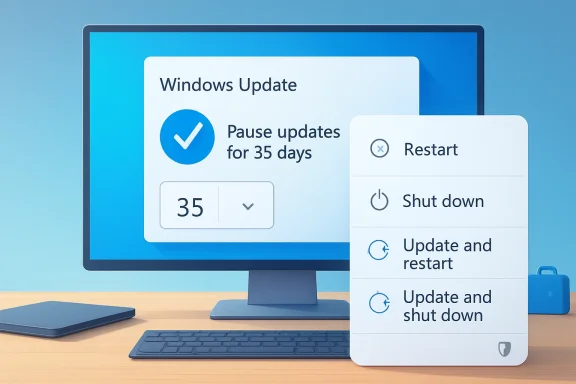
Microsoft is testing the most user-friendly Windows Update change in years: Windows 11 users will be able to keep pausing updates in 35-day blocks without first being forced to install the pending patches. The change, highlighted by Mezha and now visible across Windows Insider coverage, directly targets one of the longest-running complaints about modern Windows: updates arriving at precisely the wrong moment. Just as important, Microsoft is also separating ordinary power commands from update-triggering commands, meaning Shut down and Restart should no longer automatically become traps for pending installations.
Windows Update has always lived in tension between two legitimate goals: keeping PCs secure and keeping users in control. Microsoft’s modern update model, shaped heavily during the Windows 10 era, prioritized rapid patch adoption because unpatched consumer PCs had become a persistent security problem. That strategy made sense from a defensive standpoint, but it also trained millions of users to see updates as interruptions rather than protection.
The old bargain was simple: Windows could pause updates, but only temporarily. Once the pause window expired, users generally had to take available updates before pausing again. For people who work on laptops, travel frequently, game competitively, manage unreliable bandwidth, or depend on fragile hardware setups, that limitation often felt less like a safety mechanism and more like a countdown to disruption.
Windows 11 inherited that reputation, even while Microsoft improved servicing stack reliability, reduced update sizes in some scenarios, and refined active hours. The complaint did not disappear because the core pain point remained: the PC did not always feel like it belonged to the person sitting in front of it. A forced restart before a meeting, a long shutdown while leaving for a flight, or a driver update that breaks audio before a call can erase years of trust.
The new Insider-tested behavior marks a philosophical shift. Microsoft is not abandoning automatic updates, and it is still recommending that security patches be installed promptly. But by allowing repeated 35-day pauses and giving users normal restart and shutdown choices even when updates are waiting, the company is acknowledging that predictability is part of security, not the enemy of it.
This is not the same as a permanent “never update” switch. The system appears designed to keep users aware that they are delaying updates, while still allowing them to renew that decision. That distinction matters because it preserves a moment of accountability every few weeks without turning Windows Update into a hard deadline.
Key changes include:
The 35-day rhythm also maps reasonably well to Microsoft’s monthly servicing cadence. Windows quality updates typically arrive on a predictable monthly schedule, with optional previews and emergency out-of-band updates appearing when needed. A 35-day pause gives users enough time to ride out early bug reports while still prompting them to reconsider before two full patch cycles pass.
The 35-day increment supports those scenarios:
This matters because shutdown and restart are basic ownership signals. A user expects the power menu to do what it says. When Restart effectively means “restart and begin an update installation that may take far longer than expected,” trust breaks down.
That is a small interface change with large implications:
Windows remains one of the largest attack surfaces in personal computing. Browser components, drivers, kernel vulnerabilities, authentication flaws, and networking bugs can all turn delayed patching into real risk. The more widely exploited a vulnerability becomes, the less defensible long postponement looks.
Users should understand the difference:
The new pause model is especially valuable for users who have been burned by problematic updates. Even if most Windows updates install without drama, the exceptions loom large. One broken driver, one boot loop, or one failed cumulative update can permanently change how a user approaches the next patch.
Likely consumer use cases include:
However, Microsoft says more information is coming for commercial customers, and that matters. Enterprises care deeply about user experience, but they also need auditable compliance. A local pause button that undermines patch deadlines would be unacceptable in regulated environments.
Commercial considerations include:
Clearer driver labeling matters because drivers are often where update anxiety becomes personal. A cumulative Windows patch may be abstract, but a display driver that causes flickering or an audio driver that breaks a headset is immediately painful. Better names will not prevent every regression, but they can help users and support staff understand what changed.
Useful update information should answer basic questions:
A more unified update experience could reduce that fatigue. If updates download quietly, wait for a coordinated installation, and restart together, users may be less likely to postpone everything out of frustration. That would serve both user experience and security.
A better cadence could deliver:
By making update controls more explicit, Microsoft is trying to remove one of Windows 11’s most persistent reputational weaknesses. That matters as the company pushes AI PCs, Copilot+ branding, new silicon, and a broader ecosystem refresh. Users may tolerate ambitious features only if the basics feel trustworthy.
The competitive stakes include:
A practical approach is to pause briefly after major update releases, then install once early problems are understood. Users with mission-critical machines can be more conservative, but they should also maintain backups and recovery media. The pause button is not a substitute for resilience.
The commercial story is equally important. Microsoft has indicated that more details are coming for managed environments, and administrators will want to know exactly how repeated pauses interact with compliance deadlines, update rings, and restart policies. That guidance may determine whether enterprises view the change as a welcome user-experience improvement or a governance headache.
What to watch next:
Source: Mezha Windows 11 will allow you to indefinitely postpone the installation of updates
 Background
Windows Update has always lived in tension between two legitimate goals: keeping PCs secure and keeping users in control. Microsoft’s modern update model, shaped heavily during the Windows 10 era, prioritized rapid patch adoption because unpatched consumer PCs had become a persistent security problem. That strategy made sense from a defensive standpoint, but it also trained millions of users to see updates as interruptions rather than protection.The old bargain was simple: Windows could pause updates, but only temporarily. Once the pause window expired, users generally had to take available updates before pausing again. For people who work on laptops, travel frequently, game competitively, manage unreliable bandwidth, or depend on fragile hardware setups, that limitation often felt less like a safety mechanism and more like a countdown to disruption.
Windows 11 inherited that reputation, even while Microsoft improved servicing stack reliability, reduced update sizes in some scenarios, and refined active hours. The complaint did not disappear because the core pain point remained: the PC did not always feel like it belonged to the person sitting in front of it. A forced restart before a meeting, a long shutdown while leaving for a flight, or a driver update that breaks audio before a call can erase years of trust.
The new Insider-tested behavior marks a philosophical shift. Microsoft is not abandoning automatic updates, and it is still recommending that security patches be installed promptly. But by allowing repeated 35-day pauses and giving users normal restart and shutdown choices even when updates are waiting, the company is acknowledging that predictability is part of security, not the enemy of it.
What Microsoft Is Actually Changing
The headline feature is indefinite postponement through repeatable 35-day pauses. Users will still choose a pause period of up to 35 days, but when that period ends, they can extend the pause again rather than being forced through an update cycle first. That makes the feature functionally indefinite, even if Microsoft preserves the familiar 35-day unit.This is not the same as a permanent “never update” switch. The system appears designed to keep users aware that they are delaying updates, while still allowing them to renew that decision. That distinction matters because it preserves a moment of accountability every few weeks without turning Windows Update into a hard deadline.
The practical user experience
For everyday users, the change should feel straightforward. Instead of fighting the operating system after a pause expires, they can select another pause window and carry on. Microsoft is also testing a calendar-style interface that lets users choose a specific pause end date up to the 35-day maximum.Key changes include:
- Pause updates for up to 35 days at a time
- Extend the pause repeatedly without a stated limit
- Choose a specific date through a calendar interface
- Restart without installing pending updates
- Shut down without installing pending updates
- Keep update-specific power options available when wanted
Why the 35-Day Increment Still Matters
At first glance, keeping the 35-day cap may look oddly cautious. If users can renew the pause forever, why not offer a simple pause indefinitely button? The likely answer is that Microsoft wants flexibility without normalizing total disengagement from patching.The 35-day rhythm also maps reasonably well to Microsoft’s monthly servicing cadence. Windows quality updates typically arrive on a predictable monthly schedule, with optional previews and emergency out-of-band updates appearing when needed. A 35-day pause gives users enough time to ride out early bug reports while still prompting them to reconsider before two full patch cycles pass.
A compromise between autonomy and hygiene
This approach is a middle path between enterprise-style update rings and consumer-grade automation. Power users often want to wait a week or two after Patch Tuesday to see whether serious issues emerge. Casual users may simply need to avoid disruption during travel, exams, deadlines, or limited-bandwidth periods.The 35-day increment supports those scenarios:
- It gives cautious users time to monitor update stability
- It discourages silent multi-year neglect
- It preserves a recurring reminder to reassess risk
- It fits Microsoft’s monthly quality update model
- It is easier to explain than policy-based deferrals
Power Menu Control Ends a Familiar Frustration
The second major change may prove just as popular as the pause overhaul. Windows 11 will show ordinary Restart and Shut down commands even when updates are pending, while still offering update-specific commands separately. For years, one of the most aggravating Windows moments has been opening the power menu and seeing only update-tied options when all you wanted was a quick reboot.This matters because shutdown and restart are basic ownership signals. A user expects the power menu to do what it says. When Restart effectively means “restart and begin an update installation that may take far longer than expected,” trust breaks down.
Why separation improves clarity
By clearly separating power actions from update actions, Microsoft reduces ambiguity. If a user chooses Shut down, the PC should shut down. If the user chooses Update and shut down, the update process begins deliberately.That is a small interface change with large implications:
- Fewer accidental update installations
- Less anxiety before travel or meetings
- Clearer expectations during troubleshooting
- Better control for gamers and creators
- Reduced frustration when an update is already downloaded
Security Is Still the Complicated Trade-Off
Microsoft’s challenge is obvious: updates are essential, especially security updates, but forced timing creates resentment. The new model gives users more freedom, yet freedom can become exposure if people postpone critical patches for months. Attackers do not wait politely for a convenient maintenance window.Windows remains one of the largest attack surfaces in personal computing. Browser components, drivers, kernel vulnerabilities, authentication flaws, and networking bugs can all turn delayed patching into real risk. The more widely exploited a vulnerability becomes, the less defensible long postponement looks.
The difference between delay and neglect
A short delay is often rational. Waiting several days after a cumulative update can help users avoid rare but serious regressions, especially on machines used for work. A six-month pause, however, is a different category of decision.Users should understand the difference:
- Delaying for a week can be prudent
- Delaying during a major project can be reasonable
- Skipping security updates for months is risky
- Ignoring firmware and driver fixes can leave hardware unstable
- Postponing emergency updates may expose known vulnerabilities
Consumer Impact: More Control for Real Life
For home users, this change is about dignity as much as convenience. A family PC, gaming rig, student laptop, or creator workstation does not exist on Microsoft’s schedule alone. People need their machines to behave predictably when they are working, studying, presenting, recording, streaming, or simply trying to shut down for the night.The new pause model is especially valuable for users who have been burned by problematic updates. Even if most Windows updates install without drama, the exceptions loom large. One broken driver, one boot loop, or one failed cumulative update can permanently change how a user approaches the next patch.
Scenarios where the change helps
Consumers will use the feature differently depending on their tolerance for risk. Some will pause only around travel or deadlines. Others will routinely wait until community feedback suggests a release is safe.Likely consumer use cases include:
- Gamers avoiding restarts during tournaments or long sessions
- Students delaying updates during exams
- Remote workers protecting meeting-heavy weeks
- Creators avoiding driver changes before recording or editing
- Travelers managing limited hotel or mobile bandwidth
- Home users waiting to confirm an update is stable
Enterprise Impact: Useful, but Not a Replacement for Policy
For business customers, the story is more nuanced. Managed devices already have mature tools for update rings, deferrals, deadlines, restart policies, and compliance reporting. IT departments using Microsoft Intune, Group Policy, Windows Update for Business policies, or endpoint management platforms will not suddenly replace those systems with consumer-style pause controls.However, Microsoft says more information is coming for commercial customers, and that matters. Enterprises care deeply about user experience, but they also need auditable compliance. A local pause button that undermines patch deadlines would be unacceptable in regulated environments.
Admins will want guardrails
The enterprise opportunity is to make Windows Update less disruptive without weakening centralized control. Ideally, admins can define who may pause, for how long, and under what circumstances. They may also want different behavior for executives, frontline devices, kiosks, shared machines, and developer workstations.Commercial considerations include:
- Whether admins can disable or limit repeated pauses
- How pause status appears in compliance dashboards
- Whether deadlines override local user choices
- How emergency security updates are handled
- Whether restart-without-update affects maintenance windows
- How driver update clarity integrates with help desk workflows
Driver Updates and Clearer Information
Microsoft is also improving how Windows 11 describes available updates, particularly drivers. That sounds minor compared with indefinite pausing, but it addresses another long-running complaint: update titles can be cryptic, repetitive, or too vague to help users make informed decisions. If a driver entry does not clearly say whether it affects display, audio, battery, storage, or firmware-related components, users cannot assess risk.Clearer driver labeling matters because drivers are often where update anxiety becomes personal. A cumulative Windows patch may be abstract, but a display driver that causes flickering or an audio driver that breaks a headset is immediately painful. Better names will not prevent every regression, but they can help users and support staff understand what changed.
Transparency as a trust-building tool
More descriptive update titles are part of a larger trust repair effort. Microsoft is effectively saying: not only can you delay updates, but Windows should also explain them better. That is a healthier relationship than the old black-box model.Useful update information should answer basic questions:
- What component is affected?
- Is this a driver, firmware, feature, security, or quality update?
- Is a restart required?
- Can it be installed separately?
- Is it optional or recommended?
- Has it failed previously on this device?
Fewer Reboots Through a Unified Update Experience
Another important part of the update redesign is Microsoft’s effort to coordinate updates more cleanly. The company is moving toward bundling or aligning driver, .NET, firmware, and quality updates so users see fewer separate reboot prompts. For many people, the worst part of Windows Update is not any single reboot, but the feeling that the system keeps asking again and again.A more unified update experience could reduce that fatigue. If updates download quietly, wait for a coordinated installation, and restart together, users may be less likely to postpone everything out of frustration. That would serve both user experience and security.
Why fewer interruptions may improve patch adoption
Frequent interruptions create avoidance behavior. If every update feels like a gamble, users delay. If updates become predictable, brief, and clearly scheduled, users are more likely to cooperate.A better cadence could deliver:
- Fewer restart prompts per month
- Less duplication across update categories
- Cleaner Windows Update pages
- More predictable installation windows
- Reduced support confusion after partial update states
Competitive Implications for Windows 11
Windows has long been mocked for update interruptions, especially compared with platforms that hide or stage updates more gracefully. macOS has its own update complaints, Linux distributions vary widely by configuration, and ChromeOS emphasizes background updating with a more appliance-like model. Still, Windows carries the cultural baggage of the unexpected restart more than any rival desktop platform.By making update controls more explicit, Microsoft is trying to remove one of Windows 11’s most persistent reputational weaknesses. That matters as the company pushes AI PCs, Copilot+ branding, new silicon, and a broader ecosystem refresh. Users may tolerate ambitious features only if the basics feel trustworthy.
A small feature with brand consequences
The update pause change will not sell PCs by itself. But it can reduce friction for people considering whether to stay with Windows or move more of their work to tablets, Macs, Chromebooks, or cloud desktops. Reliability and control are emotional purchasing factors, even when buyers frame them as technical ones.The competitive stakes include:
- Improving Windows 11’s reputation among power users
- Reducing negative social media moments around forced updates
- Making Windows laptops feel more travel-friendly
- Supporting Microsoft’s AI PC push with a better baseline experience
- Giving OEM partners fewer support headaches tied to update timing
How Users Should Approach the New Controls
The smartest way to use indefinite pausing is not to treat it as a license to ignore updates forever. Instead, users should build a personal update rhythm. That means choosing when to install updates, watching for major known issues, backing up important files, and avoiding unnecessary delay when security fixes are urgent.A practical approach is to pause briefly after major update releases, then install once early problems are understood. Users with mission-critical machines can be more conservative, but they should also maintain backups and recovery media. The pause button is not a substitute for resilience.
A responsible update routine
Users who want control without unnecessary risk can follow a simple sequence:- Pause updates during high-stakes work, travel, or deadlines.
- Check community and vendor feedback after major monthly updates.
- Back up important files before installing large cumulative or feature updates.
- Install security updates promptly once serious issues are ruled out.
- Restart intentionally using the update-specific power option when ready.
Strengths and Opportunities
Microsoft’s Windows Update redesign is strongest where it treats users as participants rather than obstacles. The company is keeping its security-first posture, but it is finally conceding that forced timing can damage productivity, trust, and even patch adoption.- User autonomy improves because pauses can be renewed without a mandatory install cycle.
- Power menu clarity improves because restart and shutdown actions are separated from update actions.
- Update planning becomes easier through calendar-based pause selection.
- Driver transparency improves with clearer device-class labeling.
- Support scenarios become cleaner when ordinary restarts do not unexpectedly trigger installations.
- Patch adoption may improve if users feel less cornered by Windows Update.
- Windows 11’s reputation benefits from addressing a complaint that has persisted for more than a decade.
Risks and Concerns
The risks are real, and Microsoft will need careful defaults, clear messaging, and strong enterprise controls. A more flexible update model can empower responsible users, but it can also make it easier for careless users to stay exposed for too long.- Security exposure may increase if users repeatedly postpone critical fixes.
- Consumer confusion may persist if the pause interface does not explain risk clearly.
- Enterprise compliance could suffer if local controls conflict with admin policy.
- Emergency patches may be delayed by users who do not distinguish routine updates from urgent fixes.
- Support teams may face stale-device issues when users renew pauses for months.
- Microsoft may narrow the feature before release because it is still in Insider testing.
- Bad update quality would still damage trust even with better pause controls.
Looking Ahead
The next question is timing. The feature is currently being tested through Windows Insider channels, and Microsoft has not committed to a broad release date for all Windows 11 users. Insider features can change, arrive gradually, or be withheld if telemetry reveals reliability, security, or support concerns.The commercial story is equally important. Microsoft has indicated that more details are coming for managed environments, and administrators will want to know exactly how repeated pauses interact with compliance deadlines, update rings, and restart policies. That guidance may determine whether enterprises view the change as a welcome user-experience improvement or a governance headache.
What to watch next:
- Whether the feature reaches stable Windows 11 builds unchanged
- How Microsoft handles security-update warnings during long pauses
- What controls are offered to enterprise administrators
- Whether emergency updates can override or bypass user pauses
- How users respond once the feature leaves Insider testing
Source: Mezha Windows 11 will allow you to indefinitely postpone the installation of updates
