When Microsoft says it is giving Windows users “more control” over updates, it is touching one of the oldest fault lines in the Windows ecosystem. The company’s latest Insider changes add a calendar-based pause system, make it possible to skip updates during first-run setup, and separate simple restarts from restarts that install pending patches. On paper, that sounds like a user win; in practice, it is also an admission that Windows Update has become a trust problem as much as a technical system.
The timing matters. Microsoft is rolling these changes into Dev Channel and Experimental Channel Insider builds while Windows 11 25H2 is already moving through its broader rollout, including the company’s machine-learning-driven “intelligent” distribution to eligible 24H2 devices. That makes this less of a random convenience tweak and more of a strategic reset: Microsoft is trying to preserve the security benefits of frequent updates without forcing every reboot, setup flow, and restart prompt to feel like a small act of coercion.
For years, Windows Update has lived in a tension between necessity and annoyance. Security fixes, driver refreshes, servicing-stack changes, and feature updates are critical to keeping PCs safe and stable, but users routinely associate them with awkward timing, broken peripherals, surprise reboots, and the occasional update that turns a normal workday into a support ticket. Microsoft has repeatedly tried to smooth the experience with active hours, restart scheduling, and pause controls, yet the underlying model still largely assumes that users should accept a timetable set by the platform vendor.
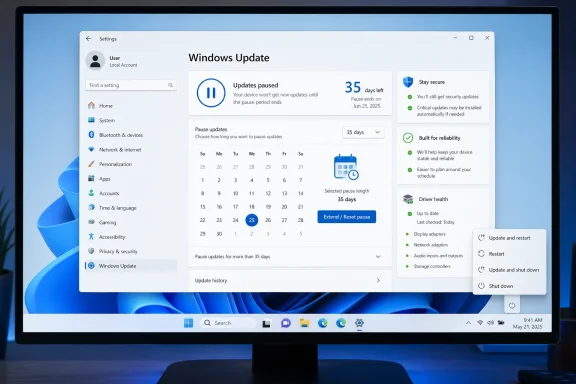
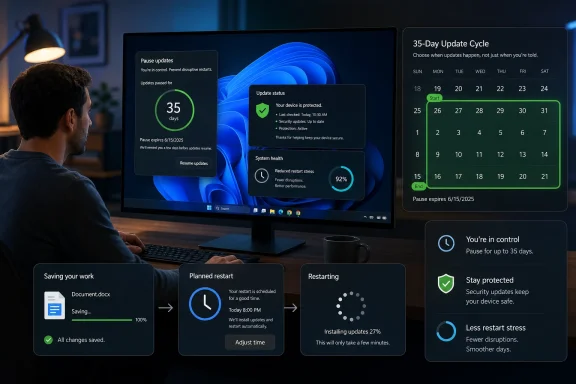
What is new now is not that Windows can be paused, but that it can be paused in a way that feels closer to a calendar policy than a short fuse. Microsoft’s Insider blog says the new interface lets users pick a specific day up to 35 days out, and then extend that pause repeatedly with no explicit cap. That is a major philosophical shift from the long-standing model where pause controls existed, but only within a comparatively narrow window.
This is also happening after a rough run of update-related incidents. Microsoft’s release-health pages have documented recent issues affecting Microsoft account sign-ins in apps such as Teams Free, OneDrive, Edge, Excel, Word, and Microsoft 365 Copilot, along with earlier WUSA installation failures from shared folders. Microsoft has also had to resolve multiple update issues through later patches and out-of-band fixes, which reinforces the impression that Windows users are not merely resisting updates out of habit; many are reacting to real instability.
The result is a more complicated story than “Microsoft finally listened.” It is a balancing act between security policy and user autonomy, between enterprise manageability and consumer patience, and between the ideal of always-current PCs and the reality that timing is part of reliability. If a patch is good but arrives at the wrong moment, many users no longer experience it as protection; they experience it as interruption.
That matters because choice architecture changes behavior. The old “pause for X days” dropdown was functional, but it still framed updates as an impending obligation. A calendar view makes the pause feel more intentional and less like a temporary exception. If Microsoft is trying to reduce frustration, this is the right kind of UX move: simple, visible, and aligned to human planning rather than servicing policy.
But the phrase indefinite pause should be used carefully. Microsoft’s own wording is more restrained: users can extend the pause as many times as needed, but the mechanism still works in 35-day increments. That means there is no strict cap in the interface, yet there is still an ongoing series of user actions required to keep updates suspended. In other words, it is effectively indefinite for anyone determined enough to keep clicking, but it is not a true “set and forget forever” switch.
That design choice is likely to be welcomed by consumers and IT teams for different reasons. Consumers want a faster path from box opening to productivity, while IT departments want more predictable provisioning flows. In both cases, the big win is that a new device stops feeling like a device that has to finish the vendor’s chores before it belongs to the user.
For consumers, the benefit is less technical than psychological. First impressions matter, and nothing kills excitement like a long first-run update loop on a laptop that was supposed to be ready in minutes. The perception of responsiveness often counts almost as much as raw speed.
This one speaks directly to a longtime user complaint: people do not always want a restart to become a patch-install event. Sometimes they want the machine off, period. Sometimes they want a clean reboot for troubleshooting, not a maintenance cycle. Giving users clearer choices reduces the sense that Windows is hijacking intent at the last second.
That distinction will matter even more in environments where downtime is expensive. A developer in the middle of a debugging session, a remote worker on a low-bandwidth connection, or a small business owner running a point-of-sale device all care about whether “reboot” means “reboot” or “reboot plus maintenance.”
This is one of the better signs that Microsoft is thinking systemically. Separate update categories may be logically tidy from an engineering standpoint, but they create fragmentation from the user’s perspective. Bundling the pieces more tightly can make Windows feel less like a rotating series of surprises and more like a single predictable monthly maintenance cycle.
There is a caveat, though: bundling can make a single bad month feel worse. If quality, driver, and firmware changes are all packaged together, a failure in one layer can complicate diagnosis in the others. That is a classic engineering tradeoff. Fewer restarts often means larger blast radius per event.
Microsoft also describes 24H2 and 25H2 as sharing a common codebase, with 25H2 largely enabled through a small activation package that turns dormant features on with a single restart. That architecture helps explain why the company can be more aggressive about feature delivery while also reducing downtime. It is a reminder that under the hood, modern Windows servicing is less about monolithic OS upgrades and more about staged feature activation.
At the same time, the fact that 25H2 is being offered automatically to eligible devices means Microsoft is not abandoning its desire to steer the installed base. The company is just changing the shape of the steering wheel. Users may get more visible control over pauses and reboots, but the platform still aims to converge on the same destination.
But security policy that ignores user experience becomes self-defeating. When updates are intrusive enough, users delay them, distrust them, or look for ways around them. A more humane control model can actually improve compliance because it reduces the resentment that leads to avoidance. Microsoft seems to understand that a less antagonistic relationship with updates may produce better real-world patch hygiene than rigid insistence ever did.
For consumers, the impact is more dramatic. Personal users often experience Windows Update as a series of interrupts with little context, while enterprise users experience it as a managed process. The new controls narrow that gap. That said, more control for consumers does not always translate into better outcomes for consumers if they use that control to keep security fixes away for too long.
The company is also trying to reduce the cognitive burden of updates by making them feel more optional in the short term and more predictable in the long term. That is a delicate message. If users believe Microsoft is finally respecting their schedule, they may become more open to updates in general. If they interpret the change as proof that updates were always too disruptive, the company could inadvertently reinforce skepticism.
This is why the calendar interface is more important than it looks. It signals that Microsoft is willing to be negotiated with. In consumer software, that can be a powerful message. A negotiable system is often a more trusted system than a paternalistic one.
That distinction is essential for understanding the likely real-world outcome. Most users will not manually re-pause every 35 days forever. Instead, they will use the pause more intelligently, stretching it across known busy periods and then letting updates through. That is probably the ideal behavior Microsoft wants: not endless deferral, but better-timed adoption.
Still, there is a risk that “more control” becomes a euphemism for “more chances to procrastinate.” That could leave a subset of users exposed for longer than before, especially those who already struggle with routine maintenance. The company will need to rely on clearer messaging, stronger default nudges, and the continued value of visible update status.
The other thing to watch is whether Microsoft extends similar thinking beyond Windows Update itself. If the company is serious about reducing friction, then clearer servicing windows, smarter reboot prompts, and better first-run handling may all evolve together. That would suggest a broader redesign of Windows maintenance philosophy, not just one convenient pause menu.
In that sense, this is less about a pause button than it is about a relationship reset. Microsoft appears to be acknowledging that the future of Windows servicing depends not just on technical correctness, but on the user’s willingness to participate. That may be the most important update of all.
Source: https://www.techspot.com/news/112184-windows-insiders-can-now-pause-updates-indefinitely-35.html
The timing matters. Microsoft is rolling these changes into Dev Channel and Experimental Channel Insider builds while Windows 11 25H2 is already moving through its broader rollout, including the company’s machine-learning-driven “intelligent” distribution to eligible 24H2 devices. That makes this less of a random convenience tweak and more of a strategic reset: Microsoft is trying to preserve the security benefits of frequent updates without forcing every reboot, setup flow, and restart prompt to feel like a small act of coercion.
 Overview
For years, Windows Update has lived in a tension between necessity and annoyance. Security fixes, driver refreshes, servicing-stack changes, and feature updates are critical to keeping PCs safe and stable, but users routinely associate them with awkward timing, broken peripherals, surprise reboots, and the occasional update that turns a normal workday into a support ticket. Microsoft has repeatedly tried to smooth the experience with active hours, restart scheduling, and pause controls, yet the underlying model still largely assumes that users should accept a timetable set by the platform vendor.What is new now is not that Windows can be paused, but that it can be paused in a way that feels closer to a calendar policy than a short fuse. Microsoft’s Insider blog says the new interface lets users pick a specific day up to 35 days out, and then extend that pause repeatedly with no explicit cap. That is a major philosophical shift from the long-standing model where pause controls existed, but only within a comparatively narrow window.
This is also happening after a rough run of update-related incidents. Microsoft’s release-health pages have documented recent issues affecting Microsoft account sign-ins in apps such as Teams Free, OneDrive, Edge, Excel, Word, and Microsoft 365 Copilot, along with earlier WUSA installation failures from shared folders. Microsoft has also had to resolve multiple update issues through later patches and out-of-band fixes, which reinforces the impression that Windows users are not merely resisting updates out of habit; many are reacting to real instability.
The result is a more complicated story than “Microsoft finally listened.” It is a balancing act between security policy and user autonomy, between enterprise manageability and consumer patience, and between the ideal of always-current PCs and the reality that timing is part of reliability. If a patch is good but arrives at the wrong moment, many users no longer experience it as protection; they experience it as interruption.
The New Pause Model
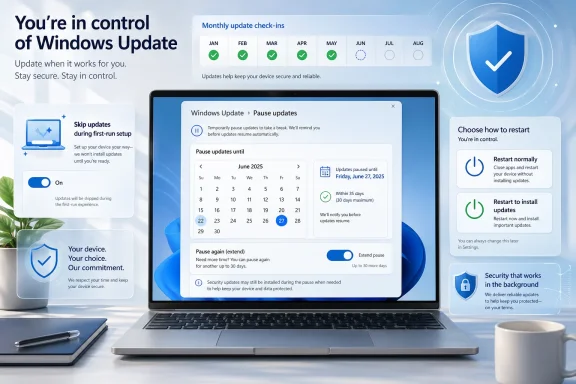
The headline change is the pause experience itself. Microsoft says Windows Update now offers a calendar interface, allowing users to pick a specific pause end date up to 35 days ahead, and then re-pause again and again after that. In practical terms, the company has replaced a small number of fixed choices with a more flexible scheduling model that resembles the way users think about travel, conferences, exams, and busy work cycles.That matters because choice architecture changes behavior. The old “pause for X days” dropdown was functional, but it still framed updates as an impending obligation. A calendar view makes the pause feel more intentional and less like a temporary exception. If Microsoft is trying to reduce frustration, this is the right kind of UX move: simple, visible, and aligned to human planning rather than servicing policy.
Why 35 Days Matters
The 35-day limit is not arbitrary. It is long enough to let a user get through a short project window, a business trip, or a school term checkpoint, but short enough that Microsoft can still claim the system is nudging people toward eventual compliance. The company is not eliminating update pressure so much as softening its edges.But the phrase indefinite pause should be used carefully. Microsoft’s own wording is more restrained: users can extend the pause as many times as needed, but the mechanism still works in 35-day increments. That means there is no strict cap in the interface, yet there is still an ongoing series of user actions required to keep updates suspended. In other words, it is effectively indefinite for anyone determined enough to keep clicking, but it is not a true “set and forget forever” switch.
- The pause window is now calendar-based rather than purely dropdown-based.
- Users can choose any day within a 35-day horizon.
- The pause can be extended repeatedly.
- Microsoft still expects updates to be installed eventually.
Setup Changes and the First-Run Experience
Microsoft is also reducing friction during the out-of-box experience, or OOBE. Under the new behavior described in the TechSpot summary and reflected in Microsoft’s broader update messaging, users can skip updates during initial setup and reach the desktop more quickly. That is not a small tweak; it changes the emotional tone of a brand-new PC from “please wait while Windows does Windows things” to something closer to immediate ownership.That design choice is likely to be welcomed by consumers and IT teams for different reasons. Consumers want a faster path from box opening to productivity, while IT departments want more predictable provisioning flows. In both cases, the big win is that a new device stops feeling like a device that has to finish the vendor’s chores before it belongs to the user.
Consumer Convenience vs Security Discipline
The tradeoff is obvious. Skipping setup-time updates can make a device usable sooner, but it can also leave it temporarily exposed before first use. Microsoft is gambling that most users either will update soon after setup or will be protected by later updates bundled into the normal monthly cadence. That may be reasonable for many households, but it is still an intentional relaxation of a long-standing assumption that a fresh Windows machine should be immediately current.For consumers, the benefit is less technical than psychological. First impressions matter, and nothing kills excitement like a long first-run update loop on a laptop that was supposed to be ready in minutes. The perception of responsiveness often counts almost as much as raw speed.
- Faster first boot and desktop access.
- Less waiting during device unboxing.
- Potentially weaker security until updates are applied.
- Better fit for managed deployment workflows.
Restart Behavior Gets Less Aggressive
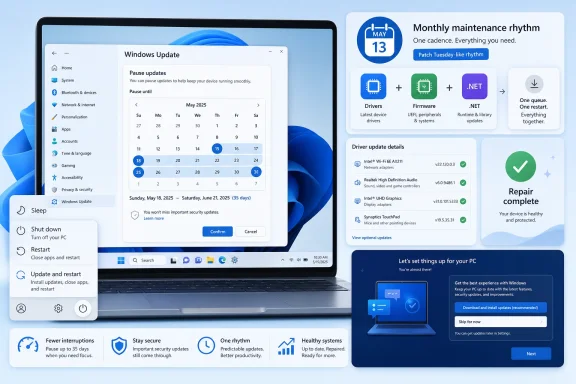
Another notable change is the separation of a normal shutdown or restart from one that immediately applies pending updates. According to the Insider blog summary, Windows will now provide normal power actions alongside options that install updates, rather than silently folding those actions together in a way that can feel like a trap. That is a subtle but important UX correction.This one speaks directly to a longtime user complaint: people do not always want a restart to become a patch-install event. Sometimes they want the machine off, period. Sometimes they want a clean reboot for troubleshooting, not a maintenance cycle. Giving users clearer choices reduces the sense that Windows is hijacking intent at the last second.
Why This Feels Like a Trust Repair
Microsoft is effectively acknowledging that power state is user agency. If the Start menu shows options that clearly distinguish “restart normally” from “restart and update,” the platform becomes less manipulative and easier to understand. This is one of those small interface changes that can have outsized trust value because it respects a basic truth: users should know when their command is about closing an app, rebooting a system, or installing a patch.That distinction will matter even more in environments where downtime is expensive. A developer in the middle of a debugging session, a remote worker on a low-bandwidth connection, or a small business owner running a point-of-sale device all care about whether “reboot” means “reboot” or “reboot plus maintenance.”
- Clearer power menu semantics.
- Less surprise during shutdown.
- Better alignment with user intent.
- Potentially fewer accidental update installations.
Bundling Updates to Reduce Disruption
Microsoft says driver,.NET, and firmware updates will be bundled with monthly quality updates, a move designed to reduce how often users need to restart. That is a practical concession to update fatigue. If everything arrives together, then a user who stays current should theoretically face fewer separate maintenance windows and less repeated reboot churn.This is one of the better signs that Microsoft is thinking systemically. Separate update categories may be logically tidy from an engineering standpoint, but they create fragmentation from the user’s perspective. Bundling the pieces more tightly can make Windows feel less like a rotating series of surprises and more like a single predictable monthly maintenance cycle.
A Better Monthly Rhythm
The monthly rhythm matters because predictability is what enterprise admins and careful consumers both want. If updates cluster around a known window, then IT can communicate around them, and users can plan around them. That is especially useful now that Microsoft has been improving the visibility of pause and restart controls instead of hiding them behind nested menus.There is a caveat, though: bundling can make a single bad month feel worse. If quality, driver, and firmware changes are all packaged together, a failure in one layer can complicate diagnosis in the others. That is a classic engineering tradeoff. Fewer restarts often means larger blast radius per event.
- More consolidated maintenance windows.
- Fewer separate reboots.
- Easier user communication.
- Potentially more complex rollback troubleshooting.
The Bigger Context: Windows 11 25H2 and Intelligent Rollouts
The update-policy changes are arriving alongside the broader Windows 11 25H2 lifecycle. Microsoft says 25H2 is now available to all eligible devices, with a machine-learning-based intelligent rollout expanding to unmanaged Home and Pro devices running 24H2. For eligible users, the company says the update will arrive automatically when the device is deemed ready.Microsoft also describes 24H2 and 25H2 as sharing a common codebase, with 25H2 largely enabled through a small activation package that turns dormant features on with a single restart. That architecture helps explain why the company can be more aggressive about feature delivery while also reducing downtime. It is a reminder that under the hood, modern Windows servicing is less about monolithic OS upgrades and more about staged feature activation.
Why 25H2 Matters Here
The 25H2 rollout is important because it gives Microsoft another lever to balance user annoyance against platform consistency. If the underlying code paths are already present on 24H2 systems and the upgrade is effectively an enablement package, then Microsoft can push broader version alignment with less disruption than the old full-upgrade model. That makes a more flexible pause policy somewhat less risky, since the major version transition is already engineered to be relatively lightweight.At the same time, the fact that 25H2 is being offered automatically to eligible devices means Microsoft is not abandoning its desire to steer the installed base. The company is just changing the shape of the steering wheel. Users may get more visible control over pauses and reboots, but the platform still aims to converge on the same destination.
- 24H2 and 25H2 share the same core OS files.
- The feature update uses an enablement package.
- Eligible devices are rolled forward automatically when ready.
- The result is faster feature servicing with less downtime.
Security Reality and User Autonomy
There is no serious argument that unpatched systems are preferable. Microsoft’s own support guidance continues to frame updates as essential, and the company still warns that after a pause limit is reached, the latest updates must be installed. Security remains the reason Windows Update exists in the first place.But security policy that ignores user experience becomes self-defeating. When updates are intrusive enough, users delay them, distrust them, or look for ways around them. A more humane control model can actually improve compliance because it reduces the resentment that leads to avoidance. Microsoft seems to understand that a less antagonistic relationship with updates may produce better real-world patch hygiene than rigid insistence ever did.
Enterprise vs Consumer Impact
For enterprises, the changes are likely to be absorbed into existing management frameworks rather than treated as a rebellion. IT already schedules reboots, manages rings, and coordinates feature uptake through policy and tooling. What matters more is that Microsoft is normalizing a more transparent user-facing model, which may make support conversations easier and reduce accidental restarts.For consumers, the impact is more dramatic. Personal users often experience Windows Update as a series of interrupts with little context, while enterprise users experience it as a managed process. The new controls narrow that gap. That said, more control for consumers does not always translate into better outcomes for consumers if they use that control to keep security fixes away for too long.
- Enterprises get better predictability and clearer reboot behavior.
- Consumers get fewer surprise interruptions.
- Security teams still need enforcement policies.
- Casual users may pause updates longer than is wise.
Microsoft’s Update Reputation Problem
The recent history helps explain why Microsoft is making these changes now. Release-health pages show that Windows update issues have not been hypothetical; they have affected sign-ins, installation workflows, and even recovery behavior. Microsoft has also issued fixes for update failures in March 2026, while documenting the resolution of earlier WUSA-related issues. That pattern matters because policy changes are often driven not by ideology, but by accumulated operational pain.The company is also trying to reduce the cognitive burden of updates by making them feel more optional in the short term and more predictable in the long term. That is a delicate message. If users believe Microsoft is finally respecting their schedule, they may become more open to updates in general. If they interpret the change as proof that updates were always too disruptive, the company could inadvertently reinforce skepticism.
Trust Is the Real Product
Windows is not just an operating system; it is a daily contract with users. Every forced reboot, failed patch, or unexpected driver regression weakens that contract. By shifting from forceful defaults to more explicit user controls, Microsoft is trying to rebuild confidence one small interaction at a time.This is why the calendar interface is more important than it looks. It signals that Microsoft is willing to be negotiated with. In consumer software, that can be a powerful message. A negotiable system is often a more trusted system than a paternalistic one.
- Fewer surprise interactions.
- Better alignment with user scheduling.
- Lower frustration after recent update incidents.
- Potentially improved trust over time.
The Practical Limits of Freedom
Even with these changes, Windows is not becoming a free-for-all. The company still wants devices updated, and the broader servicing model still points toward eventual compliance. The pause tool may be more generous, but it is not a guarantee that a device will remain frozen indefinitely without effort from the user. Microsoft is offering more flexibility, not removing its own authority over the platform.That distinction is essential for understanding the likely real-world outcome. Most users will not manually re-pause every 35 days forever. Instead, they will use the pause more intelligently, stretching it across known busy periods and then letting updates through. That is probably the ideal behavior Microsoft wants: not endless deferral, but better-timed adoption.
The Human Factor
Software policy is only as good as user behavior. If someone dislikes updates enough, they will keep postponing them, regardless of how polished the interface becomes. But many users are not anti-update; they are anti-bad-timing. Microsoft’s new model seems calibrated to that difference, and it may work precisely because it does not demand ideological loyalty from the user.Still, there is a risk that “more control” becomes a euphemism for “more chances to procrastinate.” That could leave a subset of users exposed for longer than before, especially those who already struggle with routine maintenance. The company will need to rely on clearer messaging, stronger default nudges, and the continued value of visible update status.
- Better timing does not equal perfect compliance.
- Some users will delay too long.
- Security reminders will still matter.
- UX improvements alone cannot solve avoidance.
Strengths and Opportunities
Microsoft’s update overhaul has several obvious strengths. It addresses a real pain point without abandoning the security model entirely, and it gives Windows a more modern, less adversarial feel. If executed well, it could become one of those rare platform changes that make both users and administrators slightly happier.- More user control over when updates happen.
- Lower frustration during setup and reboot cycles.
- Clearer power options reduce accidental update installs.
- Better monthly bundling may reduce repeated downtime.
- Improved trust after a period of update-related problems.
- More flexible scheduling fits travel, exams, and deadlines.
- Potentially smoother enterprise communications around maintenance windows.
Risks and Concerns
The upside is substantial, but so are the risks. Any policy that makes updates easier to defer can also make it easier to ignore, and security problems do not respect busy weeks or user preference. Microsoft will need to strike a careful balance so the interface feels empowering without becoming an invitation to neglect.- Longer exposure windows if users repeatedly defer critical patches.
- More inconsistency across devices if update timing varies widely.
- Possible confusion between normal restarts and update restarts.
- Bundled changes could complicate troubleshooting when something breaks.
- User fatigue may still lead some people to defer too aggressively.
- Security messaging may be weakened if “pause indefinitely” becomes the dominant takeaway.
- Enterprise policy drift could occur if consumers assume the same freedoms apply everywhere.
What to Watch Next
The most important question is not whether the feature looks good in Insider builds, but whether Microsoft can deploy it without undermining patch velocity. The next few release cycles should show whether the company pairs greater flexibility with stronger trust-building around update quality. If the experience is genuinely less disruptive and more reliable, it could become a model for how a modern desktop OS should behave.The other thing to watch is whether Microsoft extends similar thinking beyond Windows Update itself. If the company is serious about reducing friction, then clearer servicing windows, smarter reboot prompts, and better first-run handling may all evolve together. That would suggest a broader redesign of Windows maintenance philosophy, not just one convenient pause menu.
- How the pause UI evolves in broader release channels.
- Whether 25H2 rollout pressure intensifies for eligible devices.
- How enterprises adapt their deployment and restart policies.
- Whether update-related incidents decline as controls become clearer.
- Whether Microsoft adds more transparency about why and when updates are recommended.
In that sense, this is less about a pause button than it is about a relationship reset. Microsoft appears to be acknowledging that the future of Windows servicing depends not just on technical correctness, but on the user’s willingness to participate. That may be the most important update of all.
Source: https://www.techspot.com/news/112184-windows-insiders-can-now-pause-updates-indefinitely-35.html