

All change for your PC, but this time the change is aimed at something Windows users have complained about for years: the system’s habit of inserting itself into the middle of work, study, and downtime at the worst possible moment. Microsoft has begun rolling out a broad update to Windows Update that gives users more control over restarts, shutdowns, and installation timing, while keeping security protections intact by default. For a platform that still runs on well over a billion machines, even a modest shift in update behavior can have an outsized impact on how people experience Windows every day. The move also lands at a sensitive moment for the PC ecosystem, just as Microsoft is trying to balance user freedom, security pressure, and the migration away from Windows 10.
Microsoft’s latest Windows Update changes are part product improvement, part public apology, and part strategic reset. In a blog post published on April 24, 2026, Windows insider Aria Hanson said the team had heard a consistent complaint from users: updates arrive at inconvenient times and people do not feel they have enough control over when they happen. Microsoft says the new behavior is rolling out first to Windows Insiders in Experimental and Beta, with broader release to follow.
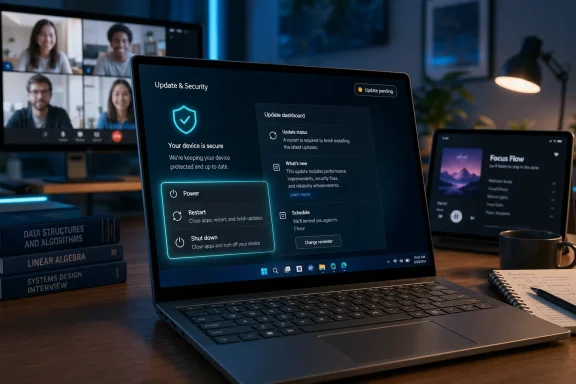
The headline change is deceptively simple. The Restart and Shut down options in the Power menu will remain available even when an update is pending, so users can choose to power off without being forced into an install flow at that moment. Microsoft is also adding more visible update information, extended pause options, and the ability to skip some updates earlier in setup. In other words, the company is trying to make Windows feel less coercive without making it less secure.
That matters because update behavior is not a niche issue. It shapes trust, productivity, and the perception of control over the entire operating system. On a consumer laptop, an intrusive reboot is annoying. On a business endpoint, it can disrupt a presentation, stall a customer session, or interrupt a managed deployment. Microsoft is signaling that it understands those pain points better than it did during the era when “update and restart” often felt like a demand rather than a choice.
It also matters because Microsoft’s broader Windows strategy is under pressure. Windows 10 support is nearing its end, and the company is pushing users toward newer releases and more secure defaults. The challenge is obvious: if the operating system becomes too aggressive about updates, it risks user backlash; if it becomes too lax, it risks falling behind on security. Microsoft’s new approach is an attempt to thread that needle.
The company has already been moving in a more user-friendly direction for some time. Earlier in 2026, Microsoft said it was improving Windows quality and making update timing more predictable, with clearer control over restarts and the ability to pause updates as long as needed. That language was important because it showed the new behavior was not a one-off tweak but part of a broader rethinking of how Windows should treat the person sitting in front of it.
The Windows Insider program has become the proving ground for that philosophy. The latest changes first appeared in the Experimental and Beta channels, which are now being reorganized as Microsoft reshapes how it tests features before they reach retail devices. That staging is significant: it gives Microsoft a way to measure whether more flexible update controls reduce complaints without creating a new class of support problems.
There is also a larger strategic backdrop. Windows 11 has become the company’s primary consumer and enterprise focus, while Windows 10 users face a shrinking support window. As the old operating system ages out, Microsoft must persuade holdouts that the newer platform is not just more secure, but also less obnoxious to live with. A gentler update experience is part of that sales pitch.
Windows has historically had to choose between convenience and security, but users often experienced that tradeoff as a binary they did not consent to. Microsoft’s new changes are an effort to make that tradeoff more transparent.
That distinction is crucial. A more polite update system is still an aggressive update system underneath.
The most visible change is the Power menu. With the update, Windows will always show standard Restart and Shut down options, even if an update is waiting in the background. That means a user can deliberately choose to power down without being pushed through installation first, which is a notable departure from the old “you can’t really leave until I’m done” style of Windows behavior.
Microsoft is also emphasizing update visibility. Rather than hiding timing behind vague prompts, it wants users to see more about what is available so they can make better decisions. That is a subtle but important design shift because it turns Windows Update from a passive system state into something closer to a dashboard. Less mystery, more agency is the core idea.
It is a classic interface problem. Small design decisions often decide whether policy feels helpful or hostile.
The deeper answer is that Microsoft needs Windows to feel modern, not merely managed. In a world of smartphones, cloud services, and always-on subscription software, users expect systems to respect context. A laptop that restarts itself at the wrong time looks archaic, even if the behavior is motivated by security. Microsoft is trying to drag Windows into a more adult relationship with its users.
There is also a defensive business reason. If the company can lower resistance to updates, it can increase patch compliance and reduce the number of devices stuck in risky states. That is especially important as security threats become more automated and more opportunistic. The goal is to make the easiest path also the safest path.
It suggests the company wants users to perceive updates as a benefit that happens with them, not something done to them.
Whether users believe it is another matter entirely.
That predictability matters more than it may appear. A laptop that always lets you power off without renegotiating the update state feels more trustworthy than one that ambushes you with a spinner and a forced reboot. The difference is not technical, it is psychological. Yet psychology shapes how people judge the whole operating system.
There is also a downstream benefit for casual users who rarely inspect update settings. Many people simply want their PC to behave like an appliance: open, close, and sleep when asked. By reducing the chance of surprise update behavior, Microsoft is making Windows feel a little more like a consumer device and a little less like a system administrator’s project.
That distinction will matter when people discover that more control is not the same as total control.
At the same time, enterprise IT will likely view the change through a more skeptical lens than consumers do. In managed environments, giving users more visible shutdown and pause choices is helpful only if policy enforcement remains strong and consistent. IT leaders will want to know whether the new behavior introduces any gaps between what users can do locally and what the organization expects centrally.
That is the classic enterprise tension: less user pain is good, but not if it opens the door to drift in compliance. Microsoft has to prove that flexibility and control can coexist with centralized governance. That is especially important for regulated industries, where patch windows are tightly controlled and auditability matters.
If not, organizations may need to reinforce update governance more aggressively.
That, in turn, can make enterprise rollout smoother and reduce the social friction around patch cycles.
It also gives Microsoft a useful contrast with the Windows 10 era. The older system remains familiar, but its lifecycle is narrowing, and support pressure is increasing. If Windows 11 can be positioned as the version that respects the user more while protecting the device better, the upgrade argument becomes more persuasive. That is especially relevant as Windows 10 support approaches its end.
The broader implication is that Microsoft is no longer treating the PC like a static desktop environment. It is treating it as a living endpoint that needs constant maintenance, but with a smoother human interface. That is a subtle but important shift in the identity of Windows itself. The machine is still managed, but the user is supposed to feel less managed.
If the changes work there, they can become part of the default Windows personality.
If Microsoft gets that right, it could ease migration pressure.
By improving update control, Microsoft is trying to erase one of the long-standing arguments against Windows: that the system is powerful but clumsy. If Windows feels more respectful, that weakens the rhetorical appeal of alternative ecosystems that market themselves as smoother or less intrusive. The real competition here is not just between operating systems, but between experiences of autonomy.
This also gives Microsoft a better answer when critics accuse Windows of being too paternalistic. The company can now say it has listened, adjusted, and still preserved the security posture it considers essential. That is a more credible position than simply insisting users should tolerate disruption because the patch matters.
That competitive pressure is healthy, even if it is invisible to most consumers.
That is a much harder standard to meet.
There is always a danger that making updates feel easier to defer also makes them easier to ignore. That is the classic downside of user control. If people are allowed to keep pushing things off, some will do so until the risk becomes material. Microsoft seems aware of this, which is why the company is not eliminating update pressure entirely. It is softening the edges, not removing the guardrails.
The challenge is that Windows is a huge, diverse ecosystem. A feature that works beautifully for one class of users may create compliance gaps for another. The company must calibrate update flexibility carefully so it does not undermine the very security gains the whole program is supposed to protect.
Microsoft is betting that people will use the flexibility responsibly.
It is also exactly the line Microsoft has to hold if it wants this change to be seen as progress rather than permissiveness.
If Windows feels considerate, Microsoft gains goodwill that spills over into the rest of the product line.
Microsoft will need to prove that the new freedom leads to better experiences without encouraging risky delay patterns.
The other thing to watch is whether Microsoft extends the same philosophy to more parts of the update journey. The current changes focus heavily on restarts, shutdowns, and setup behavior, but the broader issue is lifecycle control. Users may soon expect more visibility into update urgency, device readiness, and the impact of each patch before they click anything.
If Microsoft keeps moving in that direction, Windows Update could become less of a background nag and more of a genuine control panel. That would be a meaningful evolution for the platform, and one that could reshape how people talk about Windows for the next several years.
Source: ‘Shutdown, Restart’—Microsoft Changes Windows To Ease PC Users’ Frustrations
 Overview
Microsoft’s latest Windows Update changes are part product improvement, part public apology, and part strategic reset. In a blog post published on April 24, 2026, Windows insider Aria Hanson said the team had heard a consistent complaint from users: updates arrive at inconvenient times and people do not feel they have enough control over when they happen. Microsoft says the new behavior is rolling out first to Windows Insiders in Experimental and Beta, with broader release to follow.The headline change is deceptively simple. The Restart and Shut down options in the Power menu will remain available even when an update is pending, so users can choose to power off without being forced into an install flow at that moment. Microsoft is also adding more visible update information, extended pause options, and the ability to skip some updates earlier in setup. In other words, the company is trying to make Windows feel less coercive without making it less secure.
That matters because update behavior is not a niche issue. It shapes trust, productivity, and the perception of control over the entire operating system. On a consumer laptop, an intrusive reboot is annoying. On a business endpoint, it can disrupt a presentation, stall a customer session, or interrupt a managed deployment. Microsoft is signaling that it understands those pain points better than it did during the era when “update and restart” often felt like a demand rather than a choice.
It also matters because Microsoft’s broader Windows strategy is under pressure. Windows 10 support is nearing its end, and the company is pushing users toward newer releases and more secure defaults. The challenge is obvious: if the operating system becomes too aggressive about updates, it risks user backlash; if it becomes too lax, it risks falling behind on security. Microsoft’s new approach is an attempt to thread that needle.
Background
For years, Windows updates have lived at the intersection of user frustration and platform necessity. Microsoft needs to ship patches quickly because Windows is a prime target for attackers, and the company has repeatedly stressed that a secure baseline depends on keeping devices current. At the same time, forced restarts and opaque update timing have long been a source of irritation, especially when Windows decides a reboot is urgent at precisely the wrong time.The company has already been moving in a more user-friendly direction for some time. Earlier in 2026, Microsoft said it was improving Windows quality and making update timing more predictable, with clearer control over restarts and the ability to pause updates as long as needed. That language was important because it showed the new behavior was not a one-off tweak but part of a broader rethinking of how Windows should treat the person sitting in front of it.
The Windows Insider program has become the proving ground for that philosophy. The latest changes first appeared in the Experimental and Beta channels, which are now being reorganized as Microsoft reshapes how it tests features before they reach retail devices. That staging is significant: it gives Microsoft a way to measure whether more flexible update controls reduce complaints without creating a new class of support problems.
There is also a larger strategic backdrop. Windows 11 has become the company’s primary consumer and enterprise focus, while Windows 10 users face a shrinking support window. As the old operating system ages out, Microsoft must persuade holdouts that the newer platform is not just more secure, but also less obnoxious to live with. A gentler update experience is part of that sales pitch.
Why updates became a trust issue
The friction was never only about time. It was about agency. When a system restarts without clearly giving the user a practical alternative, it feels as if the platform owns the machine more than the owner does.Windows has historically had to choose between convenience and security, but users often experienced that tradeoff as a binary they did not consent to. Microsoft’s new changes are an effort to make that tradeoff more transparent.
Why this moment is different
This is not a cosmetic UX refresh. It is happening while Microsoft is still pushing hard on security baselines, cloud management, and faster patch cycles. That means the company is not backing away from updates; it is repackaging the experience around them.That distinction is crucial. A more polite update system is still an aggressive update system underneath.
What Microsoft Changed
Microsoft’s blog describes four main changes: the ability to skip updates during setup, the ability to extend update pauses repeatedly, always-available shut down and restart controls, and clearer information about pending updates. Those are small words for a major behavioral shift. Together, they reduce the chance that Windows will surprise the user at the exact moment they want to stop using the PC.The most visible change is the Power menu. With the update, Windows will always show standard Restart and Shut down options, even if an update is waiting in the background. That means a user can deliberately choose to power down without being pushed through installation first, which is a notable departure from the old “you can’t really leave until I’m done” style of Windows behavior.
Microsoft is also emphasizing update visibility. Rather than hiding timing behind vague prompts, it wants users to see more about what is available so they can make better decisions. That is a subtle but important design shift because it turns Windows Update from a passive system state into something closer to a dashboard. Less mystery, more agency is the core idea.
The user-facing changes in plain English
The practical changes can be boiled down to a few user wins:- Skip updates during initial setup instead of being forced through them.
- Pause updates longer and more flexibly than before.
- Shut down or restart on demand even with updates pending.
- See clearer update information before taking action.
Why “always available” matters
If a system keeps one path open—like a clean shutdown—then users feel in control even when Microsoft is still enforcing a security posture behind the scenes. That can reduce frustration without materially weakening patch compliance.It is a classic interface problem. Small design decisions often decide whether policy feels helpful or hostile.
Why Microsoft Is Doing This
The obvious answer is feedback. Microsoft says it has been reading user comments and direct verbatims, and that two complaints surfaced again and again: untimely updates and too little control over scheduling. That is not surprising, but it is important that the company is publicly acknowledging the pattern rather than pretending the issue is a fringe concern.The deeper answer is that Microsoft needs Windows to feel modern, not merely managed. In a world of smartphones, cloud services, and always-on subscription software, users expect systems to respect context. A laptop that restarts itself at the wrong time looks archaic, even if the behavior is motivated by security. Microsoft is trying to drag Windows into a more adult relationship with its users.
There is also a defensive business reason. If the company can lower resistance to updates, it can increase patch compliance and reduce the number of devices stuck in risky states. That is especially important as security threats become more automated and more opportunistic. The goal is to make the easiest path also the safest path.
Security by default, not security by force
Microsoft is explicitly tying these changes to its Secure Future Initiative, which frames device protection as a default condition rather than a forced behavior. That is a meaningful rhetorical move.It suggests the company wants users to perceive updates as a benefit that happens with them, not something done to them.
The message to skeptical users
Microsoft is basically saying: you still need the patching, but we will stop making the process feel punitive. That is a smarter line than insisting the old system was fine.Whether users believe it is another matter entirely.
What It Means for Consumer PCs
For home users, the change is mostly about peace of mind. People do not object to security updates in the abstract; they object to surprise interruptions that collide with work, entertainment, or battery anxiety. The new controls address that emotional layer directly by making shutdown and restart choices feel predictable.That predictability matters more than it may appear. A laptop that always lets you power off without renegotiating the update state feels more trustworthy than one that ambushes you with a spinner and a forced reboot. The difference is not technical, it is psychological. Yet psychology shapes how people judge the whole operating system.
There is also a downstream benefit for casual users who rarely inspect update settings. Many people simply want their PC to behave like an appliance: open, close, and sleep when asked. By reducing the chance of surprise update behavior, Microsoft is making Windows feel a little more like a consumer device and a little less like a system administrator’s project.
Everyday examples
A few common scenarios show why this matters:- A student can shut a laptop lid after class without worrying about a reboot trap.
- A parent can turn off a family PC after homework without a surprise patch session.
- A commuter can close a notebook on a train and save battery immediately.
- A home user can defer an update until they have time to deal with it properly.
The limits of consumer freedom
This is not a promise that updates become optional. Microsoft is still shaping behavior with reminders, timing, and default security settings. The company is giving users more control over the moment, not a veto over the patching model.That distinction will matter when people discover that more control is not the same as total control.
What It Means for Enterprise IT
Enterprise administrators will probably welcome the direction, even if they are not the primary audience for the new consumer-facing language. Businesses care about predictability above almost everything else, and update disruptions are costly when multiplied across a fleet of devices. Microsoft’s changes should reduce some of the friction that IT teams have had to manage through policy workarounds and user education.At the same time, enterprise IT will likely view the change through a more skeptical lens than consumers do. In managed environments, giving users more visible shutdown and pause choices is helpful only if policy enforcement remains strong and consistent. IT leaders will want to know whether the new behavior introduces any gaps between what users can do locally and what the organization expects centrally.
That is the classic enterprise tension: less user pain is good, but not if it opens the door to drift in compliance. Microsoft has to prove that flexibility and control can coexist with centralized governance. That is especially important for regulated industries, where patch windows are tightly controlled and auditability matters.
Why admins should care
For IT teams, the key question is whether these controls reduce help desk tickets without weakening policy. If the answer is yes, the changes could be a net win.If not, organizations may need to reinforce update governance more aggressively.
A better user experience can help deployment
There is a practical upside here. When users stop seeing updates as an enemy, they are less likely to delay, cancel, or complain about them.That, in turn, can make enterprise rollout smoother and reduce the social friction around patch cycles.
Why This Matters for Windows 11
This announcement reinforces a broader narrative around Windows 11: Microsoft wants the operating system to look more polished, more secure, and less intrusive than previous generations. The company has spent the last several years trying to persuade users that Windows 11 is not just a visual refresh, but a more disciplined platform. Better update behavior is a key part of that story.It also gives Microsoft a useful contrast with the Windows 10 era. The older system remains familiar, but its lifecycle is narrowing, and support pressure is increasing. If Windows 11 can be positioned as the version that respects the user more while protecting the device better, the upgrade argument becomes more persuasive. That is especially relevant as Windows 10 support approaches its end.
The broader implication is that Microsoft is no longer treating the PC like a static desktop environment. It is treating it as a living endpoint that needs constant maintenance, but with a smoother human interface. That is a subtle but important shift in the identity of Windows itself. The machine is still managed, but the user is supposed to feel less managed.
Windows 11 as the test bed
Windows 11 is where Microsoft can refine this balance before pushing it more broadly. The Insider channels make that possible.If the changes work there, they can become part of the default Windows personality.
The upgrade message
For users still sitting on Windows 10, the message is simple: the newer OS is not just newer, it is supposedly more humane. That may sound like marketing, but in operating system land, humane is a competitive feature.If Microsoft gets that right, it could ease migration pressure.
The Competitive Landscape
Microsoft is not making this change in a vacuum. Every major platform vendor now knows that people hate unpredictable interruptions. Apple, Google, and mobile OS designers all face similar tradeoffs, even if the details differ. The PC market is simply more visible because Windows remains so deeply embedded in home and business computing.By improving update control, Microsoft is trying to erase one of the long-standing arguments against Windows: that the system is powerful but clumsy. If Windows feels more respectful, that weakens the rhetorical appeal of alternative ecosystems that market themselves as smoother or less intrusive. The real competition here is not just between operating systems, but between experiences of autonomy.
This also gives Microsoft a better answer when critics accuse Windows of being too paternalistic. The company can now say it has listened, adjusted, and still preserved the security posture it considers essential. That is a more credible position than simply insisting users should tolerate disruption because the patch matters.
How rivals benefit, too
Improvement by Microsoft raises the baseline for everyone else. Once users learn to expect cleaner update behavior, they become less forgiving of platforms that still act bluntly.That competitive pressure is healthy, even if it is invisible to most consumers.
The new standard
The bar is no longer “updates happen.” The bar is “updates happen without hijacking the relationship between the user and the device.”That is a much harder standard to meet.
The Security Tradeoff
The most important question is whether more control means less protection. Microsoft’s answer is effectively no: the company is pairing flexibility with the promise that devices remain secure by design and by default. It is a reassuring phrase, but the real test will be whether users interpret the new freedom as permission to delay too long.There is always a danger that making updates feel easier to defer also makes them easier to ignore. That is the classic downside of user control. If people are allowed to keep pushing things off, some will do so until the risk becomes material. Microsoft seems aware of this, which is why the company is not eliminating update pressure entirely. It is softening the edges, not removing the guardrails.
The challenge is that Windows is a huge, diverse ecosystem. A feature that works beautifully for one class of users may create compliance gaps for another. The company must calibrate update flexibility carefully so it does not undermine the very security gains the whole program is supposed to protect.
Why delay can be dangerous
Delaying updates is fine in the short term, but it can create a larger backlog of security risk. The longer a device stays behind, the more exposure it accumulates.Microsoft is betting that people will use the flexibility responsibly.
The balance Microsoft is chasing
The ideal outcome is simple: fewer surprise interruptions, but no meaningful decline in patch adoption. That is a difficult line to hold.It is also exactly the line Microsoft has to hold if it wants this change to be seen as progress rather than permissiveness.
Strengths and Opportunities
Microsoft’s move has several clear strengths. It responds to real user pain, improves the sense of ownership people feel over their PCs, and fits neatly with a broader security narrative. It also gives the company a chance to repair some of the trust damage that built up around Windows Update over many years. Most importantly, it makes a strong point that better UX and stronger security do not have to be enemies.- More user trust because updates feel less like ambushes.
- Better productivity since restarts are less disruptive.
- Stronger adoption of Windows 11 through a more polished experience.
- Reduced support friction for consumers and IT departments.
- Cleaner messaging around security-by-default.
- Improved perception of Microsoft as responsive rather than coercive.
- A better test bed for future update and lifecycle policies.
A UX win with strategic value
This is not just a comfort feature. It is a brand feature.If Windows feels considerate, Microsoft gains goodwill that spills over into the rest of the product line.
Risks and Concerns
The biggest risk is that users interpret more control as a license to ignore updates until something breaks. Microsoft will need to monitor whether longer pauses and easier shutdowns produce a measurable drop in security posture. There is also the risk that enterprise admins see the changes as cosmetic unless policy controls remain firm and transparent.- Update deferral could increase exposure if users procrastinate.
- Enterprise policy conflicts could appear if local and managed controls diverge.
- Security messaging may be diluted if users focus on convenience over risk.
- Confusion is possible if people do not understand what is still mandatory.
- Rollout inconsistency could frustrate users if features appear unevenly.
- Support complexity may rise if update states become more variable.
- False expectations could form around total control when only partial control is being offered.
The hard part is behavior, not design
A polished interface does not automatically create good habits.Microsoft will need to prove that the new freedom leads to better experiences without encouraging risky delay patterns.
Looking Ahead
The next phase will be rollout discipline. Microsoft has said the changes are starting with Insiders in Experimental and Beta, which means the company will now watch how users react before deciding how quickly to widen availability. That staged approach suggests Microsoft understands the stakes: if the new behavior feels reliable, it can become a major Windows 11 quality-of-life improvement; if not, it may remain a niche adjustment.The other thing to watch is whether Microsoft extends the same philosophy to more parts of the update journey. The current changes focus heavily on restarts, shutdowns, and setup behavior, but the broader issue is lifecycle control. Users may soon expect more visibility into update urgency, device readiness, and the impact of each patch before they click anything.
If Microsoft keeps moving in that direction, Windows Update could become less of a background nag and more of a genuine control panel. That would be a meaningful evolution for the platform, and one that could reshape how people talk about Windows for the next several years.
- Rollout speed to retail Windows 11 devices.
- Whether user satisfaction rises in Insider feedback.
- Whether patch compliance remains strong as control increases.
- How enterprises adjust policies around local power and update choices.
- Whether Microsoft adds more transparency to update urgency and timing.
Source: ‘Shutdown, Restart’—Microsoft Changes Windows To Ease PC Users’ Frustrations
