

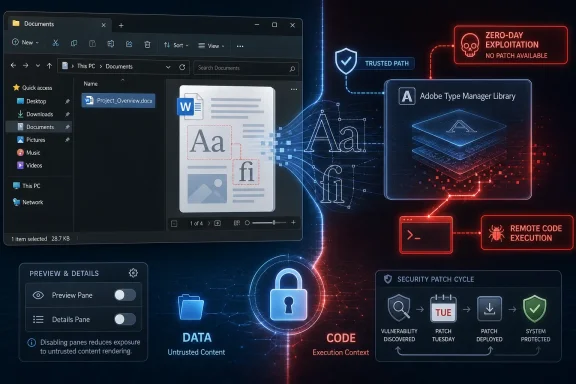
Microsoft disclosed on March 23, 2020, that attackers were exploiting two previously unknown Windows remote-code-execution vulnerabilities in the Adobe Type Manager Library, affecting supported Windows desktop and server releases, including Windows 10, before a security update was available. The flaw was not exotic in the way administrators usually fear; it lived in a trusted font-parsing path that could be reached through ordinary documents and even File Explorer preview behavior. That made the advisory more than another Patch Tuesday footnote. It was a reminder that Windows attack surface is not only network ports and browser engines, but also the quiet compatibility machinery that lets old file formats keep working.
The striking part of the advisory was not merely that Windows had another remote-code-execution issue. Windows has had plenty. The problem was that the vulnerable component sat in a rendering path so mundane that many users would never think of it as code execution territory at all.
Adobe Type Manager Library was there to help Windows handle and render font formats, including Adobe Type 1 PostScript fonts. That sounds like plumbing, and in one sense it is. But in a modern operating system, rendering is never just rendering; it is parsing attacker-controlled input, often before a user has made a deliberate trust decision.
That is why the Preview Pane detail mattered. Microsoft’s warning described an attack path in which a victim could be persuaded to open a specially crafted document or merely view it through Windows Explorer’s preview functionality. The user did not have to install a suspicious program or click through a classic executable prompt. A document could become the delivery vehicle.
The vulnerability was initially grouped under Microsoft’s ADV200006 advisory and later associated with CVE-2020-1020 and CVE-2020-0938. The distinction matters for vulnerability managers, but the practical lesson was simpler: two font-parsing bugs in a core Windows library were being exploited in limited, targeted attacks before Microsoft had a public patch ready.
Microsoft’s normal rhythm is predictable: security updates generally arrive on the second Tuesday of each month. That cadence is valuable because enterprises need testing windows, change-control boards, maintenance slots, rollback plans, and help-desk readiness. Predictability is part of the Windows security model.
But predictability is also a constraint when a bug is already being used. In March 2020, the advice was not “apply this update now.” It was “apply workarounds until an update exists.” That is a much more uncomfortable sentence for administrators, because workarounds are rarely free.
Disabling Explorer’s Preview Pane and Details Pane, turning off thumbnail rendering, disabling the WebClient service, and restricting or renaming the affected font driver were mitigation options, depending on the Windows version and environment. Each came with trade-offs. The point was not that these were impossible changes; the point was that they pushed security responsibility back onto local operational judgment.
That distinction should not be misread as a clean bill of health. Sandboxing changes the blast radius; it does not magically make a parser bug disappear. A vulnerable parser reachable through documents still deserves attention, especially in environments where users routinely handle files from email, shared drives, customer submissions, design workflows, or legacy document repositories.
The Windows 10 nuance also exposed a broader reality about Microsoft’s security architecture. The company had spent years moving dangerous processing into more constrained contexts, and those investments mattered here. Even when the same vulnerable logic existed, the surrounding platform could make exploitation less useful.
For Windows 7, Windows Server 2008, and other older platforms, the lesson was harsher. End-of-life software does not become less vulnerable just because it falls off the support calendar. If anything, it becomes more attractive: familiar internals, fewer architectural defenses, and less certainty that every affected installation will receive or deploy a fix.
The feature exists for good reasons. Users like to inspect documents quickly. Administrators browse shares. Legal, finance, design, support, and operations teams live inside folders full of files from other people. Preview functionality reduces friction in precisely the workflows that make Windows useful.
The vulnerability showed the other side of that bargain. If the preview path invokes complex parsers, then merely selecting or viewing a file can become a meaningful security event. Attackers have long understood this pattern, which is why document-rendering bugs remain so durable across platforms.
Microsoft’s workaround to disable the Preview Pane and Details Pane was therefore not a random hardening tip. It was an attempt to remove one of the lowest-friction trigger paths. Users could still make bad decisions, but the operating system would stop doing some of the attacker’s work automatically.
Disabling preview and thumbnail behavior reduces automatic exposure in Explorer. Disabling the WebClient service can reduce WebDAV-based remote attack paths. More aggressive changes to font-driver handling can shrink the attack surface further, but they may also break workflows, applications, or document rendering in ways that only become visible after deployment.
That is why administrators had to think in tiers. A locked-down server with no interactive browsing had a different risk profile from a receptionist’s workstation opening unsolicited attachments all day. A design department relying on font-heavy documents had a different operational tolerance from a kiosk PC or a jump box.
Microsoft’s mitigation guidance was useful because it acknowledged the interim reality. But it also transferred complexity to customers. The company could say which knobs reduced risk; only each organization could decide which knobs it could turn without disrupting work.
That mattered because document-based attacks thrive in messy human workflows. Remote workers receive files over email, messaging platforms, cloud shares, and ad hoc collaboration tools. They are more likely to use unmanaged networks, less likely to ask a colleague in person whether a file is legitimate, and more dependent on endpoint controls.
The vulnerability also arrived in the shadow of other Windows security anxieties from the same period, including SMB-related concerns. For admins, it was another reminder that security crises do not queue politely. They stack.
Microsoft’s decision to point toward the regular Update Tuesday cadence was defensible from a quality and ecosystem standpoint. Bad patches can be costly, especially across Windows’ enormous hardware and software diversity. But defenders facing active exploitation are rarely comforted by the elegance of release engineering.
That bargain has always had a security cost. Every parser for a legacy format is another place where malicious input can meet old assumptions. Every rendering path that tries to be helpful creates another pre-authentication or pre-click boundary that attackers can test.
The uncomfortable truth is that compatibility is one reason Windows remains dominant in business, and also one reason Windows remains such a rich target. Enterprises do not run Windows because it is minimal. They run it because it can accommodate decades of software, hardware, file formats, drivers, and line-of-business eccentricities.
Microsoft has spent years trying to wrap that complexity in sandboxing, exploit mitigations, code signing, virtualization-based security, Defender telemetry, and cloud-assisted detection. Those layers help. But a font parser bug demonstrates how much dangerous surface still exists beneath the user interface.
That hope is not a strategy. Microsoft has occasionally released emergency fixes for unsupported systems when the public risk was extraordinary, but no organization should build its risk model around vendor mercy. Unsupported Windows installations are not just missing patches; they are missing the predictable security relationship that lets administrators plan.
The font vulnerability made that visible because the attack path did not require some rare server configuration. It involved documents and rendering. That is exactly the sort of exposure that older desktops in small businesses, labs, factories, clinics, and back offices are likely to face.
The policy answer is boring but unavoidable. If a system cannot be upgraded, it should be isolated, stripped of unnecessary interactive use, denied exposure to untrusted documents where possible, and monitored as a special case. If it cannot be isolated or monitored, it is not a legacy asset. It is an unmanaged liability.
The initial advisory did that by focusing on attack scenarios, affected platforms, and mitigations. It made clear that exploitation was happening. It avoided promising an immediate out-of-band patch. It pointed administrators toward practical steps to reduce exposure.
That is not the same as saying the situation was satisfying. Users naturally want a patch, not a paragraph. Security teams want indicators, exploit details, and confidence about whether defenses will hold. Vendors often cannot provide all of that at disclosure time, especially when the bug is live.
The result is a familiar asymmetry. Attackers need one working path. Defenders need to reason across versions, user behavior, mitigations, business workflows, and incomplete information. The advisory was a map, but not a bridge.
Email attachment filtering, document detonation, endpoint detection, least privilege, and user training all mattered, but the Explorer preview angle deserved special attention because it could trigger parsing through routine browsing. Shared folders were especially relevant. A malicious file placed where users browse can become more dangerous if the operating system eagerly previews it.
Servers needed a different lens. Many Windows Server installations are not used for casual file browsing, and Server Core reduces interactive surface by design. But file servers, Remote Desktop hosts, admin workstations, and multi-user environments could still present meaningful exposure if users interactively handled documents.
The right response was layered. Disable unnecessary preview behavior. Limit WebDAV exposure where possible. Prioritize high-risk endpoints. Watch for suspicious document handling and child-process behavior. Then patch when Microsoft delivered the update, because mitigation debt should not become permanent configuration drift.
Out-of-band updates sound attractive when a zero-day is active. But Windows is not a single device with a single application stack. A rushed update can break authentication, printing, networking, line-of-business apps, remote access, or boot reliability across millions of machines. That risk is not theoretical; every large Windows shop has scars from patches that solved one emergency while creating another.
The monthly cadence gives enterprises a fighting chance to test. It also gives attackers a calendar. Microsoft’s challenge is deciding when the severity of a live bug outweighs the stability benefits of the normal process.
In this case, the company initially leaned on mitigations and the expected security update cycle. That was frustrating but not irrational. A fix for a low-level font-parsing component needed to be correct, not merely fast.
That boundary problem is not unique to Windows. Image libraries, video codecs, archive handlers, PDF engines, browser parsers, and thumbnail generators have all produced serious vulnerabilities. The more convenient the system becomes, the more background parsing it tends to do.
Windows, however, makes the issue especially consequential because it is deployed everywhere from consumer laptops to hospital desktops to industrial control support machines. A parsing bug in Windows is not just a local software defect. It is an ecosystem event.
The Adobe Type Manager Library issue was a case study in how legacy support, user convenience, and enterprise scale can combine into a security incident before anyone sees a ransom note or a worm. The absence of mass exploitation at disclosure does not make the lesson smaller. It makes the warning cheaper.
That makes the old font vulnerability feel less like an isolated historical episode and more like a preview of the next migration argument. The systems most likely to be difficult to upgrade are often the same systems least able to absorb a serious security incident. Legacy dependency and weak patch posture tend to travel together.
Windows 11, newer server releases, and Microsoft’s evolving security stack do not eliminate parser bugs. They do, however, continue the shift toward containment, virtualization-backed defenses, stricter defaults, and stronger endpoint telemetry. The value of those layers becomes visible precisely when a bug exists in a component users never think about.
The lesson for Windows shops is not to chase every advisory with the same level of panic. It is to understand which vulnerabilities undermine ordinary user behavior. A bug that turns previewing a file into an attack path belongs near the top of that list.
 A Font Bug Became a Windows Problem Because Windows Makes Fonts Ubiquitous
The striking part of the advisory was not merely that Windows had another remote-code-execution issue. Windows has had plenty. The problem was that the vulnerable component sat in a rendering path so mundane that many users would never think of it as code execution territory at all.Adobe Type Manager Library was there to help Windows handle and render font formats, including Adobe Type 1 PostScript fonts. That sounds like plumbing, and in one sense it is. But in a modern operating system, rendering is never just rendering; it is parsing attacker-controlled input, often before a user has made a deliberate trust decision.
That is why the Preview Pane detail mattered. Microsoft’s warning described an attack path in which a victim could be persuaded to open a specially crafted document or merely view it through Windows Explorer’s preview functionality. The user did not have to install a suspicious program or click through a classic executable prompt. A document could become the delivery vehicle.
The vulnerability was initially grouped under Microsoft’s ADV200006 advisory and later associated with CVE-2020-1020 and CVE-2020-0938. The distinction matters for vulnerability managers, but the practical lesson was simpler: two font-parsing bugs in a core Windows library were being exploited in limited, targeted attacks before Microsoft had a public patch ready.
The Zero-Day Window Was the Real Exposure
Security advisories often hide their drama behind careful wording. “Limited targeted attacks” sounds almost reassuring until one remembers that every mass-exploitation campaign starts as something smaller. The existence of exploitation before a fix meant defenders were not being asked to patch quickly; they were being asked to reduce risk without the usual final tool in the box.Microsoft’s normal rhythm is predictable: security updates generally arrive on the second Tuesday of each month. That cadence is valuable because enterprises need testing windows, change-control boards, maintenance slots, rollback plans, and help-desk readiness. Predictability is part of the Windows security model.
But predictability is also a constraint when a bug is already being used. In March 2020, the advice was not “apply this update now.” It was “apply workarounds until an update exists.” That is a much more uncomfortable sentence for administrators, because workarounds are rarely free.
Disabling Explorer’s Preview Pane and Details Pane, turning off thumbnail rendering, disabling the WebClient service, and restricting or renaming the affected font driver were mitigation options, depending on the Windows version and environment. Each came with trade-offs. The point was not that these were impossible changes; the point was that they pushed security responsibility back onto local operational judgment.
Windows 10 Was Safer, Not Immune in the Way Users Wanted
The reporting around the vulnerability often flattened the affected-product story into “all versions of Windows,” which was directionally true but operationally incomplete. Older Windows versions carried the more serious exposure. On supported Windows 10 releases and newer server versions, Microsoft indicated that exploitation would be constrained by AppContainer sandboxing and that remote code execution risk was significantly reduced compared with older systems.That distinction should not be misread as a clean bill of health. Sandboxing changes the blast radius; it does not magically make a parser bug disappear. A vulnerable parser reachable through documents still deserves attention, especially in environments where users routinely handle files from email, shared drives, customer submissions, design workflows, or legacy document repositories.
The Windows 10 nuance also exposed a broader reality about Microsoft’s security architecture. The company had spent years moving dangerous processing into more constrained contexts, and those investments mattered here. Even when the same vulnerable logic existed, the surrounding platform could make exploitation less useful.
For Windows 7, Windows Server 2008, and other older platforms, the lesson was harsher. End-of-life software does not become less vulnerable just because it falls off the support calendar. If anything, it becomes more attractive: familiar internals, fewer architectural defenses, and less certainty that every affected installation will receive or deploy a fix.
The Preview Pane Was Convenience With a Threat Model
File Explorer’s preview features are easy to dismiss as cosmetic. They are not. They represent a decision to automatically parse file content before the user fully opens it, and that decision has security consequences.The feature exists for good reasons. Users like to inspect documents quickly. Administrators browse shares. Legal, finance, design, support, and operations teams live inside folders full of files from other people. Preview functionality reduces friction in precisely the workflows that make Windows useful.
The vulnerability showed the other side of that bargain. If the preview path invokes complex parsers, then merely selecting or viewing a file can become a meaningful security event. Attackers have long understood this pattern, which is why document-rendering bugs remain so durable across platforms.
Microsoft’s workaround to disable the Preview Pane and Details Pane was therefore not a random hardening tip. It was an attempt to remove one of the lowest-friction trigger paths. Users could still make bad decisions, but the operating system would stop doing some of the attacker’s work automatically.
The Workarounds Were Sensible, but They Were Not a Patch
Temporary mitigations have a strange life in enterprise IT. They are sometimes treated as second-class fixes, but in a zero-day window they can be the only practical defense. The trick is remembering that a workaround is not the same thing as remediation.Disabling preview and thumbnail behavior reduces automatic exposure in Explorer. Disabling the WebClient service can reduce WebDAV-based remote attack paths. More aggressive changes to font-driver handling can shrink the attack surface further, but they may also break workflows, applications, or document rendering in ways that only become visible after deployment.
That is why administrators had to think in tiers. A locked-down server with no interactive browsing had a different risk profile from a receptionist’s workstation opening unsolicited attachments all day. A design department relying on font-heavy documents had a different operational tolerance from a kiosk PC or a jump box.
Microsoft’s mitigation guidance was useful because it acknowledged the interim reality. But it also transferred complexity to customers. The company could say which knobs reduced risk; only each organization could decide which knobs it could turn without disrupting work.
The Bug Arrived at the Worst Possible Moment for Patch Discipline
The timing amplified the story. March 2020 was not a normal month for IT departments. The rapid shift to remote work was already stretching VPN concentrators, endpoint management systems, help desks, and security teams. A document-triggered Windows zero-day landed just as more employees were working outside the comfortable assumptions of the corporate network.That mattered because document-based attacks thrive in messy human workflows. Remote workers receive files over email, messaging platforms, cloud shares, and ad hoc collaboration tools. They are more likely to use unmanaged networks, less likely to ask a colleague in person whether a file is legitimate, and more dependent on endpoint controls.
The vulnerability also arrived in the shadow of other Windows security anxieties from the same period, including SMB-related concerns. For admins, it was another reminder that security crises do not queue politely. They stack.
Microsoft’s decision to point toward the regular Update Tuesday cadence was defensible from a quality and ecosystem standpoint. Bad patches can be costly, especially across Windows’ enormous hardware and software diversity. But defenders facing active exploitation are rarely comforted by the elegance of release engineering.
Compatibility Debt Is Still Security Debt
The Adobe Type Manager Library issue was not really about Adobe as a company. It was about Windows’ long memory. Microsoft’s platform has historically carried support for old formats, old applications, and old workflows because that compatibility is part of the Windows value proposition.That bargain has always had a security cost. Every parser for a legacy format is another place where malicious input can meet old assumptions. Every rendering path that tries to be helpful creates another pre-authentication or pre-click boundary that attackers can test.
The uncomfortable truth is that compatibility is one reason Windows remains dominant in business, and also one reason Windows remains such a rich target. Enterprises do not run Windows because it is minimal. They run it because it can accommodate decades of software, hardware, file formats, drivers, and line-of-business eccentricities.
Microsoft has spent years trying to wrap that complexity in sandboxing, exploit mitigations, code signing, virtualization-based security, Defender telemetry, and cloud-assisted detection. Those layers help. But a font parser bug demonstrates how much dangerous surface still exists beneath the user interface.
Unsupported Windows Turned Risk Into a Policy Argument
The vulnerability also reopened the Windows 7 debate, which had officially exited support in January 2020 for most users. Organizations with Extended Security Updates had a path forward. Everyone else was in the familiar gray zone: technically exposed, operationally dependent, and often hoping that Microsoft would make an exception if the bug was bad enough.That hope is not a strategy. Microsoft has occasionally released emergency fixes for unsupported systems when the public risk was extraordinary, but no organization should build its risk model around vendor mercy. Unsupported Windows installations are not just missing patches; they are missing the predictable security relationship that lets administrators plan.
The font vulnerability made that visible because the attack path did not require some rare server configuration. It involved documents and rendering. That is exactly the sort of exposure that older desktops in small businesses, labs, factories, clinics, and back offices are likely to face.
The policy answer is boring but unavoidable. If a system cannot be upgraded, it should be isolated, stripped of unnecessary interactive use, denied exposure to untrusted documents where possible, and monitored as a special case. If it cannot be isolated or monitored, it is not a legacy asset. It is an unmanaged liability.
Microsoft’s Advisory Language Did What It Was Supposed to Do
It is easy to criticize vendor advisories for being dry, but dryness has a purpose. Microsoft needed to communicate urgency without providing attackers with unnecessary technical detail. It needed to tell enterprises enough to act without turning the advisory into a how-to guide.The initial advisory did that by focusing on attack scenarios, affected platforms, and mitigations. It made clear that exploitation was happening. It avoided promising an immediate out-of-band patch. It pointed administrators toward practical steps to reduce exposure.
That is not the same as saying the situation was satisfying. Users naturally want a patch, not a paragraph. Security teams want indicators, exploit details, and confidence about whether defenses will hold. Vendors often cannot provide all of that at disclosure time, especially when the bug is live.
The result is a familiar asymmetry. Attackers need one working path. Defenders need to reason across versions, user behavior, mitigations, business workflows, and incomplete information. The advisory was a map, but not a bridge.
The Defender’s Job Was to Reduce Reachability
For practical Windows administrators, the best reading of the vulnerability was not “panic about fonts.” It was “reduce the number of ways hostile font content can reach vulnerable parsing code.” That framing helps separate useful mitigations from security theater.Email attachment filtering, document detonation, endpoint detection, least privilege, and user training all mattered, but the Explorer preview angle deserved special attention because it could trigger parsing through routine browsing. Shared folders were especially relevant. A malicious file placed where users browse can become more dangerous if the operating system eagerly previews it.
Servers needed a different lens. Many Windows Server installations are not used for casual file browsing, and Server Core reduces interactive surface by design. But file servers, Remote Desktop hosts, admin workstations, and multi-user environments could still present meaningful exposure if users interactively handled documents.
The right response was layered. Disable unnecessary preview behavior. Limit WebDAV exposure where possible. Prioritize high-risk endpoints. Watch for suspicious document handling and child-process behavior. Then patch when Microsoft delivered the update, because mitigation debt should not become permanent configuration drift.
The Patch Tuesday Model Survived Because the Alternative Is Chaos
The advisory also highlighted a recurring tension in Windows security: should Microsoft ship emergency patches more often, or preserve the predictability of monthly updates? The answer depends on the bug, the exploitation, the affected population, and the expected risk of the fix itself.Out-of-band updates sound attractive when a zero-day is active. But Windows is not a single device with a single application stack. A rushed update can break authentication, printing, networking, line-of-business apps, remote access, or boot reliability across millions of machines. That risk is not theoretical; every large Windows shop has scars from patches that solved one emergency while creating another.
The monthly cadence gives enterprises a fighting chance to test. It also gives attackers a calendar. Microsoft’s challenge is deciding when the severity of a live bug outweighs the stability benefits of the normal process.
In this case, the company initially leaned on mitigations and the expected security update cycle. That was frustrating but not irrational. A fix for a low-level font-parsing component needed to be correct, not merely fast.
The Real Story Was Not the Bug, but the Boundary It Crossed
The vulnerability mattered because it crossed the mental boundary between “data” and “code.” Users think of fonts and documents as content. Operating systems know better. Content is parsed, parsing is code, and code that touches hostile input is attack surface.That boundary problem is not unique to Windows. Image libraries, video codecs, archive handlers, PDF engines, browser parsers, and thumbnail generators have all produced serious vulnerabilities. The more convenient the system becomes, the more background parsing it tends to do.
Windows, however, makes the issue especially consequential because it is deployed everywhere from consumer laptops to hospital desktops to industrial control support machines. A parsing bug in Windows is not just a local software defect. It is an ecosystem event.
The Adobe Type Manager Library issue was a case study in how legacy support, user convenience, and enterprise scale can combine into a security incident before anyone sees a ransom note or a worm. The absence of mass exploitation at disclosure does not make the lesson smaller. It makes the warning cheaper.
The Old Font Bug Still Teaches a Modern Windows Lesson
The immediate crisis around ADV200006 belongs to 2020, but the lesson has not aged out. Windows 10 is now itself approaching the end of its mainstream consumer life, and many organizations are again balancing upgrade costs, hardware eligibility, application compatibility, and security exposure.That makes the old font vulnerability feel less like an isolated historical episode and more like a preview of the next migration argument. The systems most likely to be difficult to upgrade are often the same systems least able to absorb a serious security incident. Legacy dependency and weak patch posture tend to travel together.
Windows 11, newer server releases, and Microsoft’s evolving security stack do not eliminate parser bugs. They do, however, continue the shift toward containment, virtualization-backed defenses, stricter defaults, and stronger endpoint telemetry. The value of those layers becomes visible precisely when a bug exists in a component users never think about.
The lesson for Windows shops is not to chase every advisory with the same level of panic. It is to understand which vulnerabilities undermine ordinary user behavior. A bug that turns previewing a file into an attack path belongs near the top of that list.
The Practical Memory Windows Admins Should Keep
The most useful thing about this episode is that it turns into policy cleanly. Administrators do not need to remember every font-parsing detail to carry the right lesson forward. They need to remember that automatic content handling deserves the same suspicion as obvious executable code.- A Windows component that renders documents, fonts, images, or previews should be treated as an attack surface, not as harmless user-interface plumbing.
- Preview and thumbnail features are productivity tools, but they can become liability multipliers when a parser vulnerability is under active exploitation.
- Windows 10’s sandboxing reduced the severity of this particular issue, but reduced severity is not the same as no required action.
- Unsupported Windows installations turn every serious advisory into a governance problem because patch availability can no longer be assumed.
- Temporary mitigations should be tracked like emergency changes and removed or revised after the real security update lands.
- The safest Windows environments are the ones that can quickly identify where vulnerable features are enabled, which users are exposed, and which systems cannot tolerate standard mitigations.
References
- Primary source: gadgetbridge.com
Published: 2026-06-17T05:40:15.596143
Microsoft exposed to a new Windows vulnerability: Attacking Windows supporting devices including Windows 10
The software technology giant Microsoft has revealed a new Windows vulnerability to be found in all the devices supported by previous Windows OS as well as Windows 10. www.gadgetbridge.com
- Related coverage: blog.qualys.com
Automatically Discover, Prioritize and Remediate Windows Adobe Type Manager Library Remote Code Execution Vulnerability (ADV200006) using Qualys VMDR® | Qualys
On March 23, Microsoft released zero day advisory ADV200006 to address two critical remote code execution vulnerabilities in Adobe Type Manager Library that…blog.qualys.com - Related coverage: redmondmag.com
Microsoft Warns of 'Critical' Flaw in Windows Preview Pane -- Redmondmag.com
Microsoft on Monday issued Security Advisory ADV200006 for a "Critical"-rated remote code execution vulnerability in both supported and unsupported Windows systems.redmondmag.com - Related coverage: techtarget.com
Microsoft Warns Hackers Targeting Unpatched RCE Windows Flaws | TechTarget
Microsoft is warning users and organizations that hackers are actively targeting vulnerabilities in Windows platforms; a successful remote code execution could let an attacker control the device.www.techtarget.com - Related coverage: mcpmag.com
Windows Preview Pane Hit with 'Critical' Remote Code Execution Flaw -- Microsoft Certified Professional Magazine Online
A "Critical"-rated remote code execution vulnerability in both supported and unsupported Windows systems has been exposed to "limited, targeted attacks," Microsoft warned in a security advisory this week.mcpmag.com - Related coverage: kaspersky.com
- Related coverage: techspot.com
Microsoft reports new zero-day vulnerability in Windows that is being actively exploited | TechSpot
Microsoft posted a new security advisory today (ADV200006), detailing what it's calling "Type 1 Font Parsing Remote Code Execution Vulnerability." They have given the vulnerability a "critical"...www.techspot.com - Related coverage: threatprotect.qualys.com
- Related coverage: arstechnica.com
Windows code-execution zeroday is under active exploit, Microsoft warns - Ars Technica
There's no patch available now. Here's what to do until Microsoft issues one.arstechnica.com - Related coverage: securityboulevard.com
Microsoft Released Out-of-Band Advisory – Windows Adobe Type Manager Library Remote Code Execution Vulnerability (ADV200006) - Security Boulevard
Today, Microsoft released an out-of-band security advisory ADV200006 to address two critical remote code execution vulnerabilities in Adobe Type Manager Library. Microsoft is also aware of limited, targeted attacks that attempt to leverage this vulnerability. The Vulnerability Microsoft Windows...securityboulevard.com - Related coverage: sentinelone.com
CVE-2020-0938: Windows 10 1507 Adobe Font Manager RCE Flaw
CVE-2020-0938 is a remote code execution vulnerability in Windows Adobe Type Manager Library. Learn about its impact, affected versions, and mitigation methods.www.sentinelone.com
- Related coverage: networkats.com
</rdf:Alt> </dc:title> <dc:description> <rdf:Alt> <rdf:li xml:lang="x-default"/> </rdf:Alt> </dc:description> <dc:creator> <rdf:Seq> <rdf:li>Thomas
</rdf:Alt> </dc:description> <dc:creator> <rdf:Seq> <rdf:li>Thomas Valadeznetworkats.com
