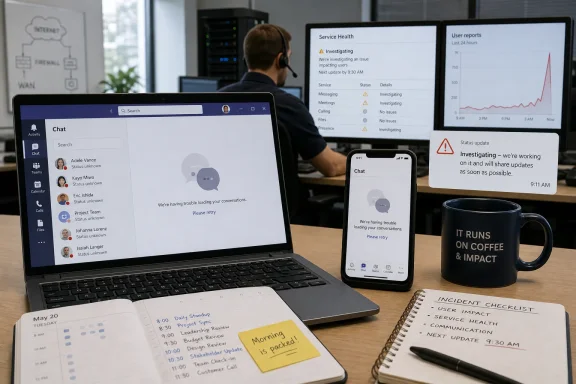
Microsoft Teams users reported presence and availability problems on Wednesday, June 17, 2026, with outage trackers and local news reports showing a morning spike that included 226 Downdetector reports at 9:08 a.m. and broader complaints that Teams was incorrectly showing users as offline. The incident was not, at least from the public evidence available early in the day, a clean “Teams is down everywhere” collapse. It was something more familiar to Microsoft 365 administrators: a partial failure in the layer that tells co-workers whether people are reachable, available, busy, away, or gone. That distinction matters because modern work does not merely depend on messages being delivered; it depends on everyone believing the collaboration graph is telling the truth.
The first mistake in reading a Teams outage is to imagine the only meaningful failure is a blank screen, a failed login, or a meeting that refuses to launch. Teams can be “up” in the narrow sense while still being operationally broken in the way users actually experience it. If presence is wrong, chat etiquette breaks, call routing becomes guesswork, and managers start asking why people appear offline while they are clearly working.
That appears to be the shape of the June 17 reports. One article framed the issue as Teams being “down,” citing 226 Downdetector reports at 9:08 a.m.; another described thousands of users seeing Microsoft status problems, with Teams showing people offline. Those are not identical symptoms, but they live in the same dependency stack: identity, presence, messaging, federation, notifications, calendar state, and service telemetry all trying to agree on a real-time view of work.
Presence is one of those features users barely notice until it lies. The little green dot is not decoration; it is an informal traffic signal that decides whether someone sends a chat, starts a call, waits for a reply, or escalates to email. When Teams tells the office that half the staff is offline, the app has not merely suffered a cosmetic fault. It has made the organization’s social map unreliable.
Microsoft’s collaboration suite has trained businesses to compress work into one surface. Chat, meetings, file sharing, calendars, channels, and external collaboration are now expected to behave like parts of a single nervous system. That integration is the product’s appeal, but it also means a modest fault can feel larger than its technical blast radius.
That makes a status outage a revealing failure mode. A message outage is obvious: the message does not send. A meeting outage is obvious: people cannot join. A presence outage is subtler and, in some ways, more corrosive, because users cannot immediately tell whether the system is broken or whether their colleagues are unavailable.
For administrators, this creates a difficult support pattern. The first wave of tickets may look like endpoint trouble: users clear cache, restart Teams, sign out, sign in, switch browsers, check VPNs, or reinstall the app. But if the same symptom appears across unrelated devices, networks, tenants, and geographies, the problem is no longer local. It is a service issue wearing the mask of a client issue.
The frustration is amplified because presence is semi-visible. A user may see themselves as available while colleagues see them as offline, or the web client may disagree with the desktop client, or a mobile device may preserve a stale state long after the user has returned to the keyboard. That ambiguity is exactly why outage trackers light up before official dashboards always tell a satisfying story.
Microsoft has built extensive service health tooling for Microsoft 365 administrators, but public visibility remains uneven. Consumer-facing status pages, admin center incident notices, social posts, and third-party outage trackers often tell different parts of the story at different speeds. When the problem is presence rather than total service failure, those gaps become more noticeable.
That limitation is not a reason to dismiss the signal. In the cloud era, user reports often surface faster than polished incident notices. Sysadmins have learned to triangulate: check tenant health, compare reports across regions, search admin communities, test multiple clients, and watch whether the complaint pattern is clustering around a single feature.
The Telegraph and Argus framing of “Teams showing offline” points toward a status or presence issue rather than a simple all-services-down event. That matters because Teams is a container for many separate service experiences. Users may be able to send messages while appearing offline, or join meetings while status indicators fail, or access files while presence updates stall.
A public “Teams down” headline is therefore both understandable and imprecise. To the user trying to coordinate a workday, Teams is down if Teams cannot be trusted. To an engineer, the distinction between message transport and presence propagation is crucial. Both perspectives are valid; the gap between them is where enterprise communication gets messy.
This is also why support teams should resist the urge to treat every incident as a device hygiene problem. Clearing cache and restarting the app are reasonable first moves for isolated failures. They become theater when the symptom is moving through entire organizations.
That integration is valuable when it works. It means a document can move from chat to meeting to co-authoring session without leaving the Microsoft cloud. It means identity, retention, search, eDiscovery, and security policies can follow the conversation. For many enterprises, Teams is less an app than a user interface for Microsoft 365 itself.
But integration has a cost: the user cannot always tell which part has failed. A Teams presence problem may feel like a Teams outage even if the underlying dependency lives elsewhere. A calendar-related status bug may look like a chat issue. A regional Microsoft 365 degradation may appear to users as random Teams weirdness.
This is not unique to Microsoft. Slack, Google Workspace, Zoom, Atlassian, and other cloud collaboration stacks all face similar dependency problems. The difference is that Teams has become embedded in organizations that already standardized on Windows, Office, Exchange, SharePoint, Entra ID, Intune, and Defender. When Teams stumbles, it is rarely just an app having a bad morning; it is the Microsoft productivity estate reminding the business how centralized it has become.
For WindowsForum readers, that is the practical takeaway. A Teams status incident is not just a nuisance for office workers. It is a test of how much your organization has placed behind one identity plane, one admin center, one vendor dashboard, and one collaboration surface.
The reason is simple: official service health is authoritative but not always immediate, complete, or phrased in user language. An admin dashboard may say Microsoft is investigating impact to a subset of users, while the help desk is already drowning in tickets from employees who appear offline in the middle of customer calls. The timing mismatch creates a credibility problem for IT.
Users do not care whether the incident has an ID yet. They care that their boss thinks they are offline, their meeting host cannot see them as available, or their colleague is assuming silence means neglect. Presence problems become interpersonal problems quickly, and IT is the translator stuck between human expectations and cloud service language.
That is why administrators increasingly run their own correlation process. They compare Microsoft’s service health with synthetic monitoring, user reports, peer communities, third-party status aggregators, and direct client tests. In a world where “cloud” is supposed to mean someone else runs the servers, internal IT still ends up doing the incident analysis.
There is an uncomfortable truth here for Microsoft: customers often learn to trust the crowd before the vendor. Not because the crowd knows the root cause, but because the crowd confirms the symptom. When dozens or thousands of users report the same thing at the same time, that has operational value even before a formal advisory arrives.
A modern workplace runs on assumptions. If someone is green, you can interrupt. If someone is red, you wait. If someone is away, you send a note and lower your expectations. If someone is offline, you may escalate, delay, or assume they are not working.
When Teams gets that wrong, it injects uncertainty into every small decision. A distributed team can tolerate a brief chat delay if everyone understands the delay. It struggles more when the system misrepresents availability, because people start building narratives around bad data. The damage is not just technical; it is social.
This is particularly acute in hybrid and remote work environments, where presence indicators have become a proxy for visibility. That proxy was always flawed, and many workers rightly resent the way green dots became informal productivity surveillance. But the fact that presence is an imperfect measure does not make its failure harmless. If an organization has allowed presence to shape expectations, a presence outage becomes an organizational outage.
The irony is sharp. Teams status indicators are too crude to measure work fairly, yet important enough to disrupt work when they fail. That contradiction is baked into much of modern enterprise software.
But during a service-side incident, the cache ritual can waste precious time. If dozens of users across multiple locations all start showing offline at the same time, the local endpoint is unlikely to be the primary cause. The right move is to verify scope before prescribing individual remediation.
A disciplined support response starts with pattern recognition. Are web, desktop, and mobile clients all affected? Are users in multiple tenants reporting the same symptom? Does presence disagree between what users see and what colleagues see? Are messages still moving? Are meetings still joinable? Is Outlook calendar state involved?
Those questions help separate annoying client weirdness from service degradation. They also help write a better internal advisory. “Some users may appear offline in Teams even while chat and meetings continue to function” is far more useful than “Teams is down,” especially when business teams are deciding whether to postpone meetings or move to alternate channels.
For administrators, the goal is not to produce a perfect root-cause analysis before Microsoft does. The goal is to reduce confusion. If the office knows the symptom is widespread, users stop reinstalling clients and managers stop treating the green dot as gospel.
A fast, precise incident note can prevent thousands of unnecessary support actions. A vague or delayed notice does the opposite. If users believe something is broken and the official dashboard says everything is fine, IT becomes the credibility buffer. That is a bad place for enterprise customers to live.
Microsoft has improved its service communications over the years, but Microsoft 365 remains a sprawling estate. Different services have different dashboards, tenant-specific incidents may not be visible to all users, and public status pages do not always mirror admin center detail. Teams compounds the problem because it sits across so many dependencies.
The June 17 reports show the need for sharper language around partial degradation. “Teams down” is too broad, but “presence status issue” may sound too small to executives who just watched a morning of coordination go sideways. The best incident language bridges those worlds: it describes what users see, what still works, what is being investigated, and what administrators should avoid wasting time on.
This is not merely a public relations concern. During an outage, bad information increases load. Users retry, sign out, open tickets, switch networks, restart devices, and flood support channels. Better communication is a mitigation tool.
The business continuity response should be proportionate. No one needs to declare disaster recovery because a green dot lies for an hour. But an organization that relies heavily on Teams should know how to move essential coordination elsewhere when Teams becomes ambiguous.
That may mean keeping email as the formal channel for decisions during an incident. It may mean using phone bridges for critical meetings. It may mean telling managers not to infer availability from Teams status until the issue clears. These are not glamorous controls, but they prevent a technical hiccup from becoming a workplace misunderstanding.
There is also a security angle. During collaboration outages, users are more likely to accept unusual workarounds: personal messaging apps, consumer file-sharing links, unsanctioned meeting platforms, or rushed credential prompts. Attackers do not need to cause the outage to exploit the confusion around one. IT should treat incident communication as a security control as well as an operational one.
For Windows-heavy environments, the dependency chain is especially tight. Teams often launches at startup, authenticates through Microsoft identity, syncs with Outlook, stores files in SharePoint or OneDrive, and is managed through Microsoft’s broader endpoint and compliance stack. That convenience is real. So is the concentration risk.
Microsoft wants Teams to be the operating layer for work. It has pushed the product from pandemic-era meeting room into a broader collaboration and workflow hub. It has tied Teams into Microsoft 365 licensing, Copilot ambitions, security policy, telephony, and frontline worker scenarios. That strategy raises the stakes for every partial failure.
If Teams is the place where work appears, then status is the place where work is interpreted. A broken presence signal may not stop a document from opening, but it changes how people behave around that document. It affects responsiveness, escalation, customer service, and managerial judgment.
That means Microsoft should be judged not only on whether chat messages eventually deliver, but on whether the collaboration environment remains trustworthy under stress. Users do not experience Teams as a collection of microservices. They experience it as the office. When the office says everyone is offline, the office has a problem.
Enterprises should draw the same lesson. If presence indicators influence workplace expectations, organizations need policies that acknowledge their fragility. The green dot should never be treated as a time clock, a productivity score, or a definitive availability record. Incidents like this make that obvious, but the principle applies even on normal days.
 Teams Did Not Need to Disappear to Break the Workday
The first mistake in reading a Teams outage is to imagine the only meaningful failure is a blank screen, a failed login, or a meeting that refuses to launch. Teams can be “up” in the narrow sense while still being operationally broken in the way users actually experience it. If presence is wrong, chat etiquette breaks, call routing becomes guesswork, and managers start asking why people appear offline while they are clearly working.That appears to be the shape of the June 17 reports. One article framed the issue as Teams being “down,” citing 226 Downdetector reports at 9:08 a.m.; another described thousands of users seeing Microsoft status problems, with Teams showing people offline. Those are not identical symptoms, but they live in the same dependency stack: identity, presence, messaging, federation, notifications, calendar state, and service telemetry all trying to agree on a real-time view of work.
Presence is one of those features users barely notice until it lies. The little green dot is not decoration; it is an informal traffic signal that decides whether someone sends a chat, starts a call, waits for a reply, or escalates to email. When Teams tells the office that half the staff is offline, the app has not merely suffered a cosmetic fault. It has made the organization’s social map unreliable.
Microsoft’s collaboration suite has trained businesses to compress work into one surface. Chat, meetings, file sharing, calendars, channels, and external collaboration are now expected to behave like parts of a single nervous system. That integration is the product’s appeal, but it also means a modest fault can feel larger than its technical blast radius.
The Green Dot Became Infrastructure
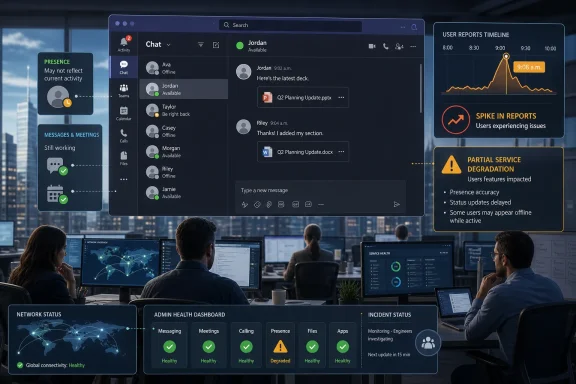
Presence used to be a convenience feature inherited from instant messaging. In Teams, it has become infrastructure. It is fed by activity signals, calendar data, call state, device state, manual user settings, and sometimes the messy reality of multiple signed-in clients competing for authority.That makes a status outage a revealing failure mode. A message outage is obvious: the message does not send. A meeting outage is obvious: people cannot join. A presence outage is subtler and, in some ways, more corrosive, because users cannot immediately tell whether the system is broken or whether their colleagues are unavailable.
For administrators, this creates a difficult support pattern. The first wave of tickets may look like endpoint trouble: users clear cache, restart Teams, sign out, sign in, switch browsers, check VPNs, or reinstall the app. But if the same symptom appears across unrelated devices, networks, tenants, and geographies, the problem is no longer local. It is a service issue wearing the mask of a client issue.
The frustration is amplified because presence is semi-visible. A user may see themselves as available while colleagues see them as offline, or the web client may disagree with the desktop client, or a mobile device may preserve a stale state long after the user has returned to the keyboard. That ambiguity is exactly why outage trackers light up before official dashboards always tell a satisfying story.
Microsoft has built extensive service health tooling for Microsoft 365 administrators, but public visibility remains uneven. Consumer-facing status pages, admin center incident notices, social posts, and third-party outage trackers often tell different parts of the story at different speeds. When the problem is presence rather than total service failure, those gaps become more noticeable.
Downdetector Is a Smoke Alarm, Not a Root-Cause Report
The 226 reports cited at 9:08 a.m. are useful because they provide a timestamped signal, not because they prove the full scale of the incident. Downdetector measures user-reported pain, not service-side telemetry. A spike tells us people are hitting a common symptom; it does not tell us whether the underlying cause is authentication, Teams presence, Exchange calendar integration, regional routing, Microsoft Graph, or a recent service change.That limitation is not a reason to dismiss the signal. In the cloud era, user reports often surface faster than polished incident notices. Sysadmins have learned to triangulate: check tenant health, compare reports across regions, search admin communities, test multiple clients, and watch whether the complaint pattern is clustering around a single feature.
The Telegraph and Argus framing of “Teams showing offline” points toward a status or presence issue rather than a simple all-services-down event. That matters because Teams is a container for many separate service experiences. Users may be able to send messages while appearing offline, or join meetings while status indicators fail, or access files while presence updates stall.
A public “Teams down” headline is therefore both understandable and imprecise. To the user trying to coordinate a workday, Teams is down if Teams cannot be trusted. To an engineer, the distinction between message transport and presence propagation is crucial. Both perspectives are valid; the gap between them is where enterprise communication gets messy.
This is also why support teams should resist the urge to treat every incident as a device hygiene problem. Clearing cache and restarting the app are reasonable first moves for isolated failures. They become theater when the symptom is moving through entire organizations.
Microsoft 365’s Strength Is Also Its Single Point of Anxiety
Teams sits inside Microsoft 365, and that placement is the whole strategic bet. Microsoft does not sell Teams merely as a chat client. It sells Teams as the front door to meetings, Office files, SharePoint content, Outlook calendar state, telephony, compliance controls, Copilot experiences, and a growing collection of workflow integrations.That integration is valuable when it works. It means a document can move from chat to meeting to co-authoring session without leaving the Microsoft cloud. It means identity, retention, search, eDiscovery, and security policies can follow the conversation. For many enterprises, Teams is less an app than a user interface for Microsoft 365 itself.
But integration has a cost: the user cannot always tell which part has failed. A Teams presence problem may feel like a Teams outage even if the underlying dependency lives elsewhere. A calendar-related status bug may look like a chat issue. A regional Microsoft 365 degradation may appear to users as random Teams weirdness.
This is not unique to Microsoft. Slack, Google Workspace, Zoom, Atlassian, and other cloud collaboration stacks all face similar dependency problems. The difference is that Teams has become embedded in organizations that already standardized on Windows, Office, Exchange, SharePoint, Entra ID, Intune, and Defender. When Teams stumbles, it is rarely just an app having a bad morning; it is the Microsoft productivity estate reminding the business how centralized it has become.
For WindowsForum readers, that is the practical takeaway. A Teams status incident is not just a nuisance for office workers. It is a test of how much your organization has placed behind one identity plane, one admin center, one vendor dashboard, and one collaboration surface.
The Admin Center Is Necessary, But It Is Not Sufficient
Microsoft’s official guidance for service health points administrators to the Microsoft 365 admin center, where tenant-specific incidents and advisories are supposed to appear. That is the right place to start. It is also not the only place admins end up looking during an incident.The reason is simple: official service health is authoritative but not always immediate, complete, or phrased in user language. An admin dashboard may say Microsoft is investigating impact to a subset of users, while the help desk is already drowning in tickets from employees who appear offline in the middle of customer calls. The timing mismatch creates a credibility problem for IT.
Users do not care whether the incident has an ID yet. They care that their boss thinks they are offline, their meeting host cannot see them as available, or their colleague is assuming silence means neglect. Presence problems become interpersonal problems quickly, and IT is the translator stuck between human expectations and cloud service language.
That is why administrators increasingly run their own correlation process. They compare Microsoft’s service health with synthetic monitoring, user reports, peer communities, third-party status aggregators, and direct client tests. In a world where “cloud” is supposed to mean someone else runs the servers, internal IT still ends up doing the incident analysis.
There is an uncomfortable truth here for Microsoft: customers often learn to trust the crowd before the vendor. Not because the crowd knows the root cause, but because the crowd confirms the symptom. When dozens or thousands of users report the same thing at the same time, that has operational value even before a formal advisory arrives.
Presence Bugs Are Productivity Bugs With a Human Face
It is tempting to treat a status indicator failure as a small problem compared with lost email, failed authentication, or unavailable documents. That is the wrong lens. Presence is a coordination protocol, and coordination is the real product Teams sells.A modern workplace runs on assumptions. If someone is green, you can interrupt. If someone is red, you wait. If someone is away, you send a note and lower your expectations. If someone is offline, you may escalate, delay, or assume they are not working.
When Teams gets that wrong, it injects uncertainty into every small decision. A distributed team can tolerate a brief chat delay if everyone understands the delay. It struggles more when the system misrepresents availability, because people start building narratives around bad data. The damage is not just technical; it is social.
This is particularly acute in hybrid and remote work environments, where presence indicators have become a proxy for visibility. That proxy was always flawed, and many workers rightly resent the way green dots became informal productivity surveillance. But the fact that presence is an imperfect measure does not make its failure harmless. If an organization has allowed presence to shape expectations, a presence outage becomes an organizational outage.
The irony is sharp. Teams status indicators are too crude to measure work fairly, yet important enough to disrupt work when they fail. That contradiction is baked into much of modern enterprise software.
The Client Cache Ritual Still Has Its Place, But Not as a First Principle
Whenever Teams misbehaves, the internet’s muscle memory is to clear cache, restart the client, try the web app, update Teams, reboot Windows, and blame the VPN. Those steps can solve real problems. Teams is a complex client with a history of local state oddities, account switching confusion, and stale data.But during a service-side incident, the cache ritual can waste precious time. If dozens of users across multiple locations all start showing offline at the same time, the local endpoint is unlikely to be the primary cause. The right move is to verify scope before prescribing individual remediation.
A disciplined support response starts with pattern recognition. Are web, desktop, and mobile clients all affected? Are users in multiple tenants reporting the same symptom? Does presence disagree between what users see and what colleagues see? Are messages still moving? Are meetings still joinable? Is Outlook calendar state involved?
Those questions help separate annoying client weirdness from service degradation. They also help write a better internal advisory. “Some users may appear offline in Teams even while chat and meetings continue to function” is far more useful than “Teams is down,” especially when business teams are deciding whether to postpone meetings or move to alternate channels.
For administrators, the goal is not to produce a perfect root-cause analysis before Microsoft does. The goal is to reduce confusion. If the office knows the symptom is widespread, users stop reinstalling clients and managers stop treating the green dot as gospel.
Outage Communication Has Become Part of the Product
Cloud vendors often talk about reliability in terms of uptime, redundancy, and service-level commitments. Those things matter. But during incidents, communication is part of reliability too.A fast, precise incident note can prevent thousands of unnecessary support actions. A vague or delayed notice does the opposite. If users believe something is broken and the official dashboard says everything is fine, IT becomes the credibility buffer. That is a bad place for enterprise customers to live.
Microsoft has improved its service communications over the years, but Microsoft 365 remains a sprawling estate. Different services have different dashboards, tenant-specific incidents may not be visible to all users, and public status pages do not always mirror admin center detail. Teams compounds the problem because it sits across so many dependencies.
The June 17 reports show the need for sharper language around partial degradation. “Teams down” is too broad, but “presence status issue” may sound too small to executives who just watched a morning of coordination go sideways. The best incident language bridges those worlds: it describes what users see, what still works, what is being investigated, and what administrators should avoid wasting time on.
This is not merely a public relations concern. During an outage, bad information increases load. Users retry, sign out, open tickets, switch networks, restart devices, and flood support channels. Better communication is a mitigation tool.
Windows Shops Need a Plan for Collaboration Brownouts
Most organizations have some plan for catastrophic outages. Fewer have a plan for collaboration brownouts, where the main tool partly works but cannot be fully trusted. Teams presence failures live in that middle ground.The business continuity response should be proportionate. No one needs to declare disaster recovery because a green dot lies for an hour. But an organization that relies heavily on Teams should know how to move essential coordination elsewhere when Teams becomes ambiguous.
That may mean keeping email as the formal channel for decisions during an incident. It may mean using phone bridges for critical meetings. It may mean telling managers not to infer availability from Teams status until the issue clears. These are not glamorous controls, but they prevent a technical hiccup from becoming a workplace misunderstanding.
There is also a security angle. During collaboration outages, users are more likely to accept unusual workarounds: personal messaging apps, consumer file-sharing links, unsanctioned meeting platforms, or rushed credential prompts. Attackers do not need to cause the outage to exploit the confusion around one. IT should treat incident communication as a security control as well as an operational one.
For Windows-heavy environments, the dependency chain is especially tight. Teams often launches at startup, authenticates through Microsoft identity, syncs with Outlook, stores files in SharePoint or OneDrive, and is managed through Microsoft’s broader endpoint and compliance stack. That convenience is real. So is the concentration risk.
Microsoft’s Collaboration Stack Is Now Too Important for Fuzzy Signals
The bigger story is not that Teams had reports of trouble on a Wednesday morning. Cloud services have incidents. The bigger story is that the status layer of a collaboration platform has become business-critical while still being treated, culturally, like a lightweight UI feature.Microsoft wants Teams to be the operating layer for work. It has pushed the product from pandemic-era meeting room into a broader collaboration and workflow hub. It has tied Teams into Microsoft 365 licensing, Copilot ambitions, security policy, telephony, and frontline worker scenarios. That strategy raises the stakes for every partial failure.
If Teams is the place where work appears, then status is the place where work is interpreted. A broken presence signal may not stop a document from opening, but it changes how people behave around that document. It affects responsiveness, escalation, customer service, and managerial judgment.
That means Microsoft should be judged not only on whether chat messages eventually deliver, but on whether the collaboration environment remains trustworthy under stress. Users do not experience Teams as a collection of microservices. They experience it as the office. When the office says everyone is offline, the office has a problem.
Enterprises should draw the same lesson. If presence indicators influence workplace expectations, organizations need policies that acknowledge their fragility. The green dot should never be treated as a time clock, a productivity score, or a definitive availability record. Incidents like this make that obvious, but the principle applies even on normal days.
The Morning’s Glitch Leaves a Larger Map for IT
The concrete facts are narrow, but the operational lesson is broad. Reports on June 17 pointed to Teams availability and status trouble, including a Downdetector spike and complaints that users were appearing offline. The early public record did not establish a root cause, a final duration, or a confirmed universal outage. That uncertainty is itself part of the story.- Teams can be operationally impaired even when messages, meetings, or files are not completely unavailable.
- A wrong presence state can disrupt coordination because users and managers treat availability indicators as real-time signals.
- Downdetector and social reports are useful early warnings, but they do not identify root cause or tenant-specific impact.
- Microsoft 365 administrators should check official service health while also validating symptoms across clients, networks, and users.
- Internal incident messages should describe the visible symptom clearly, especially when the issue is partial rather than a full outage.
- Organizations should avoid treating Teams presence as a definitive measure of whether someone is working or reachable.
References
- Primary source: el-balad.com
Published: 2026-06-17T10:02:09.536478
Microsoft Teams Down as 226 Reports Hit Downdetector at 9:08 a.m. - El-Balad.com
Users were reporting teams down issues with the Microsoft Teams app at 9:08 a.m. Downdetector showed 226 reports tied to the app not working. Microsoft Teams sits inside Microsoft 365, so the disruption reaches chat, video conferencing, and file sharing in one place.226 Reports at 9:08 a.m.The...www.el-balad.com - Independent coverage: Telegraph and Argus
Published: Wed, 17 Jun 2026 09:36:54 GMT
Is Teams down? Microsoft users report status issues today | Bradford Telegraph and Argus
Thousands of users are reporting issues with Microsoft Teams this morning (Wednesday, June 17).www.thetelegraphandargus.co.uk - Official source: learn.microsoft.com
How to check Microsoft 365 service health - Microsoft 365 Enterprise | Microsoft Learn
View the health status of Microsoft 365 services before you call support to see if there's an active service interruption.learn.microsoft.com - Related coverage: windowscentral.com
"We’ve confirmed service health has returned to normal": Microsoft 365 and Outlook are back up and running | Windows Central
If you're just sitting down to your desk, you may not be able to use Outlook or Microsoft 365.www.windowscentral.com - Related coverage: isdown.app
Status Page - Microsoft 365
Get the latest status updates - Check the latest Microsoft 365 incidents and outage. isdown.app
- Related coverage: tomsguide.com
Microsoft outage now 'resolved' — latest updates as 365, Outlook and Teams return | Tom's Guide
Everything you need to know about the major Microsoft outagewww.tomsguide.com
- Official source: status.cloud.microsoft
Microsoft service health status
status.cloud.microsoft
- Related coverage: status.ndus.edu

Intermittent Issues with SharePoint, Teams, and M365 Admin Center | March 2026 | History | NDUS CTS Status
User Impact: Some users may notice they are unable to access SharePoint sites, Teams, and Microsoft 365 admin...
status.ndus.edu
- Related coverage: 247livesupport.biz
- Official source: connectivity.m365.cloud.microsoft
Microsoft 365 network connectivity test
This web site tests your network connectivity to Microsoft 365 and shares a test report with your administratorconnectivity.m365.cloud.microsoft - Related coverage: status.is.oregonstate.edu
IS Status Dashboard
Details and updates about the Microsoft 365 Service Degradation incident that occurred on Thursday 22nd January 2026 11:52:00status.is.oregonstate.edu - Related coverage: escapistmagazine.com
Xbox Network Down as Players Report Outage - The Escapist
Xbox Network appears to be down as players report login, connection, and game launch issues across console and PC. www.escapistmagazine.com