
Microsoft Teams suffered a confirmed service incident on Wednesday, June 17, 2026, with users in the UK and parts of Europe reporting incorrect presence information while Microsoft investigated incident TM1394359 through the Microsoft 365 admin center. This was not the kind of outage that necessarily stops meetings from launching or chats from sending. It was the subtler, more corrosive kind: the collaboration layer told colleagues the wrong story about who was working, available, or missing. For a product whose value depends on ambient trust, a broken status light is not cosmetic.
The immediate symptom was simple enough to describe: Teams showed users as offline, away, or otherwise unavailable when they were not. Downdetector reports climbed into the thousands in the UK during the morning, while admins and users on social platforms compared notes on presence indicators that no longer matched reality. Microsoft’s own acknowledgement narrowed the issue to incorrect presence status information rather than a total Teams blackout.
That distinction matters, but it should not be used to minimize the disruption. In an office, a person at their desk is visible. In a hybrid workplace, the Teams presence indicator has become a proxy for the same social signal. When that signal fails, the app may still be technically “up,” but the workplace built around it starts misfiring.
Presence is one of those features that looks trivial until it breaks. It governs whether a manager sends a nudge, whether a support engineer escalates, whether a call is transferred, whether a colleague assumes silence is neglect. Microsoft Teams is not merely a chat client; it is a traffic-control system for work. On June 17, the lights did not go out, but some of them turned the wrong color.
The reports also highlight a recurring weakness in cloud status communication. Third-party outage trackers can show a visible spike before vendor dashboards give ordinary users a satisfying explanation. Microsoft 365 admins may see incident IDs and service-health notes, while everyone else sees hearsay, screenshots, and a rising sense that their own device is lying to them.
That creates a false troubleshooting loop. Users restart the desktop client, toggle their status manually, switch from Wi-Fi to mobile tethering, try the browser version, or wonder whether their employer has changed a policy. Help desks receive tickets that look local until the volume and geography reveal a pattern. The first hour of such an incident is often spent proving that it is not the user’s laptop.
This is where Teams’ centrality becomes a liability. The app now combines chat, meetings, calling, file collaboration, calendar hooks, app integrations, and increasingly AI-assisted workflows. The more business process Microsoft moves into Teams, the more even a narrow fault can feel like an organizational problem.
Presence is especially sensitive because it is shared state. It depends on signals from clients, cloud services, identity systems, calendar data, calling activity, and device behavior. A stale or incorrect state can propagate socially even when the underlying user is working normally. The result is a kind of operational uncanny valley: the system appears normal enough to be believed, but wrong enough to cause damage.
Regional incidents are now a familiar feature of cloud life. Microsoft 365 is marketed as a global productivity fabric, but its behavior is experienced locally: a tenant, a region, an edge path, a dependency, a service ring. To the end user, “Teams is down” is a perfectly reasonable statement even if Microsoft’s internal telemetry says only a component in a subset of environments is degraded.
That gap between architectural precision and lived experience is where frustration grows. Engineers may be right to say that chat delivery, meetings, or file access were not universally unavailable. Users may also be right to say that Teams was unusable for coordination if it falsely showed them as absent. Both statements can be true.
For UK organizations, the outage landed in exactly the kind of mundane but expensive zone that rarely gets a full postmortem in public. Meetings may still happen, but people miss quick decisions. Service desks may still operate, but dispatching becomes less reliable. Managers may still message staff, but the social context is wrong. The losses are small, distributed, and hard to measure — which is why they are so easy to underestimate.
For the ordinary worker, the public signal often comes from Downdetector, Reddit, X, group chats, or a colleague saying, “It’s not just you.” That ecosystem fills the gap between corporate telemetry and human reassurance. It is noisy, imperfect, and sometimes wrong, but it moves quickly.
Microsoft has improved its service communication over the years, yet incidents like this show the limits of a tenant-admin-first model. When a collaboration tool malfunctions in a way that affects social trust, public messaging matters. A short acknowledgement that presence status is unreliable can save thousands of users from wasting time on local fixes.
The company also faces a terminology problem. Calling something an “issue where users may see incorrect presence status information” is technically accurate, but it undersells the user impact. In Teams, presence is not decorative metadata. It is part of the product’s operating model. If Microsoft wants customers to treat Teams as the front door to work, it has to treat presence failures as more than a cosmetic defect.
That is why incorrect presence can cause an outsized reaction. Users who were working from 7 a.m. found themselves fielding messages asking where they were. Others appeared offline while actively using their machines. The problem was not just that Teams misreported availability; it exposed how much workplace interpretation now depends on a fragile automated signal.
Microsoft did not create the culture of availability anxiety, but Teams reinforces it. The product’s design encourages quick reads: green is available, red is busy, yellow is away, gray is absent. Those colors become shorthand for professionalism, responsiveness, even diligence. When they are wrong, the human consequences are immediate.
IT departments should take this incident as a reminder to push back on presence absolutism. A status indicator is a hint, not a time clock. It can be wrong because of service incidents, mobile-client behavior, sleep settings, calendar sync, VPN paths, browser throttling, or simply because the user is doing work outside Teams. If an organization’s management culture cannot tolerate that uncertainty, the outage is not only technical.
That success raises the standard for reliability. A decade ago, a presence bug in an instant-messaging client might have been annoying. In 2026, the same class of failure can affect call centers, school administration, distributed engineering teams, healthcare coordination, legal practices, and public-sector offices. The product category has changed around the feature.
The move toward AI-assisted work only increases the stakes. Microsoft is weaving Copilot and automation into the Microsoft 365 experience, with Teams serving as one of the main conversational surfaces. As more workflows depend on context, identity, meeting state, and availability signals, the accuracy of the underlying collaboration graph becomes more important.
Presence data is part of that graph. It tells systems and humans how to route attention. If the graph is wrong, automation can become confidently unhelpful. Today’s incorrect status light is tomorrow’s incorrectly prioritized workflow, missed escalation, or badly timed AI-generated nudge.
That discipline matters because collaboration outages create pressure to do something visible. Clearing caches, reinstalling Teams, resetting profiles, and pushing users between clients can sometimes help with local corruption or client-specific bugs. During a confirmed service incident, those steps can also waste time and increase frustration.
The better response is to communicate quickly and narrowly. Tell users that Microsoft is investigating incorrect Teams presence information. Tell managers not to rely on status indicators until the incident is resolved. Tell support teams which symptoms are in scope and which still require normal troubleshooting. The goal is not to fix Microsoft’s cloud from the help desk; it is to reduce secondary damage.
Organizations should also document how they will operate when Teams is degraded but not dead. A total outage often triggers contingency plans. A partial outage does not. Yet partial outages are the ones most likely to create confusion, because people disagree about whether the tool is working at all.
Still, dismissing outage trackers would be a mistake. They are useful precisely because they capture what vendor dashboards sometimes abstract away. If thousands of users in a region say a service is broken, IT teams should pay attention even before a formal advisory appears.
The healthy posture is to treat third-party reports as smoke alarms. They tell you to look for fire. They do not tell you which component failed, whether the incident is tenant-specific, or when the vendor will resolve it. Microsoft’s admin center remains the authoritative channel for enterprise incident detail, but user-reporting sites often provide the earliest social proof.
The same is true of sysadmin forums and social platforms. They are not official, and they contain plenty of speculation. But they often reveal the shape of an incident faster than polished vendor language. In this case, multiple users independently described the same presence-status behavior, which made the pattern harder to dismiss as local misconfiguration.
A status problem can sit far away from the pixels users see. The desktop app may be healthy, the browser may render correctly, and the user’s network may be fine. If the presence service or one of its dependencies is returning stale information, the client can faithfully display the wrong answer.
This is the uncomfortable truth of SaaS productivity: the user no longer owns enough of the stack to diagnose it fully. Windows event logs, local cache folders, and network traces still have value, but many incidents live in Microsoft’s service fabric. The endpoint is merely the window.
That shifts the burden of trust. Microsoft asks organizations to accept continuous service evolution in exchange for scale, integration, and reduced infrastructure overhead. Customers accept that trade because the overall bargain is usually favorable. But when an incident hits, they need fast, plain-language visibility into what changed, what is affected, and what is safe to ignore.
But it would be just as wrong to understate the problem because meetings and messages may have continued. Presence is embedded in how people decide to communicate. It shapes whether a message is sent now or later, whether a call is placed, whether a colleague is assumed to be ignoring work, whether a support queue looks staffed.
The incident therefore sits in the middle category that enterprises struggle to name. It is not a catastrophic outage. It is not a harmless bug. It is a trust degradation in a system that mediates work.
That category deserves more attention from vendors and customers alike. Modern productivity platforms are full of these semi-visible dependencies: free/busy data, identity tokens, notification delivery, file presence, link previews, meeting join state, device handoff, mobile push routing. When they fail, the platform’s surface may remain intact while the workflow underneath becomes unreliable.
The longer-term fix is shared. Organizations need better operational literacy around SaaS failures. That means teaching users and managers that cloud apps degrade in parts, not just as a whole. It means writing incident messages that say, plainly, “Teams presence may be wrong; do not assume someone is offline.” It means treating collaboration telemetry as fallible.
Microsoft also needs to keep narrowing the gap between internal incident classification and customer experience. A presence incident may look minor on a service map, but for a distributed workplace it can be the day’s dominant problem. Service-health language should reflect business impact, not only component scope.
There is also an opportunity here for Teams itself. If Microsoft can detect widespread presence unreliability, the client could surface a banner or subtle warning that status information may be delayed or incorrect. That would be far more useful than leaving users to discover the problem through annoyed messages from colleagues.
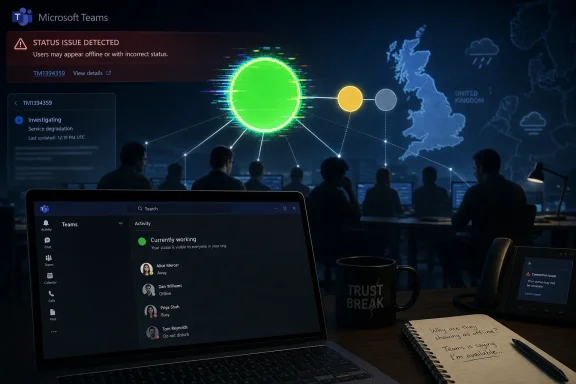 Microsoft’s Green Dot Became the Outage
The immediate symptom was simple enough to describe: Teams showed users as offline, away, or otherwise unavailable when they were not. Downdetector reports climbed into the thousands in the UK during the morning, while admins and users on social platforms compared notes on presence indicators that no longer matched reality. Microsoft’s own acknowledgement narrowed the issue to incorrect presence status information rather than a total Teams blackout.That distinction matters, but it should not be used to minimize the disruption. In an office, a person at their desk is visible. In a hybrid workplace, the Teams presence indicator has become a proxy for the same social signal. When that signal fails, the app may still be technically “up,” but the workplace built around it starts misfiring.
Presence is one of those features that looks trivial until it breaks. It governs whether a manager sends a nudge, whether a support engineer escalates, whether a call is transferred, whether a colleague assumes silence is neglect. Microsoft Teams is not merely a chat client; it is a traffic-control system for work. On June 17, the lights did not go out, but some of them turned the wrong color.
The reports also highlight a recurring weakness in cloud status communication. Third-party outage trackers can show a visible spike before vendor dashboards give ordinary users a satisfying explanation. Microsoft 365 admins may see incident IDs and service-health notes, while everyone else sees hearsay, screenshots, and a rising sense that their own device is lying to them.
A Partial Outage Can Be More Confusing Than a Total One
The cleanest outages are often the least ambiguous. If Teams will not load, if Outlook cannot authenticate, if OneDrive refuses to sync, users and IT departments quickly converge on a common diagnosis. A presence failure is messier because most of the product may continue to work.That creates a false troubleshooting loop. Users restart the desktop client, toggle their status manually, switch from Wi-Fi to mobile tethering, try the browser version, or wonder whether their employer has changed a policy. Help desks receive tickets that look local until the volume and geography reveal a pattern. The first hour of such an incident is often spent proving that it is not the user’s laptop.
This is where Teams’ centrality becomes a liability. The app now combines chat, meetings, calling, file collaboration, calendar hooks, app integrations, and increasingly AI-assisted workflows. The more business process Microsoft moves into Teams, the more even a narrow fault can feel like an organizational problem.
Presence is especially sensitive because it is shared state. It depends on signals from clients, cloud services, identity systems, calendar data, calling activity, and device behavior. A stale or incorrect state can propagate socially even when the underlying user is working normally. The result is a kind of operational uncanny valley: the system appears normal enough to be believed, but wrong enough to cause damage.
The UK Spike Was a Warning About Regional Fragility
The submitted reports centered on the UK, with users describing the problem from the early hours of Wednesday morning. That timing is significant because it hit during the working day, when Teams is not a background utility but the workplace itself. A few thousand Downdetector reports do not map cleanly to the number of affected users, but they are a useful signal of perceived disruption.Regional incidents are now a familiar feature of cloud life. Microsoft 365 is marketed as a global productivity fabric, but its behavior is experienced locally: a tenant, a region, an edge path, a dependency, a service ring. To the end user, “Teams is down” is a perfectly reasonable statement even if Microsoft’s internal telemetry says only a component in a subset of environments is degraded.
That gap between architectural precision and lived experience is where frustration grows. Engineers may be right to say that chat delivery, meetings, or file access were not universally unavailable. Users may also be right to say that Teams was unusable for coordination if it falsely showed them as absent. Both statements can be true.
For UK organizations, the outage landed in exactly the kind of mundane but expensive zone that rarely gets a full postmortem in public. Meetings may still happen, but people miss quick decisions. Service desks may still operate, but dispatching becomes less reliable. Managers may still message staff, but the social context is wrong. The losses are small, distributed, and hard to measure — which is why they are so easy to underestimate.
Microsoft’s Admin Center Is Not a Public Square
Microsoft’s incident note directed administrators to TM1394359 in the Microsoft 365 admin center. That is standard practice, and for enterprise customers it is the right canonical place for service-health detail. But the admin center is not where most affected users live.For the ordinary worker, the public signal often comes from Downdetector, Reddit, X, group chats, or a colleague saying, “It’s not just you.” That ecosystem fills the gap between corporate telemetry and human reassurance. It is noisy, imperfect, and sometimes wrong, but it moves quickly.
Microsoft has improved its service communication over the years, yet incidents like this show the limits of a tenant-admin-first model. When a collaboration tool malfunctions in a way that affects social trust, public messaging matters. A short acknowledgement that presence status is unreliable can save thousands of users from wasting time on local fixes.
The company also faces a terminology problem. Calling something an “issue where users may see incorrect presence status information” is technically accurate, but it undersells the user impact. In Teams, presence is not decorative metadata. It is part of the product’s operating model. If Microsoft wants customers to treat Teams as the front door to work, it has to treat presence failures as more than a cosmetic defect.
The Status Light Carries More Power Than It Should
The Teams presence indicator has become a managerial artifact as much as a technical feature. In healthier workplaces, it is a convenience: a hint about whether now is a good time to interrupt someone. In less healthy ones, it becomes surveillance theater, a tiny colored dot that substitutes for trust.That is why incorrect presence can cause an outsized reaction. Users who were working from 7 a.m. found themselves fielding messages asking where they were. Others appeared offline while actively using their machines. The problem was not just that Teams misreported availability; it exposed how much workplace interpretation now depends on a fragile automated signal.
Microsoft did not create the culture of availability anxiety, but Teams reinforces it. The product’s design encourages quick reads: green is available, red is busy, yellow is away, gray is absent. Those colors become shorthand for professionalism, responsiveness, even diligence. When they are wrong, the human consequences are immediate.
IT departments should take this incident as a reminder to push back on presence absolutism. A status indicator is a hint, not a time clock. It can be wrong because of service incidents, mobile-client behavior, sleep settings, calendar sync, VPN paths, browser throttling, or simply because the user is doing work outside Teams. If an organization’s management culture cannot tolerate that uncertainty, the outage is not only technical.
Teams Has Become Too Important for Vague Degradation
The Teams story since 2020 has been one of consolidation. Microsoft took a workplace chat app and turned it into the connective tissue of Microsoft 365. It now sits beside Exchange, SharePoint, Entra ID, OneDrive, and Office as part of the default enterprise nervous system.That success raises the standard for reliability. A decade ago, a presence bug in an instant-messaging client might have been annoying. In 2026, the same class of failure can affect call centers, school administration, distributed engineering teams, healthcare coordination, legal practices, and public-sector offices. The product category has changed around the feature.
The move toward AI-assisted work only increases the stakes. Microsoft is weaving Copilot and automation into the Microsoft 365 experience, with Teams serving as one of the main conversational surfaces. As more workflows depend on context, identity, meeting state, and availability signals, the accuracy of the underlying collaboration graph becomes more important.
Presence data is part of that graph. It tells systems and humans how to route attention. If the graph is wrong, automation can become confidently unhelpful. Today’s incorrect status light is tomorrow’s incorrectly prioritized workflow, missed escalation, or badly timed AI-generated nudge.
The Help Desk Lesson Is Boring, Which Is Why It Matters
For administrators, the practical response to a Teams presence incident is not glamorous. Check the Microsoft 365 admin center. Confirm whether an incident ID exists. Compare reports across users, networks, device types, and regions. Avoid mass client reinstalls unless there is evidence the fault is local.That discipline matters because collaboration outages create pressure to do something visible. Clearing caches, reinstalling Teams, resetting profiles, and pushing users between clients can sometimes help with local corruption or client-specific bugs. During a confirmed service incident, those steps can also waste time and increase frustration.
The better response is to communicate quickly and narrowly. Tell users that Microsoft is investigating incorrect Teams presence information. Tell managers not to rely on status indicators until the incident is resolved. Tell support teams which symptoms are in scope and which still require normal troubleshooting. The goal is not to fix Microsoft’s cloud from the help desk; it is to reduce secondary damage.
Organizations should also document how they will operate when Teams is degraded but not dead. A total outage often triggers contingency plans. A partial outage does not. Yet partial outages are the ones most likely to create confusion, because people disagree about whether the tool is working at all.
Outage Trackers Are Smoke Alarms, Not Root Cause Analysis
Downdetector played its usual role in this incident: it surfaced a pattern before many users had an official explanation. That does not make it a definitive source of technical truth. It measures reports, not root cause, and spikes can reflect user perception as much as service telemetry.Still, dismissing outage trackers would be a mistake. They are useful precisely because they capture what vendor dashboards sometimes abstract away. If thousands of users in a region say a service is broken, IT teams should pay attention even before a formal advisory appears.
The healthy posture is to treat third-party reports as smoke alarms. They tell you to look for fire. They do not tell you which component failed, whether the incident is tenant-specific, or when the vendor will resolve it. Microsoft’s admin center remains the authoritative channel for enterprise incident detail, but user-reporting sites often provide the earliest social proof.
The same is true of sysadmin forums and social platforms. They are not official, and they contain plenty of speculation. But they often reveal the shape of an incident faster than polished vendor language. In this case, multiple users independently described the same presence-status behavior, which made the pattern harder to dismiss as local misconfiguration.
The New Teams Era Still Carries Old Cloud Problems
Microsoft has spent years moving customers to the newer Teams client, promising better performance, lower resource use, and a more modern architecture. That work matters, and the newer client is a meaningful improvement over the Electron-era reputation that haunted Teams for years. But client modernization does not eliminate cloud dependency.A status problem can sit far away from the pixels users see. The desktop app may be healthy, the browser may render correctly, and the user’s network may be fine. If the presence service or one of its dependencies is returning stale information, the client can faithfully display the wrong answer.
This is the uncomfortable truth of SaaS productivity: the user no longer owns enough of the stack to diagnose it fully. Windows event logs, local cache folders, and network traces still have value, but many incidents live in Microsoft’s service fabric. The endpoint is merely the window.
That shifts the burden of trust. Microsoft asks organizations to accept continuous service evolution in exchange for scale, integration, and reduced infrastructure overhead. Customers accept that trade because the overall bargain is usually favorable. But when an incident hits, they need fast, plain-language visibility into what changed, what is affected, and what is safe to ignore.
The Incident Was Narrow, but the Dependency Was Not
It would be easy to overstate the June 17 disruption as a full Microsoft Teams collapse. The available evidence points more specifically to incorrect presence information, with many users apparently still able to access core Teams functions. Precision is important, especially when outage chatter can turn every degraded component into a platform-wide panic.But it would be just as wrong to understate the problem because meetings and messages may have continued. Presence is embedded in how people decide to communicate. It shapes whether a message is sent now or later, whether a call is placed, whether a colleague is assumed to be ignoring work, whether a support queue looks staffed.
The incident therefore sits in the middle category that enterprises struggle to name. It is not a catastrophic outage. It is not a harmless bug. It is a trust degradation in a system that mediates work.
That category deserves more attention from vendors and customers alike. Modern productivity platforms are full of these semi-visible dependencies: free/busy data, identity tokens, notification delivery, file presence, link previews, meeting join state, device handoff, mobile push routing. When they fail, the platform’s surface may remain intact while the workflow underneath becomes unreliable.
The Real Fix Is Better Operational Literacy
The immediate fix belongs to Microsoft. The company has to isolate the failing component, mitigate the issue, and restore accurate presence data. Customers can monitor, communicate, and avoid unnecessary local remediation, but they cannot repair the service from their side.The longer-term fix is shared. Organizations need better operational literacy around SaaS failures. That means teaching users and managers that cloud apps degrade in parts, not just as a whole. It means writing incident messages that say, plainly, “Teams presence may be wrong; do not assume someone is offline.” It means treating collaboration telemetry as fallible.
Microsoft also needs to keep narrowing the gap between internal incident classification and customer experience. A presence incident may look minor on a service map, but for a distributed workplace it can be the day’s dominant problem. Service-health language should reflect business impact, not only component scope.
There is also an opportunity here for Teams itself. If Microsoft can detect widespread presence unreliability, the client could surface a banner or subtle warning that status information may be delayed or incorrect. That would be far more useful than leaving users to discover the problem through annoyed messages from colleagues.
The June 17 Teams Glitch Belongs in Every Admin’s Runbook
The practical lessons from this outage are concrete, even if the root cause remains Microsoft’s to explain. Presence failures should be handled as collaboration incidents, not as individual user quirks. They affect behavior, expectations, and support load.- Microsoft acknowledged an incident on June 17, 2026, involving incorrect presence status information in Teams under incident TM1394359.
- User reports were concentrated heavily enough in the UK morning to produce thousands of Downdetector complaints and widespread social discussion.
- The available evidence points to a presence-status degradation rather than a confirmed total Teams outage affecting every core function.
- IT teams should check the Microsoft 365 admin center before pushing users through disruptive local troubleshooting steps.
- Managers should avoid treating Teams presence as proof of availability, productivity, or absence during any confirmed or suspected service incident.
- Organizations should have fallback communication norms for partial Teams degradation, not only for complete Microsoft 365 outages.
References
- Primary source: Jang
Published: 2026-06-17T11:42:07.538591
Loading…
jang.com.pk - Related coverage: downdetector.it
Loading…
downdetector.it - Related coverage: statusgator.com
- Related coverage: isdown.app
Is Microsoft Teams Down? Check current status and user reports | IsDown
Check if Microsoft Teams is down right now. Live Microsoft Teams status, real-time outage detection, and instant alerts when Microsoft Teams has issues. Free 14-day trial. isdown.app
- Related coverage: downdetector.jp
Microsoft Teams down? Status and current problems. - JP
Real-time problems for Microsoft Teams. Is the server down? Login does not work? see the current status here.downdetector.jp - Related coverage: tomsguide.com
Outlook is down — the latest on the ongoing Microsoft outage | Tom's Guide
What's happening with Microsoft's popular service?www.tomsguide.com
- Related coverage: downdetector.ro
Microsoft Teams down? Status and current problems. - RO
Real-time problems for Microsoft Teams. Is the server down? Login does not work? see the current status here.downdetector.ro - Related coverage: apistatuscheck.com
Loading…
apistatuscheck.com - Related coverage: downdetector.dk
Loading…
downdetector.dk - Related coverage: livemint.com
Microsoft 365 down: Several users report outages with Outlook and Teams | Mint
Microsoft 365 experienced a significant outage on Wednesday, affecting thousands of users across major cities like Minneapolis, Chicago, and Los Angeles. Issues with Teams and Outlook were reported, with over 4,000 disruptions noted on Downdetector. www.livemint.com
- Related coverage: downscanner.com
Loading…
downscanner.com - Related coverage: mbtelehealth.ca
- Related coverage: aha.org
Loading…
www.aha.org