
PFU America launched the Ricoh SP-2240N compact document scanner in the United States on June 16, 2026, pricing the network-ready desktop unit at $389.99 for small businesses, departmental teams, and other offices with recurring paper workflows. The headline is not that another scanner can push paper through an automatic feeder quickly. It is that PFU is pushing more of the capture workflow into a cheaper, smaller, Ethernet-connected box. For Windows shops, clinics, banks, and back offices still living between paper intake and digital records, that is the part that matters.
The SP-2240N is not trying to be a glamorous device. It is a utilitarian machine built for places where someone still has to scan signed forms, IDs, invoices, delivery paperwork, patient documents, contracts, and receipts several dozen or several hundred times a day. That makes it more interesting than its modest price suggests, because document capture remains one of the least glamorous but most stubborn bottlenecks in business IT.
The modern office scanner market has an odd problem: the devices are technically mature, but the work around them often is not. Most businesses do not need exotic image science; they need fewer jams, fewer “which PC is this connected to?” moments, and fewer staff-created folders named Final Scan 2. A scanner that is fast enough, networked by design, and simple enough for shared use can remove more friction than a faster model trapped on one employee’s desk.
That is the strategic space PFU America is targeting with the Ricoh SP-2240N. The company is placing it between consumer-grade personal scanners and higher-end departmental capture systems that bring heavier-duty mechanics, larger feeders, and more administrative overhead. At $389.99, the SP-2240N is priced like a small-business purchase rather than a procurement event.
The specifications reinforce that middle-ground argument. The unit scans up to 40 pages per minute or 80 images per minute at 200 or 300 dpi, includes an 80-sheet automatic document feeder, supports duplex scanning, and offers 600 dpi optical resolution. PFU lists an expected daily volume of 6,000 sheets, which is enough to move it beyond occasional desk scanning and into the realm of repeatable team workflows.
Those numbers will not make enterprise capture vendors nervous at the high end. They are not supposed to. The more important claim is that PFU has put enough speed, feeder capacity, and image cleanup into a compact device to make the scanner a shared office appliance rather than a peripheral attached to one person’s Windows session.
PC-less scanning is not new in the broader market, but its appearance at this price point is meaningful. Small teams often buy cheaper USB scanners and then quietly build process debt around them. The device may work fine, but the workflow becomes tied to a specific PC, a specific user profile, a specific desktop application, or a specific shared folder mapped in a way nobody remembers.
DirectScan attacks that failure mode. If destinations are configured centrally and exposed as simple choices on the device, the scanner becomes less dependent on the quirks of a front-desk computer or a back-office workstation. That is especially useful in environments where multiple staff members scan documents but nobody is an IT specialist.
For Windows administrators, the appeal is obvious. Anything that reduces dependence on local desktop software reduces the number of moving parts affected by Windows updates, driver drift, endpoint security tools, and user permissions. The scanner still has to be configured, secured, and maintained, but the daily act of scanning can become less fragile.
There is a trade-off, of course. A scanner that can send directly to network locations is now a network participant with access paths that need to be governed. That means credentials, folder permissions, firmware updates, and destination hygiene matter. But for many small businesses, that is still a cleaner model than hoping the office PC beside the scanner remains untouched forever.
For years, scanner hardware and capture software existed in a tense partnership. The scanner handled transport and image acquisition, while the PC handled cleanup, OCR preparation, naming, routing, and business logic. That model worked, but it also made scanning dependent on local compute resources and client-side software reliability.
By pushing more image processing into the scanner, PFU is treating capture as an edge workload. The document is cleaned up closer to the moment it is created, before it hits a folder, workflow system, or application. In shared environments, that can produce more consistent results because the output is less dependent on whichever machine happens to be running the scan job.
This matters for OCR and downstream automation. A wrinkled form, a slightly skewed invoice, or a blank back page might seem trivial to a human, but it can create noise in document management systems. Automatic rotation, blank page removal, and image cleanup are not glamorous features; they are the difference between searchable records and digital clutter.
The interesting question is how far PFU takes this idea. The SP-2240N is still an entry-level SP Series device, not a full capture platform with advanced classification and workflow automation built in. But the direction is clear: the scanner is becoming less of a dumb input peripheral and more of a specialized capture node.
TWAIN and ISIS are not exciting acronyms, but they are the connective tissue of business scanning. Medical offices, legal practices, accounting teams, logistics desks, and banks often use applications that integrate directly with scanner drivers. A device that offers network scanning but also maintains conventional driver support is more flexible than a purely app-driven appliance.
PaperStream IP is also where PFU makes its image-quality pitch. The company says the driver automatically cleans up scans to improve OCR accuracy, including documents that are wrinkled, soiled, or patterned. That is not just a visual nicety; OCR accuracy determines whether scanned documents can actually be searched, indexed, and routed.
The SP-2240N also uses PFU’s Clear Image Capture technology and real-time image monitoring to watch for feeding problems. Again, these are not the features that sell a product to casual buyers. They are the features that keep a small office from discovering a week later that half a batch of forms was unreadable, misfed, or scanned with blank pages scattered through the output.
The Windows angle is not limited to client PCs. PFU lists support for Windows, Windows Server, macOS, and Ubuntu Linux, which gives the device a broader operating-system footprint than many small offices will ever use. But Windows Server support is particularly relevant for businesses that centralize shared folders, permissions, and document intake paths around Active Directory-era infrastructure.
Wi-Fi is convenient until the scanner sits behind a reception counter with spotty signal, on a guest network that cannot reach the file server, or in a branch office where someone changed the SSID password and forgot the scanner existed. Ethernet is boring, but boring is often what shared infrastructure needs. If the scanner is expected to behave like a small office appliance, a wired network connection is a virtue.
The choice also fits the DirectScan model. A scanner that sends documents to network folders should ideally have stable connectivity and predictable addressing. Administrators can reserve an address, place the device on an appropriate VLAN, monitor it, and control where it can communicate. That is harder to do consistently when a device is floating across consumer-style wireless networks.
USB-C remains useful for direct-attached workflows or initial setups where a local connection is preferred. But the product’s identity is clearly network-first. PFU is not pitching the SP-2240N as a personal scanner that happens to have office features; it is pitching it as a compact shared scanner that can still behave like a traditional peripheral when needed.
This is where the SP-2240N’s market positioning becomes clearer. Some competing desktop scanners lean heavily on Wi-Fi and USB convenience. PFU is countering with wired network dependability and PC-less routing. For organizations that think like IT departments rather than home-office shoppers, that distinction is not cosmetic.
That price point also changes the internal politics of adoption. A $1,000-plus scanner often becomes a centralized resource, with all the queuing and ownership problems that follow. A sub-$400 scanner can be placed closer to the work: one for the clinic intake desk, one for accounting, one for HR, one for the branch office. Distributed capture is often more effective than forcing every paper document to travel to a single “scanning station.”
The expected daily volume of 6,000 sheets is an important part of that calculation. If the rating holds up in real-world use, the scanner is not merely for occasional digitization. It can support steady workflows in offices that process paper every day but not at industrial scale.
There is also a psychological component to the price. Small businesses are often trapped between buying too little and overbuying. A cheap personal scanner may fail under shared use; a large enterprise unit may be hard to justify. The SP-2240N’s pitch is that there is a responsible middle path.
Still, buyers should not confuse a good price with a total cost calculation. Scanner economics include consumables, warranty coverage, software licensing, support responsiveness, and the time spent configuring workflows. The SP-2240N appears designed to reduce those hidden costs, but the device alone does not create disciplined document management.
That history matters because scanner buyers tend to be conservative. Offices do not replace a working capture setup lightly, and IT administrators remember driver behavior, feeder reliability, support quality, and software quirks long after a brand refresh. Ricoh may now be the name on the device, but PFU is relying on continuity with the older Fujitsu scanner reputation.
The rebrand also creates some market confusion. Many users still refer to these devices as Fujitsu scanners, and many support documents, forum discussions, and legacy workflows retain that language. For IT pros, the practical question is less about the badge and more about whether the drivers, software stack, and hardware design remain predictable.
PFU’s messaging is clearly designed to answer that question. By tying the SP-2240N to RICOH fi Series scanning technology while placing it in the SP line, the company is borrowing credibility from its more established business scanner family. The claim is not that this is a radically new category; it is that proven capture features are moving downmarket.
That is a smart move if PFU can execute. The small-business scanner market rewards boring reliability. A rebrand can survive if the products behave well; it becomes a liability only if support, software compatibility, or parts availability become harder to understand.
For large organizations, environmental certifications can influence purchasing because procurement teams increasingly track sustainability requirements alongside price and performance. For small businesses, the practical value is less direct, but energy efficiency and reduced packaging waste still fit the broader trend toward lower-impact office hardware. The scanner is not going to transform a company’s environmental footprint by itself, but it does reflect how even modest peripherals now have to answer sustainability questions.
There is a deeper point here about lifecycle. A scanner that lasts longer, stays supported, and avoids premature replacement is often more sustainable than one that merely uses recycled material. PFU’s environmental claims are welcome, but the more meaningful test will be durability, repairability, driver support, and firmware maintenance over several years of use.
That is especially true for Windows-heavy environments. Peripherals often become waste not because the motors fail, but because software support breaks, operating-system compatibility erodes, or cloud services change. A business scanner with conventional driver support, network destinations, and cross-platform compatibility has a better chance of avoiding that fate.
Sustainability, in other words, is not just plastic content. It is whether the device remains useful after the next Windows feature update, server migration, endpoint security rollout, or office reorganization.
That is where small and mid-sized businesses often struggle. They may not have a dedicated records management team, but they handle the same kinds of sensitive documents as larger enterprises: IDs, medical forms, loan paperwork, employee files, legal agreements, and customer records. A scanner that simplifies capture can help, but it also makes sloppy process easier to repeat at scale.
DirectScan to network folders, for example, is powerful only if the destination structure is well designed. A shared folder called Scans is not a document strategy. If staff members are scanning sensitive IDs and contracts into a broad-access directory, the scanner has merely accelerated a compliance problem.
The same applies to OCR. Cleaner images improve searchability, but searchable documents raise discovery, retention, and privacy implications. Once paper becomes indexed digital content, organizations need policies for who can access it, how long it is retained, and how it is backed up.
This is why the SP-2240N should be viewed as an infrastructure device, not an office gadget. It deserves a small rollout plan: define destinations, set permissions, document workflows, test output quality, and decide who owns maintenance. That may sound excessive for a $389.99 scanner, but it is exactly the difference between digitization and a faster mess.
By supporting plastic ID cards and folded A3 documents, the scanner is aimed at mixed batches rather than pristine stacks of office paper. That matters in real-world settings. A front desk may scan a driver’s license, a signed consent form, a multipage packet, and a folded document in the same hour. Devices that handle only ideal paper force staff into workarounds.
The compact footprint also matters. At 292 by 163 by 150 mm and 3.3 kg, the SP-2240N can live where documents enter the business, not only where IT has a spare table. That can reduce the gap between receiving paper and digitizing it, which is often where documents get lost, delayed, or mishandled.
But putting scanners closer to frontline staff also pushes policy outward. A receptionist, teller, clerk, or store manager may become the person initiating a records workflow. That is good if the process is simple and controlled. It is risky if the device is deployed with vague instructions and broad folder access.
The best use case for the SP-2240N is therefore not “scan anything.” It is controlled convenience: preconfigured destinations, simple actions, and enough on-device processing to keep output consistent. That is what separates a shared network scanner from a box that merely produces PDFs.
PFU’s real-time image monitoring and feeder handling claims should help, but offices should still evaluate the SP-2240N against their own paper. Healthcare intake forms, retail receipts, carbon copies, embossed cards, wrinkled invoices, and folded documents behave differently. A scanner that performs well with standard letter paper may still expose weaknesses with the documents a business actually sees.
IT teams should also test how the device behaves under normal endpoint controls. If staff use PaperStream ClickScan or PaperStream Capture from Windows PCs, endpoint detection tools, driver policies, and update schedules become part of the workflow. If the organization leans on DirectScan, network permissions and destination availability become the critical path.
The good news is that the SP-2240N gives administrators options. It can operate as a USB-connected scanner, a networked scanner, and a PC-less capture device. That flexibility is useful because small offices rarely standardize perfectly.
The bad news is that flexibility can become complexity if nobody decides the intended mode of operation. The scanner should not be allowed to become three workflows at once unless there is a reason. Pick the default path, train users around it, and treat exceptions as exceptions.
For many businesses, the bottleneck in digitization is not a lack of cloud platforms or AI search tools. It is the mundane failure to capture documents cleanly and consistently at the point where paper enters the organization. A scanner like the SP-2240N improves that first step, and the first step often determines whether the rest of the workflow is useful.
The device also signals where PFU and Ricoh see demand. Small and mid-sized organizations want enterprise-flavored reliability without enterprise-scale buying cycles. They want network behavior, decent image processing, and simple user actions without needing to build a capture department. The SP-2240N is a response to that practical reality.
The risk is that buyers overestimate what hardware can solve. If a business has no folder discipline, no retention policy, no access controls, and no workflow ownership, faster scanning just produces better-looking chaos. PFU can supply the capture point; the organization still has to supply the process.
The SP-2240N is not trying to be a glamorous device. It is a utilitarian machine built for places where someone still has to scan signed forms, IDs, invoices, delivery paperwork, patient documents, contracts, and receipts several dozen or several hundred times a day. That makes it more interesting than its modest price suggests, because document capture remains one of the least glamorous but most stubborn bottlenecks in business IT.
 PFU Is Selling the Workflow, Not Just the Scanner
The modern office scanner market has an odd problem: the devices are technically mature, but the work around them often is not. Most businesses do not need exotic image science; they need fewer jams, fewer “which PC is this connected to?” moments, and fewer staff-created folders named Final Scan 2. A scanner that is fast enough, networked by design, and simple enough for shared use can remove more friction than a faster model trapped on one employee’s desk.That is the strategic space PFU America is targeting with the Ricoh SP-2240N. The company is placing it between consumer-grade personal scanners and higher-end departmental capture systems that bring heavier-duty mechanics, larger feeders, and more administrative overhead. At $389.99, the SP-2240N is priced like a small-business purchase rather than a procurement event.
The specifications reinforce that middle-ground argument. The unit scans up to 40 pages per minute or 80 images per minute at 200 or 300 dpi, includes an 80-sheet automatic document feeder, supports duplex scanning, and offers 600 dpi optical resolution. PFU lists an expected daily volume of 6,000 sheets, which is enough to move it beyond occasional desk scanning and into the realm of repeatable team workflows.
Those numbers will not make enterprise capture vendors nervous at the high end. They are not supposed to. The more important claim is that PFU has put enough speed, feeder capacity, and image cleanup into a compact device to make the scanner a shared office appliance rather than a peripheral attached to one person’s Windows session.
DirectScan Turns a Peripheral Into a Small Network Appliance
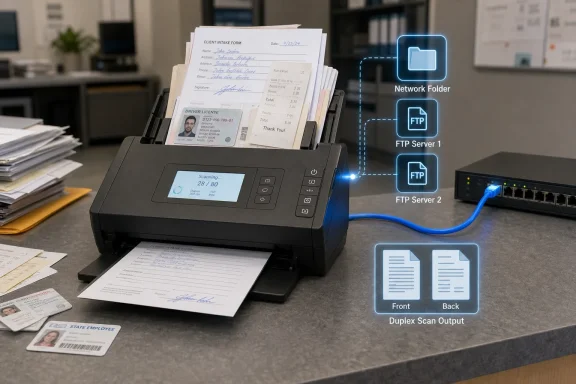
The most consequential feature is DirectScan, PFU’s PC-less scanning mode that allows users to scan directly to network folders or FTP destinations. In practical terms, the SP-2240N can sit on a counter or in a workroom and send documents to preconfigured destinations without requiring a nearby PC to act as the host. That sounds mundane until you have supported a branch office where scanning depends on a powered-on workstation, a logged-in user, a half-broken driver install, and one employee who “knows how the scanner works.”PC-less scanning is not new in the broader market, but its appearance at this price point is meaningful. Small teams often buy cheaper USB scanners and then quietly build process debt around them. The device may work fine, but the workflow becomes tied to a specific PC, a specific user profile, a specific desktop application, or a specific shared folder mapped in a way nobody remembers.
DirectScan attacks that failure mode. If destinations are configured centrally and exposed as simple choices on the device, the scanner becomes less dependent on the quirks of a front-desk computer or a back-office workstation. That is especially useful in environments where multiple staff members scan documents but nobody is an IT specialist.
For Windows administrators, the appeal is obvious. Anything that reduces dependence on local desktop software reduces the number of moving parts affected by Windows updates, driver drift, endpoint security tools, and user permissions. The scanner still has to be configured, secured, and maintained, but the daily act of scanning can become less fragile.
There is a trade-off, of course. A scanner that can send directly to network locations is now a network participant with access paths that need to be governed. That means credentials, folder permissions, firmware updates, and destination hygiene matter. But for many small businesses, that is still a cleaner model than hoping the office PC beside the scanner remains untouched forever.
The iiGA Chip Shows Where Document Capture Is Headed
PFU says DirectScan runs on its next-generation iiGA system-on-a-chip, which moves core image processing into the device itself. The scanner can perform functions such as automatic rotation and blank page removal locally rather than handing everything off to a connected computer. This is a quiet but important shift in how vendors are packaging document capture.For years, scanner hardware and capture software existed in a tense partnership. The scanner handled transport and image acquisition, while the PC handled cleanup, OCR preparation, naming, routing, and business logic. That model worked, but it also made scanning dependent on local compute resources and client-side software reliability.
By pushing more image processing into the scanner, PFU is treating capture as an edge workload. The document is cleaned up closer to the moment it is created, before it hits a folder, workflow system, or application. In shared environments, that can produce more consistent results because the output is less dependent on whichever machine happens to be running the scan job.
This matters for OCR and downstream automation. A wrinkled form, a slightly skewed invoice, or a blank back page might seem trivial to a human, but it can create noise in document management systems. Automatic rotation, blank page removal, and image cleanup are not glamorous features; they are the difference between searchable records and digital clutter.
The interesting question is how far PFU takes this idea. The SP-2240N is still an entry-level SP Series device, not a full capture platform with advanced classification and workflow automation built in. But the direction is clear: the scanner is becoming less of a dumb input peripheral and more of a specialized capture node.
PaperStream Keeps Windows in the Center of the Story
Despite the PC-less headline, the SP-2240N remains deeply relevant to Windows environments because of PFU’s PaperStream software stack. The scanner ships with PaperStream ClickScan for one-push or right-click scanning and the PaperStream IP driver with TWAIN and ISIS support. That matters because Windows document workflows are still full of line-of-business applications that expect those driver models.TWAIN and ISIS are not exciting acronyms, but they are the connective tissue of business scanning. Medical offices, legal practices, accounting teams, logistics desks, and banks often use applications that integrate directly with scanner drivers. A device that offers network scanning but also maintains conventional driver support is more flexible than a purely app-driven appliance.
PaperStream IP is also where PFU makes its image-quality pitch. The company says the driver automatically cleans up scans to improve OCR accuracy, including documents that are wrinkled, soiled, or patterned. That is not just a visual nicety; OCR accuracy determines whether scanned documents can actually be searched, indexed, and routed.
The SP-2240N also uses PFU’s Clear Image Capture technology and real-time image monitoring to watch for feeding problems. Again, these are not the features that sell a product to casual buyers. They are the features that keep a small office from discovering a week later that half a batch of forms was unreadable, misfed, or scanned with blank pages scattered through the output.
The Windows angle is not limited to client PCs. PFU lists support for Windows, Windows Server, macOS, and Ubuntu Linux, which gives the device a broader operating-system footprint than many small offices will ever use. But Windows Server support is particularly relevant for businesses that centralize shared folders, permissions, and document intake paths around Active Directory-era infrastructure.
Ethernet Still Matters in a Wi-Fi-First Office
One of the SP-2240N’s more telling choices is its connectivity mix: USB 3.2 Gen1 over Type-C and Gigabit Ethernet. In a consumer device, the absence of Wi-Fi might look like a gap. In a shared office scanner, wired Ethernet can be the more serious choice.Wi-Fi is convenient until the scanner sits behind a reception counter with spotty signal, on a guest network that cannot reach the file server, or in a branch office where someone changed the SSID password and forgot the scanner existed. Ethernet is boring, but boring is often what shared infrastructure needs. If the scanner is expected to behave like a small office appliance, a wired network connection is a virtue.
The choice also fits the DirectScan model. A scanner that sends documents to network folders should ideally have stable connectivity and predictable addressing. Administrators can reserve an address, place the device on an appropriate VLAN, monitor it, and control where it can communicate. That is harder to do consistently when a device is floating across consumer-style wireless networks.
USB-C remains useful for direct-attached workflows or initial setups where a local connection is preferred. But the product’s identity is clearly network-first. PFU is not pitching the SP-2240N as a personal scanner that happens to have office features; it is pitching it as a compact shared scanner that can still behave like a traditional peripheral when needed.
This is where the SP-2240N’s market positioning becomes clearer. Some competing desktop scanners lean heavily on Wi-Fi and USB convenience. PFU is countering with wired network dependability and PC-less routing. For organizations that think like IT departments rather than home-office shoppers, that distinction is not cosmetic.
The Price Is the Argument
At $389.99, the SP-2240N is priced aggressively for a network-capable desktop scanner with duplex scanning, an 80-sheet feeder, and PC-less scan destinations. The market around it includes Brother, Epson, Canon, and other Ricoh or former Fujitsu models, with prices that can climb quickly once Ethernet, heavier duty cycles, or business capture software enter the conversation. PFU’s bet is that many organizations want something more durable and workflow-aware than a consumer scanner but cannot justify a more expensive departmental system.That price point also changes the internal politics of adoption. A $1,000-plus scanner often becomes a centralized resource, with all the queuing and ownership problems that follow. A sub-$400 scanner can be placed closer to the work: one for the clinic intake desk, one for accounting, one for HR, one for the branch office. Distributed capture is often more effective than forcing every paper document to travel to a single “scanning station.”
The expected daily volume of 6,000 sheets is an important part of that calculation. If the rating holds up in real-world use, the scanner is not merely for occasional digitization. It can support steady workflows in offices that process paper every day but not at industrial scale.
There is also a psychological component to the price. Small businesses are often trapped between buying too little and overbuying. A cheap personal scanner may fail under shared use; a large enterprise unit may be hard to justify. The SP-2240N’s pitch is that there is a responsible middle path.
Still, buyers should not confuse a good price with a total cost calculation. Scanner economics include consumables, warranty coverage, software licensing, support responsiveness, and the time spent configuring workflows. The SP-2240N appears designed to reduce those hidden costs, but the device alone does not create disciplined document management.
The Ricoh Badge Carries Fujitsu’s Long Shadow
The SP-2240N arrives under the Ricoh name, but its lineage runs through PFU and Fujitsu’s long history in document scanners. PFU Limited, founded in 1960, built scanners sold under the Fujitsu brand for more than two decades. Ricoh completed its stock transfer deal for PFU in September 2022, and PFU later rebranded its Fujitsu-labeled fi Series, SP Series, and ScanSnap products under the Ricoh name.That history matters because scanner buyers tend to be conservative. Offices do not replace a working capture setup lightly, and IT administrators remember driver behavior, feeder reliability, support quality, and software quirks long after a brand refresh. Ricoh may now be the name on the device, but PFU is relying on continuity with the older Fujitsu scanner reputation.
The rebrand also creates some market confusion. Many users still refer to these devices as Fujitsu scanners, and many support documents, forum discussions, and legacy workflows retain that language. For IT pros, the practical question is less about the badge and more about whether the drivers, software stack, and hardware design remain predictable.
PFU’s messaging is clearly designed to answer that question. By tying the SP-2240N to RICOH fi Series scanning technology while placing it in the SP line, the company is borrowing credibility from its more established business scanner family. The claim is not that this is a radically new category; it is that proven capture features are moving downmarket.
That is a smart move if PFU can execute. The small-business scanner market rewards boring reliability. A rebrand can survive if the products behave well; it becomes a liability only if support, software compatibility, or parts availability become harder to understand.
Sustainability Is Now Part of the Spec Sheet
PFU also gives the SP-2240N a sustainability pitch, saying recycled plastic accounts for more than 25 percent of the main unit’s resin weight and that recycled plastics and pulp molds are used in packaging and cushioning. The scanner is also listed as compliant with ENERGY STAR, RoHS, and EPEAT. In 2026, those details are no longer decorative.For large organizations, environmental certifications can influence purchasing because procurement teams increasingly track sustainability requirements alongside price and performance. For small businesses, the practical value is less direct, but energy efficiency and reduced packaging waste still fit the broader trend toward lower-impact office hardware. The scanner is not going to transform a company’s environmental footprint by itself, but it does reflect how even modest peripherals now have to answer sustainability questions.
There is a deeper point here about lifecycle. A scanner that lasts longer, stays supported, and avoids premature replacement is often more sustainable than one that merely uses recycled material. PFU’s environmental claims are welcome, but the more meaningful test will be durability, repairability, driver support, and firmware maintenance over several years of use.
That is especially true for Windows-heavy environments. Peripherals often become waste not because the motors fail, but because software support breaks, operating-system compatibility erodes, or cloud services change. A business scanner with conventional driver support, network destinations, and cross-platform compatibility has a better chance of avoiding that fate.
Sustainability, in other words, is not just plastic content. It is whether the device remains useful after the next Windows feature update, server migration, endpoint security rollout, or office reorganization.
Small Offices Need Capture Discipline More Than Capture Speed
The SP-2240N’s raw speed is sufficient for the target market, but speed is rarely the hardest part of office scanning. The harder part is consistency. Documents need to land in the right place, with readable images, sensible file names, and permissions that do not expose sensitive information to the entire company.That is where small and mid-sized businesses often struggle. They may not have a dedicated records management team, but they handle the same kinds of sensitive documents as larger enterprises: IDs, medical forms, loan paperwork, employee files, legal agreements, and customer records. A scanner that simplifies capture can help, but it also makes sloppy process easier to repeat at scale.
DirectScan to network folders, for example, is powerful only if the destination structure is well designed. A shared folder called Scans is not a document strategy. If staff members are scanning sensitive IDs and contracts into a broad-access directory, the scanner has merely accelerated a compliance problem.
The same applies to OCR. Cleaner images improve searchability, but searchable documents raise discovery, retention, and privacy implications. Once paper becomes indexed digital content, organizations need policies for who can access it, how long it is retained, and how it is backed up.
This is why the SP-2240N should be viewed as an infrastructure device, not an office gadget. It deserves a small rollout plan: define destinations, set permissions, document workflows, test output quality, and decide who owns maintenance. That may sound excessive for a $389.99 scanner, but it is exactly the difference between digitization and a faster mess.
The Countertop Scanner Becomes a Policy Decision
The SP-2240N’s most important contribution may be cultural rather than mechanical. It acknowledges that paper has not disappeared; it has simply become the first mile of digital workflows. Businesses still receive signed forms, cards, receipts, delivery notes, and odd-sized documents that must be captured before software can do anything useful with them.By supporting plastic ID cards and folded A3 documents, the scanner is aimed at mixed batches rather than pristine stacks of office paper. That matters in real-world settings. A front desk may scan a driver’s license, a signed consent form, a multipage packet, and a folded document in the same hour. Devices that handle only ideal paper force staff into workarounds.
The compact footprint also matters. At 292 by 163 by 150 mm and 3.3 kg, the SP-2240N can live where documents enter the business, not only where IT has a spare table. That can reduce the gap between receiving paper and digitizing it, which is often where documents get lost, delayed, or mishandled.
But putting scanners closer to frontline staff also pushes policy outward. A receptionist, teller, clerk, or store manager may become the person initiating a records workflow. That is good if the process is simple and controlled. It is risky if the device is deployed with vague instructions and broad folder access.
The best use case for the SP-2240N is therefore not “scan anything.” It is controlled convenience: preconfigured destinations, simple actions, and enough on-device processing to keep output consistent. That is what separates a shared network scanner from a box that merely produces PDFs.
The Practical Test Comes After the First Week
The first week with any scanner is usually misleading. New hardware is clean, rollers are fresh, users are attentive, and test documents are predictable. The meaningful test begins after the device has been used by five people, fed bent forms, ignored during a busy afternoon, and asked to recover from a jam without drama.PFU’s real-time image monitoring and feeder handling claims should help, but offices should still evaluate the SP-2240N against their own paper. Healthcare intake forms, retail receipts, carbon copies, embossed cards, wrinkled invoices, and folded documents behave differently. A scanner that performs well with standard letter paper may still expose weaknesses with the documents a business actually sees.
IT teams should also test how the device behaves under normal endpoint controls. If staff use PaperStream ClickScan or PaperStream Capture from Windows PCs, endpoint detection tools, driver policies, and update schedules become part of the workflow. If the organization leans on DirectScan, network permissions and destination availability become the critical path.
The good news is that the SP-2240N gives administrators options. It can operate as a USB-connected scanner, a networked scanner, and a PC-less capture device. That flexibility is useful because small offices rarely standardize perfectly.
The bad news is that flexibility can become complexity if nobody decides the intended mode of operation. The scanner should not be allowed to become three workflows at once unless there is a reason. Pick the default path, train users around it, and treat exceptions as exceptions.
The Real Upgrade Is Fewer Excuses for Bad Scanning
The SP-2240N does not promise to end paper, automate records management, or magically modernize office operations. Its promise is narrower and more believable: give small teams a compact, reasonably priced, network-ready scanner that can handle steady document intake without being chained to a single PC. That is enough to matter.For many businesses, the bottleneck in digitization is not a lack of cloud platforms or AI search tools. It is the mundane failure to capture documents cleanly and consistently at the point where paper enters the organization. A scanner like the SP-2240N improves that first step, and the first step often determines whether the rest of the workflow is useful.
The device also signals where PFU and Ricoh see demand. Small and mid-sized organizations want enterprise-flavored reliability without enterprise-scale buying cycles. They want network behavior, decent image processing, and simple user actions without needing to build a capture department. The SP-2240N is a response to that practical reality.
The risk is that buyers overestimate what hardware can solve. If a business has no folder discipline, no retention policy, no access controls, and no workflow ownership, faster scanning just produces better-looking chaos. PFU can supply the capture point; the organization still has to supply the process.
The SP-2240N Makes the Small Office Scanner Worth Managing
The SP-2240N is best understood as a small infrastructure purchase rather than a peripheral impulse buy. Its value depends on matching the hardware to a repeatable workflow and resisting the temptation to treat scanning as somebody else’s clerical problem.- The SP-2240N became available through PFU America on June 16, 2026, with a listed price of $389.99.
- The scanner offers up to 40 pages per minute, 80 images per minute, duplex scanning, an 80-sheet automatic document feeder, and a listed daily volume of 6,000 sheets.
- DirectScan allows documents to be sent to network folders or FTP destinations without requiring a connected PC.
- The scanner uses PFU’s iiGA system-on-a-chip to perform image-processing tasks such as automatic rotation and blank page removal on the device.
- USB-C and Gigabit Ethernet make the unit suitable for both direct-attached and shared network workflows.
- The Ricoh branding reflects PFU’s post-Fujitsu transition, but the product is still being positioned around PFU’s established business-scanning software and hardware lineage.
References
- Primary source: Technobezz
Published: 2026-06-18T02:40:12.841621
Loading…
www.technobezz.com - Related coverage: pfu-us.ricoh.com
Loading…
www.pfu-us.ricoh.com - Related coverage: store.pfu-us.ricoh.com
Loading…
store.pfu-us.ricoh.com - Related coverage: pfu.ricoh.com
Loading…
www.pfu.ricoh.com - Related coverage: pfu-ca.ricoh.com
Loading…
www.pfu-ca.ricoh.com - Related coverage: pfu-emea.ricoh.com
Loading…
www.pfu-emea.ricoh.com
