

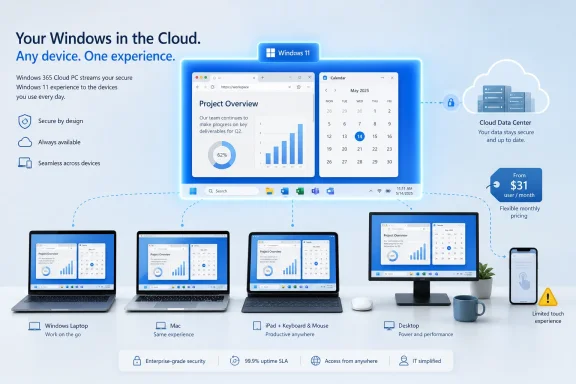
Microsoft’s Windows 365 Cloud PC is a subscription Windows 11 desktop hosted in Microsoft’s cloud, accessible from browsers and Microsoft’s Windows app on PCs, Macs, iPads, Android devices, and phones, with current Business pricing starting around the low tens of dollars per user per month. Ed Bott’s ZDNET hands-on shows the product at its most persuasive: boring, portable, persistent, and surprisingly usable. It also shows the catch Microsoft has not wished away. The Cloud PC is no longer a technical curiosity, but its economics still make it less a PC replacement than a management strategy.
The cleverest line in Bott’s piece is that his newest PC is “a pixel thick.” That captures the user experience better than any Microsoft product page: Windows 365 is less a machine than a session, less a device than a place where your work continues after the local hardware disappears from the story.
But that is also why Windows 365 remains easy to misunderstand. A Cloud PC is not simply “Windows in a browser,” though that is how many users will first encounter it. It is Microsoft’s attempt to turn the Windows desktop into a durable enterprise resource, assigned to a user, governed by policy, billed monthly, and reached from whatever glass-and-keyboard combination happens to be nearby.
That framing matters because consumers tend to evaluate Windows 365 against a laptop. IT departments evaluate it against procurement, imaging, patching, device loss, support calls, compliance exposure, refresh cycles, and the irritatingly human fact that people spill coffee on things. For a single user, the monthly bill can look steep. For an organization with scattered workers and a thin help desk, the same bill can look like an insurance premium.
The ZDNET test lands in that tension. Bott’s Cloud PC worked across Windows, macOS, iPadOS, Android, and the browser, but its value was clearest not when it performed miracles. It was clearest when it behaved exactly like a normal Windows PC and then kept behaving that way after the local device changed.
The difference is that Windows 365 packages that old idea in a way Microsoft’s business customers can buy and manage without building a bespoke virtual desktop estate. Azure Virtual Desktop remains the more flexible and infrastructure-heavy option. Windows 365 is the fixed, per-user Cloud PC: predictable resources, predictable monthly cost, and a provisioning model that looks more like assigning a license than architecting a data center.
That simplicity is the product. The ZDNET configuration — 2 virtual CPUs, 8GB of RAM, and 128GB of storage — is not a workstation. It is the sort of modest corporate PC that runs Office, Edge, Teams, a browser full of tabs, and enough line-of-business apps to make a workday happen. Bott found it broadly comparable to a local PC with similar resources, which is both praise and warning.
The praise is that the illusion holds. Office apps, web video, audio, and even a video meeting reportedly behaved well enough that the Cloud PC faded into the background. The warning is that the cloud does not alchemize an 8GB Windows machine into a powerhouse. Memory pressure is still memory pressure, even if the RAM lives in Microsoft’s data center.
That is an important corrective to the hype. Windows 365 is not magic compute. It is managed compute. The experience rises and falls on sizing, latency, and expectations.
The iPad result is more revealing. Touch-only Windows remains a compromised experience because Windows itself is still fundamentally pointer-oriented, even after years of tablet ambitions. Dragging a remote mouse pointer around an iPad screen and tapping to click is the kind of thing that works in a demo and irritates during actual work.
Add a Bluetooth keyboard and mouse, however, and the iPad becomes a plausible thin client. That is the Windows 365 story in miniature: the service is cross-device, but productivity still depends on the ergonomics of the device in front of you. Microsoft can stream the desktop; it cannot make a phone-sized display comfortable for Excel.
The Android phone test makes that point even harder. Bott could install the Windows app on a Samsung Galaxy S23 Ultra, but a full Windows desktop on a phone screen was predictably impractical. Connect that same phone to a monitor, keyboard, and mouse, and the idea becomes more credible. The Cloud PC does not abolish hardware requirements so much as move them around.
This is where Windows 365 has a sharper business case than a consumer one. The traveling employee does not need their phone to become a great PC in isolation. They need it to become an emergency path into a work desktop, or a bridge to a hotel monitor, or a way to finish a task when the company laptop is dead, delayed, or back at home.
That sounds mundane until you think about how much of modern work is state. A browser with fifteen tabs is state. A half-written document is state. A database console, a chat thread, a spreadsheet filter, a remote support session, a half-composed email — all of that is fragile context, and context is expensive to rebuild.
A local laptop preserves that state too, of course, until it is stolen, broken, out of battery, being repaired, held by airport security, or left in the wrong bag. Windows 365 shifts the continuity from the endpoint to the user’s assigned desktop. That is the conceptual break. The “PC” follows the identity, not the device.
For IT, persistence also means a different kind of containment. If corporate data and sessions live in the Cloud PC, the local machine can be treated with more suspicion. A personal Mac, an aging Windows 10 box, or a tablet becomes an access device rather than the authoritative home of the work environment.
That does not eliminate endpoint risk. Keyloggers, compromised personal devices, unmanaged networks, and careless clipboard use still matter. But it changes the blast radius. In regulated industries, contractors, call centers, seasonal staffing, mergers, and bring-your-own-device programs, that distinction can be worth real money.
Bott’s test configuration normally sits in the middle of the small-business plausibility zone: not cheap enough to be a casual add-on, not expensive enough to be dismissed outright. Microsoft’s recent 20 percent pricing move for Windows 365 Business helps, especially for small and medium-size businesses staring at hardware inflation, refresh cycles, and a Windows 10 deadline that has already forced uncomfortable planning.
But the arithmetic is still bracing. A basic Cloud PC can cost hundreds of dollars per year, per user, before adding Microsoft 365 apps, OneDrive storage, or other licensing that many people mentally include when they hear “Windows PC.” More powerful configurations rise quickly. Once you start asking for 16GB of RAM, more vCPUs, and larger storage, the monthly price begins to resemble a hardware lease without the psychological comfort of owning the hardware.
That “owning” part is emotionally satisfying but financially slippery. A physical PC also has support cost, downtime, shipping, configuration time, warranty handling, eventual disposal, and risk. Businesses often underestimate those costs because they are scattered across departments and incidents rather than printed on one monthly invoice.
Windows 365 makes the cost visible. That visibility can make the service look expensive even when the total cost is defensible. Microsoft is effectively asking customers to compare a clean subscription number against the messy, partly hidden economics of endpoints.
For a home enthusiast, that comparison is likely unforgiving. For an SMB that has no appetite for endpoint management, or an enterprise trying to standardize remote work for users scattered across regions, the calculation changes.
This is where Microsoft’s cloud desktop strategy becomes more than a convenience play. Windows 365 can provide a Windows 11 environment to users whose local machines cannot run Windows 11, and Microsoft has tied Windows 365 and Azure Virtual Desktop scenarios into the broader ESU transition for eligible Windows 10 endpoints. That gives the Cloud PC a second job: not just replacing a PC, but buying time.
For organizations with incompatible but still functional Windows 10 hardware, the temptation is obvious. Rather than rip and replace every device at once, they can use old endpoints as access terminals while the real Windows 11 desktop lives in the cloud. That does not make the hardware young again, and it does not solve every driver, peripheral, or offline-work problem. But it can smooth a migration that would otherwise be a budget shock.
The danger is that “buying time” becomes “avoiding decisions.” A Cloud PC can extend the useful role of old machines, but it should not become an excuse to run unmanaged endpoint chaos indefinitely. If the local device is insecure, unreliable, or outside policy, using it as a portal to a corporate desktop still requires guardrails.
Microsoft’s bet is that many organizations would rather centralize the Windows environment than keep fighting the entropy of endpoint fleets. Windows 10’s retirement makes that pitch much easier to make.
The dedicated Windows app tells a different story. Formerly associated with Remote Desktop branding, the app is becoming Microsoft’s gateway to Windows 365, Azure Virtual Desktop, and related cloud-hosted workspaces. The branding is almost comically broad — “Windows App” — but the ambition is clear. Microsoft wants Windows to be both an operating system and a client for streamed Windows environments.
That dual identity will define the next phase of Windows. On one side is the traditional local OS, still crucial for performance, gaming, creation, offline work, peripherals, and consumer familiarity. On the other side is Windows as a service endpoint: a managed desktop that can be summoned from macOS, iOS, Android, or a browser.
The app also gives Microsoft room to smooth the experience in ways browsers may not. Authentication, display handling, peripheral redirection, clipboard behavior, webcam and microphone use, and session reconnection all matter. Bott’s positive video meeting test is a sign that these details are no longer afterthoughts.
This is where the product has matured. A Cloud PC that cannot handle meetings, audio, printers, identity, and copy-paste is a lab toy. A Cloud PC that handles them well enough becomes part of the workday.
That sounds obvious, but it is the dividing line between “this could replace a work laptop” and “this is a disaster waiting to happen.” A local laptop degrades gracefully when the internet vanishes. You can keep writing, editing, coding, or presenting, depending on the apps and files available. A Cloud PC without connectivity is not a slow PC. It is no PC.
Latency matters as much as bandwidth. Video streaming can buffer; desktop interaction cannot hide delay as easily. Typing, pointer movement, window dragging, and audio calls are sensitive to the little pauses users feel before they can measure. A Cloud PC may work beautifully in a home office and poorly in a conference center with congested Wi-Fi.
That makes Windows 365 a poor fit for field workers who are often offline, travelers who cannot rely on connectivity, or users whose workflows involve heavy local peripherals and real-time hardware interaction. It is a stronger fit for information workers with reliable broadband, standardized apps, and an IT model that benefits from central control.
The irony is that the Cloud PC makes the local device less important while making the local connection more important. Microsoft can take responsibility for the desktop, but it cannot repeal physics.
Today’s Windows 365 is still fundamentally a work or school account product. It lives in the Microsoft 365 administrative world, with Entra ID, provisioning, trials, subscriptions, and the language of business licensing. Bott notes that personal accounts are not supported, which is not a small footnote. It defines the audience.
That limits the service’s cultural impact. Windows enthusiasts may admire the technology and even envy the convenience, but many cannot simply buy it the way they buy Microsoft 365 Family or Xbox Game Pass. Microsoft has built a cloud PC for organizations first, and everyone else gets to peer through the glass.
There are reasons for that. Identity, compliance, abuse prevention, support expectations, and licensing all become messier in a consumer Cloud PC service. A cheap personal Windows desktop in the cloud could attract everything from hobbyists to fraudsters to software vendors wondering how licensing applies when the “PC” is Microsoft-hosted.
Still, the absence is conspicuous. Microsoft has spent years nudging consumers toward accounts, subscriptions, cloud storage, and cross-device continuity. Windows 365 feels like the logical endpoint of that strategy, yet the mainstream consumer version remains missing.
A laptop dies. Assign the user a Cloud PC or have them reconnect from another device. A contractor joins for three months. Provision a desktop, apply policy, remove access when the contract ends. A user travels with a personal Mac. Give them the corporate Windows environment without shipping a second machine. A device is lost. The data was not supposed to be resident there in the first place.
This is the part of the story that consumer comparisons miss. The value is not the rectangle on the desk; it is the reduction of friction around the rectangle. Hardware procurement, device setup, and break-fix support are not glamorous, but they consume time that IT teams rarely have.
Windows 365 also aligns with the way many organizations already think about SaaS. The business pays per user for email, storage, security, collaboration, device management, and identity. A per-user desktop is conceptually less strange than it was a decade ago.
But this is also why Microsoft has to be careful. If every piece of the stack becomes a separate subscription, customers eventually stop hearing “flexibility” and start hearing “meter running.” Windows 365 must justify itself not only as a technical service but as one more recurring claim on the IT budget.
The product’s best customers are not people looking for the cheapest way to run Windows. They are organizations looking for a cleaner way to deliver Windows. That distinction should guide every buying conversation.
For small businesses, Windows 365 Business is attractive because it avoids some of the complexity associated with full virtual desktop infrastructure. For enterprises, Windows 365 Enterprise sits inside a broader management and security strategy. For individuals, the door is still only partly open, and the price-to-need ratio will often be hard to defend.
What the ZDNET experiment really demonstrates is that the technical threshold has been crossed. Windows in the cloud can be good enough for normal work. The remaining argument is not whether it functions. The argument is whether the subscription buys enough simplicity, continuity, and risk reduction to beat the old model.
That scorecard looks different from a spec sheet. It asks how quickly a user can be productive, how safely data can be contained, how easily IT can apply policy, how painful hardware failure becomes, and how predictable the cost is over time. It also asks how often users are offline, how much performance they need, and whether the network is good enough to carry the workday.
The most concrete lessons from Bott’s trial are straightforward:
 Microsoft’s Thinnest PC Is Really a Licensing Argument
The cleverest line in Bott’s piece is that his newest PC is “a pixel thick.” That captures the user experience better than any Microsoft product page: Windows 365 is less a machine than a session, less a device than a place where your work continues after the local hardware disappears from the story.But that is also why Windows 365 remains easy to misunderstand. A Cloud PC is not simply “Windows in a browser,” though that is how many users will first encounter it. It is Microsoft’s attempt to turn the Windows desktop into a durable enterprise resource, assigned to a user, governed by policy, billed monthly, and reached from whatever glass-and-keyboard combination happens to be nearby.
That framing matters because consumers tend to evaluate Windows 365 against a laptop. IT departments evaluate it against procurement, imaging, patching, device loss, support calls, compliance exposure, refresh cycles, and the irritatingly human fact that people spill coffee on things. For a single user, the monthly bill can look steep. For an organization with scattered workers and a thin help desk, the same bill can look like an insurance premium.
The ZDNET test lands in that tension. Bott’s Cloud PC worked across Windows, macOS, iPadOS, Android, and the browser, but its value was clearest not when it performed miracles. It was clearest when it behaved exactly like a normal Windows PC and then kept behaving that way after the local device changed.
The Cloud PC Has Finally Become Boring Enough to Matter
Remote desktops have existed for decades, and their reputation has often been deservedly grim. Anyone who has used a laggy terminal server over bad hotel Wi-Fi knows the particular despair of watching a mouse pointer arrive late to its own click. Windows 365 is built on more modern plumbing, but the broader promise is familiar: your desktop runs somewhere else, and your local device becomes a window into it.The difference is that Windows 365 packages that old idea in a way Microsoft’s business customers can buy and manage without building a bespoke virtual desktop estate. Azure Virtual Desktop remains the more flexible and infrastructure-heavy option. Windows 365 is the fixed, per-user Cloud PC: predictable resources, predictable monthly cost, and a provisioning model that looks more like assigning a license than architecting a data center.
That simplicity is the product. The ZDNET configuration — 2 virtual CPUs, 8GB of RAM, and 128GB of storage — is not a workstation. It is the sort of modest corporate PC that runs Office, Edge, Teams, a browser full of tabs, and enough line-of-business apps to make a workday happen. Bott found it broadly comparable to a local PC with similar resources, which is both praise and warning.
The praise is that the illusion holds. Office apps, web video, audio, and even a video meeting reportedly behaved well enough that the Cloud PC faded into the background. The warning is that the cloud does not alchemize an 8GB Windows machine into a powerhouse. Memory pressure is still memory pressure, even if the RAM lives in Microsoft’s data center.
That is an important corrective to the hype. Windows 365 is not magic compute. It is managed compute. The experience rises and falls on sizing, latency, and expectations.
The Device You Use Matters Less — Until It Matters a Lot
The most compelling part of Bott’s experiment is the device-hopping. A Windows 365 session on a Windows PC or Mac is the easy case: keyboard, mouse or trackpad, large screen, and familiar input conventions. In that setting, the Cloud PC can feel almost ordinary, which is exactly what Microsoft wants.The iPad result is more revealing. Touch-only Windows remains a compromised experience because Windows itself is still fundamentally pointer-oriented, even after years of tablet ambitions. Dragging a remote mouse pointer around an iPad screen and tapping to click is the kind of thing that works in a demo and irritates during actual work.
Add a Bluetooth keyboard and mouse, however, and the iPad becomes a plausible thin client. That is the Windows 365 story in miniature: the service is cross-device, but productivity still depends on the ergonomics of the device in front of you. Microsoft can stream the desktop; it cannot make a phone-sized display comfortable for Excel.
The Android phone test makes that point even harder. Bott could install the Windows app on a Samsung Galaxy S23 Ultra, but a full Windows desktop on a phone screen was predictably impractical. Connect that same phone to a monitor, keyboard, and mouse, and the idea becomes more credible. The Cloud PC does not abolish hardware requirements so much as move them around.
This is where Windows 365 has a sharper business case than a consumer one. The traveling employee does not need their phone to become a great PC in isolation. They need it to become an emergency path into a work desktop, or a bridge to a hotel monitor, or a way to finish a task when the company laptop is dead, delayed, or back at home.
Persistence Is the Feature That Sneaks Up on You
The most underrated Cloud PC feature is not cross-platform access. It is persistence. Close the app, disconnect the browser, move to another device, and the Windows session remains where it was.That sounds mundane until you think about how much of modern work is state. A browser with fifteen tabs is state. A half-written document is state. A database console, a chat thread, a spreadsheet filter, a remote support session, a half-composed email — all of that is fragile context, and context is expensive to rebuild.
A local laptop preserves that state too, of course, until it is stolen, broken, out of battery, being repaired, held by airport security, or left in the wrong bag. Windows 365 shifts the continuity from the endpoint to the user’s assigned desktop. That is the conceptual break. The “PC” follows the identity, not the device.
For IT, persistence also means a different kind of containment. If corporate data and sessions live in the Cloud PC, the local machine can be treated with more suspicion. A personal Mac, an aging Windows 10 box, or a tablet becomes an access device rather than the authoritative home of the work environment.
That does not eliminate endpoint risk. Keyloggers, compromised personal devices, unmanaged networks, and careless clipboard use still matter. But it changes the blast radius. In regulated industries, contractors, call centers, seasonal staffing, mergers, and bring-your-own-device programs, that distinction can be worth real money.
The Price Is the Product’s Loudest Objection
Windows 365’s problem has never been that the idea is absurd. The problem is that the bill arrives every month.Bott’s test configuration normally sits in the middle of the small-business plausibility zone: not cheap enough to be a casual add-on, not expensive enough to be dismissed outright. Microsoft’s recent 20 percent pricing move for Windows 365 Business helps, especially for small and medium-size businesses staring at hardware inflation, refresh cycles, and a Windows 10 deadline that has already forced uncomfortable planning.
But the arithmetic is still bracing. A basic Cloud PC can cost hundreds of dollars per year, per user, before adding Microsoft 365 apps, OneDrive storage, or other licensing that many people mentally include when they hear “Windows PC.” More powerful configurations rise quickly. Once you start asking for 16GB of RAM, more vCPUs, and larger storage, the monthly price begins to resemble a hardware lease without the psychological comfort of owning the hardware.
That “owning” part is emotionally satisfying but financially slippery. A physical PC also has support cost, downtime, shipping, configuration time, warranty handling, eventual disposal, and risk. Businesses often underestimate those costs because they are scattered across departments and incidents rather than printed on one monthly invoice.
Windows 365 makes the cost visible. That visibility can make the service look expensive even when the total cost is defensible. Microsoft is effectively asking customers to compare a clean subscription number against the messy, partly hidden economics of endpoints.
For a home enthusiast, that comparison is likely unforgiving. For an SMB that has no appetite for endpoint management, or an enterprise trying to standardize remote work for users scattered across regions, the calculation changes.
Windows 10’s Endgame Gives the Cloud PC a Second Job
Windows 365 has gained urgency because Windows 10 has moved from mainstream operating system to managed liability. Microsoft ended regular support for Windows 10 in October 2025, and the Extended Security Updates program now sits between organizations and an increasingly risky fleet of aging PCs.This is where Microsoft’s cloud desktop strategy becomes more than a convenience play. Windows 365 can provide a Windows 11 environment to users whose local machines cannot run Windows 11, and Microsoft has tied Windows 365 and Azure Virtual Desktop scenarios into the broader ESU transition for eligible Windows 10 endpoints. That gives the Cloud PC a second job: not just replacing a PC, but buying time.
For organizations with incompatible but still functional Windows 10 hardware, the temptation is obvious. Rather than rip and replace every device at once, they can use old endpoints as access terminals while the real Windows 11 desktop lives in the cloud. That does not make the hardware young again, and it does not solve every driver, peripheral, or offline-work problem. But it can smooth a migration that would otherwise be a budget shock.
The danger is that “buying time” becomes “avoiding decisions.” A Cloud PC can extend the useful role of old machines, but it should not become an excuse to run unmanaged endpoint chaos indefinitely. If the local device is insecure, unreliable, or outside policy, using it as a portal to a corporate desktop still requires guardrails.
Microsoft’s bet is that many organizations would rather centralize the Windows environment than keep fighting the entropy of endpoint fleets. Windows 10’s retirement makes that pitch much easier to make.
The Browser Is Good Enough, but the App Is the Better Signal
Bott’s ability to run the Cloud PC in Chrome is important because browsers are the universal solvent of modern computing. If the Windows desktop can show up in a tab, it can show up almost anywhere. That lowers friction for occasional access and emergency use.The dedicated Windows app tells a different story. Formerly associated with Remote Desktop branding, the app is becoming Microsoft’s gateway to Windows 365, Azure Virtual Desktop, and related cloud-hosted workspaces. The branding is almost comically broad — “Windows App” — but the ambition is clear. Microsoft wants Windows to be both an operating system and a client for streamed Windows environments.
That dual identity will define the next phase of Windows. On one side is the traditional local OS, still crucial for performance, gaming, creation, offline work, peripherals, and consumer familiarity. On the other side is Windows as a service endpoint: a managed desktop that can be summoned from macOS, iOS, Android, or a browser.
The app also gives Microsoft room to smooth the experience in ways browsers may not. Authentication, display handling, peripheral redirection, clipboard behavior, webcam and microphone use, and session reconnection all matter. Bott’s positive video meeting test is a sign that these details are no longer afterthoughts.
This is where the product has matured. A Cloud PC that cannot handle meetings, audio, printers, identity, and copy-paste is a lab toy. A Cloud PC that handles them well enough becomes part of the workday.
Cloud PCs Do Not Remove the Network; They Worship It
The non-negotiable requirement is still the network. A Windows 365 Cloud PC is only as usable as the connection between the user and Microsoft’s infrastructure.That sounds obvious, but it is the dividing line between “this could replace a work laptop” and “this is a disaster waiting to happen.” A local laptop degrades gracefully when the internet vanishes. You can keep writing, editing, coding, or presenting, depending on the apps and files available. A Cloud PC without connectivity is not a slow PC. It is no PC.
Latency matters as much as bandwidth. Video streaming can buffer; desktop interaction cannot hide delay as easily. Typing, pointer movement, window dragging, and audio calls are sensitive to the little pauses users feel before they can measure. A Cloud PC may work beautifully in a home office and poorly in a conference center with congested Wi-Fi.
That makes Windows 365 a poor fit for field workers who are often offline, travelers who cannot rely on connectivity, or users whose workflows involve heavy local peripherals and real-time hardware interaction. It is a stronger fit for information workers with reliable broadband, standardized apps, and an IT model that benefits from central control.
The irony is that the Cloud PC makes the local device less important while making the local connection more important. Microsoft can take responsibility for the desktop, but it cannot repeal physics.
The Consumer Dream Still Looks Like an Enterprise Contract
There is a version of Windows 365 that many enthusiasts would love: a personal Cloud PC tied to a Microsoft account, available on any device, priced like a streaming subscription, useful for occasional Windows-only apps, travel, testing, or keeping a clean desktop separate from daily hardware. That product remains more implied than real.Today’s Windows 365 is still fundamentally a work or school account product. It lives in the Microsoft 365 administrative world, with Entra ID, provisioning, trials, subscriptions, and the language of business licensing. Bott notes that personal accounts are not supported, which is not a small footnote. It defines the audience.
That limits the service’s cultural impact. Windows enthusiasts may admire the technology and even envy the convenience, but many cannot simply buy it the way they buy Microsoft 365 Family or Xbox Game Pass. Microsoft has built a cloud PC for organizations first, and everyone else gets to peer through the glass.
There are reasons for that. Identity, compliance, abuse prevention, support expectations, and licensing all become messier in a consumer Cloud PC service. A cheap personal Windows desktop in the cloud could attract everything from hobbyists to fraudsters to software vendors wondering how licensing applies when the “PC” is Microsoft-hosted.
Still, the absence is conspicuous. Microsoft has spent years nudging consumers toward accounts, subscriptions, cloud storage, and cross-device continuity. Windows 365 feels like the logical endpoint of that strategy, yet the mainstream consumer version remains missing.
Microsoft Is Selling Fewer Emergencies
The strongest pro-Windows 365 argument is not that it is cheaper than a PC. In many cases, it will not be. The strongest argument is that it converts certain kinds of emergencies into ordinary administrative events.A laptop dies. Assign the user a Cloud PC or have them reconnect from another device. A contractor joins for three months. Provision a desktop, apply policy, remove access when the contract ends. A user travels with a personal Mac. Give them the corporate Windows environment without shipping a second machine. A device is lost. The data was not supposed to be resident there in the first place.
This is the part of the story that consumer comparisons miss. The value is not the rectangle on the desk; it is the reduction of friction around the rectangle. Hardware procurement, device setup, and break-fix support are not glamorous, but they consume time that IT teams rarely have.
Windows 365 also aligns with the way many organizations already think about SaaS. The business pays per user for email, storage, security, collaboration, device management, and identity. A per-user desktop is conceptually less strange than it was a decade ago.
But this is also why Microsoft has to be careful. If every piece of the stack becomes a separate subscription, customers eventually stop hearing “flexibility” and start hearing “meter running.” Windows 365 must justify itself not only as a technical service but as one more recurring claim on the IT budget.
Where the Cloud PC Fits After the ZDNET Test
Bott’s hands-on is persuasive because it does not pretend Windows 365 is for everyone. It shows a product that is easy to access, broadly capable, and surprisingly normal on the right hardware, while also being awkward on touch-only tablets, nearly absurd on a phone screen by itself, and expensive once the trial glow fades.The product’s best customers are not people looking for the cheapest way to run Windows. They are organizations looking for a cleaner way to deliver Windows. That distinction should guide every buying conversation.
For small businesses, Windows 365 Business is attractive because it avoids some of the complexity associated with full virtual desktop infrastructure. For enterprises, Windows 365 Enterprise sits inside a broader management and security strategy. For individuals, the door is still only partly open, and the price-to-need ratio will often be hard to defend.
What the ZDNET experiment really demonstrates is that the technical threshold has been crossed. Windows in the cloud can be good enough for normal work. The remaining argument is not whether it functions. The argument is whether the subscription buys enough simplicity, continuity, and risk reduction to beat the old model.
The Cloud PC’s Real Scorecard Is Not a Benchmark
The fairest way to judge Windows 365 is not against a gaming rig, a developer workstation, or a bargain laptop from a warehouse club. It should be judged against the operational mess it claims to replace.That scorecard looks different from a spec sheet. It asks how quickly a user can be productive, how safely data can be contained, how easily IT can apply policy, how painful hardware failure becomes, and how predictable the cost is over time. It also asks how often users are offline, how much performance they need, and whether the network is good enough to carry the workday.
The most concrete lessons from Bott’s trial are straightforward:
- Windows 365 is now mature enough to feel like a normal Windows 11 PC for everyday productivity when the Cloud PC is properly sized and the network is reliable.
- Macs and traditional PCs are the most natural client devices because they already provide the keyboard, pointer, and screen real estate Windows expects.
- Tablets become credible Cloud PC terminals only when paired with a keyboard and mouse, while phones need an external display before the experience makes practical sense.
- The monthly subscription is easier to justify for organizations that value centralized management, rapid provisioning, and reduced hardware support more than device ownership.
- Windows 10’s post-support reality gives Windows 365 an additional role as a migration bridge, especially for organizations with older hardware that cannot move cleanly to Windows 11.
- The service remains a poor fit for users who need dependable offline work, heavy local performance, specialized peripherals, or a low-cost personal Windows machine.
References
- Primary source: ZDNET
Published: Sat, 30 May 2026 12:00:00 GMT
I tried Microsoft's Windows 365 Cloud PC on MacOS, Android, and iOS - here's what it's like
Who needs a Cloud PC, anyway? What's the experience like? How much does it really cost? I've got answers to all those questions.www.zdnet.com - Official source: learn.microsoft.com
Understanding Extended Security Updates (ESU) for Windows 10: Windows 365 Deployment Scenarios | Microsoft Learn
This document explains how ESU entitlement, activation, and administration work for deployments using Windows 365 – with focus on supported models, entitlement checks, policies, and technical implementation steps relevant for IT admins and customers planning for Windows 10 lifecycle management.learn.microsoft.com - Official source: microsoft.com
Windows 365 Cloud PC Plans and Pricing | Microsoft
Compare Microsoft 365 Windows plans and pricing to discover which Cloud PC is right for your organization.www.microsoft.com
- Related coverage: aguidetocloud.com
Windows 365 Enterprise — Guide & Pricing (2026)
Windows 365 Enterprise — Cloud PCs streamed from Azure, managed via Intune. Starting at $28/user/month. Free guide for the Windows & Dev family.www.aguidetocloud.com - Related coverage: windowscentral.com
Windows 365: Pricing, availability, features, and everything you need to know | Windows Central
Windows 365 is here, and it allows anyone to set up a virtual Windows 10 or Windows 11 install in the cloud, making it accessible from any device, whether that be a Windows PC, iPad, ...www.windowscentral.com - Related coverage: xen.com.tr
Windows 365 Business: Cloud PC at a 20% Lower Price — SMB Guide | Xen Bilişim
On 1 May 2026 Microsoft made the 20% Windows 365 Business price cut permanent. Started as a promotion last October, it's now the standard list. The first question: 'It's cheaper — should we replace every PC with a Cloud PC?' The honest answer depends on your team. www.xen.com.tr
- Related coverage: allthingsgeek.me
Microsoft Cloud PC Prices Cut 20% for SMBs | Windows 365
Microsoft Cloud PC prices now 20% cheaper for SMBs. Windows 365 Business plans start at $31/user/month, undercutting expensive hardware.allthingsgeek.me - Related coverage: epcgroup.net
Windows 365 Cloud PC Guide | EPC Group
Microsoft Windows 365 Cloud PC for hybrid work. Cloud-based desktop streaming, provisioning, security, and enterprise deployment for remote teams.www.epcgroup.net - Related coverage: techtarget.com
Can users run Windows 365 on Android and iOS? | TechTarget
IT administrators who want to run Windows 365 on Android and iOS should find out if it's possible and what the best use cases are for this technology.www.techtarget.com - Related coverage: techradar.com
Stop the presses — Microsoft is actually cutting cloud PC prices for SMBs, promises to make it 'more cost-effective for small and medium businesses' | TechRadar
Windows 365 Cloud PCs are about to get cheaperwww.techradar.com - Related coverage: tomshardware.com
Microsoft no longer permits local Windows 10 accounts if you want Consumer Extended Security Updates — support beyond EOL requires a Microsoft Account link-up even if you pay $30 | Tom's Hardware
$30 covers up to 10 machines for one yearwww.tomshardware.com - Related coverage: itpro.com
Microsoft touts “cost effective” cloud PC prices for small businesses as hardware prices spike | IT Pro
The tech giant is targeting small business gains with a 20% cut for Windows 365 Cloud PC serviceswww.itpro.com - Related coverage: tomsguide.com
Windows 10 End of Life: Microsoft releases final update — everything you need to know | Tom's Guide
So long, Windows 10www.tomsguide.com - Related coverage: aha.org
</rdf:Alt> </dc:title> <dc:description> <rdf:Alt> <rdf:li xml:lang="x-default"/> </rdf:Alt> </dc:description> <dc:creator> <rdf:Seq> <rdf:li>Katheri
</rdf:Alt> </dc:description> <dc:creator> <rdf:Seq> <rdf:li>Katherine Higgins (SLALOM INC)www.aha.org
- Related coverage: cloud.logicom.net
