
Microsoft warned in April 2026 that attackers are using cross-tenant Microsoft Teams chats and calls to pose as IT help desks, persuade employees to launch remote-assistance tools such as Quick Assist, and turn ordinary collaboration workflows into entry points for data theft, lateral movement, and ransomware-style disruption. The uncomfortable lesson is not that Teams is uniquely broken. It is that the modern workplace has moved so much trust into sanctioned SaaS tools that an attacker no longer needs to sneak past the front door. Sometimes, they only need to sound like the person who fixes your printer.
For two decades, security teams trained users to distrust email. They bought gateways, tuned filters, rewrote banners, staged phishing simulations, and taught employees to hover over links like suspicious customs officers. That work mattered, but it also pushed attackers toward a more profitable question: what happens when the lure arrives through a tool the company explicitly tells everyone to use all day?
Teams is not just another inbox. It is where meetings start, tickets get clarified, managers chase updates, contractors ask for access, and IT staff appear in the middle of a busy workday to solve a problem. A message from someone claiming to be “Help Desk” does not feel like a Nigerian prince. It feels like Tuesday.
That is the genius of the attack. The attacker is not trying to defeat a security stack in a cinematic duel. They are trying to insert themselves into a normal business process at the moment when a tired employee is most likely to comply.
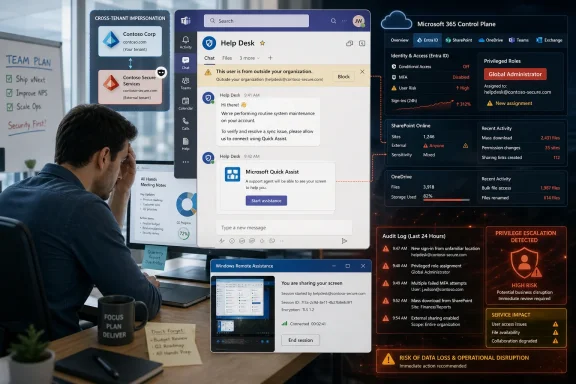
Microsoft’s recent write-up describes an intrusion chain built around cross-tenant contact, social engineering, remote access, and hands-on-keyboard activity. The attacker may begin outside the organization, but the conversation happens inside a trusted collaboration experience. The victim sees the Teams interface, hears a plausible support story, and is guided toward a remote-control workflow that Windows itself provides.
The attack abuses that design without needing to exploit a software vulnerability. The user launches the legitimate app, enters a code, and approves the session. The attacker does not have to drop malware at the first step because the user has just created a trusted tunnel into the machine.
That distinction matters. Many executives still think of ransomware as a binary infection problem: malicious attachment, malicious executable, malicious encryption routine. But the Teams help-desk playbook is more patient and more administrative. It starts with consent, proceeds through legitimate tooling, and only later may introduce payloads, credential theft, remote monitoring software, or other mechanisms for persistence and movement.
This is why the phrase living off the land has become so bleakly familiar in enterprise security. Attackers increasingly prefer what is already installed, already allowed, and already trusted. If Quick Assist, PowerShell, Windows Remote Management, browser sessions, OAuth grants, and Microsoft 365 admin features can do the job, malware becomes optional rather than essential.
Modern organizations are not sealed castles. They are webs of MSPs, consultants, auditors, suppliers, law firms, payroll vendors, cloud partners, and temporary project teams. Many employees routinely talk to external people in Teams because their work requires it. A banner that once felt like a warning can become ambient UI noise.
Attackers understand this better than some security programs do. They do not need to impersonate a CISO perfectly. They only need to impersonate a plausible support function at the right moment. If the victim has recently filed a ticket, suffered a mail flood, or heard that IT is doing maintenance, the lie lands with much less resistance.
The classic security-awareness poster says, “Verify before you click.” But verification is harder in real time than it sounds. If a caller says the organization is seeing suspicious activity on your account and needs to fix it immediately, the employee is not solving an abstract training problem. They are deciding whether to obstruct the person who appears to be helping them avoid trouble.
Microsoft 365 contains powerful mechanisms for classification, access control, retention, encryption, sharing, and policy enforcement. In normal hands, these are governance features. In hostile hands, they can become levers for denial of access at scale.
An attacker who compromises privileged accounts can attempt to change conditional access policies, weaken recovery paths, tamper with administrative roles, exfiltrate data, or interfere with SharePoint and OneDrive access. Depending on the environment, they may also abuse sensitivity labels or rights-management configurations to make data harder for legitimate users to open. The exact path will vary, but the principle is consistent: control of the tenant can become control of the business.
That is why the old mental model of ransomware is too narrow. A company can be functionally ransomed if its data is stolen, if administrators are locked out, if key repositories are inaccessible, or if policy changes make recovery slow and uncertain. The ransom note is not the defining feature. Business interruption is.
That is why this attack class deserves more attention than a routine phishing alert. It targets the connective tissue of the business. Teams provides the social channel, Windows provides the remote-assistance tool, Entra ID provides identity and access, SharePoint and OneDrive hold the working data, and admin portals provide the control plane.
The same integration that makes Microsoft 365 valuable also makes abuse difficult to contain. An attacker who compromises a single endpoint may be dangerous. An attacker who turns that endpoint into a stepping stone toward privileged cloud access is operating at a different altitude.
This is not an argument for abandoning Microsoft 365. That would be unrealistic and, for most organizations, self-defeating. It is an argument for treating the tenant like critical infrastructure rather than a bundle of productivity apps.
Employees are trained to respond quickly to IT. They are told to cooperate with support. They are measured on productivity, not adversarial verification. In many businesses, the official support process is itself ambiguous: a third-party MSP may use unfamiliar names, outsourced technicians may rotate, and tickets may be handled over chat because chat is faster than a portal.
Attackers thrive in ambiguity. If the organization has not clearly defined how IT will contact users, what tools support staff may ask users to launch, and how employees can verify a support interaction, the attacker gets to invent the process in real time.
The fix is not to shame the person who clicked. The fix is to make the malicious request structurally harder to believe. A mature organization should be able to tell every employee: IT will never initiate remote control from an external Teams tenant; IT will never ask you to enter a Quick Assist code from an unsolicited call; IT will always reference a ticket number you can verify in the service portal; and if in doubt, hang up and call the published help-desk number.
Traditional defenses are strongest when there is a clear bad artifact: a payload, a command-and-control beacon, a known malicious hash, or an exploit pattern. Social engineering through Teams followed by user-approved remote access does not begin with that kind of artifact. The first “event” may look like collaboration.
Even later in the chain, the signal can be muddy. A remote support tool may be allowed. PowerShell may be used by administrators every day. A configuration change may be legitimate during a migration. A sensitivity-label change may be part of compliance work. A new admin role assignment may be routine in one tenant and terrifying in another.
This is where baseline matters. Organizations need to know what normal looks like before they can identify abnormal. That means monitoring administrative actions, privileged role changes, external collaboration patterns, suspicious OAuth grants, unusual remote-access activity, and configuration drift across the tenant.
But the alternative should not be leaving external contact broadly available to everyone forever. External collaboration needs a blast radius. It should be limited by business need, trusted domains, user groups, and risk appetite.
This is where tenant governance becomes more than paperwork. Administrators should review Teams external access settings, guest access policies, meeting and calling permissions, and federation rules. The goal is not to make collaboration impossible. It is to stop a random newly created tenant with a help-desk display name from reaching every employee in the company.
There is also a cultural component. If external support providers are legitimate, they should be registered, documented, and recognizable. Employees should not have to guess whether “IT Support Team” from an unfamiliar domain is real. The organization should remove that uncertainty before an attacker exploits it.
The most dangerous remote-access tools are not always the most obscure. They are the ones users recognize, security tools tolerate, and attackers can explain over the phone. Quick Assist has the added advantage of sounding reassuring because it is a Microsoft component on a Windows machine.
Administrators should look at whether Quick Assist can be restricted through policy, whether approved support tools can be standardized, and whether users are trained to reject unsolicited remote-control requests. For higher-risk organizations, disabling consumer-style remote assistance and replacing it with managed, audited support workflows may be the more defensible choice.
The larger point is that remote support should be a governed transaction, not an improvised conversation. A technician should not be able to materialize in chat, ask for control, and rely on politeness to finish the authentication ceremony.
This is where least privilege becomes painfully practical. If the compromised user has broad access, the attacker inherits a broad opportunity. If the user is a help-desk technician, finance operator, SharePoint owner, identity administrator, or executive assistant, the damage can escalate quickly.
Privileged access management must assume that social engineering will occasionally work. Administrative roles should be minimized, just-in-time where possible, protected by phishing-resistant MFA for high-risk functions, and separated from daily-use accounts. Global Administrator should be rare, monitored, and treated as a break-glass-level capability rather than a convenience role for senior IT staff.
Session security matters too. A remote attacker who can ride an already authenticated browser session may not need to know the password. That makes device compliance, token protection, conditional access, sign-in risk evaluation, and session revocation part of the response story rather than optional refinements.
If data is exfiltrated, restoration does not undo disclosure. If administrators are locked out, recovery may depend on identity restoration and vendor intervention. If policies are changed across the tenant, the organization must understand what changed, when it changed, and how to reverse it safely. If attackers create persistence through accounts, apps, devices, or rules, restoring files without removing access may simply reset the stage for the next act.
This is why recovery planning must include Microsoft 365 control-plane scenarios. Many organizations have tabletop exercises for ransomware on endpoints and servers. Fewer have rehearsed what happens when a Global Admin account is hijacked, conditional access is altered, audit logs are threatened, or SharePoint content is made inaccessible through policy abuse.
The uncomfortable question is not “Do we have backups?” It is “Can we regain trusted control of the tenant under hostile conditions?” That is a very different exercise.
That is not unique to Microsoft. Every collaboration platform eventually becomes a phishing surface once it reaches sufficient scale. The same trust that makes a platform productive makes it valuable to attackers.
Still, Microsoft owns part of the burden. External-user warnings, brand impersonation detection, safer defaults, better admin controls, richer audit visibility, and clearer remote-assistance protections all matter. If a platform becomes critical infrastructure, its security model must assume adversarial use of ordinary features, not just exploitation of bugs.
Customers own the other half. Many tenants are sprawling, inconsistently governed, and full of exceptions nobody remembers approving. External access is often enabled broadly because turning it off breaks something visible, while leaving it on creates a risk that remains invisible until an incident. That is not a Microsoft-only failure; it is the predictable result of collaboration growing faster than governance.
But AI should not become the new magic word pasted over old operational gaps. A model can surface anomalies only if the organization collects the right telemetry, defines ownership, and responds quickly. Detection without authority is theater.
The best use of AI in this context is not replacing administrators. It is compressing the time between weird and contained. If the system can identify that a user who rarely receives external Teams calls just launched remote assistance and then generated unusual cloud activity, it can raise the incident before the attacker has finished turning access into control.
That still leaves the hard human work: deciding which external collaboration paths are legitimate, which tools are allowed, which accounts are privileged, which alerts matter, and who can pull the emergency brake. AI can sharpen the signal. It cannot define the business’s risk tolerance.
Start with external collaboration. Review who can be contacted from outside the organization, which domains are trusted, whether unmanaged accounts can reach users, and whether high-risk departments need stricter rules. If the business needs broad federation, make that a conscious exception rather than an inherited default.
Then tighten remote support. Publish the official process, standardize the approved tool, and make unsolicited remote-control requests a bright-line violation. Users should know exactly how to verify a support interaction without continuing the suspicious conversation.
Finally, watch the tenant like it matters. Monitor privileged role assignments, conditional access changes, app consents, mailbox rules, SharePoint and OneDrive sharing shifts, sensitivity-label changes, and unusual administrative activity. The goal is to catch the moment when social engineering becomes tenant control.
 The Phish Has Moved Into the Office
For two decades, security teams trained users to distrust email. They bought gateways, tuned filters, rewrote banners, staged phishing simulations, and taught employees to hover over links like suspicious customs officers. That work mattered, but it also pushed attackers toward a more profitable question: what happens when the lure arrives through a tool the company explicitly tells everyone to use all day?Teams is not just another inbox. It is where meetings start, tickets get clarified, managers chase updates, contractors ask for access, and IT staff appear in the middle of a busy workday to solve a problem. A message from someone claiming to be “Help Desk” does not feel like a Nigerian prince. It feels like Tuesday.
That is the genius of the attack. The attacker is not trying to defeat a security stack in a cinematic duel. They are trying to insert themselves into a normal business process at the moment when a tired employee is most likely to comply.
Microsoft’s recent write-up describes an intrusion chain built around cross-tenant contact, social engineering, remote access, and hands-on-keyboard activity. The attacker may begin outside the organization, but the conversation happens inside a trusted collaboration experience. The victim sees the Teams interface, hears a plausible support story, and is guided toward a remote-control workflow that Windows itself provides.
Quick Assist Turns Convenience Into a Credential
Quick Assist exists for a perfectly defensible reason. Remote support is a real need, especially in hybrid organizations where the nearest IT technician may be three time zones away. A built-in Windows tool that lets one person help another is the sort of feature that makes sense until the wrong person becomes the helper.The attack abuses that design without needing to exploit a software vulnerability. The user launches the legitimate app, enters a code, and approves the session. The attacker does not have to drop malware at the first step because the user has just created a trusted tunnel into the machine.
That distinction matters. Many executives still think of ransomware as a binary infection problem: malicious attachment, malicious executable, malicious encryption routine. But the Teams help-desk playbook is more patient and more administrative. It starts with consent, proceeds through legitimate tooling, and only later may introduce payloads, credential theft, remote monitoring software, or other mechanisms for persistence and movement.
This is why the phrase living off the land has become so bleakly familiar in enterprise security. Attackers increasingly prefer what is already installed, already allowed, and already trusted. If Quick Assist, PowerShell, Windows Remote Management, browser sessions, OAuth grants, and Microsoft 365 admin features can do the job, malware becomes optional rather than essential.
The External User Banner Is Not a Security Strategy
Microsoft Teams does show users when someone is external to the organization. In theory, that should create friction. In practice, the word “external” has been normalized by the way many companies actually operate.Modern organizations are not sealed castles. They are webs of MSPs, consultants, auditors, suppliers, law firms, payroll vendors, cloud partners, and temporary project teams. Many employees routinely talk to external people in Teams because their work requires it. A banner that once felt like a warning can become ambient UI noise.
Attackers understand this better than some security programs do. They do not need to impersonate a CISO perfectly. They only need to impersonate a plausible support function at the right moment. If the victim has recently filed a ticket, suffered a mail flood, or heard that IT is doing maintenance, the lie lands with much less resistance.
The classic security-awareness poster says, “Verify before you click.” But verification is harder in real time than it sounds. If a caller says the organization is seeing suspicious activity on your account and needs to fix it immediately, the employee is not solving an abstract training problem. They are deciding whether to obstruct the person who appears to be helping them avoid trouble.
Ransomware Without the Ransomware Binary
The TechRadar piece frames the nightmare scenario as a tenant-level lockout: attackers gaining sufficient privilege to misuse Microsoft 365’s own controls against the business. That is the part of the story that should make administrators sit up. The most damaging move may not be encrypting files with a custom ransomware executable. It may be turning the company’s own cloud configuration into a weapon.Microsoft 365 contains powerful mechanisms for classification, access control, retention, encryption, sharing, and policy enforcement. In normal hands, these are governance features. In hostile hands, they can become levers for denial of access at scale.
An attacker who compromises privileged accounts can attempt to change conditional access policies, weaken recovery paths, tamper with administrative roles, exfiltrate data, or interfere with SharePoint and OneDrive access. Depending on the environment, they may also abuse sensitivity labels or rights-management configurations to make data harder for legitimate users to open. The exact path will vary, but the principle is consistent: control of the tenant can become control of the business.
That is why the old mental model of ransomware is too narrow. A company can be functionally ransomed if its data is stolen, if administrators are locked out, if key repositories are inaccessible, or if policy changes make recovery slow and uncertain. The ransom note is not the defining feature. Business interruption is.
Microsoft 365 Is Infrastructure Now
The phrase “Microsoft 365 tenant” sounds tidy and contained, as though it describes a subscription boundary. In reality, for many organizations it is the operating layer for identity, documents, meetings, mail, chat, device management, records, compliance, and collaboration. When that layer is degraded, the company does not merely lose an application. It loses organizational memory and coordination.That is why this attack class deserves more attention than a routine phishing alert. It targets the connective tissue of the business. Teams provides the social channel, Windows provides the remote-assistance tool, Entra ID provides identity and access, SharePoint and OneDrive hold the working data, and admin portals provide the control plane.
The same integration that makes Microsoft 365 valuable also makes abuse difficult to contain. An attacker who compromises a single endpoint may be dangerous. An attacker who turns that endpoint into a stepping stone toward privileged cloud access is operating at a different altitude.
This is not an argument for abandoning Microsoft 365. That would be unrealistic and, for most organizations, self-defeating. It is an argument for treating the tenant like critical infrastructure rather than a bundle of productivity apps.
The Weakest Link Is a Workflow, Not a Person
It is tempting to reduce this story to “users are gullible.” That is emotionally satisfying for administrators and strategically useless. The more useful diagnosis is that the workflow is unsafe under pressure.Employees are trained to respond quickly to IT. They are told to cooperate with support. They are measured on productivity, not adversarial verification. In many businesses, the official support process is itself ambiguous: a third-party MSP may use unfamiliar names, outsourced technicians may rotate, and tickets may be handled over chat because chat is faster than a portal.
Attackers thrive in ambiguity. If the organization has not clearly defined how IT will contact users, what tools support staff may ask users to launch, and how employees can verify a support interaction, the attacker gets to invent the process in real time.
The fix is not to shame the person who clicked. The fix is to make the malicious request structurally harder to believe. A mature organization should be able to tell every employee: IT will never initiate remote control from an external Teams tenant; IT will never ask you to enter a Quick Assist code from an unsolicited call; IT will always reference a ticket number you can verify in the service portal; and if in doubt, hang up and call the published help-desk number.
Security Tools Struggle When the Attacker Uses the Admin Console
Endpoint detection and response tools are still necessary. Email security is still necessary. Conditional access, MFA, device compliance, logging, and backup are still necessary. The problem is that none of them alone answers the central question posed by this attack: what if the suspicious behavior looks like administration?Traditional defenses are strongest when there is a clear bad artifact: a payload, a command-and-control beacon, a known malicious hash, or an exploit pattern. Social engineering through Teams followed by user-approved remote access does not begin with that kind of artifact. The first “event” may look like collaboration.
Even later in the chain, the signal can be muddy. A remote support tool may be allowed. PowerShell may be used by administrators every day. A configuration change may be legitimate during a migration. A sensitivity-label change may be part of compliance work. A new admin role assignment may be routine in one tenant and terrifying in another.
This is where baseline matters. Organizations need to know what normal looks like before they can identify abnormal. That means monitoring administrative actions, privileged role changes, external collaboration patterns, suspicious OAuth grants, unusual remote-access activity, and configuration drift across the tenant.
External Collaboration Needs a Blast Radius
The hard truth for Microsoft 365 administrators is that “on” and “off” are rarely good enough. Many companies cannot simply disable all external Teams communication. Sales, legal, consulting, procurement, and support teams may depend on it.But the alternative should not be leaving external contact broadly available to everyone forever. External collaboration needs a blast radius. It should be limited by business need, trusted domains, user groups, and risk appetite.
This is where tenant governance becomes more than paperwork. Administrators should review Teams external access settings, guest access policies, meeting and calling permissions, and federation rules. The goal is not to make collaboration impossible. It is to stop a random newly created tenant with a help-desk display name from reaching every employee in the company.
There is also a cultural component. If external support providers are legitimate, they should be registered, documented, and recognizable. Employees should not have to guess whether “IT Support Team” from an unfamiliar domain is real. The organization should remove that uncertainty before an attacker exploits it.
Quick Assist Should Not Be Everyone’s Remote Door
Quick Assist is useful, but usefulness is not the same as universal entitlement. If a business has a managed remote-support platform, it should decide whether Quick Assist belongs in the environment at all. If it remains enabled, its use should be logged, monitored, and surrounded by clear policy.The most dangerous remote-access tools are not always the most obscure. They are the ones users recognize, security tools tolerate, and attackers can explain over the phone. Quick Assist has the added advantage of sounding reassuring because it is a Microsoft component on a Windows machine.
Administrators should look at whether Quick Assist can be restricted through policy, whether approved support tools can be standardized, and whether users are trained to reject unsolicited remote-control requests. For higher-risk organizations, disabling consumer-style remote assistance and replacing it with managed, audited support workflows may be the more defensible choice.
The larger point is that remote support should be a governed transaction, not an improvised conversation. A technician should not be able to materialize in chat, ask for control, and rely on politeness to finish the authentication ceremony.
Identity Is the Prize Behind the Screen Share
A remote session is rarely the final objective. It is the foothold. Once the attacker can observe or control the user’s machine, the next question is what identity material, session tokens, credentials, admin portals, VPN connections, browser profiles, and internal resources can be reached.This is where least privilege becomes painfully practical. If the compromised user has broad access, the attacker inherits a broad opportunity. If the user is a help-desk technician, finance operator, SharePoint owner, identity administrator, or executive assistant, the damage can escalate quickly.
Privileged access management must assume that social engineering will occasionally work. Administrative roles should be minimized, just-in-time where possible, protected by phishing-resistant MFA for high-risk functions, and separated from daily-use accounts. Global Administrator should be rare, monitored, and treated as a break-glass-level capability rather than a convenience role for senior IT staff.
Session security matters too. A remote attacker who can ride an already authenticated browser session may not need to know the password. That makes device compliance, token protection, conditional access, sign-in risk evaluation, and session revocation part of the response story rather than optional refinements.
Backups Are Necessary, but They Are Not a Time Machine
The TechRadar commentary is right to challenge the comforting assumption that “we have ransomware protection” settles the matter. Backup and recovery are essential, but a cloud-tenant compromise can create problems that backups alone do not instantly solve.If data is exfiltrated, restoration does not undo disclosure. If administrators are locked out, recovery may depend on identity restoration and vendor intervention. If policies are changed across the tenant, the organization must understand what changed, when it changed, and how to reverse it safely. If attackers create persistence through accounts, apps, devices, or rules, restoring files without removing access may simply reset the stage for the next act.
This is why recovery planning must include Microsoft 365 control-plane scenarios. Many organizations have tabletop exercises for ransomware on endpoints and servers. Fewer have rehearsed what happens when a Global Admin account is hijacked, conditional access is altered, audit logs are threatened, or SharePoint content is made inaccessible through policy abuse.
The uncomfortable question is not “Do we have backups?” It is “Can we regain trusted control of the tenant under hostile conditions?” That is a very different exercise.
Microsoft Has a Platform Problem and Customers Have an Operations Problem
It would be too easy to pin this entirely on user behavior or entirely on Microsoft. The reality is more complicated. Microsoft built Teams and Microsoft 365 to enable frictionless collaboration across organizational boundaries, then had to retrofit warnings and protections as attackers followed users into those channels.That is not unique to Microsoft. Every collaboration platform eventually becomes a phishing surface once it reaches sufficient scale. The same trust that makes a platform productive makes it valuable to attackers.
Still, Microsoft owns part of the burden. External-user warnings, brand impersonation detection, safer defaults, better admin controls, richer audit visibility, and clearer remote-assistance protections all matter. If a platform becomes critical infrastructure, its security model must assume adversarial use of ordinary features, not just exploitation of bugs.
Customers own the other half. Many tenants are sprawling, inconsistently governed, and full of exceptions nobody remembers approving. External access is often enabled broadly because turning it off breaks something visible, while leaving it on creates a risk that remains invisible until an incident. That is not a Microsoft-only failure; it is the predictable result of collaboration growing faster than governance.
AI Will Help, but It Will Not Save the Tenant by Itself
The TechRadar piece argues for an intelligent operating layer that can spot anomalous configuration drift and privilege changes as they happen. That is a reasonable direction, especially in large tenants where manual review is too slow and too shallow. Machine assistance can help correlate events that no human would connect in time: an external Teams contact, a Quick Assist launch, a privileged sign-in, a new role assignment, and a sudden change to sharing or labeling policy.But AI should not become the new magic word pasted over old operational gaps. A model can surface anomalies only if the organization collects the right telemetry, defines ownership, and responds quickly. Detection without authority is theater.
The best use of AI in this context is not replacing administrators. It is compressing the time between weird and contained. If the system can identify that a user who rarely receives external Teams calls just launched remote assistance and then generated unusual cloud activity, it can raise the incident before the attacker has finished turning access into control.
That still leaves the hard human work: deciding which external collaboration paths are legitimate, which tools are allowed, which accounts are privileged, which alerts matter, and who can pull the emergency brake. AI can sharpen the signal. It cannot define the business’s risk tolerance.
The Real Fix Is Boring, Which Is Why It Works
The defense against Teams help-desk impersonation is not a single product toggle. It is a stack of boring controls that make the attack less likely to start, less likely to succeed, and less damaging when it does. That is not glamorous, but it is how enterprise security usually improves.Start with external collaboration. Review who can be contacted from outside the organization, which domains are trusted, whether unmanaged accounts can reach users, and whether high-risk departments need stricter rules. If the business needs broad federation, make that a conscious exception rather than an inherited default.
Then tighten remote support. Publish the official process, standardize the approved tool, and make unsolicited remote-control requests a bright-line violation. Users should know exactly how to verify a support interaction without continuing the suspicious conversation.
Finally, watch the tenant like it matters. Monitor privileged role assignments, conditional access changes, app consents, mailbox rules, SharePoint and OneDrive sharing shifts, sensitivity-label changes, and unusual administrative activity. The goal is to catch the moment when social engineering becomes tenant control.
The Teams Attack Leaves Administrators With Fewer Excuses
This is the point in the story where practical security beats grand theory. A Teams message should not be able to take down a business, but in a poorly governed tenant it can become the first domino. The most concrete lessons are not exotic.- Organizations should restrict external Teams communication to the people and partners that genuinely need it, rather than treating open federation as a harmless convenience.
- Employees should be told that unsolicited remote-assistance requests over Teams are suspicious, even when the caller claims to be from IT or a third-party support provider.
- Quick Assist and other remote-control tools should be either disabled where unnecessary or governed through a clearly documented, auditable support process.
- Privileged Microsoft 365 roles should be rare, monitored, separated from daily-use accounts, and protected with stronger authentication and just-in-time access wherever possible.
- Security teams should alert on suspicious combinations of events, not just isolated malware detections, because this attack chain often begins with legitimate tools.
- Recovery plans should include full Microsoft 365 tenant compromise scenarios, not only endpoint ransomware and file restoration exercises.
References
- Primary source: TechRadar
Published: 2026-06-18T09:42:08.375799
The enemy within: how to stop a simple Teams message taking down your business | TechRadar
How organizations can prevent Microsoft attackswww.techradar.com - Official source: support.microsoft.com
Prevent spam or phishing attempts from external chats in Microsoft Teams | Microsoft Support
Ensure your security from spam, phishing, or impersonation attempts from external chats in Microsoft Teams.support.microsoft.com - Related coverage: expertinsights.com
Microsoft Teams Users Targeted in Fake IT Support Scam Linked to Black Basta Ransomware
Campaign abuses Microsoft Teams and Quick Assist to deploy previously undocumented backdoor. expertinsights.com
- Related coverage: cybersecuritynews.com
- Related coverage: burgitech.com
Microsoft Teams Phishing Attack: Protect Your Business (2026)
Hackers are impersonating IT support via Microsoft Teams and Quick Assist. Learn how to protect your business from this dangerous new attack.www.burgitech.com - Related coverage: windowscentral.com
Microsoft warns Teams users about new scammers | Windows Central
Microsoft Teams adds real‑time brand impersonation alerts to protect users from scam calls.www.windowscentral.com
- Official source: microsoft.com
Disrupting threats targeting Microsoft Teams | Microsoft Security Blog
Threat actors seek to abuse Microsoft Teams features and capabilities across the attack chain, underscoring the importance for defenders to proactively monitor, detect, and respond effectively. In this blog, we recommend countermeasures and optimal controls across identity, endpoints, data apps...www.microsoft.com - Related coverage: itpro.com
A notorious ransomware group is spreading fake Microsoft Teams ads to snare victims | IT Pro
The Rhysida ransomware group is leveraging Trusted Signing from Microsoft to lend plausibility to its activitieswww.itpro.com - Related coverage: labs.cloudsecurityalliance.org
Microsoft Teams as Phishing Infrastructure: The A0Backdoor Campaign and the Industrialization of Collaboration-Platform Attacks
PDF documentlabs.cloudsecurityalliance.org
- Related coverage: ntgit.com
Microsoft Teams “IT Support” Impersonation Scam | Northern Technologies Group
An active, fast-moving scam is targeting organizations that use Microsoft Teams — and the threat actors running it are sophisticated, persistent, and effective. Microsoft published a detailed security advisory on this campaign on April 18, 2026, and what they describe matches what is being seen... ntgit.com