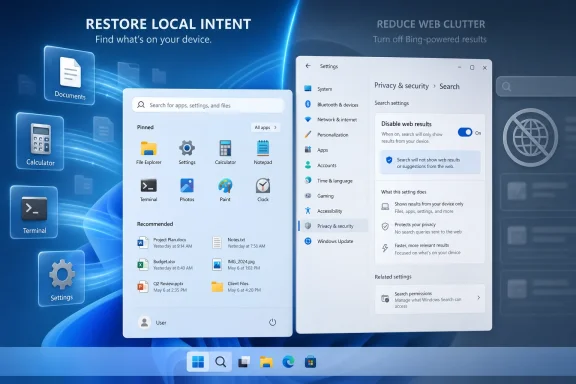
Microsoft is testing a Windows 11 setting, reported on June 18, 2026, that lets users turn off Bing-powered web results in Start menu and taskbar search from Settings instead of registry edits, Group Policy, regional workarounds, or LTSC installs. The feature is small enough to sound like a housekeeping toggle and big enough to expose one of Windows 11’s most stubborn product contradictions. For years, Microsoft has treated Search as both a local utility and a distribution channel for Bing, Rewards, MSN, Edge, and now Copilot. The new option is an admission that those goals were never as compatible as Redmond wanted them to be.
The reported change is straightforward: Windows 11 Search will gain a Settings control under Privacy & Security that disables web results. Bing remains on by default, but users will be able to turn it off without spelunking through the registry or pretending their PC lives in a more regulatorily assertive jurisdiction. Once disabled, Windows Search should surface local apps, settings, files, and recent searches without Bing results, MSN content, Microsoft Rewards prompts, or Copilot-flavored promotional detours.
That matters because Windows Search has long been asked to do too many jobs. It is supposed to be the fastest way to open Notepad, find a downloaded PDF, jump to a control panel, or launch Device Manager. But Microsoft also made it a front door to web search, a space for content recommendations, and a place to nudge users toward Microsoft services.
The friction was not subtle. Users looking for a local utility could get web cards. Users typing a file name could see online suggestions. Administrators who wanted predictable endpoint behavior often reached for policy or registry hacks because the consumer UI treated web search as part of the operating system’s personality rather than a preference.
The new toggle reframes that bargain. Microsoft is not killing Bing in Windows; it is acknowledging that local search and web search should not be inseparable. That is a much more important shift than the setting itself.
Those workarounds were never only about preference. They were about trust. When a basic desktop action requires unofficial surgery to remove network-backed suggestions, users infer that the vendor wants the telemetry, traffic, or engagement more than it wants the operating system to feel clean.
That is a dangerous perception for Microsoft because Search is not some optional widget pinned to a corner of the desktop. It sits in the muscle memory of Windows itself. Press the Windows key, type three letters, hit Enter: that loop is one of the fastest workflows in personal computing when it works, and one of the most maddening when it guesses wrong.
The registry era also created operational debt. IT departments do not want fleets of machines relying on undocumented tweaks that may break after a cumulative update. Power users do not want to rediscover the same DWORD after every reinstall. A supported Settings toggle turns an act of resistance into a normal configuration choice.
A local launcher should feel instant. It should not appear to deliberate over whether “maps” means the installed Maps app, an online search for maps, a Store suggestion, a web result, or a promotional card. Every extra surface area adds latency, ambiguity, and the possibility of the wrong result winning.
The irony is that Windows has powerful indexing machinery underneath it. Third-party launchers and Microsoft’s own PowerToys Run can often feel sharper than the native Search panel despite depending on the same broad ecosystem of indexing and shell capabilities. That has made the native experience look less like a technical limitation and more like a product-design compromise.
Bing integration did not single-handedly make every Windows Search complaint true. Indexing scope, file metadata, OneDrive state, broken shortcuts, and app registration all affect results. But web integration gave Search another competing priority, and in a launcher-style interface, competing priorities are poison.
That instinct is commercially understandable. Windows is a massive installed base, and Bing has spent its life fighting for user attention against Google. If the Start menu can create search traffic, display web suggestions, or establish Bing as the default answer engine, that is strategically valuable to Microsoft.
But the user’s mental model is different. The Start menu is not a browser tab. The taskbar search box is not primarily an ad funnel. When people search from the desktop, they often want the machine in front of them, not the web beyond it.
This is why the Bing toggle lands with outsized force. It is not merely a convenience; it restores a boundary. The operating system can still offer web search, but it should not confuse web search with local command execution.
The same is true of Copilot promotions appearing when users are simply trying to find something on their PC. Copilot may be strategically central to Microsoft’s future, and AI assistants may eventually reshape how people interact with operating systems. But promotional friction inside local Search risks teaching users to see AI as another interruption rather than an enhancement.
That distinction matters. A genuinely useful assistant should appear when it can help, not when the vendor needs impressions. If Copilot can summarize documents, automate settings changes, explain error codes, or troubleshoot system state, users will invite it in. If it appears as another ad-shaped object while they are looking for a file, they will learn to disable it.
Decoupling Rewards and web results from local Search is therefore not anti-Bing or anti-Copilot. It is pro-context. The fastest way to make users resent a feature is to put it in the wrong place.
That created an awkward optics problem. If a cleaner Windows Search experience can exist for compliance reasons in one market, why is it not a normal preference everywhere? Microsoft’s answer, until now, has effectively been inertia plus business interest.
The rumored global toggle suggests the company may be learning that regional compliance features have a way of becoming global expectations. Once users see that a bundled service is technically optional, the argument that it must remain welded into the OS becomes much harder to sustain.
This is not a full unbundling revolution. Bing remains on by default, and defaults are powerful. But default-on is a very different posture from impossible-to-disable-through-normal-settings.
This is where the feature becomes a study in Microsoft’s modern Windows strategy. The company can say it offers choice while preserving the engagement stream for the majority of installations. Enthusiasts get relief. Enterprise admins get a cleaner supported path. Microsoft keeps Bing in the default lane.
That compromise may be reasonable, but it is not neutral. Defaults shape behavior, support costs, privacy expectations, and user trust. If a family member’s new laptop still shows web results when searching for Control Panel, the average user experience has not changed until someone flips the switch.
Still, there is value in making the switch official. Once a setting exists, OEMs, administrators, setup scripts, privacy guides, and power-user tools can build around it without resorting to fragile hacks. Over time, that can shift the practical baseline even if the factory default remains Microsoft’s preferred one.
There are also compliance and data-governance implications, even if ordinary Search queries are not the same as uploading documents to a cloud service. A local-only search mode is easier to explain, easier to audit, and easier to support. In heavily controlled environments, fewer network-backed surfaces is often the point.
The setting should also reduce the reliance on policy contortions. Group Policy remains essential for centralized management, but a consumer-facing toggle means Microsoft is acknowledging the distinction in the product itself. That tends to produce better documentation, more stable behavior, and fewer surprises after feature updates.
The big unanswered question is how the new toggle maps to existing enterprise controls. Administrators will want to know whether it is exposed through policy, MDM, provisioning packages, and configuration baselines. If Microsoft handles that well, this becomes a small but welcome quality-of-life improvement for Windows management.
The reported Microsoft confirmation gives those complaints a measure of validation. If disabling web results improves speed, reliability, and offline usefulness, then the community’s frustration was not just nostalgia for Windows 7 or hostility toward Bing. It was a response to a measurable design tradeoff.
This is also a reminder that enthusiast complaints can identify mainstream product problems early. Power users hit friction first because they use keyboard-driven workflows intensely. Administrators notice because they manage repetition at scale. Casual users may simply adapt, blame themselves, or stop trusting Search.
By the time Microsoft adds a toggle, the issue has usually traveled through all three groups. What begins as a forum grievance becomes a support pattern, then a press narrative, then finally a product setting.
Windows Search also exists in a broader shell that remains cluttered. The Start menu still carries recommendations. Widgets still pull the user toward Microsoft’s content ecosystem. Edge and Microsoft 365 prompts still appear in places where users may not expect them. Copilot’s long-term role in the shell remains unsettled.
But Search is a symbolic place to start because it is so close to the core Windows experience. It is one of the few features where milliseconds and intent recognition matter more than visual polish. A beautiful Search panel that returns the wrong thing is worse than an ugly one that instantly opens the right tool.
If Microsoft wants Windows 11 to feel faster, it does not only need lower CPU usage or better animation timing. It needs fewer moments where the OS appears to misunderstand why the user touched it.
The more interesting consequence is cultural. Microsoft is being forced, by user impatience and regulatory reality, to distinguish between features people choose and services they are maneuvered into using. That distinction will define the next phase of Windows more than any one toggle.
A good operating system can recommend. It can integrate. It can even promote new capabilities. But it must also know when to get out of the way, and local Search is one of those places where restraint is a feature.
 Microsoft Finally Separates Search From Search Marketing
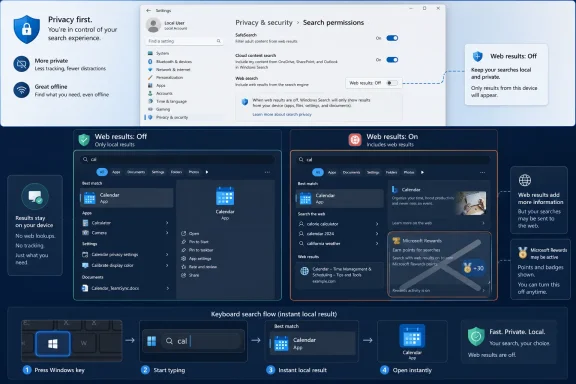
The reported change is straightforward: Windows 11 Search will gain a Settings control under Privacy & Security that disables web results. Bing remains on by default, but users will be able to turn it off without spelunking through the registry or pretending their PC lives in a more regulatorily assertive jurisdiction. Once disabled, Windows Search should surface local apps, settings, files, and recent searches without Bing results, MSN content, Microsoft Rewards prompts, or Copilot-flavored promotional detours.That matters because Windows Search has long been asked to do too many jobs. It is supposed to be the fastest way to open Notepad, find a downloaded PDF, jump to a control panel, or launch Device Manager. But Microsoft also made it a front door to web search, a space for content recommendations, and a place to nudge users toward Microsoft services.
The friction was not subtle. Users looking for a local utility could get web cards. Users typing a file name could see online suggestions. Administrators who wanted predictable endpoint behavior often reached for policy or registry hacks because the consumer UI treated web search as part of the operating system’s personality rather than a preference.
The new toggle reframes that bargain. Microsoft is not killing Bing in Windows; it is acknowledging that local search and web search should not be inseparable. That is a much more important shift than the setting itself.
The Registry Hack Era Was a Symptom, Not a Solution
The old ways of disabling Bing in Windows Search were always a little absurd. Home users were told to modify registry keys. Pro and Enterprise users could lean on Group Policy. Enthusiasts used third-party debloating scripts, region hacks, firewall rules, or LTSC builds to get a Start menu that behaved like a Start menu.Those workarounds were never only about preference. They were about trust. When a basic desktop action requires unofficial surgery to remove network-backed suggestions, users infer that the vendor wants the telemetry, traffic, or engagement more than it wants the operating system to feel clean.
That is a dangerous perception for Microsoft because Search is not some optional widget pinned to a corner of the desktop. It sits in the muscle memory of Windows itself. Press the Windows key, type three letters, hit Enter: that loop is one of the fastest workflows in personal computing when it works, and one of the most maddening when it guesses wrong.
The registry era also created operational debt. IT departments do not want fleets of machines relying on undocumented tweaks that may break after a cumulative update. Power users do not want to rediscover the same DWORD after every reinstall. A supported Settings toggle turns an act of resistance into a normal configuration choice.
Performance Was Always the Political Argument
Microsoft’s reported framing emphasizes that Search is getting faster and more reliable, and that turning off web results enables a cleaner offline experience. That is the right argument, because performance is where this debate leaves the realm of aesthetic annoyance and becomes a product failure.A local launcher should feel instant. It should not appear to deliberate over whether “maps” means the installed Maps app, an online search for maps, a Store suggestion, a web result, or a promotional card. Every extra surface area adds latency, ambiguity, and the possibility of the wrong result winning.
The irony is that Windows has powerful indexing machinery underneath it. Third-party launchers and Microsoft’s own PowerToys Run can often feel sharper than the native Search panel despite depending on the same broad ecosystem of indexing and shell capabilities. That has made the native experience look less like a technical limitation and more like a product-design compromise.
Bing integration did not single-handedly make every Windows Search complaint true. Indexing scope, file metadata, OneDrive state, broken shortcuts, and app registration all affect results. But web integration gave Search another competing priority, and in a launcher-style interface, competing priorities are poison.
The Start Menu Is Not a Browser Tab
The deeper problem is philosophical. Microsoft has repeatedly treated Windows shell surfaces as if they were flexible canvases for services. Start, Search, Widgets, Edge prompts, account banners, OneDrive reminders, Microsoft 365 nudges, and Copilot entry points all come from a related instinct: the operating system can be a distribution layer.That instinct is commercially understandable. Windows is a massive installed base, and Bing has spent its life fighting for user attention against Google. If the Start menu can create search traffic, display web suggestions, or establish Bing as the default answer engine, that is strategically valuable to Microsoft.
But the user’s mental model is different. The Start menu is not a browser tab. The taskbar search box is not primarily an ad funnel. When people search from the desktop, they often want the machine in front of them, not the web beyond it.
This is why the Bing toggle lands with outsized force. It is not merely a convenience; it restores a boundary. The operating system can still offer web search, but it should not confuse web search with local command execution.
Rewards and Copilot Were the Tell
The reported removal of the Microsoft Rewards icon when web results are disabled is especially revealing. Rewards is not essential to finding a file. It is not essential to launching an app. Its presence in Search made clear that Microsoft saw the panel as a service-engagement surface, not just an operating-system utility.The same is true of Copilot promotions appearing when users are simply trying to find something on their PC. Copilot may be strategically central to Microsoft’s future, and AI assistants may eventually reshape how people interact with operating systems. But promotional friction inside local Search risks teaching users to see AI as another interruption rather than an enhancement.
That distinction matters. A genuinely useful assistant should appear when it can help, not when the vendor needs impressions. If Copilot can summarize documents, automate settings changes, explain error codes, or troubleshoot system state, users will invite it in. If it appears as another ad-shaped object while they are looking for a file, they will learn to disable it.
Decoupling Rewards and web results from local Search is therefore not anti-Bing or anti-Copilot. It is pro-context. The fastest way to make users resent a feature is to put it in the wrong place.
Europe Showed the Future Before Microsoft Admitted It
Windows users have already seen a version of this story through regulatory geography. In the European Economic Area, Microsoft has had to make parts of Windows more separable, including some defaults and service integrations, under pressure from the Digital Markets Act. Users elsewhere noticed that region sometimes determined whether Windows respected choices that felt universal.That created an awkward optics problem. If a cleaner Windows Search experience can exist for compliance reasons in one market, why is it not a normal preference everywhere? Microsoft’s answer, until now, has effectively been inertia plus business interest.
The rumored global toggle suggests the company may be learning that regional compliance features have a way of becoming global expectations. Once users see that a bundled service is technically optional, the argument that it must remain welded into the OS becomes much harder to sustain.
This is not a full unbundling revolution. Bing remains on by default, and defaults are powerful. But default-on is a very different posture from impossible-to-disable-through-normal-settings.
Default-On Still Means Microsoft Wins the First Round
The setting’s existence should not obscure the fact that Bing web results reportedly remain enabled by default. That matters because most users do not change defaults, and Microsoft knows it. A toggle buried under Privacy & Security is a concession to people who care enough to look, not a redefinition of the out-of-box experience.This is where the feature becomes a study in Microsoft’s modern Windows strategy. The company can say it offers choice while preserving the engagement stream for the majority of installations. Enthusiasts get relief. Enterprise admins get a cleaner supported path. Microsoft keeps Bing in the default lane.
That compromise may be reasonable, but it is not neutral. Defaults shape behavior, support costs, privacy expectations, and user trust. If a family member’s new laptop still shows web results when searching for Control Panel, the average user experience has not changed until someone flips the switch.
Still, there is value in making the switch official. Once a setting exists, OEMs, administrators, setup scripts, privacy guides, and power-user tools can build around it without resorting to fragile hacks. Over time, that can shift the practical baseline even if the factory default remains Microsoft’s preferred one.
Enterprise IT Gets a Cleaner Story to Tell
For managed environments, the appeal is less about annoyance and more about predictability. Help desks do not want screenshots of Start search showing web content when a user was instructed to open a local tool. Security teams do not want unnecessary web calls mixed into basic shell interactions if they can avoid them. Desktop admins do not want to explain why a user searching for an internal app gets public web suggestions.There are also compliance and data-governance implications, even if ordinary Search queries are not the same as uploading documents to a cloud service. A local-only search mode is easier to explain, easier to audit, and easier to support. In heavily controlled environments, fewer network-backed surfaces is often the point.
The setting should also reduce the reliance on policy contortions. Group Policy remains essential for centralized management, but a consumer-facing toggle means Microsoft is acknowledging the distinction in the product itself. That tends to produce better documentation, more stable behavior, and fewer surprises after feature updates.
The big unanswered question is how the new toggle maps to existing enterprise controls. Administrators will want to know whether it is exposed through policy, MDM, provisioning packages, and configuration baselines. If Microsoft handles that well, this becomes a small but welcome quality-of-life improvement for Windows management.
Enthusiasts Were Right About the Shape of the Problem
Windows enthusiasts have spent years complaining that Search had become polluted. Sometimes the rhetoric was overheated, as it often is when people argue about operating systems. But the core complaint was correct: a desktop search tool should not routinely prioritize web engagement over local intent.The reported Microsoft confirmation gives those complaints a measure of validation. If disabling web results improves speed, reliability, and offline usefulness, then the community’s frustration was not just nostalgia for Windows 7 or hostility toward Bing. It was a response to a measurable design tradeoff.
This is also a reminder that enthusiast complaints can identify mainstream product problems early. Power users hit friction first because they use keyboard-driven workflows intensely. Administrators notice because they manage repetition at scale. Casual users may simply adapt, blame themselves, or stop trusting Search.
By the time Microsoft adds a toggle, the issue has usually traveled through all three groups. What begins as a forum grievance becomes a support pattern, then a press narrative, then finally a product setting.
A Faster Search Box Will Not Fix Windows by Itself
It would be easy to overstate this change. Turning off Bing results will not magically make Windows Search perfect. Microsoft still has work to do on relevance, indexing transparency, settings discovery, app aliases, OneDrive integration, and the messy overlap between old Control Panel items and modern Settings pages.Windows Search also exists in a broader shell that remains cluttered. The Start menu still carries recommendations. Widgets still pull the user toward Microsoft’s content ecosystem. Edge and Microsoft 365 prompts still appear in places where users may not expect them. Copilot’s long-term role in the shell remains unsettled.
But Search is a symbolic place to start because it is so close to the core Windows experience. It is one of the few features where milliseconds and intent recognition matter more than visual polish. A beautiful Search panel that returns the wrong thing is worse than an ugly one that instantly opens the right tool.
If Microsoft wants Windows 11 to feel faster, it does not only need lower CPU usage or better animation timing. It needs fewer moments where the OS appears to misunderstand why the user touched it.
The Clean Search Toggle Is a Small Switch With Large Consequences
The practical advice, once the feature reaches mainstream builds, will be simple: users who treat Start search as a launcher should turn off web results and see whether the experience improves. Those who like searching the web from the taskbar can leave Bing enabled. That is exactly the kind of preference Windows should have exposed all along.The more interesting consequence is cultural. Microsoft is being forced, by user impatience and regulatory reality, to distinguish between features people choose and services they are maneuvered into using. That distinction will define the next phase of Windows more than any one toggle.
A good operating system can recommend. It can integrate. It can even promote new capabilities. But it must also know when to get out of the way, and local Search is one of those places where restraint is a feature.
The Switch Windows Users Have Been Asking For Is Finally the Test
This is the rare Windows change where the concrete implications are easy to understand, even if the product politics around it are not. The toggle is small, but it touches performance, privacy, trust, and Microsoft’s habit of turning shell surfaces into service surfaces.- Windows 11 Search is expected to gain a normal Settings toggle for disabling Bing-powered web results.
- Bing results reportedly remain enabled by default, so the change helps users who actively opt out rather than transforming the default Windows experience.
- Disabling web results should remove Microsoft Rewards and related web-backed content from the Search interface.
- Local-only Search should be faster and more predictable for users who primarily launch apps, open files, and find settings from Start.
- Administrators should watch for matching policy and MDM controls, because fleet-wide manageability will determine whether this is merely nice or operationally useful.
- The change is best understood as Microsoft separating a core desktop utility from a services funnel that had outgrown its welcome.
References
- Primary source: Windows Latest
Published: Thu, 18 Jun 2026 12:27:18 GMT
Microsoft reveals you can kill Bing in Windows 11 Search and boost performance after years of lag
Microsoft has confirmed what we reported a little while ago: you'll be able to Bing web results in Windows 11 Start menu search. www.windowslatest.com
- Official source: support.microsoft.com
Windows Search and privacy - Microsoft Support
Learn how to connect Windows Search with your accounts in the cloud, manage your Windows Search and SafeSearch settings, clear search history, and more.support.microsoft.com - Related coverage: makeuseof.com
How to Disable Bing Web Searches in Windows 11
Sick of Bing giving its opinion on your Windows 11 searches? Here's how to turn it off. www.makeuseof.com
- Related coverage: windowscentral.com
How to stop internet results in Search for Windows 11 | Windows Central
Turn off online suggestions inside the Windows Search feature and regain a local-only experience on Windows 11.www.windowscentral.com - Related coverage: pureinfotech.com
How to disable web search results on Windows 11 – and remove Bing - Pureinfotech
To disable web search in Start menu or Windows Search box, use Group Policy or Registry on Windows 11. This also removes the Copilot button. pureinfotech.com
- Related coverage: techspot.com
Windows 11 will soon have an option for removing web results from local search queries | TechSpot
During a recent meetup with Windows enthusiasts enrolled in the Windows Insiders program, Microsoft showcased several search-related changes that are expected to arrive in a future update...www.techspot.com
- Related coverage: techrepublic.com
Windows 11 Search Could Get a Bing Results Toggle - TechRepublic
Microsoft is testing a Windows 11 Search toggle for Bing web results and Store suggestions, but the setting is not publicly available yet.www.techrepublic.com
- Related coverage: techradar.com
Microsoft is fixing one of the most baffling things about Windows 11 — 'spam' in search results | TechRadar
Why didn't this happen long before now? Search mewww.techradar.com - Related coverage: tomshardware.com
How to Disable Windows Web Search and Speed Up Your PC | Tom's Hardware
Stop Windows from showing you web results when you just want files and apps.www.tomshardware.com - Related coverage: teachucomp.com
- Related coverage: askwoody.com