
Microsoft on June 19, 2026 released five Windows 11 Insider Preview builds across Beta and Experimental channels, including the first Experimental-channel build that identifies itself as Windows 11 version 26H2 in Settings and winver. The headline is not the usual weekly churn of fixes, but the widening gap between Windows as a consumer product and Windows as a set of platform trains. Microsoft is trying to make Insider flighting more legible while simultaneously asking testers to accept more branches, more enablement packages, and more hardware-specific exceptions. That tension is now the story of Windows 11’s 2026 roadmap.
The most consequential bit in this batch is deceptively small: Windows Insiders in the Experimental channel now see version 26H2 under Settings > System > About and in winver. That is the kind of change normal users never notice until it appears in a support ticket, a screenshot, or an admin inventory dashboard. For Insiders, though, version strings are not trivia; they are the first public signs of how Microsoft intends to package the next annual Windows release.
Build 26300.8697 is the build carrying that 26H2 identity in Experimental. Microsoft says these builds are delivered on top of Windows 11 version 25H2 with an enablement package, a familiar trick that changes the visible feature-update version while keeping the underlying platform close to what is already in market. In practical terms, 26H2 is not arriving as a giant new codebase for mainstream x64 PCs today. It is being staged as another turn of the enablement-package crank.
That matters because the Windows 11 era has been defined by a strange duality. Microsoft talks about annual feature updates, but many of the user-visible changes arrive continuously through cumulative updates, Store app revisions, Controlled Feature Rollout, or cloud-connected experiences. The version number increasingly tells you less about what your PC can do on a given morning and more about where Microsoft wants that PC to sit in a support matrix.
The build also includes the sort of fixes that make Insider notes look small until they touch your machine: Dark mode improvements to File Explorer’s Copy dialog, better Start menu reliability after app installs and removals, a fix for the smaller taskbar system tray getting cut off, Settings reliability improvements, and virtualization fixes for bugchecks involving HYPERVISOR_ERROR and KMODE_EXCEPTION_NOT_HANDLED. These are not flashy 26H2 features. They are housekeeping items on the road to a release label.
That is the point. Microsoft is not presenting 26H2 as a theatrical reveal. It is letting the label seep into the Insider system first, wrapped in stability work and channel plumbing.
But the June 19 releases show why the cleanup only goes so far. On the same day, Microsoft shipped a mainstream Beta build for Windows 11 version 25H2, an Experimental build now labeled 26H2, a Beta build for 26H1, and an Experimental build for 26H1. That is not a typo; 26H1 and 26H2 are moving in parallel, and one of them is not meant for the vast majority of existing PCs.
This is where Windows enthusiasts can follow the plot but normal customers cannot. A version number that looks later is not necessarily the upgrade path for every machine. A channel name that sounds earlier or riskier does not always mean a single branch. Even “Experimental” is not one thing; it can mean the 26H2 enablement path, the 26H1 Arm-specific path, or Future Platforms work that may not map to Windows 11 at all.
For Microsoft, that segmentation may be technically rational. Windows now has to support x64 PCs, Arm PCs, AI accelerators, new silicon bring-up, virtualization-heavy developer workflows, enterprise servicing policy, and consumer feature delivery without exploding into separate products. For the people installing these builds, however, the burden shifts from “which channel am I in?” to “which channel, version, build family, hardware platform, feature rollout state, and enablement package am I actually testing?”
That is a lot to put on a Settings page.
That decision has a logic. When a new Arm platform needs deep operating-system support, Microsoft has to deliver that support somewhere. Shipping a special release for those machines avoids forcing every existing Windows PC through a platform transition it does not need. It also lets Microsoft and Qualcomm bring new hardware to market without waiting for the year’s general Windows feature update.
The trade-off is narrative chaos. A customer buying a new Snapdragon X2 PC with Windows 11 version 26H1 is, numerically, ahead of a 25H2 PC. But Microsoft has said those 26H1 devices will not move to 26H2 in the second half of 2026 and will instead have a path to a future Windows release. That means 26H1 is both newer and off to the side. It is a shipping release, but not the mainstream 2026 feature-update train.
For Windows admins, the weirdness is not merely semantic. Version labels feed compliance reports, update rings, application compatibility assumptions, procurement checklists, and end-user support scripts. If a device says 26H1 but is not eligible for 26H2, the label has stopped acting like a simple chronological marker. It has become a branch marker disguised as a calendar marker.
That is exactly the kind of thing Windows has struggled with before. Microsoft has spent years trying to make Windows servicing feel predictable after the disruptive early Windows 10 cadence. The 26H1/26H2 split does not return to those bad old days, but it reintroduces a familiar anxiety: the fear that Windows versioning means something different depending on which machine is on the desk.
The advantage is speed and risk reduction. If 26H2 rides on top of 25H2-era components for most PCs, installation should look more like a monthly update than a multi-gigabyte operating-system transplant. Enterprises like that because it reduces help desk load and lowers the odds that a feature update becomes a fleet-wide incident. Consumers like it, when they notice at all, because the PC gets back to usable faster.
But enablement packages also blur the meaning of a Windows release. If version 26H2 is largely latent inside 25H2 until Microsoft flips it on, then the annual feature update is less a delivery vehicle than a support milestone. The real feature delivery has already happened in pieces, or will continue happening after the version bump through controlled rollouts.
That is not necessarily bad. In fact, it is probably the only sane way to maintain Windows at global scale in 2026. The problem is that Microsoft still markets and documents Windows around named versions, while engineering increasingly ships Windows as a continuously serviced platform. The June 19 Insider drops are another snapshot of that unresolved compromise.
The result is a Windows release model that is technically quieter but communicatively louder. Fewer giant upgrades, more small switches. Fewer obvious cliff edges, more hidden state.
Virtualization underpins developer workflows, Windows Subsystem for Linux, credential protections, application isolation, Android-related experiments when those existed, enterprise security features, and parts of the modern gaming anti-cheat ecosystem. A hypervisor bugcheck is not a niche inconvenience if it lands on the wrong class of machines. It is the kind of failure that makes advanced users stop trusting flights.
The Start menu and Settings fixes are equally mundane and equally important. A Start menu that fails to reflect installed or removed apps without sign-out or restart is the kind of paper cut that tells users the shell is out of sync with reality. Settings > Apps > Startup reliability sounds tiny, but startup app management is where ordinary users go when they think Windows is getting slow. If that page misbehaves, Windows feels less manageable.
The smaller taskbar fix has a different flavor. Microsoft has spent much of Windows 11’s life slowly restoring or reworking shell affordances that users expected from earlier Windows releases. A smaller taskbar option that clips the system tray is the kind of defect Insiders are supposed to catch, but it also illustrates how much accumulated complexity lives in the shell. Even a size toggle touches layout, scaling, localization, notification icons, accessibility, and multi-monitor behavior.
File Explorer’s Dark mode Copy dialog improvements belong in the same category. This is not the stuff of keynote demos, but it is the craft layer Microsoft has often been criticized for neglecting. Windows 11 can have all the AI branding in the world; if a file operation dialog looks inconsistent or launches unreliably, users will still describe the product as unfinished.
That split confirms that 26H1 is not being abandoned just because 26H2 is starting to show up elsewhere. Microsoft still has to service the machines that ship with it, and it still has to test fixes in Insider rings. For Snapdragon X2 owners, this is reassuring in the narrow sense: their branch is alive, receiving fixes, and visible in the Insider machinery.
But it also reinforces the uncomfortable broader point. Arm Windows is again on a track that requires careful explanation. Microsoft and Qualcomm want Windows on Arm to look like a normal PC choice, not a science project. Yet the update path for the newest Arm machines is already different enough that buyers and admins have to understand exceptions before they even get to application compatibility or driver questions.
There is a charitable reading here. Microsoft may be using 26H1 as a bridge release, keeping new silicon moving while preparing a future platform convergence. The company’s wording about a path to a future Windows release leaves room for that. But until Microsoft names that destination and timing clearly, the public story remains incomplete.
This matters for OEMs, too. Hardware launches depend on simple messages. “This new laptop runs Windows 11” is simple. “This new laptop runs Windows 11 26H1, which is not the annual 26H2 update path but will receive a future Windows release later” is not. The distinction may be technically accurate, but retail shelves punish nuance.
This is a necessary escape hatch. If every early build is interpreted as the next Windows 11 release, Microsoft loses room to experiment. Kernel, driver, security, setup, update, and hardware-enablement work often needs long lead time. Some of it may ship in Windows 11. Some may ship in a future Windows release. Some may be killed before it reaches ordinary Insiders.
The clearer label helps, but only if users respect it. “Future Platforms” sounds exciting, and enthusiasts are naturally drawn to the newest build number. That can lead to predictable pain when a build includes limited documentation, instability, or changes that are not intended for daily PCs. Microsoft can warn people, but it cannot fully counteract the psychology of wanting the newest thing.
For WindowsForum readers, the advice is simple even if the matrix is not. Future Platforms belongs on sacrificial hardware, lab VMs where supported, or machines whose loss will not ruin your week. It should not be treated as a clever way to get tomorrow’s Windows early. It is more like watching road crews dig up the street before anyone has published the new bus route.
That is why these builds can feel both small and important. A Copy dialog improvement is small. A version transition to 26H2 via Experimental is important. An HD Audio driver reliability fix is small. A parallel 26H1 branch for new Arm silicon is important. The individual release notes do not look dramatic, but the pattern does.
The revised Insider system also tries to answer a long-standing complaint: users often read about a feature in a Microsoft blog post, install the relevant build, and then cannot find the feature. Controlled rollouts caused much of that frustration. Feature flags in Experimental are Microsoft’s attempt to give eager testers more direct control over what they are testing, though even that does not eliminate every staged rollout or regional limitation.
This is a more honest model, but it is not necessarily simpler. A test PC might be on the right build and still not have a feature unless a flag is enabled or a rollout has reached it. Another PC might have the same version number but a different hardware path. A third might be on Future Platforms and not be comparable at all.
In other words, the Insider Program is becoming more transparent about Windows’ complexity rather than hiding it. That is good for serious testers. It may be bewildering for everyone else.
Still, admins will be cautious. Insider builds are not production builds, and the machines most likely to benefit from early testing are often the machines least convenient to break: developer workstations, security pilot devices, hardware evaluation units, and app compatibility labs. The June 19 builds contain exactly the sort of fixes that enterprises want validated before broad release, particularly around virtualization and Settings reliability. But the channel/version maze raises the cost of knowing what, precisely, was validated.
The 26H1 exception is also a procurement issue. If an organization is evaluating Snapdragon X2 PCs, it should understand that those devices sit on a different Windows release path in 2026. That does not mean they are bad purchases. It does mean lifecycle planning should be explicit, especially for organizations with rigid feature-update rings or compliance tooling that assumes H2 releases are the annual norm for all Windows 11 endpoints.
There is also a documentation burden. Help desk scripts that say “upgrade to 26H2” may not apply to 26H1 devices. Asset reports that group machines by Windows version may overstate similarity between devices. Pilot programs need to tag not just Windows version, but build family and silicon class.
Microsoft can reduce this pain by making the future path for 26H1 devices clearer before the fall rollout window. The longer that path remains vague, the more cautious IT buyers will become.
The trouble is not that Microsoft is doing complex engineering. Windows is complex because the PC ecosystem is complex. The trouble is that the naming scheme implies a single line when Microsoft is operating multiple lines. Users see numbers; Microsoft sees servicing branches.
There are ways to fix that. Microsoft could be more explicit in user-facing copy that 26H1 is a silicon-specific release and 26H2 is the annual mainstream release for supported 24H2 and 25H2 PCs. It could make Insider Settings show not just the channel, but the release family and whether the build maps to a retail release. It could treat Future Platforms as a clearly separated lab lane rather than one more variant under the same broad Experimental umbrella.
The company has already moved in that direction with the new channel language, feature flags, and documentation hub. But the June 19 announcement shows that the work is unfinished. If experienced Windows watchers are pausing to parse the branch structure, ordinary users have no chance.
That does not mean Microsoft should slow down technical progress to preserve a tidy naming story. It means the product language has to catch up with the engineering reality. Otherwise every release cycle becomes a minor detective story.
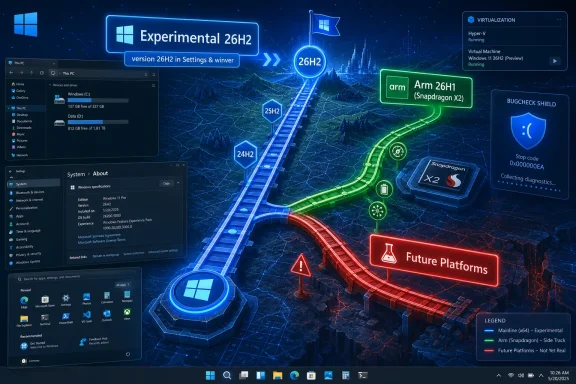 Microsoft Turns 26H2 Into a Channel Event Before It Becomes a Product Event
The most consequential bit in this batch is deceptively small: Windows Insiders in the Experimental channel now see version 26H2 under Settings > System > About and in winver. That is the kind of change normal users never notice until it appears in a support ticket, a screenshot, or an admin inventory dashboard. For Insiders, though, version strings are not trivia; they are the first public signs of how Microsoft intends to package the next annual Windows release.Build 26300.8697 is the build carrying that 26H2 identity in Experimental. Microsoft says these builds are delivered on top of Windows 11 version 25H2 with an enablement package, a familiar trick that changes the visible feature-update version while keeping the underlying platform close to what is already in market. In practical terms, 26H2 is not arriving as a giant new codebase for mainstream x64 PCs today. It is being staged as another turn of the enablement-package crank.
That matters because the Windows 11 era has been defined by a strange duality. Microsoft talks about annual feature updates, but many of the user-visible changes arrive continuously through cumulative updates, Store app revisions, Controlled Feature Rollout, or cloud-connected experiences. The version number increasingly tells you less about what your PC can do on a given morning and more about where Microsoft wants that PC to sit in a support matrix.
The build also includes the sort of fixes that make Insider notes look small until they touch your machine: Dark mode improvements to File Explorer’s Copy dialog, better Start menu reliability after app installs and removals, a fix for the smaller taskbar system tray getting cut off, Settings reliability improvements, and virtualization fixes for bugchecks involving HYPERVISOR_ERROR and KMODE_EXCEPTION_NOT_HANDLED. These are not flashy 26H2 features. They are housekeeping items on the road to a release label.
That is the point. Microsoft is not presenting 26H2 as a theatrical reveal. It is letting the label seep into the Insider system first, wrapped in stability work and channel plumbing.
The New Insider Map Is Simpler Until You Try to Explain It
Microsoft’s newer Insider structure is supposed to make life easier. Beta is closer to production. Experimental is where Microsoft tests features and platform changes earlier. Experimental also has a Future Platforms lane for work that is not mapped to a particular retail release. On paper, this is a cleaner vocabulary than the old maze of Canary, Dev, Beta, and Release Preview, each of which acquired historical baggage.But the June 19 releases show why the cleanup only goes so far. On the same day, Microsoft shipped a mainstream Beta build for Windows 11 version 25H2, an Experimental build now labeled 26H2, a Beta build for 26H1, and an Experimental build for 26H1. That is not a typo; 26H1 and 26H2 are moving in parallel, and one of them is not meant for the vast majority of existing PCs.
This is where Windows enthusiasts can follow the plot but normal customers cannot. A version number that looks later is not necessarily the upgrade path for every machine. A channel name that sounds earlier or riskier does not always mean a single branch. Even “Experimental” is not one thing; it can mean the 26H2 enablement path, the 26H1 Arm-specific path, or Future Platforms work that may not map to Windows 11 at all.
For Microsoft, that segmentation may be technically rational. Windows now has to support x64 PCs, Arm PCs, AI accelerators, new silicon bring-up, virtualization-heavy developer workflows, enterprise servicing policy, and consumer feature delivery without exploding into separate products. For the people installing these builds, however, the burden shifts from “which channel am I in?” to “which channel, version, build family, hardware platform, feature rollout state, and enablement package am I actually testing?”
That is a lot to put on a Settings page.
26H1 Is the Exception That Explains the Rule
The confusion around 26H2 cannot be separated from 26H1. Microsoft previously made clear that Windows 11 version 26H1 is a hardware-optimized release for new silicon, led by Snapdragon X2-based PCs. It is not being offered as an in-place update from Windows 11 versions 24H2 or 25H2 for existing devices.That decision has a logic. When a new Arm platform needs deep operating-system support, Microsoft has to deliver that support somewhere. Shipping a special release for those machines avoids forcing every existing Windows PC through a platform transition it does not need. It also lets Microsoft and Qualcomm bring new hardware to market without waiting for the year’s general Windows feature update.
The trade-off is narrative chaos. A customer buying a new Snapdragon X2 PC with Windows 11 version 26H1 is, numerically, ahead of a 25H2 PC. But Microsoft has said those 26H1 devices will not move to 26H2 in the second half of 2026 and will instead have a path to a future Windows release. That means 26H1 is both newer and off to the side. It is a shipping release, but not the mainstream 2026 feature-update train.
For Windows admins, the weirdness is not merely semantic. Version labels feed compliance reports, update rings, application compatibility assumptions, procurement checklists, and end-user support scripts. If a device says 26H1 but is not eligible for 26H2, the label has stopped acting like a simple chronological marker. It has become a branch marker disguised as a calendar marker.
That is exactly the kind of thing Windows has struggled with before. Microsoft has spent years trying to make Windows servicing feel predictable after the disruptive early Windows 10 cadence. The 26H1/26H2 split does not return to those bad old days, but it reintroduces a familiar anxiety: the fear that Windows versioning means something different depending on which machine is on the desk.
Enablement Packages Are Microsoft’s Favorite Kind of Boring
For mainstream PCs, the 26H2 story appears to be built around the enablement package model. This is the same basic mechanism Microsoft used to move between certain Windows 10 and Windows 11 releases when the codebase was already largely present and the feature update acted more like a switch than a forklift upgrade. It is unglamorous, but it is also one of Microsoft’s more successful servicing ideas.The advantage is speed and risk reduction. If 26H2 rides on top of 25H2-era components for most PCs, installation should look more like a monthly update than a multi-gigabyte operating-system transplant. Enterprises like that because it reduces help desk load and lowers the odds that a feature update becomes a fleet-wide incident. Consumers like it, when they notice at all, because the PC gets back to usable faster.
But enablement packages also blur the meaning of a Windows release. If version 26H2 is largely latent inside 25H2 until Microsoft flips it on, then the annual feature update is less a delivery vehicle than a support milestone. The real feature delivery has already happened in pieces, or will continue happening after the version bump through controlled rollouts.
That is not necessarily bad. In fact, it is probably the only sane way to maintain Windows at global scale in 2026. The problem is that Microsoft still markets and documents Windows around named versions, while engineering increasingly ships Windows as a continuously serviced platform. The June 19 Insider drops are another snapshot of that unresolved compromise.
The result is a Windows release model that is technically quieter but communicatively louder. Fewer giant upgrades, more small switches. Fewer obvious cliff edges, more hidden state.
The Fixes Tell You What Microsoft Is Worried About
Look past the versioning and the actual fixes in these builds are revealing. The 26H2 Experimental and 25H2 Beta builds both address virtualization-related bugchecks that could appear during restarts, virtual machine operations, or some gaming scenarios. That is a broad and sensitive category, because Windows virtualization is no longer just for Hyper-V administrators.Virtualization underpins developer workflows, Windows Subsystem for Linux, credential protections, application isolation, Android-related experiments when those existed, enterprise security features, and parts of the modern gaming anti-cheat ecosystem. A hypervisor bugcheck is not a niche inconvenience if it lands on the wrong class of machines. It is the kind of failure that makes advanced users stop trusting flights.
The Start menu and Settings fixes are equally mundane and equally important. A Start menu that fails to reflect installed or removed apps without sign-out or restart is the kind of paper cut that tells users the shell is out of sync with reality. Settings > Apps > Startup reliability sounds tiny, but startup app management is where ordinary users go when they think Windows is getting slow. If that page misbehaves, Windows feels less manageable.
The smaller taskbar fix has a different flavor. Microsoft has spent much of Windows 11’s life slowly restoring or reworking shell affordances that users expected from earlier Windows releases. A smaller taskbar option that clips the system tray is the kind of defect Insiders are supposed to catch, but it also illustrates how much accumulated complexity lives in the shell. Even a size toggle touches layout, scaling, localization, notification icons, accessibility, and multi-monitor behavior.
File Explorer’s Dark mode Copy dialog improvements belong in the same category. This is not the stuff of keynote demos, but it is the craft layer Microsoft has often been criticized for neglecting. Windows 11 can have all the AI branding in the world; if a file operation dialog looks inconsistent or launches unreliably, users will still describe the product as unfinished.
26H1’s Separate Builds Keep Arm on Its Own Clock
The June 19 release set also includes Windows 11 Insider Beta 26H1 build 28020.2308 and Experimental 26H1 build 28120.2315. The Beta 26H1 build is modest, with minor fixes and improved inbox HD Audio driver reliability. The Experimental 26H1 build adds a live captions style responsiveness improvement and the same HD Audio driver reliability work.That split confirms that 26H1 is not being abandoned just because 26H2 is starting to show up elsewhere. Microsoft still has to service the machines that ship with it, and it still has to test fixes in Insider rings. For Snapdragon X2 owners, this is reassuring in the narrow sense: their branch is alive, receiving fixes, and visible in the Insider machinery.
But it also reinforces the uncomfortable broader point. Arm Windows is again on a track that requires careful explanation. Microsoft and Qualcomm want Windows on Arm to look like a normal PC choice, not a science project. Yet the update path for the newest Arm machines is already different enough that buyers and admins have to understand exceptions before they even get to application compatibility or driver questions.
There is a charitable reading here. Microsoft may be using 26H1 as a bridge release, keeping new silicon moving while preparing a future platform convergence. The company’s wording about a path to a future Windows release leaves room for that. But until Microsoft names that destination and timing clearly, the public story remains incomplete.
This matters for OEMs, too. Hardware launches depend on simple messages. “This new laptop runs Windows 11” is simple. “This new laptop runs Windows 11 26H1, which is not the annual 26H2 update path but will receive a future Windows release later” is not. The distinction may be technically accurate, but retail shelves punish nuance.
Future Platforms Is the Canary Reborn With a Better Warning Label
The most easily misunderstood part of the new scheme is Experimental Future Platforms. Microsoft describes it as the earliest preview build area for Windows and not aligned to a specific retail version. That is, in spirit, what Canary became: a place where Microsoft can test platform work without promising that any of it maps to the next named Windows release.This is a necessary escape hatch. If every early build is interpreted as the next Windows 11 release, Microsoft loses room to experiment. Kernel, driver, security, setup, update, and hardware-enablement work often needs long lead time. Some of it may ship in Windows 11. Some may ship in a future Windows release. Some may be killed before it reaches ordinary Insiders.
The clearer label helps, but only if users respect it. “Future Platforms” sounds exciting, and enthusiasts are naturally drawn to the newest build number. That can lead to predictable pain when a build includes limited documentation, instability, or changes that are not intended for daily PCs. Microsoft can warn people, but it cannot fully counteract the psychology of wanting the newest thing.
For WindowsForum readers, the advice is simple even if the matrix is not. Future Platforms belongs on sacrificial hardware, lab VMs where supported, or machines whose loss will not ruin your week. It should not be treated as a clever way to get tomorrow’s Windows early. It is more like watching road crews dig up the street before anyone has published the new bus route.
The Insider Program Is Becoming a Servicing Simulator
The deeper shift is that the Insider Program is no longer just a preview program for enthusiasts. It has become a simulation environment for Windows servicing itself. Microsoft is not merely testing features; it is testing how features move, how version labels change, how enablement packages land, how feature flags expose options, and how different hardware generations ride different rails.That is why these builds can feel both small and important. A Copy dialog improvement is small. A version transition to 26H2 via Experimental is important. An HD Audio driver reliability fix is small. A parallel 26H1 branch for new Arm silicon is important. The individual release notes do not look dramatic, but the pattern does.
The revised Insider system also tries to answer a long-standing complaint: users often read about a feature in a Microsoft blog post, install the relevant build, and then cannot find the feature. Controlled rollouts caused much of that frustration. Feature flags in Experimental are Microsoft’s attempt to give eager testers more direct control over what they are testing, though even that does not eliminate every staged rollout or regional limitation.
This is a more honest model, but it is not necessarily simpler. A test PC might be on the right build and still not have a feature unless a flag is enabled or a rollout has reached it. Another PC might have the same version number but a different hardware path. A third might be on Future Platforms and not be comparable at all.
In other words, the Insider Program is becoming more transparent about Windows’ complexity rather than hiding it. That is good for serious testers. It may be bewildering for everyone else.
Enterprise IT Will Care Less About the Name Than the Exit Ramp
For enterprises, the release label matters less than the upgrade path, support lifecycle, and reversibility. Microsoft’s note that Beta users can switch to Experimental and back to Beta without a full reinstall is therefore more important than it first appears. Channel mobility is a pressure valve. Without it, a mistaken enrollment can become a rebuild project.Still, admins will be cautious. Insider builds are not production builds, and the machines most likely to benefit from early testing are often the machines least convenient to break: developer workstations, security pilot devices, hardware evaluation units, and app compatibility labs. The June 19 builds contain exactly the sort of fixes that enterprises want validated before broad release, particularly around virtualization and Settings reliability. But the channel/version maze raises the cost of knowing what, precisely, was validated.
The 26H1 exception is also a procurement issue. If an organization is evaluating Snapdragon X2 PCs, it should understand that those devices sit on a different Windows release path in 2026. That does not mean they are bad purchases. It does mean lifecycle planning should be explicit, especially for organizations with rigid feature-update rings or compliance tooling that assumes H2 releases are the annual norm for all Windows 11 endpoints.
There is also a documentation burden. Help desk scripts that say “upgrade to 26H2” may not apply to 26H1 devices. Asset reports that group machines by Windows version may overstate similarity between devices. Pilot programs need to tag not just Windows version, but build family and silicon class.
Microsoft can reduce this pain by making the future path for 26H1 devices clearer before the fall rollout window. The longer that path remains vague, the more cautious IT buyers will become.
The Naming Scheme Is Now Carrying Too Much Weight
Windows version names have always been a compromise between marketing, engineering, and support. Windows 11 version 24H2, 25H2, 26H1, and 26H2 sound orderly. They imply a calendar cadence and a predictable sequence. The current reality is more complicated: 26H1 is a hardware-optimized side release, 26H2 is the annual mainstream release taking shape through enablement, and Future Platforms is deliberately not tied to either.The trouble is not that Microsoft is doing complex engineering. Windows is complex because the PC ecosystem is complex. The trouble is that the naming scheme implies a single line when Microsoft is operating multiple lines. Users see numbers; Microsoft sees servicing branches.
There are ways to fix that. Microsoft could be more explicit in user-facing copy that 26H1 is a silicon-specific release and 26H2 is the annual mainstream release for supported 24H2 and 25H2 PCs. It could make Insider Settings show not just the channel, but the release family and whether the build maps to a retail release. It could treat Future Platforms as a clearly separated lab lane rather than one more variant under the same broad Experimental umbrella.
The company has already moved in that direction with the new channel language, feature flags, and documentation hub. But the June 19 announcement shows that the work is unfinished. If experienced Windows watchers are pausing to parse the branch structure, ordinary users have no chance.
That does not mean Microsoft should slow down technical progress to preserve a tidy naming story. It means the product language has to catch up with the engineering reality. Otherwise every release cycle becomes a minor detective story.
A Small Flight With a Large Map Folded Inside
The concrete facts of the June 19 drop are manageable, but the implications are bigger than the changelog. Microsoft is putting 26H2 into view while continuing to service 26H1 as a separate hardware-tuned release. It is also asking Insiders to navigate a new channel model that is more accurate, but not automatically more intuitive.- Windows 11 build 26300.8697 in the Experimental channel now reports itself as version 26H2, marking the first visible Insider step toward the second-half 2026 Windows 11 feature update.
- The 26H2 Experimental build is delivered on top of Windows 11 version 25H2 through an enablement package, reinforcing that mainstream PCs are likely on an evolutionary update path rather than a disruptive platform jump.
- Windows 11 version 26H1 remains a separate hardware-optimized release for new silicon such as Snapdragon X2 PCs, and those devices are not expected to move to 26H2 this fall.
- The June 19 builds focus heavily on reliability fixes, including virtualization bugchecks, Start menu app-list freshness, Settings stability, HD Audio driver reliability, and small shell polish.
- The new Insider structure is more descriptive than the old one, but Beta, Experimental, Experimental 26H1, and Experimental Future Platforms still require careful reading before anyone installs a build.
- For IT teams, the practical lesson is to track build family and hardware platform alongside version number, because “26H” no longer tells the whole servicing story by itself.
References
- Primary source: thurrott.com
Published: Fri, 19 Jun 2026 19:55:41 GMT
Microsoft Announces New Insider Builds, a Bit of 26H2 News - Thurrott.com
Microsoft announced five new Windows Insider Preview builds today and some expected news about Windows 11 version 26H2.www.thurrott.com - Related coverage: windowscentral.com
I dug through the Windows 11 Insider builds for June 2026 and found 7 features worth paying attention to | Windows Central
Microsoft's June Insider preview builds show a growing focus on polishing the OS experience across accessibility, updates, and performance.www.windowscentral.com - Official source: blogs.windows.com
We’re moving to Experimental and Beta! Announcing new builds for 24 April 2026
Hello Windows Insiders, Today is the day we’re beginning to move to the new Experimental and Beta channels as announced earlier this monthblogs.windows.com - Related coverage: techradar.com
Microsoft confirms Windows 11 26H1 update won't be coming to your current PC — here's why that's actually great news | TechRadar
It's all about avoiding another 24H2 disaster for existing PCs, which will stay on 25H2 and not get 26H1www.techradar.com - Related coverage: windowslatest.com
Microsoft details Windows 11 26H1 support cycle, CPU requirements (just Snapdragon X2 for now), and more
Microsoft says Windows 11 26H1 is supported until March 2028 for consumers and is now rolling out on PCs with eligible CPUs. www.windowslatest.com
- Related coverage: pcworld.com
Uh oh! Not all Arm PCs are getting Windows 11 26H1 special update | PCWorld
Microsoft has quietly revealed in a support document which Arm PCs will actually receive the Windows 11 26H1 update.www.pcworld.com
- Related coverage: tomshardware.com
Microsoft confirms Windows 11 26H1 will be for Arm devices only at launch — Snapdragon X2-powered devices officially shipping with 26H1 | Tom's Hardware
It's 24H2 all over again, but with the caveat that 26H1 will only support specific hardware for its entire lifecycle. Devices running 26H1 will not be able to upgrade to 26H2.www.tomshardware.com - Related coverage: techgenyz.com
Microsoft’s Bold Windows 11 Version 26H1 Launch Elevates Snapdragon X2 PCs
Microsoft announces Windows 11 Version 26H1 for new Snapdragon X2 PCs. Not available for existing users; regular updates continue until 26H2 in 2026.techgenyz.com - Related coverage: windows.atsit.in
