
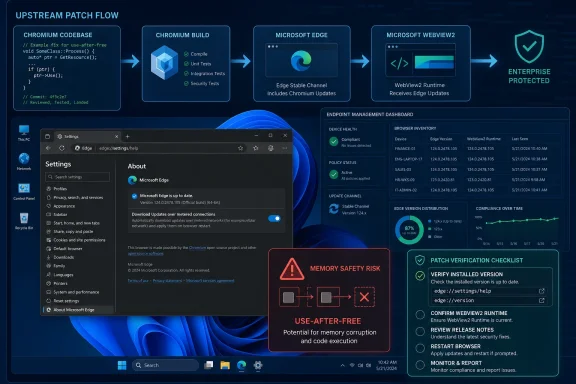
Microsoft lists CVE-2026-12439 in the Security Update Guide because the flaw was assigned by Chrome for Chromium code, Microsoft Edge is built on Chromium, and Microsoft’s June 2026 Edge update records that Edge has absorbed the upstream fix. The short version is simple: this is not “a Chrome-only problem” once the affected code ships inside Edge. The Security Update Guide is Microsoft’s public ledger for that downstream exposure, not merely a catalog of Windows bugs. For users and administrators, the useful test is not the browser logo on the desktop but the version number actually installed.
The confusion around CVE-2026-12439 starts with the way browser security is now manufactured. Google Chrome, Microsoft Edge, Brave, Vivaldi, Opera, and other browsers may differ sharply in user interface, cloud services, sync behavior, enterprise policy, and bundled features, but a large part of their rendering and web-platform machinery comes from the Chromium open source project. When a memory-safety bug appears in that shared machinery, the blast radius is defined by code reuse.
CVE-2026-12439 is described as a use-after-free issue in Digital Credentials in Google Chrome before version 149.0.7827.155, with the potential for heap corruption through a crafted HTML page. That description names Chrome because Chrome assigned and disclosed the CVE, not because the vulnerable code can only exist in Google’s browser. If Edge consumed the affected Chromium component before Microsoft integrated the fix, Edge had to be treated as a relevant downstream product.
That is why Microsoft’s Security Update Guide includes the entry. The page is doing something precise: it documents Microsoft’s position that the latest Microsoft Edge Chromium-based build is no longer vulnerable. In other words, the SUG entry is not claiming Microsoft wrote the vulnerable component from scratch. It is telling customers that Microsoft’s Chromium-based browser has caught up with the upstream repair.
This distinction matters because browser security is now a supply-chain story. Microsoft no longer maintains a wholly separate browser engine for mainstream Edge in the way it did during the Internet Explorer and EdgeHTML eras. Edge’s security posture depends partly on how quickly Microsoft imports, tests, packages, signs, and ships the Chromium patches that begin life upstream.
This is especially important for enterprise vulnerability management. Scanners, compliance dashboards, and patch-management systems do not care much about philosophical distinctions between “Google code,” “Chromium code,” and “Microsoft code” if the vulnerable binary is running on a managed endpoint. They need to know whether the installed copy of Edge is affected, what version remediates the risk, and whether an update has been successfully applied.
Microsoft’s wording on these Chromium CVE pages is deliberately formulaic because the situation repeats constantly. Chrome assigns a CVE. Chromium incorporates a fix. Edge, which consumes Chromium, ships a Microsoft-signed browser update containing that fix. Microsoft then documents the result in the Security Update Guide so administrators have a Microsoft-controlled reference point.
That is a sensible system, even if it creates awkward optics. The alternative would be worse: Microsoft could leave Chromium-origin vulnerabilities out of its guide and force Windows administrators to infer Edge exposure from Google Chrome release notes. That would create gaps in audit trails and confusion in environments where Chrome is not installed but Edge is mandatory.
A crafted HTML page is enough to put this class of vulnerability on the radar for everyday browsing risk. A use-after-free bug occurs when software continues to use memory after it has been released, creating an opening for corruption and, in serious cases, attacker-controlled behavior. Browser vendors treat these bugs with urgency because they sit near the boundary between hostile web input and the local machine.
Not every memory corruption vulnerability becomes a reliable exploit. Modern browsers layer site isolation, sandboxing, control-flow protections, exploit mitigations, and rapid update channels to make exploitation harder. But administrators do not get to assume “hard” means “irrelevant,” especially when a CVE is rated in the upper tier of severity and involves remote content.
That is the enduring lesson of Chromium CVEs in Edge. The feature name may be unfamiliar, but the operating model is familiar: untrusted web content reaches complex browser code, a memory-safety defect is found, and every vendor shipping that code must move quickly.
The apparent mismatch between Chrome’s 149.0.7827.155 numbering and Edge’s 149.0.4022.80 numbering is normal. Edge and Chrome share Chromium foundations, but they do not use identical full version strings. The major version is often the easiest first clue, but the full build number is vendor-specific and must be checked against Microsoft’s own release notes and SUG entries for Edge.
This is where many vulnerability dashboards become noisy. A scanner may know that Chrome before a particular build is vulnerable, but Edge’s fixed build may not map one-to-one to Chrome’s public version number. The correct remediation path for Edge is not “install Chrome 149.0.7827.155.” It is “ensure Microsoft Edge is updated to the Microsoft build that incorporates the Chromium fix.”
On unmanaged consumer systems, Edge should update itself in the background. On managed Windows systems, update timing may be governed by policy, Microsoft Edge Update settings, network restrictions, WSUS-like controls, or broader endpoint management tools. The installed version is therefore the fact that matters most.
There is also a more detailed diagnostic page at
In Google Chrome, the equivalent consumer page is
That last point is a chronic weakness in browser patching. Browser vendors can ship fixes quickly, but users can keep vulnerable processes alive by postponing restarts. In managed environments, administrators should care not only that the update is available, but that endpoints have actually relaunched the browser and are running the fixed binary.
That does not mean every Chromium browser CVE automatically has the same exploitability profile inside every WebView2 application. Exposure depends on what content the host application loads, what permissions it grants, and how the runtime is configured. A line-of-business app that displays only trusted internal content is not the same risk as a consumer app rendering arbitrary web pages.
Still, administrators should avoid treating Edge security as only a browser-shortcut problem. On Windows 10 and Windows 11, WebView2 has become part of the application platform. If a Chromium vulnerability affects components present in the runtime, the runtime’s update state may matter even where users rarely open Edge itself.
The fix pattern is familiar: keep Edge and the WebView2 Runtime current, verify versions through enterprise inventory, and do not assume that disabling or hiding the Edge icon removes Chromium exposure from the machine.
That creates tension in enterprises. Security teams want rapid deployment. Application owners want compatibility testing. Help desks want fewer surprise restarts. Compliance teams want clean evidence that a CVE has been remediated. Chromium’s cadence forces those concerns into the same calendar.
Microsoft’s job with Edge is more complicated than simply repackaging Chrome. Edge carries enterprise policies, Microsoft account and Entra integration, Windows integration, management service features, sidebar and Copilot experiences, and Microsoft-specific security work. Each upstream Chromium fix has to land inside that moving product without breaking the management surface enterprises rely on.
But the underlying security bargain is unavoidable. The browser is now one of the most exposed applications on the endpoint. A patch delayed for “stability” reasons can become a patch delayed into an exploit window. That is why Microsoft’s SUG entry is less bureaucratic than it looks; it is part of the machinery that lets enterprises decide whether the browser fleet is inside or outside the risk window.
A Windows shop that has standardized on Edge may see a Chrome CVE and assume it has no relevance. That is precisely the assumption Microsoft’s Security Update Guide is designed to prevent. If Microsoft publishes an Edge entry for the CVE, the question is no longer whether Chrome is installed. The question is whether Microsoft’s Chromium-based Edge build has received the fix.
The reverse can also happen. A Microsoft SUG entry may cause readers to believe the issue is a Microsoft-authored vulnerability. That can lead to equally bad analysis, especially when teams try to assign blame or determine whether non-Windows systems are affected. The vulnerability follows Chromium-derived code, not corporate branding.
For administrators, the practical rule is brutally simple: map CVEs to installed software and embedded components, not to the vendor name that happens to appear first in the advisory.
Edge’s About page is good enough for a single PC. At scale, organizations should collect browser version data through Intune, Configuration Manager, Defender for Endpoint, endpoint management agents, or whatever inventory system they trust. The important thing is to check the running version rather than merely the package available in a catalog.
Security teams should also watch for Extended Stable differences. Extended Stable exists to reduce change velocity for organizations that need a slower feature cadence, but security fixes still need to be tracked carefully. A CVE may be remediated in Stable and Extended Stable on different version strings, and the Microsoft release notes are the authoritative map for Edge.
The same caution applies to mobile Edge and platform-specific builds. A June 2026 desktop Edge update does not automatically tell you the state of Android or iOS builds. Microsoft publishes separate version information for those channels, and administrators managing mobile devices should verify those builds separately.
That chain is not evidence of failure by itself. It is evidence that browsers are collaborative, layered, and aggressively reused. The security model depends on upstream discovery and downstream speed. When that chain works, users get patched before most of them understand what the vulnerable feature even does.
The risk is in the gaps between those stages. A fix can exist upstream before it is present downstream. A downstream build can be released before every endpoint has installed it. An endpoint can install it before the user restarts the browser. A scanner can detect stale metadata after the machine is actually fixed, or miss an embedded runtime that remains outdated.
That is why version checking is not clerical busywork. It is the point where the advisory becomes evidence.
For a Windows administrator, the same advice becomes policy. Ensure Edge Update is not blocked, confirm update rings are not lagging unintentionally, and build a report showing the deployed Edge versions across the fleet. Where WebView2 is relevant, include the runtime in the same audit rather than treating it as an afterthought.
For security teams, CVE-2026-12439 should be triaged as a browser memory-safety issue with potential remote web-content exposure, not dismissed because the first line says Chrome. If exploit-in-the-wild language is absent, that lowers urgency compared with an actively exploited zero-day, but it does not make the patch optional. Browser CVEs live in an environment where proof-of-concept work and exploit development can move quickly.
For developers shipping Windows apps with embedded web content, the lesson is to understand which runtime your application uses and how it updates. Bundling old web engines or depending on stale runtimes is a security liability. The web surface inside an app is still a web surface.
 Microsoft’s Browser Is a Chromium Product, and the Vulnerability Follows the Code
The confusion around CVE-2026-12439 starts with the way browser security is now manufactured. Google Chrome, Microsoft Edge, Brave, Vivaldi, Opera, and other browsers may differ sharply in user interface, cloud services, sync behavior, enterprise policy, and bundled features, but a large part of their rendering and web-platform machinery comes from the Chromium open source project. When a memory-safety bug appears in that shared machinery, the blast radius is defined by code reuse.CVE-2026-12439 is described as a use-after-free issue in Digital Credentials in Google Chrome before version 149.0.7827.155, with the potential for heap corruption through a crafted HTML page. That description names Chrome because Chrome assigned and disclosed the CVE, not because the vulnerable code can only exist in Google’s browser. If Edge consumed the affected Chromium component before Microsoft integrated the fix, Edge had to be treated as a relevant downstream product.
That is why Microsoft’s Security Update Guide includes the entry. The page is doing something precise: it documents Microsoft’s position that the latest Microsoft Edge Chromium-based build is no longer vulnerable. In other words, the SUG entry is not claiming Microsoft wrote the vulnerable component from scratch. It is telling customers that Microsoft’s Chromium-based browser has caught up with the upstream repair.
This distinction matters because browser security is now a supply-chain story. Microsoft no longer maintains a wholly separate browser engine for mainstream Edge in the way it did during the Internet Explorer and EdgeHTML eras. Edge’s security posture depends partly on how quickly Microsoft imports, tests, packages, signs, and ships the Chromium patches that begin life upstream.
The Security Update Guide Is a Receipt, Not a Confession
A CVE appearing under Microsoft’s Security Update Guide is often read as “Microsoft vulnerability.” That is not always the right interpretation. In the Edge Chromium era, the SUG also functions as a vendor-specific receipt that a third-party or open source vulnerability has been handled in Microsoft’s product line.This is especially important for enterprise vulnerability management. Scanners, compliance dashboards, and patch-management systems do not care much about philosophical distinctions between “Google code,” “Chromium code,” and “Microsoft code” if the vulnerable binary is running on a managed endpoint. They need to know whether the installed copy of Edge is affected, what version remediates the risk, and whether an update has been successfully applied.
Microsoft’s wording on these Chromium CVE pages is deliberately formulaic because the situation repeats constantly. Chrome assigns a CVE. Chromium incorporates a fix. Edge, which consumes Chromium, ships a Microsoft-signed browser update containing that fix. Microsoft then documents the result in the Security Update Guide so administrators have a Microsoft-controlled reference point.
That is a sensible system, even if it creates awkward optics. The alternative would be worse: Microsoft could leave Chromium-origin vulnerabilities out of its guide and force Windows administrators to infer Edge exposure from Google Chrome release notes. That would create gaps in audit trails and confusion in environments where Chrome is not installed but Edge is mandatory.
Digital Credentials Makes the Bug Sound Niche, but the Web Platform Is the Attack Surface
The phrase Digital Credentials may sound like a narrow feature for identity wallets and emerging credential APIs. That is part of why this CVE can look less urgent than a bug in JavaScript, WebRTC, media parsing, or the browser sandbox. But the relevant security point is broader: modern browsers expose an enormous amount of privileged, memory-sensitive code to untrusted web content.A crafted HTML page is enough to put this class of vulnerability on the radar for everyday browsing risk. A use-after-free bug occurs when software continues to use memory after it has been released, creating an opening for corruption and, in serious cases, attacker-controlled behavior. Browser vendors treat these bugs with urgency because they sit near the boundary between hostile web input and the local machine.
Not every memory corruption vulnerability becomes a reliable exploit. Modern browsers layer site isolation, sandboxing, control-flow protections, exploit mitigations, and rapid update channels to make exploitation harder. But administrators do not get to assume “hard” means “irrelevant,” especially when a CVE is rated in the upper tier of severity and involves remote content.
That is the enduring lesson of Chromium CVEs in Edge. The feature name may be unfamiliar, but the operating model is familiar: untrusted web content reaches complex browser code, a memory-safety defect is found, and every vendor shipping that code must move quickly.
Edge’s Update Channel Is the Real Boundary Between Exposed and Fixed
For Windows users, the practical dividing line is the installed Edge version. Microsoft’s current Edge security release notes for June 2026 show Stable channel version 149.0.4022.80 released on June 18, 2026, incorporating the latest Chromium security updates. That is the kind of release administrators should be looking for when reconciling CVE-2026-12439 across fleets.The apparent mismatch between Chrome’s 149.0.7827.155 numbering and Edge’s 149.0.4022.80 numbering is normal. Edge and Chrome share Chromium foundations, but they do not use identical full version strings. The major version is often the easiest first clue, but the full build number is vendor-specific and must be checked against Microsoft’s own release notes and SUG entries for Edge.
This is where many vulnerability dashboards become noisy. A scanner may know that Chrome before a particular build is vulnerable, but Edge’s fixed build may not map one-to-one to Chrome’s public version number. The correct remediation path for Edge is not “install Chrome 149.0.7827.155.” It is “ensure Microsoft Edge is updated to the Microsoft build that incorporates the Chromium fix.”
On unmanaged consumer systems, Edge should update itself in the background. On managed Windows systems, update timing may be governed by policy, Microsoft Edge Update settings, network restrictions, WSUS-like controls, or broader endpoint management tools. The installed version is therefore the fact that matters most.
Finding the Browser Version Is the First Incident-Response Step
The user-facing method is straightforward. In Microsoft Edge, open the menu, choose Settings, then About Microsoft Edge, or typeedge://settings/help into the address bar. Edge will display the installed version and usually trigger an update check at the same time.There is also a more detailed diagnostic page at
edge://version. That page shows the full version string, executable path, command-line flags, profile path, and other build details. It is more information than most consumers need, but it can be useful for administrators, support staff, and anyone trying to distinguish between Stable, Beta, Dev, Canary, or WebView2-related components.In Google Chrome, the equivalent consumer page is
chrome://settings/help, and the detailed version page is chrome://version. The same logic applies: the About page is both a version display and an update trigger. If a browser has been open for days, the update may be downloaded but not fully applied until the browser restarts.That last point is a chronic weakness in browser patching. Browser vendors can ship fixes quickly, but users can keep vulnerable processes alive by postponing restarts. In managed environments, administrators should care not only that the update is available, but that endpoints have actually relaunched the browser and are running the fixed binary.
WebView2 Extends the Edge Question Beyond the Edge Icon
Edge’s Chromium base also raises a second issue: WebView2. Many Windows applications use the Microsoft Edge WebView2 Runtime to display web content inside desktop apps. That runtime is Chromium-based as well, and it is serviced independently from the visible Edge browser in many environments.That does not mean every Chromium browser CVE automatically has the same exploitability profile inside every WebView2 application. Exposure depends on what content the host application loads, what permissions it grants, and how the runtime is configured. A line-of-business app that displays only trusted internal content is not the same risk as a consumer app rendering arbitrary web pages.
Still, administrators should avoid treating Edge security as only a browser-shortcut problem. On Windows 10 and Windows 11, WebView2 has become part of the application platform. If a Chromium vulnerability affects components present in the runtime, the runtime’s update state may matter even where users rarely open Edge itself.
The fix pattern is familiar: keep Edge and the WebView2 Runtime current, verify versions through enterprise inventory, and do not assume that disabling or hiding the Edge icon removes Chromium exposure from the machine.
The Patch Cadence Has Become Part of the Product
One reason Chromium-based browsers have survived the modern web’s security pressure is velocity. Browser vendors patch constantly because the attack surface changes constantly. The cost is that IT departments now have to treat browsers less like traditional desktop applications and more like continuously serviced infrastructure.That creates tension in enterprises. Security teams want rapid deployment. Application owners want compatibility testing. Help desks want fewer surprise restarts. Compliance teams want clean evidence that a CVE has been remediated. Chromium’s cadence forces those concerns into the same calendar.
Microsoft’s job with Edge is more complicated than simply repackaging Chrome. Edge carries enterprise policies, Microsoft account and Entra integration, Windows integration, management service features, sidebar and Copilot experiences, and Microsoft-specific security work. Each upstream Chromium fix has to land inside that moving product without breaking the management surface enterprises rely on.
But the underlying security bargain is unavoidable. The browser is now one of the most exposed applications on the endpoint. A patch delayed for “stability” reasons can become a patch delayed into an exploit window. That is why Microsoft’s SUG entry is less bureaucratic than it looks; it is part of the machinery that lets enterprises decide whether the browser fleet is inside or outside the risk window.
The Word “Chrome” Still Misleads Windows Administrators
The most common mistake in cases like CVE-2026-12439 is to stop reading at “Google Chrome.” That mistake is understandable. CVE descriptions often name the assigning vendor or the first affected product, and vulnerability databases may prioritize Chrome because Google’s release notes are the origin point. But in the Chromium ecosystem, product names can obscure shared exposure.A Windows shop that has standardized on Edge may see a Chrome CVE and assume it has no relevance. That is precisely the assumption Microsoft’s Security Update Guide is designed to prevent. If Microsoft publishes an Edge entry for the CVE, the question is no longer whether Chrome is installed. The question is whether Microsoft’s Chromium-based Edge build has received the fix.
The reverse can also happen. A Microsoft SUG entry may cause readers to believe the issue is a Microsoft-authored vulnerability. That can lead to equally bad analysis, especially when teams try to assign blame or determine whether non-Windows systems are affected. The vulnerability follows Chromium-derived code, not corporate branding.
For administrators, the practical rule is brutally simple: map CVEs to installed software and embedded components, not to the vendor name that happens to appear first in the advisory.
The Useful Answer Is Operational, Not Semantic
The “why is this here?” question has a clean answer, but the better question is “what should I do with it?” The answer is to verify the installed Edge version, confirm that automatic updates are functioning, and make sure browser restarts have occurred. For enterprise fleets, that means inventory and policy, not just trust in the updater.Edge’s About page is good enough for a single PC. At scale, organizations should collect browser version data through Intune, Configuration Manager, Defender for Endpoint, endpoint management agents, or whatever inventory system they trust. The important thing is to check the running version rather than merely the package available in a catalog.
Security teams should also watch for Extended Stable differences. Extended Stable exists to reduce change velocity for organizations that need a slower feature cadence, but security fixes still need to be tracked carefully. A CVE may be remediated in Stable and Extended Stable on different version strings, and the Microsoft release notes are the authoritative map for Edge.
The same caution applies to mobile Edge and platform-specific builds. A June 2026 desktop Edge update does not automatically tell you the state of Android or iOS builds. Microsoft publishes separate version information for those channels, and administrators managing mobile devices should verify those builds separately.
The June 2026 Entry Shows How Browser Security Really Works Now
CVE-2026-12439 is not remarkable because it is the only Chromium flaw to show up in Microsoft’s guide. It is remarkable because it neatly illustrates the modern dependency chain. A bug in shared browser code becomes a Chrome CVE, then a Chromium fix, then a Microsoft Edge release, then a Security Update Guide entry, then a scanner finding, then a help-desk ticket.That chain is not evidence of failure by itself. It is evidence that browsers are collaborative, layered, and aggressively reused. The security model depends on upstream discovery and downstream speed. When that chain works, users get patched before most of them understand what the vulnerable feature even does.
The risk is in the gaps between those stages. A fix can exist upstream before it is present downstream. A downstream build can be released before every endpoint has installed it. An endpoint can install it before the user restarts the browser. A scanner can detect stale metadata after the machine is actually fixed, or miss an embedded runtime that remains outdated.
That is why version checking is not clerical busywork. It is the point where the advisory becomes evidence.
The Version Number Is the Security Boundary Users Can Actually See
For a home user, the advice is refreshingly mundane: open Edge, go toedge://settings/help, let it check for updates, and restart the browser if prompted. If Edge reports that it is up to date on a current build, the Microsoft-documented Chromium fix should be present. If it cannot update, that is the problem to solve first.For a Windows administrator, the same advice becomes policy. Ensure Edge Update is not blocked, confirm update rings are not lagging unintentionally, and build a report showing the deployed Edge versions across the fleet. Where WebView2 is relevant, include the runtime in the same audit rather than treating it as an afterthought.
For security teams, CVE-2026-12439 should be triaged as a browser memory-safety issue with potential remote web-content exposure, not dismissed because the first line says Chrome. If exploit-in-the-wild language is absent, that lowers urgency compared with an actively exploited zero-day, but it does not make the patch optional. Browser CVEs live in an environment where proof-of-concept work and exploit development can move quickly.
For developers shipping Windows apps with embedded web content, the lesson is to understand which runtime your application uses and how it updates. Bundling old web engines or depending on stale runtimes is a security liability. The web surface inside an app is still a web surface.
The Small Checklist That Prevents a Big Misread
CVE-2026-12439 is a good reminder that the visible browser brand is no longer enough information. The operational answer is version-driven, and the administrative answer is evidence-driven.- Microsoft included CVE-2026-12439 because Edge consumes Chromium code, and Chromium-origin vulnerabilities can affect Edge when the relevant component is present.
- The Security Update Guide entry is Microsoft’s confirmation channel that the latest Microsoft Edge Chromium-based version has incorporated the upstream fix.
- Edge users can check their installed build at
edge://settings/help, while Chrome users can usechrome://settings/help. - Administrators should compare installed Edge versions against Microsoft’s Edge security release notes rather than trying to match Chrome’s full build number directly.
- Browser updates are not fully effective until the fixed process is actually running, so restart compliance matters.
- WebView2 should be included in enterprise thinking because Chromium-based web content may be present even when users are not actively launching Edge.
References
- Primary source: MSRC
Published: 2026-06-19T13:52:19-07:00
Security Update Guide - Microsoft Security Response Center
 msrc.microsoft.com
- Related coverage: vulnerability.circl.lu
Vulnerability-Lookup
Vulnerability-Lookup - Fast vulnerability lookup correlation from different sources.vulnerability.circl.lu - Related coverage: datacomm.com
- Related coverage: netservicesgroup.com
Chromium: CVE-2026-4456 Use after free in Digital Credentials API - Network Services Group
This CVE was assigned by Chrome. Microsoft Edge (Chromium-based) ingests Chromium, which addresses this vulnerability. Please see [Google Chrome Releases](https://chromereleases.googleblog.com/2026) for more information.www.netservicesgroup.com - Related coverage: rapid7.com
Rapid7 Vulnerability Database
Rapid7's VulnDB is curated repository of vetted computer software exploits and exploitable vulnerabilities.www.rapid7.com - Related coverage: sentinelone.com
CVE-2026-4456: Google Chrome Use After Free Vulnerability
CVE-2026-4456 is a use after free vulnerability in Google Chrome. Learn about its impact, affected versions, and mitigation methods for this issue.www.sentinelone.com
- Official source: learn.microsoft.com
Release notes for Microsoft Edge Security Updates | Microsoft Learn
Release notes for Microsoft Edge Security Updateslearn.microsoft.com - Related coverage: windowsforum.com
CVE-2025-12439: How Edge Ingests the Chromium Fix via Microsoft Security Update Guide | Windows Forum
Microsoft lists CVE‑2025‑12439 because the bug lives in the Chromium open‑source engine that Microsoft Edge (Chromium‑based) consumes; the Security Update...windowsforum.com - Related coverage: vulert.com
Critical Use After Free Vulnerability in Chromium - CVE-2026-4456
Learn about CVE-2026-4456, a critical vulnerability in Chromium that allows remote attackers to escape the sandbox. Update your browser to stay secure.vulert.com - Related coverage: www2.gov.bc.ca
- Related coverage: mphasis.com
