
CVE-2026-12440 appears in Microsoft’s Security Update Guide because the flaw was found in Chromium’s open-source browser code, disclosed in mid-June 2026, and that same Chromium code is incorporated into Microsoft Edge on Windows, macOS, and Linux. The short version is that this is a Chrome CVE only in the narrow branding sense; operationally, it is an Edge vulnerability until Edge consumes the fixed Chromium build. Microsoft’s guide is therefore doing what it increasingly has to do in the Chromium era: telling Windows shops that the browser they manage through Microsoft channels has inherited, and then shed, a bug from upstream.
Microsoft Edge is not “Chrome with a blue icon,” but it is close enough to Chromium that the distinction matters most to engineers and least to attackers. When a memory-safety flaw lands in shared Chromium code, every browser that imports that code has to answer the same uncomfortable question: have we shipped the fixed version yet?
That is why a CVE assigned through Chrome’s vulnerability process can show up in Microsoft’s Security Update Guide. The vulnerable component is not a traditional Windows DLL, nor an Edge-only feature written by Microsoft. It is part of the Chromium open-source project, and Edge is one of the largest downstream consumers of that project.
For administrators, the label can be misleading. A vulnerability page that says Chrome, Chromium, and DigitalCredentials looks at first glance like something outside the Microsoft patch orbit. But the Security Update Guide is not a shrine to Microsoft-authored bugs; it is a map of risks affecting Microsoft-supported products.
This is the bargain Microsoft made when it moved Edge to Chromium. The company gained compatibility with the modern web, a faster engine cadence, and a richer extension ecosystem. It also accepted Chromium’s security calendar, Chromium’s defect classes, and Chromium’s habit of turning browser patching into a rolling supply-chain exercise.
That is a crucial distinction for IT teams. Vulnerability ownership and product exposure are not the same thing. Google may assign the CVE and publish the Chrome-side fix, while Microsoft still has to document the Edge-side impact, ship an Edge build containing the fix, and give enterprise defenders a way to track compliance.
Security teams do not patch CVE authors. They patch affected software. If Edge includes the vulnerable Chromium component, the fact that the vulnerability was first described in Chrome is trivia compared with the version sitting on a user’s workstation.
The Security Update Guide exists for that second world: the world of inventories, scanners, audit reports, and managed endpoints. Microsoft’s entry tells administrators that the newest Edge build is no longer vulnerable, not that Windows itself suddenly acquired a new native subsystem called DigitalCredentials.
CVE-2026-12440 is described as a use-after-free vulnerability in DigitalCredentials. In memory-safety terms, that means software may continue to use a piece of memory after it has been freed, creating an opening for corruption, control-flow confusion, or more serious exploitation depending on context and mitigations.
The public description says the issue affected Google Chrome on Windows before version 149.0.7827.155 and could allow a remote attacker to potentially perform a sandbox escape through a crafted HTML page. That wording matters. A crafted page is the classic browser attack delivery mechanism, and a sandbox escape is the line between “the browser process got confused” and “the attacker may be able to reach beyond the containment boundary browsers rely on.”
Not every critical browser CVE becomes a mass-exploited emergency. Public scoring also indicated user interaction was required, and available enrichment data did not show known exploitation at the time of publication. But “user interaction” in a browser context often means visiting a page, clicking a link, or being routed through hostile content. That is not much comfort in a web-driven enterprise.
Chrome and Edge version numbers do not always match exactly, even when they are built from related Chromium baselines. Google’s fixed Chrome version for this CVE does not automatically tell you the fixed Edge version in your tenant. Microsoft has to publish and distribute the corresponding Edge update through its own release process.
This is where confusion creeps into vulnerability management. A scanner may flag a CVE whose primary description says Chrome, while the endpoint only has Edge installed. Another tool may map the issue to Microsoft Edge because Microsoft documented it in the Security Update Guide. Both can be right if the underlying Chromium component is present.
For admins, the clean approach is to stop arguing with the product name and verify the build. If Edge is current on the relevant channel, the machine is no longer exposed through Edge. If it is lagging, the machine may still be vulnerable even though no one has installed Google Chrome.
That page shows the installed version and normally triggers an update check. If an update is available, Edge will download it and typically require a browser restart to finish applying it. For a home user, that is usually the whole story: check the version, let Edge update, restart the browser.
Chrome has a parallel workflow. Open Chrome, go to the three-dot menu, choose Help, then About Google Chrome, or type
In managed environments, the browser UI is only the visible tip of the process. Edge may be controlled by Microsoft Edge Update policies, Configuration Manager, Intune, WSUS-related workflows, third-party patching tools, or enterprise rings that deliberately delay rollout. The browser may say “managed by your organization,” which is not a problem by itself, but it means the update path is policy-driven rather than purely user-driven.
The result is a guide that sometimes looks strange to a Windows traditionalist. A Chrome-origin CVE appears under Microsoft’s umbrella. An open-source library bug becomes a Microsoft product advisory. A browser fix ships outside classic Patch Tuesday expectations, then still needs to be tracked by the same teams that track Windows cumulative updates.
This is not clerical overreach. It is the shape of modern software. Microsoft is documenting what affects Microsoft customers, even when the root cause began upstream.
That said, the user experience remains messy. “Why is this Chrome CVE here?” is a reasonable question because the industry still has not developed a clean public language for inherited vulnerabilities. The CVE ecosystem is good at assigning identifiers; it is less good at explaining product lineage to people who just need to know whether to patch Edge today.
But CVE-2026-12440 is notable because the public description points to a potential sandbox escape. That does not guarantee a working exploit chain in the wild, and it does not mean every visit to a malicious page becomes a device takeover. It does mean the vulnerability sits closer to the category defenders take seriously: a browser memory bug with a path beyond normal containment.
Attackers like browsers because browsers are everywhere. They are exposed to arbitrary content all day, they hold session tokens and credentials, and they bridge personal and corporate identities in ways users barely notice. A browser flaw does not need to be a Windows kernel flaw to be strategically useful.
This is also why Edge matters in Windows environments even when users think of it as “just the default browser.” Edge is tied into enterprise identity, Microsoft 365 workflows, PDF viewing, WebView-adjacent habits, and single sign-on patterns. A vulnerable browser build can become the softest entrance into a very Microsoft-centric workplace.
That means update governance has to be different. Monthly patch cycles are too slow for serious browser vulnerabilities, especially when fixes arrive out of band. Pilot rings still matter, but a two-week pause that feels prudent for a line-of-business desktop app may be reckless for a critical browser memory flaw.
Administrators should know which Edge channel their devices are on, how quickly Stable updates land, whether Extended Stable is being used for compatibility reasons, and what exceptions exist for kiosks, servers, VDI images, and offline systems. The devices most likely to be forgotten are often the ones with the strangest browser configurations.
There is also a reporting problem. Security teams often ask, “Are we patched for CVE-2026-12440?” Desktop teams answer, “Edge is updating automatically.” Those are not the same statement. The useful answer is a version distribution: how many endpoints are on the fixed build or later, how many are pending restart, and how many have update failures.
For an enterprise, the same instruction turns into an operational chain. Update policies must allow the fixed build. Devices must reach update services. Browser processes must restart. Users must not defer relaunch indefinitely. Monitoring must distinguish downloaded updates from applied updates.
The restart detail is worth emphasizing. Browser updates often stage quietly, but the old vulnerable code can remain in use until the browser process closes. In environments where users keep browser sessions open for days, “installed” can become a deceptively optimistic word.
This is one reason some organizations enforce browser relaunch deadlines. It is irritating, and users complain, but security patching without process replacement is theater. A fixed browser build sitting on disk does not protect a still-running vulnerable process.
That reality should change how Windows users read Microsoft advisories. A Microsoft Security Update Guide entry does not necessarily mean Microsoft wrote the vulnerable code. It means a Microsoft product is in the affected path or has shipped a mitigation. For Edge, that path frequently runs through Chromium.
The inverse is also true. A Google Chrome advisory should prompt Edge users to ask whether Edge is affected, not to assume immunity. The Edge team usually moves quickly, but “based on Chromium” is not a magic shield; it is a dependency relationship.
The practical habit is simple: when a significant Chromium CVE drops, check every Chromium-based browser in the environment. That includes Edge, Chrome, Brave, Opera, Vivaldi, and any embedded browser components that may follow separate servicing rules. The vendor label is the beginning of the investigation, not the end.
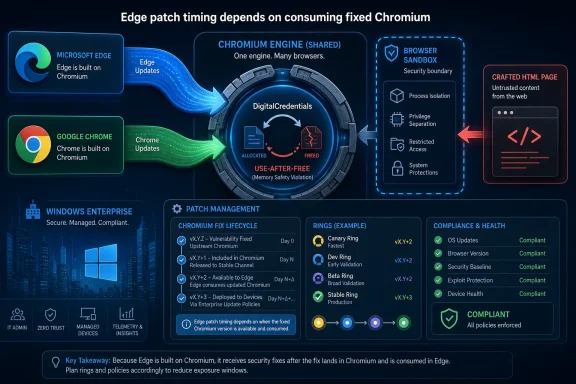 Chromium Turned Browser Security Into a Supply Chain Story
Microsoft Edge is not “Chrome with a blue icon,” but it is close enough to Chromium that the distinction matters most to engineers and least to attackers. When a memory-safety flaw lands in shared Chromium code, every browser that imports that code has to answer the same uncomfortable question: have we shipped the fixed version yet?That is why a CVE assigned through Chrome’s vulnerability process can show up in Microsoft’s Security Update Guide. The vulnerable component is not a traditional Windows DLL, nor an Edge-only feature written by Microsoft. It is part of the Chromium open-source project, and Edge is one of the largest downstream consumers of that project.
For administrators, the label can be misleading. A vulnerability page that says Chrome, Chromium, and DigitalCredentials looks at first glance like something outside the Microsoft patch orbit. But the Security Update Guide is not a shrine to Microsoft-authored bugs; it is a map of risks affecting Microsoft-supported products.
This is the bargain Microsoft made when it moved Edge to Chromium. The company gained compatibility with the modern web, a faster engine cadence, and a richer extension ecosystem. It also accepted Chromium’s security calendar, Chromium’s defect classes, and Chromium’s habit of turning browser patching into a rolling supply-chain exercise.
The Microsoft Guide Is Reporting Exposure, Not Ownership
The phrase that matters in Microsoft’s own explanation is that Edge “consumes” Chromium OSS. That one verb does more work than the rest of the advisory. Microsoft is not claiming Google’s bug as its own invention; it is acknowledging that Edge incorporated code in which the vulnerability existed.That is a crucial distinction for IT teams. Vulnerability ownership and product exposure are not the same thing. Google may assign the CVE and publish the Chrome-side fix, while Microsoft still has to document the Edge-side impact, ship an Edge build containing the fix, and give enterprise defenders a way to track compliance.
Security teams do not patch CVE authors. They patch affected software. If Edge includes the vulnerable Chromium component, the fact that the vulnerability was first described in Chrome is trivia compared with the version sitting on a user’s workstation.
The Security Update Guide exists for that second world: the world of inventories, scanners, audit reports, and managed endpoints. Microsoft’s entry tells administrators that the newest Edge build is no longer vulnerable, not that Windows itself suddenly acquired a new native subsystem called DigitalCredentials.
DigitalCredentials Is Small Plumbing With Large Blast Radius
DigitalCredentials sounds like the sort of feature most users never knowingly touch. That is precisely why browser vulnerabilities can be so awkward to communicate. The bug is not necessarily in a button users recognize; it is in the machinery browsers use to support modern web capabilities.CVE-2026-12440 is described as a use-after-free vulnerability in DigitalCredentials. In memory-safety terms, that means software may continue to use a piece of memory after it has been freed, creating an opening for corruption, control-flow confusion, or more serious exploitation depending on context and mitigations.
The public description says the issue affected Google Chrome on Windows before version 149.0.7827.155 and could allow a remote attacker to potentially perform a sandbox escape through a crafted HTML page. That wording matters. A crafted page is the classic browser attack delivery mechanism, and a sandbox escape is the line between “the browser process got confused” and “the attacker may be able to reach beyond the containment boundary browsers rely on.”
Not every critical browser CVE becomes a mass-exploited emergency. Public scoring also indicated user interaction was required, and available enrichment data did not show known exploitation at the time of publication. But “user interaction” in a browser context often means visiting a page, clicking a link, or being routed through hostile content. That is not much comfort in a web-driven enterprise.
Edge’s Chromium Base Makes Patch Timing the Real Product Boundary
The decisive product boundary is not whether the logo says Chrome or Edge. It is whether the installed browser build contains the fixed Chromium code. That is why version numbers matter more than marketing names.Chrome and Edge version numbers do not always match exactly, even when they are built from related Chromium baselines. Google’s fixed Chrome version for this CVE does not automatically tell you the fixed Edge version in your tenant. Microsoft has to publish and distribute the corresponding Edge update through its own release process.
This is where confusion creeps into vulnerability management. A scanner may flag a CVE whose primary description says Chrome, while the endpoint only has Edge installed. Another tool may map the issue to Microsoft Edge because Microsoft documented it in the Security Update Guide. Both can be right if the underlying Chromium component is present.
For admins, the clean approach is to stop arguing with the product name and verify the build. If Edge is current on the relevant channel, the machine is no longer exposed through Edge. If it is lagging, the machine may still be vulnerable even though no one has installed Google Chrome.
Finding the Edge Version Is the First Triage Step
The fastest way for an individual user to check Edge is inside the browser itself. Open Edge, select the three-dot menu, go to Help and feedback, and choose About Microsoft Edge. You can also typeedge://settings/help into the address bar.That page shows the installed version and normally triggers an update check. If an update is available, Edge will download it and typically require a browser restart to finish applying it. For a home user, that is usually the whole story: check the version, let Edge update, restart the browser.
Chrome has a parallel workflow. Open Chrome, go to the three-dot menu, choose Help, then About Google Chrome, or type
chrome://settings/help. The page displays the current version and checks for updates.In managed environments, the browser UI is only the visible tip of the process. Edge may be controlled by Microsoft Edge Update policies, Configuration Manager, Intune, WSUS-related workflows, third-party patching tools, or enterprise rings that deliberately delay rollout. The browser may say “managed by your organization,” which is not a problem by itself, but it means the update path is policy-driven rather than purely user-driven.
The Security Update Guide Has Become a Browser Patch Ledger
Microsoft’s Security Update Guide used to be easier to read as a Windows-and-Office patch ledger. That world is gone. Edge is a cross-platform Chromium browser, Defender is cloud-connected, Azure services have their own disclosure patterns, and open-source components sit inside almost every major product.The result is a guide that sometimes looks strange to a Windows traditionalist. A Chrome-origin CVE appears under Microsoft’s umbrella. An open-source library bug becomes a Microsoft product advisory. A browser fix ships outside classic Patch Tuesday expectations, then still needs to be tracked by the same teams that track Windows cumulative updates.
This is not clerical overreach. It is the shape of modern software. Microsoft is documenting what affects Microsoft customers, even when the root cause began upstream.
That said, the user experience remains messy. “Why is this Chrome CVE here?” is a reasonable question because the industry still has not developed a clean public language for inherited vulnerabilities. The CVE ecosystem is good at assigning identifiers; it is less good at explaining product lineage to people who just need to know whether to patch Edge today.
Browser Sandboxes Raise the Stakes Without Eliminating the Risk
Modern browsers are built on the assumption that web content is hostile. They isolate tabs, restrict renderer processes, broker access to sensitive resources, and build layers of sandboxing around risky code. That architecture is the reason many browser bugs do not immediately become full system compromise.But CVE-2026-12440 is notable because the public description points to a potential sandbox escape. That does not guarantee a working exploit chain in the wild, and it does not mean every visit to a malicious page becomes a device takeover. It does mean the vulnerability sits closer to the category defenders take seriously: a browser memory bug with a path beyond normal containment.
Attackers like browsers because browsers are everywhere. They are exposed to arbitrary content all day, they hold session tokens and credentials, and they bridge personal and corporate identities in ways users barely notice. A browser flaw does not need to be a Windows kernel flaw to be strategically useful.
This is also why Edge matters in Windows environments even when users think of it as “just the default browser.” Edge is tied into enterprise identity, Microsoft 365 workflows, PDF viewing, WebView-adjacent habits, and single sign-on patterns. A vulnerable browser build can become the softest entrance into a very Microsoft-centric workplace.
Enterprise Admins Should Treat Edge as a Fast-Moving App, Not a Windows Accessory
One of the recurring mistakes in Windows fleet management is treating Edge like part of the operating system wallpaper. It ships with Windows, it updates quietly, and many users do not think about it until something breaks. But from a security operations perspective, Edge is a high-risk internet-facing application with a release cadence closer to Chrome than to old-school Windows components.That means update governance has to be different. Monthly patch cycles are too slow for serious browser vulnerabilities, especially when fixes arrive out of band. Pilot rings still matter, but a two-week pause that feels prudent for a line-of-business desktop app may be reckless for a critical browser memory flaw.
Administrators should know which Edge channel their devices are on, how quickly Stable updates land, whether Extended Stable is being used for compatibility reasons, and what exceptions exist for kiosks, servers, VDI images, and offline systems. The devices most likely to be forgotten are often the ones with the strangest browser configurations.
There is also a reporting problem. Security teams often ask, “Are we patched for CVE-2026-12440?” Desktop teams answer, “Edge is updating automatically.” Those are not the same statement. The useful answer is a version distribution: how many endpoints are on the fixed build or later, how many are pending restart, and how many have update failures.
The User-Facing Fix Is Simple; The Fleet-Facing Fix Is Not
For an individual, the fix is almost boring: update the browser and relaunch it. Edge’s About page is enough. Chrome’s About page is enough. The patched version replaces the vulnerable code, and the user moves on.For an enterprise, the same instruction turns into an operational chain. Update policies must allow the fixed build. Devices must reach update services. Browser processes must restart. Users must not defer relaunch indefinitely. Monitoring must distinguish downloaded updates from applied updates.
The restart detail is worth emphasizing. Browser updates often stage quietly, but the old vulnerable code can remain in use until the browser process closes. In environments where users keep browser sessions open for days, “installed” can become a deceptively optimistic word.
This is one reason some organizations enforce browser relaunch deadlines. It is irritating, and users complain, but security patching without process replacement is theater. A fixed browser build sitting on disk does not protect a still-running vulnerable process.
The CVE Name Is Less Important Than the Update Habit
CVE-2026-12440 will not be the last advisory that blurs the line between Chrome, Chromium, and Edge. It is a representative case, not an anomaly. The browser ecosystem now operates on shared code, shared bugs, and staggered vendor fixes.That reality should change how Windows users read Microsoft advisories. A Microsoft Security Update Guide entry does not necessarily mean Microsoft wrote the vulnerable code. It means a Microsoft product is in the affected path or has shipped a mitigation. For Edge, that path frequently runs through Chromium.
The inverse is also true. A Google Chrome advisory should prompt Edge users to ask whether Edge is affected, not to assume immunity. The Edge team usually moves quickly, but “based on Chromium” is not a magic shield; it is a dependency relationship.
The practical habit is simple: when a significant Chromium CVE drops, check every Chromium-based browser in the environment. That includes Edge, Chrome, Brave, Opera, Vivaldi, and any embedded browser components that may follow separate servicing rules. The vendor label is the beginning of the investigation, not the end.
The Patch Trail Runs Through Edge, Even When the Bug Starts Elsewhere
The concrete readout from CVE-2026-12440 is less mysterious than the advisory taxonomy makes it look. A Chromium vulnerability affected Chrome, Edge consumes Chromium, and Microsoft documented the issue to confirm that updated Edge builds are no longer vulnerable.- Microsoft includes Chrome-origin Chromium CVEs in the Security Update Guide when Microsoft Edge is affected by the same upstream code.
- CVE-2026-12440 is a use-after-free issue in DigitalCredentials, publicly described as critical and potentially capable of sandbox escape through crafted web content.
- Users can check Edge by opening
edge://settings/help, where the browser displays its version and checks for updates. - Users can check Chrome by opening
chrome://settings/help, which performs the same version and update check for Google’s browser. - Enterprise teams should verify deployed Edge build numbers rather than relying on the assumption that automatic updates have completed everywhere.
- A browser update may not fully protect a session until the browser has restarted and the old process is gone.
References
- Primary source: MSRC
Published: 2026-06-19T13:52:22-07:00
Security Update Guide - Microsoft Security Response Center
 msrc.microsoft.com
- Related coverage: netservicesgroup.com
Chromium: CVE-2026-4456 Use after free in Digital Credentials API - Network Services Group
This CVE was assigned by Chrome. Microsoft Edge (Chromium-based) ingests Chromium, which addresses this vulnerability. Please see [Google Chrome Releases](https://chromereleases.googleblog.com/2026) for more information.www.netservicesgroup.com - Related coverage: datacomm.com
- Related coverage: vulnerability.circl.lu
Vulnerability-Lookup
Vulnerability-Lookup - Fast vulnerability lookup correlation from different sources.vulnerability.circl.lu - Related coverage: rapid7.com
Rapid7 Vulnerability Database
Rapid7's VulnDB is curated repository of vetted computer software exploits and exploitable vulnerabilities.www.rapid7.com - Related coverage: thewindowsupdate.com
- Related coverage: www2.gov.bc.ca
- Official source: learn.microsoft.com
Microsoft Edge release notes for Stable Channel | Microsoft Learn
Microsoft Edge release note for the Stable Channellearn.microsoft.com - Related coverage: cyber.gc.ca
Microsoft Edge security advisory (AV26-591) - Canadian Centre for Cyber Security
Microsoft Edge security advisory (AV26-591)www.cyber.gc.ca - Official source: catalog.update.microsoft.com
- Related coverage: hkcert.org
Microsoft Edge Multiple Vulnerabilities
Multiple vulnerabilities were identified in Microsoft Edge. A remote attacker could exploit some of these vulnerabilities to trigger remote code execution, denial of service condition, elevation of privilege, security restriction bypass and sensitive infowww.hkcert.org
