
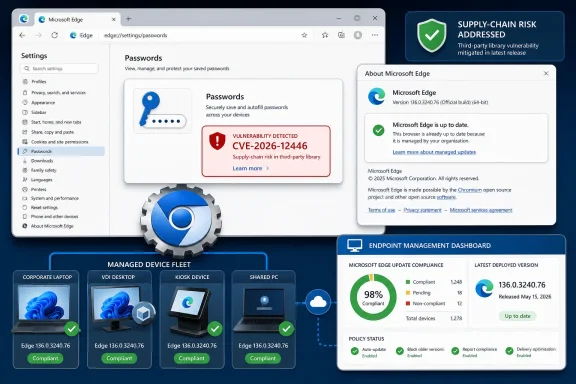
Microsoft documented CVE-2026-12446 in the Microsoft Security Update Guide because the bug is in Chromium open-source code consumed by Microsoft Edge, and Microsoft’s June 2026 Edge update is its statement that current Chromium-based Edge builds are no longer vulnerable. That answer is bureaucratically simple, but operationally important: a “Chrome CVE” can still be an Edge vulnerability when the vulnerable component ships inside Edge. For Windows administrators, the real issue is not the logo on the CVE entry; it is whether the browser engine, password manager, and update channel on managed machines have actually moved past the affected code.
The confusion around CVE-2026-12446 starts with an old mental model of Edge. Many Windows users still treat Microsoft Edge as a Microsoft-only browser, like the pre-Chromium EdgeHTML product that shipped with Windows 10 in 2015. That product is gone from the security conversation that matters here.
Modern Edge is Chromium-based. It uses Microsoft’s services, policies, sync infrastructure, UI choices, enterprise controls, and platform integrations, but its web platform foundation comes from the same open-source Chromium project that underpins Google Chrome and a long list of other browsers. When a vulnerability lands in Chromium code, downstream browsers do not get to shrug and say the bug belongs to someone else.
That is why the Microsoft Security Update Guide sometimes looks like it is carrying Google’s laundry. Microsoft is not claiming that every Chromium CVE was discovered by Redmond, nor that the affected feature was uniquely Microsoft’s. It is telling customers that a component shipped inside Microsoft Edge contained vulnerable code and that an Edge update is the Microsoft-supported remediation path.
This matters because enterprise vulnerability management is built around product ownership, not software genealogy. A scanner does not merely ask whether Chromium had a bug. It asks whether the installed product on a Windows endpoint is affected, whether that product is supported by Microsoft, and whether Microsoft has published guidance that security teams can map to patch compliance.
That phrasing is doing a lot of work. It draws a line between origin and exposure. The origin is Chromium OSS. The exposure is any browser that incorporated the affected code path and shipped it to users before the fix was integrated.
This is how open-source supply chains are supposed to work, at least when they work well. A project identifies a flaw, assigns or references a CVE, lands a fix upstream, and downstream vendors ingest, test, package, and publish updates. The CVE may be popularly associated with Chrome because Google maintains Chromium and ships Chrome, but Chromium is not Chrome alone.
For Microsoft, the Security Update Guide is the clearinghouse that turns that upstream reality into a Windows administration artifact. It gives security teams a Microsoft record they can track in dashboards, audit reports, patch windows, and exception processes. Without that record, defenders would be left to infer Edge exposure from Chrome release notes and Chromium commits, which is not how most regulated environments want to manage risk.
That responsibility includes Windows, Office, Azure components, developer tools, browsers, runtimes, and embedded third-party or open-source technologies. If Microsoft ships it, integrates it, or supports it as part of a Microsoft product, Microsoft may need to document when that product becomes vulnerable and when it is fixed.
Edge makes that especially visible because browsers are now rolling supply chains with icons. The thing users click is branded Microsoft Edge, but the engine underneath is evolving on Chromium’s cadence. When Chromium moves fast, Edge must move fast, and the Security Update Guide becomes a translation layer between upstream browser security and Microsoft’s customer base.
That translation layer is particularly important for sysadmins who do not deploy Chrome at all. A Windows shop may standardize on Edge, block Chrome, and still see “Chrome” language in third-party CVE feeds. Microsoft’s listing answers the practical question: yes, this matters to Edge too, but the Edge fix is delivered through Microsoft Edge’s update mechanism, not by installing Chrome.
That combination creates a tension security teams know well. A password manager that is too intrusive will be bypassed. A password manager that is too permissive becomes an attack amplifier. Browser vendors are constantly balancing those competing pressures inside code that is exposed to untrusted web content all day long.
An insufficient data validation flaw in a password-related Chromium component is therefore not just another browser bug in the abstract. Even when exploitation details are limited, the affected area pushes administrators to pay attention. Anything that touches cross-origin data, form handling, credential storage, or autofill behavior deserves scrutiny because browsers enforce the boundaries that keep one site from learning too much about another.
That does not mean every password-manager CVE is a credential apocalypse. It means the impact analysis should be grounded in the browser threat model. The browser is the place where hostile pages, sensitive user data, corporate identity flows, and persistent local profile state all meet.
On unmanaged consumer machines, Edge generally updates itself in the background. Opening the About page will usually trigger a check, download an available update, and prompt for a restart if needed. On managed systems, that same simplicity can be complicated by update policies, maintenance windows, virtual desktop images, kiosk configurations, app control, network egress restrictions, and rollback requirements.
That is why version verification matters. “We deploy Edge” is not enough. “We allow Edge updates” is not enough. The only answer that matters after a Chromium security advisory is whether the installed Edge build is at or above the fixed version Microsoft has shipped for the relevant channel.
The practical route for an individual user is straightforward: open Edge, select the three-dot menu, go to Help and feedback, then About Microsoft Edge. The same page can be reached by typing
In Microsoft Edge, the path is:
Open the three-dot menu in the upper-right corner. Choose Help and feedback. Select About Microsoft Edge. Read the version shown on the page, and let the browser complete any update check it starts. If an update installs, restart the browser when prompted, then return to the page and confirm the new version.
For administrators, the equivalent evidence can come from inventory tools, endpoint management platforms, software update reports, registry queries, or enterprise browser management dashboards. The exact mechanism varies by environment, but the principle is the same. A vulnerability record is not closed because a patch exists; it is closed when affected assets have moved to a fixed build.
This is especially important with Edge because organizations may run multiple channels. Stable, Extended Stable, Beta, Dev, and Canary do not all have the same operational meaning. A developer workstation on one channel and a call-center fleet on another can present different risk and remediation timelines even though both say “Microsoft Edge” in the Start menu.
The old enterprise instinct was to slow everything down. Test, pilot, approve, deploy, and only then declare victory. Browsers have made that instinct harder to sustain because the browser is now one of the most exposed applications on the endpoint. Delaying a browser security update for weeks is not the same risk calculation as delaying a cosmetic app update.
Microsoft’s inclusion of Chromium CVEs in the Security Update Guide is partly a concession to that reality. Security teams need a record that fits their process, but the process has to move at browser speed. A CVE in Chromium that affects Edge is not waiting for the next comfortable monthly cycle just because the endpoint is Windows.
That tension is now a permanent feature of Windows administration. The operating system may still anchor the patch calendar, but browsers, runtimes, collaboration tools, and security agents all operate on faster tracks. Edge is Microsoft’s browser, but Chromium’s tempo is part of the deal.
Those are not the same issue as CVE-2026-12446, and they should not be collapsed into one scary blob. The CVE described here concerns Chromium password code and data validation. Memory-resident plaintext discussions concern local post-compromise behavior and design tradeoffs. But the topics rhyme because they all expose the same uncomfortable truth: the browser password manager is now part of the identity perimeter.
For WindowsForum readers, that means browser security cannot be treated as a consumer convenience feature. In many organizations, Edge stores work credentials, fills SaaS logins, mediates passkeys, syncs profile data, and sits next to Microsoft Entra ID sessions. A bug in that zone is not merely about a browser tab misbehaving.
The strategic direction is clear. Microsoft, Google, Apple, and the rest of the ecosystem want more authentication to move toward passkeys, device-backed credentials, phishing-resistant flows, and OS-mediated unlock prompts. But passwords will remain present for years, and the code that handles them will remain a high-value target.
The product column is what matters. If Microsoft lists Microsoft Edge as affected and documents a fixed build, the organization has an Edge action item. If Google lists Chrome, that is a Chrome action item. If another vendor ships Chromium-based technology, that vendor may need its own advisory and update path.
This is where vulnerability scanners can both help and hinder. A good scanner maps installed products to affected versions and fixed versions. A bad or poorly tuned scanner floods teams with generic Chromium CVEs without explaining which executable, channel, or application instance is actually exposed.
Administrators should resist the temptation to dismiss these findings because the name says Chrome. They should also resist the opposite temptation to panic because Chromium appears everywhere. The right response is boring and disciplined: identify the installed product, determine whether the vulnerable code is present, confirm the vendor’s fixed build, and update.
The Security Update Guide supplies that source. It lets teams create tickets, write change records, justify emergency updates, and demonstrate that a Microsoft-supported product has been brought to a non-vulnerable state. That is not glamorous, but it is the plumbing that turns public vulnerability disclosure into actual patching.
This is especially relevant for Edge because browser updates may be delegated differently from Windows updates. Some organizations manage Edge through Microsoft Edge Update policies. Others let it self-update. Others package it through endpoint management tooling. Some still discover, usually during an incident, that a proxy rule or hardening baseline has been preventing browser updates from completing.
A Security Update Guide entry gives all of those teams a common reference point. It says: this is not merely a Google thing, and it is not merely theoretical upstream churn. This is a Microsoft browser servicing issue.
For enterprises, the easy instruction becomes a governance problem. The fleet may include persistent desktops, non-persistent virtual machines, shared workstations, offline laptops, developer boxes, servers with Edge installed for administrative workflows, and WebView2 runtimes used by line-of-business apps. Each category has a different update path and a different way to prove compliance.
The hardest machines are often not the obvious ones. A user’s primary laptop may update quickly because it is online every day. A golden image may remain stale because nobody rebuilt it after the browser update. A kiosk may be pinned to a controlled maintenance cycle. A jump box may have browser updates restricted because administrators hardened it and then forgot the operational consequence.
That is why “check the version” is not just advice for end users. It is a reminder that security state lives on endpoints, not in announcements. Microsoft can publish a fixed Edge build; Google can publish a fixed Chrome build; Chromium can merge the patch. None of that protects a system that never receives the update.
But monoculture has costs. A vulnerability in a shared component can ripple across brands. A security assumption in Chromium can shape the risk profile of products that feel distinct to users. A patch delay in any downstream browser can leave users exposed even after the upstream project has moved on.
Edge embodies both sides of that bargain. Microsoft gains the velocity and compatibility of Chromium, but it also inherits Chromium’s security debt. The Security Update Guide entry for CVE-2026-12446 is one small example of that inheritance being made visible.
That visibility is a good thing. It may be confusing at first glance to see a Chrome-associated CVE in Microsoft’s guide, but the alternative would be worse. Silence would force administrators to guess whether Microsoft’s browser was affected by upstream Chromium issues. Documentation turns that guess into an update task.
 Microsoft’s Browser Is Not an Island Anymore
The confusion around CVE-2026-12446 starts with an old mental model of Edge. Many Windows users still treat Microsoft Edge as a Microsoft-only browser, like the pre-Chromium EdgeHTML product that shipped with Windows 10 in 2015. That product is gone from the security conversation that matters here.Modern Edge is Chromium-based. It uses Microsoft’s services, policies, sync infrastructure, UI choices, enterprise controls, and platform integrations, but its web platform foundation comes from the same open-source Chromium project that underpins Google Chrome and a long list of other browsers. When a vulnerability lands in Chromium code, downstream browsers do not get to shrug and say the bug belongs to someone else.
That is why the Microsoft Security Update Guide sometimes looks like it is carrying Google’s laundry. Microsoft is not claiming that every Chromium CVE was discovered by Redmond, nor that the affected feature was uniquely Microsoft’s. It is telling customers that a component shipped inside Microsoft Edge contained vulnerable code and that an Edge update is the Microsoft-supported remediation path.
This matters because enterprise vulnerability management is built around product ownership, not software genealogy. A scanner does not merely ask whether Chromium had a bug. It asks whether the installed product on a Windows endpoint is affected, whether that product is supported by Microsoft, and whether Microsoft has published guidance that security teams can map to patch compliance.
A Chrome CVE Becomes an Edge Problem at the Supply Chain Boundary
CVE-2026-12446 is described as an insufficient data validation issue in Passwords. Public vulnerability databases have characterized the Chrome-side issue as an inappropriate implementation in the browser’s password component that could allow a remote attacker to leak cross-origin data through a crafted HTML page in versions prior to the fixed Chrome build. Microsoft’s entry frames the same underlying class of issue through the lens of Edge: the vulnerable code is in Chromium open-source software that Edge consumes.That phrasing is doing a lot of work. It draws a line between origin and exposure. The origin is Chromium OSS. The exposure is any browser that incorporated the affected code path and shipped it to users before the fix was integrated.
This is how open-source supply chains are supposed to work, at least when they work well. A project identifies a flaw, assigns or references a CVE, lands a fix upstream, and downstream vendors ingest, test, package, and publish updates. The CVE may be popularly associated with Chrome because Google maintains Chromium and ships Chrome, but Chromium is not Chrome alone.
For Microsoft, the Security Update Guide is the clearinghouse that turns that upstream reality into a Windows administration artifact. It gives security teams a Microsoft record they can track in dashboards, audit reports, patch windows, and exception processes. Without that record, defenders would be left to infer Edge exposure from Chrome release notes and Chromium commits, which is not how most regulated environments want to manage risk.
The Security Update Guide Is a Map of Responsibility, Not Authorship
The most common mistake in reading the Security Update Guide is assuming that its contents are a list of vulnerabilities Microsoft personally introduced. They are not. The guide is a map of Microsoft’s responsibility to customers.That responsibility includes Windows, Office, Azure components, developer tools, browsers, runtimes, and embedded third-party or open-source technologies. If Microsoft ships it, integrates it, or supports it as part of a Microsoft product, Microsoft may need to document when that product becomes vulnerable and when it is fixed.
Edge makes that especially visible because browsers are now rolling supply chains with icons. The thing users click is branded Microsoft Edge, but the engine underneath is evolving on Chromium’s cadence. When Chromium moves fast, Edge must move fast, and the Security Update Guide becomes a translation layer between upstream browser security and Microsoft’s customer base.
That translation layer is particularly important for sysadmins who do not deploy Chrome at all. A Windows shop may standardize on Edge, block Chrome, and still see “Chrome” language in third-party CVE feeds. Microsoft’s listing answers the practical question: yes, this matters to Edge too, but the Edge fix is delivered through Microsoft Edge’s update mechanism, not by installing Chrome.
Password Bugs Carry More Heat Than Their CVSS Scores Suggest
The vulnerable component name, Passwords, is what gives CVE-2026-12446 its sting. Browser password managers sit at an uncomfortable intersection of convenience, identity, and attack surface. They are expected to remember secrets, fill them at the right time, resist phishing where possible, sync across devices, and stay invisible enough that normal people keep using strong unique passwords instead of reusing weak ones.That combination creates a tension security teams know well. A password manager that is too intrusive will be bypassed. A password manager that is too permissive becomes an attack amplifier. Browser vendors are constantly balancing those competing pressures inside code that is exposed to untrusted web content all day long.
An insufficient data validation flaw in a password-related Chromium component is therefore not just another browser bug in the abstract. Even when exploitation details are limited, the affected area pushes administrators to pay attention. Anything that touches cross-origin data, form handling, credential storage, or autofill behavior deserves scrutiny because browsers enforce the boundaries that keep one site from learning too much about another.
That does not mean every password-manager CVE is a credential apocalypse. It means the impact analysis should be grounded in the browser threat model. The browser is the place where hostile pages, sensitive user data, corporate identity flows, and persistent local profile state all meet.
Edge’s Update Story Is Better Than Windows’ Patch Tuesday Reputation
One reason this CVE feels odd in the Security Update Guide is that Edge does not behave like the classic monthly Windows servicing stack. Chromium-based browsers update frequently, sometimes urgently, and often outside the rhythm people still call Patch Tuesday. Microsoft’s Security Update Guide has to accommodate both worlds.On unmanaged consumer machines, Edge generally updates itself in the background. Opening the About page will usually trigger a check, download an available update, and prompt for a restart if needed. On managed systems, that same simplicity can be complicated by update policies, maintenance windows, virtual desktop images, kiosk configurations, app control, network egress restrictions, and rollback requirements.
That is why version verification matters. “We deploy Edge” is not enough. “We allow Edge updates” is not enough. The only answer that matters after a Chromium security advisory is whether the installed Edge build is at or above the fixed version Microsoft has shipped for the relevant channel.
The practical route for an individual user is straightforward: open Edge, select the three-dot menu, go to Help and feedback, then About Microsoft Edge. The same page can be reached by typing
edge://settings/help into the address bar. Edge will display the installed version and typically begin checking for updates immediately.The Version Number Is the Evidence
The user-facing answer to “How can I see the version of the browser?” is simple, but it is worth treating as more than a help-desk aside. Version numbers are how browser security becomes measurable.In Microsoft Edge, the path is:
Open the three-dot menu in the upper-right corner. Choose Help and feedback. Select About Microsoft Edge. Read the version shown on the page, and let the browser complete any update check it starts. If an update installs, restart the browser when prompted, then return to the page and confirm the new version.
For administrators, the equivalent evidence can come from inventory tools, endpoint management platforms, software update reports, registry queries, or enterprise browser management dashboards. The exact mechanism varies by environment, but the principle is the same. A vulnerability record is not closed because a patch exists; it is closed when affected assets have moved to a fixed build.
This is especially important with Edge because organizations may run multiple channels. Stable, Extended Stable, Beta, Dev, and Canary do not all have the same operational meaning. A developer workstation on one channel and a call-center fleet on another can present different risk and remediation timelines even though both say “Microsoft Edge” in the Start menu.
The Chromium Cadence Compresses the Administrator’s Calendar
The Chromium ecosystem has trained browser vendors into a rapid-release discipline. Security fixes can appear as part of routine stable updates, emergency out-of-band releases, or channel-specific builds. That pace is good for users in the abstract and annoying for administrators in the concrete.The old enterprise instinct was to slow everything down. Test, pilot, approve, deploy, and only then declare victory. Browsers have made that instinct harder to sustain because the browser is now one of the most exposed applications on the endpoint. Delaying a browser security update for weeks is not the same risk calculation as delaying a cosmetic app update.
Microsoft’s inclusion of Chromium CVEs in the Security Update Guide is partly a concession to that reality. Security teams need a record that fits their process, but the process has to move at browser speed. A CVE in Chromium that affects Edge is not waiting for the next comfortable monthly cycle just because the endpoint is Windows.
That tension is now a permanent feature of Windows administration. The operating system may still anchor the patch calendar, but browsers, runtimes, collaboration tools, and security agents all operate on faster tracks. Edge is Microsoft’s browser, but Chromium’s tempo is part of the deal.
The Password Component Makes This More Than a Branding Footnote
CVE-2026-12446 also lands in a year when browser password handling has been receiving unusual attention. Microsoft has been tightening some Edge password behaviors, including movement toward device-based authentication for saved passwords. Separately, security researchers and press reports have scrutinized how browsers handle decrypted credentials in memory and how much protection users should expect once a device is already compromised.Those are not the same issue as CVE-2026-12446, and they should not be collapsed into one scary blob. The CVE described here concerns Chromium password code and data validation. Memory-resident plaintext discussions concern local post-compromise behavior and design tradeoffs. But the topics rhyme because they all expose the same uncomfortable truth: the browser password manager is now part of the identity perimeter.
For WindowsForum readers, that means browser security cannot be treated as a consumer convenience feature. In many organizations, Edge stores work credentials, fills SaaS logins, mediates passkeys, syncs profile data, and sits next to Microsoft Entra ID sessions. A bug in that zone is not merely about a browser tab misbehaving.
The strategic direction is clear. Microsoft, Google, Apple, and the rest of the ecosystem want more authentication to move toward passkeys, device-backed credentials, phishing-resistant flows, and OS-mediated unlock prompts. But passwords will remain present for years, and the code that handles them will remain a high-value target.
Security Teams Should Read the Product Column Before the Nickname
The informal label “Chrome CVE” is useful shorthand in conversation, but it can mislead triage. A CVE’s popular name often reflects where the bug was disclosed, where the first patch appeared, or which vendor has the loudest release notes. None of that tells you whether Edge, Electron apps, embedded WebView components, or other Chromium consumers are affected.The product column is what matters. If Microsoft lists Microsoft Edge as affected and documents a fixed build, the organization has an Edge action item. If Google lists Chrome, that is a Chrome action item. If another vendor ships Chromium-based technology, that vendor may need its own advisory and update path.
This is where vulnerability scanners can both help and hinder. A good scanner maps installed products to affected versions and fixed versions. A bad or poorly tuned scanner floods teams with generic Chromium CVEs without explaining which executable, channel, or application instance is actually exposed.
Administrators should resist the temptation to dismiss these findings because the name says Chrome. They should also resist the opposite temptation to panic because Chromium appears everywhere. The right response is boring and disciplined: identify the installed product, determine whether the vulnerable code is present, confirm the vendor’s fixed build, and update.
Microsoft’s Documentation Is Also a Compliance Artifact
There is a second reason Microsoft documents these issues: compliance. In many enterprises, a vulnerability does not fully exist in workflow terms until it appears in an authoritative vendor advisory. Security teams can cite NVD, CISA, Google, or third-party intelligence feeds, but Windows administrators often need a Microsoft source to drive Microsoft product remediation.The Security Update Guide supplies that source. It lets teams create tickets, write change records, justify emergency updates, and demonstrate that a Microsoft-supported product has been brought to a non-vulnerable state. That is not glamorous, but it is the plumbing that turns public vulnerability disclosure into actual patching.
This is especially relevant for Edge because browser updates may be delegated differently from Windows updates. Some organizations manage Edge through Microsoft Edge Update policies. Others let it self-update. Others package it through endpoint management tooling. Some still discover, usually during an incident, that a proxy rule or hardening baseline has been preventing browser updates from completing.
A Security Update Guide entry gives all of those teams a common reference point. It says: this is not merely a Google thing, and it is not merely theoretical upstream churn. This is a Microsoft browser servicing issue.
Users Can Fix the Easy Part Faster Than Enterprises Can Fix the Hard Part
For individual Windows users, the answer is blessedly short. Open Edge, visit the About Microsoft Edge page, allow the update check to finish, restart the browser if prompted, and verify the new version. If the browser says it is up to date, the user has done the practical thing Microsoft expects.For enterprises, the easy instruction becomes a governance problem. The fleet may include persistent desktops, non-persistent virtual machines, shared workstations, offline laptops, developer boxes, servers with Edge installed for administrative workflows, and WebView2 runtimes used by line-of-business apps. Each category has a different update path and a different way to prove compliance.
The hardest machines are often not the obvious ones. A user’s primary laptop may update quickly because it is online every day. A golden image may remain stale because nobody rebuilt it after the browser update. A kiosk may be pinned to a controlled maintenance cycle. A jump box may have browser updates restricted because administrators hardened it and then forgot the operational consequence.
That is why “check the version” is not just advice for end users. It is a reminder that security state lives on endpoints, not in announcements. Microsoft can publish a fixed Edge build; Google can publish a fixed Chrome build; Chromium can merge the patch. None of that protects a system that never receives the update.
The Real Lesson Is That Browser Monoculture Has a Long Tail
Chromium’s dominance has real advantages. Bugs fixed upstream can propagate quickly to multiple browsers. Security engineering work in one place can improve the baseline for much of the web. Developers get more consistent behavior, and users benefit from a web platform that is less fragmented than it was in the Internet Explorer era.But monoculture has costs. A vulnerability in a shared component can ripple across brands. A security assumption in Chromium can shape the risk profile of products that feel distinct to users. A patch delay in any downstream browser can leave users exposed even after the upstream project has moved on.
Edge embodies both sides of that bargain. Microsoft gains the velocity and compatibility of Chromium, but it also inherits Chromium’s security debt. The Security Update Guide entry for CVE-2026-12446 is one small example of that inheritance being made visible.
That visibility is a good thing. It may be confusing at first glance to see a Chrome-associated CVE in Microsoft’s guide, but the alternative would be worse. Silence would force administrators to guess whether Microsoft’s browser was affected by upstream Chromium issues. Documentation turns that guess into an update task.
The Check That Matters After CVE-2026-12446
The immediate action is not complicated, and that is the point. Microsoft has documented CVE-2026-12446 because Edge consumed vulnerable Chromium code and the latest Chromium-based Edge build is intended to remove that exposure. Users and administrators should verify the browser version rather than relying on assumptions about automatic updates.- Microsoft Edge is affected by some Chromium CVEs because modern Edge is built on Chromium open-source software.
- CVE-2026-12446 belongs in Microsoft’s Security Update Guide because Microsoft ships the affected Chromium component inside Edge.
- The fix for Edge users is to update Microsoft Edge, not to install or update Google Chrome.
- Users can check the installed Edge version from the three-dot menu under Help and feedback, then About Microsoft Edge, or by visiting
edge://settings/help. - Administrators should confirm fixed Edge versions through endpoint inventory and management tooling, especially on managed, shared, kiosk, virtual, and offline systems.
- The larger lesson is that browser security now follows shared-code supply chains, so product branding is less important than the installed build.
References
- Primary source: MSRC
Published: 2026-06-19T13:52:27-07:00
Security Update Guide - Microsoft Security Response Center
 msrc.microsoft.com
- Official source: learn.microsoft.com
Microsoft Edge release notes for Stable Channel | Microsoft Learn
Microsoft Edge release note for the Stable Channellearn.microsoft.com - Official source: support.microsoft.com
Keep your saved passwords private in Microsoft Edge | Microsoft Support
Keep your saved passwords private in Microsoft Edgesupport.microsoft.com - Related coverage: tomsguide.com
'Only Chromium-based browser I've tested that behaves this way': Microsoft Edge has a huge password vulnerability researcher claims | Tom's Guide
Microsoft's Chromium-based Edge browser reportedly stores saved passwords in cleartext by design.www.tomsguide.com - Related coverage: www2.gov.bc.ca
- Related coverage: mphasis.com
- Related coverage: buildings.honeywell.com
The purpose of this document is to identify the patches that have been delivered by Microsoft® which have been tested against Pro-Watch
PDF documentbuildings.honeywell.com
- Related coverage: howtogeek.com
How to Update Microsoft Edge
Here's how to update Microsoft Edge, whether you're using the new Chromium-based Edge or the original version that came with Windows 10. www.howtogeek.com
- Official source: microsoft.com
How and Why You Should Update Your Browser Regularly | Microsoft Edge
Update your browser regularly to protect yourself online. Learn why it’s important to update your browser and how to update one like Microsoft Edge.www.microsoft.com
- Related coverage: windowscentral.com
Major Microsoft Edge versions will now ship every two weeks: Microsoft confirms plans to ship new Edge features and changes twice a month | Windows Central
Microsoft has announced that Edge will be moving to a two-week release cycle for major versions of the browser, matching Chrome.www.windowscentral.com - Related coverage: psni.police.uk
