
Microsoft listed CVE-2026-12451 in its Security Update Guide because the flaw was assigned by Chrome for Chromium’s DigitalCredentials code, and Microsoft Edge consumes that Chromium open-source code in the Edge browser released for Windows, macOS, Linux, and mobile platforms. The short answer is not that Windows itself suddenly inherited a Google-branded bug. It is that Edge is no longer a browser island, and Microsoft’s security ledger now has to account for upstream Chromium defects that reach Microsoft customers through Microsoft’s own product channel.
That distinction matters because it changes how administrators should read the Security Update Guide. A Chromium CVE appearing under Microsoft’s umbrella is not a clerical oddity; it is a supply-chain disclosure in plain sight. The patch is still an Edge update, the vulnerable code still came from Chromium, and the operational burden still lands on whoever is responsible for keeping browsers current on managed Windows devices.
The confusion around CVE-2026-12451 comes from the way modern browser security is divided among projects, vendors, and products. The vulnerability is described as a use-after-free bug in DigitalCredentials in Google Chrome before version 149.0.7827.155, with the possible consequence of sandbox escape after a renderer process has already been compromised. That wording sounds like a Chrome advisory, because it is rooted in the Chromium security ecosystem.
But Microsoft Edge is built on Chromium. Since the Chromium-based Edge replaced the old EdgeHTML-era browser, Microsoft has relied on the same upstream engine family that powers Chrome and a broad class of other browsers. When a memory-safety defect lands in shared Chromium code, the vendor name on the original CVE does not neatly map to the only product that customers must update.
That is why Microsoft’s explanation is blunt: the vulnerability is in Chromium open-source software consumed by Microsoft Edge, and the Security Update Guide entry exists to announce that the latest Edge version is no longer vulnerable. In other words, Microsoft is not claiming authorship of the bug. It is claiming responsibility for the patched state of the Microsoft product that includes the affected code.
This is the right posture. Enterprises do not deploy “Chromium OSS” as an abstract library; they deploy Edge, Chrome, WebView2 Runtime, embedded browser components, and application stacks that inherit browser code in sometimes surprising places. A vulnerability database that pretended upstream code stopped at the project boundary would be less tidy for lawyers, but more dangerous for defenders.
For administrators, that means the product field is often more important than the CVE’s origin story. If the Security Update Guide says Microsoft Edge is affected, the practical question is whether the deployed Edge build on your endpoints is at or above the fixed version. Whether the CVE was assigned by Chrome, Microsoft, or another CNA is useful context, but it does not change the patching job.
The upside is transparency. Microsoft documenting Chromium-originated CVEs in its own guide gives Windows shops one place to see whether Edge is covered by a given fix. It also helps vulnerability scanners and patch-management tools correlate Microsoft’s Edge update channel with CVEs that might otherwise appear to be “Google Chrome only.”
The downside is noise. Security teams already live with duplicated-looking findings across Chrome, Edge, WebView2, Electron applications, and embedded Chromium runtimes. A Chrome CVE in Microsoft’s guide can look like double-counting unless the reader understands that the same bug may be remediated through different vendor update mechanisms.
A use-after-free bug is a classic memory-corruption failure. In plain English, software frees a chunk of memory but later continues to use it as if it were still valid. Attackers prize this class of bug because, under the right conditions, it can be shaped into control over program behavior rather than a simple crash.
The published description says exploitation would require a remote attacker who had already compromised the renderer process and then used a crafted HTML page to potentially escape the browser sandbox. That qualifier matters. This is not described as a one-click, straight-to-kernel compromise. It is a post-renderer-compromise escalation path, the kind of vulnerability that becomes far more valuable when chained with another browser flaw.
That is how many serious browser attacks work in practice. One bug gets code running inside a sandboxed renderer; another weakens or breaks the sandbox boundary; a third may pursue persistence, credential theft, or operating-system access. Judging a sandbox escape only by whether it starts the attack misses why defenders treat these bugs seriously.
A sandbox escape undermines that promise. It does not necessarily mean an attacker instantly owns the machine, but it moves the attack from “trapped in a constrained browser process” toward “able to reach more privileged broker processes, operating-system interfaces, or user data.” That is why sandbox escapes often receive high severity even when the prerequisites look restrictive.
The fact that CVE-2026-12451 is tied to a crafted HTML page should also focus attention. Browser vulnerabilities are uniquely exposed because the delivery mechanism is the ordinary web. Users do not install a malicious driver or open an obscure enterprise file format; they browse, click, authenticate, and render.
For Windows administrators, Edge’s integration makes that exposure even more relevant. Edge is the default browser on Windows, a dependency for many Microsoft experiences, and the foundation for WebView2 applications. Treating Edge as “just another app” understates how often browser code is invoked in everyday work.
On a personal PC, that usually means opening Edge’s menu, going to Help and feedback, selecting About Microsoft Edge, and letting the browser check for updates. The About page displays the installed version and typically triggers update detection. If an update is available, Edge downloads it and prompts for a restart.
The direct shortcut is to type
On Chrome, the equivalent path is
That is one reason Microsoft’s Security Update Guide entry exists. It tells Edge customers that Microsoft has shipped an Edge build in which the consumed Chromium vulnerability has been addressed. The relevant question for a Windows endpoint is therefore not “Did Google patch Chrome?” but “Is this installed Edge build the Microsoft build that includes the Chromium fix?”
In managed environments, the version check should not be a manual ritual performed only when a CVE trends on social media. Browser version inventory belongs in endpoint management, vulnerability management, and software update compliance dashboards. If those tools disagree, the About page remains a useful ground truth for a single machine, but it is not a fleet strategy.
Administrators should also remember that browser updates can be blocked by policy, network controls, stale management templates, maintenance windows, or user behavior. A machine can be “configured for automatic updates” and still be running a vulnerable browser because it has not restarted, cannot reach the update service, or is pinned by enterprise policy.
The industry learned years ago that browsers need rapid patch pipelines. They sit directly on the internet, parse hostile content, include massive codebases, and expose high-value user data. A monthly-only model would give attackers too much time with known bugs.
Microsoft Edge follows its own update machinery, and many consumers receive fixes without thinking about Windows Update at all. In enterprise environments, however, the picture is more complicated. Some organizations route Edge updates through management systems, WSUS, Microsoft Intune, Configuration Manager, third-party patch tools, or controlled rings.
That is where the Security Update Guide can create false reassurance. Seeing an entry in Microsoft’s guide does not mean every managed endpoint has taken the update. It means Microsoft has documented the vulnerability and released remediation. Your fleet still has to ingest it.
Not every Chromium CVE has the same implications for every WebView2 application. Exploitability depends on what content the application loads, what privileges it has, how it handles navigation, and whether it exposes local bridges between web content and native code. But the general principle is clear: if an app depends on Chromium-rendered content, Chromium security is part of the app’s security.
This is why vulnerability reports sometimes surprise users by flagging Edge or WebView2 even when Chrome is the name in the upstream CVE. The scanner is not necessarily confused. It may be recognizing that the vulnerable code lineage exists in Microsoft’s browser runtime.
For administrators, the inventory question should include both Microsoft Edge and Microsoft Edge WebView2 Runtime. If you only check the browser a user launches manually, you may miss the runtime an application launches invisibly.
That does not make every use-after-free equally exploitable. Some are theoretical, some crash reliably, some require delicate heap shaping, and some become critical ingredients in real exploit chains. Public advisories often withhold technical detail until users have had time to patch, which is sensible but leaves defenders reading between the lines.
The phrase “remote attacker who had compromised the renderer process” is one of those lines. It implies the bug is not the first foothold, but it could be a second stage. In a mature exploit chain, that may be exactly what the attacker needs.
This is why waiting for proof-of-concept code before patching browser sandbox escapes is poor risk management. By the time exploit details are easy to reproduce, the patch window has already turned into an exposure window.
That helps, but it also produces the familiar ticket churn sysadmins know too well. A scanner may flag CVE-2026-12451 against Edge because the Microsoft guide says Edge consumed the vulnerable Chromium code. Another tool may flag Chrome separately. A third may flag WebView2. The result can look like three vulnerabilities when the remediation work is mostly one browser-runtime hygiene problem repeated across products.
The fix is not to ignore the alerts. The fix is to normalize them. Security teams should track browser-family vulnerabilities by installed product and runtime, then close findings based on verified version state rather than advisory brand names.
This is where good asset data beats heroic manual checking. If your patch dashboard can show Edge Stable, Edge Extended Stable if used, Chrome Stable, WebView2 Runtime, and unmanaged portable browsers, CVE triage becomes a manageable compliance task. If not, every Chromium CVE becomes a scavenger hunt.
If the browser says it is up to date, close and reopen it if a restart prompt appears. If it still reports an older build after restarting, the machine may be blocked by policy, an update service issue, or a delayed rollout. In that case, downloading the current Edge installer from Microsoft or contacting the administrator may be necessary.
For Chrome, use the same pattern with Chrome’s About page or
For administrators, the same check does not scale. Use your endpoint management platform to query installed Edge and WebView2 versions across the fleet, enforce update policies, and require browser restarts where needed. The uncomfortable truth is that browser patching often fails not because the vendor did not ship the fix, but because organizations lack a reliable way to prove the fixed code is actually running.
This should not be read as an indictment of Edge in particular. The old model, where every browser maintained a largely separate engine, produced its own security problems and duplicated engineering burden. Chromium’s scale means enormous scrutiny, fast patching, and a mature security apparatus.
But scale also concentrates risk. When a Chromium component has a serious memory-safety flaw, it can matter to Chrome, Edge, embedded runtimes, and downstream application frameworks. The patch story becomes less about which logo sits on the browser and more about how quickly each vendor integrates, ships, and enforces the fix.
Microsoft’s inclusion of the CVE is therefore less strange than it first appears. It is what responsible downstream stewardship looks like in a world where open-source components are not optional accessories but core product infrastructure.
That distinction matters because it changes how administrators should read the Security Update Guide. A Chromium CVE appearing under Microsoft’s umbrella is not a clerical oddity; it is a supply-chain disclosure in plain sight. The patch is still an Edge update, the vulnerable code still came from Chromium, and the operational burden still lands on whoever is responsible for keeping browsers current on managed Windows devices.
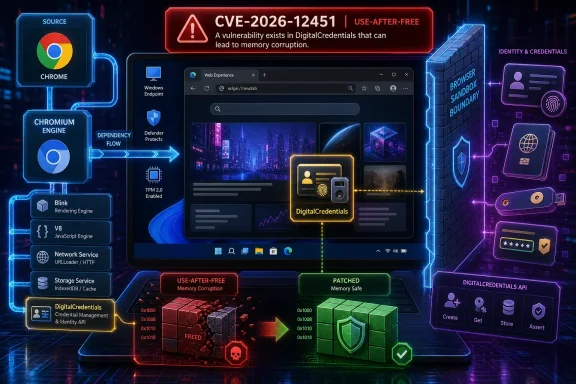 Microsoft Owns the Browser It Ships, Even When Google Found the Bug
The confusion around CVE-2026-12451 comes from the way modern browser security is divided among projects, vendors, and products. The vulnerability is described as a use-after-free bug in DigitalCredentials in Google Chrome before version 149.0.7827.155, with the possible consequence of sandbox escape after a renderer process has already been compromised. That wording sounds like a Chrome advisory, because it is rooted in the Chromium security ecosystem.But Microsoft Edge is built on Chromium. Since the Chromium-based Edge replaced the old EdgeHTML-era browser, Microsoft has relied on the same upstream engine family that powers Chrome and a broad class of other browsers. When a memory-safety defect lands in shared Chromium code, the vendor name on the original CVE does not neatly map to the only product that customers must update.
That is why Microsoft’s explanation is blunt: the vulnerability is in Chromium open-source software consumed by Microsoft Edge, and the Security Update Guide entry exists to announce that the latest Edge version is no longer vulnerable. In other words, Microsoft is not claiming authorship of the bug. It is claiming responsibility for the patched state of the Microsoft product that includes the affected code.
This is the right posture. Enterprises do not deploy “Chromium OSS” as an abstract library; they deploy Edge, Chrome, WebView2 Runtime, embedded browser components, and application stacks that inherit browser code in sometimes surprising places. A vulnerability database that pretended upstream code stopped at the project boundary would be less tidy for lawyers, but more dangerous for defenders.
The Security Update Guide Has Become a Map of Dependencies
The Microsoft Security Update Guide used to be easier to parse when most Windows vulnerabilities were defects in Windows components, Office, Exchange, SQL Server, or other obviously Microsoft-branded software. Edge complicates that model because it is simultaneously a Microsoft product and a participant in the Chromium release train. CVE-2026-12451 is a small example of a much larger reality: software vendors now patch ecosystems as much as they patch products.For administrators, that means the product field is often more important than the CVE’s origin story. If the Security Update Guide says Microsoft Edge is affected, the practical question is whether the deployed Edge build on your endpoints is at or above the fixed version. Whether the CVE was assigned by Chrome, Microsoft, or another CNA is useful context, but it does not change the patching job.
The upside is transparency. Microsoft documenting Chromium-originated CVEs in its own guide gives Windows shops one place to see whether Edge is covered by a given fix. It also helps vulnerability scanners and patch-management tools correlate Microsoft’s Edge update channel with CVEs that might otherwise appear to be “Google Chrome only.”
The downside is noise. Security teams already live with duplicated-looking findings across Chrome, Edge, WebView2, Electron applications, and embedded Chromium runtimes. A Chrome CVE in Microsoft’s guide can look like double-counting unless the reader understands that the same bug may be remediated through different vendor update mechanisms.
Digital Credentials Is a Small Feature With a Large Attack Surface
The component named in CVE-2026-12451, DigitalCredentials, is not the sort of browser feature most users think about when they click an update prompt. It sits in the expanding zone where browsers mediate identity, wallets, credentials, attestations, and high-trust interactions between websites and local platforms. That makes it security-sensitive by design.A use-after-free bug is a classic memory-corruption failure. In plain English, software frees a chunk of memory but later continues to use it as if it were still valid. Attackers prize this class of bug because, under the right conditions, it can be shaped into control over program behavior rather than a simple crash.
The published description says exploitation would require a remote attacker who had already compromised the renderer process and then used a crafted HTML page to potentially escape the browser sandbox. That qualifier matters. This is not described as a one-click, straight-to-kernel compromise. It is a post-renderer-compromise escalation path, the kind of vulnerability that becomes far more valuable when chained with another browser flaw.
That is how many serious browser attacks work in practice. One bug gets code running inside a sandboxed renderer; another weakens or breaks the sandbox boundary; a third may pursue persistence, credential theft, or operating-system access. Judging a sandbox escape only by whether it starts the attack misses why defenders treat these bugs seriously.
The Browser Sandbox Is the Wall Attackers Keep Testing
Modern browsers assume hostile content. Every tab that renders an unknown website is a potential encounter with attacker-controlled JavaScript, malformed media, clever timing behavior, and exploit research that targets the browser’s most complex surfaces. The sandbox is the architectural promise that even if something goes wrong inside the renderer, the damage should be constrained.A sandbox escape undermines that promise. It does not necessarily mean an attacker instantly owns the machine, but it moves the attack from “trapped in a constrained browser process” toward “able to reach more privileged broker processes, operating-system interfaces, or user data.” That is why sandbox escapes often receive high severity even when the prerequisites look restrictive.
The fact that CVE-2026-12451 is tied to a crafted HTML page should also focus attention. Browser vulnerabilities are uniquely exposed because the delivery mechanism is the ordinary web. Users do not install a malicious driver or open an obscure enterprise file format; they browse, click, authenticate, and render.
For Windows administrators, Edge’s integration makes that exposure even more relevant. Edge is the default browser on Windows, a dependency for many Microsoft experiences, and the foundation for WebView2 applications. Treating Edge as “just another app” understates how often browser code is invoked in everyday work.
Edge Updates Are Fast, but “Installed” Is Not the Same as “Running Patched Code”
The practical fix for most users is simple: update Microsoft Edge and restart it. The important detail is the restart. Like Chrome, Edge can download an update in the background, but the running browser process may not be protected by the new binary until the browser restarts.On a personal PC, that usually means opening Edge’s menu, going to Help and feedback, selecting About Microsoft Edge, and letting the browser check for updates. The About page displays the installed version and typically triggers update detection. If an update is available, Edge downloads it and prompts for a restart.
The direct shortcut is to type
edge://settings/help into the address bar. That lands on the same About page and is often the quickest path for support desks, power users, and anyone validating a scanner result. The version number appears there, along with update status.On Chrome, the equivalent path is
chrome://settings/help, or the menu path through Help and About Google Chrome. That matters in mixed-browser environments because CVE-2026-12451 originated in Chrome’s Chromium disclosures but also matters for Edge when Microsoft has not yet deployed, or a device has not yet applied, the corresponding Edge update.The Version Number Is a Security Boundary in Disguise
The fixed Chrome version associated with this CVE is 149.0.7827.155 or later. Edge’s fixed version may not always use the exact same four-part build number at the same moment, because Microsoft packages and releases Edge on its own channel while tracking Chromium closely. The safe operational rule is to rely on Microsoft’s Edge update status for Edge and Google’s Chrome release status for Chrome, rather than assuming one browser’s version string perfectly certifies the other.That is one reason Microsoft’s Security Update Guide entry exists. It tells Edge customers that Microsoft has shipped an Edge build in which the consumed Chromium vulnerability has been addressed. The relevant question for a Windows endpoint is therefore not “Did Google patch Chrome?” but “Is this installed Edge build the Microsoft build that includes the Chromium fix?”
In managed environments, the version check should not be a manual ritual performed only when a CVE trends on social media. Browser version inventory belongs in endpoint management, vulnerability management, and software update compliance dashboards. If those tools disagree, the About page remains a useful ground truth for a single machine, but it is not a fleet strategy.
Administrators should also remember that browser updates can be blocked by policy, network controls, stale management templates, maintenance windows, or user behavior. A machine can be “configured for automatic updates” and still be running a vulnerable browser because it has not restarted, cannot reach the update service, or is pinned by enterprise policy.
Patch Tuesday Thinking Does Not Fit Chromium Cadence
CVE-2026-12451 is also a reminder that browser security does not wait politely for Patch Tuesday. Chromium fixes arrive on a faster cadence than Windows cumulative updates, and emergency browser releases often appear between Microsoft’s monthly security batches. That is a feature, not a flaw.The industry learned years ago that browsers need rapid patch pipelines. They sit directly on the internet, parse hostile content, include massive codebases, and expose high-value user data. A monthly-only model would give attackers too much time with known bugs.
Microsoft Edge follows its own update machinery, and many consumers receive fixes without thinking about Windows Update at all. In enterprise environments, however, the picture is more complicated. Some organizations route Edge updates through management systems, WSUS, Microsoft Intune, Configuration Manager, third-party patch tools, or controlled rings.
That is where the Security Update Guide can create false reassurance. Seeing an entry in Microsoft’s guide does not mean every managed endpoint has taken the update. It means Microsoft has documented the vulnerability and released remediation. Your fleet still has to ingest it.
WebView2 Turns Browser CVEs Into Application Questions
Edge itself is only part of the story. Microsoft’s WebView2 Runtime allows Windows applications to embed web content using the Edge Chromium engine. That has been a major win for developers who want modern web rendering without shipping their own browser stack, but it also means Chromium security updates can matter beyond the visible Edge icon.Not every Chromium CVE has the same implications for every WebView2 application. Exploitability depends on what content the application loads, what privileges it has, how it handles navigation, and whether it exposes local bridges between web content and native code. But the general principle is clear: if an app depends on Chromium-rendered content, Chromium security is part of the app’s security.
This is why vulnerability reports sometimes surprise users by flagging Edge or WebView2 even when Chrome is the name in the upstream CVE. The scanner is not necessarily confused. It may be recognizing that the vulnerable code lineage exists in Microsoft’s browser runtime.
For administrators, the inventory question should include both Microsoft Edge and Microsoft Edge WebView2 Runtime. If you only check the browser a user launches manually, you may miss the runtime an application launches invisibly.
The Digital Credentials Label Should Not Distract From the Old Memory-Safety Problem
The name “DigitalCredentials” sounds modern and specialized, but the bug class is old. Use-after-free vulnerabilities have haunted C and C++ software for decades. Browser vendors have poured enormous engineering effort into sandboxing, site isolation, fuzzing, exploit mitigations, and memory-safety initiatives because complex native code remains difficult to make perfectly safe.That does not make every use-after-free equally exploitable. Some are theoretical, some crash reliably, some require delicate heap shaping, and some become critical ingredients in real exploit chains. Public advisories often withhold technical detail until users have had time to patch, which is sensible but leaves defenders reading between the lines.
The phrase “remote attacker who had compromised the renderer process” is one of those lines. It implies the bug is not the first foothold, but it could be a second stage. In a mature exploit chain, that may be exactly what the attacker needs.
This is why waiting for proof-of-concept code before patching browser sandbox escapes is poor risk management. By the time exploit details are easy to reproduce, the patch window has already turned into an exposure window.
Microsoft’s Inclusion Is Also a Message to Scanners
Vulnerability scanners live on mappings. They need to know which CVEs apply to which products, which versions are fixed, and which installed binaries correspond to which advisories. When Microsoft includes Chromium CVEs in the Security Update Guide, it feeds that ecosystem with vendor-recognized applicability.That helps, but it also produces the familiar ticket churn sysadmins know too well. A scanner may flag CVE-2026-12451 against Edge because the Microsoft guide says Edge consumed the vulnerable Chromium code. Another tool may flag Chrome separately. A third may flag WebView2. The result can look like three vulnerabilities when the remediation work is mostly one browser-runtime hygiene problem repeated across products.
The fix is not to ignore the alerts. The fix is to normalize them. Security teams should track browser-family vulnerabilities by installed product and runtime, then close findings based on verified version state rather than advisory brand names.
This is where good asset data beats heroic manual checking. If your patch dashboard can show Edge Stable, Edge Extended Stable if used, Chrome Stable, WebView2 Runtime, and unmanaged portable browsers, CVE triage becomes a manageable compliance task. If not, every Chromium CVE becomes a scavenger hunt.
The User Check Is Simple, the Fleet Check Is Not
For an individual Windows user, the version question has a clean answer. Open Microsoft Edge, select the three-dot menu, choose Help and feedback, then About Microsoft Edge. Alternatively, typeedge://settings/help in the address bar. The page shows the current version and checks for updates automatically.If the browser says it is up to date, close and reopen it if a restart prompt appears. If it still reports an older build after restarting, the machine may be blocked by policy, an update service issue, or a delayed rollout. In that case, downloading the current Edge installer from Microsoft or contacting the administrator may be necessary.
For Chrome, use the same pattern with Chrome’s About page or
chrome://settings/help. The relevant Chrome fixed version for this CVE is 149.0.7827.155 or later, but Edge users should verify against Edge’s own update channel rather than treating the Chrome number as a perfect proxy.For administrators, the same check does not scale. Use your endpoint management platform to query installed Edge and WebView2 versions across the fleet, enforce update policies, and require browser restarts where needed. The uncomfortable truth is that browser patching often fails not because the vendor did not ship the fix, but because organizations lack a reliable way to prove the fixed code is actually running.
A Chrome-Branded CVE Is Still a Windows Admin Problem
The practical lesson from CVE-2026-12451 is that the browser monoculture created by Chromium has security benefits and operational costs. Upstream bugs are found once and patched across many products, but they also propagate across many products before the fix lands. Microsoft’s Security Update Guide is reflecting that shared reality, not blurring it.This should not be read as an indictment of Edge in particular. The old model, where every browser maintained a largely separate engine, produced its own security problems and duplicated engineering burden. Chromium’s scale means enormous scrutiny, fast patching, and a mature security apparatus.
But scale also concentrates risk. When a Chromium component has a serious memory-safety flaw, it can matter to Chrome, Edge, embedded runtimes, and downstream application frameworks. The patch story becomes less about which logo sits on the browser and more about how quickly each vendor integrates, ships, and enforces the fix.
Microsoft’s inclusion of the CVE is therefore less strange than it first appears. It is what responsible downstream stewardship looks like in a world where open-source components are not optional accessories but core product infrastructure.
The Edge Check That Actually Matters This Week
The immediate work is modest, but it should be done deliberately. CVE-2026-12451 is not a reason to panic; it is a reason to verify that automatic browser patching is doing what everyone assumes it is doing. That assumption is where many organizations get burned.- Microsoft included CVE-2026-12451 because Microsoft Edge consumes the Chromium code where the vulnerability existed.
- The flaw is a use-after-free in DigitalCredentials that could potentially support a sandbox escape after renderer compromise.
- Individual users can check Edge by opening
edge://settings/helpor using Help and feedback, then About Microsoft Edge. - Chrome users should be on version 149.0.7827.155 or later, while Edge users should rely on Edge’s own update status and Microsoft’s fixed build.
- Administrators should inventory Edge, Chrome, and WebView2 Runtime rather than treating the visible browser icon as the whole exposure.
- A downloaded update is not enough if the browser or runtime has not restarted into the patched build.
References
- Primary source: MSRC
Published: 2026-06-19T13:52:30-07:00
Security Update Guide - Microsoft Security Response Center
 msrc.microsoft.com
- Official source: microsoft.com
MSRC - Microsoft Security Response Center
The Microsoft Security Response Center is part of the defender community and on the front line of security response evolution. For over twenty years, we have been engaged with security researchers working to protect customers and the broader ecosystem.www.microsoft.com
- Related coverage: netservicesgroup.com
Chromium: CVE-2026-4456 Use after free in Digital Credentials API - Network Services Group
This CVE was assigned by Chrome. Microsoft Edge (Chromium-based) ingests Chromium, which addresses this vulnerability. Please see [Google Chrome Releases](https://chromereleases.googleblog.com/2026) for more information.www.netservicesgroup.com - Related coverage: datacomm.com
- Related coverage: rapid7.com
Rapid7 Vulnerability Database
Rapid7's VulnDB is curated repository of vetted computer software exploits and exploitable vulnerabilities.www.rapid7.com - Related coverage: sentinelone.com
CVE-2026-4456: Google Chrome Use After Free Vulnerability
CVE-2026-4456 is a use after free vulnerability in Google Chrome. Learn about its impact, affected versions, and mitigation methods for this issue.www.sentinelone.com
- Related coverage: cert.gov.vu
Advisory 117 CVE 2026 20805 Microsoft Windows Information Disclosure Vulnerability
PDF documentcert.gov.vu
- Official source: support.microsoft.com
Microsoft Edge update settings | Microsoft Support
Microsoft Edge update settingssupport.microsoft.com - Related coverage: howtogeek.com
How to Update Microsoft Edge
Here's how to update Microsoft Edge, whether you're using the new Chromium-based Edge or the original version that came with Windows 10. www.howtogeek.com
- Related coverage: windowscentral.com
Major Microsoft Edge versions will now ship every two weeks: Microsoft confirms plans to ship new Edge features and changes twice a month | Windows Central
Microsoft has announced that Edge will be moving to a two-week release cycle for major versions of the browser, matching Chrome.www.windowscentral.com - Related coverage: techradar.com
Microsoft Edge gets a major security upgrade which should ease concerns for many users | TechRadar
Edge will check for malicious extensions going forwardwww.techradar.com - Related coverage: 44438071.fs1.hubspotusercontent-na1.net
Microsoft Word - Microsoft Edge Browser Settings 092120.docx
PDF document44438071.fs1.hubspotusercontent-na1.net
