
Xbox Cloud Gaming in 2026 makes the most sense on Game Pass Ultimate if you need Microsoft’s new up-to-1440p, higher-bitrate console streaming; otherwise, test Premium or Essential first, and wait before changing plans if your regional latency is still unproven.
Use this framework before you migrate:
That is the practical answer. Ultimate is still the quality tier for Xbox Cloud Gaming, but it is no longer the automatic cloud tier.
For years, the simple Xbox Cloud Gaming advice was to subscribe to Game Pass Ultimate or forget about it. That made sense when cloud gaming was a beta-era premium feature, bundled into the most expensive plan and pitched as a bonus for people already buying the full Xbox package.
That advice is now too blunt.
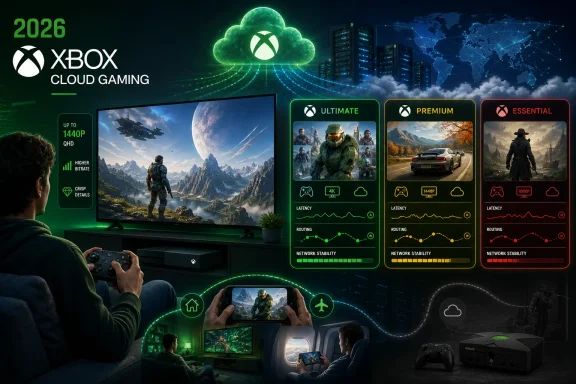
On February 25, 2026, Microsoft began rolling out up-to-1440p streaming with higher bitrate for Xbox Game Pass Ultimate members on Xbox consoles. Microsoft also says Xbox Cloud Gaming is out of beta, while its current plan pages describe cloud gaming across Game Pass Ultimate, Premium, and Essential, with support for streaming selected cloud-playable games you own on supported devices.
That creates a cleaner split:
Ultimate still makes obvious sense for players who expect cloud gaming to look and feel as close to console-local play as Microsoft can currently make it. The February 25, 2026 rollout is aimed at that audience: supported Xbox console users who want up-to-1440p streaming and higher bitrate.
That does not mean every cloud user needs Ultimate.
Premium and Essential make sense when cloud is not the center of the experience. If your main gaming still happens through installed Xbox or PC titles, and cloud is there for hotel rooms, quick trials, family-room overflow, or launching a supported game without a large download, then the lower tiers deserve a serious look.
The “wait” category is not indecision. It is a rational response to a service where the plan page can look the same everywhere while the experience is intensely local. Latency, routing, Wi-Fi quality, controller path, display size, and nearby cloud capacity all affect whether a subscription feels smooth or frustrating.
But 1440p streaming is not the same thing as every game rendering natively at 1440p. It also does not erase the normal limits of cloud gaming. A sharper video stream cannot fix a game’s own performance profile, and higher bitrate cannot make a distant or congested network path feel local.
That distinction matters for WindowsForum readers because enthusiasts notice the gaps vendors tend to smooth over. If you are using an Xbox One-era console as a cloud box, 1440p can be meaningful. If you are sitting close to a monitor comparing cloud output with a locally rendered PC game, the same stream may still feel like a compromise.
So the right way to describe Ultimate is not “the best Xbox experience.” It is more precise than that: Ultimate is the best Xbox Cloud Gaming experience Microsoft is currently offering for supported console streaming.
That is still valuable. It is just a narrower claim than the marketing-friendly version.
That makes lower-tier plans a better first stop for many users.
If you are not chasing the highest available stream quality, do not begin by assuming you need the highest subscription tier. Start with the plan that matches your library and usage pattern, then upgrade only if you hit a real limitation.
That is especially true for households with mixed habits. One person may care about cloud streaming on a TV. Another may play only installed games. A third may use cloud gaming to jump into supported titles from a laptop or secondary screen. In that environment, Ultimate can be either a bargain or a tax. It depends entirely on whether the premium cloud features are actually used.
Microsoft’s support for streaming selected cloud-playable games you own also changes the old Game Pass math. A player who buys a small number of favorite games and wants flexible access is not evaluating cloud gaming the same way as a player who treats Game Pass as a rotating subscription library.
Owned-game streaming pushes Xbox Cloud Gaming closer to infrastructure. It is not just about renting access to a catalog. It is about whether your Xbox library can follow you to supported devices without a local install.
For users, the immediate benefit is flexibility. You are not only asking whether a game is in a rotating library. You are asking whether your own purchase can be played without installing it locally on a supported device. That matters for users with limited storage, older consoles, shared household hardware, or secondary screens.
For Microsoft, this is strategically useful. It lets the company argue that Xbox is not only a console under the TV, while still keeping purchased games, accounts, saves, and subscriptions tied to the Xbox ecosystem.
For IT-minded readers, the analogy is obvious. This is the consumer gaming version of moving a workload from one local machine to a service endpoint. The endpoint matters. The network matters. The entitlement model matters. The user experience is only as good as the weakest part of that chain.
That is also why the subscription decision should be practical, not emotional. If you are using cloud gaming as infrastructure, ask what kind of infrastructure you need. Occasional access and high-fidelity console-first streaming are different workloads.
WindowsForum’s own coverage of Xbox PC app updates fits directly into this decision. Readers have been watching Microsoft add cloud gaming entry points and cross-device play history features to the Xbox app, which makes the PC feel more like part of a continuous Xbox session rather than a separate island.
But Windows users should not mistake client availability for performance certainty. A cloud game launched from a PC still depends on the same fundamentals as any other streamed interactive workload: latency, congestion, Wi-Fi quality, display scaling, controller input, and Microsoft’s available cloud capacity for that session.
The app is only the front door.
That means the downgrade decision should be based on measured use, not brand loyalty. If you stream mostly on a laptop screen, use cloud gaming occasionally, and do not care about the sharpest possible image, a lower tier may be rational. If you use a Windows device as your primary Xbox screen and expect long, high-quality sessions, Ultimate is easier to defend.
The practical advice is blunt: audit your last month of play. If cloud gaming was mostly a convenience button, do not pay Ultimate prices for an Ultimate fantasy. If cloud gaming was your main way to play, do not pretend a cheaper plan will necessarily feel identical.
That is not the same as giving old hardware a new GPU. It changes the retirement schedule.
For an Xbox One S or Xbox One X in a spare room, child’s room, office, or travel setup, Ultimate may be more compelling than a hardware upgrade if the games you care about are cloud-playable and your connection is solid. In that case, the console becomes less about local silicon and more about controller, display, account access, and stream quality.
This is where Premium and Essential become more complicated. If the entire purpose of keeping an older console alive is better cloud streaming on a television, Ultimate’s 1440p and higher-bitrate feature may be the difference between “usable” and “not good enough.” If the console is only an occasional access point, the lower tiers still deserve consideration.
This is Microsoft’s strongest version of backward compatibility as a service. Instead of guaranteeing that every new experience runs locally on old hardware, the company can use the cloud to keep older devices useful. The trade-off is that the subscription becomes part of the console’s lifecycle cost.
WindowsForum readers have been especially interested in regional availability and performance, including reports around Xbox Cloud Gaming’s India availability and discussion of local capacity, latency, and higher-quality streaming. Treat those reports as a reminder of what to verify, not as a promise that every user in a large market will get the same result.
Here is the safe recommendation: if your region has recently gained access, recently improved service, or inconsistent user reports, do not make a long-term subscription decision until you test cloud gaming on your own connection.
That means testing:
Microsoft saying Xbox Cloud Gaming is out of beta matters. It signals product maturity, broader entitlement design, and more confidence in the platform. It does not mean every route, household, device, and display behaves like a perfect demo.
The fact that it is “just gaming” does not change the network behavior.
That matters in households and small offices where gaming devices share bandwidth with work machines, streaming boxes, backups, and smart-home clutter. A bad cloud gaming session may not be Microsoft’s fault. It may not be only the ISP’s fault either. It may be a congested Wi-Fi channel, a weak access point, bufferbloat, a poor controller path, or a router that handles competing traffic badly.
The subscription decision should therefore include a network decision. Before paying for Ultimate purely to get better stream quality, make sure the local network can preserve that quality. A higher-bitrate stream can expose weaknesses that a lower-quality stream hides.
Be empirical:
That is more mature than the beta-era pitch. Early Xbox Cloud Gaming had to prove it could work at all. Now the question is different: how much cloud does each customer need, and how much will that customer pay for better fidelity?
WindowsForum’s user reports reflect that broader transition. Readers have followed Xbox Cloud Gaming from Project xCloud to a more mainstream streaming layer, watched the Xbox app become a more capable client, and debated whether cloud-first usage changes the value of Game Pass tiers. The through-line is not hype. It is workload matching.
For customers, segmentation is both useful and annoying. It can lower the entry point for people who do not need everything. It can also make the buying decision more confusing if Microsoft does not communicate quality differences clearly.
That is why the best answer is not “always Ultimate” or “always downgrade.” The best answer is to match the plan to the job.
Stay on Ultimate if cloud gaming is central to your Xbox life. That includes users who stream regularly to a supported Xbox console, care about image quality on a larger display, want Microsoft’s best available bitrate, or use cloud as a substitute for buying newer hardware. Ultimate is still the cleanest answer for the player who wants the least compromised cloud version Microsoft currently offers.
Downgrade or start lower if cloud gaming is occasional. If your real center of gravity is installed games, owned titles, or light streaming on smaller screens, Premium and Essential are no longer automatically disqualified. The existence of cloud access outside Ultimate means many users should test those plans before assuming Ultimate is required.
Wait if your experience is regionally uncertain. That applies to users in newly supported or recently improved markets, users who have seen inconsistent routing, and anyone whose home network is changing. Regional and local performance data matters more than a plan comparison chart.
The migration framework is simple:
If cloud gaming is occasional or mostly a backup option, Premium or Essential may be enough. Test your real use before paying for the highest tier.
If cloud gaming was your main way to play, Ultimate remains the safest answer. If cloud gaming was a convenience button, Premium or Essential deserve a real look. If your experience depends on a region, route, ISP, or home network that still feels unpredictable, wait before locking yourself into a plan.
The broader point is that Game Pass has stopped being a single obvious upsell for anyone interested in cloud play. Microsoft has moved the decision from entitlement to experience. That is better for users, but only if they stop treating Ultimate as the default answer.
Xbox Cloud Gaming in 2026 is no longer a beta curiosity and no longer a feature locked behind one premium door. It is also not a universal replacement for local hardware. Ultimate remains the right plan for players who can actually benefit from Microsoft’s best cloud stream, while Premium and Essential now deserve a real look from everyone else.
Use this framework before you migrate:
| Your situation | Best move | Why |
|---|---|---|
| You regularly stream on a supported Xbox console, use a large display, care about image quality, and want the new up-to-1440p, higher-bitrate stream | Stay on Ultimate | Ultimate is where Microsoft placed the February 25, 2026 quality upgrade for console cloud play. |
| You use cloud gaming mostly as a convenience feature: travel, quick trials, secondary screens, or occasional play without installing | Downgrade to or start with Premium/Essential | Cloud access is no longer treated as an Ultimate-only reason by itself. |
| You mostly play installed games and only stream when storage, downloads, or device access get in the way | Start lower, then upgrade only if you hit a real limit | Your main workload is not cloud gaming, so do not pay first for premium cloud quality you may not use. |
| You rely on an older Xbox console mainly as a cloud endpoint on a TV | Lean Ultimate, then test hard | The 1440p/higher-bitrate upgrade may matter most when cloud streaming is standing in for newer hardware. |
| Your market, ISP route, Wi-Fi, or household network gives inconsistent latency | Wait and test locally | Cloud gaming quality is regional and network-dependent; no plan name can guarantee your experience. |
 Microsoft Has Split Cloud Access From Cloud Quality
For years, the simple Xbox Cloud Gaming advice was to subscribe to Game Pass Ultimate or forget about it. That made sense when cloud gaming was a beta-era premium feature, bundled into the most expensive plan and pitched as a bonus for people already buying the full Xbox package.That advice is now too blunt.
On February 25, 2026, Microsoft began rolling out up-to-1440p streaming with higher bitrate for Xbox Game Pass Ultimate members on Xbox consoles. Microsoft also says Xbox Cloud Gaming is out of beta, while its current plan pages describe cloud gaming across Game Pass Ultimate, Premium, and Essential, with support for streaming selected cloud-playable games you own on supported devices.
That creates a cleaner split:
- Ultimate is for the best Xbox Cloud Gaming quality Microsoft currently offers.
- Premium and Essential are for users who want cloud access without automatically paying for the top cloud tier.
- Waiting is reasonable when your local performance is not yet predictable.
The New Rule: Pay Ultimate for Fidelity, Not Mere Access
The cleanest migration rule is this: subscribe to Ultimate if cloud streaming is replacing local console play; consider Premium or Essential if cloud streaming is only supplementing local play; wait if your region, route, or device setup makes performance uncertain.Ultimate still makes obvious sense for players who expect cloud gaming to look and feel as close to console-local play as Microsoft can currently make it. The February 25, 2026 rollout is aimed at that audience: supported Xbox console users who want up-to-1440p streaming and higher bitrate.
That does not mean every cloud user needs Ultimate.
Premium and Essential make sense when cloud is not the center of the experience. If your main gaming still happens through installed Xbox or PC titles, and cloud is there for hotel rooms, quick trials, family-room overflow, or launching a supported game without a large download, then the lower tiers deserve a serious look.
The “wait” category is not indecision. It is a rational response to a service where the plan page can look the same everywhere while the experience is intensely local. Latency, routing, Wi-Fi quality, controller path, display size, and nearby cloud capacity all affect whether a subscription feels smooth or frustrating.
1440p Is a Real Upgrade, But It Is Not a Console Replacement Spell
The 1440p upgrade is the clearest reason to stay on Ultimate, and it should not be dismissed. Higher resolution and higher bitrate can reduce the soft, smeared look that has long made cloud gaming feel compromised on larger screens. For Xbox console owners, especially those using older hardware as streaming endpoints, this can make the living-room experience more credible.But 1440p streaming is not the same thing as every game rendering natively at 1440p. It also does not erase the normal limits of cloud gaming. A sharper video stream cannot fix a game’s own performance profile, and higher bitrate cannot make a distant or congested network path feel local.
That distinction matters for WindowsForum readers because enthusiasts notice the gaps vendors tend to smooth over. If you are using an Xbox One-era console as a cloud box, 1440p can be meaningful. If you are sitting close to a monitor comparing cloud output with a locally rendered PC game, the same stream may still feel like a compromise.
So the right way to describe Ultimate is not “the best Xbox experience.” It is more precise than that: Ultimate is the best Xbox Cloud Gaming experience Microsoft is currently offering for supported console streaming.
That is still valuable. It is just a narrower claim than the marketing-friendly version.
Premium and Essential Are Now the Sensible Default for Casual Cloud Users
The biggest change for ordinary users is psychological. Once cloud gaming appears outside Ultimate, the burden of proof shifts. Ultimate must justify itself with quality, catalog value, convenience, and device fit rather than mere permission to stream.That makes lower-tier plans a better first stop for many users.
If you are not chasing the highest available stream quality, do not begin by assuming you need the highest subscription tier. Start with the plan that matches your library and usage pattern, then upgrade only if you hit a real limitation.
That is especially true for households with mixed habits. One person may care about cloud streaming on a TV. Another may play only installed games. A third may use cloud gaming to jump into supported titles from a laptop or secondary screen. In that environment, Ultimate can be either a bargain or a tax. It depends entirely on whether the premium cloud features are actually used.
Microsoft’s support for streaming selected cloud-playable games you own also changes the old Game Pass math. A player who buys a small number of favorite games and wants flexible access is not evaluating cloud gaming the same way as a player who treats Game Pass as a rotating subscription library.
Owned-game streaming pushes Xbox Cloud Gaming closer to infrastructure. It is not just about renting access to a catalog. It is about whether your Xbox library can follow you to supported devices without a local install.
Owned-Game Streaming Makes Game Pass Less Like Netflix and More Like a Platform
The ability to stream supported games you own is one of the more important changes because it weakens the idea that Xbox Cloud Gaming is only a subscription catalog feature. If a purchased game can follow you to supported devices, cloud gaming becomes part of the Xbox platform layer.For users, the immediate benefit is flexibility. You are not only asking whether a game is in a rotating library. You are asking whether your own purchase can be played without installing it locally on a supported device. That matters for users with limited storage, older consoles, shared household hardware, or secondary screens.
For Microsoft, this is strategically useful. It lets the company argue that Xbox is not only a console under the TV, while still keeping purchased games, accounts, saves, and subscriptions tied to the Xbox ecosystem.
For IT-minded readers, the analogy is obvious. This is the consumer gaming version of moving a workload from one local machine to a service endpoint. The endpoint matters. The network matters. The entitlement model matters. The user experience is only as good as the weakest part of that chain.
That is also why the subscription decision should be practical, not emotional. If you are using cloud gaming as infrastructure, ask what kind of infrastructure you need. Occasional access and high-fidelity console-first streaming are different workloads.
Windows Users Should Treat the Xbox App as a Client, Not a Guarantee
Windows users may be the most conflicted cloud customers. They already own capable general-purpose machines, but they may not want to install every game locally, dedicate storage, or maintain GPU headroom for casual play. Xbox Cloud Gaming can be a useful release valve when the alternative is a huge download for a game you may abandon after 20 minutes.WindowsForum’s own coverage of Xbox PC app updates fits directly into this decision. Readers have been watching Microsoft add cloud gaming entry points and cross-device play history features to the Xbox app, which makes the PC feel more like part of a continuous Xbox session rather than a separate island.
But Windows users should not mistake client availability for performance certainty. A cloud game launched from a PC still depends on the same fundamentals as any other streamed interactive workload: latency, congestion, Wi-Fi quality, display scaling, controller input, and Microsoft’s available cloud capacity for that session.
The app is only the front door.
That means the downgrade decision should be based on measured use, not brand loyalty. If you stream mostly on a laptop screen, use cloud gaming occasionally, and do not care about the sharpest possible image, a lower tier may be rational. If you use a Windows device as your primary Xbox screen and expect long, high-quality sessions, Ultimate is easier to defend.
The practical advice is blunt: audit your last month of play. If cloud gaming was mostly a convenience button, do not pay Ultimate prices for an Ultimate fantasy. If cloud gaming was your main way to play, do not pretend a cheaper plan will necessarily feel identical.
Older Xbox Consoles Just Got a Stay of Execution
The February 25, 2026 update is especially interesting for owners of older Xbox hardware. A console that struggles to participate natively in the newest generation can still act as a cloud endpoint, and higher-quality streaming makes that role more credible.That is not the same as giving old hardware a new GPU. It changes the retirement schedule.
For an Xbox One S or Xbox One X in a spare room, child’s room, office, or travel setup, Ultimate may be more compelling than a hardware upgrade if the games you care about are cloud-playable and your connection is solid. In that case, the console becomes less about local silicon and more about controller, display, account access, and stream quality.
This is where Premium and Essential become more complicated. If the entire purpose of keeping an older console alive is better cloud streaming on a television, Ultimate’s 1440p and higher-bitrate feature may be the difference between “usable” and “not good enough.” If the console is only an occasional access point, the lower tiers still deserve consideration.
This is Microsoft’s strongest version of backward compatibility as a service. Instead of guaranteeing that every new experience runs locally on old hardware, the company can use the cloud to keep older devices useful. The trade-off is that the subscription becomes part of the console’s lifecycle cost.
Regional Performance Advice: Test Before You Commit
Cloud gaming is never just a product SKU. It is a service path between your controller, your device, your home network, your ISP, Microsoft’s infrastructure, and the game session running elsewhere.WindowsForum readers have been especially interested in regional availability and performance, including reports around Xbox Cloud Gaming’s India availability and discussion of local capacity, latency, and higher-quality streaming. Treat those reports as a reminder of what to verify, not as a promise that every user in a large market will get the same result.
Here is the safe recommendation: if your region has recently gained access, recently improved service, or inconsistent user reports, do not make a long-term subscription decision until you test cloud gaming on your own connection.
That means testing:
- The exact device you will use.
- The display size you actually care about.
- The controller path you intend to use.
- Your normal Wi-Fi or Ethernet setup.
- Peak evening hours, not only quiet daytime conditions.
- The games you actually play, not only a quick menu launch.
Microsoft saying Xbox Cloud Gaming is out of beta matters. It signals product maturity, broader entitlement design, and more confidence in the platform. It does not mean every route, household, device, and display behaves like a perfect demo.
The Admin View: Cloud Gaming Is Another Network Workload
For sysadmins and technically inclined home users, Xbox Cloud Gaming belongs in the same mental bucket as video conferencing, remote desktops, VDI, and high-bitrate media streaming. It is interactive, latency-sensitive, and visibly degraded by jitter in a way buffered video is not.The fact that it is “just gaming” does not change the network behavior.
That matters in households and small offices where gaming devices share bandwidth with work machines, streaming boxes, backups, and smart-home clutter. A bad cloud gaming session may not be Microsoft’s fault. It may not be only the ISP’s fault either. It may be a congested Wi-Fi channel, a weak access point, bufferbloat, a poor controller path, or a router that handles competing traffic badly.
The subscription decision should therefore include a network decision. Before paying for Ultimate purely to get better stream quality, make sure the local network can preserve that quality. A higher-bitrate stream can expose weaknesses that a lower-quality stream hides.
Be empirical:
- Test over Ethernet if possible.
- Compare Ethernet with Wi-Fi.
- Test 5 GHz or 6 GHz Wi-Fi separately from crowded 2.4 GHz networks.
- Try the same game at different times of day.
- Watch for controller delay, not only image quality.
- Judge the experience on the display where you actually intend to play.
- Do not assume a small laptop test predicts a large TV experience.
Microsoft’s Bet Is That “Good Enough” Cloud Expands Xbox
The business logic behind the new tiering is straightforward. Microsoft does not need every cloud user to buy Ultimate if lower-tier cloud access keeps more users inside the Xbox ecosystem. It needs enough users to see Xbox as available wherever they are, and enough quality-sensitive users to pay for the premium lane.That is more mature than the beta-era pitch. Early Xbox Cloud Gaming had to prove it could work at all. Now the question is different: how much cloud does each customer need, and how much will that customer pay for better fidelity?
WindowsForum’s user reports reflect that broader transition. Readers have followed Xbox Cloud Gaming from Project xCloud to a more mainstream streaming layer, watched the Xbox app become a more capable client, and debated whether cloud-first usage changes the value of Game Pass tiers. The through-line is not hype. It is workload matching.
For customers, segmentation is both useful and annoying. It can lower the entry point for people who do not need everything. It can also make the buying decision more confusing if Microsoft does not communicate quality differences clearly.
That is why the best answer is not “always Ultimate” or “always downgrade.” The best answer is to match the plan to the job.
The Migration Framework Is a Usage Audit, Not a Brand Preference
The right plan in 2026 starts with behavior. Do not begin with Microsoft’s tier names. Begin with how you actually play.Stay on Ultimate if cloud gaming is central to your Xbox life. That includes users who stream regularly to a supported Xbox console, care about image quality on a larger display, want Microsoft’s best available bitrate, or use cloud as a substitute for buying newer hardware. Ultimate is still the cleanest answer for the player who wants the least compromised cloud version Microsoft currently offers.
Downgrade or start lower if cloud gaming is occasional. If your real center of gravity is installed games, owned titles, or light streaming on smaller screens, Premium and Essential are no longer automatically disqualified. The existence of cloud access outside Ultimate means many users should test those plans before assuming Ultimate is required.
Wait if your experience is regionally uncertain. That applies to users in newly supported or recently improved markets, users who have seen inconsistent routing, and anyone whose home network is changing. Regional and local performance data matters more than a plan comparison chart.
The migration framework is simple:
- Stay on Ultimate if you regularly stream on a supported Xbox console and want the new up-to-1440p, higher-bitrate experience.
- Stay on Ultimate if an older Xbox console is now mainly a cloud endpoint for a larger display.
- Stay on Ultimate if cloud gaming is your primary way to play and you are sensitive to compression, blur, or image softness.
- Downgrade to Premium or Essential if cloud gaming is occasional, secondary, or mostly a convenience feature.
- Downgrade or start lower if you mostly play installed games and only use cloud to avoid downloads or continue a session away from your main device.
- Wait if latency, routing, or regional performance is unproven for your setup.
- Do not decide from marketing pages alone. Test the service on the device, display, controller, and network you plan to use.
Frequently Asked Questions
Should I keep Xbox Game Pass Ultimate just for Xbox Cloud Gaming?
Keep Ultimate just for cloud gaming only if you actually use the premium cloud features. The strongest case is regular streaming on a supported Xbox console where the up-to-1440p, higher-bitrate experience matters to you.If cloud gaming is occasional or mostly a backup option, Premium or Essential may be enough. Test your real use before paying for the highest tier.
Is Xbox Cloud Gaming still an Ultimate-only feature?
No. Microsoft’s current cloud gaming messaging places cloud play across Game Pass Ultimate, Premium, and Essential. The key distinction is no longer simple access. The key distinction is quality, scope, devices, catalog fit, and whether you need the premium console streaming experience.Who should downgrade from Ultimate?
Consider downgrading if you mostly play installed games, use cloud gaming only occasionally, stream on smaller screens, or do not care about the highest available cloud image quality. Also consider starting lower if you are new to cloud gaming and do not yet know whether it will become part of your normal routine.Who should not downgrade?
Do not rush to downgrade if cloud gaming is your main way to play, if you regularly stream to a supported Xbox console, if you use an older Xbox primarily as a cloud device, or if the new up-to-1440p, higher-bitrate stream is exactly what makes the service acceptable on your display.Is 1440p cloud streaming the same as local 1440p gaming?
No. A 1440p cloud stream is still a video stream of a remote session. It can look much better than lower-resolution or lower-bitrate streaming, especially on larger displays, but it does not eliminate compression, latency, routing issues, or the game’s own performance limits.Should Windows PC users pay for Ultimate?
Windows users should decide based on workload. If the Xbox app is mostly a convenient way to sample games without installing them, a lower tier may be enough. If a Windows device is your primary Xbox screen and you expect long, high-quality cloud sessions, Ultimate is easier to justify.What should I do if cloud performance is inconsistent in my region?
Wait before making a long subscription commitment. Test cloud gaming at your own peak hours, on your actual device, with your normal controller and network. Regional availability does not guarantee identical performance for every user, ISP, or home network.Does owned-game streaming change the value of Game Pass?
Yes. Streaming selected games you own makes Xbox Cloud Gaming feel more like a platform feature and less like only a rotating catalog benefit. If you buy a smaller number of favorite games and want flexible access to them, your plan decision may differ from someone who mainly wants the subscription library.Is an older Xbox still useful for cloud gaming?
Yes, potentially. Older Xbox consoles can still be useful as cloud endpoints, especially on secondary TVs or in rooms where buying new hardware does not make sense. If that is your main use, Ultimate’s higher-quality console streaming may matter. If it is occasional, test a lower tier first.What is the safest migration path?
Start with your last ten gaming sessions. If cloud was central, keep Ultimate. If cloud was occasional, try Premium or Essential. If performance was inconsistent, wait and test more before changing plans.The Cleanest Answer Is Hidden in Your Last Ten Sessions
The easiest way to avoid wasting money is to look at your recent play history and classify your cloud use honestly. Microsoft’s 2026 tier structure rewards that kind of self-audit more than blind upgrading.If cloud gaming was your main way to play, Ultimate remains the safest answer. If cloud gaming was a convenience button, Premium or Essential deserve a real look. If your experience depends on a region, route, ISP, or home network that still feels unpredictable, wait before locking yourself into a plan.
The broader point is that Game Pass has stopped being a single obvious upsell for anyone interested in cloud play. Microsoft has moved the decision from entitlement to experience. That is better for users, but only if they stop treating Ultimate as the default answer.
Xbox Cloud Gaming in 2026 is no longer a beta curiosity and no longer a feature locked behind one premium door. It is also not a universal replacement for local hardware. Ultimate remains the right plan for players who can actually benefit from Microsoft’s best cloud stream, while Premium and Essential now deserve a real look from everyone else.
References
- Primary source: news.xbox.com
February Xbox Update: 1440p Streaming on Xbox Consoles, ROG Xbox Ally Updates, and More - XBOX Wire
The February Xbox Update is introducing a wave of new features, like game streaming on consoles up to 1440p, improved control responsiveness on the ROG Xbox Ally, and more.news.xbox.com - Independent coverage: xbox.com
XBOX Cloud Gaming | XBOX
Stream XBOX games to your phones, tablets, smart TVs and more with XBOX Cloud Gaming. Play free-to-play favorites, plus hundreds of games with XBOX Game Pass.www.xbox.com - Primary source: WindowsForum
Xbox Cloud Gaming arrives in India with local Azure nodes | Windows Forum
Microsoft’s Xbox Cloud Gaming has finally crossed a major milestone: after months of signals in the service code and scattered tests, cloud stacks tied to...windowsforum.com
