
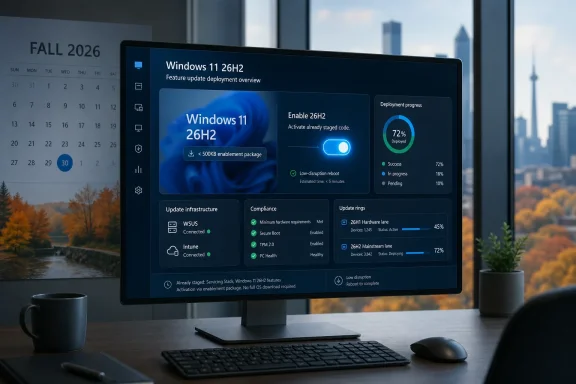
Microsoft confirmed on June 19, 2026, that Windows 11 version 26H2 is being prepared for a fall 2026 release, using a small enablement package for eligible Windows 11 24H2 and 25H2 systems rather than a full operating system replacement. The announcement is less about a flashy new version number than a maturing servicing strategy. Microsoft is trying to make annual Windows releases feel boring, predictable, and administratively cheap. For IT departments still carrying scar tissue from the Windows 10-to-11 transition, that may be the most important feature of all.
The headline detail is almost comically small: the Windows 11 26H2 enablement package is expected to be under 500KB. That is not a typo, nor is it a sign that Microsoft has discovered a magical compression algorithm for operating systems. It means the real payload has already been staged through cumulative updates, with the final package acting as a switch that lights up code already present on the machine.
This is the same broad playbook Microsoft has used before with Windows 10 and, more recently, with Windows 11 feature updates that share a servicing branch. The operating system moves forward through monthly cumulative updates; the annual release marker becomes a policy and lifecycle boundary more than a forklift upgrade. For administrators, that changes the upgrade conversation from “How do we deploy a new OS image?” to “When do we flip the version?”
That distinction matters because Windows servicing pain has rarely come from the version string alone. It comes from driver churn, application compatibility surprises, imaging changes, reboot windows, bandwidth pressure, help desk spikes, and the terrifying phrase “feature update” appearing in environments with thousands of machines and many different hardware profiles. A small enablement package does not eliminate those risks, but it narrows the blast radius.
Microsoft’s bet is that organizations will accept annual Windows releases if those releases behave more like cumulative updates. That is a pragmatic concession to reality. Enterprises do not want dramatic OS moments every autumn; they want dependable servicing mechanics that do not derail endpoint management calendars.
This is also why the distinction between Windows 11 26H1 and 26H2 has become more important than the labels suggest. Windows 11 26H1 exists, but Microsoft has positioned it as a targeted release for new silicon rather than a general feature update for existing PCs. It is not the annual update most Windows users should be waiting for. It is a hardware-enablement release, built for specific devices coming to market in 2026.
That bifurcation is unusual enough to confuse casual observers, but it fits the way Windows now has to serve two masters. On one side are the hundreds of millions of existing Windows 11 PCs that need conservative, low-friction servicing. On the other side are new Arm and accelerator-heavy platforms that may require platform work before the annual Windows train is ready to carry everyone else.
The result is a Windows roadmap that looks simpler on the surface and more complicated underneath. 26H2 is the general-purpose annual release. 26H1 is the special-case platform release. Microsoft is trying to keep those lanes separate, because mixing them would undermine the very predictability it is promising enterprise customers.
That makes the fall release more than a cosmetic milestone. It gives organizations another supported baseline to target, another runway for compliance planning, and another decision point for hardware refresh cycles. In tightly managed environments, those dates matter as much as whatever new Settings page or File Explorer behavior ships alongside the update.
The timing is also relevant because Windows 11 24H2 reaches the end of support for consumer and business editions before the longer-lived enterprise tracks expire. Organizations that have standardized on 24H2 have a clear path forward, but they still need to manage prerequisites, policy rings, application validation, and reporting. An enablement package can make the technical transition fast; it does not make governance disappear.
That is the recurring tension in modern Windows servicing. Microsoft can reduce installation friction, but administrators still have to decide when to trust the release. A five-minute reboot is not the same thing as a five-minute approval process.
For administrators, unchanged requirements are useful precisely because they are uneventful. Deployment planning becomes easier when the annual release does not reopen procurement debates or force another round of hardware exception handling. The machines that could run the previous release should, in principle, remain in scope for the next one.
The more interesting compatibility story is not minimum specs, but operational sameness. If Windows 11 26H2 installs through an enablement package on 24H2 and 25H2 systems, then existing deployment rings, update compliance tooling, and rollback expectations should look familiar. Microsoft is selling continuity as a product feature.
That pitch will land differently depending on the organization. Some administrators will welcome another low-disruption release after years of update fatigue. Others will point out that Microsoft has sometimes paired quiet servicing mechanics with aggressive feature rollout experiments, inbox app changes, and cloud-connected UI behavior that do not always respect the boundaries enterprises wish existed. The small package is reassuring; it is not a guarantee of cultural restraint.
That matters because Windows on Arm is no longer a science project. Qualcomm’s Snapdragon X push, Microsoft’s Copilot+ PC branding, and renewed industry interest in power-efficient laptop platforms have all pushed Windows toward a more silicon-aware future. New processors, NPUs, firmware stacks, and driver models can require changes that do not neatly fit the annual enterprise servicing cadence.
Microsoft’s challenge is to support that hardware momentum without fragmenting Windows into a mess of version islands. If a new Arm platform needs a special release early in the year, Microsoft can ship one. But if existing PCs are told to wait for 26H2, the company has to be explicit about why those trains differ.
This is where communication becomes as important as engineering. Windows users are used to assuming that a higher version number means a newer release for everyone. In 2026, that assumption no longer holds cleanly. 26H1 may be newer than 25H2, but for most existing PCs, it is not the relevant upgrade.
That work is essential because Windows 11 now sits under an unusually diverse set of workloads. A single machine may be expected to run corporate endpoint security, Hyper-V or Windows Subsystem for Linux, Android development tooling, anti-cheat systems, GPU-heavy games, local AI features, and cloud management agents. The more Windows becomes a common substrate for everything, the more subtle kernel and virtualization bugs become front-page problems for affected users.
Insider builds are not guarantees, but they are signals. When Microsoft fixes hypervisor crashes before a broader annual release, it is trying to reduce the number of unpleasant surprises that arrive with the enablement switch. For enterprise customers, the question is not whether Microsoft fixed a specific bug in a preview build; it is whether the servicing pipeline is catching the right class of problems before general availability.
The answer is usually mixed. Microsoft’s Insider ecosystem is broad, but not identical to the real world of aging fleet hardware, niche peripherals, custom line-of-business software, and security stacks that hook deeply into the OS. That is why even a low-disruption enablement package still deserves staged deployment.
This is not merely polish. Windows 11 has spent much of its life fighting the perception that it is heavier, more cloud-entangled, and less immediate than earlier versions of Windows. A shell that hesitates when opening Explorer or navigating Settings makes a modern PC feel worse than its hardware suggests. Responsiveness is emotional infrastructure.
The Low Latency Profile also fits the 26H2 story because it shows Microsoft working in two layers at once. The annual version update may be small, but the ongoing cumulative updates can still change the feel of the system. In the new Windows model, the big release is not necessarily where users experience the most noticeable improvement.
That cuts both ways. It means Microsoft can deliver performance work without making customers wait for fall. It also means administrators must pay attention to monthly updates as behavioral releases, not just security payloads. The annual enablement package may be small, but Windows itself is constantly moving.
But predictability is not the same as control. Administrators still need to manage feature exposure through Windows Update for Business, Intune, Autopatch, WSUS where applicable, Group Policy, and whatever third-party endpoint management stack their organization has layered on top. They also need to understand which devices are on 24H2, which are on 25H2, which are eligible for 26H2, and which oddball systems may be stuck because of hardware, policy, or compatibility holds.
The enablement package model can make update execution easier, but it can also hide complexity. If code is already present before it is activated, then feature validation becomes a question of timing and configuration. A dormant feature is not operationally irrelevant simply because the switch has not been flipped yet.
That is why serious IT shops will treat 26H2 as both a small update and a full release. They will pilot it, measure it, check application compatibility, validate VPN and security agents, test virtualization workloads, and monitor support channels. The installer may be tiny; the change-management discipline should not be.
That is likely the point. Microsoft has spent years trying to make Windows updates feel less disruptive, even as users continue to complain about timing, restarts, drivers, and feature changes they did not request. The company cannot make Windows invisible, but it can make the annual update less theatrical.
The remaining consumer pain points will be familiar. Unsupported Windows 10 hardware remains unsupported. Windows 11’s system requirements remain a line in the sand. PCs with unusual drivers or marginal storage may still struggle. Users who simply dislike Microsoft’s direction on accounts, ads, recommendations, Copilot integration, or cloud tie-ins will not be pacified by a 500KB enablement package.
In other words, 26H2 may solve the upgrade mechanics problem without solving the trust problem. Microsoft can make Windows easier to service, but users still judge Windows by what changes after the reboot.
The lesson from the 26H2 announcement is not that Windows development has slowed down. It is that Microsoft is moving more work into cumulative updates, controlled feature enablement, hardware-specific branches, and policy-managed release moments. The version number is becoming the visible tip of a much larger servicing machine.
 Microsoft Turns the Annual Upgrade Into a Reboot
The headline detail is almost comically small: the Windows 11 26H2 enablement package is expected to be under 500KB. That is not a typo, nor is it a sign that Microsoft has discovered a magical compression algorithm for operating systems. It means the real payload has already been staged through cumulative updates, with the final package acting as a switch that lights up code already present on the machine.This is the same broad playbook Microsoft has used before with Windows 10 and, more recently, with Windows 11 feature updates that share a servicing branch. The operating system moves forward through monthly cumulative updates; the annual release marker becomes a policy and lifecycle boundary more than a forklift upgrade. For administrators, that changes the upgrade conversation from “How do we deploy a new OS image?” to “When do we flip the version?”
That distinction matters because Windows servicing pain has rarely come from the version string alone. It comes from driver churn, application compatibility surprises, imaging changes, reboot windows, bandwidth pressure, help desk spikes, and the terrifying phrase “feature update” appearing in environments with thousands of machines and many different hardware profiles. A small enablement package does not eliminate those risks, but it narrows the blast radius.
Microsoft’s bet is that organizations will accept annual Windows releases if those releases behave more like cumulative updates. That is a pragmatic concession to reality. Enterprises do not want dramatic OS moments every autumn; they want dependable servicing mechanics that do not derail endpoint management calendars.
The eKB Is Small Because the Servicing Branch Is the Story
The enablement package model works only when versions share the same underlying platform branch. In this case, Windows 11 24H2, 25H2, and the forthcoming 26H2 are being treated as part of the same servicing family for eligible PCs. That is why the update can activate dormant functionality without requiring a full platform migration.This is also why the distinction between Windows 11 26H1 and 26H2 has become more important than the labels suggest. Windows 11 26H1 exists, but Microsoft has positioned it as a targeted release for new silicon rather than a general feature update for existing PCs. It is not the annual update most Windows users should be waiting for. It is a hardware-enablement release, built for specific devices coming to market in 2026.
That bifurcation is unusual enough to confuse casual observers, but it fits the way Windows now has to serve two masters. On one side are the hundreds of millions of existing Windows 11 PCs that need conservative, low-friction servicing. On the other side are new Arm and accelerator-heavy platforms that may require platform work before the annual Windows train is ready to carry everyone else.
The result is a Windows roadmap that looks simpler on the surface and more complicated underneath. 26H2 is the general-purpose annual release. 26H1 is the special-case platform release. Microsoft is trying to keep those lanes separate, because mixing them would undermine the very predictability it is promising enterprise customers.
Fall 2026 Is Really a Lifecycle Reset
For consumers, a Windows version number often reads like a feature label. For IT, it is also a support clock. Windows 11 26H2 is expected to follow the standard lifecycle pattern: 24 months of servicing for Home, Pro, Pro Education, and Pro for Workstations editions, and 36 months for Enterprise and Education.That makes the fall release more than a cosmetic milestone. It gives organizations another supported baseline to target, another runway for compliance planning, and another decision point for hardware refresh cycles. In tightly managed environments, those dates matter as much as whatever new Settings page or File Explorer behavior ships alongside the update.
The timing is also relevant because Windows 11 24H2 reaches the end of support for consumer and business editions before the longer-lived enterprise tracks expire. Organizations that have standardized on 24H2 have a clear path forward, but they still need to manage prerequisites, policy rings, application validation, and reporting. An enablement package can make the technical transition fast; it does not make governance disappear.
That is the recurring tension in modern Windows servicing. Microsoft can reduce installation friction, but administrators still have to decide when to trust the release. A five-minute reboot is not the same thing as a five-minute approval process.
Compatibility Is the Feature Microsoft Wants You to Notice
Microsoft says hardware requirements for 26H2 remain aligned with prior Windows 11 releases. That means the same broad baseline remains in place, including the familiar minimums such as 4GB of RAM and 64GB of storage, along with the wider Windows 11 requirements that have shaped the platform since launch. For users hoping 26H2 might relax Windows 11’s controversial eligibility rules, there is no sign of that.For administrators, unchanged requirements are useful precisely because they are uneventful. Deployment planning becomes easier when the annual release does not reopen procurement debates or force another round of hardware exception handling. The machines that could run the previous release should, in principle, remain in scope for the next one.
The more interesting compatibility story is not minimum specs, but operational sameness. If Windows 11 26H2 installs through an enablement package on 24H2 and 25H2 systems, then existing deployment rings, update compliance tooling, and rollback expectations should look familiar. Microsoft is selling continuity as a product feature.
That pitch will land differently depending on the organization. Some administrators will welcome another low-disruption release after years of update fatigue. Others will point out that Microsoft has sometimes paired quiet servicing mechanics with aggressive feature rollout experiments, inbox app changes, and cloud-connected UI behavior that do not always respect the boundaries enterprises wish existed. The small package is reassuring; it is not a guarantee of cultural restraint.
26H1 Shows Windows Is Becoming More Hardware-Specific
The presence of Windows 11 26H1 complicates the narrative because it reveals a second Windows strategy running in parallel. Microsoft has said 26H1 is scoped for new devices rather than existing PCs, and reporting has tied it most visibly to next-generation Snapdragon X2 hardware, with additional speculation and discussion around Nvidia’s Arm ambitions. The key point is that 26H1 is not the mainstream annual upgrade path.That matters because Windows on Arm is no longer a science project. Qualcomm’s Snapdragon X push, Microsoft’s Copilot+ PC branding, and renewed industry interest in power-efficient laptop platforms have all pushed Windows toward a more silicon-aware future. New processors, NPUs, firmware stacks, and driver models can require changes that do not neatly fit the annual enterprise servicing cadence.
Microsoft’s challenge is to support that hardware momentum without fragmenting Windows into a mess of version islands. If a new Arm platform needs a special release early in the year, Microsoft can ship one. But if existing PCs are told to wait for 26H2, the company has to be explicit about why those trains differ.
This is where communication becomes as important as engineering. Windows users are used to assuming that a higher version number means a newer release for everyone. In 2026, that assumption no longer holds cleanly. 26H1 may be newer than 25H2, but for most existing PCs, it is not the relevant upgrade.
The Insider Builds Are the Warning System
Alongside the 26H2 preparation, Microsoft continues to push Insider builds that show the less glamorous side of Windows development: crash fixes, virtualization repairs, KMODE bug patches, and stability work that matters more than any launch-day feature montage. Recent Beta Channel builds have included fixes for hypervisor-related failures and virtualization scenarios that could affect virtual machines and gaming workloads.That work is essential because Windows 11 now sits under an unusually diverse set of workloads. A single machine may be expected to run corporate endpoint security, Hyper-V or Windows Subsystem for Linux, Android development tooling, anti-cheat systems, GPU-heavy games, local AI features, and cloud management agents. The more Windows becomes a common substrate for everything, the more subtle kernel and virtualization bugs become front-page problems for affected users.
Insider builds are not guarantees, but they are signals. When Microsoft fixes hypervisor crashes before a broader annual release, it is trying to reduce the number of unpleasant surprises that arrive with the enablement switch. For enterprise customers, the question is not whether Microsoft fixed a specific bug in a preview build; it is whether the servicing pipeline is catching the right class of problems before general availability.
The answer is usually mixed. Microsoft’s Insider ecosystem is broad, but not identical to the real world of aging fleet hardware, niche peripherals, custom line-of-business software, and security stacks that hook deeply into the OS. That is why even a low-disruption enablement package still deserves staged deployment.
The Low Latency Push Is Microsoft Admitting the Shell Has Felt Heavy
One of the more interesting adjacent developments is Microsoft’s recent work on a Low Latency Profile for parts of the Windows shell. The idea, broadly, is to improve responsiveness in short interactive tasks by temporarily boosting processor behavior when the user is doing something visible and immediate. File Explorer, Settings, and core shell interactions are obvious candidates because they are where users feel sluggishness most acutely.This is not merely polish. Windows 11 has spent much of its life fighting the perception that it is heavier, more cloud-entangled, and less immediate than earlier versions of Windows. A shell that hesitates when opening Explorer or navigating Settings makes a modern PC feel worse than its hardware suggests. Responsiveness is emotional infrastructure.
The Low Latency Profile also fits the 26H2 story because it shows Microsoft working in two layers at once. The annual version update may be small, but the ongoing cumulative updates can still change the feel of the system. In the new Windows model, the big release is not necessarily where users experience the most noticeable improvement.
That cuts both ways. It means Microsoft can deliver performance work without making customers wait for fall. It also means administrators must pay attention to monthly updates as behavioral releases, not just security payloads. The annual enablement package may be small, but Windows itself is constantly moving.
Enterprise IT Gets Predictability, But Not Control by Default
Microsoft’s language around 26H2 is aimed squarely at organizations and IT professionals. Predictable, low-disruption, annual, enablement package: these are not consumer marketing words. They are deployment words. They are meant to tell admins that Windows 11 is settling into a rhythm they can plan around.But predictability is not the same as control. Administrators still need to manage feature exposure through Windows Update for Business, Intune, Autopatch, WSUS where applicable, Group Policy, and whatever third-party endpoint management stack their organization has layered on top. They also need to understand which devices are on 24H2, which are on 25H2, which are eligible for 26H2, and which oddball systems may be stuck because of hardware, policy, or compatibility holds.
The enablement package model can make update execution easier, but it can also hide complexity. If code is already present before it is activated, then feature validation becomes a question of timing and configuration. A dormant feature is not operationally irrelevant simply because the switch has not been flipped yet.
That is why serious IT shops will treat 26H2 as both a small update and a full release. They will pilot it, measure it, check application compatibility, validate VPN and security agents, test virtualization workloads, and monitor support channels. The installer may be tiny; the change-management discipline should not be.
The Consumer Story Is Quieter, and That Is Probably Deliberate
For home users, Windows 11 26H2 may arrive as another annual version bump that installs quickly and asks for a reboot. If Microsoft executes well, many users will barely notice the mechanics. They may notice new features that have already been rolling out gradually, or a refreshed version number in Settings, but not the old sensation of a major OS upgrade taking over the machine for an afternoon.That is likely the point. Microsoft has spent years trying to make Windows updates feel less disruptive, even as users continue to complain about timing, restarts, drivers, and feature changes they did not request. The company cannot make Windows invisible, but it can make the annual update less theatrical.
The remaining consumer pain points will be familiar. Unsupported Windows 10 hardware remains unsupported. Windows 11’s system requirements remain a line in the sand. PCs with unusual drivers or marginal storage may still struggle. Users who simply dislike Microsoft’s direction on accounts, ads, recommendations, Copilot integration, or cloud tie-ins will not be pacified by a 500KB enablement package.
In other words, 26H2 may solve the upgrade mechanics problem without solving the trust problem. Microsoft can make Windows easier to service, but users still judge Windows by what changes after the reboot.
The Real Test Will Be Whether 26H2 Stays Boring
If Microsoft wants Windows 11 26H2 to be remembered fondly by administrators, the company should resist the temptation to turn a servicing win into a feature surprise. A boring annual update is not a failure. In enterprise Windows, boring is often the highest compliment available.The lesson from the 26H2 announcement is not that Windows development has slowed down. It is that Microsoft is moving more work into cumulative updates, controlled feature enablement, hardware-specific branches, and policy-managed release moments. The version number is becoming the visible tip of a much larger servicing machine.
- Windows 11 26H2 is expected to arrive in fall 2026 as the mainstream annual update for eligible Windows 11 PCs.
- The upgrade path from Windows 11 24H2 or 25H2 should use a small enablement package rather than a full platform migration.
- Windows 11 26H1 should not be treated as the general predecessor to 26H2 because it is scoped for specific new hardware.
- Organizations should still pilot 26H2 like a full release, even if the installation experience resembles a monthly update.
- The unchanged hardware requirements mean 26H2 is about servicing continuity, not a new eligibility reset.
- Microsoft’s performance and stability work in cumulative and Insider builds may matter more to daily users than the enablement package itself.
References
- Primary source: asatunews.co.id
Published: 2026-06-20T07:12:15.106721
Loading…
www.asatunews.co.id - Related coverage: windowscentral.com
Windows 11 version 26H1: Everything you need to know about Microsoft's special OS release now shipping on new hardware | Windows Central
Microsoft has confirmed that Windows 11 version 26H1 is now shipping exclusively on new PCs that ship with Qualcomm's new Snapdragon X2 SoC. Here's what you need to know.www.windowscentral.com - Related coverage: windowslatest.com
Loading…
www.windowslatest.com - Official source: learn.microsoft.com
Windows 11 - release information | Microsoft Learn
Learn release information for Windows 11 releaseslearn.microsoft.com - Related coverage: tomshardware.com
Microsoft confirms Windows 11 26H1 will be for Arm devices only at launch — Snapdragon X2-powered devices officially shipping with 26H1 | Tom's Hardware
It's 24H2 all over again, but with the caveat that 26H1 will only support specific hardware for its entire lifecycle. Devices running 26H1 will not be able to upgrade to 26H2.www.tomshardware.com - Related coverage: windowsforum.com
Loading…
windowsforum.com
- Related coverage: windowsreport.com
Windows 11 26H1 Targets Snapdragon X2 CPUs, Excludes Existing PCs
Microsoft confirms Windows 11 26H1 as a scoped Snapdragon X2 release, excluding 24H2 and 25H2 devices. windowsreport.com
- Related coverage: techradar.com
Microsoft confirms Windows 11 26H1 update won't be coming to your current PC — here's why that's actually great news | TechRadar
It's all about avoiding another 24H2 disaster for existing PCs, which will stay on 25H2 and not get 26H1www.techradar.com - Related coverage: hfrance.fr
Loading…
www.hfrance.fr - Related coverage: pureinfotech.com
Windows 11 26H1 is official, but you can’t install it and here’s why
Windows 11 26H1 is official but exclusive to Snapdragon X2 devices. Here’s why you can’t download it and what 26H2 really means. pureinfotech.com
- Related coverage: hardwareluxx.de
Windows 11 26H1: Vorerst exklusiv für Snapdragon-X2-Notebooks - Hardwareluxx
Windows 11 26H1: Vorerst exklusiv für Snapdragon-X2-Notebooks. www.hardwareluxx.de
- Related coverage: computerbase.de
Loading…
www.computerbase.de - Related coverage: multiplayer.it
Loading…
multiplayer.it - Related coverage: fdaytalk.com
Loading…
www.fdaytalk.com - Official source: techcommunity.microsoft.com