
Microsoft has expanded the automatic Windows 11 version 25H2 rollout as of May 15, 2025, to eligible unmanaged Home and Pro devices, moving consumer PCs toward the current servicing baseline before Windows 11 version 26H2 arrives in fall 2026. The move looks aggressive because it is automatic, but it is less a classic feature-upgrade land grab than a servicing cleanup operation. Microsoft is trying to put as many consumer machines as possible on the same Germanium-era foundation before the next annual release turns the crank again. The real story is not that 25H2 is huge; it is that Windows feature updates are becoming smaller, quieter, and harder for ordinary users to opt out of.
For years, the phrase “feature update” trained Windows users to expect disruption. Windows 10’s twice-yearly releases could mean long installs, driver surprises, missing settings, and the familiar dread of a reboot that did not quite end when the desktop returned. Even after Microsoft moved Windows 11 to an annual cadence, many users still treated each H2 release as something to schedule, defer, or avoid.
Windows 11 25H2 does not fit that old model neatly. On PCs already running the 24H2 platform, it behaves more like an enablement package than a traditional operating system upgrade. The feature code is already present through cumulative updates; the small package mostly flips version switches and extends the support calendar.
That is why Microsoft can plausibly say the update is being delivered when devices are ready. It is also why the company has little patience for unmanaged consumer PCs lingering on older releases. If 25H2 is materially the same operating system foundation as 24H2, Microsoft’s incentive is obvious: reduce fragmentation, reset servicing clocks, and prepare the installed base for the next enablement-style jump.
The language change on Microsoft’s release health page matters because it signals a wider net. Earlier language tied the automatic 25H2 push to Home and Pro devices on 24H2. The current wording describes eligible unmanaged Home and Pro Windows 11 devices more broadly, which is why Windows Latest frames the update as a rollout that now reaches across the consumer Windows 11 base rather than only one release cohort.
In this case, however, the substance is less alarming than the label. Windows 11 25H2 is not a new platform migration for most eligible PCs. If the machine is already on 24H2, the 25H2 install should be short, usually involving a single restart rather than the drawn-out setup experience associated with a full build replacement.
That does not make user consent irrelevant. It does mean the practical blast radius is different. The update is not comparable to moving from Windows 10 to Windows 11, or from Windows 11 23H2 to the 24H2 platform. It is better understood as Microsoft moving consumer PCs onto a newer support identity while preserving the same underlying servicing branch.
The tradeoff is familiar: Microsoft reduces risk at population scale by narrowing the number of supported consumer baselines, while individual users lose some control over timing. For a home user who simply wants security updates to keep arriving, that bargain is probably fine. For enthusiasts who carefully curate drivers, gaming configurations, or unsupported hardware workarounds, “probably fine” is not the same as welcome.
That calendar explains more than any marketing slogan does. Microsoft wants consumer devices off releases that have expired or are approaching expiration. The automatic 25H2 rollout is a support lifecycle maneuver dressed in the language of intelligent deployment.
This is especially important because Windows 11 26H2 is expected in fall 2026. If 26H2 also lands as an enablement-style release for PCs already on the Germanium platform, then Microsoft benefits from having 24H2 and 25H2 devices already aligned. The fewer old branches in the wild, the easier it is to deliver the next annual version without treating every PC like a bespoke upgrade case.
There is also a security argument that is not merely corporate spin. Unsupported consumer Windows builds do not stop working, but they do stop receiving the steady monthly flow of security fixes. Microsoft has a strong incentive to prevent ordinary Home and Pro PCs from drifting into unsupported territory, especially when the available update is comparatively small.
That changes the meaning of version numbers. In the old model, a new Windows version often implied new setup behavior, new compatibility risk, and a meaningful operating system replacement. In the Germanium model, the annual version can be more of a public milestone layered over cumulative changes that have already arrived.
This is good news for reliability, at least in theory. A small enablement package should be easier to validate than a full OS swap. It also lets Microsoft stage code gradually, monitor telemetry, apply safeguard holds, and unlock features only when the machine is judged ready.
But it also makes Windows feel more opaque. If the code is already there and the version number is switched later, users have a harder time understanding what changed and when. The “update” becomes less an event than a reveal, and the operating system’s behavior can shift through monthly cumulative updates long before the annual label catches up.
The problem is that intelligence does not equal agency. For unmanaged Home and Pro users, the rollout may be smart about timing, but it is still Microsoft deciding that the update will arrive. Users can choose restart timing, pause updates for a limited period, or manually seek the update early, but they are not being offered a permanent veto.
This is where the consumer and enterprise worlds split sharply. Managed devices remain outside the automatic consumer push because organizations have tooling, policy, and accountability requirements. A business can test, defer, stage, and report; a home user largely receives.
That distinction is defensible, but it is also revealing. Microsoft knows that IT departments require control because poorly timed updates have real costs. The company also knows that most consumers will not maintain their systems responsibly if given indefinite deferral. Windows Update is the compromise, and every automatic feature update exposes the compromise again.
The practical enterprise question is whether 25H2 should be treated as a major validation event or a minor servicing transition. For organizations already standardized on 24H2, the answer will often be the latter. A shared codebase lowers the testing burden, but it does not eliminate it.
Kernel-adjacent security tools, VPN clients, endpoint agents, print infrastructure, line-of-business applications, and accessibility software still deserve validation. Even an enablement package can expose issues already introduced by earlier cumulative updates. The version switch may be small, but the installed reality of a Windows estate is never purely theoretical.
The bigger risk is complacency. When Microsoft makes annual upgrades feel routine, organizations may underinvest in monitoring the monthly updates that actually carry most of the change. The 25H2 label is a milestone; the cumulative update stream is where many of the consequential bits arrive.
That split sounds messy because it is messy. Microsoft is trying to support the next wave of Windows on Arm hardware without dragging the entire installed base onto a new platform before it is ready. The result is a two-track Windows roadmap: Bromine for selected new devices, Germanium for the mainstream fleet.
For most users, this will be invisible. Their PC will not see 26H1, and they will move from 25H2 to 26H2 when Microsoft opens that path. For hardware watchers and IT pros, though, it is a reminder that Windows version numbers no longer tell the whole story.
The model resembles a controlled fork. Microsoft can advance new hardware support on one branch while keeping the vast majority of PCs on a stable servicing foundation. That is sensible engineering, but it also adds another layer of confusion to a product line that already asks users to distinguish version names, build numbers, servicing channels, feature packs, and support deadlines.
For users on Windows 11 Home or Pro, the support lifecycle is the hard boundary. Once a release exits servicing, staying put becomes a security liability. The update to 25H2 buys time, keeps monthly fixes flowing, and positions the machine for the next annual release.
This is the part enthusiasts often underweight. Stability is not only about avoiding change today; it is also about remaining on a maintained path tomorrow. A Windows install that refuses version updates indefinitely may feel stable until it becomes unsupported, at which point every new vulnerability turns into a more serious problem.
Still, Microsoft should not pretend that a painless update is the same as a transparent one. If the company wants users to trust small enablement releases, it should communicate clearly when version scope expands, what prerequisites apply, and which devices are excluded. Quiet wording changes on release health pages may satisfy documentation requirements, but they do not build confidence.
For supported devices, 25H2 is supposed to be straightforward. For unsupported or workaround-based installs, the experience can vary. Microsoft’s official position is simple: unsupported configurations are unsupported. The enthusiast reality is messier, with users relying on ISO upgrades, registry bypasses, third-party tools, or manual servicing tricks.
The automatic rollout does not solve that problem. It sharpens it. As Microsoft narrows the consumer fleet around newer baselines, machines outside the supported envelope become more visibly stranded. Some will continue to work; some will require manual intervention; some will be better served by staying on a supported Windows 10 ESU path, moving to Linux, or being replaced.
This is where Microsoft’s security argument meets the economics of hardware. A small enablement package may be low-risk on a compliant PC, but the Windows 11 era still carries the larger cost of devices that aged out by policy rather than by immediate technical failure.
From a user-trust standpoint, the picture is less tidy. Microsoft has spent years mixing security necessity with product nudges, account prompts, Edge promotion, Copilot placement, OneDrive pressure, and advertising experiments inside Windows. That history means even a sensible servicing move can be read as another example of Redmond taking liberties with the PC.
The company’s challenge is that Windows is both infrastructure and product. As infrastructure, it needs central maintenance and fast patch adoption. As a product, it keeps changing in ways users did not always request. Automatic updates sit at the collision point between those roles.
25H2 is probably not the update to fear. But the mechanism deserves scrutiny because the same mechanism can deliver both necessary security baselines and unwanted experience changes. The question is not whether Microsoft should keep Windows secure; it is how much discretion users retain when the company decides security, lifecycle management, and product strategy all point in the same direction.
 Microsoft Turns the Feature Update Into Servicing Housekeeping
For years, the phrase “feature update” trained Windows users to expect disruption. Windows 10’s twice-yearly releases could mean long installs, driver surprises, missing settings, and the familiar dread of a reboot that did not quite end when the desktop returned. Even after Microsoft moved Windows 11 to an annual cadence, many users still treated each H2 release as something to schedule, defer, or avoid.Windows 11 25H2 does not fit that old model neatly. On PCs already running the 24H2 platform, it behaves more like an enablement package than a traditional operating system upgrade. The feature code is already present through cumulative updates; the small package mostly flips version switches and extends the support calendar.
That is why Microsoft can plausibly say the update is being delivered when devices are ready. It is also why the company has little patience for unmanaged consumer PCs lingering on older releases. If 25H2 is materially the same operating system foundation as 24H2, Microsoft’s incentive is obvious: reduce fragmentation, reset servicing clocks, and prepare the installed base for the next enablement-style jump.
The language change on Microsoft’s release health page matters because it signals a wider net. Earlier language tied the automatic 25H2 push to Home and Pro devices on 24H2. The current wording describes eligible unmanaged Home and Pro Windows 11 devices more broadly, which is why Windows Latest frames the update as a rollout that now reaches across the consumer Windows 11 base rather than only one release cohort.
The Force Is Real, But the Upgrade Is Smaller Than the Word Suggests
“Force installing” is a loaded phrase, and in Windows history it has earned its baggage. Users remember unwanted OS upgrades, surprise restarts, and Microsoft’s long-running habit of treating Windows Update as both a security channel and a product-adoption lever. That history is why any automatic feature update still raises hackles, even when the technical risk is low.In this case, however, the substance is less alarming than the label. Windows 11 25H2 is not a new platform migration for most eligible PCs. If the machine is already on 24H2, the 25H2 install should be short, usually involving a single restart rather than the drawn-out setup experience associated with a full build replacement.
That does not make user consent irrelevant. It does mean the practical blast radius is different. The update is not comparable to moving from Windows 10 to Windows 11, or from Windows 11 23H2 to the 24H2 platform. It is better understood as Microsoft moving consumer PCs onto a newer support identity while preserving the same underlying servicing branch.
The tradeoff is familiar: Microsoft reduces risk at population scale by narrowing the number of supported consumer baselines, while individual users lose some control over timing. For a home user who simply wants security updates to keep arriving, that bargain is probably fine. For enthusiasts who carefully curate drivers, gaming configurations, or unsupported hardware workarounds, “probably fine” is not the same as welcome.
The Calendar Is Doing More Work Than Copilot
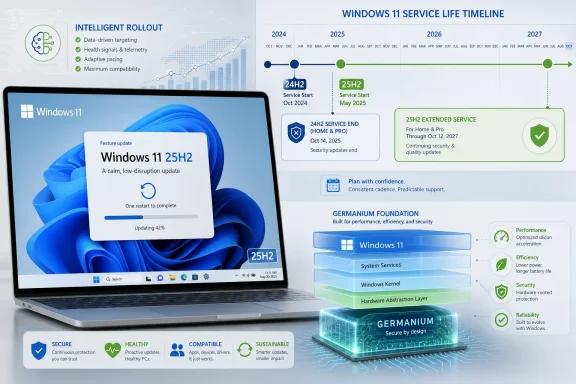
The timing is not accidental. Windows 11 23H2 Home and Pro reached end of servicing on November 11, 2025, while Windows 11 24H2 Home and Pro are scheduled to reach end of updates on October 13, 2026. Windows 11 25H2, by contrast, extends consumer support into October 2027.That calendar explains more than any marketing slogan does. Microsoft wants consumer devices off releases that have expired or are approaching expiration. The automatic 25H2 rollout is a support lifecycle maneuver dressed in the language of intelligent deployment.
This is especially important because Windows 11 26H2 is expected in fall 2026. If 26H2 also lands as an enablement-style release for PCs already on the Germanium platform, then Microsoft benefits from having 24H2 and 25H2 devices already aligned. The fewer old branches in the wild, the easier it is to deliver the next annual version without treating every PC like a bespoke upgrade case.
There is also a security argument that is not merely corporate spin. Unsupported consumer Windows builds do not stop working, but they do stop receiving the steady monthly flow of security fixes. Microsoft has a strong incentive to prevent ordinary Home and Pro PCs from drifting into unsupported territory, especially when the available update is comparatively small.
Germanium Makes Windows 11 Look More Like a Rolling Platform
The most important technical detail in the Windows Latest report is not the rollout wording. It is the shared platform underneath 24H2, 25H2, and reportedly 26H2. Microsoft’s Germanium branch has turned what looks like three annual Windows releases into something closer to a rolling servicing track.That changes the meaning of version numbers. In the old model, a new Windows version often implied new setup behavior, new compatibility risk, and a meaningful operating system replacement. In the Germanium model, the annual version can be more of a public milestone layered over cumulative changes that have already arrived.
This is good news for reliability, at least in theory. A small enablement package should be easier to validate than a full OS swap. It also lets Microsoft stage code gradually, monitor telemetry, apply safeguard holds, and unlock features only when the machine is judged ready.
But it also makes Windows feel more opaque. If the code is already there and the version number is switched later, users have a harder time understanding what changed and when. The “update” becomes less an event than a reveal, and the operating system’s behavior can shift through monthly cumulative updates long before the annual label catches up.
Intelligent Rollout Is Microsoft’s Soft Name for Hard Control
Microsoft’s phrase “machine learning-based intelligent rollout” sounds benign, and in many ways it is the right mechanism for a fleet the size of Windows. The company can use telemetry to identify hardware and driver combinations that are more likely to succeed, slow deployment when defects appear, and avoid machines affected by known safeguard holds. At Windows scale, blind simultaneity would be irresponsible.The problem is that intelligence does not equal agency. For unmanaged Home and Pro users, the rollout may be smart about timing, but it is still Microsoft deciding that the update will arrive. Users can choose restart timing, pause updates for a limited period, or manually seek the update early, but they are not being offered a permanent veto.
This is where the consumer and enterprise worlds split sharply. Managed devices remain outside the automatic consumer push because organizations have tooling, policy, and accountability requirements. A business can test, defer, stage, and report; a home user largely receives.
That distinction is defensible, but it is also revealing. Microsoft knows that IT departments require control because poorly timed updates have real costs. The company also knows that most consumers will not maintain their systems responsibly if given indefinite deferral. Windows Update is the compromise, and every automatic feature update exposes the compromise again.
Enterprise IT Gets a Reprieve, Not a Different Future
For IT administrators, the 25H2 push is less an immediate operational emergency than a preview of the servicing model Microsoft wants everyone to internalize. Managed devices are not being swept up by the consumer intelligent rollout, but that does not mean organizations can ignore 25H2. Lifecycle dates still apply, and the broader platform direction is the same.The practical enterprise question is whether 25H2 should be treated as a major validation event or a minor servicing transition. For organizations already standardized on 24H2, the answer will often be the latter. A shared codebase lowers the testing burden, but it does not eliminate it.
Kernel-adjacent security tools, VPN clients, endpoint agents, print infrastructure, line-of-business applications, and accessibility software still deserve validation. Even an enablement package can expose issues already introduced by earlier cumulative updates. The version switch may be small, but the installed reality of a Windows estate is never purely theoretical.
The bigger risk is complacency. When Microsoft makes annual upgrades feel routine, organizations may underinvest in monitoring the monthly updates that actually carry most of the change. The 25H2 label is a milestone; the cumulative update stream is where many of the consequential bits arrive.
26H1 Is the Odd Branch That Explains the Strategy
The Windows 11 26H1 wrinkle makes the 25H2 rollout more interesting. Microsoft has positioned 26H1 as a release for new silicon, particularly next-generation Arm hardware, rather than a general upgrade for existing PCs. It reportedly uses a newer internal platform known as Bromine, while mainstream existing PCs remain on the Germanium track through 26H2.That split sounds messy because it is messy. Microsoft is trying to support the next wave of Windows on Arm hardware without dragging the entire installed base onto a new platform before it is ready. The result is a two-track Windows roadmap: Bromine for selected new devices, Germanium for the mainstream fleet.
For most users, this will be invisible. Their PC will not see 26H1, and they will move from 25H2 to 26H2 when Microsoft opens that path. For hardware watchers and IT pros, though, it is a reminder that Windows version numbers no longer tell the whole story.
The model resembles a controlled fork. Microsoft can advance new hardware support on one branch while keeping the vast majority of PCs on a stable servicing foundation. That is sensible engineering, but it also adds another layer of confusion to a product line that already asks users to distinguish version names, build numbers, servicing channels, feature packs, and support deadlines.
The User Benefit Is Boring, Which Is Exactly the Point
The best argument for accepting 25H2 is not that it will transform your PC. It probably will not. The best argument is that it should keep the machine supported with minimal drama.For users on Windows 11 Home or Pro, the support lifecycle is the hard boundary. Once a release exits servicing, staying put becomes a security liability. The update to 25H2 buys time, keeps monthly fixes flowing, and positions the machine for the next annual release.
This is the part enthusiasts often underweight. Stability is not only about avoiding change today; it is also about remaining on a maintained path tomorrow. A Windows install that refuses version updates indefinitely may feel stable until it becomes unsupported, at which point every new vulnerability turns into a more serious problem.
Still, Microsoft should not pretend that a painless update is the same as a transparent one. If the company wants users to trust small enablement releases, it should communicate clearly when version scope expands, what prerequisites apply, and which devices are excluded. Quiet wording changes on release health pages may satisfy documentation requirements, but they do not build confidence.
Unsupported Hardware Remains the Shadow Story
Every automatic Windows 11 rollout has an unspoken edge case: the PCs that are useful, functional, and not officially eligible. Windows 11’s hardware requirements created a large class of systems that can run the OS in practice but sit outside Microsoft’s supported lane. Those machines are where enablement packages and annual servicing deadlines become especially fraught.For supported devices, 25H2 is supposed to be straightforward. For unsupported or workaround-based installs, the experience can vary. Microsoft’s official position is simple: unsupported configurations are unsupported. The enthusiast reality is messier, with users relying on ISO upgrades, registry bypasses, third-party tools, or manual servicing tricks.
The automatic rollout does not solve that problem. It sharpens it. As Microsoft narrows the consumer fleet around newer baselines, machines outside the supported envelope become more visibly stranded. Some will continue to work; some will require manual intervention; some will be better served by staying on a supported Windows 10 ESU path, moving to Linux, or being replaced.
This is where Microsoft’s security argument meets the economics of hardware. A small enablement package may be low-risk on a compliant PC, but the Windows 11 era still carries the larger cost of devices that aged out by policy rather than by immediate technical failure.
Microsoft’s Quiet Update Strategy Is Working, But Trust Is Lagging
From an engineering standpoint, the 25H2 push is the kind of Windows update Microsoft has been trying to build for years. It is incremental, telemetry-guided, staged, and lifecycle-aware. It avoids the spectacle of a massive upgrade while still moving the ecosystem forward.From a user-trust standpoint, the picture is less tidy. Microsoft has spent years mixing security necessity with product nudges, account prompts, Edge promotion, Copilot placement, OneDrive pressure, and advertising experiments inside Windows. That history means even a sensible servicing move can be read as another example of Redmond taking liberties with the PC.
The company’s challenge is that Windows is both infrastructure and product. As infrastructure, it needs central maintenance and fast patch adoption. As a product, it keeps changing in ways users did not always request. Automatic updates sit at the collision point between those roles.
25H2 is probably not the update to fear. But the mechanism deserves scrutiny because the same mechanism can deliver both necessary security baselines and unwanted experience changes. The question is not whether Microsoft should keep Windows secure; it is how much discretion users retain when the company decides security, lifecycle management, and product strategy all point in the same direction.
The Practical Read for WindowsForum Readers
For Windows enthusiasts and administrators, the sane response is neither panic nor indifference. Treat 25H2 as a low-impact servicing transition, but verify your backup posture, recovery options, and hardware compatibility before the rollout chooses its moment. The install may be small, but the principle remains the same: Windows updates are easiest when you are prepared before Microsoft’s schedule becomes your schedule.- Windows 11 25H2 is now being delivered automatically to eligible unmanaged Home and Pro devices through Microsoft’s intelligent rollout process.
- The update is relatively small for PCs already on the 24H2 platform because 24H2 and 25H2 share the same Germanium foundation.
- The main practical benefit is a longer support window, with 25H2 keeping consumer devices serviced beyond the 24H2 cutoff in October 2026.
- Managed enterprise devices are not part of the consumer automatic rollout, but organizations still need to plan their own 25H2 validation and deployment timelines.
- Windows 11 26H2 is expected to continue the Germanium path for existing PCs, while 26H1 serves a narrower new-silicon track based on Bromine.
- Users who want control should check Windows Update manually, schedule restarts deliberately, and avoid waiting until a support deadline forces the issue.
References
- Primary source: Windows Latest
Published: Mon, 22 Jun 2026 23:15:26 GMT
Microsoft is force installing Windows 11 25H2 ahead of 26H2 release
Microsoft is force installing Windows 11 25H2 on all eligible Home and Pro PCs, as it clears the decks ahead of the 26H2 release this fall. www.windowslatest.com
- Official source: learn.microsoft.com
Windows 11 Home and Pro - Microsoft Lifecycle | Microsoft Learn
Windows 11 Home and Pro follows the Modern Lifecycle Policy.learn.microsoft.com - Related coverage: allthings.how
Windows 11 support end dates — Home, Pro, Enterprise, and more
There’s no single cutoff; support depends on your edition and the specific Windows 11 version you’re running.allthings.how - Related coverage: thefpsreview.com
- Related coverage: windowscentral.com
Microsoft forces Windows 11 update for PC security | Windows Central
Microsoft is starting to automatically install the latest feature update (25H2) on older Windows 11 versions like 23H2 because they have reached End-of-Service and pose a security risk without patches.www.windowscentral.com - Related coverage: winbuzzer.com
Windows 11 26H1 Won't Get 26H2 Update Until 2027
Microsoft has confirmed Windows 11 version 26H1 devices cannot move to 26H2 in 2026, forcing Snapdragon X2 PCs onto a separate update branch until 2027.winbuzzer.com
- Related coverage: tomshardware.com
Microsoft confirms Windows 11 26H1 will be for Arm devices only at launch — Snapdragon X2-powered devices officially shipping with 26H1 | Tom's Hardware
It's 24H2 all over again, but with the caveat that 26H1 will only support specific hardware for its entire lifecycle. Devices running 26H1 will not be able to upgrade to 26H2.www.tomshardware.com - Related coverage: pureinfotech.com
Windows 11 lifecycle for Home and Pro - Pureinfotech
Windows 11 Home and Pro lifecycle for version 25H2 ends on 10/13/27, and the 24H2 lifecycle ends on 10/13/26. Enterprise and Education have longer support. pureinfotech.com
- Related coverage: techspot.com
Windows 11 will be force-updated to version 25H2 using machine learning | TechSpot
According to Microsoft's latest timeline, Windows 11 25H2 will soon be rolled out to all devices running the Home and Pro editions of Windows 11 24H2. The...www.techspot.com - Related coverage: techradar.com
Windows 11 25H2 update is now available for all PCs – here's how to get it | TechRadar
You can get version 25H2 now if you're keenwww.techradar.com - Related coverage: windowsarea.de
Windows 11 26H1: Exklusives Update bringt neuen "Bromine"-Core für kommende ARM-Geräte
Microsoft hat Windows 11 Version 26H1 offiziell vorgestellt und sorgt...windowsarea.de - Related coverage: lansweeper.com
Windows 11 End of Life - Lansweeper
On October 14, version 22H2 of Windows 11 Enterprise, Education, and IoT Enterprise will go end of life. Audit affected devices with our free audit.www.lansweeper.com - Official source: microsoft.com
- Official source: techcommunity.microsoft.com