
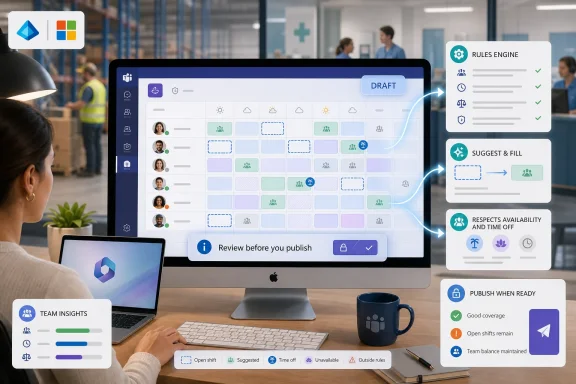
Microsoft began rolling out Auto Assign Open Shifts for Microsoft Teams Shifts in June 2026, bringing a new desktop and Mac scheduling feature that lets frontline managers automatically place unassigned shifts with available employees before reviewing the generated draft and publishing it to their team. The feature is small in interface terms, but large in operational meaning. It moves Teams Shifts from being a shared scheduling board toward becoming a rules-driven labor allocation system. For organizations already living inside Microsoft 365, that matters because another slice of frontline management is being absorbed into the productivity suite.
The basic pitch is disarmingly simple: a manager creates open shifts, clicks an assignment button, picks the relevant schedule group, reviews the rules, and lets Teams attempt to fill the gaps. If the system can build a workable schedule, the result appears as a draft. If it cannot, the unresolved shifts stay open for manual handling.
That sounds like the kind of feature that should have existed years ago. In many workplaces, the ugliest part of scheduling is not creating shifts; it is distributing them fairly, legally, and plausibly among people who have different availability, time-off approvals, fatigue limits, and informal expectations. The spreadsheet can show the gap, but it cannot negotiate all the constraints without turning into a maze of formulas and manager folklore.
Microsoft’s new feature is aimed at exactly that midpoint between manual assignment and full workforce-management automation. It is not presented as a black-box autopilot that publishes the schedule on behalf of management. It generates a draft, keeps the manager in the loop, and leaves exceptions visible. That positioning is important because frontline scheduling is one of those business processes where “automation” quickly becomes a labor-relations issue if the software appears to make final decisions without human judgment.
The feature also shows how Microsoft is nudging Teams Shifts into more serious operational territory. Teams is no longer just the chat layer around work; in frontline environments, it is increasingly the place where work is requested, accepted, swapped, recorded, and now algorithmically assigned.
That is why the “draft before publish” design is more than a usability courtesy. It is Microsoft acknowledging that scheduling rules rarely capture the whole truth. A system can consider approved time off, availability, previous patterns, maximum hours, consecutive-day limits, and rest periods, but it cannot fully understand which employee is cross-trained for a particular closing routine, who is being coached out of burnout, or which informal rotation has kept a team from mutiny.
The manager remains accountable because the manager still presses publish. In practice, that means the automation becomes a recommendation engine rather than a final authority. For IT administrators and operations leaders, this distinction will matter when explaining the feature internally: Teams is not “deciding who works.” Teams is proposing a schedule based on rules the organization configures and data it already maintains.
But the political nature of scheduling also means the rules need governance. If a team’s availability data is stale, if approved time off is not consistently entered, or if managers quietly override the draft every week, the system will not magically produce fairness. It will instead formalize the mess already in the process.
Auto Assign Open Shifts deepens that advantage. Instead of forcing managers to export to Excel, consult a separate scheduling package, or manually drag names across a grid, Microsoft can now say the scheduling loop is increasingly native. Create the open work, apply the rules, review the generated outcome, and publish to the same place workers already check.
This is classic Microsoft platform gravity. A feature that might not defeat a dedicated scheduling vendor on its own becomes powerful when it removes one more reason to leave the Microsoft 365 environment. For small and midsize operations, that may be enough. For larger enterprises, it may become a “good enough for certain teams” option alongside heavier workforce systems used in regulated or unionized departments.
The rollout also lands at a moment when Microsoft is trying to make Teams relevant beyond knowledge work. Frontline workers do not live in meetings and channel threads in the same way office staff do. They need schedules, task lists, approvals, announcements, time-sensitive updates, and mobile-first workflows. Assigning open shifts automatically is not flashy, but it is much closer to the daily pain of retail, healthcare support, hospitality, logistics, and field operations than another meeting summary feature.
That word lightweight is doing real work. Microsoft is not promising that Teams Shifts will understand every labor law, union agreement, premium-pay provision, certification requirement, or site-specific staffing rule. The feature’s value will depend on whether the constraints available in Teams map closely enough to the organization’s real scheduling requirements.
For many managers, even partial rule awareness is an upgrade. Manual scheduling often breaks down because humans are good at seeing the obvious gaps but poor at consistently remembering every cumulative constraint across a large team. A manager may know not to schedule someone during approved leave, but still accidentally create too many consecutive days, overlook a rest-period issue, or repeatedly favor the same reliable employees for extra work.
A rules-driven draft can reduce those accidental patterns. It can also expose them. If the draft consistently fails to fill certain shifts, that is not merely a software limitation; it may be evidence that staffing levels, availability expectations, or shift design are unrealistic. In that sense, Auto Assign Open Shifts could become a diagnostic tool as much as a convenience feature.
Silent automation would be risky here. If workers receive assignments without a human review step, every perceived unfairness becomes a software dispute. Employees may wonder whether the system is punishing them for limited availability, favoring those with certain past patterns, or ignoring circumstances that were never entered into Teams. Managers, meanwhile, might blame the system for choices they approved.
The draft model keeps accountability legible. The system suggests; the manager decides. It gives Microsoft a path to introduce algorithmic assistance without immediately triggering the cultural resistance that often follows automated workforce tools. That does not eliminate concern, but it lowers the temperature.
It also gives administrators a chance to observe behavior before tightening process. Organizations can pilot the feature with selected teams, compare drafts against manually produced schedules, and decide whether the rules need adjustment. The first goal should not be perfect automation. It should be fewer avoidable mistakes and less time spent on repetitive assignment work.
That makes sense. The pain Auto Assign Open Shifts addresses is concentrated in the manager’s workflow. Employees benefit indirectly if schedules are published faster, conflicts are reduced, and open shifts are distributed more consistently. But the button belongs to the scheduler.
The desktop focus also suggests that this is not merely about rapid mobile approvals or casual shift claiming. It is about constructing a schedule view with enough context to make review meaningful. Managers need to see who was assigned, who was not, and where the algorithm could not resolve coverage. A phone screen is rarely the best place to audit that.
For IT teams, the platform note is a reminder to test the actual client experience. Teams features can appear differently across classic and new clients, web, desktop, and mobile surfaces. A roadmap status of “rolling out” does not mean every tenant, client build, and user population will see the same thing on the same day.
But organizations should resist treating this as a compliance engine unless Microsoft documents the necessary coverage for their jurisdiction and policy environment. Labor rules vary by country, state, province, contract, role, and industry. Some rules are straightforward; others depend on rolling periods, exceptions, premiums, seniority, or employee consent. A generic scheduling constraint is not the same as a legal interpretation.
That distinction matters because Microsoft 365 features often arrive with broad productivity framing, then get pulled into higher-stakes workflows by enthusiastic departments. The right internal message is not “Teams now handles scheduling compliance.” It is “Teams can help managers assign open shifts while honoring configured constraints and known availability data.”
Admins should also consider auditability. If a manager changes auto-assignment rules, organizations need to know who can make those changes, how those changes are communicated, and whether the resulting schedule history is sufficient for later review. The more a business relies on automated drafts, the more important it becomes to understand the evidence trail behind the final published rota.
This is the familiar problem with automation in workplace systems: the algorithm may appear neutral because it follows rules, but the inputs may carry old managerial habits. If certain employees historically received fewer premium shifts, more closing shifts, or less predictable hours, a system that learns from those patterns could preserve them unless the rules actively counterbalance the history.
The human review step helps, but only if managers review with fairness in mind. Otherwise, they may treat the draft as a convenient default and make only coverage-related corrections. Over time, default acceptance can become de facto policy.
Organizations that care about fairness should measure outcomes after adoption. Are open shifts distributed differently than before? Are the same workers repeatedly assigned last-minute coverage? Are workers with more constrained availability being excluded from opportunities, or simply protected from conflicts? These are management questions, not just software questions.
This is where IT and operations need to collaborate. Teams administrators can enable access, manage policies, and support client deployment, but they usually do not own the scheduling norms of a store, ward, branch, depot, or service desk. Operations leaders understand those realities, but they may not understand how Teams permissions, group ownership, retention, and audit capabilities shape the workflow.
A successful rollout therefore needs more than a message saying the feature is available. It needs a short operational playbook: who can use it, which teams should pilot it, what rules should be configured, how time off must be entered, and what managers should check before publishing. Without that, the feature may simply accelerate bad scheduling.
The irony is that automation makes process discipline more important, not less. A manager assigning shifts manually may catch missing context because they are forced to think through each person. A manager reviewing an auto-generated draft may assume the system already handled the boring details. That assumption is where avoidable mistakes will hide.
But Microsoft does not need to win the hardest cases to change the market. It only needs to make basic scheduling automation available enough that many organizations delay or avoid buying a separate tool. If Teams Shifts can solve the common case for departments with moderate complexity, that will pressure vendors to justify their cost with deeper functionality.
This is how Microsoft often reshapes software categories. It adds a feature that is not best-in-class, but is integrated, governed, and “free enough” inside an existing licensing relationship. The specialist vendors then move upmarket, deepen integrations, or emphasize compliance and analytics that Microsoft’s generalist tool cannot match.
For WindowsForum readers, the practical takeaway is not that Teams Shifts has suddenly become a full workforce-management suite. It is that Microsoft 365 keeps absorbing adjacent operational workflows that once lived in spreadsheets, email threads, or niche SaaS products. Each absorption changes what IT is expected to support.
Teams Shifts features are especially prone to this because they sit at the intersection of collaboration and management authority. A channel feature may affect communication habits; a scheduling feature affects people’s hours. That raises the stakes.
Admins should identify which Teams use Shifts today, which managers have ownership rights, and whether scheduling policies are centrally defined or locally improvised. They should also review whether existing training materials mention open shifts, time-off approvals, and schedule publication workflows. Auto-assignment will make old documentation feel incomplete.
The feature also deserves tenant-level communication that is plain rather than promotional. Managers should understand that the system creates drafts, unresolved shifts may remain open, and rule changes can affect future assignments. Employees should understand that published schedules remain manager-approved schedules, not mysterious machine-issued commands.
That distinction matters in Microsoft 365 because features can arrive quietly. Some tenants will see them early, some later, and some only after client updates, policy conditions, or licensing realities line up. A feature can be technically available and operationally invisible for weeks.
For frontline teams, gradual adoption may be beneficial. Scheduling is too consequential to change with a surprise button. A sensible pilot would compare auto-assigned drafts against manually built schedules for a few cycles, gather manager feedback, and ask employees whether the published outcomes feel more predictable or less transparent.
The worst rollout would be accidental adoption by a few managers who discover the button, use it under time pressure, and then establish inconsistent local practices before the organization has guidance. Microsoft ships features; businesses absorb consequences.
 Microsoft Turns the Rota Into a Solver
The basic pitch is disarmingly simple: a manager creates open shifts, clicks an assignment button, picks the relevant schedule group, reviews the rules, and lets Teams attempt to fill the gaps. If the system can build a workable schedule, the result appears as a draft. If it cannot, the unresolved shifts stay open for manual handling.That sounds like the kind of feature that should have existed years ago. In many workplaces, the ugliest part of scheduling is not creating shifts; it is distributing them fairly, legally, and plausibly among people who have different availability, time-off approvals, fatigue limits, and informal expectations. The spreadsheet can show the gap, but it cannot negotiate all the constraints without turning into a maze of formulas and manager folklore.
Microsoft’s new feature is aimed at exactly that midpoint between manual assignment and full workforce-management automation. It is not presented as a black-box autopilot that publishes the schedule on behalf of management. It generates a draft, keeps the manager in the loop, and leaves exceptions visible. That positioning is important because frontline scheduling is one of those business processes where “automation” quickly becomes a labor-relations issue if the software appears to make final decisions without human judgment.
The feature also shows how Microsoft is nudging Teams Shifts into more serious operational territory. Teams is no longer just the chat layer around work; in frontline environments, it is increasingly the place where work is requested, accepted, swapped, recorded, and now algorithmically assigned.
The Feature Is Modest Because the Workflow Is Political
Open shifts are deceptively loaded. In some workplaces they are opportunities, letting employees pick up extra hours. In others they are holes in coverage that managers need to patch before service levels fall apart. The same unassigned shift can mean overtime, fairness complaints, budget pressure, fatigue risk, or compliance exposure depending on the industry.That is why the “draft before publish” design is more than a usability courtesy. It is Microsoft acknowledging that scheduling rules rarely capture the whole truth. A system can consider approved time off, availability, previous patterns, maximum hours, consecutive-day limits, and rest periods, but it cannot fully understand which employee is cross-trained for a particular closing routine, who is being coached out of burnout, or which informal rotation has kept a team from mutiny.
The manager remains accountable because the manager still presses publish. In practice, that means the automation becomes a recommendation engine rather than a final authority. For IT administrators and operations leaders, this distinction will matter when explaining the feature internally: Teams is not “deciding who works.” Teams is proposing a schedule based on rules the organization configures and data it already maintains.
But the political nature of scheduling also means the rules need governance. If a team’s availability data is stale, if approved time off is not consistently entered, or if managers quietly override the draft every week, the system will not magically produce fairness. It will instead formalize the mess already in the process.
Microsoft’s Frontline Strategy Keeps Moving Down the Stack
Teams Shifts has always been a curious product. It sits inside a collaboration platform, but it competes for attention with specialized workforce-management tools that were built around labor scheduling from day one. Microsoft’s advantage is distribution: Teams is already deployed in many organizations, already authenticated through Entra ID, already governed by Microsoft 365 policies, and already familiar enough that training costs are lower than a brand-new system.Auto Assign Open Shifts deepens that advantage. Instead of forcing managers to export to Excel, consult a separate scheduling package, or manually drag names across a grid, Microsoft can now say the scheduling loop is increasingly native. Create the open work, apply the rules, review the generated outcome, and publish to the same place workers already check.
This is classic Microsoft platform gravity. A feature that might not defeat a dedicated scheduling vendor on its own becomes powerful when it removes one more reason to leave the Microsoft 365 environment. For small and midsize operations, that may be enough. For larger enterprises, it may become a “good enough for certain teams” option alongside heavier workforce systems used in regulated or unionized departments.
The rollout also lands at a moment when Microsoft is trying to make Teams relevant beyond knowledge work. Frontline workers do not live in meetings and channel threads in the same way office staff do. They need schedules, task lists, approvals, announcements, time-sensitive updates, and mobile-first workflows. Assigning open shifts automatically is not flashy, but it is much closer to the daily pain of retail, healthcare support, hospitality, logistics, and field operations than another meeting summary feature.
The Rules Are the Product
The most consequential part of Auto Assign Open Shifts is not the button. It is the rule layer beneath it. Microsoft says the system can account for availability, approved time off, historical scheduling patterns, and constraints such as maximum hours and rest periods. That makes the feature less like a random assignment tool and more like a lightweight scheduling optimizer.That word lightweight is doing real work. Microsoft is not promising that Teams Shifts will understand every labor law, union agreement, premium-pay provision, certification requirement, or site-specific staffing rule. The feature’s value will depend on whether the constraints available in Teams map closely enough to the organization’s real scheduling requirements.
For many managers, even partial rule awareness is an upgrade. Manual scheduling often breaks down because humans are good at seeing the obvious gaps but poor at consistently remembering every cumulative constraint across a large team. A manager may know not to schedule someone during approved leave, but still accidentally create too many consecutive days, overlook a rest-period issue, or repeatedly favor the same reliable employees for extra work.
A rules-driven draft can reduce those accidental patterns. It can also expose them. If the draft consistently fails to fill certain shifts, that is not merely a software limitation; it may be evidence that staffing levels, availability expectations, or shift design are unrealistic. In that sense, Auto Assign Open Shifts could become a diagnostic tool as much as a convenience feature.
Draft Automation Is Safer Than Silent Automation
Microsoft appears to have chosen the more conservative implementation path, and that is the right call. The feature generates a draft schedule that managers can review, edit, undo, and publish. That workflow is slower than full automation, but it is better suited to the messy reality of frontline staffing.Silent automation would be risky here. If workers receive assignments without a human review step, every perceived unfairness becomes a software dispute. Employees may wonder whether the system is punishing them for limited availability, favoring those with certain past patterns, or ignoring circumstances that were never entered into Teams. Managers, meanwhile, might blame the system for choices they approved.
The draft model keeps accountability legible. The system suggests; the manager decides. It gives Microsoft a path to introduce algorithmic assistance without immediately triggering the cultural resistance that often follows automated workforce tools. That does not eliminate concern, but it lowers the temperature.
It also gives administrators a chance to observe behavior before tightening process. Organizations can pilot the feature with selected teams, compare drafts against manually produced schedules, and decide whether the rules need adjustment. The first goal should not be perfect automation. It should be fewer avoidable mistakes and less time spent on repetitive assignment work.
The Desktop-First Rollout Says Something About the Manager
The roadmap entry lists desktop and Mac platforms, which is a quiet but telling detail. Frontline workers may rely heavily on mobile Teams, but scheduling managers often build rotas from a desktop environment where they can see the week, compare groups, and make bulk changes. Microsoft is aiming the first-order benefit at the person doing the scheduling, not necessarily the person receiving the shift.That makes sense. The pain Auto Assign Open Shifts addresses is concentrated in the manager’s workflow. Employees benefit indirectly if schedules are published faster, conflicts are reduced, and open shifts are distributed more consistently. But the button belongs to the scheduler.
The desktop focus also suggests that this is not merely about rapid mobile approvals or casual shift claiming. It is about constructing a schedule view with enough context to make review meaningful. Managers need to see who was assigned, who was not, and where the algorithm could not resolve coverage. A phone screen is rarely the best place to audit that.
For IT teams, the platform note is a reminder to test the actual client experience. Teams features can appear differently across classic and new clients, web, desktop, and mobile surfaces. A roadmap status of “rolling out” does not mean every tenant, client build, and user population will see the same thing on the same day.
The Compliance Story Is Helpful, but Not Complete
Scheduling constraints sound like compliance controls, and in some cases they will help. Maximum hours and minimum rest periods are not just convenience settings in industries where fatigue, overtime, or regulated staffing ratios matter. A tool that can avoid obvious violations before a schedule is published is valuable.But organizations should resist treating this as a compliance engine unless Microsoft documents the necessary coverage for their jurisdiction and policy environment. Labor rules vary by country, state, province, contract, role, and industry. Some rules are straightforward; others depend on rolling periods, exceptions, premiums, seniority, or employee consent. A generic scheduling constraint is not the same as a legal interpretation.
That distinction matters because Microsoft 365 features often arrive with broad productivity framing, then get pulled into higher-stakes workflows by enthusiastic departments. The right internal message is not “Teams now handles scheduling compliance.” It is “Teams can help managers assign open shifts while honoring configured constraints and known availability data.”
Admins should also consider auditability. If a manager changes auto-assignment rules, organizations need to know who can make those changes, how those changes are communicated, and whether the resulting schedule history is sufficient for later review. The more a business relies on automated drafts, the more important it becomes to understand the evidence trail behind the final published rota.
Fairness Will Be the Hardest Feature to Validate
Microsoft says the system considers historical scheduling patterns. That phrase is both promising and potentially fraught. Past patterns can help distribute work more evenly, avoid repeatedly assigning the same person to undesirable shifts, or reflect established rotations. They can also reproduce old inequities if the history itself is biased.This is the familiar problem with automation in workplace systems: the algorithm may appear neutral because it follows rules, but the inputs may carry old managerial habits. If certain employees historically received fewer premium shifts, more closing shifts, or less predictable hours, a system that learns from those patterns could preserve them unless the rules actively counterbalance the history.
The human review step helps, but only if managers review with fairness in mind. Otherwise, they may treat the draft as a convenient default and make only coverage-related corrections. Over time, default acceptance can become de facto policy.
Organizations that care about fairness should measure outcomes after adoption. Are open shifts distributed differently than before? Are the same workers repeatedly assigned last-minute coverage? Are workers with more constrained availability being excluded from opportunities, or simply protected from conflicts? These are management questions, not just software questions.
The Biggest Risk Is Bad Data Wearing a Microsoft Badge
Auto Assign Open Shifts depends on data that is often messier than executives assume. Availability has to be current. Approved time off has to be entered in the right place. Schedule groups have to reflect operational reality. Rules have to match policy. Team membership has to be accurate. If any of that is wrong, the draft schedule will inherit the error with the confidence of automation.This is where IT and operations need to collaborate. Teams administrators can enable access, manage policies, and support client deployment, but they usually do not own the scheduling norms of a store, ward, branch, depot, or service desk. Operations leaders understand those realities, but they may not understand how Teams permissions, group ownership, retention, and audit capabilities shape the workflow.
A successful rollout therefore needs more than a message saying the feature is available. It needs a short operational playbook: who can use it, which teams should pilot it, what rules should be configured, how time off must be entered, and what managers should check before publishing. Without that, the feature may simply accelerate bad scheduling.
The irony is that automation makes process discipline more important, not less. A manager assigning shifts manually may catch missing context because they are forced to think through each person. A manager reviewing an auto-generated draft may assume the system already handled the boring details. That assumption is where avoidable mistakes will hide.
Specialized Scheduling Vendors Still Have Room to Fight
The arrival of auto-assignment in Teams does not end the market for workforce-management software. Dedicated platforms still have advantages in complex labor modeling, forecasting demand, time-clock integration, payroll rules, union provisions, skill-based staffing, compliance reporting, and industry-specific workflows. For hospitals, airlines, manufacturing plants, call centers, and large retailers, scheduling is not an applet. It is core infrastructure.But Microsoft does not need to win the hardest cases to change the market. It only needs to make basic scheduling automation available enough that many organizations delay or avoid buying a separate tool. If Teams Shifts can solve the common case for departments with moderate complexity, that will pressure vendors to justify their cost with deeper functionality.
This is how Microsoft often reshapes software categories. It adds a feature that is not best-in-class, but is integrated, governed, and “free enough” inside an existing licensing relationship. The specialist vendors then move upmarket, deepen integrations, or emphasize compliance and analytics that Microsoft’s generalist tool cannot match.
For WindowsForum readers, the practical takeaway is not that Teams Shifts has suddenly become a full workforce-management suite. It is that Microsoft 365 keeps absorbing adjacent operational workflows that once lived in spreadsheets, email threads, or niche SaaS products. Each absorption changes what IT is expected to support.
Admins Should Treat This as a Change Management Event
Because the feature is rolling out under General Availability for standard worldwide tenants, many organizations will encounter it as part of the normal Microsoft 365 feature stream. That can create a familiar problem: a business-facing feature appears before IT, HR, legal, and operations have agreed how it should be used.Teams Shifts features are especially prone to this because they sit at the intersection of collaboration and management authority. A channel feature may affect communication habits; a scheduling feature affects people’s hours. That raises the stakes.
Admins should identify which Teams use Shifts today, which managers have ownership rights, and whether scheduling policies are centrally defined or locally improvised. They should also review whether existing training materials mention open shifts, time-off approvals, and schedule publication workflows. Auto-assignment will make old documentation feel incomplete.
The feature also deserves tenant-level communication that is plain rather than promotional. Managers should understand that the system creates drafts, unresolved shifts may remain open, and rule changes can affect future assignments. Employees should understand that published schedules remain manager-approved schedules, not mysterious machine-issued commands.
The Rollout Calendar Is Not the Adoption Calendar
The roadmap date says June 2026, and the status says rolling out. That is useful information, but it should not be mistaken for an adoption plan. Microsoft’s rollout is only the moment the feature starts becoming available; the organizational rollout begins when a manager actually uses it to assign work.That distinction matters in Microsoft 365 because features can arrive quietly. Some tenants will see them early, some later, and some only after client updates, policy conditions, or licensing realities line up. A feature can be technically available and operationally invisible for weeks.
For frontline teams, gradual adoption may be beneficial. Scheduling is too consequential to change with a surprise button. A sensible pilot would compare auto-assigned drafts against manually built schedules for a few cycles, gather manager feedback, and ask employees whether the published outcomes feel more predictable or less transparent.
The worst rollout would be accidental adoption by a few managers who discover the button, use it under time pressure, and then establish inconsistent local practices before the organization has guidance. Microsoft ships features; businesses absorb consequences.
The Button Is Small, but the Governance Checklist Is Not
Auto Assign Open Shifts is worth paying attention to because it is practical, not because it is glamorous. It gives managers a way to reduce repetitive assignment work while keeping review and publication under human control. The concrete value will depend on how well each organization prepares the data, rules, permissions, and expectations around it.- Microsoft Teams Shifts is gaining auto-assignment for open shifts on desktop and Mac as part of a June 2026 General Availability rollout.
- The feature creates a draft schedule rather than automatically publishing assignments, which keeps managers responsible for the final rota.
- The system can account for availability, approved time off, historical scheduling patterns, and configurable limits such as maximum hours and rest periods.
- Unfilled shifts remain open when Teams cannot produce a workable assignment, so exception handling remains part of the manager’s job.
- Organizations should pilot the feature with real schedules before treating it as a standard scheduling process.
- IT, HR, and operations teams should agree on rule ownership, permissions, audit expectations, and employee communication before broad use.
References
- Primary source: Microsoft 365 Roadmap
Published: 2026-06-22T23:00:47.0315291Z
Loading…
www.microsoft.com - Official source: learn.microsoft.com
Loading…
learn.microsoft.com - Related coverage: m365admin.handsontek.net
Loading…
m365admin.handsontek.net - Official source: techcommunity.microsoft.com
Loading…
techcommunity.microsoft.com - Related coverage: its.ny.gov
Loading…
its.ny.gov - Official source: cdn-dynmedia-1.microsoft.com