
IT and security teams in the UK and US are adopting workplace AI faster than they can secure it, with Heimdal’s June 2026 survey of 1,000 IT professionals finding ChatGPT present in 71 percent of IT estates and Microsoft Copilot in 68 percent. The headline is not that AI has arrived in the enterprise; that argument ended sometime between the first shadow ChatGPT prompt and the first board-level Copilot budget. The sharper point is that AI has become infrastructure before many organizations have decided how to govern it. For Windows shops already drowning in identity sprawl, SaaS permissions, endpoint noise, and data-classification debt, that is not a future risk. It is the current operating model.
The most important number in Heimdal’s report may not be the 71 percent ChatGPT footprint or the 68 percent Microsoft Copilot footprint. It is the roughly four-in-ten figure for teams that believe their security stack is ready for AI-related threats. Adoption and control are no longer moving at the same speed.
That mismatch should feel familiar to anyone who lived through the first wave of cloud apps, unmanaged smartphones, or Teams-era collaboration sprawl. The business discovers utility, users normalize the workflow, and security is invited in after the new behavior has already hardened into expectation. AI is following the same script, only faster and with a more ambiguous data boundary.
ChatGPT’s presence in business IT estates shows that generative AI is not merely a Microsoft 365 add-on story. Copilot’s rapid uptake shows the other side of the same coin: AI is also being absorbed into the productivity stack Windows administrators already manage. Between those two poles sits the real estate problem — prompts, plugins, agents, browser sessions, tenant permissions, OAuth grants, files, emails, tickets, code, and corporate memory.
The vendor pitch says AI reduces toil, and Heimdal’s survey supports that claim in broad terms. Nearly three-quarters of IT teams say they spend about a quarter of their week on repetitive, low-value tasks that AI can help remove. But the security lesson is older than AI: anything powerful enough to automate work is powerful enough to automate mistakes.
The problem is that boards tend to see AI as a horizontal productivity layer, while practitioners see the connections underneath. A Copilot result is not just a clever answer; it is a reflection of permissions, indexing, labeling, sharing history, and tenant configuration. A ChatGPT prompt is not just a conversation; it may be a data-handling event involving source code, customer records, credentials, contracts, or incident details.
This is why visibility often increases anxiety rather than reducing it. Heimdal’s findings suggest that teams with fuller visibility into AI use are more likely to flag data leakage as a top concern. That is not a paradox. It is what happens when a dashboard finally confirms what security suspected.
For WindowsForum readers, the Copilot angle deserves special attention because Microsoft’s AI push rides on top of systems many organizations already trust by default. Microsoft 365, Entra ID, SharePoint, OneDrive, Teams, Outlook, Defender, Purview, Intune, and Windows endpoints are not separate islands. Copilot’s value comes from that integration, and so does much of its risk.
Stuart Harvey of Datactics was blunter: AI runs on data, and if the data is a mess, the AI does not stand a chance. That is not just a model-quality complaint. It is a security complaint.
Most enterprises have spent years tolerating messy permissions because humans were the limiting factor. A poorly shared SharePoint folder was bad, but someone still had to find it, open it, interpret it, and misuse it. AI reduces that friction. It can surface what users forgot existed, summarize what they should not have been able to see, and turn a legacy access-control problem into a board-visible incident.
This is the uncomfortable Copilot truth. Many organizations do not need a new AI-specific disaster to get into trouble. They only need their existing oversharing, stale groups, weak labeling, and “everyone except external users” permissions to become more searchable.
Data governance used to be the project everyone agreed was important after the urgent work was done. AI makes that delay harder to defend. If 58 percent of organizations describe their data as “chaos,” as cited in the material around the report, then AI is not entering a clean room. It is entering a warehouse with bad labels, open doors, and a forklift.
Shadow AI is not merely a rebellion against IT. Often it is a symptom of unmet demand. If the approved tool is slow, locked down, unavailable to contractors, bad at a niche task, or trapped in procurement limbo, users will route around it.
That does not excuse the behavior, but it does explain why policy-only approaches fail. Telling employees not to paste sensitive data into public AI tools is necessary, but it is not sufficient. The same was true for USB storage, personal cloud drives, and consumer messaging apps. When a workflow is useful enough, users will rationalize the exception.
The lesson for administrators is that sanctioned AI must be paired with usable paths. If the safe option is worse than the unsafe option in every practical way, the unsafe option wins quietly. Security teams then get blamed for failing to prevent behavior the organization’s own tooling encouraged.
It also gives IT departments a governance burden they cannot outsource to Microsoft. Copilot can respect permissions, but it cannot magically repair bad permissions. It can operate inside a tenant, but it cannot decide whether years of Teams sprawl, guest access, stale sites, and poorly labeled documents represent acceptable risk. It can integrate with security tooling, but integration is not the same thing as readiness.
This is where Windows and Microsoft 365 administrators need to resist the comforting myth that “because it is Microsoft, it is already governed.” Microsoft can provide the controls, logs, policies, labels, admin centers, and architectural guidance. The tenant owner still has to configure them, test them, monitor them, and explain the residual risk.
The same is true for ChatGPT and other external tools. Enterprise licensing can improve data handling, administrative visibility, and contractual posture. But a license is not a control plane by itself. The work remains: inventory, access management, data-loss prevention, browser controls, endpoint policy, logging, user training, vendor review, and incident response.
A chatbot that produces a questionable answer can mislead a user. An agent with access to email, files, code repositories, ticketing systems, CRM records, admin portals, or deployment pipelines can change the environment. The risk shifts from disclosure to execution.
For IT teams, this is a familiar security boundary wearing new clothes. Least privilege, change control, audit logging, rollback, approval workflows, and separation of duties all matter more when the actor is semi-autonomous. If an AI agent can open tickets, modify records, run scripts, summarize sensitive files, or trigger workflows, then it belongs in the same risk conversation as service accounts and automation platforms.
The phrase human in the loop is often used as a sedative here. It should not be. A human who clicks approve on an AI-generated action they do not understand is not a meaningful control. A human who receives a clear diff, a scoped permission request, a rollback path, and an audit trail might be.
That distinction will separate serious AI governance from theatre. The goal is not to slow every AI-assisted action until productivity disappears. The goal is to decide which actions are reversible, which are sensitive, which require approval, and which should never be available to an agent at all.
AI cuts across those categories. A prompt may be a data event, a browser event, a SaaS event, and an identity event at once. A Copilot answer may expose an access-control failure rather than a malware infection. A coding assistant may introduce vulnerable code without tripping a traditional endpoint alert. An agent may perform a legitimate action at the wrong scope.
That creates a tooling problem and an ownership problem. Does AI governance belong to security, IT, data governance, legal, compliance, procurement, enterprise architecture, or the business unit buying the tool? The honest answer is yes, which means the dishonest answer is usually “security will handle it.”
Security cannot handle it alone. It can define controls, monitor misuse, enforce policy, and respond to incidents. But it cannot classify every document, redesign every workflow, validate every vendor claim, and adjudicate every business use case without becoming the department of no. AI governance has to be distributed, or it will become performative.
The Heimdal findings point to real pressure inside IT teams. Repetitive work consumes a large chunk of the week. Alert fatigue remains stubborn. Tool fragmentation is still a tax. Skills shortages have not gone away. AI arrives promising relief from exactly the kinds of work that make security and IT operations feel permanently behind.
That is why blanket skepticism misses the mark. AI is not being adopted only because executives read a trend deck. It is being adopted because administrators, analysts, developers, and support teams can see practical uses. The help desk wants faster ticket summaries. The SOC wants triage assistance. The infrastructure team wants script generation. The compliance team wants evidence collection. The business wants every report by yesterday afternoon.
The risk is that exhausted teams become easier to sell to. A team that has no time to evaluate tooling may accept vendor claims at face value. A department drowning in low-value work may deploy automation before it has mapped failure modes. AI then becomes both the treatment and the new source of symptoms.
The practical starting point is not glamorous. Administrators need to know which AI tools are in use, which users have access, what data those tools can reach, what logs exist, and what controls can actually block or constrain risky behavior. A policy document that cannot be enforced through identity, endpoint, browser, SaaS, or data controls is only a statement of intent.
For Microsoft-heavy shops, the work often begins with permissions hygiene. SharePoint and OneDrive oversharing, stale Teams, unmanaged guest access, broad security groups, weak sensitivity labeling, and inconsistent retention policies all become more consequential when AI can traverse and summarize large amounts of content.
Endpoint and browser management matter too. If users can reach public AI services from unmanaged browsers, personal profiles, or unsupervised devices, the organization’s official AI policy may cover only the traffic it can see. The same applies to developer workstations, admin jump boxes, and contractor devices.
None of this requires panic. It requires treating AI as part of the IT estate rather than a novelty bolted onto it. The organizations that do that early will have a boring advantage: fewer surprises.
This is where the “data chaos” argument becomes a board-level issue. If an organization cannot say where sensitive data lives, who can access it, and which AI tools can process it, it will struggle to answer auditors, customers, insurers, and regulators. AI does not create that weakness from nothing. It exposes it.
The UK and US focus of Heimdal’s survey is useful because both markets are moving quickly, but not identically. Multinational organizations cannot build governance around one country’s assumptions. They need controls that survive different privacy expectations, contractual terms, and industry obligations.
For IT pros, this means documentation matters. Not the kind produced after a breach, but living documentation: approved tools, prohibited uses, data-handling rules, exception processes, admin ownership, logging coverage, and review cadence. Governance that exists only in a slide deck will not survive contact with users.
That distinction matters because operator risk is deeper. A user pasting sensitive data into a chatbot can cause a leak. An operator connecting an AI tool to a repository, CRM, ticketing system, mailbox, or administrative workflow can create a persistent access path. The former is a user-awareness and DLP problem. The latter is architecture.
Windows administrators have seen this pattern before with service accounts and automation scripts. What begins as a convenience becomes a dependency. The dependency accumulates privileges. The person who understood the original setup moves teams. Years later, nobody wants to touch it because too many things might break.
AI agents and integrations can follow the same decay curve at higher speed. That is why audit trails and guardrails are not optional niceties. They are the difference between automation and ungoverned delegation.
What changed is the urgency. AI makes weak controls more visible and more exploitable. It shortens the path between “someone technically had access” and “someone received a synthesized answer drawn from data they should not have seen.” It also makes it easier for well-meaning employees to move sensitive information into systems they do not fully understand.
The best AI governance programs will not be the ones with the longest acceptable-use policies. They will be the ones that connect policy to enforcement. If confidential data cannot go to public AI tools, the organization needs technical controls that make that rule real. If Copilot should not surface certain classes of documents, the organization needs labeling, permissions, and review processes that support that outcome.
There is a cultural piece as well. Employees need a safe way to ask which AI tool they can use for a task without feeling as though they have confessed to misconduct. Shadow AI thrives when official channels are slow, vague, or punitive. Good governance gives users a path to yes, not just a list of ways to get in trouble.
For Windows and Microsoft 365 environments, the immediate implications are concrete:
The enterprises that win with AI will not be the ones that ban it, nor the ones that wave it through because productivity graphs look good. They will be the ones that admit the uncomfortable middle ground: AI is useful, already deployed, and dangerous when layered onto chaotic data and weak controls. For Windows shops, the path forward runs through the same unglamorous work administrators have been asking the business to fund for years. AI did not make that work obsolete. It made it impossible to postpone.
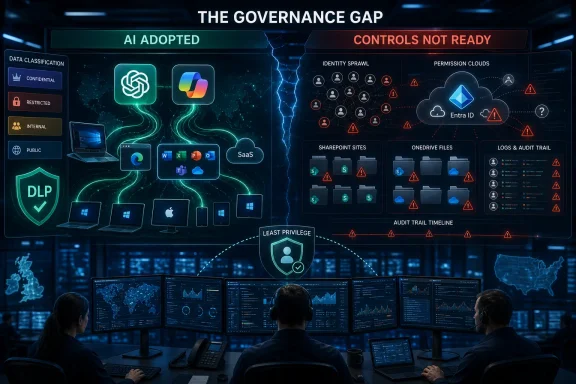 AI Has Become the New Default Before Security Got a Vote
The most important number in Heimdal’s report may not be the 71 percent ChatGPT footprint or the 68 percent Microsoft Copilot footprint. It is the roughly four-in-ten figure for teams that believe their security stack is ready for AI-related threats. Adoption and control are no longer moving at the same speed.That mismatch should feel familiar to anyone who lived through the first wave of cloud apps, unmanaged smartphones, or Teams-era collaboration sprawl. The business discovers utility, users normalize the workflow, and security is invited in after the new behavior has already hardened into expectation. AI is following the same script, only faster and with a more ambiguous data boundary.
ChatGPT’s presence in business IT estates shows that generative AI is not merely a Microsoft 365 add-on story. Copilot’s rapid uptake shows the other side of the same coin: AI is also being absorbed into the productivity stack Windows administrators already manage. Between those two poles sits the real estate problem — prompts, plugins, agents, browser sessions, tenant permissions, OAuth grants, files, emails, tickets, code, and corporate memory.
The vendor pitch says AI reduces toil, and Heimdal’s survey supports that claim in broad terms. Nearly three-quarters of IT teams say they spend about a quarter of their week on repetitive, low-value tasks that AI can help remove. But the security lesson is older than AI: anything powerful enough to automate work is powerful enough to automate mistakes.
The Board Sees Productivity; Practitioners See the Blast Radius
Executives are not wrong to want AI. In a stretched IT department, a tool that drafts scripts, summarizes incidents, enriches tickets, or helps users find buried information can look less like a luxury than survival gear. If a team is spending days every month on repetitive triage and administrative churn, “AI efficiency” is not a slogan. It is a budget argument.The problem is that boards tend to see AI as a horizontal productivity layer, while practitioners see the connections underneath. A Copilot result is not just a clever answer; it is a reflection of permissions, indexing, labeling, sharing history, and tenant configuration. A ChatGPT prompt is not just a conversation; it may be a data-handling event involving source code, customer records, credentials, contracts, or incident details.
This is why visibility often increases anxiety rather than reducing it. Heimdal’s findings suggest that teams with fuller visibility into AI use are more likely to flag data leakage as a top concern. That is not a paradox. It is what happens when a dashboard finally confirms what security suspected.
For WindowsForum readers, the Copilot angle deserves special attention because Microsoft’s AI push rides on top of systems many organizations already trust by default. Microsoft 365, Entra ID, SharePoint, OneDrive, Teams, Outlook, Defender, Purview, Intune, and Windows endpoints are not separate islands. Copilot’s value comes from that integration, and so does much of its risk.
Data Chaos Is the Debt AI Collects With Interest
Richard Bovey of AND Digital put his finger on the governance problem: boards are pressing CIOs and CTOs to deploy AI, but many organizations lack the control and visibility to do it safely. His warning about autonomous agents is particularly important. Once AI moves from answering questions to taking actions, governance stops being a policy exercise and becomes an execution-control problem.Stuart Harvey of Datactics was blunter: AI runs on data, and if the data is a mess, the AI does not stand a chance. That is not just a model-quality complaint. It is a security complaint.
Most enterprises have spent years tolerating messy permissions because humans were the limiting factor. A poorly shared SharePoint folder was bad, but someone still had to find it, open it, interpret it, and misuse it. AI reduces that friction. It can surface what users forgot existed, summarize what they should not have been able to see, and turn a legacy access-control problem into a board-visible incident.
This is the uncomfortable Copilot truth. Many organizations do not need a new AI-specific disaster to get into trouble. They only need their existing oversharing, stale groups, weak labeling, and “everyone except external users” permissions to become more searchable.
Data governance used to be the project everyone agreed was important after the urgent work was done. AI makes that delay harder to defend. If 58 percent of organizations describe their data as “chaos,” as cited in the material around the report, then AI is not entering a clean room. It is entering a warehouse with bad labels, open doors, and a forklift.
Shadow AI Is Not the Opposite of Enterprise AI
It is tempting to divide the world into sanctioned AI and shadow AI. In practice, that split is too tidy. The same organization can have a paid Copilot rollout, an approved ChatGPT Enterprise tenant, developers using coding assistants, sales teams experimenting with meeting bots, and employees quietly pasting spreadsheet extracts into whatever public tool gives the best answer.Shadow AI is not merely a rebellion against IT. Often it is a symptom of unmet demand. If the approved tool is slow, locked down, unavailable to contractors, bad at a niche task, or trapped in procurement limbo, users will route around it.
That does not excuse the behavior, but it does explain why policy-only approaches fail. Telling employees not to paste sensitive data into public AI tools is necessary, but it is not sufficient. The same was true for USB storage, personal cloud drives, and consumer messaging apps. When a workflow is useful enough, users will rationalize the exception.
The lesson for administrators is that sanctioned AI must be paired with usable paths. If the safe option is worse than the unsafe option in every practical way, the unsafe option wins quietly. Security teams then get blamed for failing to prevent behavior the organization’s own tooling encouraged.
Microsoft’s Advantage Is Also Microsoft’s Burden
Microsoft Copilot is not just another AI service in the enterprise stack. It is AI wrapped around the productivity substrate many organizations already use every day. That gives Microsoft a distribution advantage no standalone AI vendor can easily match.It also gives IT departments a governance burden they cannot outsource to Microsoft. Copilot can respect permissions, but it cannot magically repair bad permissions. It can operate inside a tenant, but it cannot decide whether years of Teams sprawl, guest access, stale sites, and poorly labeled documents represent acceptable risk. It can integrate with security tooling, but integration is not the same thing as readiness.
This is where Windows and Microsoft 365 administrators need to resist the comforting myth that “because it is Microsoft, it is already governed.” Microsoft can provide the controls, logs, policies, labels, admin centers, and architectural guidance. The tenant owner still has to configure them, test them, monitor them, and explain the residual risk.
The same is true for ChatGPT and other external tools. Enterprise licensing can improve data handling, administrative visibility, and contractual posture. But a license is not a control plane by itself. The work remains: inventory, access management, data-loss prevention, browser controls, endpoint policy, logging, user training, vendor review, and incident response.
Agents Turn Bad Governance Into Bad Actions
The next phase of AI risk is not just about what employees ask a model. It is about what systems allow models to do. That is why Bovey’s warning about autonomous agents matters more than the usual chatbot privacy debate.A chatbot that produces a questionable answer can mislead a user. An agent with access to email, files, code repositories, ticketing systems, CRM records, admin portals, or deployment pipelines can change the environment. The risk shifts from disclosure to execution.
For IT teams, this is a familiar security boundary wearing new clothes. Least privilege, change control, audit logging, rollback, approval workflows, and separation of duties all matter more when the actor is semi-autonomous. If an AI agent can open tickets, modify records, run scripts, summarize sensitive files, or trigger workflows, then it belongs in the same risk conversation as service accounts and automation platforms.
The phrase human in the loop is often used as a sedative here. It should not be. A human who clicks approve on an AI-generated action they do not understand is not a meaningful control. A human who receives a clear diff, a scoped permission request, a rollback path, and an audit trail might be.
That distinction will separate serious AI governance from theatre. The goal is not to slow every AI-assisted action until productivity disappears. The goal is to decide which actions are reversible, which are sensitive, which require approval, and which should never be available to an agent at all.
The Security Stack Was Built for Yesterday’s Workflow
Only around four in ten teams considering their stack ready for AI risk should not surprise anyone. Most security stacks were assembled to answer older questions. Is this endpoint compromised? Is this email malicious? Is this identity behaving oddly? Is this vulnerability patched? Is this file leaving the network?AI cuts across those categories. A prompt may be a data event, a browser event, a SaaS event, and an identity event at once. A Copilot answer may expose an access-control failure rather than a malware infection. A coding assistant may introduce vulnerable code without tripping a traditional endpoint alert. An agent may perform a legitimate action at the wrong scope.
That creates a tooling problem and an ownership problem. Does AI governance belong to security, IT, data governance, legal, compliance, procurement, enterprise architecture, or the business unit buying the tool? The honest answer is yes, which means the dishonest answer is usually “security will handle it.”
Security cannot handle it alone. It can define controls, monitor misuse, enforce policy, and respond to incidents. But it cannot classify every document, redesign every workflow, validate every vendor claim, and adjudicate every business use case without becoming the department of no. AI governance has to be distributed, or it will become performative.
Productivity Gains Are Real, Which Makes the Risk Harder to Contain
If AI tools were useless, security would have an easier job. The organization would run a pilot, users would shrug, and the risk would fade with the hype. That is not what is happening.The Heimdal findings point to real pressure inside IT teams. Repetitive work consumes a large chunk of the week. Alert fatigue remains stubborn. Tool fragmentation is still a tax. Skills shortages have not gone away. AI arrives promising relief from exactly the kinds of work that make security and IT operations feel permanently behind.
That is why blanket skepticism misses the mark. AI is not being adopted only because executives read a trend deck. It is being adopted because administrators, analysts, developers, and support teams can see practical uses. The help desk wants faster ticket summaries. The SOC wants triage assistance. The infrastructure team wants script generation. The compliance team wants evidence collection. The business wants every report by yesterday afternoon.
The risk is that exhausted teams become easier to sell to. A team that has no time to evaluate tooling may accept vendor claims at face value. A department drowning in low-value work may deploy automation before it has mapped failure modes. AI then becomes both the treatment and the new source of symptoms.
The Windows Estate Is Where AI Governance Gets Real
For many organizations, AI governance will not be decided in an abstract risk committee. It will be decided in the Windows and Microsoft 365 estate. That is where identities live, files are shared, endpoints are managed, email flows, Teams chats accumulate, and Copilot gets its context.The practical starting point is not glamorous. Administrators need to know which AI tools are in use, which users have access, what data those tools can reach, what logs exist, and what controls can actually block or constrain risky behavior. A policy document that cannot be enforced through identity, endpoint, browser, SaaS, or data controls is only a statement of intent.
For Microsoft-heavy shops, the work often begins with permissions hygiene. SharePoint and OneDrive oversharing, stale Teams, unmanaged guest access, broad security groups, weak sensitivity labeling, and inconsistent retention policies all become more consequential when AI can traverse and summarize large amounts of content.
Endpoint and browser management matter too. If users can reach public AI services from unmanaged browsers, personal profiles, or unsupervised devices, the organization’s official AI policy may cover only the traffic it can see. The same applies to developer workstations, admin jump boxes, and contractor devices.
None of this requires panic. It requires treating AI as part of the IT estate rather than a novelty bolted onto it. The organizations that do that early will have a boring advantage: fewer surprises.
Compliance Will Not Wait for Perfect AI Maturity
The governance gap is not only operational. It is regulatory and contractual. AI use can intersect with privacy law, sector rules, intellectual property obligations, customer commitments, employment practices, financial controls, and records retention. The exact burden varies by jurisdiction and industry, but the direction of travel is obvious: organizations will increasingly be expected to know how AI is used and how data is protected.This is where the “data chaos” argument becomes a board-level issue. If an organization cannot say where sensitive data lives, who can access it, and which AI tools can process it, it will struggle to answer auditors, customers, insurers, and regulators. AI does not create that weakness from nothing. It exposes it.
The UK and US focus of Heimdal’s survey is useful because both markets are moving quickly, but not identically. Multinational organizations cannot build governance around one country’s assumptions. They need controls that survive different privacy expectations, contractual terms, and industry obligations.
For IT pros, this means documentation matters. Not the kind produced after a breach, but living documentation: approved tools, prohibited uses, data-handling rules, exception processes, admin ownership, logging coverage, and review cadence. Governance that exists only in a slide deck will not survive contact with users.
The Real Divide Is Between AI Users and AI Operators
Much of the AI conversation treats employees as users. That is too narrow. In the enterprise, some people are merely asking AI for help, while others are embedding it into workflows, applications, scripts, security operations, and business processes. The second group is operating AI, whether or not their job title says so.That distinction matters because operator risk is deeper. A user pasting sensitive data into a chatbot can cause a leak. An operator connecting an AI tool to a repository, CRM, ticketing system, mailbox, or administrative workflow can create a persistent access path. The former is a user-awareness and DLP problem. The latter is architecture.
Windows administrators have seen this pattern before with service accounts and automation scripts. What begins as a convenience becomes a dependency. The dependency accumulates privileges. The person who understood the original setup moves teams. Years later, nobody wants to touch it because too many things might break.
AI agents and integrations can follow the same decay curve at higher speed. That is why audit trails and guardrails are not optional niceties. They are the difference between automation and ungoverned delegation.
The AI Reckoning Starts With the Boring Controls
The least fashionable controls are likely to do the most work. Inventory. Identity. Least privilege. Data classification. DLP. Vendor review. Logging. Conditional access. Endpoint management. Browser policy. Change control. Incident playbooks. None of these became obsolete because a model can summarize a meeting.What changed is the urgency. AI makes weak controls more visible and more exploitable. It shortens the path between “someone technically had access” and “someone received a synthesized answer drawn from data they should not have seen.” It also makes it easier for well-meaning employees to move sensitive information into systems they do not fully understand.
The best AI governance programs will not be the ones with the longest acceptable-use policies. They will be the ones that connect policy to enforcement. If confidential data cannot go to public AI tools, the organization needs technical controls that make that rule real. If Copilot should not surface certain classes of documents, the organization needs labeling, permissions, and review processes that support that outcome.
There is a cultural piece as well. Employees need a safe way to ask which AI tool they can use for a task without feeling as though they have confessed to misconduct. Shadow AI thrives when official channels are slow, vague, or punitive. Good governance gives users a path to yes, not just a list of ways to get in trouble.
Heimdal’s Numbers Point to a Windows Admin To-Do List
The survey’s details matter because they translate the AI debate into operational work. The headline adoption figures show that AI is already inside the estate. The readiness figure shows that controls lag behind. The workload findings explain why teams are tempted to accelerate anyway. The data-leakage concern shows where fear is concentrated.For Windows and Microsoft 365 environments, the immediate implications are concrete:
- Organizations should inventory sanctioned and unsanctioned AI tools across endpoints, browsers, SaaS tenants, identity logs, and procurement records.
- Administrators should review Microsoft 365 permissions, sharing links, Teams sprawl, guest access, and sensitivity labels before expanding Copilot access.
- Security teams should treat public AI prompts, enterprise AI integrations, and agentic workflows as data-handling events that require logging and enforceable policy.
- Procurement teams should require clear contractual answers about data retention, training use, subprocessors, tenant boundaries, auditability, and incident notification.
- IT leaders should reduce repetitive operational burden before expecting the same exhausted teams to govern AI safely at scale.
- Boards should measure AI readiness by practitioner visibility and enforceable controls, not by the existence of a policy or a successful pilot.
The enterprises that win with AI will not be the ones that ban it, nor the ones that wave it through because productivity graphs look good. They will be the ones that admit the uncomfortable middle ground: AI is useful, already deployed, and dangerous when layered onto chaotic data and weak controls. For Windows shops, the path forward runs through the same unglamorous work administrators have been asking the business to fund for years. AI did not make that work obsolete. It made it impossible to postpone.
References
- Primary source: BBN Times
Published: 2026-06-23T13:39:15.955491
Loading…
www.bbntimes.com - Related coverage: cio.com
Loading…
www.cio.com - Related coverage: bitsight.com
Loading…
www.bitsight.com - Related coverage: safe.security
Loading…
safe.security - Related coverage: zerotrust.cio.com
Loading…
zerotrust.cio.com