
Microsoft’s May 26, 2026 preview update for Windows 11 24H2 and 25H2, KB5089573, adds optional Task Manager columns that expose NPU use, NPU engines, and NPU memory across Processes, Users, and Details views on PCs with neural processors. That sounds like a minor instrumentation tweak until you remember how much of Microsoft’s Windows strategy now depends on convincing users that local AI is real, measurable, and worth buying new hardware for. Task Manager has always been where Windows marketing claims go to meet observable behavior. With this update, the neural processing unit stops being a spec-sheet promise and becomes another resource Windows users can interrogate.
For two years, the AI PC has been sold largely through abstraction: trillions of operations per second, on-device models, Copilot+ branding, battery-friendly acceleration, and the promise that some workloads belong somewhere other than the CPU or GPU. The problem with abstraction is that Windows users have been trained not to trust it. If a laptop fan spins up, a battery drains too quickly, or Search suddenly feels heavier, the first instinct is not to admire the platform architecture. It is to open Task Manager and ask what is actually happening.
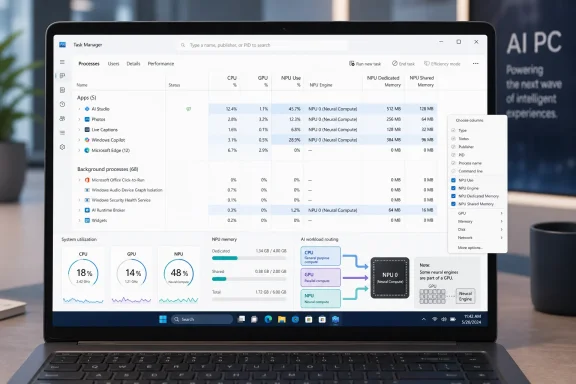
KB5089573 gives that instinct more teeth. The update adds optional NPU and NPU Engine columns to the Processes, Users, and Details pages, and it adds NPU Dedicated Memory and NPU Shared Memory columns to the Details page. Neural engines that are part of a GPU also appear on the Performance page, widening the view beyond discrete or branded NPUs and acknowledging that AI acceleration on Windows is becoming a mixed hardware story.
That is the real shift. Microsoft is no longer just saying that Windows can route work to a neural processor; it is exposing enough telemetry for users and administrators to see which processes are participating. For an operating system that increasingly embeds AI into search, imaging, camera effects, accessibility, and shell experiences, that visibility is not a luxury. It is a condition of trust.
The update is a preview release, not a security patch, and its changes are part of the continuing drift of Windows 11 toward feature delivery through cumulative updates. But Task Manager changes have a special kind of symbolic weight. They are not just features; they are admissions about what Microsoft believes users now need to see.
That is why the arrival of NPU columns matters more than another Settings page toggle would. A Settings page can explain a feature. Task Manager can incriminate it. If an AI-powered photo tool, camera effect, indexing process, browser feature, or shell component is exercising the neural processor, users can now look for the evidence in a familiar place.
The new NPU column answers the blunt question: is this process using the neural processor? The NPU Engine column adds a second layer by showing which engine is being used, a distinction that becomes more important as hardware vendors package different kinds of accelerators under one AI banner. The memory columns matter because AI workloads are not just compute workloads. They also move and reserve memory, and on thin-and-light systems that distinction can show up as sluggishness long before it shows up as a crash.
The Performance page addition is equally revealing. Microsoft’s language about neural engines inside GPUs recognizes that Windows AI acceleration is not confined to the Copilot+ NPU narrative. Some systems will have dedicated NPUs, some will expose AI blocks in GPUs, and some will rely on combinations of CPU, GPU, and neural hardware depending on the workload and driver stack. A credible monitoring tool has to reflect that messy reality.
This is also why the change feels overdue. CPU columns have been table stakes for decades. GPU utilization became visible only after graphics workloads had become central to everyday computing, not just gaming. NPU visibility is following the same path, but under more scrutiny because Microsoft is asking users to accept AI features as operating-system features, not optional apps.
Copilot+ PCs were introduced as a class of machines defined in part by neural processing capability, with local AI features positioned as the payoff for buying new hardware. But the average Windows user does not experience TOPS; they experience battery life, responsiveness, camera quality, search speed, and whether the laptop gets hot during a video call. Without a visible meter, the NPU is easy to mistake for a branding exercise.
Task Manager changes that relationship. It does not prove that every AI feature is useful, private, efficient, or well-designed. It does make the platform’s resource routing less opaque. If a feature claims to run locally, or claims to avoid hammering the CPU, a user now has a better chance of seeing whether specialized silicon is part of the story.
For administrators, that visibility is more than curiosity. Enterprises do not deploy features because a keynote says they are efficient; they deploy them when they can monitor impact, reproduce behavior, and explain support tickets. An NPU column is not a full observability platform, but it is a foothold for operational reality.
The more AI moves into Windows itself, the more Microsoft needs that foothold. A world where local models are triggered by Search, Photos, Recall-like timelines, translation, accessibility, camera effects, or third-party apps is a world where “AI” stops being a single application category. It becomes a resource class. Windows now has to manage it like one.
That avoids overwhelming the mainstream Task Manager view, but it also keeps the feature slightly hidden from the users most likely to benefit from the reassurance. Microsoft has spent years simplifying Windows surfaces, then re-adding detail behind context menus, advanced panes, and optional views. NPU telemetry follows that pattern: available for those who know where to look, invisible to those who do not.
There is a defensible reason for restraint. Many PCs still have no usable NPU, and many users would be confused by an empty or mostly idle column. Even on AI-capable machines, NPU activity may be bursty. A process may invoke a model briefly, hand work to a GPU engine, fall back to CPU, or rely on a vendor driver in ways that are not obvious from a single percentage value.
But optional visibility also lets Microsoft avoid a more uncomfortable interface problem. If Windows put NPU usage front and center, users would naturally ask why the number is zero during supposedly AI-enhanced workflows, why one app uses shared memory aggressively, or why a background component is waking the accelerator. Those are good questions. They are also support questions.
The cautious approach makes sense for a preview update. It gives enthusiasts and IT pros the tools first, lets documentation and community knowledge catch up, and avoids forcing a new hardware concept into every user’s daily view. Still, if local AI becomes as ordinary as GPU compositing, NPU telemetry cannot stay buried forever.
That matters because AI workloads often hide behind friendly app names or shared runtime components. A user may not know whether a visible feature is being executed by the foreground app, a system service, a framework process, or a brokered component. The Details view gives more room to line up process behavior with resource consumption.
NPU Dedicated Memory and NPU Shared Memory are especially useful signals on systems where the neural processor borrows from unified or system memory. Many AI PC buyers are using laptops with integrated graphics, soldered RAM, and no easy upgrade path. If local AI features reserve or churn memory in ways that affect multitasking, a dedicated column gives power users a first clue.
The memory story also complicates the simplistic claim that NPUs are always a free efficiency win. Offloading compute from a CPU can save power, but model loading, memory transfer, driver overhead, and shared memory pressure still matter. A badly integrated workload can be technically accelerated and still feel inefficient to the person using the machine.
That is why exposing memory alongside utilization is important. Utilization alone risks turning the NPU into another misleading percentage graph. Memory columns make it easier to distinguish a quick inference burst from a workload that is occupying resources persistently.
PC silicon vendors have taken different paths to AI acceleration. Qualcomm’s Snapdragon X platform pushed the Copilot+ conversation early with an Arm-based SoC and a strong NPU story. Intel and AMD have been integrating NPUs into laptop processors. Nvidia has spent years making GPUs the dominant platform for AI development and inference, even when Windows branding has emphasized the NPU. Integrated GPUs, discrete GPUs, NPUs, and hybrid pipelines are now all part of the same end-user experience.
Microsoft has to reconcile that hardware diversity without making the UI incomprehensible. If a neural engine lives inside a GPU, showing it only as generic GPU usage would understate its role. If Windows hides it because it is not a standalone NPU, the monitoring model becomes artificially tied to marketing categories instead of hardware behavior.
This is where Task Manager becomes a quiet standards battleground. What counts as an AI engine? How should Windows label it? What does the user see when a workload moves from NPU to GPU fallback? How should shared memory be represented across architectures? These are not just UI questions; they shape how users understand performance claims.
The update does not answer all of them, but it starts moving Windows away from a simplistic “has NPU or does not have NPU” framing. That is healthy. The AI PC era will be messy, and Windows’ own tools should admit that.
That breadth is now normal for Windows 11 preview cumulative updates. A non-security preview can contain visible features, quality fixes, servicing stack changes, enterprise policy adjustments, and hardware-specific improvements. The old mental model of “feature updates” and “patches” has been eroded by continuous delivery.
The Task Manager change stands out because it connects Microsoft’s AI strategy to the daily diagnostic life of Windows. Shared Audio may matter to users with supported Bluetooth LE Audio devices. Multi-App Camera policies may matter to enterprises standardizing meeting-room behavior or accessibility workflows. Secure Boot certificate servicing may matter to administrators watching the 2026 expiration timeline. But NPU visibility is a platform signal.
It tells users that Microsoft expects AI acceleration to be common enough to monitor. It tells hardware vendors that their engines need to appear coherently in Windows. It tells developers that NPU usage is no longer entirely hidden behind APIs and drivers. And it tells IT departments that local AI features are moving from novelty to resource-management concern.
That is why this particular line item deserves more attention than its placement in a long support article might suggest. In Windows, the moment a resource gets a Task Manager column is the moment it becomes part of the operating system’s ordinary accountability structure.
For Arm64, the documented individual order includes KB5043080 followed by KB5089573. The x64 path follows the same prerequisite logic with architecture-specific packages. Microsoft also notes that when updating Windows installation media, Dynamic Update packages should match the same month where available, with the most recent SafeOS or Setup Dynamic Update used if same-month packages are not available.
This is the unglamorous half of Windows innovation. The visible feature is a neat NPU column; the operational reality may involve DISM, mounted images, prerequisite MSUs, servicing stack updates, and update catalog hygiene. For consumers receiving the update through Windows Update, that complexity is mostly abstracted away. For admins maintaining images or controlled deployment rings, it is the job.
The preview nature of the update also matters. Optional previews let Microsoft ship non-security changes ahead of broader Patch Tuesday inclusion, but many organizations do not treat them as production defaults. Enthusiasts and testers may install early to get the Task Manager changes. Conservative shops may wait for the next cumulative security update, where applicable changes typically roll forward.
That split creates a familiar Windows timeline. First the feature appears for Insiders, then in a preview cumulative update, then in broader monthly servicing. By the time mainstream users notice, IT pros have already had to decide whether to test, defer, or ignore it.
That may sound unrelated to Task Manager’s NPU columns, but the two stories share an underlying theme: Windows is asking users and administrators to trust a lot of invisible machinery. Secure Boot certificate rotation is invisible until it breaks. AI acceleration is invisible until performance, privacy, or battery life becomes suspect. Servicing stack health is invisible until an update fails.
Microsoft’s challenge is not merely to add features. It is to expose enough of the machinery that Windows remains governable. The Secure Boot work does that through release health documentation, policies, and phased targeting. The Task Manager work does it through resource visibility. Different surfaces, same principle.
The addition of an Isolation column for AppContainer status, also noted in the update, fits this pattern. AppContainer isolation is a security boundary that most users never think about, but surfacing it in Task Manager lets advanced users and administrators see which apps are operating inside that model. Like NPU usage, it turns an architectural detail into something observable.
This is where Windows is strongest when Microsoft lets it be. The platform is enormous, messy, backward-compatible, and layered with old and new subsystems. Users do not need every internal detail all the time. But when something matters to performance, security, or trust, hiding it behind cheerful product language is worse than complexity.
Help desks will be able to distinguish “this AI feature is slow because the machine lacks the right accelerator” from “this feature is using the accelerator but still performing badly.” Desktop engineering teams can compare behavior across Qualcomm, Intel, AMD, and GPU-assisted systems. Security teams can watch for unexpected processes invoking AI engines, especially as third-party apps start embedding local inference.
The NPU Engine column could also become useful in vendor support cases. If a workload appears to route to a particular engine and fails, overheats, or misbehaves after a driver update, screenshots and process-level data from Task Manager provide a common vocabulary. That is not a replacement for Event Viewer, Windows Performance Recorder, or vendor-specific tooling, but it lowers the first rung of the ladder.
There is also procurement value. AI PC buying has been foggy because the connection between hardware capability and user-visible benefit is inconsistent. If organizations can run controlled pilots and observe real NPU utilization during approved workflows, they can make better decisions about whether premium AI-capable hardware is justified.
The flip side is that Task Manager may expose disappointing truths. Some expensive AI PCs may spend most of their working lives with idle NPUs. Some promoted features may barely touch local accelerators. Some third-party apps may use GPU or CPU paths despite marketing themselves as AI-native. That is not bad for customers, but it will make the market less forgiving.
That visibility can be beneficial. A well-behaved app that offloads work efficiently to an NPU has a new way to demonstrate it. Developers can tell users to look at Task Manager during a workload and see the accelerator engage. For tools in imaging, transcription, translation, video effects, coding assistance, and document analysis, that evidence may become part of the credibility pitch.
But Windows AI development remains fragmented. Developers may target ONNX Runtime, vendor SDKs, DirectML, Windows APIs, or application-specific runtimes. Hardware support varies by device class and driver maturity. A model that runs well on one NPU may fall back elsewhere. Task Manager will not explain all of that nuance.
Still, platform visibility nudges the ecosystem toward accountability. Once users can see NPU activity, developers have an incentive to make offload behavior predictable, document hardware requirements honestly, and avoid treating “AI acceleration” as a vague marketing phrase. The operating system is giving customers a window. Software vendors should assume someone will look through it.
The complication is important. Some AI workloads may run too briefly to catch. Some may use GPU neural engines rather than a separate NPU tile. Some may fall back to CPU because of model support, driver state, power mode, privacy settings, or device capability. Some features may not be enabled on a given machine even if the hardware looks capable.
That means Task Manager provides evidence, not a verdict. It can show activity, but it cannot by itself explain why a workload chose one engine over another. It can show memory pressure, but not whether that pressure is justified. It can show that a process is using the NPU, but not whether the model is local, private, accurate, or useful.
Even so, evidence is progress. The AI PC discussion has too often forced consumers to choose between vendor promises and online skepticism. A built-in meter gives them a way to observe their own machine. That is how trust starts: not with branding, but with repeatable behavior.
NPU visibility follows the same arc. Microsoft and its hardware partners have decided that neural processors are central to the future of personal computing. If that is true, the NPU cannot remain a decorative line in Device Manager or a marketing bullet on a retail page. It has to be observable when work happens, idle when work does not, and understandable enough that users can separate useful acceleration from expensive theater.
KB5089573 is not a dramatic update in the old Windows sense. It does not redesign the desktop or introduce a new shell. It adds columns, engines, and memory counters. But those small surfaces may prove more important than flashier AI demos, because they move the conversation from “trust us” to “look here.”
That is where Microsoft needs to go if it wants local AI to survive contact with real users. The future of Windows AI will not be decided only by model quality, Copilot branding, or silicon roadmaps. It will be decided by whether people can see what their PCs are doing, understand why it matters, and decide for themselves whether the new hardware earns its keep.
 Microsoft Puts the AI PC on the Witness Stand
For two years, the AI PC has been sold largely through abstraction: trillions of operations per second, on-device models, Copilot+ branding, battery-friendly acceleration, and the promise that some workloads belong somewhere other than the CPU or GPU. The problem with abstraction is that Windows users have been trained not to trust it. If a laptop fan spins up, a battery drains too quickly, or Search suddenly feels heavier, the first instinct is not to admire the platform architecture. It is to open Task Manager and ask what is actually happening.KB5089573 gives that instinct more teeth. The update adds optional NPU and NPU Engine columns to the Processes, Users, and Details pages, and it adds NPU Dedicated Memory and NPU Shared Memory columns to the Details page. Neural engines that are part of a GPU also appear on the Performance page, widening the view beyond discrete or branded NPUs and acknowledging that AI acceleration on Windows is becoming a mixed hardware story.
That is the real shift. Microsoft is no longer just saying that Windows can route work to a neural processor; it is exposing enough telemetry for users and administrators to see which processes are participating. For an operating system that increasingly embeds AI into search, imaging, camera effects, accessibility, and shell experiences, that visibility is not a luxury. It is a condition of trust.
The update is a preview release, not a security patch, and its changes are part of the continuing drift of Windows 11 toward feature delivery through cumulative updates. But Task Manager changes have a special kind of symbolic weight. They are not just features; they are admissions about what Microsoft believes users now need to see.
Task Manager Has Always Been Windows’ Truth Serum
Task Manager occupies a strange place in Windows. It is both a consumer panic button and a professional diagnostic surface. Casual users open it to kill a frozen app; administrators open it to confirm a suspicion before reaching for heavier tools. Developers, support desks, and enthusiasts use it as a first pass at reality.That is why the arrival of NPU columns matters more than another Settings page toggle would. A Settings page can explain a feature. Task Manager can incriminate it. If an AI-powered photo tool, camera effect, indexing process, browser feature, or shell component is exercising the neural processor, users can now look for the evidence in a familiar place.
The new NPU column answers the blunt question: is this process using the neural processor? The NPU Engine column adds a second layer by showing which engine is being used, a distinction that becomes more important as hardware vendors package different kinds of accelerators under one AI banner. The memory columns matter because AI workloads are not just compute workloads. They also move and reserve memory, and on thin-and-light systems that distinction can show up as sluggishness long before it shows up as a crash.
The Performance page addition is equally revealing. Microsoft’s language about neural engines inside GPUs recognizes that Windows AI acceleration is not confined to the Copilot+ NPU narrative. Some systems will have dedicated NPUs, some will expose AI blocks in GPUs, and some will rely on combinations of CPU, GPU, and neural hardware depending on the workload and driver stack. A credible monitoring tool has to reflect that messy reality.
This is also why the change feels overdue. CPU columns have been table stakes for decades. GPU utilization became visible only after graphics workloads had become central to everyday computing, not just gaming. NPU visibility is following the same path, but under more scrutiny because Microsoft is asking users to accept AI features as operating-system features, not optional apps.
The Copilot+ Pitch Needed a Meter
The AI PC pitch has always had a measurement problem. Vendors can print “40+ TOPS” on a box, but ordinary users rarely know whether the silicon is being used, when it is being used, or whether it is improving anything they care about. That gap leaves room for both hype and cynicism.Copilot+ PCs were introduced as a class of machines defined in part by neural processing capability, with local AI features positioned as the payoff for buying new hardware. But the average Windows user does not experience TOPS; they experience battery life, responsiveness, camera quality, search speed, and whether the laptop gets hot during a video call. Without a visible meter, the NPU is easy to mistake for a branding exercise.
Task Manager changes that relationship. It does not prove that every AI feature is useful, private, efficient, or well-designed. It does make the platform’s resource routing less opaque. If a feature claims to run locally, or claims to avoid hammering the CPU, a user now has a better chance of seeing whether specialized silicon is part of the story.
For administrators, that visibility is more than curiosity. Enterprises do not deploy features because a keynote says they are efficient; they deploy them when they can monitor impact, reproduce behavior, and explain support tickets. An NPU column is not a full observability platform, but it is a foothold for operational reality.
The more AI moves into Windows itself, the more Microsoft needs that foothold. A world where local models are triggered by Search, Photos, Recall-like timelines, translation, accessibility, camera effects, or third-party apps is a world where “AI” stops being a single application category. It becomes a resource class. Windows now has to manage it like one.
Optional Columns Are Microsoft’s Cautious Compromise
The new columns are optional, and that choice is telling. Microsoft is not turning Task Manager into an AI dashboard by default. Users must add the columns by right-clicking a column header and selecting them, the same way they would surface other advanced process details.That avoids overwhelming the mainstream Task Manager view, but it also keeps the feature slightly hidden from the users most likely to benefit from the reassurance. Microsoft has spent years simplifying Windows surfaces, then re-adding detail behind context menus, advanced panes, and optional views. NPU telemetry follows that pattern: available for those who know where to look, invisible to those who do not.
There is a defensible reason for restraint. Many PCs still have no usable NPU, and many users would be confused by an empty or mostly idle column. Even on AI-capable machines, NPU activity may be bursty. A process may invoke a model briefly, hand work to a GPU engine, fall back to CPU, or rely on a vendor driver in ways that are not obvious from a single percentage value.
But optional visibility also lets Microsoft avoid a more uncomfortable interface problem. If Windows put NPU usage front and center, users would naturally ask why the number is zero during supposedly AI-enhanced workflows, why one app uses shared memory aggressively, or why a background component is waking the accelerator. Those are good questions. They are also support questions.
The cautious approach makes sense for a preview update. It gives enthusiasts and IT pros the tools first, lets documentation and community knowledge catch up, and avoids forcing a new hardware concept into every user’s daily view. Still, if local AI becomes as ordinary as GPU compositing, NPU telemetry cannot stay buried forever.
The Details Page Becomes the Interesting Page Again
The most practical part of the update may be the Details page additions. Processes view is where most users begin, but Details is where Windows stops pretending that application names are enough. It exposes process identity, session context, architecture, priority, memory behavior, and now NPU memory use.That matters because AI workloads often hide behind friendly app names or shared runtime components. A user may not know whether a visible feature is being executed by the foreground app, a system service, a framework process, or a brokered component. The Details view gives more room to line up process behavior with resource consumption.
NPU Dedicated Memory and NPU Shared Memory are especially useful signals on systems where the neural processor borrows from unified or system memory. Many AI PC buyers are using laptops with integrated graphics, soldered RAM, and no easy upgrade path. If local AI features reserve or churn memory in ways that affect multitasking, a dedicated column gives power users a first clue.
The memory story also complicates the simplistic claim that NPUs are always a free efficiency win. Offloading compute from a CPU can save power, but model loading, memory transfer, driver overhead, and shared memory pressure still matter. A badly integrated workload can be technically accelerated and still feel inefficient to the person using the machine.
That is why exposing memory alongside utilization is important. Utilization alone risks turning the NPU into another misleading percentage graph. Memory columns make it easier to distinguish a quick inference burst from a workload that is occupying resources persistently.
The GPU Neural Engine Note Is the Bigger Tell
The line about neural engines that are part of a GPU appearing on the Performance page may end up being more consequential than the process columns. It suggests Microsoft is preparing Task Manager for a world where AI acceleration is not synonymous with a single NPU tile. That world is already here.PC silicon vendors have taken different paths to AI acceleration. Qualcomm’s Snapdragon X platform pushed the Copilot+ conversation early with an Arm-based SoC and a strong NPU story. Intel and AMD have been integrating NPUs into laptop processors. Nvidia has spent years making GPUs the dominant platform for AI development and inference, even when Windows branding has emphasized the NPU. Integrated GPUs, discrete GPUs, NPUs, and hybrid pipelines are now all part of the same end-user experience.
Microsoft has to reconcile that hardware diversity without making the UI incomprehensible. If a neural engine lives inside a GPU, showing it only as generic GPU usage would understate its role. If Windows hides it because it is not a standalone NPU, the monitoring model becomes artificially tied to marketing categories instead of hardware behavior.
This is where Task Manager becomes a quiet standards battleground. What counts as an AI engine? How should Windows label it? What does the user see when a workload moves from NPU to GPU fallback? How should shared memory be represented across architectures? These are not just UI questions; they shape how users understand performance claims.
The update does not answer all of them, but it starts moving Windows away from a simplistic “has NPU or does not have NPU” framing. That is healthy. The AI PC era will be messy, and Windows’ own tools should admit that.
The Update Is Bigger Than Task Manager, but Task Manager Is the Signal
KB5089573 is not a single-feature release. Microsoft’s support notes describe it as a preview cumulative update for Windows 11 version 24H2 and 25H2, with OS builds 26100.8524 and 26200.8524. It includes a broader batch of Windows 11 changes: Shared Audio, Magnifier improvements, camera policy controls, Windows Setup tweaks, performance work, personalization fixes, Windows Hello behavior changes, Search improvements, storage UI refinements, USB reliability work, and more.That breadth is now normal for Windows 11 preview cumulative updates. A non-security preview can contain visible features, quality fixes, servicing stack changes, enterprise policy adjustments, and hardware-specific improvements. The old mental model of “feature updates” and “patches” has been eroded by continuous delivery.
The Task Manager change stands out because it connects Microsoft’s AI strategy to the daily diagnostic life of Windows. Shared Audio may matter to users with supported Bluetooth LE Audio devices. Multi-App Camera policies may matter to enterprises standardizing meeting-room behavior or accessibility workflows. Secure Boot certificate servicing may matter to administrators watching the 2026 expiration timeline. But NPU visibility is a platform signal.
It tells users that Microsoft expects AI acceleration to be common enough to monitor. It tells hardware vendors that their engines need to appear coherently in Windows. It tells developers that NPU usage is no longer entirely hidden behind APIs and drivers. And it tells IT departments that local AI features are moving from novelty to resource-management concern.
That is why this particular line item deserves more attention than its placement in a long support article might suggest. In Windows, the moment a resource gets a Task Manager column is the moment it becomes part of the operating system’s ordinary accountability structure.
Servicing Complexity Still Lurks Under the Feature Story
The installation instructions attached to KB5089573 are a reminder that Windows servicing remains less elegant than the marketing around Windows features. Microsoft says the standalone packages are available through the Microsoft Update Catalog and that the update can involve one or more MSU files requiring installation in a specific order. Administrators can install all MSU files together from the same folder using DISM, or install them individually in order.For Arm64, the documented individual order includes KB5043080 followed by KB5089573. The x64 path follows the same prerequisite logic with architecture-specific packages. Microsoft also notes that when updating Windows installation media, Dynamic Update packages should match the same month where available, with the most recent SafeOS or Setup Dynamic Update used if same-month packages are not available.
This is the unglamorous half of Windows innovation. The visible feature is a neat NPU column; the operational reality may involve DISM, mounted images, prerequisite MSUs, servicing stack updates, and update catalog hygiene. For consumers receiving the update through Windows Update, that complexity is mostly abstracted away. For admins maintaining images or controlled deployment rings, it is the job.
The preview nature of the update also matters. Optional previews let Microsoft ship non-security changes ahead of broader Patch Tuesday inclusion, but many organizations do not treat them as production defaults. Enthusiasts and testers may install early to get the Task Manager changes. Conservative shops may wait for the next cumulative security update, where applicable changes typically roll forward.
That split creates a familiar Windows timeline. First the feature appears for Insiders, then in a preview cumulative update, then in broader monthly servicing. By the time mainstream users notice, IT pros have already had to decide whether to test, defer, or ignore it.
Secure Boot and AI Share the Same Trust Problem
KB5089573 also arrives amid Microsoft’s Secure Boot certificate work, with certificates used by many Windows devices set to expire starting in June 2026. Microsoft says devices that have not yet received newer certificates will continue to start and operate normally, and that standard Windows updates will continue to install, while newer certificates keep rolling out through Windows updates. The update also addresses an installation issue where some devices could fail with error 0x800f0922, especially when the EFI System Partition had very limited free space after the May 2026 security update.That may sound unrelated to Task Manager’s NPU columns, but the two stories share an underlying theme: Windows is asking users and administrators to trust a lot of invisible machinery. Secure Boot certificate rotation is invisible until it breaks. AI acceleration is invisible until performance, privacy, or battery life becomes suspect. Servicing stack health is invisible until an update fails.
Microsoft’s challenge is not merely to add features. It is to expose enough of the machinery that Windows remains governable. The Secure Boot work does that through release health documentation, policies, and phased targeting. The Task Manager work does it through resource visibility. Different surfaces, same principle.
The addition of an Isolation column for AppContainer status, also noted in the update, fits this pattern. AppContainer isolation is a security boundary that most users never think about, but surfacing it in Task Manager lets advanced users and administrators see which apps are operating inside that model. Like NPU usage, it turns an architectural detail into something observable.
This is where Windows is strongest when Microsoft lets it be. The platform is enormous, messy, backward-compatible, and layered with old and new subsystems. Users do not need every internal detail all the time. But when something matters to performance, security, or trust, hiding it behind cheerful product language is worse than complexity.
Where Administrators Will Actually Use This
For enterprise IT, the NPU columns are unlikely to trigger an immediate policy revolution. Most organizations are still early in AI PC fleet planning, and many will treat neural hardware as a hardware refresh attribute rather than a managed resource. But the diagnostic value is immediate.Help desks will be able to distinguish “this AI feature is slow because the machine lacks the right accelerator” from “this feature is using the accelerator but still performing badly.” Desktop engineering teams can compare behavior across Qualcomm, Intel, AMD, and GPU-assisted systems. Security teams can watch for unexpected processes invoking AI engines, especially as third-party apps start embedding local inference.
The NPU Engine column could also become useful in vendor support cases. If a workload appears to route to a particular engine and fails, overheats, or misbehaves after a driver update, screenshots and process-level data from Task Manager provide a common vocabulary. That is not a replacement for Event Viewer, Windows Performance Recorder, or vendor-specific tooling, but it lowers the first rung of the ladder.
There is also procurement value. AI PC buying has been foggy because the connection between hardware capability and user-visible benefit is inconsistent. If organizations can run controlled pilots and observe real NPU utilization during approved workflows, they can make better decisions about whether premium AI-capable hardware is justified.
The flip side is that Task Manager may expose disappointing truths. Some expensive AI PCs may spend most of their working lives with idle NPUs. Some promoted features may barely touch local accelerators. Some third-party apps may use GPU or CPU paths despite marketing themselves as AI-native. That is not bad for customers, but it will make the market less forgiving.
Developers Get a New Audience for Their Offload Choices
Developers building Windows AI applications should read this update as a warning: users may soon see what your app is doing. If an application claims to use local acceleration but pegs the CPU, the discrepancy becomes easier to spot. If it burns shared memory while the UI stutters, the process table may tell on it.That visibility can be beneficial. A well-behaved app that offloads work efficiently to an NPU has a new way to demonstrate it. Developers can tell users to look at Task Manager during a workload and see the accelerator engage. For tools in imaging, transcription, translation, video effects, coding assistance, and document analysis, that evidence may become part of the credibility pitch.
But Windows AI development remains fragmented. Developers may target ONNX Runtime, vendor SDKs, DirectML, Windows APIs, or application-specific runtimes. Hardware support varies by device class and driver maturity. A model that runs well on one NPU may fall back elsewhere. Task Manager will not explain all of that nuance.
Still, platform visibility nudges the ecosystem toward accountability. Once users can see NPU activity, developers have an incentive to make offload behavior predictable, document hardware requirements honestly, and avoid treating “AI acceleration” as a vague marketing phrase. The operating system is giving customers a window. Software vendors should assume someone will look through it.
Consumers Get Proof, but Not Simplicity
For consumers, the immediate use case is straightforward: open Task Manager, add the NPU columns, and watch what happens when AI-flavored features run. That could include camera effects, image tools, semantic search, local model features, or apps that advertise on-device inference. If the NPU column lights up, the hardware is doing something. If it does not, the answer may be more complicated than the feature being fake.The complication is important. Some AI workloads may run too briefly to catch. Some may use GPU neural engines rather than a separate NPU tile. Some may fall back to CPU because of model support, driver state, power mode, privacy settings, or device capability. Some features may not be enabled on a given machine even if the hardware looks capable.
That means Task Manager provides evidence, not a verdict. It can show activity, but it cannot by itself explain why a workload chose one engine over another. It can show memory pressure, but not whether that pressure is justified. It can show that a process is using the NPU, but not whether the model is local, private, accurate, or useful.
Even so, evidence is progress. The AI PC discussion has too often forced consumers to choose between vendor promises and online skepticism. A built-in meter gives them a way to observe their own machine. That is how trust starts: not with branding, but with repeatable behavior.
The Small Columns That Make AI Hardware Accountable
KB5089573 will not settle whether Copilot+ PCs are worth the upgrade, whether local AI belongs in the shell, or whether Microsoft’s AI roadmap is moving faster than user demand. It does, however, give Windows users a better instrument panel for the argument. A short list captures the practical change.- Windows 11 Task Manager can now show per-process NPU use through optional NPU and NPU Engine columns on Processes, Users, and Details views.
- The Details page can expose NPU Dedicated Memory and NPU Shared Memory, which matters on systems where AI workloads compete for limited system resources.
- The Performance page can show neural engines integrated into GPUs, reflecting a broader AI acceleration landscape than standalone NPUs alone.
- The feature applies to PCs with relevant neural processing hardware, so older systems may see little or no practical change.
- KB5089573 is a preview cumulative update for Windows 11 24H2 and 25H2, and cautious organizations may wait for broader cumulative rollout rather than deploying it immediately.
- The same update package includes other Windows 11 servicing, reliability, camera, Search, Secure Boot, and setup improvements, making it more than a Task Manager-only release.
The AI PC Era Needs More Than New Silicon
The history of Windows performance monitoring is a history of resources becoming too important to stay invisible. CPU time became a daily concern. Memory pressure became a daily concern. Disk activity, network usage, GPU load, power behavior, startup impact, and process isolation all became visible because users needed to understand why their machines behaved the way they did.NPU visibility follows the same arc. Microsoft and its hardware partners have decided that neural processors are central to the future of personal computing. If that is true, the NPU cannot remain a decorative line in Device Manager or a marketing bullet on a retail page. It has to be observable when work happens, idle when work does not, and understandable enough that users can separate useful acceleration from expensive theater.
KB5089573 is not a dramatic update in the old Windows sense. It does not redesign the desktop or introduce a new shell. It adds columns, engines, and memory counters. But those small surfaces may prove more important than flashier AI demos, because they move the conversation from “trust us” to “look here.”
That is where Microsoft needs to go if it wants local AI to survive contact with real users. The future of Windows AI will not be decided only by model quality, Copilot branding, or silicon roadmaps. It will be decided by whether people can see what their PCs are doing, understand why it matters, and decide for themselves whether the new hardware earns its keep.
References
- Primary source: Microsoft - Message Center
Published: 2026-06-23 15:00 PT

May 26, 2026—KB5089573 (OS Builds 26200.8524 and 26100.8524) Preview - Microsoft Support
support.microsoft.com
- Related coverage: windowscentral.com
You can now watch your NPU work (or not work) in Windows 11’s Task Manager
NPUs are only becoming more common in the PCs we buy, so it only makes sense that Task Manager be capable of monitoring what it's doing. www.windowscentral.com
- Official source: learn.microsoft.com
- Related coverage: maru-note.com
【AI PCを使いこなす】タスクマネージャーでNPU(AI処理チップ)の使用率を確認する方法【Windows 11・Copilot+ PC対応】
NPU使用率確認の方法を解説します。2026年6月のKB5094126でCopilot+ PCのタスクマネージャーにNPU列が追加。対応CPU(Qualcomm・AMD・Intel)での表示手順と出ない場合の対処法を紹介します。 maru-note.com
- Related coverage: techgear-guide.com
Windows 11実験的ビルド28020.1921でTask ManagerにNPU監視列が追加——AI処理の可視化を強化
MicrosoftがWindows 11の実験的ビルド28020.1921を公開。NPU・NPUエンジンの使用状況をTask Managerで確認できる新オプション列が追加され、AIワークロードの監視機能が強化されました。 techgear-guide.com
- Related coverage: newsminimalist.com
- Related coverage: abit.ee
Windows 11 Task Manager now monitors NPU workloads
Microsoft added NPU monitoring to Windows 11 Task Manager. New columns show neural processing unit load and memory usage per process. Currently available in Insider Preview builds only.abit.ee
- Official source: microsoft.com
- Official source: news.microsoft.com
