
Microsoft’s next Windows 11 annual update, version 26H2, was confirmed for Insider testing on June 19, 2026, and is expected to reach ordinary Windows 11 PCs later this year as a smaller enablement-package release rather than a full platform replacement. That sounds like the least exciting sentence in operating-system news. It may also be the most important one for anyone who has spent the Windows 11 era fighting the Start menu, the taskbar, Bing integration, widgets, memory pressure, and Microsoft’s habit of turning every surface into a growth funnel. The story of 26H2 is not that Windows is becoming something new; it is that Microsoft appears to be rediscovering the value of making Windows feel less hostile to the people who already use it.
For years, Microsoft has treated Windows as both an operating system and a billboard. The modern Windows desktop became a place where search was not always search, recommendations were not always helpful, and default experiences often nudged users toward Microsoft services whether or not those services were relevant to the task at hand.
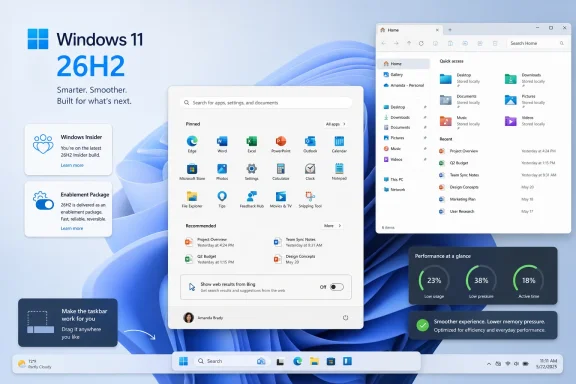
That is why the early framing around Windows 11 version 26H2 matters. PCMag’s report presents Microsoft executives talking less about transformation and more about polish: stability in File Explorer, lower memory use, a calmer desktop, a movable taskbar, and a Start menu that can stop dragging Bing into local searches. None of this has the stage-demo sparkle of a new AI assistant or a reimagined shell. But it lands directly on the annoyances that made many Windows 11 users feel as if the product was built around corporate priorities first and daily workflow second.
The phrase “Microsoft is listening” has been used so often in Windows history that it deserves suspicion by default. The company listened when it retreated from the worst excesses of Windows 8. It listened when it softened some of Windows 10’s upgrade pressure. It has also listened selectively, slowly, and usually after exhausting every other option.
Still, the 26H2 cycle looks different because the concessions are not abstract. A user who can disable Bing results in Start without a registry edit will notice. A user who can move the taskbar will notice. A user whose Explorer windows stop freezing or whose 8GB laptop stops feeling like a wheezing kiosk will notice. Windows 11 does not need a grand reinvention nearly as much as it needs to stop irritating people between clicks.
That is why the reported Start menu changes are bigger than they sound. Windows 11 has already allowed determined users to suppress Bing web results through registry edits, policy tweaks, or third-party tools. But requiring that level of intervention is itself a statement. It says the default belongs to Microsoft, and user preference is an escape hatch.
Moving the option into Settings changes the politics of the feature. It does not make Bing disappear from Windows, and it does not mean Microsoft has abandoned service integration. But it acknowledges that local search and web search are different user intents. When a user opens Start and types “Device Manager,” “invoice,” or “Notepad,” the operating system should not behave as if the primary problem is a shortage of Bing engagement.
The same applies to Microsoft Store app results. There is a legitimate case for surfacing installable apps when a user searches for something missing from the machine. But there is also a legitimate case that Start search should be fast, local, and boring. Power users, administrators, and people working on locked-down systems often want predictability more than discovery.
Microsoft’s problem is that it trained users to distrust helpfulness. Once an interface has been used for ads, upsells, and service capture, even sensible suggestions begin to look like intrusion. Giving users switches is not merely a usability improvement; it is reputation repair.
For some users, the issue was simple preference. For others, it was ergonomics, multi-monitor workflow, accessibility, or habit built over decades. Microsoft’s early response effectively told those users that the new design direction mattered more than their established working patterns.
That is the wound 26H2 appears to be trying to close. A movable taskbar will not satisfy every complaint about the Windows 11 shell, and Microsoft may still impose limits compared with the more flexible taskbars of earlier Windows versions. But the concession matters because it admits that customization is not clutter. On a platform as broad as Windows, configurability is part of the product’s value.
The Windows installed base is not a monoculture. It includes gamers with ultrawide displays, accountants with three monitors, developers living in terminals and IDEs, older users who do not want UI muscle memory disrupted, and enterprise workers whose desktops are shaped by policy rather than taste. A single blessed layout may photograph well in a keynote, but it does not survive contact with that variety.
Windows 11’s original bet was that a more controlled, centered, simplified interface would feel modern enough to justify the trade-offs. The pushback showed that Windows users are not opposed to modern design; they are opposed to modern design that removes working options for no practical gain. Restoring taskbar movement is Microsoft learning, belatedly, that “clean” and “capable” cannot be treated as opposites.
For home users, the benefit is mostly convenience. The update should install more like a monthly cumulative update than a long feature upgrade with multiple reboots and a long wait at a percentage screen. For IT departments, the appeal is larger: less disruption, easier validation, and fewer moving parts during deployment.
This is not Microsoft being charitable. It is Microsoft responding to the reality that Windows feature updates became operational events. Every big annual release forced administrators to think about application compatibility, driver readiness, help-desk load, deployment rings, rollback plans, and the grim timing of updates colliding with quarterly deadlines or exam seasons.
The enablement-package model narrows that blast radius. It does not eliminate risk, because new features can still break workflows and dormant code can still become active code. But it shifts Windows servicing toward a more incremental cadence, which is what enterprises have wanted for years: fewer cliff edges, more controlled change.
There is an irony here. Consumers often complain that Windows updates are too frequent, while enterprises complain that big version jumps are too disruptive. Microsoft is trying to solve both by making the annual label feel less like a forklift upgrade. If 26H2 succeeds, its most impressive feature may be that many people barely notice the installation at all.
This matters because Microsoft’s Windows messaging often compresses architectural complexity into friendly version labels. To enthusiasts and administrators, the difference between servicing branches, enablement packages, hardware-optimized releases, and general availability channels is not trivia. It determines what devices get which features, which fixes arrive when, and how long particular configurations remain in a support lane.
The Arm situation also points toward Microsoft’s longer-term challenge. The company wants Windows on Arm to be a first-class citizen, especially as Qualcomm and other silicon partners push more efficient laptop designs. But the closer Microsoft gets to hardware-optimized Windows releases, the harder it becomes to maintain the illusion that every Windows 11 device is moving through the same river.
For now, most existing Windows 11 users should think of 26H2 as the next annual release. But the 26H1 exception is a warning against reading version numbers too casually. In the modern Windows ecosystem, the name on the Settings page is only part of the story.
Windows 11 has often seemed caught between elegance and heaviness. Its animations, rounded surfaces, translucent materials, widgets, search integrations, background services, and AI-adjacent components can make the desktop feel richer on premium hardware. On older or lower-spec systems, they can make the OS feel like it is spending too much effort performing itself.
Memory use is particularly sensitive because Windows 11 sits in the middle of a hardware transition. Microsoft’s minimum requirements already left many Windows 10-era PCs outside the official upgrade path. Among supported machines, there are still plenty of systems with 8GB of RAM, modest SSDs, integrated graphics, and processors that look fine on paper but do not have much headroom once Teams, Edge, OneDrive, security tools, and vendor utilities join the party.
If Microsoft can make Windows 11 feel lighter without requiring users to buy new hardware, that is not merely an optimization win. It is a trust win. It tells users the answer to every slowdown is not “buy a Copilot+ PC” or “accept that the future is heavier.”
File Explorer deserves special mention because it is one of the most unforgiving parts of Windows. Users can tolerate a flaky new app. They are much less forgiving when the file manager lags, crashes, forgets state, mishandles network locations, or stalls while doing ordinary work. Explorer is not glamorous, but it is foundational. A polished Windows release that leaves Explorer unstable is not polished at all.
Microsoft has spent enormous energy positioning AI as the next interface layer for computing. Build keynotes, developer tooling, Microsoft 365, Azure, GitHub, Edge, and Windows have all been pulled into that orbit. The company clearly believes agentic AI will change how people use PCs. It may be right.
But Windows users have been living through a mismatch between AI ambition and desktop reality. Many people do not object to AI features existing; they object to those features arriving while basic interface complaints remain unresolved. A Copilot key feels different when the Start menu is still cluttered. An AI-powered search story feels different when local search is inconsistent. A future-of-computing demo feels different when the taskbar still cannot do what it did years ago.
That is why 26H2’s relative emphasis on non-AI improvements is strategically smart. Microsoft does not need to abandon AI to recognize that the Windows desktop must earn the right to host it. If the OS feels slow, pushy, or unfinished, every new assistant risks looking like another layer of abstraction over unresolved problems.
The best version of Windows AI would be ambient, optional, and genuinely useful. The worst version would be another compulsory surface competing for attention. By foregrounding polish in 26H2, Microsoft is tacitly admitting that the foundation matters before the agent moves in.
Browsers are no longer just HTML renderers. They are password vaults, bookmark libraries, extension hosts, tab histories, payment surfaces, profile managers, and increasingly AI workbenches. Asking a Chrome user to switch browsers is really asking them to migrate a personal computing environment.
By allowing Google account sync, Microsoft lowers the switching cost. It also makes a sharp competitive point: if Edge is built on Chromium and can import or sync enough of the Chrome-adjacent experience, then the browser fight becomes less about compatibility and more about defaults, features, performance, privacy posture, and ecosystem pressure.
That pressure cuts both ways. Critics will see the move as another attempt by Microsoft to use Windows adjacency to capture browser share. Supporters will argue that reducing account friction is user-friendly. Both can be true. Edge has become a capable browser, but Microsoft’s promotion tactics inside Windows have often made users resent it before they evaluate it.
The broader browser market is restless. Firefox is redesigning parts of its experience. Vivaldi is positioning itself against the rush to AI integration. Brave is experimenting with paid and stripped-down offerings. Microsoft, meanwhile, is trying to make Edge feel like the easiest Chrome alternative without asking users to leave Google identity behind on day one. That is a pragmatic move, and a telling one.
Chrome’s dominance is not just about speed or compatibility anymore. It is tied to Google accounts, Android, Gmail, YouTube, Workspace, passwords, autofill, and years of accumulated user trust or inertia. Edge’s challenge is not simply to be better than Chrome in a benchmark. It has to be good enough that switching does not feel like moving house.
That is why Google-account sync in Edge is potentially potent. It lets Microsoft say: keep your account, keep your data flow, but try our browser. It reframes Edge as a less disruptive alternative rather than a Microsoft-only silo.
But there is a risk for Microsoft, too. If Edge becomes more comfortable for Google users, it may also become less effective as a Microsoft-account funnel. That suggests the company has decided browser share is worth more than strict identity purity, at least at the onboarding stage.
For Windows users, the practical impact is straightforward. The browser bundled with the OS may soon become easier to test without committing to Microsoft’s broader account ecosystem. Whether that leads to meaningful switching depends on whether Microsoft can resist turning the first-run experience into another persuasion campaign.
For many users, Windows 11 was not simply the next version of Windows. It was the version that told their PC it was old. For administrators, it introduced another hardware inventory problem. For enthusiasts, it became a symbol of Microsoft’s willingness to trade continuity for a cleaner platform baseline.
That history makes the reported executive reluctance to talk about Windows 12 notable. A new version number would create excitement in some corners, but it would also revive anxiety about requirements, compatibility, and another round of forced decisions. Microsoft may be better served by making Windows 11 feel complete than by asking users to emotionally reset around another brand.
There is also a support-cycle reality. As Windows 10 exits mainstream life for most consumers and organizations move deeper into Windows 11 deployment, Microsoft has a narrowing window to make Windows 11 feel like the stable default rather than the thing people accepted because time ran out. 26H2 arrives in that context.
If the update is genuinely calmer, more configurable, and less resource-hungry, it could help soften Windows 11’s reputation. If it merely adds switches around annoyances while creating new ones elsewhere, it will reinforce the cynicism Microsoft has spent years earning.
That is why the Settings toggles matter, but defaults matter more. If Bing results can be disabled but remain aggressively enabled by default, many users will still experience the old Windows. If Widgets can be calmer but ship with noisy feeds, the burden remains on the user to clean up the OS. If Edge supports Google sync but the Windows shell continues to nag users away from other browsers, the browser-war truce will feel cosmetic.
Microsoft has the right to promote its services in its operating system. Windows is a commercial product, and the company’s cloud, search, browser, and AI businesses are strategically linked. The issue is not promotion in the abstract. The issue is whether the operating system respects user intent once the user has made a choice.
Administrators understand this distinction instinctively. A default is manageable. A default that keeps reasserting itself is a policy problem. A consumer prompt is tolerable. A prompt that returns after dismissal is a trust problem.
For 26H2 to mark a real turn, Microsoft has to treat configurability as a durable commitment rather than a temporary pressure valve. The company should not make power users prove their preferences every six months. Windows should remember what users told it.
But corporate IT will not take Microsoft’s framing on faith. Organizations will test Start changes against group policy and mobile device management. They will validate taskbar behavior with existing layouts. They will check whether Bing and Store search controls are manageable at scale. They will measure whether File Explorer improvements hold up with network shares, redirected folders, security agents, and line-of-business applications.
The enablement-package model helps here because it reduces the update footprint. But it also creates a subtle testing challenge: features may be present before they are lit up, and staged rollouts can make two machines with similar build numbers behave differently. That is manageable, but only if Microsoft documents the controls clearly and avoids surprise activation in business environments.
The good news is that Microsoft has spent years improving its enterprise servicing language and release-health communications. The less good news is that Windows feature rollout remains complex enough that administrators often learn the practical truth from pilots rather than promises.
For business customers, 26H2’s value will be measured less by keynote phrases than by help-desk tickets. If users stop asking why search opened the web, why the taskbar cannot go where they want, or why Explorer hung again, the update will have done its job.
This can look like stagnation from the outside, especially in an industry addicted to novelty. But for a platform as old and central as Windows, restraint is not stagnation. It is maintenance of the social contract.
The Windows desktop’s job is not to surprise users every morning. It is to let them launch applications, manage files, control windows, connect hardware, secure data, and get through the day. The more Microsoft remembers that, the better Windows becomes.
That does not mean Windows should freeze. It means change has to earn its place. AI features, cloud integration, richer widgets, and smarter search can all be useful if they are subordinate to user intent. They become corrosive when they feel like the operating system pursuing Microsoft’s quarterly priorities through the user’s workflow.
26H2 is interesting because it appears to be built around the former idea. Not perfectly, not completely, and not without commercial motives. But enough to make the update feel like an apology disguised as a service release.
 Microsoft Is Finally Selling Restraint as a Feature
For years, Microsoft has treated Windows as both an operating system and a billboard. The modern Windows desktop became a place where search was not always search, recommendations were not always helpful, and default experiences often nudged users toward Microsoft services whether or not those services were relevant to the task at hand.That is why the early framing around Windows 11 version 26H2 matters. PCMag’s report presents Microsoft executives talking less about transformation and more about polish: stability in File Explorer, lower memory use, a calmer desktop, a movable taskbar, and a Start menu that can stop dragging Bing into local searches. None of this has the stage-demo sparkle of a new AI assistant or a reimagined shell. But it lands directly on the annoyances that made many Windows 11 users feel as if the product was built around corporate priorities first and daily workflow second.
The phrase “Microsoft is listening” has been used so often in Windows history that it deserves suspicion by default. The company listened when it retreated from the worst excesses of Windows 8. It listened when it softened some of Windows 10’s upgrade pressure. It has also listened selectively, slowly, and usually after exhausting every other option.
Still, the 26H2 cycle looks different because the concessions are not abstract. A user who can disable Bing results in Start without a registry edit will notice. A user who can move the taskbar will notice. A user whose Explorer windows stop freezing or whose 8GB laptop stops feeling like a wheezing kiosk will notice. Windows 11 does not need a grand reinvention nearly as much as it needs to stop irritating people between clicks.
The Start Menu Was Always the Argument
The Start menu is not just a launcher. It is the front door of Windows, the muscle-memory hub that tells users whether the OS is working with them or trying to redirect them. When Microsoft puts web search, Store results, recommendations, account nudges, or promotional content into that space, it changes the emotional contract of the desktop.That is why the reported Start menu changes are bigger than they sound. Windows 11 has already allowed determined users to suppress Bing web results through registry edits, policy tweaks, or third-party tools. But requiring that level of intervention is itself a statement. It says the default belongs to Microsoft, and user preference is an escape hatch.
Moving the option into Settings changes the politics of the feature. It does not make Bing disappear from Windows, and it does not mean Microsoft has abandoned service integration. But it acknowledges that local search and web search are different user intents. When a user opens Start and types “Device Manager,” “invoice,” or “Notepad,” the operating system should not behave as if the primary problem is a shortage of Bing engagement.
The same applies to Microsoft Store app results. There is a legitimate case for surfacing installable apps when a user searches for something missing from the machine. But there is also a legitimate case that Start search should be fast, local, and boring. Power users, administrators, and people working on locked-down systems often want predictability more than discovery.
Microsoft’s problem is that it trained users to distrust helpfulness. Once an interface has been used for ads, upsells, and service capture, even sensible suggestions begin to look like intrusion. Giving users switches is not merely a usability improvement; it is reputation repair.
The Taskbar Fight Was a Symbol of Windows 11’s Original Sin
The Windows 11 taskbar arrived with a visual refresh and a long list of missing behaviors. Compared with Windows 10, it felt less like a mature desktop component and more like a rewritten shell that had shipped before it had earned the right to replace the old one. The inability to move the taskbar was one of the most visible regressions.For some users, the issue was simple preference. For others, it was ergonomics, multi-monitor workflow, accessibility, or habit built over decades. Microsoft’s early response effectively told those users that the new design direction mattered more than their established working patterns.
That is the wound 26H2 appears to be trying to close. A movable taskbar will not satisfy every complaint about the Windows 11 shell, and Microsoft may still impose limits compared with the more flexible taskbars of earlier Windows versions. But the concession matters because it admits that customization is not clutter. On a platform as broad as Windows, configurability is part of the product’s value.
The Windows installed base is not a monoculture. It includes gamers with ultrawide displays, accountants with three monitors, developers living in terminals and IDEs, older users who do not want UI muscle memory disrupted, and enterprise workers whose desktops are shaped by policy rather than taste. A single blessed layout may photograph well in a keynote, but it does not survive contact with that variety.
Windows 11’s original bet was that a more controlled, centered, simplified interface would feel modern enough to justify the trade-offs. The pushback showed that Windows users are not opposed to modern design; they are opposed to modern design that removes working options for no practical gain. Restoring taskbar movement is Microsoft learning, belatedly, that “clean” and “capable” cannot be treated as opposites.
Enablement Packages Are Microsoft’s Quiet Peace Treaty With IT
The other important detail in 26H2 is the delivery model. Microsoft says Windows 11 version 26H2 shares a servicing branch with version 25H2 and is implemented through an enablement package. In plain English, that means many of the underlying bits can already be present on supported systems, with the annual version change acting more like a switch-flip than a traditional operating-system upgrade.For home users, the benefit is mostly convenience. The update should install more like a monthly cumulative update than a long feature upgrade with multiple reboots and a long wait at a percentage screen. For IT departments, the appeal is larger: less disruption, easier validation, and fewer moving parts during deployment.
This is not Microsoft being charitable. It is Microsoft responding to the reality that Windows feature updates became operational events. Every big annual release forced administrators to think about application compatibility, driver readiness, help-desk load, deployment rings, rollback plans, and the grim timing of updates colliding with quarterly deadlines or exam seasons.
The enablement-package model narrows that blast radius. It does not eliminate risk, because new features can still break workflows and dormant code can still become active code. But it shifts Windows servicing toward a more incremental cadence, which is what enterprises have wanted for years: fewer cliff edges, more controlled change.
There is an irony here. Consumers often complain that Windows updates are too frequent, while enterprises complain that big version jumps are too disruptive. Microsoft is trying to solve both by making the annual label feel less like a forklift upgrade. If 26H2 succeeds, its most impressive feature may be that many people barely notice the installation at all.
The 26H1 Detour Shows the Platform Is Still Messier Than the Branding
The neat story is that Windows 11 moves from 25H2 to 26H2. The messier story is that 26H1 exists as a specialized release for certain new Arm-based devices, and those machines are not on the same straightforward path to 26H2. That split is a reminder that Windows is still a platform family wearing a single consumer-facing name.This matters because Microsoft’s Windows messaging often compresses architectural complexity into friendly version labels. To enthusiasts and administrators, the difference between servicing branches, enablement packages, hardware-optimized releases, and general availability channels is not trivia. It determines what devices get which features, which fixes arrive when, and how long particular configurations remain in a support lane.
The Arm situation also points toward Microsoft’s longer-term challenge. The company wants Windows on Arm to be a first-class citizen, especially as Qualcomm and other silicon partners push more efficient laptop designs. But the closer Microsoft gets to hardware-optimized Windows releases, the harder it becomes to maintain the illusion that every Windows 11 device is moving through the same river.
For now, most existing Windows 11 users should think of 26H2 as the next annual release. But the 26H1 exception is a warning against reading version numbers too casually. In the modern Windows ecosystem, the name on the Settings page is only part of the story.
Performance Is the Feature Microsoft Should Have Led With Years Ago
PCMag’s report says Microsoft is emphasizing craft, performance, and polish, including work to reduce memory consumption and improve File Explorer stability. That is the kind of operating-system work that rarely trends on social media and almost never dominates a keynote. It is also the work users feel every day.Windows 11 has often seemed caught between elegance and heaviness. Its animations, rounded surfaces, translucent materials, widgets, search integrations, background services, and AI-adjacent components can make the desktop feel richer on premium hardware. On older or lower-spec systems, they can make the OS feel like it is spending too much effort performing itself.
Memory use is particularly sensitive because Windows 11 sits in the middle of a hardware transition. Microsoft’s minimum requirements already left many Windows 10-era PCs outside the official upgrade path. Among supported machines, there are still plenty of systems with 8GB of RAM, modest SSDs, integrated graphics, and processors that look fine on paper but do not have much headroom once Teams, Edge, OneDrive, security tools, and vendor utilities join the party.
If Microsoft can make Windows 11 feel lighter without requiring users to buy new hardware, that is not merely an optimization win. It is a trust win. It tells users the answer to every slowdown is not “buy a Copilot+ PC” or “accept that the future is heavier.”
File Explorer deserves special mention because it is one of the most unforgiving parts of Windows. Users can tolerate a flaky new app. They are much less forgiving when the file manager lags, crashes, forgets state, mishandles network locations, or stalls while doing ordinary work. Explorer is not glamorous, but it is foundational. A polished Windows release that leaves Explorer unstable is not polished at all.
AI Is Still the Future, but It Is Not the Pitch This Time
One of the more striking parts of the PCMag account is what Microsoft executives reportedly were not emphasizing: Windows 12, Copilot+ PCs, and a total AI-driven reinvention of the desktop. After the last few years, that restraint is almost jarring.Microsoft has spent enormous energy positioning AI as the next interface layer for computing. Build keynotes, developer tooling, Microsoft 365, Azure, GitHub, Edge, and Windows have all been pulled into that orbit. The company clearly believes agentic AI will change how people use PCs. It may be right.
But Windows users have been living through a mismatch between AI ambition and desktop reality. Many people do not object to AI features existing; they object to those features arriving while basic interface complaints remain unresolved. A Copilot key feels different when the Start menu is still cluttered. An AI-powered search story feels different when local search is inconsistent. A future-of-computing demo feels different when the taskbar still cannot do what it did years ago.
That is why 26H2’s relative emphasis on non-AI improvements is strategically smart. Microsoft does not need to abandon AI to recognize that the Windows desktop must earn the right to host it. If the OS feels slow, pushy, or unfinished, every new assistant risks looking like another layer of abstraction over unresolved problems.
The best version of Windows AI would be ambient, optional, and genuinely useful. The worst version would be another compulsory surface competing for attention. By foregrounding polish in 26H2, Microsoft is tacitly admitting that the foundation matters before the agent moves in.
Edge’s Google Sync Move Is a Browser-War Gambit Dressed as Convenience
The reported Edge change may be the most commercially revealing part of the week’s Windows news. Edge will soon let users sign in and sync data with a Google account, rather than requiring a Microsoft account for browser sync. That is not a small philosophical shift. It is Microsoft acknowledging that Chrome’s identity layer is one of the strongest moats in consumer computing.Browsers are no longer just HTML renderers. They are password vaults, bookmark libraries, extension hosts, tab histories, payment surfaces, profile managers, and increasingly AI workbenches. Asking a Chrome user to switch browsers is really asking them to migrate a personal computing environment.
By allowing Google account sync, Microsoft lowers the switching cost. It also makes a sharp competitive point: if Edge is built on Chromium and can import or sync enough of the Chrome-adjacent experience, then the browser fight becomes less about compatibility and more about defaults, features, performance, privacy posture, and ecosystem pressure.
That pressure cuts both ways. Critics will see the move as another attempt by Microsoft to use Windows adjacency to capture browser share. Supporters will argue that reducing account friction is user-friendly. Both can be true. Edge has become a capable browser, but Microsoft’s promotion tactics inside Windows have often made users resent it before they evaluate it.
The broader browser market is restless. Firefox is redesigning parts of its experience. Vivaldi is positioning itself against the rush to AI integration. Brave is experimenting with paid and stripped-down offerings. Microsoft, meanwhile, is trying to make Edge feel like the easiest Chrome alternative without asking users to leave Google identity behind on day one. That is a pragmatic move, and a telling one.
The Browser Wars Never Ended; They Just Became Account Wars
The phrase “browser wars” sounds nostalgic, but the competition never really ended. It changed terrain. In the 1990s and early 2000s, browsers fought over standards, bundling, and rendering engines. Today they fight over identity, defaults, privacy, sync, AI, and the economic value of the address bar.Chrome’s dominance is not just about speed or compatibility anymore. It is tied to Google accounts, Android, Gmail, YouTube, Workspace, passwords, autofill, and years of accumulated user trust or inertia. Edge’s challenge is not simply to be better than Chrome in a benchmark. It has to be good enough that switching does not feel like moving house.
That is why Google-account sync in Edge is potentially potent. It lets Microsoft say: keep your account, keep your data flow, but try our browser. It reframes Edge as a less disruptive alternative rather than a Microsoft-only silo.
But there is a risk for Microsoft, too. If Edge becomes more comfortable for Google users, it may also become less effective as a Microsoft-account funnel. That suggests the company has decided browser share is worth more than strict identity purity, at least at the onboarding stage.
For Windows users, the practical impact is straightforward. The browser bundled with the OS may soon become easier to test without committing to Microsoft’s broader account ecosystem. Whether that leads to meaningful switching depends on whether Microsoft can resist turning the first-run experience into another persuasion campaign.
Windows 10’s Shadow Still Hangs Over Every Windows 11 Promise
Any discussion of Microsoft making Windows 11 more user-friendly has to contend with the Windows 10 transition. Windows 11’s hardware requirements left a large population of otherwise functional PCs outside the supported path. That decision may have been defensible from a security-baseline perspective, but it shaped public perception of Windows 11 from the start.For many users, Windows 11 was not simply the next version of Windows. It was the version that told their PC it was old. For administrators, it introduced another hardware inventory problem. For enthusiasts, it became a symbol of Microsoft’s willingness to trade continuity for a cleaner platform baseline.
That history makes the reported executive reluctance to talk about Windows 12 notable. A new version number would create excitement in some corners, but it would also revive anxiety about requirements, compatibility, and another round of forced decisions. Microsoft may be better served by making Windows 11 feel complete than by asking users to emotionally reset around another brand.
There is also a support-cycle reality. As Windows 10 exits mainstream life for most consumers and organizations move deeper into Windows 11 deployment, Microsoft has a narrowing window to make Windows 11 feel like the stable default rather than the thing people accepted because time ran out. 26H2 arrives in that context.
If the update is genuinely calmer, more configurable, and less resource-hungry, it could help soften Windows 11’s reputation. If it merely adds switches around annoyances while creating new ones elsewhere, it will reinforce the cynicism Microsoft has spent years earning.
The Real Test Is Whether Microsoft Can Stop Backsliding
The danger in praising 26H2 too early is that Microsoft’s Windows strategy has often advanced in cycles of concession and relapse. The company removes an annoyance, then introduces a different one. It simplifies a setting, then adds a recommendation. It promises user choice, then makes the default path suspiciously narrow.That is why the Settings toggles matter, but defaults matter more. If Bing results can be disabled but remain aggressively enabled by default, many users will still experience the old Windows. If Widgets can be calmer but ship with noisy feeds, the burden remains on the user to clean up the OS. If Edge supports Google sync but the Windows shell continues to nag users away from other browsers, the browser-war truce will feel cosmetic.
Microsoft has the right to promote its services in its operating system. Windows is a commercial product, and the company’s cloud, search, browser, and AI businesses are strategically linked. The issue is not promotion in the abstract. The issue is whether the operating system respects user intent once the user has made a choice.
Administrators understand this distinction instinctively. A default is manageable. A default that keeps reasserting itself is a policy problem. A consumer prompt is tolerable. A prompt that returns after dismissal is a trust problem.
For 26H2 to mark a real turn, Microsoft has to treat configurability as a durable commitment rather than a temporary pressure valve. The company should not make power users prove their preferences every six months. Windows should remember what users told it.
Enterprises Will Welcome Boring, but They Will Verify Everything
From an enterprise perspective, the most attractive version of 26H2 is the one that sounds least exciting. Fast installation, shared servicing, fewer shell shocks, performance improvements, and predictable policy controls are exactly the kind of release notes that make desktop engineering teams breathe easier.But corporate IT will not take Microsoft’s framing on faith. Organizations will test Start changes against group policy and mobile device management. They will validate taskbar behavior with existing layouts. They will check whether Bing and Store search controls are manageable at scale. They will measure whether File Explorer improvements hold up with network shares, redirected folders, security agents, and line-of-business applications.
The enablement-package model helps here because it reduces the update footprint. But it also creates a subtle testing challenge: features may be present before they are lit up, and staged rollouts can make two machines with similar build numbers behave differently. That is manageable, but only if Microsoft documents the controls clearly and avoids surprise activation in business environments.
The good news is that Microsoft has spent years improving its enterprise servicing language and release-health communications. The less good news is that Windows feature rollout remains complex enough that administrators often learn the practical truth from pilots rather than promises.
For business customers, 26H2’s value will be measured less by keynote phrases than by help-desk tickets. If users stop asking why search opened the web, why the taskbar cannot go where they want, or why Explorer hung again, the update will have done its job.
The Windows Desktop Is Becoming a Product of Apology
There is a pattern in mature software platforms: the features that generate the most goodwill are often reversals. Restore the missing option. Remove the forced feed. Make the search box search what the user meant. Let the user decline. Make the thing faster.This can look like stagnation from the outside, especially in an industry addicted to novelty. But for a platform as old and central as Windows, restraint is not stagnation. It is maintenance of the social contract.
The Windows desktop’s job is not to surprise users every morning. It is to let them launch applications, manage files, control windows, connect hardware, secure data, and get through the day. The more Microsoft remembers that, the better Windows becomes.
That does not mean Windows should freeze. It means change has to earn its place. AI features, cloud integration, richer widgets, and smarter search can all be useful if they are subordinate to user intent. They become corrosive when they feel like the operating system pursuing Microsoft’s quarterly priorities through the user’s workflow.
26H2 is interesting because it appears to be built around the former idea. Not perfectly, not completely, and not without commercial motives. But enough to make the update feel like an apology disguised as a service release.
The 26H2 Scorecard Windows Users Should Keep Handy
The early 26H2 story is promising precisely because its claims are concrete. Users and administrators do not need to judge Microsoft by mood music. They can judge the release by whether specific irritations actually get better.- Windows 11 version 26H2 is being tested through the Insider program and is expected to arrive later in 2026 as an enablement-package update for existing supported Windows 11 PCs.
- Microsoft’s most visible concession is giving ordinary users Settings-level controls to remove Bing web results from Start menu search instead of relying on registry edits.
- The return of taskbar movement matters because it reverses one of Windows 11’s most symbolic regressions and acknowledges that desktop workflows are not one-size-fits-all.
- Performance and File Explorer stability may prove more important than new features if Microsoft can make Windows 11 feel lighter on mainstream hardware.
- Edge support for Google-account sync is a serious switching-cost play in the browser wars, but Microsoft still has to overcome user resentment created by years of aggressive Edge promotion.
- The update will be judged by whether Microsoft respects user choices after installation, not by whether it adds toggles that defaults and prompts later undermine.
References
- Primary source: PCMag
Published: Wed, 24 Jun 2026 15:00:11 GMT
Loading…
www.pcmag.com - Related coverage: techradar.com
Microsoft confirms Windows 11 26H2 is another boring update that does nothing — but here's why I'm happy about that | TechRadar
It's all about avoiding a repeat of the bug-fest that was 24H2www.techradar.com - Official source: blogs.windows.com
Announcing new builds for 19 June 2026, version 26H2 for Experimental
Hello Windows Insiders, We have new releases today with builds across Beta and Experimental, including Windows 11, version 26H2 for Experimental. Windows 11, version 26H2 Windows 11, version 26H2 represents our yearly second halfblogs.windows.com - Related coverage: techspot.com
Windows 11 26H2 continues Microsoft's shift to smaller and faster updates | TechSpot
This approach dates back to Windows 11 24H2, released in October 2024, which marked the last traditional feature update. Since then, Microsoft has kept new versions on...www.techspot.com - Related coverage: pcworld.com
Windows 11 26H2 is coming: Meet all the new features | PCWorld
Windows 11 26H2 is the next major free update for all Windows users. Among other things, it brings improvements to Explorer, camera control, and AI. Here's an overview.www.pcworld.com - Related coverage: techrepublic.com
Windows 11 26H2 Is Coming: Microsoft Shares New Details
Microsoft confirmed Windows 11 26H2 will use an enablement package, giving IT teams a faster upgrade path and support reset for supported PCs.www.techrepublic.com
- Official source: learn.microsoft.com
Flight Hub - Windows Insider Program | Microsoft Learn
Flight schedules and status for Windows Insider Programlearn.microsoft.com - Related coverage: windowscentral.com
Microsoft confirms that Windows 11 version 26H1 will not be updated to version 26H2 this fall — won't get a new version until 2027 | Windows Central
Microsoft's special offshoot version of Windows 11 that's exclusive to Snapdragon X2 devices won't be getting an upgrade to version 26H2 this fall. Here's whywww.windowscentral.com - Related coverage: windowslatest.com
Microsoft confirms wider release of Windows 11’s revamped Start menu, explains why it "redesigned" the Start again
Microsoft told Windows Latest that the new Windows 11 Start menu is now widely rolling out as part of January update. www.windowslatest.com
- Related coverage: tomshardware.com
Windows 11 25H2 ISOs released after delays — upgrade switches on some features, now available for insiders | Tom's Hardware
Microsoft has released ISO install media for Windows 11 version 25H2, the next feature update in its annual release cycle.www.tomshardware.com - Official source: techcommunity.microsoft.com