
Microsoft is telling Windows users and IT administrators in June 2026 to continue phased Secure Boot certificate deployments using Windows updates, OEM firmware, validation tooling, and staged rollout practices as the ecosystem moves from aging 2011 certificates toward newer 2023 Secure Boot trust anchors. The message is deliberately calm, but the timing is not incidental. Secure Boot is one of those technologies that disappears when it works and becomes existential when it does not. Microsoft’s latest guidance is less a victory lap than a reminder that platform trust is not maintained by one patch, one policy, or one vendor alone.
The most important thing about Microsoft’s Secure Boot certificate update campaign is that it is supposed to look uneventful. For home users on supported Windows releases, the desired experience is almost comically simple: keep Windows Update running, keep Secure Boot enabled, and let the operating system and firmware ecosystem do the work.
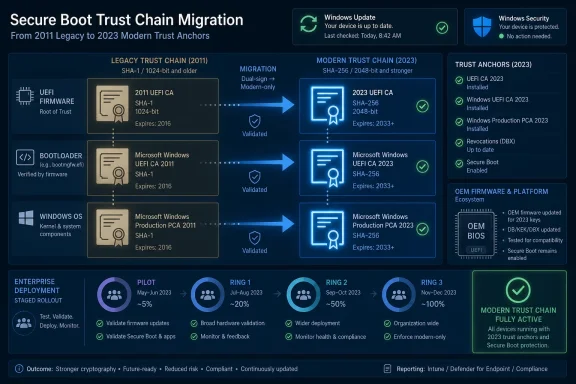
That simplicity is not accidental. Secure Boot lives below Windows, in the pre-boot chain where firmware decides which bootloaders and early-stage components are allowed to run. When that trust chain depends on certificates issued more than a decade ago, replacing them is not just another monthly cumulative update. It is a coordinated migration of the cryptographic foundation that tells modern PCs what is trustworthy before the operating system has even started.
Microsoft’s “stay the course” tone reflects the awkward reality of infrastructure security. The work is high consequence, but the user-facing drama should be low. If everything goes well, users do not see a security cliff; they see a routine Windows update, a status message in Windows Security, and perhaps a firmware update from their PC maker.
That is the argument Microsoft is making: the right way to complete this transition is not heroic last-minute intervention, but disciplined completion of a process already underway.
The catch is that trust has a lifecycle. The certificates that made Secure Boot practical across the Windows hardware ecosystem were never meant to be timeless. They were embedded across firmware, bootloaders, option ROMs, recovery environments, virtualization platforms, and vendor tooling. Over time, those certificates became less like ordinary credentials and more like shared plumbing.
That is why this migration is complex. Microsoft cannot simply declare the old trust anchors obsolete and move on. Devices need updated certificate databases. Firmware needs to tolerate the newer objects. Boot managers need to be updated. Third-party components that participate in the boot path need to remain compatible. Enterprise administrators need a way to inventory status, stage deployment, and avoid discovering edge cases on executive laptops or production servers.
The age of the 2011 certificates turns what might sound like a routine renewal into a global compatibility exercise. The point is not that Windows PCs will suddenly stop booting en masse the moment a calendar date passes. The point is that an aging trust chain becomes progressively less suitable as the basis for future boot security, revocation updates, and ecosystem hardening.
But “not a brick wall” does not mean “not urgent.” The longer a device remains on older Secure Boot trust anchors, the more likely it is to fall behind future protections that assume the newer certificate set is present. The risk is less dramatic than a universal boot failure and more familiar to administrators: drift, unsupported states, inconsistent telemetry, and a growing gap between the documented secure baseline and the devices actually in service.
That is why Microsoft’s guidance focuses on finishing the deployment rather than panic. The company is effectively telling customers that the window for orderly migration is still open, but that they should not mistake grace for irrelevance. In enterprise security, the most dangerous words are often “it still works.”
The best administrators will treat the deadline as a forcing function for inventory and validation, not as an invitation to gamble. Knowing which devices have the 2023 certificates, which need firmware, which are blocked by policy, and which are too old to be supported is now part of the job.
That model has obvious advantages. It uses the update channel users already know, avoids requiring them to enter firmware menus, and lets Microsoft pace deployment based on telemetry. It also reduces the chance that nontechnical users will follow random internet instructions and break a system that would otherwise have updated automatically.
But Secure Boot is not controlled by Windows alone. The firmware owns the Secure Boot databases, and the quality of firmware implementations varies by device generation, OEM, model, and support lifecycle. That is why Microsoft continues to point users toward OEM firmware updates when Windows Security indicates that a device is waiting on manufacturer support.
This is where the consumer story becomes less tidy. A modern PC from a vendor still maintaining its firmware should be in good shape. Older systems may not receive the firmware updates needed to support every part of the transition cleanly. That does not necessarily mean instant failure, but it does mean the user’s security posture may depend on whether the device maker still treats that model as alive.
For Windows enthusiasts, this is a familiar lesson wearing a security hat. Firmware is software. Firmware has bugs. Firmware has support windows. And when a security feature is anchored in firmware, the operating system cannot always save hardware that its manufacturer has effectively abandoned.
But flexibility is not the same thing as abdication. Microsoft can provide the update payloads and playbooks, but enterprise IT owns sequencing, exclusions, change windows, telemetry, and rollback planning. The administrator’s problem is not merely how to apply a certificate update; it is how to prove that the update applied correctly across a heterogeneous estate.
The recommended pattern is familiar because it is the pattern that works: pilot first, observe carefully, expand gradually, and avoid mixing too many unknowns in the same deployment wave. Secure Boot certificate deployment may involve Windows updates, boot manager updates, firmware updates, policy changes, and validation scripts. If all of those move at once across an entire fleet, troubleshooting becomes archaeology.
A staged approach lets administrators separate coincidence from causality. If a particular laptop model needs a firmware prerequisite, a pilot ring should reveal that. If a virtualization template behaves differently from physical hardware, the validation phase should catch it. If an estate has disabled Secure Boot on a subset of machines for historical reasons, inventory should expose that before the security team assumes coverage that does not exist.
The boring answer is still the correct one: build rings, collect signals, document blockers, and widen only when the data says the previous ring is healthy.
The catch is that the Windows Security app is not the center of the enterprise universe. Microsoft notes that it is disabled by default in enterprise environments, which is why IT-managed fleets need inventory and reporting through other channels. That distinction matters because administrators should not confuse a consumer-facing readiness signal with a fleet management strategy.
Still, the app’s existence is useful even for enterprise readers. It shows what Microsoft thinks the minimum viable user experience should be: a clear status, a clear blocker, and a clear next step. Enterprise tooling should aim for the same shape, even if the implementation uses event logs, Defender, Intune remediation, PowerShell, or a configuration management platform.
The goal is not just deployment. It is explainability. When a device fails to update, the help desk needs more than “Secure Boot problem.” It needs to know whether the issue is disabled Secure Boot, missing firmware support, policy deferral, unsupported Windows, a failed KEK update, or some other state that requires a different remedy.
That is especially important because Secure Boot issues can be intimidating to ordinary users. The phrase sounds like something that happens before the computer is even a computer, and in a sense that is true. Good tooling turns that anxiety into a checklist.
Microsoft’s guidance for Windows Server, Windows 365, and Azure Virtual Desktop reflects that reality. In these environments, Secure Boot certificate updates intersect with maintenance windows, cluster behavior, image management, recovery procedures, and change advisory boards. The work may be technically similar, but the blast radius is different.
Virtualization adds another layer because the “firmware” may be virtual firmware controlled by a platform rather than a physical OEM BIOS. That can simplify updates when the provider manages the substrate well, but it can also hide complexity behind templates, host settings, and generation-specific VM configurations. Administrators need to verify the actual state of deployed machines, not just the intended state of the image they started from.
Servers also tend to accumulate exceptions. Secure Boot may have been disabled years ago for a driver, an appliance-like workload, a backup tool, or a troubleshooting incident that nobody documented. Certificate deployment is therefore a chance to rediscover the gap between the security architecture on paper and the machines that actually boot every morning.
In that sense, the certificate transition is not merely maintenance. It is a forced audit of the pre-boot trust model.
This is also where users encounter the least elegant part of the Windows ecosystem. Windows Update may be polished, but firmware update practices remain uneven. Some OEMs deliver updates through Windows Update. Others rely on vendor utilities. Some publish clear support pages. Others bury the relevant BIOS package behind model numbers, service tags, and release notes that assume the reader already knows what they need.
That inconsistency matters because Secure Boot is a chain. A weak link in firmware support can delay or block an otherwise straightforward Windows-side deployment. Microsoft can detect and communicate some of those states, but it cannot force every old device model into a modern support lifecycle.
For consumers, the practical advice is blunt: install supported Windows updates, check Windows Security, and if firmware is flagged, use the manufacturer’s official support channel rather than a third-party driver site. For administrators, the advice is more demanding: inventory hardware models, map firmware versions, test OEM update mechanisms, and identify devices that may be aging out of a trustworthy baseline.
The certificate migration therefore becomes a referendum on hardware lifecycle management. Organizations that already know their fleet will treat this as another controlled change. Organizations that do not may discover that their asset inventory is less complete than their risk register implies.
The danger is not tool diversity. The danger is state diversity. If one team tracks firmware compliance in an endpoint management platform, another tracks Secure Boot status through scripts, and a third relies on update success reports, the organization may end up with several partial truths and no authoritative answer.
A Secure Boot certificate deployment should have a defined success state. That state should include whether Secure Boot is enabled, whether the expected 2023 certificates are present, whether the relevant firmware baseline is installed, whether updated boot components are in use, and whether any revocation-related steps are planned or deferred. Without that definition, “deployed” becomes a mood rather than a measurable condition.
This is where many organizations should resist the temptation to turn Microsoft’s guidance into a one-time campaign. Certificate refreshes, revocations, and platform trust changes will not end with this migration. The better outcome is to build repeatable visibility into Secure Boot state so that the next ecosystem-level change is less mysterious.
If the only way to know whether a fleet is ready is to run a heroic script during a deadline week, the process has already failed at the governance level. The tool matters less than the discipline around it.
But the win is real. Secure Boot exists to make early boot compromise harder. Aging certificates, stale revocation paths, and inconsistent firmware databases create room for attackers and complexity for defenders. Refreshing the trust chain keeps Windows aligned with modern signing infrastructure and preserves Microsoft’s ability to respond to boot-level threats.
That matters more in a world where attackers increasingly look below the operating system. Kernel protections, endpoint detection, identity controls, and application isolation all assume that the platform underneath them has not already been subverted. Secure Boot is not a magic shield, but it is part of the foundation on which the rest of the security stack stands.
The certificate update campaign also demonstrates a lesson that applies far beyond Windows. Cryptographic agility is not optional. Any system that cannot rotate keys, replace trust anchors, and revoke obsolete components eventually becomes brittle. The longer a credential is treated as permanent, the more painful its eventual replacement becomes.
Microsoft is now paying down that accumulated ecosystem debt. The bill is paperwork, firmware, testing, telemetry, and patience.
But that is not the same as a free pass. Devices that are not updated may remain in a degraded security posture. Unsupported Windows installations may not receive the needed updates. Older hardware may need firmware that never arrives. Enterprise devices may be blocked by policy, disabled Secure Boot, or management choices made years before this certificate refresh became visible.
Complacency is particularly tempting because the evidence of failure may be absent at first. A machine boots. Users log in. Monthly updates install. Nothing looks broken. Yet the device may still be outside the desired Secure Boot trust baseline, waiting to become a problem during a future boot manager change, revocation update, hardware refresh, or incident review.
That is why Microsoft’s phrase “stay the course” is more pointed than it sounds. The company is not telling administrators to begin from scratch. It is telling them not to stop at 80 percent because 80 percent feels quiet.
Security projects often die in the gap between “mostly done” and “provably complete.” This one should not.
For WindowsForum readers, the practical picture is sharper than the marketing language. Home users should keep Windows Update enabled, confirm Secure Boot is on, and pay attention to Windows Security if it flags missing certificate readiness or firmware requirements. Power users should resist unnecessary manual tinkering unless they understand the exact certificate database and boot path implications.
Administrators have a broader mandate. They should test across representative hardware, keep OEM firmware current, use deployment rings, validate with logs and inventory, and document exceptions. They should also treat unsupported hardware and unsupported Windows releases as business risks, not mere annoyances.
The following points are the operational core of Microsoft’s latest message:
 Microsoft Wants This to Feel Boring, Because Boring Is the Goal
The most important thing about Microsoft’s Secure Boot certificate update campaign is that it is supposed to look uneventful. For home users on supported Windows releases, the desired experience is almost comically simple: keep Windows Update running, keep Secure Boot enabled, and let the operating system and firmware ecosystem do the work.That simplicity is not accidental. Secure Boot lives below Windows, in the pre-boot chain where firmware decides which bootloaders and early-stage components are allowed to run. When that trust chain depends on certificates issued more than a decade ago, replacing them is not just another monthly cumulative update. It is a coordinated migration of the cryptographic foundation that tells modern PCs what is trustworthy before the operating system has even started.
Microsoft’s “stay the course” tone reflects the awkward reality of infrastructure security. The work is high consequence, but the user-facing drama should be low. If everything goes well, users do not see a security cliff; they see a routine Windows update, a status message in Windows Security, and perhaps a firmware update from their PC maker.
That is the argument Microsoft is making: the right way to complete this transition is not heroic last-minute intervention, but disciplined completion of a process already underway.
The 2011 Certificates Became Infrastructure, Not Just Credentials
Secure Boot arrived in the Windows 8 era as part of the industry’s shift toward UEFI firmware and stronger pre-boot integrity. The basic idea remains straightforward: the firmware checks signatures before allowing boot components to run. If the boot path has been tampered with, Secure Boot is meant to stop the system before malicious code can seize control beneath the operating system.The catch is that trust has a lifecycle. The certificates that made Secure Boot practical across the Windows hardware ecosystem were never meant to be timeless. They were embedded across firmware, bootloaders, option ROMs, recovery environments, virtualization platforms, and vendor tooling. Over time, those certificates became less like ordinary credentials and more like shared plumbing.
That is why this migration is complex. Microsoft cannot simply declare the old trust anchors obsolete and move on. Devices need updated certificate databases. Firmware needs to tolerate the newer objects. Boot managers need to be updated. Third-party components that participate in the boot path need to remain compatible. Enterprise administrators need a way to inventory status, stage deployment, and avoid discovering edge cases on executive laptops or production servers.
The age of the 2011 certificates turns what might sound like a routine renewal into a global compatibility exercise. The point is not that Windows PCs will suddenly stop booting en masse the moment a calendar date passes. The point is that an aging trust chain becomes progressively less suitable as the basis for future boot security, revocation updates, and ecosystem hardening.
The Real Deadline Is Operational, Not Theatrical
Security vendors and platform makers often talk about expiration dates as if they were cliff edges. In practice, the Secure Boot certificate transition is more nuanced. Microsoft has said devices with older certificates can continue functioning and receiving updates, which matters because fleets do not all move at the same pace.But “not a brick wall” does not mean “not urgent.” The longer a device remains on older Secure Boot trust anchors, the more likely it is to fall behind future protections that assume the newer certificate set is present. The risk is less dramatic than a universal boot failure and more familiar to administrators: drift, unsupported states, inconsistent telemetry, and a growing gap between the documented secure baseline and the devices actually in service.
That is why Microsoft’s guidance focuses on finishing the deployment rather than panic. The company is effectively telling customers that the window for orderly migration is still open, but that they should not mistake grace for irrelevance. In enterprise security, the most dangerous words are often “it still works.”
The best administrators will treat the deadline as a forcing function for inventory and validation, not as an invitation to gamble. Knowing which devices have the 2023 certificates, which need firmware, which are blocked by policy, and which are too old to be supported is now part of the job.
Windows Update Can Carry the Certificates, But Firmware Still Gets a Vote
For many consumer and lightly managed business PCs, the story is simple because Microsoft can deliver the newer Secure Boot certificates through regular Windows updates. That is the experience the company wants most people to have. If the machine is supported, Secure Boot is enabled, and updates are flowing normally, the user may not need to do anything beyond staying current.That model has obvious advantages. It uses the update channel users already know, avoids requiring them to enter firmware menus, and lets Microsoft pace deployment based on telemetry. It also reduces the chance that nontechnical users will follow random internet instructions and break a system that would otherwise have updated automatically.
But Secure Boot is not controlled by Windows alone. The firmware owns the Secure Boot databases, and the quality of firmware implementations varies by device generation, OEM, model, and support lifecycle. That is why Microsoft continues to point users toward OEM firmware updates when Windows Security indicates that a device is waiting on manufacturer support.
This is where the consumer story becomes less tidy. A modern PC from a vendor still maintaining its firmware should be in good shape. Older systems may not receive the firmware updates needed to support every part of the transition cleanly. That does not necessarily mean instant failure, but it does mean the user’s security posture may depend on whether the device maker still treats that model as alive.
For Windows enthusiasts, this is a familiar lesson wearing a security hat. Firmware is software. Firmware has bugs. Firmware has support windows. And when a security feature is anchored in firmware, the operating system cannot always save hardware that its manufacturer has effectively abandoned.
Enterprises Should Hear “Flexible” as “You Own the Outcome”
Microsoft’s enterprise guidance emphasizes flexibility: Intune, Group Policy, PowerShell, Azure automation, event logs, Microsoft Defender insights, Windows Autopatch reporting, and other deployment mechanisms can all play a role. That is a reasonable posture because no two fleets are identical. A school district, a hospital, a bank, and a manufacturer running ruggedized industrial PCs will not have the same constraints.But flexibility is not the same thing as abdication. Microsoft can provide the update payloads and playbooks, but enterprise IT owns sequencing, exclusions, change windows, telemetry, and rollback planning. The administrator’s problem is not merely how to apply a certificate update; it is how to prove that the update applied correctly across a heterogeneous estate.
The recommended pattern is familiar because it is the pattern that works: pilot first, observe carefully, expand gradually, and avoid mixing too many unknowns in the same deployment wave. Secure Boot certificate deployment may involve Windows updates, boot manager updates, firmware updates, policy changes, and validation scripts. If all of those move at once across an entire fleet, troubleshooting becomes archaeology.
A staged approach lets administrators separate coincidence from causality. If a particular laptop model needs a firmware prerequisite, a pilot ring should reveal that. If a virtualization template behaves differently from physical hardware, the validation phase should catch it. If an estate has disabled Secure Boot on a subset of machines for historical reasons, inventory should expose that before the security team assumes coverage that does not exist.
The boring answer is still the correct one: build rings, collect signals, document blockers, and widen only when the data says the previous ring is healthy.
The Windows Security App Is a Consumer Tool With Enterprise Lessons
Microsoft is leaning on the Windows Security app as a visible status surface for home users and small-business devices. That makes sense. Users need a place to see whether Secure Boot is enabled and whether the newer certificates have arrived. If a firmware update is required, the app can point them toward the problem rather than leaving them to guess.The catch is that the Windows Security app is not the center of the enterprise universe. Microsoft notes that it is disabled by default in enterprise environments, which is why IT-managed fleets need inventory and reporting through other channels. That distinction matters because administrators should not confuse a consumer-facing readiness signal with a fleet management strategy.
Still, the app’s existence is useful even for enterprise readers. It shows what Microsoft thinks the minimum viable user experience should be: a clear status, a clear blocker, and a clear next step. Enterprise tooling should aim for the same shape, even if the implementation uses event logs, Defender, Intune remediation, PowerShell, or a configuration management platform.
The goal is not just deployment. It is explainability. When a device fails to update, the help desk needs more than “Secure Boot problem.” It needs to know whether the issue is disabled Secure Boot, missing firmware support, policy deferral, unsupported Windows, a failed KEK update, or some other state that requires a different remedy.
That is especially important because Secure Boot issues can be intimidating to ordinary users. The phrase sounds like something that happens before the computer is even a computer, and in a sense that is true. Good tooling turns that anxiety into a checklist.
Servers and Virtual Desktops Make the Quiet Work Louder
Client PCs get most of the attention because there are more of them, but servers and virtual desktops make the Secure Boot certificate transition more operationally sensitive. A failed laptop update is disruptive. A failed server boot path can be an incident. A golden image with outdated assumptions can multiply risk across hundreds or thousands of virtual machines.Microsoft’s guidance for Windows Server, Windows 365, and Azure Virtual Desktop reflects that reality. In these environments, Secure Boot certificate updates intersect with maintenance windows, cluster behavior, image management, recovery procedures, and change advisory boards. The work may be technically similar, but the blast radius is different.
Virtualization adds another layer because the “firmware” may be virtual firmware controlled by a platform rather than a physical OEM BIOS. That can simplify updates when the provider manages the substrate well, but it can also hide complexity behind templates, host settings, and generation-specific VM configurations. Administrators need to verify the actual state of deployed machines, not just the intended state of the image they started from.
Servers also tend to accumulate exceptions. Secure Boot may have been disabled years ago for a driver, an appliance-like workload, a backup tool, or a troubleshooting incident that nobody documented. Certificate deployment is therefore a chance to rediscover the gap between the security architecture on paper and the machines that actually boot every morning.
In that sense, the certificate transition is not merely maintenance. It is a forced audit of the pre-boot trust model.
OEMs Are the Part of the Story Users Notice Last
Microsoft’s latest note gives OEM partners credit for firmware support, and they deserve some of it. The Secure Boot ecosystem cannot be refreshed from Redmond alone. PC vendors need to test firmware, ship updates, document affected models, and support users whose systems sit between “new enough to run Windows” and “old enough that nobody wants to touch the BIOS.”This is also where users encounter the least elegant part of the Windows ecosystem. Windows Update may be polished, but firmware update practices remain uneven. Some OEMs deliver updates through Windows Update. Others rely on vendor utilities. Some publish clear support pages. Others bury the relevant BIOS package behind model numbers, service tags, and release notes that assume the reader already knows what they need.
That inconsistency matters because Secure Boot is a chain. A weak link in firmware support can delay or block an otherwise straightforward Windows-side deployment. Microsoft can detect and communicate some of those states, but it cannot force every old device model into a modern support lifecycle.
For consumers, the practical advice is blunt: install supported Windows updates, check Windows Security, and if firmware is flagged, use the manufacturer’s official support channel rather than a third-party driver site. For administrators, the advice is more demanding: inventory hardware models, map firmware versions, test OEM update mechanisms, and identify devices that may be aging out of a trustworthy baseline.
The certificate migration therefore becomes a referendum on hardware lifecycle management. Organizations that already know their fleet will treat this as another controlled change. Organizations that do not may discover that their asset inventory is less complete than their risk register implies.
“Multiple Tools Can Lead to Success” Is True, But Only With One Source of Truth
Microsoft is right that there is no single correct deployment tool. Intune may be ideal for cloud-managed endpoints. Group Policy may still dominate in traditional domain environments. PowerShell can fill gaps. Azure automation may be useful for cloud-hosted workloads. Autopatch and Defender reporting can help organizations already invested in Microsoft’s management stack.The danger is not tool diversity. The danger is state diversity. If one team tracks firmware compliance in an endpoint management platform, another tracks Secure Boot status through scripts, and a third relies on update success reports, the organization may end up with several partial truths and no authoritative answer.
A Secure Boot certificate deployment should have a defined success state. That state should include whether Secure Boot is enabled, whether the expected 2023 certificates are present, whether the relevant firmware baseline is installed, whether updated boot components are in use, and whether any revocation-related steps are planned or deferred. Without that definition, “deployed” becomes a mood rather than a measurable condition.
This is where many organizations should resist the temptation to turn Microsoft’s guidance into a one-time campaign. Certificate refreshes, revocations, and platform trust changes will not end with this migration. The better outcome is to build repeatable visibility into Secure Boot state so that the next ecosystem-level change is less mysterious.
If the only way to know whether a fleet is ready is to run a heroic script during a deadline week, the process has already failed at the governance level. The tool matters less than the discipline around it.
The Security Win Is Real, Even If the User Never Sees It
It is easy to underrate this kind of work because the visible feature set does not change. No one gets a redesigned Start menu because a Secure Boot certificate was updated. No user brags that their KEK is healthier than it was last month. Platform security rarely gets applause when it prevents a future class of failures.But the win is real. Secure Boot exists to make early boot compromise harder. Aging certificates, stale revocation paths, and inconsistent firmware databases create room for attackers and complexity for defenders. Refreshing the trust chain keeps Windows aligned with modern signing infrastructure and preserves Microsoft’s ability to respond to boot-level threats.
That matters more in a world where attackers increasingly look below the operating system. Kernel protections, endpoint detection, identity controls, and application isolation all assume that the platform underneath them has not already been subverted. Secure Boot is not a magic shield, but it is part of the foundation on which the rest of the security stack stands.
The certificate update campaign also demonstrates a lesson that applies far beyond Windows. Cryptographic agility is not optional. Any system that cannot rotate keys, replace trust anchors, and revoke obsolete components eventually becomes brittle. The longer a credential is treated as permanent, the more painful its eventual replacement becomes.
Microsoft is now paying down that accumulated ecosystem debt. The bill is paperwork, firmware, testing, telemetry, and patience.
The Risk Is Not Panic, It Is Complacency
The worst reading of Microsoft’s reassurance would be to conclude that nothing needs doing. Yes, devices with older certificates may continue to function. Yes, many supported PCs will receive the newer certificates automatically. Yes, Microsoft has been rolling this out in a measured fashion rather than lighting up a global emergency siren.But that is not the same as a free pass. Devices that are not updated may remain in a degraded security posture. Unsupported Windows installations may not receive the needed updates. Older hardware may need firmware that never arrives. Enterprise devices may be blocked by policy, disabled Secure Boot, or management choices made years before this certificate refresh became visible.
Complacency is particularly tempting because the evidence of failure may be absent at first. A machine boots. Users log in. Monthly updates install. Nothing looks broken. Yet the device may still be outside the desired Secure Boot trust baseline, waiting to become a problem during a future boot manager change, revocation update, hardware refresh, or incident review.
That is why Microsoft’s phrase “stay the course” is more pointed than it sounds. The company is not telling administrators to begin from scratch. It is telling them not to stop at 80 percent because 80 percent feels quiet.
Security projects often die in the gap between “mostly done” and “provably complete.” This one should not.
The Last Mile Belongs to Inventory, Firmware, and Proof
The clearest lesson from the Secure Boot certificate rollout is that trust chain maintenance is now an operational discipline, not an occasional engineering event. The organizations best positioned to finish are not necessarily the ones with the fanciest tooling. They are the ones that know what they own, how it boots, who updates it, and how to prove its state.For WindowsForum readers, the practical picture is sharper than the marketing language. Home users should keep Windows Update enabled, confirm Secure Boot is on, and pay attention to Windows Security if it flags missing certificate readiness or firmware requirements. Power users should resist unnecessary manual tinkering unless they understand the exact certificate database and boot path implications.
Administrators have a broader mandate. They should test across representative hardware, keep OEM firmware current, use deployment rings, validate with logs and inventory, and document exceptions. They should also treat unsupported hardware and unsupported Windows releases as business risks, not mere annoyances.
The following points are the operational core of Microsoft’s latest message:
- Supported Windows devices that receive regular updates are generally expected to receive the newer Secure Boot certificates automatically when the device is ready.
- Secure Boot should remain enabled unless there is a documented and temporary operational reason to disable it.
- Some systems may require OEM firmware updates before the certificate transition can complete cleanly.
- Enterprise deployments should proceed through pilots and staged rollout rings rather than broad, unvalidated pushes.
- Fleet reporting should prove certificate, firmware, and Secure Boot status instead of relying only on Windows Update success.
- Older or unsupported devices may need replacement, exception handling, or vendor escalation if firmware support is unavailable.
References
- Primary source: Microsoft - Message Center
Published: 2026-06-24 10:00 PT
Best practices for deploying Secure Boot certificate updates - Windows IT Pro Blog
If you’re still on the path to finishing your Secure Boot certificate deployment, stay the course. Find proven best practices from those who have completed... techcommunity.microsoft.com
- Official source: support.microsoft.com
- Official source: learn.microsoft.com
Update Secure Boot Certificates for Windows Devices - Windows Client | Microsoft Learn
Update your Windows devices to maintain Secure Boot protection with 2023 certificates before they expire in June 2026.learn.microsoft.com - Official source: microsoft.com
Prepare your servers for Secure Boot certificate updates | Microsoft Windows Server Blog
The original Secure Boot certificates introduced in 2011 are approaching the end of their planned lifecycle, with expirations beginning in late June 2026.www.microsoft.com - Related coverage: windowslatest.com
Windows 11 Secure Boot update released to all, hours ahead of expiry
Microsoft has released Secure Boot 2023 certificates to all eligible Windows 11 and Windows 10 PC. Here's how to check if you got the update. www.windowslatest.com
- Related coverage: tomshardware.com
Microsoft is refreshing Secure Boot certificates to plug security holes before they happen — if you bought a PC last year, you should be set | Tom's Hardware
Be sure to keep Windows 11 systems updated to get refreshed security certificates.www.tomshardware.com

- Related coverage: windowscentral.com
Microsoft warns Secure Boot certificates will expire in 2026 | Windows Central
After 15 years, the original Secure Boot certificates that keep your PC secure during boot are expiring. Here's what you need to know.www.windowscentral.com - Related coverage: techradar.com
Still using Windows 10? Microsoft is automatically replacing Secure Boot certificates on older PCs ahead of expiration, so you might want to update ASAP | TechRadar
Secure Boot certificate upgrades is bad news for Windows 10www.techradar.com - Related coverage: pcgamer.com
Secure Boot certificates used by anti-cheat software are set to expire in June but new ones are already in the mail | PC Gamer
You shouldn't have to worry about expired certificates if you keep your PC up-to-date.www.pcgamer.com - Related coverage: tomsguide.com
Windows 10 users warned to upgrade now or risk a ‘degraded security state’ as Microsoft ends Secure Boot support | Tom's Guide
Support for Windows 10 officially ended in October 2025, and Microsoft says devices that don’t upgrade could enter a degraded security state — leaving them vulnerable to threats. Here’s what it means for your PC and how to protect it.www.tomsguide.com - Related coverage: uefi.org
- Related coverage: pcbug.org
- Related coverage: techriver.com