
After several years using Samsung Galaxy phones, a How-To Geek writer says he switched to Google’s Pixel 10 Pro because Google’s phones still offer the fastest Android updates, cleaner software, Pixel-first camera tools, Pixelsnap accessories, and daily-use AI features that Samsung’s otherwise mature Android ecosystem could not quite match. The argument is not that Samsung has fallen behind in the old, simple sense. It is that Google has turned the Pixel from a camera-first curiosity into the most coherent version of Android for users who want the operating system to feel like one product, not a negotiation among vendors, carriers, duplicate apps, and delayed rollouts.
For years, the easiest knock against Android was not that it lacked features, but that users could not reliably know when they would get them. Google announced a new Android release, Pixel owners got it first, and everyone else entered the familiar chain of OEM testing, carrier validation, regional rollout, and “soon.” Samsung has done more than almost anyone to narrow that gap, especially with its modern update commitments, but the gap still exists.
That is the first major lesson in this Samsung-to-Pixel switch story. Samsung’s Galaxy S21 FE was not abandoned; by Android standards, it was treated well. It received regular security patches, One UI updates, and major Android upgrades faster than many rival devices. The issue is that “good for Android” is no longer the same thing as “best possible Android.”
Pixel phones occupy a privileged lane because Google controls both the platform and the reference hardware. When Android 17 began rolling out to supported Pixel devices in June 2026, it reinforced the same pattern that has shaped the Pixel line for years: if you care about day-one Android access, the Pixel remains the cleanest bet. That is not merely about bragging rights on update day. It changes how a phone ages.
A Galaxy phone often improves through Samsung’s own One UI roadmap, which can be expansive and genuinely useful. A Pixel improves through Android itself, Pixel Drops, and Google’s increasingly aggressive AI services. Those updates arrive with less ambiguity, and for a certain kind of user, that predictability is a feature as important as battery life or screen brightness.
But capability and coherence are not the same thing. Samsung’s software gives users a deep cabinet of toggles, panels, modes, and customizations. Google’s Pixel UI tends to offer fewer knobs but a stronger sense that the phone was designed by one team with one visual language and one set of priorities.
That distinction matters more as phones become less about raw hardware and more about repeated micro-interactions. The notification shade, screenshots, app switching, search, voice input, call screening, camera launch speed, and lock screen all shape the feeling of a device. A phone can win a spec sheet and still feel less elegant in the hand.
The writer’s praise for Material You gets at this point. Google’s design language is no longer just a coat of paint; on Pixel phones, it is the organizing principle. The settings app, quick settings, home screen, widgets, and system surfaces feel like part of the same argument. Samsung’s One UI is broader and often more customizable, but the Pixel feels less assembled.
The stronger argument is cumulative. Pixel phones are becoming valuable because Google has made the default behavior smarter in more places. The phone identifies music in the background. It screens and structures calls. It turns screenshots into searchable memory. It receives platform features first. It takes reliable photos without asking the user to become a camera hobbyist.
That is how ecosystems become sticky. Not through one killer app, but through dozens of small conveniences that users stop noticing until they switch away. Apple has understood this for years. Google, after a decade of uneven Pixel positioning, finally appears to be applying the lesson to Android.
Samsung has its own ecosystem gravity, especially for users with Galaxy Watches, tablets, SmartThings devices, Windows integration habits, and deep One UI customization. But Google’s Pixel gravity is now less about hardware ownership and more about ambient software. The more Android becomes an AI delivery layer, the more that advantage matters.
Yet the Pixel camera still has a distinct appeal: it is built around trust. The user points, shoots, and expects the image to look good without much fiddling. That is not the same as having the most versatile pro mode, the most extreme zoom range, or the punchiest social-media-ready color profile.
The writer’s preference for the Pixel 10 Pro’s wide, ultrawide, and 5x telephoto setup reflects a practical standard. Most people do not want a mobile photography workstation. They want a camera that handles dinner, pets, kids, city streets, night scenes, documents, and travel without turning every shot into a settings exercise.
Google’s camera features also reveal how the company thinks about AI differently from Samsung. Samsung often emphasizes breadth: many modes, many settings, many ways to alter or generate an image. Google emphasizes intervention at the moment of capture and retrieval. Add Me, Camera Coach, and the broader Pixel photo workflow are less about showing off AI and more about hiding it inside ordinary behavior.
Magnetic accessory systems are not always about immediate need. Apple’s MagSafe became important because it standardized a physical behavior: snap, mount, charge, align, carry. Even users who do not rely on it daily understand what it is for. Google’s Pixelsnap appears to be chasing the same kind of muscle memory.
For Android users, this matters because accessory ecosystems have historically been fragmented. Samsung’s market share gives it plenty of case and charger support, but Android as a whole has rarely had a single magnetic accessory convention with broad consumer recognition. If Pixelsnap and Qi2-style alignment become normal across Pixel devices, Google gains a hardware ritual that complements its software rituals.
Still, the writer’s lukewarm reaction is a useful corrective. Pixelsnap is not why most Samsung users will switch. It is a supporting feature, and perhaps a future-facing one. Its value will rise if battery capacity fades, travel increases, car mounts improve, and accessory makers treat Pixel as a first-class platform.
Google Messages or Samsung Messages. Google Photos or Samsung Gallery. Google Wallet or Samsung Wallet. Google Assistant or Gemini versus Samsung’s own services. Samsung Internet or Chrome. SmartThings versus Google Home. Some users love this choice. Others experience it as friction.
Pixel phones reduce that ambiguity. They still ship with Google’s agenda, of course, and that agenda is hardly neutral. But at least the phone’s core services point in the same direction. For a user already living in Gmail, Google Photos, Drive, Maps, Assistant or Gemini, and Chrome, Pixel feels less like choosing an ecosystem than removing a translation layer.
That is where “almost zero bloatware” becomes less about storage space and more about confidence. The phone feels cleaner because it asks fewer identity questions. Samsung’s breadth remains a strength for many users, but Google’s narrower path increasingly feels like a premium experience rather than a limitation.
That is a healthier model for phone AI than the industry’s current obsession with spectacle. Consumers have seen plenty of demos in which a phone summarizes, rewrites, generates, erases, imagines, and plans. Some of that is useful. Much of it is still novelty, especially when the feature requires the user to change habits.
Now Playing works because it asks almost nothing. Pixel Screenshots works because people already screenshot things they want to remember. Voice typing works when it is fast and accurate enough that speaking feels less risky than tapping. Call-assist tools work because unwanted and inefficient calls are a universal annoyance.
This is where Google’s advantage is not merely technical. It has the data, services, and platform hooks to turn AI into system behavior. Samsung can partner, integrate, and build its own Galaxy AI layer, but Google controls the underlying Android direction. Pixel is where that direction becomes visible first.
Neither pole is objectively superior. A Galaxy Ultra owner who lives in DeX, S Pen notes, Good Lock modules, Secure Folder, and Samsung’s ecosystem would probably find a Pixel restrictive. A Pixel user who values day-one Android updates, automatic call tools, consistent design, and low-friction photography may find Samsung busy.
The mistake is pretending that both companies are chasing the same ideal. Samsung wants to make the most complete Android phone. Google wants to make the most Google Android phone. Those are different products, and the difference is becoming more pronounced as AI moves from app features into system-level behavior.
For WindowsForum readers, this split should sound familiar. It resembles the difference between a highly customized Windows workstation and a tightly managed, cloud-integrated device where the defaults are the product. Power users often want control. Mainstream users often want the machine to make fewer demands. The best device depends on which kind of compromise annoys you less.
That makes the software experience more important, not less. If a user might keep a phone for four, five, or six years, the question is not just what the device can do on launch day. It is whether the owner wants to live inside that software philosophy for the long haul.
The How-To Geek writer’s move from an S21 FE to a Pixel 10 Pro captures that generational shift. The old Android buying logic emphasized hardware value, camera quality, and whether the manufacturer would abandon the device too quickly. The new logic asks which company’s update cadence, AI layer, and system defaults the user trusts to improve over time.
That is a much harder contest for Samsung than the spec-sheet fight. Samsung can match or beat Google on hardware in many areas. It can promise long support. It can ship polished software. But it cannot be first-party Google, and for some Android users, that has become the deciding feature.
The Pixel 10 Pro, as described in this switch account, sounds different. The persuasive elements are not wild. They are updates, interface polish, camera reliability, magnetic accessories, call tools, voice typing, and screenshot memory. In other words, the Pixel’s case has become ordinary.
That is good news for Google. Mature consumer technology wins when the impressive becomes dependable. A phone does not need to surprise its owner every day. It needs to remove enough irritation that the owner starts taking its help for granted.
Samsung still has the broader empire. It sells more models, serves more price points, and provides more options for users who want Android with maximal hardware diversity. But Google has made Pixel feel like the place where Android’s future arrives first and with the least translation.
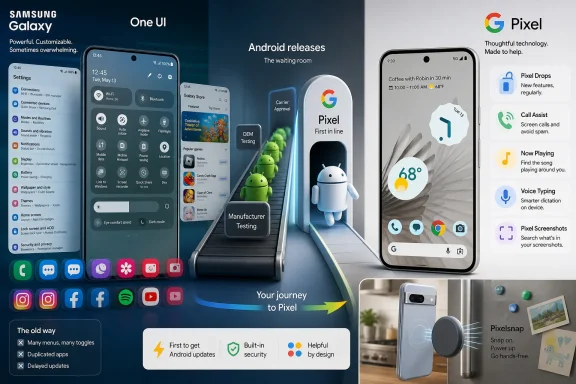 Google Wins by Owning the Waiting Room
For years, the easiest knock against Android was not that it lacked features, but that users could not reliably know when they would get them. Google announced a new Android release, Pixel owners got it first, and everyone else entered the familiar chain of OEM testing, carrier validation, regional rollout, and “soon.” Samsung has done more than almost anyone to narrow that gap, especially with its modern update commitments, but the gap still exists.That is the first major lesson in this Samsung-to-Pixel switch story. Samsung’s Galaxy S21 FE was not abandoned; by Android standards, it was treated well. It received regular security patches, One UI updates, and major Android upgrades faster than many rival devices. The issue is that “good for Android” is no longer the same thing as “best possible Android.”
Pixel phones occupy a privileged lane because Google controls both the platform and the reference hardware. When Android 17 began rolling out to supported Pixel devices in June 2026, it reinforced the same pattern that has shaped the Pixel line for years: if you care about day-one Android access, the Pixel remains the cleanest bet. That is not merely about bragging rights on update day. It changes how a phone ages.
A Galaxy phone often improves through Samsung’s own One UI roadmap, which can be expansive and genuinely useful. A Pixel improves through Android itself, Pixel Drops, and Google’s increasingly aggressive AI services. Those updates arrive with less ambiguity, and for a certain kind of user, that predictability is a feature as important as battery life or screen brightness.
Samsung Built the Better Android Department Store
It would be lazy to frame this as stock Android defeating Samsung bloat. That version of the story belongs to a much older Android era, when manufacturer skins were slow, ugly, and overloaded with gimmicks. Samsung’s modern One UI is not that. It is one of the most capable Android interfaces on the market, and Good Lock remains a power-user playground that Google has never really matched.But capability and coherence are not the same thing. Samsung’s software gives users a deep cabinet of toggles, panels, modes, and customizations. Google’s Pixel UI tends to offer fewer knobs but a stronger sense that the phone was designed by one team with one visual language and one set of priorities.
That distinction matters more as phones become less about raw hardware and more about repeated micro-interactions. The notification shade, screenshots, app switching, search, voice input, call screening, camera launch speed, and lock screen all shape the feeling of a device. A phone can win a spec sheet and still feel less elegant in the hand.
The writer’s praise for Material You gets at this point. Google’s design language is no longer just a coat of paint; on Pixel phones, it is the organizing principle. The settings app, quick settings, home screen, widgets, and system surfaces feel like part of the same argument. Samsung’s One UI is broader and often more customizable, but the Pixel feels less assembled.
The Real Pixel Exclusive Is Not One Feature
Pixel exclusives are often marketed as if each one is a reason to buy the phone by itself. Add Me. Camera Coach. Now Playing. Pixel Screenshots. Call Assist. Pixelsnap. Pixel Drops. Each feature gets its little moment in a launch video, and each can sound disposable when separated from the rest.The stronger argument is cumulative. Pixel phones are becoming valuable because Google has made the default behavior smarter in more places. The phone identifies music in the background. It screens and structures calls. It turns screenshots into searchable memory. It receives platform features first. It takes reliable photos without asking the user to become a camera hobbyist.
That is how ecosystems become sticky. Not through one killer app, but through dozens of small conveniences that users stop noticing until they switch away. Apple has understood this for years. Google, after a decade of uneven Pixel positioning, finally appears to be applying the lesson to Android.
Samsung has its own ecosystem gravity, especially for users with Galaxy Watches, tablets, SmartThings devices, Windows integration habits, and deep One UI customization. But Google’s Pixel gravity is now less about hardware ownership and more about ambient software. The more Android becomes an AI delivery layer, the more that advantage matters.
The Camera Is Still the Emotional Hook
The Pixel camera reputation has survived long enough to become almost mythological. In earlier generations, Google’s computational photography gave Pixel phones a clear identity even when the hardware lagged behind competitors. Today, Samsung, Apple, Xiaomi, Vivo, Oppo, and others all ship excellent cameras, and the old “Pixel wins photos” shorthand is too simplistic.Yet the Pixel camera still has a distinct appeal: it is built around trust. The user points, shoots, and expects the image to look good without much fiddling. That is not the same as having the most versatile pro mode, the most extreme zoom range, or the punchiest social-media-ready color profile.
The writer’s preference for the Pixel 10 Pro’s wide, ultrawide, and 5x telephoto setup reflects a practical standard. Most people do not want a mobile photography workstation. They want a camera that handles dinner, pets, kids, city streets, night scenes, documents, and travel without turning every shot into a settings exercise.
Google’s camera features also reveal how the company thinks about AI differently from Samsung. Samsung often emphasizes breadth: many modes, many settings, many ways to alter or generate an image. Google emphasizes intervention at the moment of capture and retrieval. Add Me, Camera Coach, and the broader Pixel photo workflow are less about showing off AI and more about hiding it inside ordinary behavior.
Pixelsnap Shows Google Still Wants Hardware Rituals
Pixelsnap is an interesting inclusion because it is not described as transformative. The writer expected Google’s magnetic accessory system to be a bigger deal and instead found it useful mostly in narrow routines, such as snapping the phone to a fridge while cooking. That mild disappointment is telling, but not fatal.Magnetic accessory systems are not always about immediate need. Apple’s MagSafe became important because it standardized a physical behavior: snap, mount, charge, align, carry. Even users who do not rely on it daily understand what it is for. Google’s Pixelsnap appears to be chasing the same kind of muscle memory.
For Android users, this matters because accessory ecosystems have historically been fragmented. Samsung’s market share gives it plenty of case and charger support, but Android as a whole has rarely had a single magnetic accessory convention with broad consumer recognition. If Pixelsnap and Qi2-style alignment become normal across Pixel devices, Google gains a hardware ritual that complements its software rituals.
Still, the writer’s lukewarm reaction is a useful corrective. Pixelsnap is not why most Samsung users will switch. It is a supporting feature, and perhaps a future-facing one. Its value will rise if battery capacity fades, travel increases, car mounts improve, and accessory makers treat Pixel as a first-class platform.
The Bloatware Debate Has Matured Into a Trust Debate
Samsung phones are no longer the caricature of duplicate apps and carrier clutter that haunted Android a decade ago. But the complaint has not disappeared; it has evolved. The issue is not merely that Samsung installs too much software. It is that the user must constantly decide whose version of Android they are using.Google Messages or Samsung Messages. Google Photos or Samsung Gallery. Google Wallet or Samsung Wallet. Google Assistant or Gemini versus Samsung’s own services. Samsung Internet or Chrome. SmartThings versus Google Home. Some users love this choice. Others experience it as friction.
Pixel phones reduce that ambiguity. They still ship with Google’s agenda, of course, and that agenda is hardly neutral. But at least the phone’s core services point in the same direction. For a user already living in Gmail, Google Photos, Drive, Maps, Assistant or Gemini, and Chrome, Pixel feels less like choosing an ecosystem than removing a translation layer.
That is where “almost zero bloatware” becomes less about storage space and more about confidence. The phone feels cleaner because it asks fewer identity questions. Samsung’s breadth remains a strength for many users, but Google’s narrower path increasingly feels like a premium experience rather than a limitation.
AI Features Become Persuasive When They Stop Performing
The most interesting Pixel features in this switch story are not the flashiest ones. Call Assist, Now Playing, voice typing, Comfort View, and Pixel Screenshots are all examples of AI or automation that quietly reduce effort. They do not require the user to open a chatbot and ask for magic. They simply sit in the flow of phone use.That is a healthier model for phone AI than the industry’s current obsession with spectacle. Consumers have seen plenty of demos in which a phone summarizes, rewrites, generates, erases, imagines, and plans. Some of that is useful. Much of it is still novelty, especially when the feature requires the user to change habits.
Now Playing works because it asks almost nothing. Pixel Screenshots works because people already screenshot things they want to remember. Voice typing works when it is fast and accurate enough that speaking feels less risky than tapping. Call-assist tools work because unwanted and inefficient calls are a universal annoyance.
This is where Google’s advantage is not merely technical. It has the data, services, and platform hooks to turn AI into system behavior. Samsung can partner, integrate, and build its own Galaxy AI layer, but Google controls the underlying Android direction. Pixel is where that direction becomes visible first.
Android Enthusiasts Are Being Pulled Toward Opposite Poles
The Samsung-versus-Pixel decision has become a philosophical split inside Android. Samsung is the power-user flagship: more features, more customization, more hardware variety, more aggressive displays, more device categories, and stronger retail presence. Pixel is the integrated reference device: fewer models, faster platform access, deeper Google services, and cleaner defaults.Neither pole is objectively superior. A Galaxy Ultra owner who lives in DeX, S Pen notes, Good Lock modules, Secure Folder, and Samsung’s ecosystem would probably find a Pixel restrictive. A Pixel user who values day-one Android updates, automatic call tools, consistent design, and low-friction photography may find Samsung busy.
The mistake is pretending that both companies are chasing the same ideal. Samsung wants to make the most complete Android phone. Google wants to make the most Google Android phone. Those are different products, and the difference is becoming more pronounced as AI moves from app features into system-level behavior.
For WindowsForum readers, this split should sound familiar. It resembles the difference between a highly customized Windows workstation and a tightly managed, cloud-integrated device where the defaults are the product. Power users often want control. Mainstream users often want the machine to make fewer demands. The best device depends on which kind of compromise annoys you less.
Seven Years of Updates Change the Upgrade Math
Long support windows have also changed the emotional stakes of buying a phone. A flagship is no longer a two-year object unless the user wants it to be. Google’s recent Pixels and Samsung’s recent flagships now compete in a world where seven years of updates can be part of the sales pitch.That makes the software experience more important, not less. If a user might keep a phone for four, five, or six years, the question is not just what the device can do on launch day. It is whether the owner wants to live inside that software philosophy for the long haul.
The How-To Geek writer’s move from an S21 FE to a Pixel 10 Pro captures that generational shift. The old Android buying logic emphasized hardware value, camera quality, and whether the manufacturer would abandon the device too quickly. The new logic asks which company’s update cadence, AI layer, and system defaults the user trusts to improve over time.
That is a much harder contest for Samsung than the spec-sheet fight. Samsung can match or beat Google on hardware in many areas. It can promise long support. It can ship polished software. But it cannot be first-party Google, and for some Android users, that has become the deciding feature.
The Pixel Pitch Has Finally Become Boring in the Right Way
Google spent years making Pixel phones feel experimental. Some models were beloved, some were compromised, and some seemed to exist mainly to show what Google’s software could do if the hardware survived long enough. That inconsistency made Pixels interesting, but it also made them hard to recommend without caveats.The Pixel 10 Pro, as described in this switch account, sounds different. The persuasive elements are not wild. They are updates, interface polish, camera reliability, magnetic accessories, call tools, voice typing, and screenshot memory. In other words, the Pixel’s case has become ordinary.
That is good news for Google. Mature consumer technology wins when the impressive becomes dependable. A phone does not need to surprise its owner every day. It needs to remove enough irritation that the owner starts taking its help for granted.
Samsung still has the broader empire. It sells more models, serves more price points, and provides more options for users who want Android with maximal hardware diversity. But Google has made Pixel feel like the place where Android’s future arrives first and with the least translation.
The Switch Was Really About Who Gets to Define Android
This Samsung-to-Pixel move is less a rejection of Galaxy phones than a vote for Google’s version of Android as the cleanest long-term bet.- Pixel phones remain the safest choice for users who want major Android releases and Pixel Drops as early as possible.
- Samsung’s One UI is still more customizable, but Pixel UI offers a more unified and less duplicated everyday experience.
- The Pixel camera advantage is now less about crushing rivals and more about reliable point-and-shoot confidence.
- Pixelsnap is useful but not yet a decisive reason to switch unless magnetic accessories already fit your routine.
- Google’s most persuasive Pixel exclusives are the quiet ones, including call assistance, Now Playing, voice typing, and Pixel Screenshots.
- The longer users keep phones, the more update cadence, software taste, and ecosystem direction matter.
References
- Primary source: How-To Geek
Published: 2026-06-24T19:10:13.221400
After years with Samsung, these Pixel exclusives finally convinced me to switch
Goodbye Samsung, hello Google. www.howtogeek.com
- Related coverage: androidcentral.com
Android 17 is making Pixel widgets vanish, but Google already has a fix in the works | Android Central
Some Android 17 users are reporting missing home screen widgets after updating.www.androidcentral.com - Related coverage: techradar.com
Android 17 is causing touchscreen issues for some Pixel owners — but there’s a potential workaround | TechRadar
Turn off triple-tapwww.techradar.com - Related coverage: arstechnica.com
Android 17 starts hitting Pixel phones and watches today - Ars Technica
Pixels will get their OTA in the coming weeks, but don't expect monumental changes.arstechnica.com - Related coverage: phonearena.com
Google reveals the Pixel devices getting Android 17 this summer - PhoneArena
This will be the last year that all Tensor-powered Pixel devices will be updated to the new Android build.www.phonearena.com - Related coverage: notebookcheck.net
Samsung's Galaxy S21 FE starts getting its last major One UI update - Notebookcheck News
Samsung's Galaxy S21 FE is now receiving its final major OS upgrade, the Android 16-based One UI 8.0. This update fulfills the company's original four-year software support promise, concluding the phone's feature update path. While the new software brings fresh designs to apps... www.notebookcheck.net
- Related coverage: tomsguide.com
Android 17 officially rolls out to Pixel devices with new features — screen reactions, bubbles, gaming mode, and more | Tom's Guide
Google's massive June 2026 software drop delivers Android 17's productivity and security overhauls to Pixel devices, alongside new Wear OS 7 features.www.tomsguide.com - Related coverage: cincodias.elpais.com
Android 17 ya está aquí: esto es lo más importante que ofrece y los Pixel compatibles | Smartphones | Smartlife | Cinco Días
Ya ha comenzado el despliegue de esta iteración del sistema operativo de la firma de Mountain View para sus teléfonos Pixel.cincodias.elpais.com - Related coverage: tdsynnex.com
