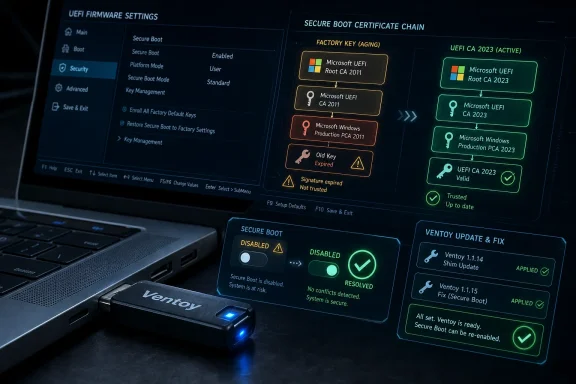
Ventoy 1.1.15 arrived on June 25, 2026, after two rapid-fire predecessor releases, adding support for Microsoft’s 2023 Secure Boot certificate transition and fixing a boot failure that could affect systems with Secure Boot disabled. The update looks like a small utility changelog, but it lands in the middle of a much larger Windows trust-chain migration. For anyone who maintains recovery sticks, Windows installers, Linux rescue media, or multi-boot toolkits, this is the sort of maintenance release that matters precisely because it is easy to underestimate.
Ventoy has long occupied an odd but useful place in the Windows ecosystem. Microsoft’s Media Creation Tool makes clean Windows installation media, Rufus gives power users a polished way to build customized installers, and Ventoy takes a different route: format the USB drive once, then drop ISO, WIM, IMG, VHD, or EFI files onto it like ordinary files. For technicians and enthusiasts who carry one drive with Windows setup media, Linux installers, partitioning tools, firmware utilities, and rescue environments, that model is hard to beat.
The catch is that modern booting is no longer just a question of whether the firmware can find an executable. Secure Boot means the firmware must also trust the boot path. A multiboot tool can be technically elegant and still fail at the first screen if its shim, keys, or policy do not line up with what the firmware now expects.
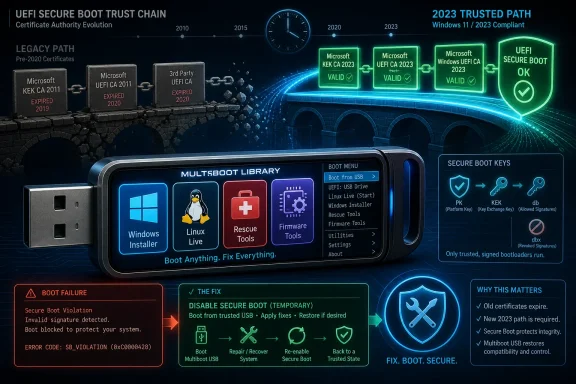
That is why Ventoy’s latest update is not merely “Windows 11 compatibility” in the casual sense. It is compatibility with Microsoft’s ongoing replacement of the old Secure Boot certificate set, much of which dates back to the Windows 8 era. Those certificates are reaching the end of their planned life, and the industry is being pushed toward the 2023 certificate chain before expiration turns from a calendar problem into a support problem.
Ventoy 1.1.14 was the meaningful pivot release, updating the Secure Boot shim file to address the UEFI CA 2023 issue. Ventoy 1.1.15 followed almost immediately, after 1.1.13 was pulled and replaced by corrected builds. That compressed release sequence tells its own story: the Secure Boot transition is not just a Microsoft servicing event, but a compatibility stress test for every tool that sits between firmware and operating system.
Ventoy changed the shape of that contest by treating the USB stick as a persistent boot library instead of disposable installation media. Users install Ventoy to the drive, copy over images, and select from a menu at boot. The appeal is obvious to anyone who has ever overwritten the same flash drive three times in an afternoon.
But Secure Boot complicates that model because Ventoy is not just handing off to one known Microsoft installer. It is brokering a menu of boot targets, some Windows, some Linux, some vendor tools, some rescue environments, and some homegrown images. The more flexible the boot chain, the more exposed it is to changes in trust policy.
That is the deeper significance of the new Secure Boot shim. A shim is a small first-stage loader commonly used to bridge the gap between firmware trust and downstream bootloaders. In a world where the firmware’s trust store is changing, the shim becomes a pressure point. If it is signed or validated through a chain the firmware no longer accepts, the whole multiboot dream stops before the menu appears.
Ventoy’s fix, therefore, is not cosmetic. It acknowledges that the key material embedded in real machines is changing under users’ feet. A tool that works perfectly on one laptop may fail on another depending on whether the firmware and Windows servicing pipeline have already installed the 2023 Secure Boot certificates.
From a security standpoint, this is not optional housekeeping. Secure Boot exists to make it harder for bootkits and other pre-OS malware to tamper with the earliest stages of system startup. If the trust chain stagnates forever, attackers get a longer runway to abuse old assumptions, old signing paths, and old deployment habits.
From an administrator’s standpoint, however, a mandatory trust-chain migration is exactly the kind of change that can produce edge-case pain. Firmware, OEM update cadence, Windows Update policy, recovery media, third-party boot tools, BitLocker, Linux shims, and out-of-band repair drives all intersect at boot. The fact that most consumer systems should update automatically does not eliminate the risk for fleets, labs, repair benches, or older machines.
This is where the word mandatory deserves nuance. Microsoft is not forcing every user to enable Secure Boot at every moment in every scenario, and Windows can still be installed or run in configurations where Secure Boot is not actively enforcing policy, depending on hardware and edition context. But the certificate transition itself is not a fad or optional feature update. It is a security infrastructure replacement that the Windows ecosystem has to absorb.
Ventoy’s release notes reflect that reality. The new build uses a new certificate authority path and requires users to enroll a new key on first boot. That enrollment step is familiar territory for users who have booted Ventoy under Secure Boot before, but it is still a moment where power-user convenience meets platform security.
Secure Boot is often disabled temporarily during troubleshooting. Technicians do it when booting older rescue environments, vendor firmware tools, specialized Linux distributions, cloned disks, or internal diagnostics that do not play nicely with a locked-down firmware policy. Enthusiasts do it when testing operating systems. Admins may do it in controlled lab environments when the point is repeatability rather than production-grade attestation.
A Ventoy failure in that mode is especially irritating because the user has already stepped outside the Secure Boot trust path. If Secure Boot is off, a failure suggests the problem is not an expected signature rejection but a regression in the utility’s own boot logic. For a tool whose pitch is “carry everything and boot anything,” that kind of startup bug cuts directly against the product’s value.
The fix also highlights a subtle truth about Secure Boot-era tooling. Supporting Secure Boot is not enough. Tools must behave predictably when Secure Boot is enabled, disabled, partially updated, factory-reset, misconfigured, or caught between old and new certificate stores. Real firmware states are messy, and repair environments encounter the mess before corporate dashboards do.
That is why Ventoy’s quick follow-up release matters. A pulled release, a corrected release, and then another rapid release is not elegant, but it is responsive. In the boot-media world, responsiveness counts because a broken USB utility tends to be discovered at the worst possible moment: when the operating system on the target machine is already unavailable.
Ventoy is playing a different game. It does not merely create a Windows installer; it creates a bootable container for many installers and utilities. That makes it less focused than Rufus for one-off Windows deployment, but more powerful for people who live out of their toolkit.
The Secure Boot certificate transition exposes the strengths and weaknesses of both approaches. A single-purpose Windows installer can track Microsoft’s media and boot-chain expectations more narrowly. A multiboot environment has to account for a wider range of images, bootloaders, and firmware behaviors.
That does not make Ventoy worse. It makes Ventoy more ambitious. The very features that make it attractive to WindowsForum readers — multiboot convenience, ISO copying without reformatting, broad OS support, legacy BIOS and UEFI support, Secure Boot handling, plugin-based customization — also mean it sits closer to the blast radius when firmware security policy changes.
This is why the new VTOY_SECURE_BOOT_POLICY option in the Global Control plugin is worth more attention than its dry name suggests. It gives users another lever for managing Secure Boot behavior in Ventoy’s environment. For casual users, that may be invisible. For technicians standardizing a USB drive they use across dozens of machines, it could be the difference between predictable behavior and a morning lost to firmware menus.
The key lesson is not that the Secure Boot update is bad. The lesson is that boot trust is foundational infrastructure, and foundational infrastructure tends to fail loudly when it fails at all. Users do not experience a certificate mismatch as an abstract PKI event. They experience it as a machine that will not boot, a recovery prompt, a BitLocker surprise, or a USB stick that worked yesterday and fails today.
For home users, the practical risk is confusion. They may see unfamiliar key enrollment prompts, firmware messages about invalid signatures, or boot media that behaves differently after Windows Update. For enthusiasts, the risk is wasted time diagnosing what looks like a Ventoy problem, a Windows ISO problem, or a firmware problem when it is actually the intersection of all three.
For enterprise IT, the stakes are higher. Recovery media is part of incident response, disaster recovery, imaging, and break-glass operations. If a fleet is updated to the 2023 Secure Boot certificate chain but the organization’s rescue USBs, deployment sticks, or custom WinPE environments are not tested against that new state, the failure will appear precisely when the organization is least patient.
Ventoy’s update is a reminder to test boot media on updated hardware, not just keep the executable current in a downloads folder. In the Secure Boot era, a boot stick is not “known good” because it booted last year. It is known good only if it boots on the firmware and certificate state you actually have now.
That model is not as frictionless as Microsoft-signed installation media, but it is arguably more honest. Secure Boot is supposed to be about explicit trust. If a tool wants to run before the operating system and outside the normal Windows boot chain, there should be a moment where the user or administrator decides whether to trust it.
The problem is that most PC users have never been taught to think of boot as a trust decision. They think of boot as a mechanical process: plug in USB, press a function key, select a device. Secure Boot turned that mechanical process into a policy decision, but the industry still often explains failures as if the machine were merely being stubborn.
Ventoy sits in that educational gap. Its Secure Boot enrollment flow is an extra step, but it also makes visible what is usually hidden: your firmware is choosing which code is allowed to run before Windows. With the 2023 certificate transition, that choice is being refreshed across the ecosystem.
There is a security tradeoff here. Users who casually enroll keys they do not understand can weaken the value of Secure Boot. Users who refuse all third-party boot paths can make recovery and diagnostics harder. The sensible middle ground is not panic or blind trust, but deliberate tooling: download from official sources, verify releases where practical, keep known-good media current, and test before relying on it.
Third-party boot utilities became symbols in that fight. Rufus, in particular, gained mainstream attention for exposing installer bypasses in a clean interface. Ventoy became part of the same ecosystem because it made it easy to carry modified installers, multiple Windows builds, and recovery tools on one drive.
But the Secure Boot certificate update is a different category of issue from a Windows 11 setup bypass. Bypassing a Microsoft Account prompt or a CPU check changes the installation experience. Updating the boot trust chain changes the cryptographic plumbing that allows firmware, boot managers, and operating systems to agree on what is trusted.
That difference matters because it should change user behavior. It is one thing to decide knowingly that an unsupported lab machine will run Windows 11 without meeting Microsoft’s preferred baseline. It is another to ignore certificate updates on a machine that depends on Secure Boot for platform integrity.
The irony is that tools associated with bypassing Windows 11 friction now have to become more disciplined about supporting Microsoft’s security foundation. Ventoy’s update is a good example. It preserves user flexibility not by rejecting the new Secure Boot world, but by adapting to it.
That does not make Ventoy immune from trust concerns. Boot software is powerful. A compromised boot utility, malicious fork, poisoned download, or careless key enrollment could do real damage. The fact that a tool is open source does not absolve users from sourcing it carefully.
But open-source boot utilities also offer a counterweight to platform centralization. Microsoft has legitimate reasons to harden the Windows boot chain, especially against bootkits and pre-OS tampering. Users and administrators have legitimate reasons to maintain flexible recovery and deployment tools that are not limited to Microsoft’s own Media Creation Tool.
The health of the ecosystem depends on both sides. Microsoft must rotate aging certificates and keep Secure Boot meaningful. Third-party tools must keep pace without encouraging users to disable security permanently. OEMs must ship firmware updates that do not turn a planned certificate transition into a support lottery.
Ventoy’s latest release is one small proof that this balance is possible. It does not ask users to abandon Secure Boot. It updates the shim, introduces more policy control, and fixes a no-Secure-Boot boot path that should have worked all along.
That testing should include both Secure Boot enabled and disabled states. It should include systems from major OEMs in your environment. It should include BitLocker-protected machines, because boot-path changes can trigger recovery scenarios even when nothing is “wrong” with Windows itself.
The same logic applies to enthusiasts, only at smaller scale. If you maintain a magic USB stick for family repairs, do not wait until a relative’s laptop is dead to discover your bootloader no longer passes firmware policy. Update Ventoy, boot it on a modern Windows 11 machine, enroll the new key if you choose to trust it, and confirm that your most important images still load.
This is also a good time to retire stale assumptions. A five-year-old rescue ISO may still be useful, but it may not be Secure Boot friendly. An old firmware updater may require Secure Boot to be disabled. A Windows installer that worked on a 2021 laptop may behave differently on a 2026 device that has newer certificates and stricter defaults.
The hard part is that none of this feels urgent until it is. Boot media is like backups: everyone agrees it matters, but many people only test it after the first failure. Microsoft’s certificate clock and Ventoy’s update provide a convenient excuse to do the unglamorous work now.
That makes the old advice to “just turn off Secure Boot” increasingly unsatisfying. Disabling Secure Boot can still be a valid diagnostic step, and Microsoft does not require every boot event to happen with Secure Boot actively enabled. But leaving it off permanently because a tool or ISO is outdated is a bad trade for most modern Windows systems.
The better approach is selective trust. Keep Secure Boot on where practical. Use updated tools that understand the 2023 certificate transition. Enroll third-party keys only when you understand what they are for. Maintain a fallback path for older media, but do not let the fallback become the default.
Ventoy’s new Global Control option fits neatly into that philosophy. More control is useful when it helps knowledgeable users align a tool with their security posture. It is dangerous only when treated as a magic checkbox divorced from the boot policy it affects.
This is where Windows enthusiasts can lead rather than complain. The community has enough experience to distinguish between Microsoft overreach, necessary security maintenance, and third-party tooling catching up with a platform change. This Ventoy release belongs mostly in the second and third categories.
Ventoy’s quick adaptation is good news for the people who depend on it, but it is also a warning shot. Microsoft’s Secure Boot certificate migration will continue to surface edge cases across firmware, recovery tools, Linux loaders, and Windows deployment workflows. The winners in that transition will not be the tools that pretend nothing changed; they will be the ones that keep user flexibility alive while respecting the new trust chain beneath every modern Windows boot.
 Ventoy Gets Pulled Into Microsoft’s Certificate Clock
Ventoy has long occupied an odd but useful place in the Windows ecosystem. Microsoft’s Media Creation Tool makes clean Windows installation media, Rufus gives power users a polished way to build customized installers, and Ventoy takes a different route: format the USB drive once, then drop ISO, WIM, IMG, VHD, or EFI files onto it like ordinary files. For technicians and enthusiasts who carry one drive with Windows setup media, Linux installers, partitioning tools, firmware utilities, and rescue environments, that model is hard to beat.The catch is that modern booting is no longer just a question of whether the firmware can find an executable. Secure Boot means the firmware must also trust the boot path. A multiboot tool can be technically elegant and still fail at the first screen if its shim, keys, or policy do not line up with what the firmware now expects.
That is why Ventoy’s latest update is not merely “Windows 11 compatibility” in the casual sense. It is compatibility with Microsoft’s ongoing replacement of the old Secure Boot certificate set, much of which dates back to the Windows 8 era. Those certificates are reaching the end of their planned life, and the industry is being pushed toward the 2023 certificate chain before expiration turns from a calendar problem into a support problem.
Ventoy 1.1.14 was the meaningful pivot release, updating the Secure Boot shim file to address the UEFI CA 2023 issue. Ventoy 1.1.15 followed almost immediately, after 1.1.13 was pulled and replaced by corrected builds. That compressed release sequence tells its own story: the Secure Boot transition is not just a Microsoft servicing event, but a compatibility stress test for every tool that sits between firmware and operating system.
The Old “Just Boot the ISO” Era Is Over
For years, bootable USB utilities competed mostly on convenience. Could they write the ISO correctly? Could they preserve data? Could they handle UEFI and legacy BIOS? Could they bypass Windows 11’s TPM, CPU, Secure Boot, and Microsoft Account friction for lab installs or unsupported machines?Ventoy changed the shape of that contest by treating the USB stick as a persistent boot library instead of disposable installation media. Users install Ventoy to the drive, copy over images, and select from a menu at boot. The appeal is obvious to anyone who has ever overwritten the same flash drive three times in an afternoon.
But Secure Boot complicates that model because Ventoy is not just handing off to one known Microsoft installer. It is brokering a menu of boot targets, some Windows, some Linux, some vendor tools, some rescue environments, and some homegrown images. The more flexible the boot chain, the more exposed it is to changes in trust policy.
That is the deeper significance of the new Secure Boot shim. A shim is a small first-stage loader commonly used to bridge the gap between firmware trust and downstream bootloaders. In a world where the firmware’s trust store is changing, the shim becomes a pressure point. If it is signed or validated through a chain the firmware no longer accepts, the whole multiboot dream stops before the menu appears.
Ventoy’s fix, therefore, is not cosmetic. It acknowledges that the key material embedded in real machines is changing under users’ feet. A tool that works perfectly on one laptop may fail on another depending on whether the firmware and Windows servicing pipeline have already installed the 2023 Secure Boot certificates.
Microsoft’s Mandatory Update Is a Security Necessity With Operational Side Effects
Microsoft’s Secure Boot certificate rotation has a straightforward rationale. The original certificates were issued in 2011 and were never meant to be permanent infrastructure. As they approach expiration in 2026, Windows devices need updated trust anchors so bootloaders can continue to be verified and serviced.From a security standpoint, this is not optional housekeeping. Secure Boot exists to make it harder for bootkits and other pre-OS malware to tamper with the earliest stages of system startup. If the trust chain stagnates forever, attackers get a longer runway to abuse old assumptions, old signing paths, and old deployment habits.
From an administrator’s standpoint, however, a mandatory trust-chain migration is exactly the kind of change that can produce edge-case pain. Firmware, OEM update cadence, Windows Update policy, recovery media, third-party boot tools, BitLocker, Linux shims, and out-of-band repair drives all intersect at boot. The fact that most consumer systems should update automatically does not eliminate the risk for fleets, labs, repair benches, or older machines.
This is where the word mandatory deserves nuance. Microsoft is not forcing every user to enable Secure Boot at every moment in every scenario, and Windows can still be installed or run in configurations where Secure Boot is not actively enforcing policy, depending on hardware and edition context. But the certificate transition itself is not a fad or optional feature update. It is a security infrastructure replacement that the Windows ecosystem has to absorb.
Ventoy’s release notes reflect that reality. The new build uses a new certificate authority path and requires users to enroll a new key on first boot. That enrollment step is familiar territory for users who have booted Ventoy under Secure Boot before, but it is still a moment where power-user convenience meets platform security.
The Boot Bug Matters Because Technicians Disable Secure Boot for Good Reasons
The other notable change in Ventoy 1.1.14 and the subsequent 1.1.15 release is a fix for a boot issue when Secure Boot is disabled in UEFI firmware. At first glance, that sounds less dramatic than support for Microsoft’s new Secure Boot certificates. In practice, it may be the fix that saves more time on repair benches.Secure Boot is often disabled temporarily during troubleshooting. Technicians do it when booting older rescue environments, vendor firmware tools, specialized Linux distributions, cloned disks, or internal diagnostics that do not play nicely with a locked-down firmware policy. Enthusiasts do it when testing operating systems. Admins may do it in controlled lab environments when the point is repeatability rather than production-grade attestation.
A Ventoy failure in that mode is especially irritating because the user has already stepped outside the Secure Boot trust path. If Secure Boot is off, a failure suggests the problem is not an expected signature rejection but a regression in the utility’s own boot logic. For a tool whose pitch is “carry everything and boot anything,” that kind of startup bug cuts directly against the product’s value.
The fix also highlights a subtle truth about Secure Boot-era tooling. Supporting Secure Boot is not enough. Tools must behave predictably when Secure Boot is enabled, disabled, partially updated, factory-reset, misconfigured, or caught between old and new certificate stores. Real firmware states are messy, and repair environments encounter the mess before corporate dashboards do.
That is why Ventoy’s quick follow-up release matters. A pulled release, a corrected release, and then another rapid release is not elegant, but it is responsive. In the boot-media world, responsiveness counts because a broken USB utility tends to be discovered at the worst possible moment: when the operating system on the target machine is already unavailable.
Rufus Still Owns the Windows Installer Hack, but Ventoy Owns the Bag of Tricks
The comparison to Rufus is unavoidable, partly because Rufus has become the default shorthand for “make a Windows installer that does what Microsoft’s tool will not.” Rufus offers visible toggles to remove Windows 11 hardware checks, skip online-account pressure, create local accounts, and tailor the installer experience. It is excellent at turning one ISO into one deliberately configured USB installer.Ventoy is playing a different game. It does not merely create a Windows installer; it creates a bootable container for many installers and utilities. That makes it less focused than Rufus for one-off Windows deployment, but more powerful for people who live out of their toolkit.
The Secure Boot certificate transition exposes the strengths and weaknesses of both approaches. A single-purpose Windows installer can track Microsoft’s media and boot-chain expectations more narrowly. A multiboot environment has to account for a wider range of images, bootloaders, and firmware behaviors.
That does not make Ventoy worse. It makes Ventoy more ambitious. The very features that make it attractive to WindowsForum readers — multiboot convenience, ISO copying without reformatting, broad OS support, legacy BIOS and UEFI support, Secure Boot handling, plugin-based customization — also mean it sits closer to the blast radius when firmware security policy changes.
This is why the new VTOY_SECURE_BOOT_POLICY option in the Global Control plugin is worth more attention than its dry name suggests. It gives users another lever for managing Secure Boot behavior in Ventoy’s environment. For casual users, that may be invisible. For technicians standardizing a USB drive they use across dozens of machines, it could be the difference between predictable behavior and a morning lost to firmware menus.
The HP Boot Scare Was a Preview, Not an Isolated Incident
Reports of severe boot trouble on some HP systems after updated Secure Boot 2023 keys began rolling out gave the broader Windows community a preview of what this transition can look like when it collides with OEM reality. Secure Boot is a standard, but the implementation path crosses firmware vendors, device manufacturers, Microsoft servicing, and end-user configuration. There are many places where an assumption can break.The key lesson is not that the Secure Boot update is bad. The lesson is that boot trust is foundational infrastructure, and foundational infrastructure tends to fail loudly when it fails at all. Users do not experience a certificate mismatch as an abstract PKI event. They experience it as a machine that will not boot, a recovery prompt, a BitLocker surprise, or a USB stick that worked yesterday and fails today.
For home users, the practical risk is confusion. They may see unfamiliar key enrollment prompts, firmware messages about invalid signatures, or boot media that behaves differently after Windows Update. For enthusiasts, the risk is wasted time diagnosing what looks like a Ventoy problem, a Windows ISO problem, or a firmware problem when it is actually the intersection of all three.
For enterprise IT, the stakes are higher. Recovery media is part of incident response, disaster recovery, imaging, and break-glass operations. If a fleet is updated to the 2023 Secure Boot certificate chain but the organization’s rescue USBs, deployment sticks, or custom WinPE environments are not tested against that new state, the failure will appear precisely when the organization is least patient.
Ventoy’s update is a reminder to test boot media on updated hardware, not just keep the executable current in a downloads folder. In the Secure Boot era, a boot stick is not “known good” because it booted last year. It is known good only if it boots on the firmware and certificate state you actually have now.
The New Key Enrollment Is the Price of Keeping Trust Local
Ventoy’s note that users need to enroll the new key on first boot may worry some readers, but it is consistent with how Ventoy has handled Secure Boot support. Instead of pretending that a third-party multiboot tool is part of Microsoft’s ordinary Windows boot path, Ventoy makes the user participate in trusting its loader.That model is not as frictionless as Microsoft-signed installation media, but it is arguably more honest. Secure Boot is supposed to be about explicit trust. If a tool wants to run before the operating system and outside the normal Windows boot chain, there should be a moment where the user or administrator decides whether to trust it.
The problem is that most PC users have never been taught to think of boot as a trust decision. They think of boot as a mechanical process: plug in USB, press a function key, select a device. Secure Boot turned that mechanical process into a policy decision, but the industry still often explains failures as if the machine were merely being stubborn.
Ventoy sits in that educational gap. Its Secure Boot enrollment flow is an extra step, but it also makes visible what is usually hidden: your firmware is choosing which code is allowed to run before Windows. With the 2023 certificate transition, that choice is being refreshed across the ecosystem.
There is a security tradeoff here. Users who casually enroll keys they do not understand can weaken the value of Secure Boot. Users who refuse all third-party boot paths can make recovery and diagnostics harder. The sensible middle ground is not panic or blind trust, but deliberate tooling: download from official sources, verify releases where practical, keep known-good media current, and test before relying on it.
Windows 11’s Requirements Debate Keeps Bleeding Into Boot Media
No discussion of Rufus, Ventoy, and Windows 11 can avoid the requirements debate. Microsoft made TPM 2.0, modern CPUs, UEFI, and Secure Boot capability central to Windows 11’s official hardware line. The result was a long-running tug of war between Microsoft’s security baseline and users who wanted to keep older hardware useful.Third-party boot utilities became symbols in that fight. Rufus, in particular, gained mainstream attention for exposing installer bypasses in a clean interface. Ventoy became part of the same ecosystem because it made it easy to carry modified installers, multiple Windows builds, and recovery tools on one drive.
But the Secure Boot certificate update is a different category of issue from a Windows 11 setup bypass. Bypassing a Microsoft Account prompt or a CPU check changes the installation experience. Updating the boot trust chain changes the cryptographic plumbing that allows firmware, boot managers, and operating systems to agree on what is trusted.
That difference matters because it should change user behavior. It is one thing to decide knowingly that an unsupported lab machine will run Windows 11 without meeting Microsoft’s preferred baseline. It is another to ignore certificate updates on a machine that depends on Secure Boot for platform integrity.
The irony is that tools associated with bypassing Windows 11 friction now have to become more disciplined about supporting Microsoft’s security foundation. Ventoy’s update is a good example. It preserves user flexibility not by rejecting the new Secure Boot world, but by adapting to it.
The Open-Source Advantage Is Speed, Not Immunity
Ventoy’s open-source nature gives it an advantage in visibility and iteration. Users can inspect releases, file issues, and watch the project respond. The rapid progression from 1.1.13 to 1.1.14 to 1.1.15 is messy in the way active software projects are messy: a problem appears, a release is pulled, fixes land, and the project moves.That does not make Ventoy immune from trust concerns. Boot software is powerful. A compromised boot utility, malicious fork, poisoned download, or careless key enrollment could do real damage. The fact that a tool is open source does not absolve users from sourcing it carefully.
But open-source boot utilities also offer a counterweight to platform centralization. Microsoft has legitimate reasons to harden the Windows boot chain, especially against bootkits and pre-OS tampering. Users and administrators have legitimate reasons to maintain flexible recovery and deployment tools that are not limited to Microsoft’s own Media Creation Tool.
The health of the ecosystem depends on both sides. Microsoft must rotate aging certificates and keep Secure Boot meaningful. Third-party tools must keep pace without encouraging users to disable security permanently. OEMs must ship firmware updates that do not turn a planned certificate transition into a support lottery.
Ventoy’s latest release is one small proof that this balance is possible. It does not ask users to abandon Secure Boot. It updates the shim, introduces more policy control, and fixes a no-Secure-Boot boot path that should have worked all along.
The Admin Playbook Now Starts Before the Machine Fails
For IT pros, the right response to Ventoy 1.1.15 is not simply “download the new zip.” The right response is to treat boot media as inventory. If your organization uses Ventoy, Rufus-created installers, WinPE sticks, Linux rescue media, firmware update ISOs, backup recovery environments, or vendor diagnostics, those tools should be tested against machines that already carry the 2023 Secure Boot certificates.That testing should include both Secure Boot enabled and disabled states. It should include systems from major OEMs in your environment. It should include BitLocker-protected machines, because boot-path changes can trigger recovery scenarios even when nothing is “wrong” with Windows itself.
The same logic applies to enthusiasts, only at smaller scale. If you maintain a magic USB stick for family repairs, do not wait until a relative’s laptop is dead to discover your bootloader no longer passes firmware policy. Update Ventoy, boot it on a modern Windows 11 machine, enroll the new key if you choose to trust it, and confirm that your most important images still load.
This is also a good time to retire stale assumptions. A five-year-old rescue ISO may still be useful, but it may not be Secure Boot friendly. An old firmware updater may require Secure Boot to be disabled. A Windows installer that worked on a 2021 laptop may behave differently on a 2026 device that has newer certificates and stricter defaults.
The hard part is that none of this feels urgent until it is. Boot media is like backups: everyone agrees it matters, but many people only test it after the first failure. Microsoft’s certificate clock and Ventoy’s update provide a convenient excuse to do the unglamorous work now.
The USB Stick Is Now Part of the Security Boundary
The most concrete lesson from Ventoy’s update is that removable boot media is no longer outside the security model. It is part of it. The firmware has opinions, Windows has opinions, Microsoft’s certificate authorities have lifetimes, and third-party utilities have to negotiate their place in that chain.That makes the old advice to “just turn off Secure Boot” increasingly unsatisfying. Disabling Secure Boot can still be a valid diagnostic step, and Microsoft does not require every boot event to happen with Secure Boot actively enabled. But leaving it off permanently because a tool or ISO is outdated is a bad trade for most modern Windows systems.
The better approach is selective trust. Keep Secure Boot on where practical. Use updated tools that understand the 2023 certificate transition. Enroll third-party keys only when you understand what they are for. Maintain a fallback path for older media, but do not let the fallback become the default.
Ventoy’s new Global Control option fits neatly into that philosophy. More control is useful when it helps knowledgeable users align a tool with their security posture. It is dangerous only when treated as a magic checkbox divorced from the boot policy it affects.
This is where Windows enthusiasts can lead rather than complain. The community has enough experience to distinguish between Microsoft overreach, necessary security maintenance, and third-party tooling catching up with a platform change. This Ventoy release belongs mostly in the second and third categories.
The Ventoy 1.1.15 Lesson Is Bigger Than One Multiboot Tool
Ventoy’s update is easy to summarize, but the practical implications deserve a sharper checklist. The release is less about flashy new features than keeping a critical utility usable as Windows devices move through a once-in-a-generation Secure Boot certificate transition.- Ventoy 1.1.15 follows a short sequence of 1.1.13 and 1.1.14 releases, with the earlier problematic build pulled and corrected quickly.
- The central change is an updated Secure Boot shim intended to work with Microsoft’s 2023 UEFI certificate path.
- Users booting Ventoy with Secure Boot may need to enroll a new key the first time they use the updated release.
- The update adds a VTOY_SECURE_BOOT_POLICY option in the Global Control plugin for more granular Secure Boot behavior.
- The release fixes a startup failure that could occur when Secure Boot was disabled in UEFI firmware.
- Anyone who relies on Ventoy for Windows installers, recovery images, Linux tools, or field diagnostics should update and test the drive on hardware that has received the 2023 Secure Boot certificates.
Ventoy’s quick adaptation is good news for the people who depend on it, but it is also a warning shot. Microsoft’s Secure Boot certificate migration will continue to surface edge cases across firmware, recovery tools, Linux loaders, and Windows deployment workflows. The winners in that transition will not be the tools that pretend nothing changed; they will be the ones that keep user flexibility alive while respecting the new trust chain beneath every modern Windows boot.
References
- Primary source: Neowin
Published: 2026-06-25T09:10:09.460015
Rufus alternative Ventoy now supports Windows 11's mandatory update, fixes major boot bug | Neowin
Rufus is a popular utility used for installing Windows 11. Ventoy is a similar app, and it has received new important updates. www.neowin.net
- Official source: learn.microsoft.com
Update Secure Boot Certificates for Windows Devices - Windows Client | Microsoft Learn
Update your Windows devices to maintain Secure Boot protection with 2023 certificates before they expire in June 2026.learn.microsoft.com - Official source: support.microsoft.com
Surface Secure Boot Certificates | Microsoft Support
Secure Boot in UEFI firmware verifies pre-boot software using trusted certificates. Microsoft will update expiring Windows Secure Boot certificates starting June 2026 to maintain device protection.support.microsoft.com - Related coverage: windowscentral.com
Microsoft warns Secure Boot certificates will expire in 2026 | Windows Central
After 15 years, the original Secure Boot certificates that keep your PC secure during boot are expiring. Here's what you need to know.www.windowscentral.com - Related coverage: ventoy.net
Ventoy
Ventoy is an open source tool to create bootable USB drive for ISO files. With ventoy, you don't need to format the disk again and again, you just need to copy the iso file to the USB drive and boot it.www.ventoy.net
- Related coverage: windowslatest.com
Windows 11 Secure Boot update released to all, hours ahead of expiry
Microsoft has released Secure Boot 2023 certificates to all eligible Windows 11 and Windows 10 PC. Here's how to check if you got the update. www.windowslatest.com
- Related coverage: notebookcheck.net
Microsoft sets 2026 deadline for Secure Boot certificate expiration - Notebookcheck News
Microsoft has issued new guidance warning that 2011 Secure Boot certificates begin expiring in June 2026. Windows updates are rolling out 2023 replacement certificates, with some PCs requiring OEM firmware updates. www.notebookcheck.net
- Related coverage: tomshardware.com
Microsoft's Secure Boot UEFI bootloader signing key expires in September, posing problems for Linux users | Tom's Hardware
A new key was issued in 2023, but it might not be well-supported ahead of the original key's expiration.www.tomshardware.com - Related coverage: pcgamer.com
Secure Boot certificates used by anti-cheat software are set to expire in June but new ones are already in the mail | PC Gamer
You shouldn't have to worry about expired certificates if you keep your PC up-to-date.www.pcgamer.com - Related coverage: media.defense.gov
- Official source: github.com
Releases · ventoy/Ventoy · GitHub
A new bootable USB solution. Contribute to ventoy/Ventoy development by creating an account on GitHub. github.com