
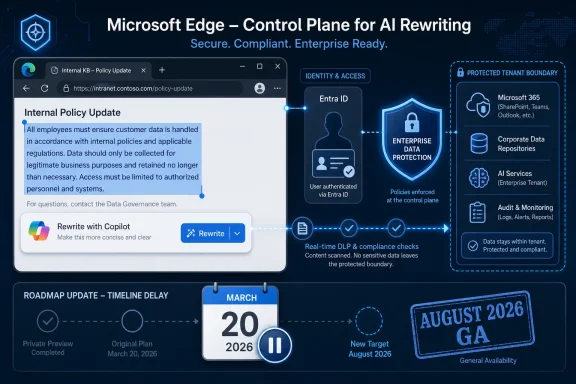
Microsoft is upgrading Rewrite by Copilot in Microsoft Edge so Entra ID–signed-in commercial users receive enterprise data protection when editing text on web pages, but the feature remains paused after a March 20, 2026 release delay and is now listed for August 2026 general availability. That makes this a small browser feature with an outsized governance story. Microsoft is not merely adding AI polish to a text box; it is trying to make the browser a compliant place to perform work that used to happen in Word, Outlook, Teams, and increasingly, nowhere in particular. The pause matters because it shows the hard part of enterprise AI is no longer the demo — it is the data boundary.
Rewrite by Copilot is deceptively modest. A user types into a field on an open web page, invokes Copilot, and asks it to adjust tone, format, or length. That sounds like the kind of convenience feature vendors now sprinkle across every surface in the productivity stack.
But the browser is not just another text editor. It is where employees draft customer responses in SaaS tools, write incident updates in ticketing systems, paste contract language into portals, fill in HR systems, and perform the messy connective work that never fit neatly inside Office. If Microsoft wants Copilot to be ambient, Edge is the natural battlefield.
The problem is that ambient AI turns every text box into a potential compliance event. A rewrite request can contain customer names, financial figures, unreleased product plans, medical information, legal notes, source snippets, or internal strategy. In consumer contexts, that may be a privacy concern. In enterprise contexts, it is a records, retention, data loss prevention, audit, and tenant-boundary concern.
That is why this roadmap item is more important than its surface description suggests. Microsoft is saying that when Rewrite becomes available under this update, users signed in to Edge with Microsoft Entra ID will have enterprise data protection. In plain English, Microsoft is trying to make a browser-level Copilot edit behave less like a public chatbot and more like a managed Microsoft 365 workload.
For customers, that creates an awkward but familiar Microsoft 365 reality: the product surface exists in concept, the roadmap says it is in development, and IT teams are left to plan around a moving target. In a consumer browser, a delayed rewrite tool is an annoyance. In a regulated enterprise, a delayed compliance upgrade can determine whether a feature is allowed, blocked, or ignored.
The delay also undercuts the idea that AI features can be shipped everywhere first and governed later. For Microsoft, Edge has become a showcase for Copilot integration, but enterprise customers buy governance as much as capability. If a feature cannot satisfy that governance story, the feature is not truly enterprise-ready, no matter how clever the model output looks.
This is the recurring tension of Microsoft’s AI era. The company wants Copilot to feel ubiquitous, but ubiquity collides with the reality that enterprises do not treat every surface equally. A prompt typed into a browser, a prompt sent from Word, and a prompt submitted through a web sidebar may look similar to an end user. To a compliance officer, they can be very different events.
This is not merely branding. Entra ID is the identity layer that lets Microsoft determine whether a person is operating as a commercial user inside a managed tenant. Without that identity context, the browser cannot reliably distinguish between someone rewriting a personal social post and someone rewriting a privileged customer escalation inside a company system.
For admins, the appeal is obvious. They do not want to train users to remember which AI text box is safe in which context. They want identity, policy, and product design to do that work. The more Copilot becomes embedded into Edge, the more critical it becomes that work identity remains the gatekeeper.
The danger is ambiguity. Many employees operate with multiple browser profiles, multiple Microsoft accounts, and a mix of personal and corporate services in the same day. Microsoft’s strongest enterprise AI promises depend on users actually being in the right profile, with the right sign-in state, in the right managed browser context. That is not a trivial assumption at scale.
That positioning is essential because the first wave of generative AI adoption taught IT departments to fear copy-and-paste behavior. Employees learned that public AI tools could draft, summarize, translate, and polish faster than traditional software. Security teams learned that those same tools could become unsanctioned data processors overnight.
Rewrite in Edge sits directly in that behavioral path. It is not asking users to open a separate app or visit a chatbot page. It meets them where they are already typing. That is powerful, but it also means Microsoft has to convince customers that the act of rewriting text inside a browser does not silently route sensitive work through a weaker privacy regime.
The compliance promise is therefore not a footnote. It is the reason the feature can plausibly move from novelty to default work behavior. Microsoft does not need to convince users that AI-assisted rewriting is useful; millions have already made that leap. It needs to convince administrators that the convenience is governable.
Traditional DLP was built around files, emails, labels, and repositories. It asked whether a document contained sensitive information, whether an email should be blocked, whether a file could be shared externally, or whether a retention label applied. Copilot-style rewriting moves the control point down to a fragment of text in motion.
That is a harder problem. A user may not be uploading a file. They may be editing three sentences inside a web app. Those sentences may contain regulated data, confidential project names, or fragments copied from an internal system. The value of Rewrite is that it works in the flow; the risk is that the flow is precisely where governance has historically been weakest.
If Microsoft can make DLP meaningful at that level, Edge becomes more than a browser with an AI button. It becomes a policy enforcement surface for everyday language work. If it cannot, Rewrite becomes another feature that cautious enterprises disable until the governance story catches up.
That strategy makes sense. Chrome won the modern browser war on performance, extensions, and habit. Microsoft cannot easily dislodge that with another round of speed claims or battery-life charts. But it can argue that the browser is now an enterprise control plane, and that Edge is better positioned than rivals when the user’s work, identity, data, and AI assistant all live in Microsoft’s stack.
Rewrite by Copilot fits that argument neatly. It is useful enough for ordinary users, visible enough to demonstrate AI integration, and sensitive enough to require enterprise-grade guardrails. In other words, it is exactly the sort of feature Microsoft can use to make Edge feel administratively strategic rather than merely bundled.
The catch is that enterprise browsers live or die on trust. If admins see Copilot features as unpredictable, difficult to suppress, inconsistently documented, or subject to sudden roadmap changes, they may respond by locking down the entire category. Microsoft’s advantage is integration. Its vulnerability is the perception that integration often arrives before the control plane is fully settled.
The enterprise question is whether that behavior happens in sanctioned tools or unsanctioned ones. If Microsoft can make Edge’s built-in Rewrite convenient and compliant, it gives employees a lower-friction alternative to public AI services. That is the best version of the strategy: meet the user where the risky behavior already occurs, then wrap it in identity and policy.
But official AI has to be better than shadow AI in more than legal terms. It has to be fast, available, and predictable. If users see disabled buttons, unclear messages, or inconsistent availability across profiles and tenants, they will route around the system. The history of workplace technology is the history of users punishing tools that create friction at the moment of need.
That is why the release pause matters operationally. Microsoft may be doing the right thing by delaying until enterprise protection is ready. But every delay also gives organizations another reason to hesitate and users another reason to keep using whatever already works.
Administrators should treat August 2026 as a window to prepare policy decisions, not as a date to promise users. The roadmap item has already been paused once, and Microsoft’s own language says new release timelines will be announced. In practice, that means tenants may see communication in Message Center, Edge release notes, Microsoft Learn updates, or admin documentation before the capability lands broadly.
The most prudent organizations will not wait until general availability to decide their posture. They will review Edge policies, Copilot controls, user sign-in requirements, DLP coverage, browser profile guidance, and help desk scripts. If Rewrite arrives and the first internal question is “is this safe to use?”, IT has already lost the communications battle.
That does not mean every organization should block it. It means the decision should be deliberate. For many commercial customers, a protected in-browser rewrite tool may be safer than the uncontrolled alternatives users already reach for.
The second era is about permission. Which Copilot is this? Which identity is active? Which data can it see? Which policies apply? Which logs exist? Which tenant boundary controls the request? Those questions are not as marketable as a sidebar demo, but they are the questions that determine enterprise adoption.
Rewrite by Copilot in Edge is a perfect example of that shift. The feature itself is easy to explain. The release is complicated because the surrounding trust model is complicated. Microsoft is not just shipping an AI text editor; it is trying to prove that AI assistance can appear inside arbitrary web workflows without dissolving the compliance perimeter.
That is a much harder sell than “write this more professionally.” It is also the sell Microsoft has to make if Copilot is going to become default infrastructure rather than an optional assistant for early adopters.
IT departments will judge it by a different standard. They will ask whether sensitive data leaves the tenant, whether prompts and responses are logged appropriately, whether DLP policies apply, whether the feature can be controlled, and whether users can distinguish protected work contexts from consumer ones. Those questions are not bureaucratic obstruction; they are the terms under which regulated organizations are allowed to use cloud AI.
The tension between those views is where many AI deployments stumble. Users experience controls as friction, while admins experience frictionless AI as risk. Microsoft’s job is to reduce that gap until the protected path is also the easy path.
The Entra ID condition is therefore central. If the experience clearly changes when a user is signed in with a work account, and if the protection status is legible, Microsoft has a chance to build trust. If the boundaries are invisible or inconsistent, admins will assume the worst.
Microsoft’s bet is that enterprise AI will favor vertically integrated stacks. Identity, productivity data, security tooling, compliance labels, endpoint management, and browser policy all reinforce one another. Edge becomes more valuable not because it is a better standalone browser, but because it can claim first-class access to Microsoft’s governance machinery.
That creates a credible argument for organizations already deep in Microsoft 365. If they are using Entra ID, Purview, Intune, Defender, and Copilot, Edge becomes the browser where those investments can converge. Rewrite with enterprise data protection is a small feature that illustrates a large platform thesis.
But it also raises the cost of being outside the Microsoft stack. Organizations with mixed identity providers, non-Microsoft DLP tools, or multi-browser strategies may find the value proposition less clean. Microsoft’s enterprise AI story is strongest when the customer accepts Microsoft as the control plane.
There is also a less flattering reading: Microsoft’s AI roadmap is moving faster than its documentation, governance controls, and enterprise readiness processes can comfortably support. Customers have seen enough Copilot branding shifts, feature renames, entry-point changes, and policy complexity to be skeptical. A pause may be responsible, but it still adds to the sense that the ground is moving.
Both readings can be true. Microsoft is building unusually broad AI infrastructure across products that were not originally designed for model-mediated workflows. Some turbulence is inevitable. But enterprise customers do not buy inevitability; they buy predictability.
If Microsoft wants admins to trust Copilot in Edge, it needs crisp documentation, clear admin controls, transparent user messaging, and conservative defaults. AI features in the browser should not feel like experiments that escaped into production.
The most interesting policy question is not simply whether to allow the feature. It is where to allow it, for whom, and under what conditions. A sales team drafting public-facing follow-ups may benefit immediately. A legal team working with privileged material may need stricter guidance. A healthcare or financial services organization may need DLP validation before broad enablement.
That nuance is often missing from AI debates. Features are framed as either enabled innovation or blocked risk. In reality, enterprises will need graduated positions: allowed in managed profiles, discouraged in personal profiles, restricted for certain data types, logged for audit, and accompanied by user education.
Edge gives Microsoft a place to enforce some of that nuance. Whether customers trust it to do so will depend on the implementation, not the roadmap blurb.
This feature is not worth panic, but it is worth preparation. A protected Rewrite tool could reduce risky copy-and-paste behavior into public AI systems. It could also introduce a new surface that administrators need to explain, monitor, and govern.
 Microsoft Moves the AI Editor Into the Browser’s Most Dangerous Place
Rewrite by Copilot is deceptively modest. A user types into a field on an open web page, invokes Copilot, and asks it to adjust tone, format, or length. That sounds like the kind of convenience feature vendors now sprinkle across every surface in the productivity stack.But the browser is not just another text editor. It is where employees draft customer responses in SaaS tools, write incident updates in ticketing systems, paste contract language into portals, fill in HR systems, and perform the messy connective work that never fit neatly inside Office. If Microsoft wants Copilot to be ambient, Edge is the natural battlefield.
The problem is that ambient AI turns every text box into a potential compliance event. A rewrite request can contain customer names, financial figures, unreleased product plans, medical information, legal notes, source snippets, or internal strategy. In consumer contexts, that may be a privacy concern. In enterprise contexts, it is a records, retention, data loss prevention, audit, and tenant-boundary concern.
That is why this roadmap item is more important than its surface description suggests. Microsoft is saying that when Rewrite becomes available under this update, users signed in to Edge with Microsoft Entra ID will have enterprise data protection. In plain English, Microsoft is trying to make a browser-level Copilot edit behave less like a public chatbot and more like a managed Microsoft 365 workload.
The Delay Is the Product Message
The roadmap entry’s most revealing line is not the promised capability. It is the pause. Microsoft says the release was temporarily paused on March 20, 2026 and that new timelines will be announced, while the current roadmap metadata points to general availability in August 2026.For customers, that creates an awkward but familiar Microsoft 365 reality: the product surface exists in concept, the roadmap says it is in development, and IT teams are left to plan around a moving target. In a consumer browser, a delayed rewrite tool is an annoyance. In a regulated enterprise, a delayed compliance upgrade can determine whether a feature is allowed, blocked, or ignored.
The delay also undercuts the idea that AI features can be shipped everywhere first and governed later. For Microsoft, Edge has become a showcase for Copilot integration, but enterprise customers buy governance as much as capability. If a feature cannot satisfy that governance story, the feature is not truly enterprise-ready, no matter how clever the model output looks.
This is the recurring tension of Microsoft’s AI era. The company wants Copilot to feel ubiquitous, but ubiquity collides with the reality that enterprises do not treat every surface equally. A prompt typed into a browser, a prompt sent from Word, and a prompt submitted through a web sidebar may look similar to an end user. To a compliance officer, they can be very different events.
Entra ID Becomes the Switch That Separates Work From Everything Else
Microsoft’s description puts Microsoft Entra ID at the center of the protection model. That is exactly where enterprise customers would expect the line to be drawn. If the user is signed in with a work identity, the feature should inherit work protections; if not, it should not pretend to.This is not merely branding. Entra ID is the identity layer that lets Microsoft determine whether a person is operating as a commercial user inside a managed tenant. Without that identity context, the browser cannot reliably distinguish between someone rewriting a personal social post and someone rewriting a privileged customer escalation inside a company system.
For admins, the appeal is obvious. They do not want to train users to remember which AI text box is safe in which context. They want identity, policy, and product design to do that work. The more Copilot becomes embedded into Edge, the more critical it becomes that work identity remains the gatekeeper.
The danger is ambiguity. Many employees operate with multiple browser profiles, multiple Microsoft accounts, and a mix of personal and corporate services in the same day. Microsoft’s strongest enterprise AI promises depend on users actually being in the right profile, with the right sign-in state, in the right managed browser context. That is not a trivial assumption at scale.
Enterprise Data Protection Is Microsoft’s Answer to the Chatbot Hangover
The phrase enterprise data protection has become Microsoft’s umbrella answer to one of the central objections to workplace AI: what happens to the data? For commercial customers, Microsoft’s pitch is that prompts and responses are protected, tenant boundaries matter, and enterprise data is not used to train foundation models by default.That positioning is essential because the first wave of generative AI adoption taught IT departments to fear copy-and-paste behavior. Employees learned that public AI tools could draft, summarize, translate, and polish faster than traditional software. Security teams learned that those same tools could become unsanctioned data processors overnight.
Rewrite in Edge sits directly in that behavioral path. It is not asking users to open a separate app or visit a chatbot page. It meets them where they are already typing. That is powerful, but it also means Microsoft has to convince customers that the act of rewriting text inside a browser does not silently route sensitive work through a weaker privacy regime.
The compliance promise is therefore not a footnote. It is the reason the feature can plausibly move from novelty to default work behavior. Microsoft does not need to convince users that AI-assisted rewriting is useful; millions have already made that leap. It needs to convince administrators that the convenience is governable.
DLP Moves From the File Cabinet to the Sentence
Microsoft’s Learn documentation for Copilot in Edge frames enterprise protections in terms that will sound familiar to Microsoft 365 administrators: commercial data protection, tenant boundaries, and enforcement of data loss prevention policies. That is the right language, but it also shows how much the compliance perimeter has changed.Traditional DLP was built around files, emails, labels, and repositories. It asked whether a document contained sensitive information, whether an email should be blocked, whether a file could be shared externally, or whether a retention label applied. Copilot-style rewriting moves the control point down to a fragment of text in motion.
That is a harder problem. A user may not be uploading a file. They may be editing three sentences inside a web app. Those sentences may contain regulated data, confidential project names, or fragments copied from an internal system. The value of Rewrite is that it works in the flow; the risk is that the flow is precisely where governance has historically been weakest.
If Microsoft can make DLP meaningful at that level, Edge becomes more than a browser with an AI button. It becomes a policy enforcement surface for everyday language work. If it cannot, Rewrite becomes another feature that cautious enterprises disable until the governance story catches up.
Edge for Business Is Becoming a Compliance Shell for AI
Microsoft has spent the past few years trying to make Edge for Business more than “the browser Windows came with.” The company has pitched it as a managed enterprise browser, with work and personal separation, policy controls, security integrations, and now AI capabilities tied to the Microsoft 365 ecosystem.That strategy makes sense. Chrome won the modern browser war on performance, extensions, and habit. Microsoft cannot easily dislodge that with another round of speed claims or battery-life charts. But it can argue that the browser is now an enterprise control plane, and that Edge is better positioned than rivals when the user’s work, identity, data, and AI assistant all live in Microsoft’s stack.
Rewrite by Copilot fits that argument neatly. It is useful enough for ordinary users, visible enough to demonstrate AI integration, and sensitive enough to require enterprise-grade guardrails. In other words, it is exactly the sort of feature Microsoft can use to make Edge feel administratively strategic rather than merely bundled.
The catch is that enterprise browsers live or die on trust. If admins see Copilot features as unpredictable, difficult to suppress, inconsistently documented, or subject to sudden roadmap changes, they may respond by locking down the entire category. Microsoft’s advantage is integration. Its vulnerability is the perception that integration often arrives before the control plane is fully settled.
The Browser Is Where Shadow AI Becomes Official AI
There is an unspoken reason Microsoft wants Rewrite inside Edge: employees are already using AI to rewrite workplace text. They are pasting rough drafts into chatbots, asking for more executive-friendly language, shortening customer responses, changing tone, and converting notes into polished updates. The demand is not hypothetical.The enterprise question is whether that behavior happens in sanctioned tools or unsanctioned ones. If Microsoft can make Edge’s built-in Rewrite convenient and compliant, it gives employees a lower-friction alternative to public AI services. That is the best version of the strategy: meet the user where the risky behavior already occurs, then wrap it in identity and policy.
But official AI has to be better than shadow AI in more than legal terms. It has to be fast, available, and predictable. If users see disabled buttons, unclear messages, or inconsistent availability across profiles and tenants, they will route around the system. The history of workplace technology is the history of users punishing tools that create friction at the moment of need.
That is why the release pause matters operationally. Microsoft may be doing the right thing by delaying until enterprise protection is ready. But every delay also gives organizations another reason to hesitate and users another reason to keep using whatever already works.
The Roadmap Date Gives Admins a Planning Window, Not a Contract
The current roadmap metadata lists the feature as in development, with general availability in August 2026 for worldwide standard multi-tenant cloud customers. That is useful, but Microsoft 365 Roadmap dates are not delivery guarantees. They are planning signals.Administrators should treat August 2026 as a window to prepare policy decisions, not as a date to promise users. The roadmap item has already been paused once, and Microsoft’s own language says new release timelines will be announced. In practice, that means tenants may see communication in Message Center, Edge release notes, Microsoft Learn updates, or admin documentation before the capability lands broadly.
The most prudent organizations will not wait until general availability to decide their posture. They will review Edge policies, Copilot controls, user sign-in requirements, DLP coverage, browser profile guidance, and help desk scripts. If Rewrite arrives and the first internal question is “is this safe to use?”, IT has already lost the communications battle.
That does not mean every organization should block it. It means the decision should be deliberate. For many commercial customers, a protected in-browser rewrite tool may be safer than the uncontrolled alternatives users already reach for.
Microsoft’s AI Rollout Has Entered the Governance Phase
The first era of Copilot was about presence. Microsoft put AI in Windows, Edge, Office, search, Teams, and the Microsoft 365 app experience. The message was simple: Copilot would be everywhere work happens.The second era is about permission. Which Copilot is this? Which identity is active? Which data can it see? Which policies apply? Which logs exist? Which tenant boundary controls the request? Those questions are not as marketable as a sidebar demo, but they are the questions that determine enterprise adoption.
Rewrite by Copilot in Edge is a perfect example of that shift. The feature itself is easy to explain. The release is complicated because the surrounding trust model is complicated. Microsoft is not just shipping an AI text editor; it is trying to prove that AI assistance can appear inside arbitrary web workflows without dissolving the compliance perimeter.
That is a much harder sell than “write this more professionally.” It is also the sell Microsoft has to make if Copilot is going to become default infrastructure rather than an optional assistant for early adopters.
Users Will See Convenience; IT Will See Liability
End users will judge Rewrite by whether it saves time. If it can turn a blunt ticket comment into a diplomatic one, shorten a rambling update, or reformat a rough paragraph without leaving the page, many people will use it. The mental model is simple: highlight text, ask Copilot, move on.IT departments will judge it by a different standard. They will ask whether sensitive data leaves the tenant, whether prompts and responses are logged appropriately, whether DLP policies apply, whether the feature can be controlled, and whether users can distinguish protected work contexts from consumer ones. Those questions are not bureaucratic obstruction; they are the terms under which regulated organizations are allowed to use cloud AI.
The tension between those views is where many AI deployments stumble. Users experience controls as friction, while admins experience frictionless AI as risk. Microsoft’s job is to reduce that gap until the protected path is also the easy path.
The Entra ID condition is therefore central. If the experience clearly changes when a user is signed in with a work account, and if the protection status is legible, Microsoft has a chance to build trust. If the boundaries are invisible or inconsistent, admins will assume the worst.
The Competitive Browser Story Is Really an Enterprise Stack Story
It is tempting to read this as another Edge-versus-Chrome maneuver. Microsoft adds an AI writing feature, wraps it in enterprise controls, and uses Windows distribution to keep Edge relevant. That is true as far as it goes, but the bigger competitive story is not the browser market alone.Microsoft’s bet is that enterprise AI will favor vertically integrated stacks. Identity, productivity data, security tooling, compliance labels, endpoint management, and browser policy all reinforce one another. Edge becomes more valuable not because it is a better standalone browser, but because it can claim first-class access to Microsoft’s governance machinery.
That creates a credible argument for organizations already deep in Microsoft 365. If they are using Entra ID, Purview, Intune, Defender, and Copilot, Edge becomes the browser where those investments can converge. Rewrite with enterprise data protection is a small feature that illustrates a large platform thesis.
But it also raises the cost of being outside the Microsoft stack. Organizations with mixed identity providers, non-Microsoft DLP tools, or multi-browser strategies may find the value proposition less clean. Microsoft’s enterprise AI story is strongest when the customer accepts Microsoft as the control plane.
The Pause Should Make Microsoft More Careful, Not Less Ambitious
There is a charitable reading of the March 2026 pause: Microsoft found that enterprise data protection for Rewrite needed more work and slowed down rather than ship a half-ready compliance feature. If so, that is the right call. The industry does not need more AI features whose legal and administrative implications are discovered after deployment.There is also a less flattering reading: Microsoft’s AI roadmap is moving faster than its documentation, governance controls, and enterprise readiness processes can comfortably support. Customers have seen enough Copilot branding shifts, feature renames, entry-point changes, and policy complexity to be skeptical. A pause may be responsible, but it still adds to the sense that the ground is moving.
Both readings can be true. Microsoft is building unusually broad AI infrastructure across products that were not originally designed for model-mediated workflows. Some turbulence is inevitable. But enterprise customers do not buy inevitability; they buy predictability.
If Microsoft wants admins to trust Copilot in Edge, it needs crisp documentation, clear admin controls, transparent user messaging, and conservative defaults. AI features in the browser should not feel like experiments that escaped into production.
The August Target Puts the Burden on Tenant Readiness
Assuming the current August 2026 general availability target holds, organizations have a few months to decide how Rewrite fits into their AI governance posture. That preparation should not be limited to the Edge team. Security, compliance, legal, records management, service desk, and business application owners all have a stake in browser-based rewriting.The most interesting policy question is not simply whether to allow the feature. It is where to allow it, for whom, and under what conditions. A sales team drafting public-facing follow-ups may benefit immediately. A legal team working with privileged material may need stricter guidance. A healthcare or financial services organization may need DLP validation before broad enablement.
That nuance is often missing from AI debates. Features are framed as either enabled innovation or blocked risk. In reality, enterprises will need graduated positions: allowed in managed profiles, discouraged in personal profiles, restricted for certain data types, logged for audit, and accompanied by user education.
Edge gives Microsoft a place to enforce some of that nuance. Whether customers trust it to do so will depend on the implementation, not the roadmap blurb.
The Practical Read for WindowsForum Readers
For Windows enthusiasts, this is another sign that Edge is becoming one of Microsoft’s main AI delivery vehicles. For sysadmins, it is a reminder that browser management is now AI management. For security-minded readers, the key issue is whether Microsoft can make the protected workflow obvious enough that users do not accidentally bypass it.This feature is not worth panic, but it is worth preparation. A protected Rewrite tool could reduce risky copy-and-paste behavior into public AI systems. It could also introduce a new surface that administrators need to explain, monitor, and govern.
- Microsoft’s current roadmap entry lists Rewrite by Copilot in Edge with enterprise data protection as in development, with general availability targeted for August 2026.
- Microsoft paused the release on March 20, 2026 and has said it will announce updated timelines, so the August date should be treated as a planning signal rather than a guaranteed launch.
- The protection model depends on users being signed in with Microsoft Entra ID, making browser profile hygiene and work-account sign-in practices more important than usual.
- The feature matters because it brings AI rewriting into arbitrary web-page text fields, where employees often handle sensitive work outside traditional Office documents.
- Administrators should review Edge policies, Copilot controls, DLP coverage, and user guidance before the feature appears broadly.
- The safest enterprise outcome is not blocking all browser AI by default, but making the sanctioned, protected path easier than the unsanctioned alternatives.
References
- Primary source: Microsoft 365 Roadmap
Published: 2026-06-25T23:15:45.5477468Z
Microsoft 365 Roadmap | Microsoft 365
The Microsoft 365 Roadmap lists updates that are currently planned for applicable subscribers. Check here for more information on the status of new features and updates.www.microsoft.com
- Official source: Microsoft
Published: 2026-06-25T23:15:45.5477468Z
Microsoft 365 Copilot Chat in Edge | Microsoft Learn
Learn how to use Microsoft 365 Copilot Chat in Edge.learn.microsoft.com - Official source: support.microsoft.com
Using Microsoft Copilot in Edge at work | Microsoft Support
Learn how to use Microsoft Copilot in Edge at work.support.microsoft.com - Related coverage: windowscentral.com
How to get rid of the Copilot rewrite feature on Microsoft Edge | Windows Central
Microsoft Edge includes a new "Rewrite with Copilot" feature that appears when selecting text in a text box, but if you don't find it useful, you can disable it with these steps.www.windowscentral.com - Related coverage: techradar.com
Microsoft's Copilot can now peek into your open tabs in Edge — if you let it — as part of new AI features for the browser | TechRadar
It's a big change for Edge, but AI isn't going awaywww.techradar.com - Official source: news.microsoft.com
Introducing the Frontier Suite - Source EMEA
 news.microsoft.com
- Related coverage: tomshardware.com
Edge browser's new Copilot Mode lets you talk to AI about your tabs if you opt in — but it's only free for 'a limited time' | Tom's Hardware
Copilot Mode in Edge will be available on Windows and macOSwww.tomshardware.com - Related coverage: pcgamer.com
Microsoft rolls out 'experimental' AI mode for the Edge browser you can ask to spy on all your internetting and lend a helping hand. Yikes! | PC Gamer
But it's optional, for now. Phew!www.pcgamer.com - Related coverage: tomsguide.com
Microsoft’s Edge just got a major AI makeover — meet Copilot Mode | Tom's Guide
Microsoft’s Edge browser just launched Copilot Mode — a voice-enabled AI assistant that helps you plan, research, and multitask across tabs. Here’s how it workswww.tomsguide.com - Related coverage: vendorcompliance.surf.nl
Manual advice on disabling Copilot applications in Microsoft products
PDF documentvendorcompliance.surf.nl
- Related coverage: techriver.com
- Related coverage: algonquincollege.com
- Related coverage: courseoutlines.blob.core.windows.net
- Official source: download.microsoft.com