
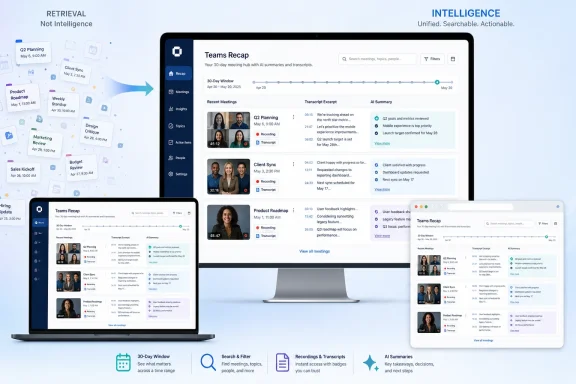
Microsoft is preparing a dedicated Recap app for Microsoft Teams on Windows, Mac, and the web by late July 2026, giving work and school users a single place to find recent meeting recordings, transcripts, and AI-generated summaries instead of hunting through calendar invites or SharePoint folders. The move sounds small because it is not a new meeting format, a new chat model, or another Copilot-branded command surface. But in practice, it addresses one of Teams’ most stubborn productivity failures: the meeting artifact exists, yet nobody can find it when it matters.
That is the real story behind the Recap app. Microsoft has spent the past several years making Teams meetings easier to record, transcribe, summarize, translate, and mine for action items. The missing piece was not intelligence; it was retrieval. Teams has become very good at producing evidence that a meeting happened, and rather less good at helping ordinary users rediscover that evidence three weeks later.
The Teams meeting no longer ends when everyone clicks Leave. It lives on as a recording in OneDrive or SharePoint, a transcript, a chat thread, a calendar object, a recap tab, shared files, Loop components, tasks, and, for paying Copilot customers, an AI-generated digest of what supposedly mattered. That sprawl reflects Teams’ success as much as its design debt.
For years, the post-meeting experience has been treated as an appendix to the meeting itself. If you knew the meeting title, the organizer, the date, or the right chat thread, you could usually work your way back to the recording. If you did not, the process became a grim little scavenger hunt through Outlook, Teams calendar history, SharePoint document libraries, and search results with nearly identical titles.
The Recap app is Microsoft’s attempt to elevate that afterlife into a first-class workspace. Instead of asking users to remember where a meeting was born, Teams will show recent recaps in a consolidated view. According to Microsoft’s published support and admin documentation around intelligent recap, the broader recap experience can already include recordings, transcripts, AI notes, recommended tasks, chapters, speaker markers, mentions, audio summaries, and video highlights, depending on license and meeting conditions.
That distinction matters. The Recap app is not merely a new window for video files. It is a new index for the growing pile of machine-readable meeting residue that Microsoft now believes is central to productivity.
But the boringness of Recap is precisely what makes it useful. Enterprise software is full of features that demo well and fail at the moment of retrieval. A meeting summary is impressive in the five minutes after a call ends; it is far more valuable when someone can find it before a customer escalation, audit review, project handoff, or performance discussion.
The problem Microsoft is addressing is not that Teams users lack recordings. It is that recordings are distributed across the logic of storage, permissions, and meeting metadata rather than the logic of human memory. People remember that “the budget call was sometime after the offsite” or that “Sarah explained the migration risk in a meeting last month.” They often do not remember the exact meeting title, particularly in organizations where half the calendar is filled with recurring series called Sync, Weekly Touchpoint, or Project Review.
A centralized Recap app gives Microsoft a place to turn all of that into a searchable, filterable activity stream. The reported 30-day window is modest, but it is also revealing. Microsoft appears to be aiming first at the near-term operational use case: catching up on what you missed, reviewing recent decisions, and preparing for the next meeting in a sequence.
That is not accidental. Microsoft has been trying to prove that Copilot is not just a chat box pasted into Office but a layer of intelligence across the workday. Meetings are the easiest place to make that argument because the pain is obvious. Nobody enjoys rewatching a 58-minute status call to find a two-minute decision. Nobody wants to comb a transcript manually if a passable summary can point them to the right moment.
Audio recap is particularly telling. Microsoft describes it as a podcast-style summary that can draw from up to eight transcribed meetings during a selected period, with generated audio stored in the user’s OneDrive and retained for a limited time. That is a different workflow from “summarize this meeting.” It imagines the worker as a commuter, manager, seller, or support lead who wants a digest of the day’s meetings while moving between tasks.
The Recap app, then, is not just a convenience feature. It is a distribution surface for Copilot-generated artifacts. Microsoft needs users to encounter those artifacts repeatedly, in context, and at moments when they save real time. A dedicated app is a cleaner funnel than asking users to remember which meeting chat contains the magic button.
That choice also keeps Microsoft away from some harder governance questions, at least initially. The longer a meeting artifact remains surfaced, summarized, searchable, and remixable, the more it starts to look like an institutional knowledge base rather than a convenience feature. That raises questions about retention, discovery, eDiscovery, deletion, external access, and whether employees understand how much of their spoken work is now durable and searchable.
Enterprises already had to manage Teams recordings and transcripts under OneDrive and SharePoint permissions. AI recap adds another layer: generated notes, chapters, tasks, highlights, and audio summaries derived from those underlying artifacts. Microsoft’s documentation repeatedly warns that AI-generated summaries should be checked for accuracy, which is legally prudent but operationally awkward. The more polished the recap, the more likely users are to treat it as authoritative.
The 30-day hub neatly frames Recap as a catch-up space rather than a permanent meeting brain. That may be the right first step. But once users depend on it, they will ask why the useful meeting they need is 45 days old and therefore outside the easy view.
That default matters to IT departments because Teams is already a policy thicket. Recording, transcription, Copilot access, external sharing, meeting chat, storage location, retention, and app pinning are all governed by different combinations of Teams, SharePoint, OneDrive, Purview, licensing, and tenant settings. A centralized Recap app does not erase those dependencies; it makes them more visible.
For admins, the upside is discoverability. Users who previously filed tickets asking where a recording went may have an obvious place to look. The downside is also discoverability. Artifacts that were technically available but practically buried may become much easier to find, which can surprise legal, HR, education, healthcare, and regulated-industry teams.
This is where Microsoft’s “existing permissions” language does important work. The Recap app is not supposed to grant access to recordings or transcripts a user could not otherwise view. But permission inheritance is not the same as user expectation. If an employee suddenly sees a neat grid of recent recordings and transcripts, the organization’s recording culture becomes much more tangible.
Recap fits that pattern. It is not asking users to conduct more meetings. It is trying to make the meetings they already endured easier to mine. That is a healthier direction than stuffing another collaboration format into the client.
It also aligns with the broader evolution of Microsoft 365. Outlook is no longer just email; it is a meeting and task surface. Teams is no longer just chat; it is a knowledge capture system. OneDrive and SharePoint are no longer just storage; they are the substrate for recordings, transcripts, Copilot outputs, and compliance controls. Recap sits on top of that stack as a human-facing index.
The risk is that Microsoft names and packages too many adjacent things. Teams already has meeting recap, intelligent recap, Meet, Copilot in meetings, audio recap, video recap, Stream playback, and transcript search. A Recap app may simplify the user journey, but only if Microsoft resists turning it into another branded maze.
But meeting memory is a high-trust domain. Summaries can omit caveats, flatten disagreement, misattribute decisions, or turn tentative ideas into apparent commitments. Video recaps can imply that selected moments were the important ones. Audio recaps can make machine interpretation feel polished enough to forget it is still interpretation.
That does not make the feature bad. It makes it administratively and culturally significant. Organizations adopting Copilot meeting features need to tell employees when meetings are recorded or transcribed, how recaps are generated, who can access them, how long artifacts persist, and what should not be treated as an official record without review.
Microsoft’s own warnings that AI output should be checked for accuracy are necessary, but they are not enough. In real workplaces, convenience often outruns caution. The more Recap becomes part of daily workflow, the more companies will need norms around when AI summaries are acceptable, when the original transcript must be consulted, and when sensitive discussions should not be captured at all.
The more important impact is behavioral. People will review more meetings if the recordings are easier to find. Managers will cite recaps more often if they are surfaced in a dedicated app. Teams will become not just the place where meetings happen, but the place where the organization remembers what those meetings meant.
That is powerful, and it is not neutral. A searchable meeting memory improves continuity, onboarding, and accountability. It can also intensify surveillance concerns, encourage over-recording, and create false confidence in AI-produced summaries. As with many Microsoft 365 changes, the same feature that makes life easier for one user creates a governance checklist for another.
Still, the direction is hard to argue with. The old model assumed that meeting artifacts were storage objects. The new model treats them as active work objects. For a product as central as Teams, that is overdue.
That is the real story behind the Recap app. Microsoft has spent the past several years making Teams meetings easier to record, transcribe, summarize, translate, and mine for action items. The missing piece was not intelligence; it was retrieval. Teams has become very good at producing evidence that a meeting happened, and rather less good at helping ordinary users rediscover that evidence three weeks later.
 Microsoft Finally Admits the Meeting Afterlife Is a Product
The Teams meeting no longer ends when everyone clicks Leave. It lives on as a recording in OneDrive or SharePoint, a transcript, a chat thread, a calendar object, a recap tab, shared files, Loop components, tasks, and, for paying Copilot customers, an AI-generated digest of what supposedly mattered. That sprawl reflects Teams’ success as much as its design debt.For years, the post-meeting experience has been treated as an appendix to the meeting itself. If you knew the meeting title, the organizer, the date, or the right chat thread, you could usually work your way back to the recording. If you did not, the process became a grim little scavenger hunt through Outlook, Teams calendar history, SharePoint document libraries, and search results with nearly identical titles.
The Recap app is Microsoft’s attempt to elevate that afterlife into a first-class workspace. Instead of asking users to remember where a meeting was born, Teams will show recent recaps in a consolidated view. According to Microsoft’s published support and admin documentation around intelligent recap, the broader recap experience can already include recordings, transcripts, AI notes, recommended tasks, chapters, speaker markers, mentions, audio summaries, and video highlights, depending on license and meeting conditions.
That distinction matters. The Recap app is not merely a new window for video files. It is a new index for the growing pile of machine-readable meeting residue that Microsoft now believes is central to productivity.
The Feature Solves a Boring Problem, Which Is Why It Matters
There is a temptation to dismiss this as Microsoft adding yet another app to Teams’ already crowded left rail. That criticism is not entirely unfair. Teams has apps for chat, calendar, calls, files, workflows, Viva, Meet, Planner, Loop, and any number of third-party integrations, and every new surface risks becoming one more icon users ignore.But the boringness of Recap is precisely what makes it useful. Enterprise software is full of features that demo well and fail at the moment of retrieval. A meeting summary is impressive in the five minutes after a call ends; it is far more valuable when someone can find it before a customer escalation, audit review, project handoff, or performance discussion.
The problem Microsoft is addressing is not that Teams users lack recordings. It is that recordings are distributed across the logic of storage, permissions, and meeting metadata rather than the logic of human memory. People remember that “the budget call was sometime after the offsite” or that “Sarah explained the migration risk in a meeting last month.” They often do not remember the exact meeting title, particularly in organizations where half the calendar is filled with recurring series called Sync, Weekly Touchpoint, or Project Review.
A centralized Recap app gives Microsoft a place to turn all of that into a searchable, filterable activity stream. The reported 30-day window is modest, but it is also revealing. Microsoft appears to be aiming first at the near-term operational use case: catching up on what you missed, reviewing recent decisions, and preparing for the next meeting in a sequence.
Copilot Is the Upsell, but Search Is the Hook
The licensing split is the most Microsoft part of the announcement. Basic access to recordings and transcripts follows the existing permissions model, while the more ambitious AI features — intelligent summaries, audio recaps, and video recaps — sit behind Microsoft 365 Copilot licensing. In other words, the Recap app is free enough to become habit-forming and gated enough to reinforce Copilot’s value proposition.That is not accidental. Microsoft has been trying to prove that Copilot is not just a chat box pasted into Office but a layer of intelligence across the workday. Meetings are the easiest place to make that argument because the pain is obvious. Nobody enjoys rewatching a 58-minute status call to find a two-minute decision. Nobody wants to comb a transcript manually if a passable summary can point them to the right moment.
Audio recap is particularly telling. Microsoft describes it as a podcast-style summary that can draw from up to eight transcribed meetings during a selected period, with generated audio stored in the user’s OneDrive and retained for a limited time. That is a different workflow from “summarize this meeting.” It imagines the worker as a commuter, manager, seller, or support lead who wants a digest of the day’s meetings while moving between tasks.
The Recap app, then, is not just a convenience feature. It is a distribution surface for Copilot-generated artifacts. Microsoft needs users to encounter those artifacts repeatedly, in context, and at moments when they save real time. A dedicated app is a cleaner funnel than asking users to remember which meeting chat contains the magic button.
The 30-Day Window Reveals Microsoft’s Real Bet
The reported 30-day scope may disappoint users who want a universal archive of every meeting they have ever attended. But it makes sense if Microsoft sees Recap less as a records-management tool and more as a working-memory tool. The app is designed around the period when meeting context is still active and operationally useful.That choice also keeps Microsoft away from some harder governance questions, at least initially. The longer a meeting artifact remains surfaced, summarized, searchable, and remixable, the more it starts to look like an institutional knowledge base rather than a convenience feature. That raises questions about retention, discovery, eDiscovery, deletion, external access, and whether employees understand how much of their spoken work is now durable and searchable.
Enterprises already had to manage Teams recordings and transcripts under OneDrive and SharePoint permissions. AI recap adds another layer: generated notes, chapters, tasks, highlights, and audio summaries derived from those underlying artifacts. Microsoft’s documentation repeatedly warns that AI-generated summaries should be checked for accuracy, which is legally prudent but operationally awkward. The more polished the recap, the more likely users are to treat it as authoritative.
The 30-day hub neatly frames Recap as a catch-up space rather than a permanent meeting brain. That may be the right first step. But once users depend on it, they will ask why the useful meeting they need is 45 days old and therefore outside the easy view.
Administrators Get Another Default to Explain
Microsoft says the app will be preinstalled in Teams but not pinned by default. Users will be able to find it through the Teams app store or app area and pin it themselves, while organizations can use app setup policies to influence what appears in the Teams rail. It will reportedly be enabled by default once available.That default matters to IT departments because Teams is already a policy thicket. Recording, transcription, Copilot access, external sharing, meeting chat, storage location, retention, and app pinning are all governed by different combinations of Teams, SharePoint, OneDrive, Purview, licensing, and tenant settings. A centralized Recap app does not erase those dependencies; it makes them more visible.
For admins, the upside is discoverability. Users who previously filed tickets asking where a recording went may have an obvious place to look. The downside is also discoverability. Artifacts that were technically available but practically buried may become much easier to find, which can surprise legal, HR, education, healthcare, and regulated-industry teams.
This is where Microsoft’s “existing permissions” language does important work. The Recap app is not supposed to grant access to recordings or transcripts a user could not otherwise view. But permission inheritance is not the same as user expectation. If an employee suddenly sees a neat grid of recent recordings and transcripts, the organization’s recording culture becomes much more tangible.
The Best Teams Features Are Now About Reducing Teams
Teams has always suffered from a paradox. Microsoft wants it to be the hub for work, but the more work it absorbs, the more the interface becomes a map of accumulated compromises. The best new Teams features increasingly function as anti-Teams features: they reduce the number of places users must click, the number of threads they must remember, and the amount of time they must spend inside the product.Recap fits that pattern. It is not asking users to conduct more meetings. It is trying to make the meetings they already endured easier to mine. That is a healthier direction than stuffing another collaboration format into the client.
It also aligns with the broader evolution of Microsoft 365. Outlook is no longer just email; it is a meeting and task surface. Teams is no longer just chat; it is a knowledge capture system. OneDrive and SharePoint are no longer just storage; they are the substrate for recordings, transcripts, Copilot outputs, and compliance controls. Recap sits on top of that stack as a human-facing index.
The risk is that Microsoft names and packages too many adjacent things. Teams already has meeting recap, intelligent recap, Meet, Copilot in meetings, audio recap, video recap, Stream playback, and transcript search. A Recap app may simplify the user journey, but only if Microsoft resists turning it into another branded maze.
AI Meeting Memory Needs Trust More Than Theater
The podcast-style recap is the flashiest part of the package, and it will probably generate the most demos. Select several meetings, press a button, and receive an audio briefing that sounds like a private work podcast. It is a clever way to make Copilot feel less like a chatbot and more like a daily executive assistant.But meeting memory is a high-trust domain. Summaries can omit caveats, flatten disagreement, misattribute decisions, or turn tentative ideas into apparent commitments. Video recaps can imply that selected moments were the important ones. Audio recaps can make machine interpretation feel polished enough to forget it is still interpretation.
That does not make the feature bad. It makes it administratively and culturally significant. Organizations adopting Copilot meeting features need to tell employees when meetings are recorded or transcribed, how recaps are generated, who can access them, how long artifacts persist, and what should not be treated as an official record without review.
Microsoft’s own warnings that AI output should be checked for accuracy are necessary, but they are not enough. In real workplaces, convenience often outruns caution. The more Recap becomes part of daily workflow, the more companies will need norms around when AI summaries are acceptable, when the original transcript must be consulted, and when sensitive discussions should not be captured at all.
The App Makes Teams More Useful and More Accountable
For Windows users and IT pros, the practical impact is straightforward. If the rollout lands as described, Teams on desktop and web will gain a central place for recent meeting recaps, with thumbnail and list views, search and filters, and access to recordings, transcripts, and licensed AI extras. Mobile support is expected later, which is a notable gap for a feature whose audio recap mode seems tailor-made for phones.The more important impact is behavioral. People will review more meetings if the recordings are easier to find. Managers will cite recaps more often if they are surfaced in a dedicated app. Teams will become not just the place where meetings happen, but the place where the organization remembers what those meetings meant.
That is powerful, and it is not neutral. A searchable meeting memory improves continuity, onboarding, and accountability. It can also intensify surveillance concerns, encourage over-recording, and create false confidence in AI-produced summaries. As with many Microsoft 365 changes, the same feature that makes life easier for one user creates a governance checklist for another.
Still, the direction is hard to argue with. The old model assumed that meeting artifacts were storage objects. The new model treats them as active work objects. For a product as central as Teams, that is overdue.
The Useful Button Is Also a Policy Decision
The Recap app’s arrival should prompt organizations to look at their meeting practices before users discover the feature on their own. A small interface change can expose years of inconsistent recording behavior, unclear sharing norms, and uneven licensing decisions.- Organizations should review who is allowed to record and transcribe Teams meetings before a central Recap app makes those artifacts easier to discover.
- Users without Microsoft 365 Copilot should still benefit from simpler access to recordings and transcripts, but they should not expect the full intelligent recap experience.
- Copilot-licensed users should treat AI summaries, audio recaps, and video recaps as accelerators rather than official records unless their organization says otherwise.
- Administrators should decide whether to pin the Recap app for users or let adoption happen organically through the Teams app store.
- Teams mobile support will matter because audio recaps make the most sense when users can catch up away from the desktop.
- The 30-day window makes Recap a practical catch-up hub, not a substitute for retention, compliance, or long-term knowledge management.
References
- Primary source: Neowin
Published: Fri, 26 Jun 2026 14:42:00 GMT
Microsoft is bringing a much-needed Recap app to Teams, here is a first look - Neowin
Finding old Teams meeting recordings is about to get much easier, with a handy new app bringing everything together in one place. www.neowin.net
- Official source: support.microsoft.com
Listen to audio recaps of your meetings | Microsoft Support
Listen to audio recaps of your meetingssupport.microsoft.com - Official source: learn.microsoft.com
Intelligent recap for Teams calls, meetings, and events - Microsoft Teams | Microsoft Learn
Learn how to manage intelligent recap for Teams calls, meetings, and events. Understand the licenses your users need to use intelligent recap for VoIP and PSTN calls and audio recap.learn.microsoft.com - Related coverage: windowsforum.com
Microsoft Teams Meeting Recap App (July 2026): Filter, Review & Audio Recaps | Windows Forum
Microsoft is preparing a new Microsoft Teams Meeting recap app for general availability in July 2026, giving users a single place to find, filter, browse...windowsforum.com - Related coverage: blog-en.topedia.com
Audio Recaps in Teams are now available in additional languages | Topedia Blog
Audio Recap in Teams now supports additional languages, allowing users to customize executive- or podcast-style meeting summaries in their preferred language.blog-en.topedia.com - Related coverage: basilai.app
Microsoft Teams Copilot 'Recap Without Transcript': Compliance Reality Check | Basil AI
Microsoft's new 'Recap without saving transcript' feature for Teams Copilot is an admission that AI meeting transcripts are a compliance liability. Here's what it actually does — and why on-device is the only true zero-retention answer.basilai.app
- Related coverage: uctoday.com
Microsoft Teams Meeting Recap App June 2026 - UC Today
Teams gets a dedicated Meeting Recap app this month alongside Video Recap and AI recap without transcript. Here's what IT teams need to review before it rolls out.www.uctoday.com - Related coverage: voip.review
Microsoft Teams Unveils Game-Changing Meeting Recap App | VoIP Review
In an exciting development for Microsoft Teams users, the company is launching a dedicated Meeting Recap app this month.voip.review - Official source: cdn-dynmedia-1.microsoft.com
Slide 1: Create Teams Meeting Notes using Copilot in Stream
PDF documentcdn-dynmedia-1.microsoft.com
- Official source: techcommunity.microsoft.com
Microsoft Teams Licensing Updates April 2026 Customer FAQ 1
PDF documenttechcommunity.microsoft.com
- Related coverage: aldridge.com
Microsoft copilot in outlook & teams
</rdf:Alt> </dc:description> <dc:creator> <rdf:Seq> <rdf:li>Mason Conealdridge.com
- Official source: microsoft.ai