
Microsoft added Microsoft 365 Roadmap item 566703 on June 26, 2026, confirming that Edge will get an upgraded Copilot new tab page for worldwide commercial tenants, with preview availability planned for July 2026 and general availability scheduled for September 2026. The feature sounds modest: one search box, suggested actions, and curated work content. In practice, it is another step in Microsoft’s larger attempt to turn the browser’s most frequently opened surface into a Microsoft 365 Copilot workbench. For administrators, the question is no longer whether AI is coming to Edge, but how much of the browser’s default experience should become an AI-mediated front door to corporate data.
The new tab page used to be one of the browser’s quietest pieces of real estate. It was a place for a search box, a few shortcuts, perhaps some news and weather, and then a quick escape to whatever site the user actually meant to open. Microsoft’s latest Edge roadmap item treats that old model as wasted space.
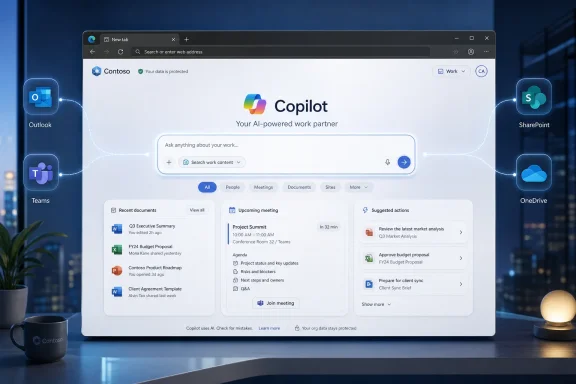
The upgraded Copilot new tab page promises a single box for searching, chatting, and exploring the web, with Copilot-suggested actions and curated work content layered around it. That phrasing matters. Microsoft is not merely adding a Copilot button to Edge; it is making Copilot the organizing metaphor for a page many users see dozens of times a day.
This is where Edge’s enterprise story diverges from the consumer browser wars. Chrome still wins on inertia, extension compatibility, and habit. Edge’s best argument inside Microsoft 365 shops is different: it can become the browser that understands the tenant, the identity, the files, the meetings, and the security boundary.
The upgraded new tab page is therefore less about convenience than placement. Microsoft wants Copilot to be present before the user has chosen a destination, before they have opened Outlook, before they have searched SharePoint, and before they have asked a colleague where a file lives.
Browsers have long collapsed URLs and search into a single field. Edge is now trying to collapse navigation, enterprise search, and conversational assistance into the same habit. That is a meaningful shift because it changes the browser from a passive tool into something closer to a command surface.
The risk is ambiguity. When a user types into a single box, the system has to decide whether the intent is navigational, informational, or operational. In a consumer context, a bad guess is annoying. In an enterprise context, a bad guess can mean surfacing the wrong document, creating confusion around authoritative information, or nudging users toward AI-generated answers when they needed a system of record.
Microsoft’s bet is that convenience will overcome that friction. If the box can reliably find the right file, summarize the right meeting context, or suggest the next useful action, users may stop thinking of the browser as a launcher and start treating it as a daily work console.
For users, the pitch is obvious. Instead of opening a new tab and manually navigating through Outlook, Teams, OneDrive, SharePoint, or Microsoft 365 search, Edge can present work that appears relevant before the user asks. Upcoming meetings, recently touched documents, and suggested prompts can turn the new tab page into a kind of morning dashboard.
For administrators, the same feature reads differently. Any surface that curates work content must respect identity, permissions, sensitivity labels, retention rules, conditional access, and organizational boundaries. Microsoft will argue that this sits inside enterprise-grade security and compliance controls, but IT teams will still want to know exactly what is being indexed, displayed, cached, logged, and used for prompt grounding.
That concern is not paranoia. The modern Microsoft 365 tenant is often a sprawl of legacy SharePoint sites, Teams channels, unmanaged file sharing, stale permissions, and documents that technically should not be broadly discoverable. Copilot does not create those governance problems, but it can make them visible at machine speed.
That makes Edge a natural control point for Microsoft’s agentic ambitions. Browser-based assistance can see more of the journey than a Word or Outlook add-in can. It can potentially bridge Microsoft’s own apps and the open web, which is exactly where many knowledge workers spend their day.
The upgraded Copilot new tab page should be read in that context. It is not just a visual refresh or a productivity widget. It is the home screen for a browser that Microsoft increasingly wants to describe as AI-native.
That also explains why this development matters even to organizations that do not care about flashy AI demos. If the browser becomes the place where Copilot actions begin, then Edge policy becomes AI policy. Settings that once governed home pages, search providers, sidebar buttons, and new tab content now sit closer to questions of data exposure, user autonomy, and workflow design.
The roadmap item applies to Microsoft Edge and Microsoft Copilot for Microsoft 365 on the web, in the worldwide standard multi-tenant cloud. It is marked for both Preview and General Availability release rings, and its status is still “In development.” Those labels are important because roadmap entries are directional rather than contractual; Microsoft can and often does adjust timing.
Still, the schedule shows a familiar pattern. Microsoft puts a Copilot feature into preview, positions it as a productivity enhancement, and then moves quickly toward GA once the control plane and customer messaging are in place. For tenants that wait until September to notice the change, the decision may feel less like adoption and more like reaction.
The smart play for IT is to treat July as the real date. Preview is when help desks can capture screenshots, administrators can test policies, security teams can evaluate content surfacing, and communications teams can decide whether users need guidance. September is when the complaints arrive if that work has not happened.
The Copilot new tab page intensifies that tension. Users who live in Microsoft 365 may find it genuinely useful, especially if the search box can quickly jump between chat, work files, and web navigation. Users who prefer a clean browser may experience the same surface as another piece of software that refuses to stay out of the way.
Enterprise IT cannot resolve that tension by taste alone. The better question is whether the new tab page improves work without increasing confusion, support volume, or governance risk. A feature that saves thirty seconds ten times a day is valuable; a feature that sends users to plausible but poorly grounded answers is expensive.
Admins should also assume that expectations will vary by role. A sales team that jumps constantly between meetings, proposals, and customer research may welcome a proactive work surface. A developer, security analyst, or finance user may care more about predictability, minimal distraction, and confidence that sensitive material is not being surfaced casually.
If Copilot-suggested actions and work cards are grounded in Microsoft 365 data, then the quality of the experience depends on the quality of the organization’s information architecture. Clean permissions, current documents, sensible labels, and well-maintained SharePoint sites will make the feature feel smart. Messy tenants will make it feel uncanny.
This is the same dynamic that has followed Microsoft 365 Copilot from the beginning. AI assistants are only as trustworthy as the content and permissions beneath them. If old HR files, abandoned project documents, or over-shared executive decks are discoverable, a more proactive surface can expose uncomfortable truths.
That does not mean organizations should turn everything off by reflex. It means Copilot rollouts need to be paired with information hygiene. A new tab page that curates work is a daily reminder that Microsoft 365 governance is no longer background plumbing; it is part of the visible user experience.
Copilot gives Microsoft a new argument. Instead of asking users to switch browsers because Edge is fast, secure, or compatible, Microsoft can ask organizations to standardize on Edge because it is the richest Copilot endpoint. That is a more strategic pitch, especially for companies already paying for Microsoft 365 Copilot.
The upgraded new tab page is one of the clearest expressions of that strategy. It places AI assistance where Microsoft can combine browser context, web search, organizational identity, and Microsoft 365 data. Competitors can match pieces of that story, but Microsoft’s advantage is the depth of its enterprise graph.
The counterargument is equally clear. The more Edge becomes a vehicle for Microsoft 365 Copilot, the less neutral it feels as a browser. Users and admins who want the browser to be a quiet, standards-based window to the web may resist a model where every new tab feels like another Microsoft productivity surface.
But productivity gains are notoriously easy to claim and hard to measure. If the new tab page becomes one more surface full of prompts, cards, and recommendations, it may simply move distraction closer to the beginning of every browsing session. The difference between helpful and noisy will come down to relevance.
This is where Microsoft’s execution matters. The system must understand when to suggest an action and when to stay quiet. It must distinguish important work from recent work. It must avoid turning every document, meeting, and search into an invitation to ask Copilot.
For IT leaders, the measurement should be practical. Are users finding files faster? Are they relying less on manual Teams pings to locate information? Are support tickets increasing because the browser experience changed? Are sensitive documents appearing in places that surprise users? Those answers matter more than Microsoft’s launch copy.
Testing should include different license states. A user with Microsoft 365 Copilot, a user without it, a user in a tightly governed department, and a user in a more open collaboration environment may all see different behavior. Admins should not assume that one screenshot describes the whole tenant.
Security teams should also review how the feature behaves under conditional access, sensitivity labels, information barriers, and external sharing restrictions. The most important question is not whether Copilot can theoretically access content; it is whether the new tab page surfaces content in ways that match the organization’s expectations.
Communications teams have a role too. If users open Edge one morning and see a new Copilot-centered page without warning, the reaction will be shaped by surprise. A short explanation before rollout can prevent a routine interface change from being interpreted as another forced AI experiment.
That is a genuinely useful vision. It treats the browser as a working environment rather than a blank launching pad. It also fits the reality of modern office work, where the next task is often buried somewhere between email, chat, files, calendars, and the web.
The hard part is making that experience dependable. The new tab page has to be fast, respectful of user intent, policy-aware, and quiet when it has nothing useful to say. If it becomes slow or cluttered, users will work around it. If it surfaces irrelevant or surprising content, admins will lock it down.
Microsoft’s challenge is that the same intelligence that makes the feature valuable also makes it sensitive. A static shortcut page is boring but predictable. A Copilot-curated work surface is potentially powerful, but only if the organization trusts the layer doing the curation.
The practical reading is straightforward:
Microsoft’s upgraded Copilot new tab page may end up being useful, irritating, or quietly ignored depending on execution and tenant readiness, but its direction is unmistakable. The browser is becoming less of a neutral frame around work and more of an active participant in deciding what work comes next. By September 2026, many Microsoft 365 organizations will have to decide whether that is the productivity layer they wanted — or simply the one that arrived first.
 Microsoft Turns the Blank Tab Into a Work Surface
The new tab page used to be one of the browser’s quietest pieces of real estate. It was a place for a search box, a few shortcuts, perhaps some news and weather, and then a quick escape to whatever site the user actually meant to open. Microsoft’s latest Edge roadmap item treats that old model as wasted space.The upgraded Copilot new tab page promises a single box for searching, chatting, and exploring the web, with Copilot-suggested actions and curated work content layered around it. That phrasing matters. Microsoft is not merely adding a Copilot button to Edge; it is making Copilot the organizing metaphor for a page many users see dozens of times a day.
This is where Edge’s enterprise story diverges from the consumer browser wars. Chrome still wins on inertia, extension compatibility, and habit. Edge’s best argument inside Microsoft 365 shops is different: it can become the browser that understands the tenant, the identity, the files, the meetings, and the security boundary.
The upgraded new tab page is therefore less about convenience than placement. Microsoft wants Copilot to be present before the user has chosen a destination, before they have opened Outlook, before they have searched SharePoint, and before they have asked a colleague where a file lives.
The Search Box Becomes a Router for Intent
The headline feature is a unified search box that can route a user toward web search, navigation, or Copilot chat. That may sound like a familiar omnibox with AI branding, but Microsoft’s description suggests a more ambitious layer: the box is meant to infer whether the user is trying to find a site, ask a question, perform a task, or begin work against Microsoft 365 content.Browsers have long collapsed URLs and search into a single field. Edge is now trying to collapse navigation, enterprise search, and conversational assistance into the same habit. That is a meaningful shift because it changes the browser from a passive tool into something closer to a command surface.
The risk is ambiguity. When a user types into a single box, the system has to decide whether the intent is navigational, informational, or operational. In a consumer context, a bad guess is annoying. In an enterprise context, a bad guess can mean surfacing the wrong document, creating confusion around authoritative information, or nudging users toward AI-generated answers when they needed a system of record.
Microsoft’s bet is that convenience will overcome that friction. If the box can reliably find the right file, summarize the right meeting context, or suggest the next useful action, users may stop thinking of the browser as a launcher and start treating it as a daily work console.
Curated Work Content Is the Real Enterprise Hook
The roadmap language around “curated work content” is doing a lot of work. Microsoft has already been moving Edge for Business toward a Microsoft 365-aware experience, with recent files, calendar events, work cards, and prompts appearing in Copilot-flavored surfaces. The upgraded new tab page appears to continue that direction.For users, the pitch is obvious. Instead of opening a new tab and manually navigating through Outlook, Teams, OneDrive, SharePoint, or Microsoft 365 search, Edge can present work that appears relevant before the user asks. Upcoming meetings, recently touched documents, and suggested prompts can turn the new tab page into a kind of morning dashboard.
For administrators, the same feature reads differently. Any surface that curates work content must respect identity, permissions, sensitivity labels, retention rules, conditional access, and organizational boundaries. Microsoft will argue that this sits inside enterprise-grade security and compliance controls, but IT teams will still want to know exactly what is being indexed, displayed, cached, logged, and used for prompt grounding.
That concern is not paranoia. The modern Microsoft 365 tenant is often a sprawl of legacy SharePoint sites, Teams channels, unmanaged file sharing, stale permissions, and documents that technically should not be broadly discoverable. Copilot does not create those governance problems, but it can make them visible at machine speed.
Edge Is Becoming the Copilot Client Microsoft Can Actually Control
Microsoft has Copilot surfaces scattered across Windows, Microsoft 365 apps, Teams, Outlook, Bing, and the web. Edge is different because it sits across the workflow rather than inside one application. A user may begin in a new tab, jump to a SaaS dashboard, read a PDF, open a CRM system, compare vendor pages, and then return to Microsoft 365 content, all without leaving the browser.That makes Edge a natural control point for Microsoft’s agentic ambitions. Browser-based assistance can see more of the journey than a Word or Outlook add-in can. It can potentially bridge Microsoft’s own apps and the open web, which is exactly where many knowledge workers spend their day.
The upgraded Copilot new tab page should be read in that context. It is not just a visual refresh or a productivity widget. It is the home screen for a browser that Microsoft increasingly wants to describe as AI-native.
That also explains why this development matters even to organizations that do not care about flashy AI demos. If the browser becomes the place where Copilot actions begin, then Edge policy becomes AI policy. Settings that once governed home pages, search providers, sidebar buttons, and new tab content now sit closer to questions of data exposure, user autonomy, and workflow design.
The Calendar Reveals Microsoft’s Deployment Strategy
The roadmap entry lists preview availability for July 2026 and general availability for September 2026. That two-month gap is short enough to signal confidence but long enough to give Microsoft telemetry and tenant feedback before broad rollout. It also gives enterprise administrators a narrow window to test policies, user experience, and internal communications.The roadmap item applies to Microsoft Edge and Microsoft Copilot for Microsoft 365 on the web, in the worldwide standard multi-tenant cloud. It is marked for both Preview and General Availability release rings, and its status is still “In development.” Those labels are important because roadmap entries are directional rather than contractual; Microsoft can and often does adjust timing.
Still, the schedule shows a familiar pattern. Microsoft puts a Copilot feature into preview, positions it as a productivity enhancement, and then moves quickly toward GA once the control plane and customer messaging are in place. For tenants that wait until September to notice the change, the decision may feel less like adoption and more like reaction.
The smart play for IT is to treat July as the real date. Preview is when help desks can capture screenshots, administrators can test policies, security teams can evaluate content surfacing, and communications teams can decide whether users need guidance. September is when the complaints arrive if that work has not happened.
The Admin Question Is Not Whether Users Like It
End-user sentiment around Edge’s new tab page has always been complicated. Some users appreciate shortcuts, feeds, and Microsoft 365 integration. Others see the page as crowded, promotional, or too eager to insert Microsoft services into basic browsing.The Copilot new tab page intensifies that tension. Users who live in Microsoft 365 may find it genuinely useful, especially if the search box can quickly jump between chat, work files, and web navigation. Users who prefer a clean browser may experience the same surface as another piece of software that refuses to stay out of the way.
Enterprise IT cannot resolve that tension by taste alone. The better question is whether the new tab page improves work without increasing confusion, support volume, or governance risk. A feature that saves thirty seconds ten times a day is valuable; a feature that sends users to plausible but poorly grounded answers is expensive.
Admins should also assume that expectations will vary by role. A sales team that jumps constantly between meetings, proposals, and customer research may welcome a proactive work surface. A developer, security analyst, or finance user may care more about predictability, minimal distraction, and confidence that sensitive material is not being surfaced casually.
Governance Debt Will Show Up in the New Tab Page
The biggest practical issue is not the new tab page itself. It is what the new tab page may reveal about the tenant.If Copilot-suggested actions and work cards are grounded in Microsoft 365 data, then the quality of the experience depends on the quality of the organization’s information architecture. Clean permissions, current documents, sensible labels, and well-maintained SharePoint sites will make the feature feel smart. Messy tenants will make it feel uncanny.
This is the same dynamic that has followed Microsoft 365 Copilot from the beginning. AI assistants are only as trustworthy as the content and permissions beneath them. If old HR files, abandoned project documents, or over-shared executive decks are discoverable, a more proactive surface can expose uncomfortable truths.
That does not mean organizations should turn everything off by reflex. It means Copilot rollouts need to be paired with information hygiene. A new tab page that curates work is a daily reminder that Microsoft 365 governance is no longer background plumbing; it is part of the visible user experience.
Microsoft’s Browser Strategy Is Now an AI Distribution Strategy
Edge has struggled for years with a perception problem. Technically, it is a capable Chromium-based browser with strong enterprise management hooks. Culturally, it remains the browser many users encounter because Windows or Microsoft 365 nudged them toward it.Copilot gives Microsoft a new argument. Instead of asking users to switch browsers because Edge is fast, secure, or compatible, Microsoft can ask organizations to standardize on Edge because it is the richest Copilot endpoint. That is a more strategic pitch, especially for companies already paying for Microsoft 365 Copilot.
The upgraded new tab page is one of the clearest expressions of that strategy. It places AI assistance where Microsoft can combine browser context, web search, organizational identity, and Microsoft 365 data. Competitors can match pieces of that story, but Microsoft’s advantage is the depth of its enterprise graph.
The counterargument is equally clear. The more Edge becomes a vehicle for Microsoft 365 Copilot, the less neutral it feels as a browser. Users and admins who want the browser to be a quiet, standards-based window to the web may resist a model where every new tab feels like another Microsoft productivity surface.
The Productivity Pitch Needs Proof, Not Just Placement
Microsoft’s language around getting things done faster is plausible but not self-proving. A unified search and chat box can reduce context switching. Suggested actions can help users start routine tasks. Curated work content can surface forgotten documents or upcoming meeting context at the right moment.But productivity gains are notoriously easy to claim and hard to measure. If the new tab page becomes one more surface full of prompts, cards, and recommendations, it may simply move distraction closer to the beginning of every browsing session. The difference between helpful and noisy will come down to relevance.
This is where Microsoft’s execution matters. The system must understand when to suggest an action and when to stay quiet. It must distinguish important work from recent work. It must avoid turning every document, meeting, and search into an invitation to ask Copilot.
For IT leaders, the measurement should be practical. Are users finding files faster? Are they relying less on manual Teams pings to locate information? Are support tickets increasing because the browser experience changed? Are sensitive documents appearing in places that surprise users? Those answers matter more than Microsoft’s launch copy.
The Rollout Window Is Short Enough to Demand Early Testing
Organizations that manage Edge should start by identifying which policies control the Copilot new tab page, whether the feature is enabled by default in their environment, and how it interacts with existing new tab, search, sidebar, and Copilot settings. Microsoft has already documented policy controls for the Copilot new tab page, and those controls will likely become central to enterprise deployment decisions.Testing should include different license states. A user with Microsoft 365 Copilot, a user without it, a user in a tightly governed department, and a user in a more open collaboration environment may all see different behavior. Admins should not assume that one screenshot describes the whole tenant.
Security teams should also review how the feature behaves under conditional access, sensitivity labels, information barriers, and external sharing restrictions. The most important question is not whether Copilot can theoretically access content; it is whether the new tab page surfaces content in ways that match the organization’s expectations.
Communications teams have a role too. If users open Edge one morning and see a new Copilot-centered page without warning, the reaction will be shaped by surprise. A short explanation before rollout can prevent a routine interface change from being interpreted as another forced AI experiment.
The Useful Version of This Feature Is Also the Hard Version
The best version of the upgraded Copilot new tab page is easy to imagine. A user opens Edge before a meeting and sees the relevant agenda, the latest shared deck, and a prompt that can summarize the project status. They type a vague request into the box, and Edge routes it correctly: sometimes to a website, sometimes to Microsoft 365 search, sometimes to Copilot chat.That is a genuinely useful vision. It treats the browser as a working environment rather than a blank launching pad. It also fits the reality of modern office work, where the next task is often buried somewhere between email, chat, files, calendars, and the web.
The hard part is making that experience dependable. The new tab page has to be fast, respectful of user intent, policy-aware, and quiet when it has nothing useful to say. If it becomes slow or cluttered, users will work around it. If it surfaces irrelevant or surprising content, admins will lock it down.
Microsoft’s challenge is that the same intelligence that makes the feature valuable also makes it sensitive. A static shortcut page is boring but predictable. A Copilot-curated work surface is potentially powerful, but only if the organization trusts the layer doing the curation.
The September Deadline Makes July the Month That Matters
The roadmap entry’s dates are the concrete facts administrators should plan around, but the operational implications are broader than a calendar reminder. Microsoft is moving Edge another step toward becoming the front-end of Microsoft 365 Copilot, and the new tab page is the most visible place to make that move.The practical reading is straightforward:
- Microsoft created Roadmap ID 566703 on June 26, 2026, with preview availability planned for July 2026 and general availability planned for September 2026.
- The upgraded Copilot new tab page is intended for Microsoft Edge and Microsoft 365 Copilot users in worldwide standard multi-tenant cloud environments.
- The experience combines search, chat, and web exploration in one box while adding Copilot-suggested actions and curated work content.
- Administrators should test policy controls, licensing differences, content surfacing, and user communications during the preview period rather than waiting for general availability.
- The feature’s value will depend less on the interface and more on tenant governance, permissions hygiene, and the relevance of Microsoft’s recommendations.
Microsoft’s upgraded Copilot new tab page may end up being useful, irritating, or quietly ignored depending on execution and tenant readiness, but its direction is unmistakable. The browser is becoming less of a neutral frame around work and more of an active participant in deciding what work comes next. By September 2026, many Microsoft 365 organizations will have to decide whether that is the productivity layer they wanted — or simply the one that arrived first.
References
- Primary source: Microsoft 365 Roadmap
Published: 2026-06-26T22:01:51.0909953Z
Loading…
www.microsoft.com - Official source: learn.microsoft.com
Configure the Copilot new tab page
Provides configuration guidance for the Copilot new tab page in Microsoft Edge.learn.microsoft.com - Official source: support.microsoft.com
Loading…
support.microsoft.com - Official source: blogs.windows.com
New updates to Edge across desktop and mobile
Edge just made it easier to go from first tab to final plan, wherever you go. Your favorite Copilot experiences, plus new ones, are now available directly in Edge on desktop and, for the first time, in the Edge mobile app. This includes capabilities blogs.windows.com
- Related coverage: supersimple365.com
Copilot Mode for new tabs in Edge - Super Simple 365
Short VersionMicrosoft Edge will soon offer a Copilot-focused page when you select ‘New tab’. Now due early to late May 2026. DetailsThe refreshed ‘Copilot‑inspired new tab page’ (Copilot Mode) in Microsoft Edge for business will offer search, chat, and web combined into a single search box (1)...supersimple365.com - Related coverage: tomshardware.com
Edge browser's new Copilot Mode lets you talk to AI about your tabs if you opt in — but it's only free for 'a limited time' | Tom's Hardware
Copilot Mode in Edge will be available on Windows and macOSwww.tomshardware.com
- Related coverage: windowscentral.com
Microsoft Edge integrates Copilot into the New Tab Page
Hidden flags in the latest Edge Canary builds reveal a New Tab Page experience that has been redesigned with Copilot at the very heart of the experience. www.windowscentral.com
- Related coverage: techradar.com
Microsoft's Copilot can now peek into your open tabs in Edge — if you let it — as part of new AI features for the browser | TechRadar
It's a big change for Edge, but AI isn't going awaywww.techradar.com - Related coverage: pcgamer.com
Microsoft rolls out 'experimental' AI mode for the Edge browser you can ask to spy on all your internetting and lend a helping hand. Yikes! | PC Gamer
But it's optional, for now. Phew!www.pcgamer.com